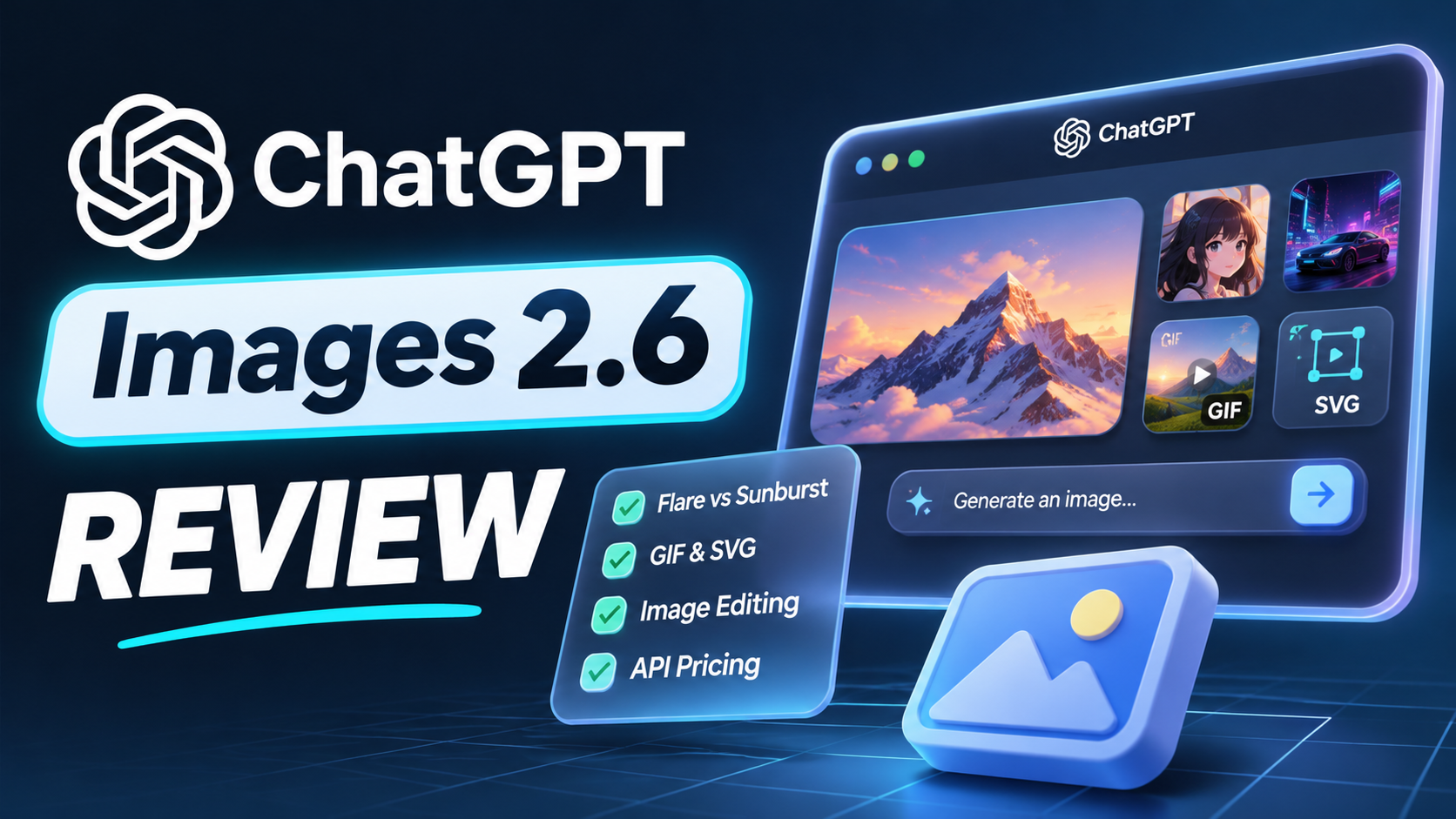
ChatGPT Images 2.6 Review: GIFs, Vectors and Better Edits
ChatGPT Images 2.6 gives creators a useful reason to revisit their image workflow: the update extends beyond making another attractive picture. OpenAI's November 4, 2026 API changelog introduces GPT-Image-2.6 Flare and Sunburst with adjustable complexity, SVG generation, animated GIF generation, and markup-guided editing.
For marketers, designers, and founders, the opportunity is practical. A product concept can become a set of campaign assets, a character can become a short reaction loop, and feedback can point to the area that needs changing. The question is how much work remains before those outputs are usable.
This review explains the published capabilities, API pricing, prompting approach, and limitations. Our recommendations are based on documentation and workflow analysis rather than hands-on model tests or an invented review score.
Our AI image and video generation hub connects the wider field of image models, editing tools, and prompt guides when you want to compare options by the work you need to finish.
Updated November 6, 2026. API prices below are in USD.
QUICK ANSWER
ChatGPT Images 2.6 is worth evaluating for iterative image creation, localized edits, short animated GIFs, and vector-asset workflows. Developers can choose gpt-image-2.6-flare for fast iteration or gpt-image-2.6-sunburst for detailed visual work. Both models accept text and image inputs.
The published standard API rates are $5 per million text-input tokens, $8 per million image-input tokens, and $30 per million image-output tokens. Those are token prices, not a fixed price per picture. Output format, settings, input material, and revisions affect the final bill.
My take: evaluate the complete edit cycle. A useful image model should help you reach an approved asset without repeatedly breaking the details you already accepted.
1. What Is ChatGPT Images 2.6?
Images 2.6 is OpenAI's image generation and editing update, with two explicitly named API models: Flare and Sunburst. The model pages describe text-to-image generation and editing from image inputs, giving developers a choice between interactive iteration and more detailed visual work.
The everyday workflow starts with a brief or reference image, then develops through revisions. You might create a product scene, adjust its composition, change the background, and finish a campaign variation. Keeping those decisions connected is often more valuable than producing unrelated images quickly.
That makes the update relevant to people who create recurring visual assets. A store needs a consistent catalog. A marketing team needs several versions of an offer. A founder needs graphics that fit the product's identity. Each task rewards controllable revisions and clear review criteria.
Our ChatGPT Images 2.5 review covers the earlier generation of this workflow. It provides the comparison point for deciding which existing prompts and editing tasks you should retest with 2.6.
2. ChatGPT Images 2.6 Features at a Glance
The defining features are model choice, adjustable planning complexity, guided edits, animated GIF output, and SVG generation. Their value depends on the task and the interface exposing them.
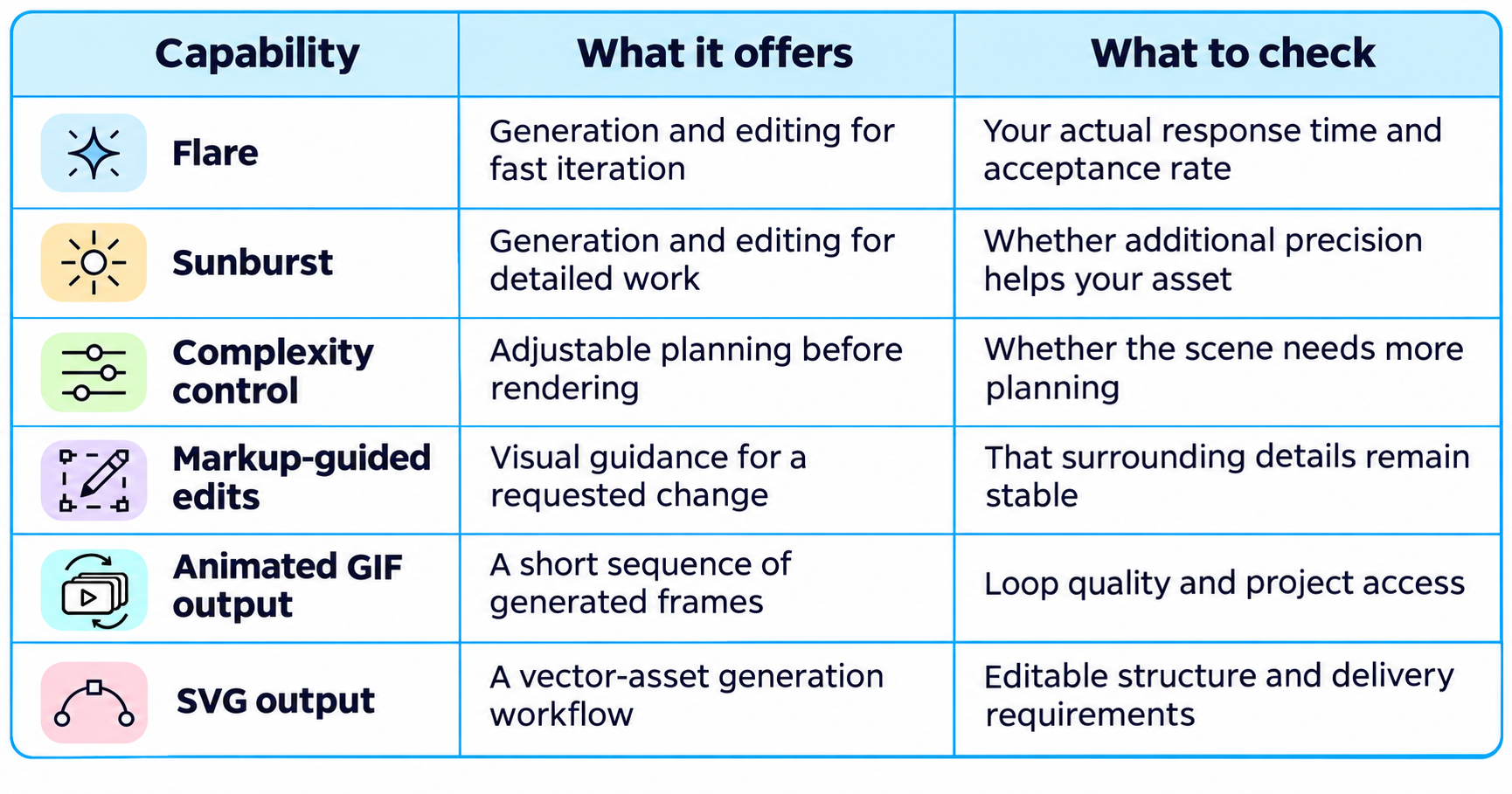
These features do not mean every interface exposes the same controls. For API development, choose the exact model and operation rather than assuming that a setting shown in one example applies everywhere.
3. GPT-Image-2.6 Flare vs Sunburst
Flare is positioned for interactive creation and editing, while Sunburst is positioned for detailed compositions and image editing. That is a useful starting distinction, rather than proof that either model wins every prompt.
Start a Flare evaluation with jobs where quick feedback matters: trying several layouts, exploring backgrounds, or letting a user refine an idea during a session. The important observation is whether another revision feels practical and keeps the image moving toward approval.
Evaluate Sunburst on tasks where small errors cause expensive rework. Examples include a composition with several interacting elements or an edit that must preserve a detailed product. Use the same source image and brief so the comparison measures the model rather than a better prompt.
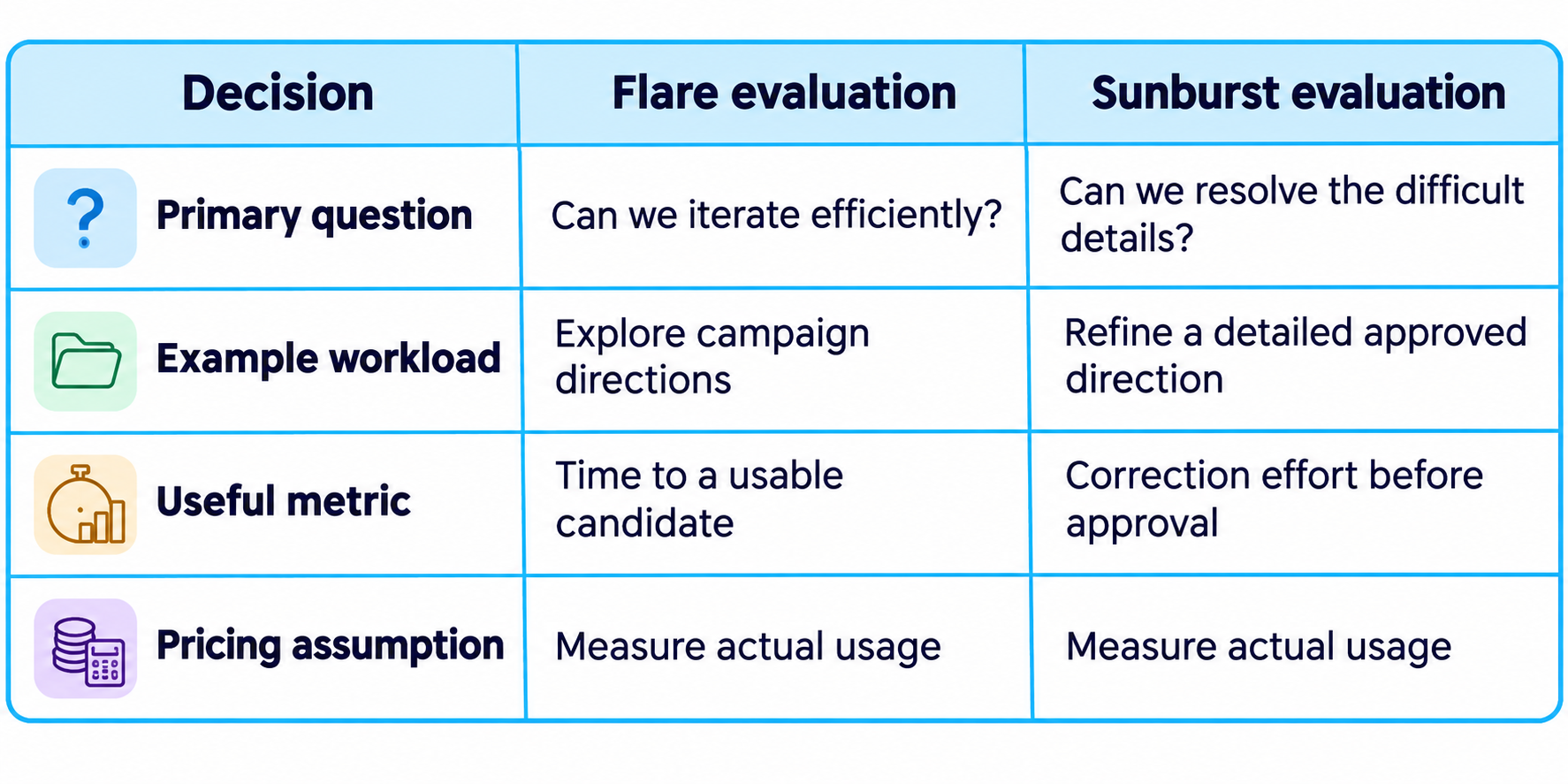
Both model pages list the same standard token rates. Do not infer that Sunburst automatically has a higher per-token price, or that equal token prices guarantee equal cost per finished asset.
4. Quality and Complexity Are Different Controls
Quality concerns rendering fidelity; complexity concerns the planning involved in constructing the image. OpenAI's guide lists low, medium, and high complexity, with high used when the setting is omitted.
A focused edit may need little new planning. Changing one backdrop should not require reconsidering the whole composition. A dense infographic or scene with several spatial relationships presents a different problem and may justify testing a higher complexity level.
Higher complexity is not an automatic upgrade. OpenAI warns that it can increase latency and introduce unwanted changes. Treat the control as something to evaluate against a concrete requirement, especially when the previous version of the image is already close to approval.
For your own comparison, change one control at a time. Keep the prompt, input image, and delivery goal constant. Otherwise, you cannot tell whether the improvement came from quality, complexity, or a rewritten brief.
5. Reference Images and Product Consistency
A reference image gives the model a visual anchor, but the finished output still needs to be checked against it. For commercial work, the approval question is whether the real item remains accurately represented.
Before generating, list the details that matter: shape, proportions, material, color, packaging, and visible marks. A stylish lifestyle scene is not useful if the product changes halfway through the editing process or acquires an accessory it does not include.
Keep your references consistent. Avoid mixing obsolete packaging with the current product or supplying conflicting color variants without identifying them. A reviewer should be able to compare the result with one clear source of truth.
Our October 27 guide to AI product photography prompts for ecommerce helps translate a product image into studio, lifestyle, and campaign briefs. Use those scene structures while keeping the real item as the accuracy check.
6. Markup-Guided Editing
Markup-guided editing combines a visual indication of where to change an image with a written instruction describing the change. OpenAI's image guide demonstrates the workflow through the image-edit endpoint with a transparent annotation overlay.
This addresses a common communication problem. In an image containing several similar objects, “change the vase” may be ambiguous. Pointing to the object narrows the target, while the prompt explains the intended result.
A useful instruction might be: “Change the marked cushion to deep blue. Keep its shape, fabric texture, sofa position, and room lighting consistent. Remove the annotation from the final image.” That is a suggested brief, not a tested result.
Review the whole image after the edit. Check that the change happened in the intended region and that nearby details stayed acceptable. If the output introduces another issue, compare it against the last approved version rather than assuming every new generation is progress.
For more examples of precise editing language, our ChatGPT photo editing prompts covers changes to portraits, lighting, backgrounds, and composition. Choose the example matching your edit and state what must remain stable.
7. Animated GIFs and Short Loops
GPT Image 2.6 supports animated GIF output through generation and editing operations. The API reference specifies 2 to 16 frames and notes that access to the selected model's GIF preview is required.
Think of a GIF as a compact visual gesture: a mascot waving, a character reacting, or a small object moving through a repeatable action. It is a different deliverable from a video with a soundtrack, several scenes, and precise editorial timing.
Start by approving the still character or object. Then describe one motion, a stable camera, and the return to the starting pose. This makes it easier to judge whether the loop works and whether the subject remains recognizable across frames.
For a stylized subject, our October 19 collection of 3D and cartoon AI photo prompts can help establish the character's look before you add movement. Keep that approved design as the reference rather than reinventing it for each variation.
Check the loop at its intended display size. Look for a visible jump between the final and first frame, changes in facial features, or movements that become unclear when the image is small. Exporting successfully is only the first part of judging the asset.
8. SVG Output for Design Assets
The SVG workflow generates a reference image and then uses an authoring model to produce vector content. This matters because the result and its billing involve more than choosing a raster image format.
Use this path when editable shapes, paths, and colors are useful, such as an icon or a simple illustration. Review the vector structure in your design tool. An attractive preview does not tell you whether the file will be easy to maintain or adjust.
The guide describes static vector content and limits SVG generation to one output per request. It also distinguishes the generation workflow from the image-edit endpoint. Confirm operation support before promising a client that an existing SVG can be edited in the same way as a photograph.
My preference is to begin with simple geometry and a restrained palette. That gives the designer a clearer basis for evaluating path quality, spacing, and consistency with an existing asset library.
9. ChatGPT Images 2.6 API Pricing
OpenAI lists identical standard token rates for GPT-Image-2.6 Flare and Sunburst. The table below summarizes the published rates as of November 6, 2026.
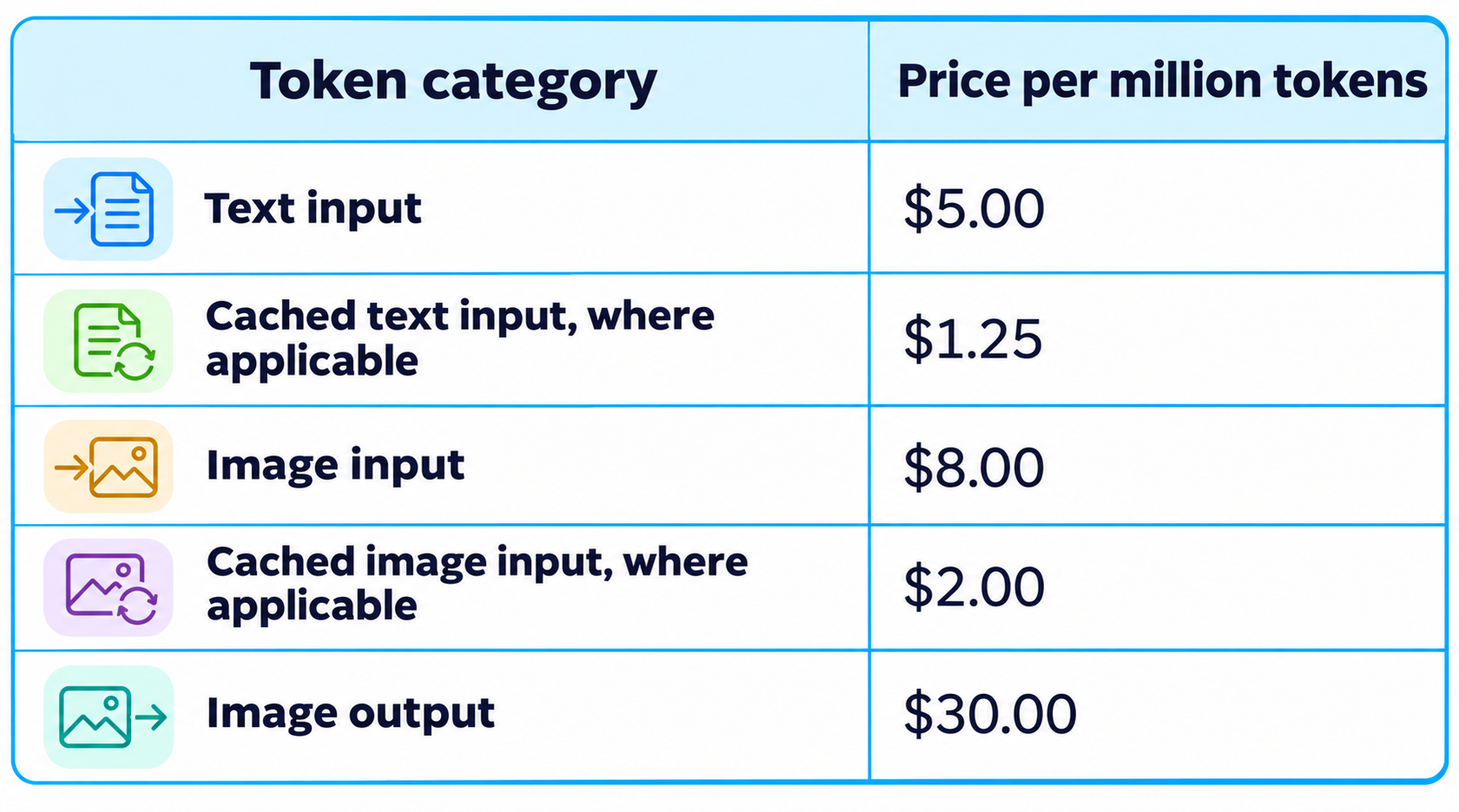
There is no universal per-image price in that table. Actual cost depends on token consumption and the operation. Do not assume the cached-input rates apply to every request simply because they appear in the price list.
For a simplified illustration, 4,000 billable image-output tokens at $30 per million would cost $0.12 for output alone. This is arithmetic using a hypothetical token count, not a quoted price for a particular image size or quality setting.
SVG generation has an additional distinction: the guide describes charges for the reference image and for the model authoring the vector output. Include both stages when estimating that workflow.
The business metric is cost per approved asset. Divide the total cost of attempts and revisions by the number accepted. Add review time when comparing tools, because an inexpensive generation can still require substantial human correction.
10. Access and Integration
For developers, the explicit model IDs are gpt-image-2.6-flare and gpt-image-2.6-sunburst. The API changelog names the image generation and image editing endpoints for this release.
For ChatGPT use, check the image creation tools, model availability, and allowances shown in your account. A capability documented for an API request should not be treated as a promise that an identical switch appears in the ChatGPT interface.
For an integration, start with one complete flow: submit a prompt, retrieve the image, request an edit, and show the revised asset. Record the model, settings, input material, and billing details so the team can reproduce a useful result.
Name the model explicitly in production code. Some documentation examples and defaults still refer to earlier versions. Confirm support for the exact operation, especially GIF or SVG access, before building a product around it.
11. ChatGPT Images 2.6 vs Images 2.5
The November release gives existing users specific reasons to retest: the new 2.6 model IDs and the documented complexity, SVG, and GIF workflows. It does not establish that every old prompt will improve or that all editing features originated with 2.6.
In particular, OpenAI's changelog says markup-guided editing supports selected 2.5 and 2.6 models. Avoid treating that capability as exclusive to the newest version when evaluating an upgrade.
Run representative old jobs again: one product image, one localized edit, one text-heavy layout, and one character. Compare the number of revisions required, preservation of important details, and total cost. Keep the old result available so the comparison is concrete.
Our October 12 collection of AI background change prompts provides a focused editing task for this exercise. Changing the scene while preserving the subject makes unintended changes easier to spot.
12. Practical Prompts for Images 2.6
A useful prompt names the output's purpose, subject, layout, style, and preservation requirements. The examples below are original starting briefs, not tested outputs or promises about generation quality.
Ecommerce product scene
“Use the uploaded product photo as the identity reference. Place the item on a warm stone shelf beside a softly lit window. Create a clean editorial product photograph with realistic material texture and a subtle contact shadow. Preserve the product's shape, color, packaging, and visible details. Do not add claims or accessories. Leave clear space on the left for final copy.”
Focused background revision
“Replace only the background with a pale blue studio wall. Keep the product, label position, camera angle, shadows, and reflections as close as possible to the approved version. Do not add props or change the crop.”
Brand mascot GIF
“Using the uploaded mascot as the visual reference, create a short looping animation of one friendly wave. Keep the camera fixed and preserve the face, proportions, clothing, and palette. End in the starting pose so the loop feels continuous. Use a simple background without captions.”
Simple vector illustration
“Create a simple vector illustration of a desk lamp beside a closed notebook. Use three flat colors, clear geometric forms, consistent visual weight, and generous spacing. Avoid gradients, tiny decorative details, and text. The illustration should remain recognizable at small sizes.”
Separate the creative instructions from the final production requirements. If a design needs exact pricing, product claims, or legal copy, supply verified wording and review the finished asset before publishing.
For a timely campaign example, our November 2 collection of Diwali AI photo prompts for Gemini and ChatGPT shows how seasonal details can give a brief direction. Adapt the setting while preserving the reference subject and checking cultural details.
13. A Production Workflow That Keeps Revisions Useful
The most reliable process is to approve the brief, establish the reference, generate a candidate, and change one variable at a time. This keeps the review focused and reduces confusion about what caused an improvement.
Begin with the destination. A website hero, product listing, social post, and small icon ask different things of the composition. Decide what must be visible and where final text will sit before generating.
Choose a small set of evaluation criteria. For a product scene, these might be item accuracy, composition, lighting, and room for copy. For a character loop, identity and a smooth repeating action may matter more.
After each edit, compare against the last approved version. Keep a simple record of the prompt and decision. This prevents a team from losing a strong direction while chasing a minor improvement.
Finish with the delivery check: inspect the actual file, test it at the intended size, proofread visible text, and confirm that the asset represents the intended product or message.
14. Alternatives and Limitations
Choose an alternative when its workflow fits your requirements better, and compare it on the same brief. A model's reputation or a striking demo cannot settle whether it suits your team's recurring jobs.
OpenAI's image guide acknowledges remaining limitations in precise text placement and consistency for recurring characters or brand elements. Build review around the details your work depends on instead of assuming a stronger model removes that responsibility.
Our October 22 Fibo 2.0 review examines another image-generation option, including pricing and licensing considerations. It is a relevant next read when you are comparing the workflow and deployment choice alongside the visual result.
Test a repeated edit, a dense layout, and your most difficult reference image. Include failures in the comparison. A tool that produces one exceptional result may still be less useful than one that regularly delivers assets your team can approve.
15. Is ChatGPT Images 2.6 Worth It?
Yes, it is worth evaluating if you repeatedly create and refine visual assets. The combination of two model choices, guided editing, and additional output workflows creates practical options for marketers, designers, founders, and developers.
The strongest adoption case is a repeatable job where you can measure improvement. Start with one asset type and record acceptance rate, correction time, and cost. Expand only when those results support using the tool more widely.
My verdict is to judge Images 2.6 by how efficiently it turns a brief into a finished asset. Use the controls deliberately, preserve approved decisions, and choose the model that performs best on your work.
Frequently Asked Questions
What is ChatGPT Images 2.6?
It is OpenAI's image generation and editing update. The API release includes GPT-Image-2.6 Flare and Sunburst, with documented support for complexity control, guided edits, GIFs, and SVG generation.
What is the difference between Flare and Sunburst?
Flare is positioned for fast iteration and interactive editing. Sunburst is positioned for detailed visual work. Compare them using the same brief and references before choosing a default.
How much does ChatGPT Images 2.6 cost in the API?
Both models list standard rates of $5 per million text-input tokens, $8 per million image-input tokens, and $30 per million image-output tokens. The final cost depends on actual usage and the selected workflow.
Can Images 2.6 generate animated GIFs?
Yes. The API documents GIF output for generation and editing, with 2 to 16 frames. Check access to the selected model's GIF preview and the supported size limits.
Can Images 2.6 create SVG files?
Yes, through the documented generation workflow. It creates a reference image and uses a model to author the SVG, so review both the vector structure and the total cost.
Does higher complexity always improve an image?
No. Higher complexity can help with demanding scenes, but OpenAI notes that it may increase latency and introduce unwanted changes. A focused edit may benefit from a simpler approach.
Is ChatGPT Images 2.6 free?
Check the image-generation allowance shown in your ChatGPT account. API token pricing is a separate question and should not be inferred from a consumer plan or an in-app allowance.
Is Images 2.6 better than every other AI image generator?
There is no universal winner for every task. Compare reference fidelity, editing reliability, output requirements, and cost per approved asset using work representative of your needs.
Recommended Blogs
- 50 Best Diwali AI Photo Prompts 2026 for Gemini, ChatGPT & Nano Banana
- AI Product Photography Prompts 2026: Copy-Paste Ideas for Ecommerce
- Fibo 2.0 Review: Benchmarks, Price, License & Is It Worth It?
- 100 Best 3D and Cartoon AI Photo Prompts 2026
- 100 Best AI Background Change Prompts 2026
- 75 Best ChatGPT Images 2.5 Prompts 2026
- ChatGPT Images 2.5 Review: Quality, Speed, Editing & Is It Worth It?
Resources & Community
Join our community of 70,000+ AI enthusiasts and learn to build powerful AI applications. Build Fast with AI helps developers, creators and teams understand and implement practical AI.
Agentic AI Launchpad 2026
A structured six-week cohort program focused on building and deploying real-world agentic AI systems, with live sessions, mentorship, project reviews and a builder community.
Explore the program: Agentic AI Launchpad 2026
Free AI Resources
Access free learning resources, workshops and practical AI material.
References
- OpenAI: API changelog and November 4 image-model release
- OpenAI: GPT-Image-2.6 Flare model documentation
- OpenAI: GPT-Image-2.6 Sunburst model documentation
- OpenAI: Image generation guide
- OpenAI: API pricing
- OpenAI: Image generation API reference
- OpenAI: Image editing API reference
- Build Fast with AI: Community and learning programs
- Build Fast with AI: Agentic AI Launchpad
- Build Fast with AI: Free AI workshops