Fibo 2.0 Review: Can Bria's 8B Model Make Open-Weight Image Editing Practical?
Fibo 2.0 is Bria's 8.1-billion-parameter image model that brings text-to-image generation and instruction-based editing into one model family. That combination matters because creative workflows rarely end when the first image appears. A designer may need to change a product's color, replace a background, adjust lighting, preserve a logo, combine references or generate a new version for another campaign. Fibo 2.0 is built for that generate-and-refine loop, with a full Dev checkpoint and a four-step Edit Turbo checkpoint for faster editing.
Released in October 2026, Fibo 2.0 has become a notable option in the open-weight image field. On Artificial Analysis's image-editing leaderboard, it is currently the highest-ranked open-weight model, with an Elo score around 1,087. On the open-weight text-to-image leaderboard, it scores around 1,039, just behind Qwen-Image-2.1 at about 1,042. These are preference-based arena results, not universal quality scores, and the confidence intervals overlap. The fair takeaway is that Fibo 2.0 belongs in the leading open-weight group for both editing and generation.
Its practical advantage is not simply leaderboard position. Bria emphasizes licensed training data, structured prompts and controllable image operations. Its most important limitation is licensing: the downloadable weights are offered for non-commercial use under CC BY-NC 4.0, while commercial use requires a separate arrangement. The hosted API has separate pricing and usage terms, so teams should not assume the model weights and the commercial API have identical rights.
QUICK ANSWER
Fibo 2.0 is an 8.1B-parameter image model from Bria that supports both text-to-image generation and image editing. The full Fibo 2.0 Dev checkpoint is designed for quality, control and fine-tuning; Fibo 2.0 Edit Turbo is a distilled four-step checkpoint focused on fast image editing. The model uses structured Visual GenAI Language (VGL) captions rather than relying only on an unstructured natural-language prompt.
Current Artificial Analysis snapshots place Fibo 2.0 at approximately 1,087 Elo on open-weight image editing and 1,039 Elo on open-weight text-to-image. It ranks first among open-weight editors and second among open-weight text-to-image models in the cited snapshots, but Qwen-Image-2.1's confidence interval overlaps with Fibo's. These rankings can change as more votes arrive.
Bria's public pricing lists Fibo image generation at $0.03 per image. That is a hosted API rate, not the cost of running the weights locally. The downloaded weights are non-commercial under CC BY-NC 4.0 unless a separate commercial agreement is obtained. For commercial work, verify the current API plan, license terms and any required indemnity directly with Bria.
Verdict: Fibo 2.0 is worth testing if you need an image model that can generate and edit, value structured control, or want downloadable weights for research and non-commercial experimentation. It is less straightforward for businesses that need commercial self-hosting without negotiating a separate license.
1. What Is Fibo 2.0?
Fibo 2.0 is the next generation of Bria's FIBO image-model family. The important change is that generation and editing are brought together in one unified model architecture. Instead of treating text-to-image generation and image editing as separate product experiences, the family is designed to support creation, refinement and reference-guided changes across a shared foundation.
The Dev checkpoint is the full, non-distilled model. It supports text-to-image and editing and is intended for users who want the higher-control path or a starting point for fine-tuning. Edit Turbo is distilled for editing in four steps without classifier-free guidance. It is not a drop-in replacement for Dev when the job is to generate an image from scratch.
Fibo 2.0 is not a general-purpose multimodal assistant. It is a specialist visual model. Its value should be judged by whether it follows composition instructions, preserves important parts of an existing image, renders text and objects accurately, and makes edits without damaging unrelated regions.
2. Fibo 2.0 Specifications at a Glance
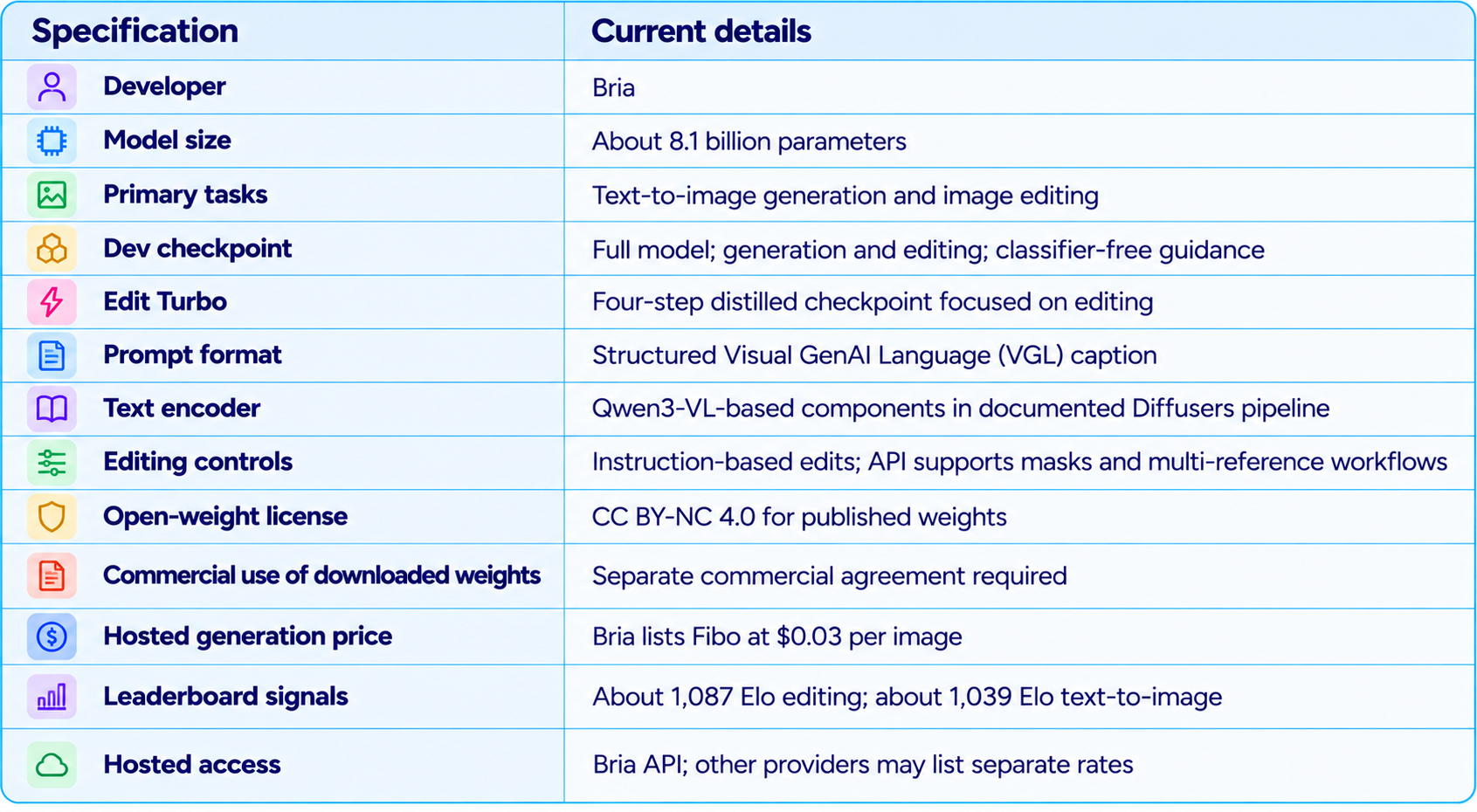
These specifications describe the current published model and service information. Exact memory use depends on checkpoint precision, text encoder, VAE, resolution and inference software. Bria does not provide one universal VRAM number that guarantees every local setup will work.
3. Image Editing Benchmarks: What Does 1,087 Elo Mean?
Artificial Analysis's image-editing arena evaluates models using pairwise human preference votes. In the current open-weight leaderboard snapshot, Fibo 2.0 scores roughly 1,087 Elo with a 95% confidence interval of approximately 1,073 to 1,101. Qwen-Image-2.1 is around 1,083, with an interval of roughly 1,070 to 1,096. The intervals overlap, so a four-point lead is not strong evidence that Fibo is definitively better on every editing task.
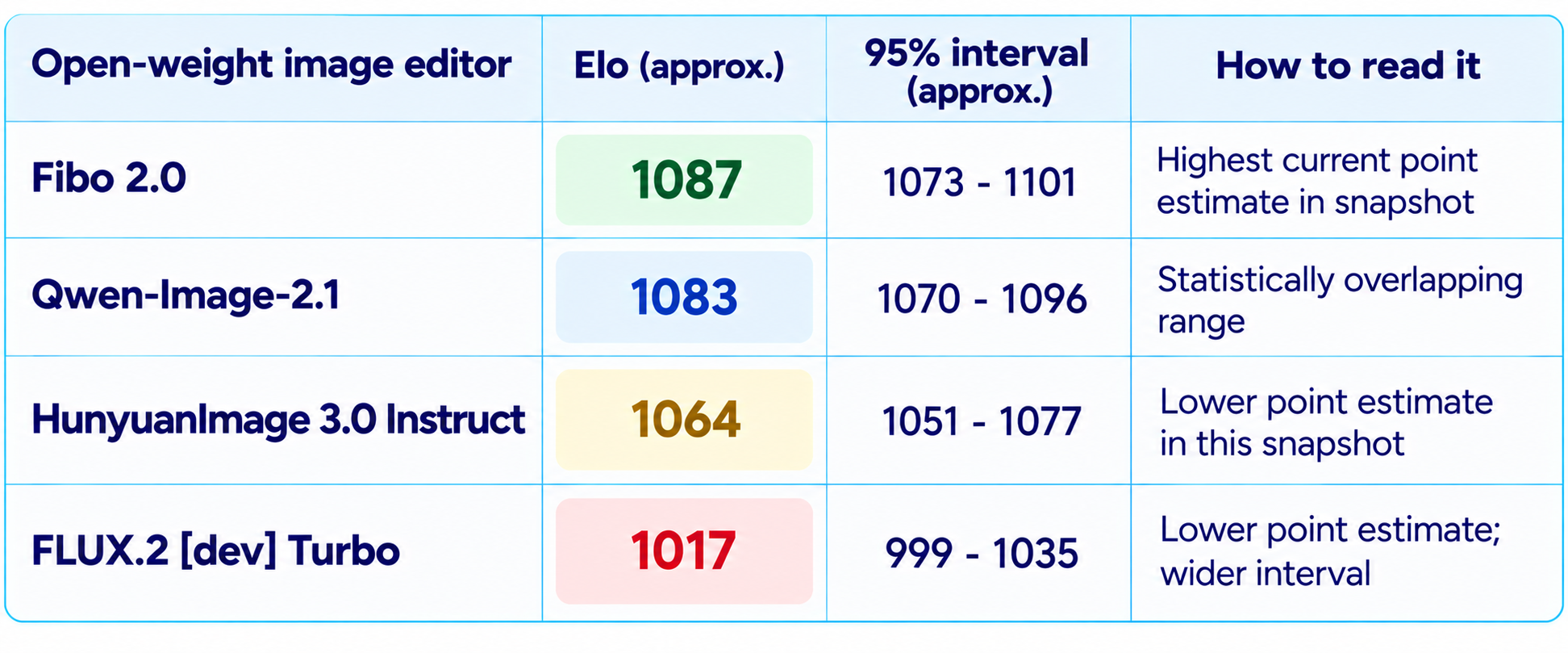
The useful conclusion is not that Fibo wins every edit. It is that Fibo 2.0 has entered the top tier of open-weight image editing, with a strong position for instruction-based edits. The benchmark does not automatically measure exact logo preservation, repeated edits over a long workflow or the quality of every commercial asset. Test those requirements separately.
4. Text-to-Image Benchmarks: Close to Qwen-Image-2.1
On the open-weight text-to-image leaderboard, Fibo 2.0 scores about 1,039 Elo, while Qwen-Image-2.1 scores about 1,042. Their confidence intervals overlap substantially, and both models have thousands of preference comparisons. Fibo is a leading open-weight generator, but the result does not establish a clear winner between the two.
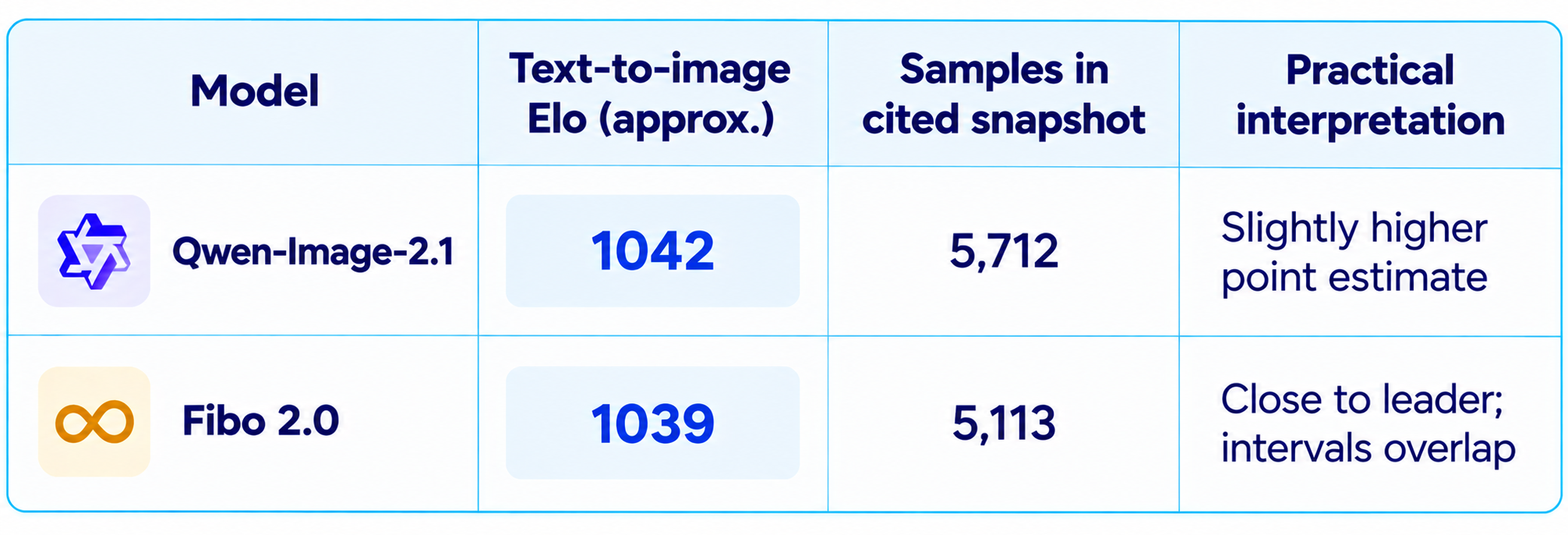
A leaderboard compresses many prompts into one score. It does not tell you which model is best for product images, editorial portraits, typography, illustration, catalog consistency or a particular visual identity. For those tasks, use a small prompt set that reflects your real production needs.
5. What Makes Fibo 2.0 Different?
Fibo's core design idea is structured visual prompting. Bria's Visual GenAI Language, or VGL, expands a brief into a detailed description of the image's objects, composition, lighting, camera and other visual properties. The model is trained around this structured representation, making it easier to inspect and refine the instructions that shape the final image.
This approach is useful when a creative brief contains more than a subject. A product image may need a specific lens look, an empty area for ad copy, a defined background texture, a particular shadow direction and a product label that remains visible. A structured description makes those requirements explicit instead of hiding them in one long sentence.
Structured prompts do not guarantee perfect execution. They provide an inspectable control layer, but the resulting image still needs review for anatomy, product details, text, reflections, composition and unwanted changes.
6. Fibo 2.0 Dev vs Fibo 2.0 Edit Turbo
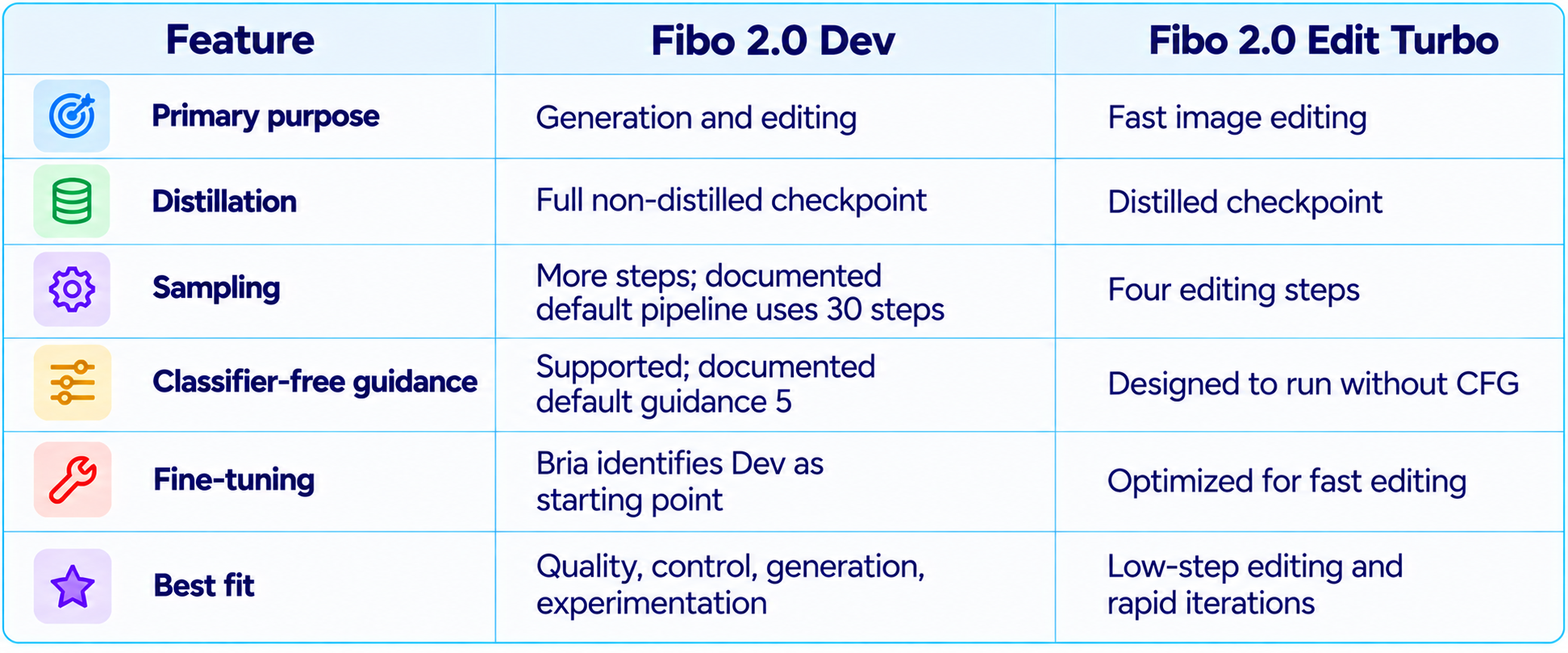
Choose Dev when you need to create images from scratch, explore the full control path or investigate fine-tuning. Choose Edit Turbo when the task starts with an existing image and the goal is a quick, localized change. Do not judge Turbo's lack of text-to-image generation as a failure if you selected an editing-focused checkpoint.
7. Image Editing Capabilities
Fibo 2.0 supports instruction-based image editing through Bria's FIBO workflow. A user can describe a change in natural language or use a structured instruction path. Bria's wider editing API documents masking, object replacement, object removal, generative fill, background operations, relighting, restyling and image expansion. Confirm which specific endpoint is backed by Fibo 2.0 in your chosen plan before assuming every Bria editing service uses the same checkpoint.
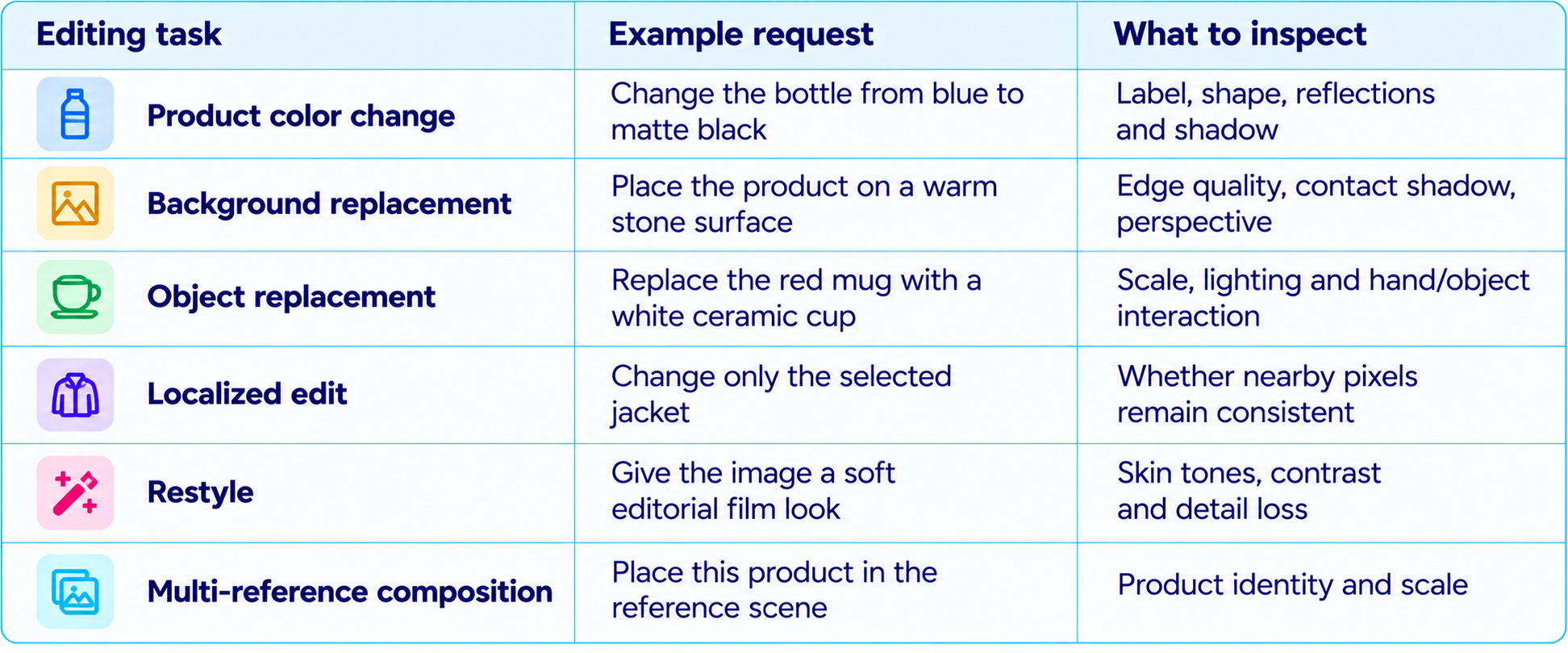
A good editing model should change the requested element while preserving the rest of the image. Assess whether it altered faces, logos, product geometry, typography, reflections or background objects that were not mentioned. These failure points matter more than a visually impressive single demo.
8. Image Generation and Prompt Adherence
For generation, Fibo 2.0 is designed for text-to-image and structured-prompt workflows. It is a useful candidate for marketing visuals, product scenes, editorial images, concept art and controlled compositions. Its benchmark position indicates strong average preference, while structured prompting offers a way to express detailed visual requirements.
Prompt adherence should be tested as a checklist. If a prompt specifies three objects, a left-to-right arrangement, a color palette, a lens style and negative space for text, mark each requirement as pass or fail. This is more informative than asking whether the result looks attractive overall.
For production, write prompts in layers: subject and action first, composition second, lighting and materials third, then typography and constraints. For tasks that use VGL, inspect or refine the structured prompt rather than repeatedly adding vague adjectives to the original request.
9. Text Rendering, Product Detail and Visual Consistency
Bria identifies improvements in text rendering, texture and anatomy as part of the Fibo 2.0 release. These areas matter for real-world image work: packaging labels, poster headings, clothing textures, hands and faces often determine whether an image can be used without substantial retouching.
Still, 'improved text rendering' does not guarantee every label will be exact. For any image containing a brand name, price, product claim, UI element or legal text, zoom in and verify every character. For commercial product photography, compare the generated result with the original SKU and check logos, dimensions, packaging color and material.
Fibo 2.0 is best evaluated with repeatable tests: exact text, small text, hands holding products, reflective packaging, complex fabrics, repeated objects and a sequence of related campaign assets. That reveals whether the model is dependable for your niche rather than just capable of producing one strong image.
10. Fibo 2.0 Pricing: API vs Local Use
Bria's public pricing currently lists standard Fibo generation at $0.03 per image and Fibo Lite at $0.02 per image. These are hosted API rates, and pricing can differ by endpoint, plan or provider. Artificial Analysis lists Fibo 2.0 generation at about $32 per 1,000 images in its snapshot, consistent with roughly $0.032 per image. Check live pricing before budgeting production.
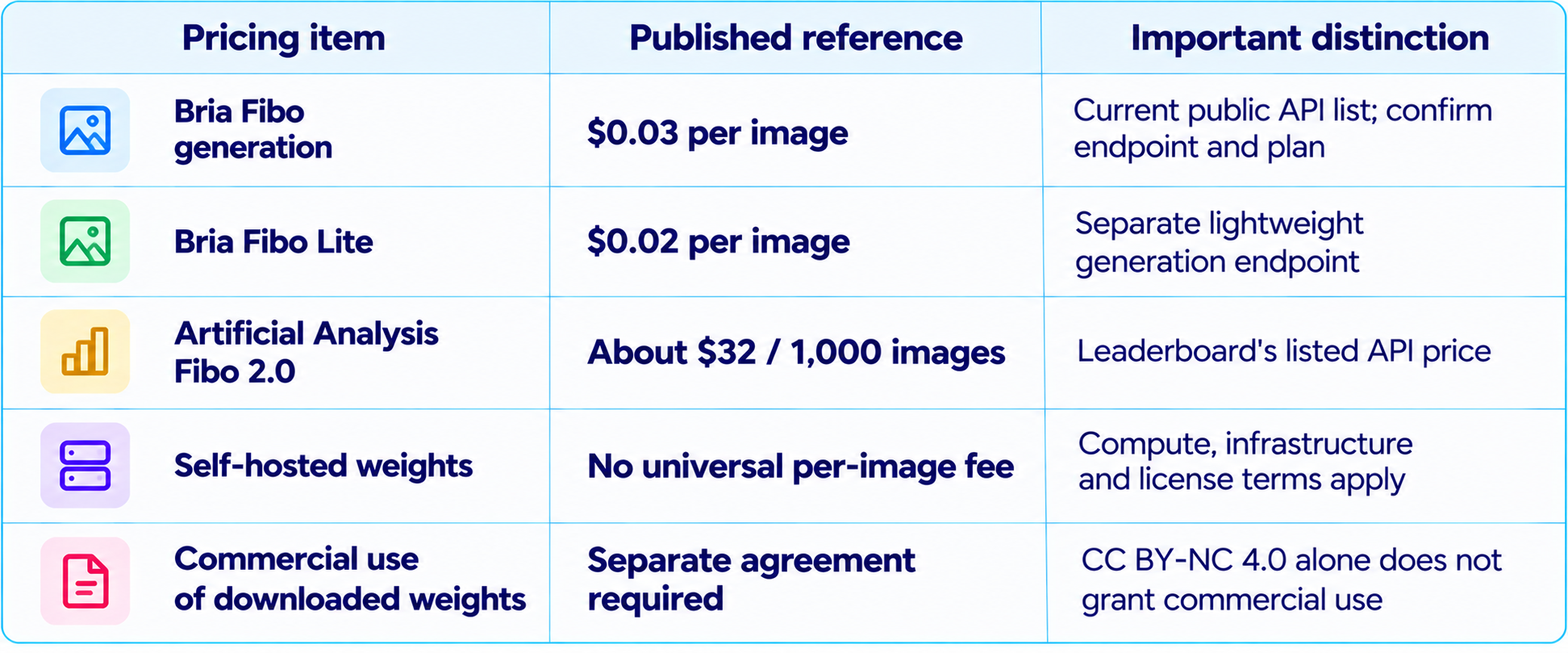
For example, 10,000 generations at $0.03 each would cost about $300 before retries, storage, editing operations or other API charges. Your actual cost per approved asset may be higher because some prompts need several candidates. Track cost per usable output, not just cost per request.
11. Is Fibo 2.0 Open Source?
The model is commonly described as open-weight because Bria publishes downloadable checkpoints on Hugging Face. However, open weights are not the same as an unrestricted open-source license. The published Fibo 2.0 weights use CC BY-NC 4.0, which restricts use to non-commercial purposes and requires attribution under the license. Commercial use requires a separate agreement with Bria.
This distinction matters for agencies, ecommerce brands, design studios, SaaS products and internal business systems. Downloading the checkpoint does not automatically give a company permission to use it in paid client work or a revenue-generating product. Read the current model card and license, and obtain written clarification from Bria for any commercial deployment.
Hosted API rights may differ from local-weight rights. A paid API can have its own terms, and Bria advertises commercial rights and additional protections for certain paid plans. Do not assume those rights transfer to the downloaded checkpoint.
12. Licensed Training Data and Commercial Safety
Bria says Fibo 2.0 is trained exclusively on licensed data. That is meaningful for organizations assessing training-data provenance and downstream commercial risk, especially marketing teams and businesses that want a documented approach to generative media.
Licensed training data does not mean every output is automatically safe to publish. Generated images can still resemble protected brands, include trademark-like details, depict people in sensitive contexts or produce inaccurate product claims. Teams should review outputs, keep records of prompts and source assets, and follow brand and legal approval processes.
For enterprise buyers, ask about the exact API plan, commercial rights, indemnity scope, provenance metadata, retention and data-processing terms. These questions matter more than a generic statement that a model is commercially safe.
13. Can You Run Fibo 2.0 Locally?
The published checkpoints are available for local experimentation, but practical hardware requirements depend on precision, runtime, model components and output settings. The full model repository includes more than one weight file: the pipeline also uses text-encoder and VAE components. A model that appears to fit in a given amount of VRAM on paper may require additional memory or CPU offloading in a real setup.
The Hugging Face Diffusers documentation describes a BriaFibo2 pipeline, while integration status and install steps can change as the implementation evolves. Follow the current model card and Diffusers instructions rather than copying an older environment setup. Community ComfyUI packages may exist, but verify repository trustworthiness, checkpoint compatibility and node requirements before using them in production.
Local execution is most attractive for researchers, developers and artists who need reproducibility, private experimentation or model-level control. For commercial workloads, local execution does not remove the non-commercial restriction in the downloadable weights' license.
14. Fibo 2.0 vs Qwen-Image-2.1
Qwen-Image-2.1 is the closest direct comparison in the current open-weight arena. Fibo has the higher point estimate on image editing, while Qwen has a slightly higher point estimate on text-to-image. The confidence intervals overlap on both boards, so the ranking difference should not be treated as a decisive quality gap.
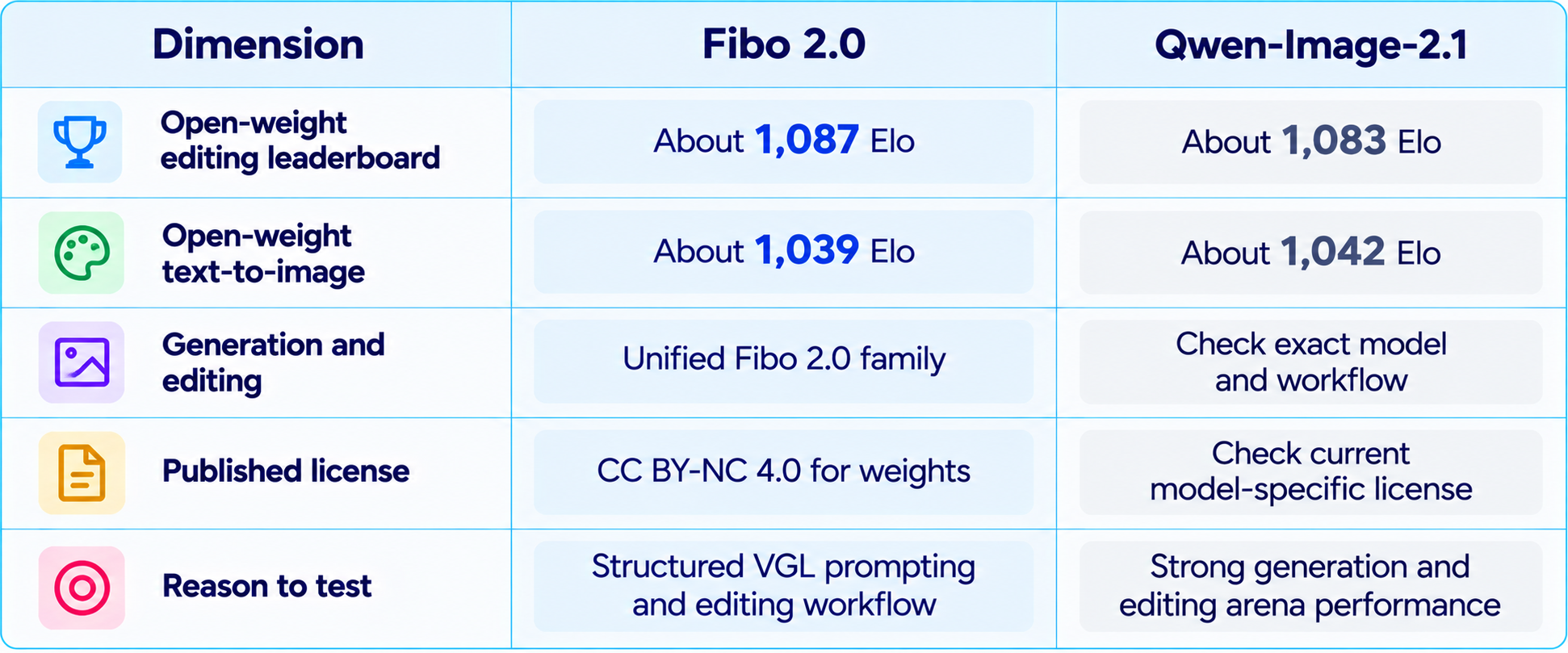
The best choice depends on workflow and license. Compare the same prompts, output sizes and editing instructions on both models. Score prompt adherence, local preservation, text accuracy, artifact rate, speed, cost and whether the license supports the intended use.
15. Fibo 2.0 vs Hosted Image Models
Hosted image systems can be easier to use because they hide model setup and may include a polished editing interface. Fibo 2.0's advantage is the combination of a downloadable checkpoint, structured prompting and an API path. It is a better fit for developers who want to integrate image generation and editing into their own product or pipeline than for someone who only wants a one-click design app.
Do not compare models on price alone. A hosted service may include workflow tools, commercial rights, output provenance, support and a stable deployment. A downloadable checkpoint gives more control but requires compute, version management, safety review and license diligence. Compare total cost and control for the intended workflow.
16. Best Use Cases for Fibo 2.0
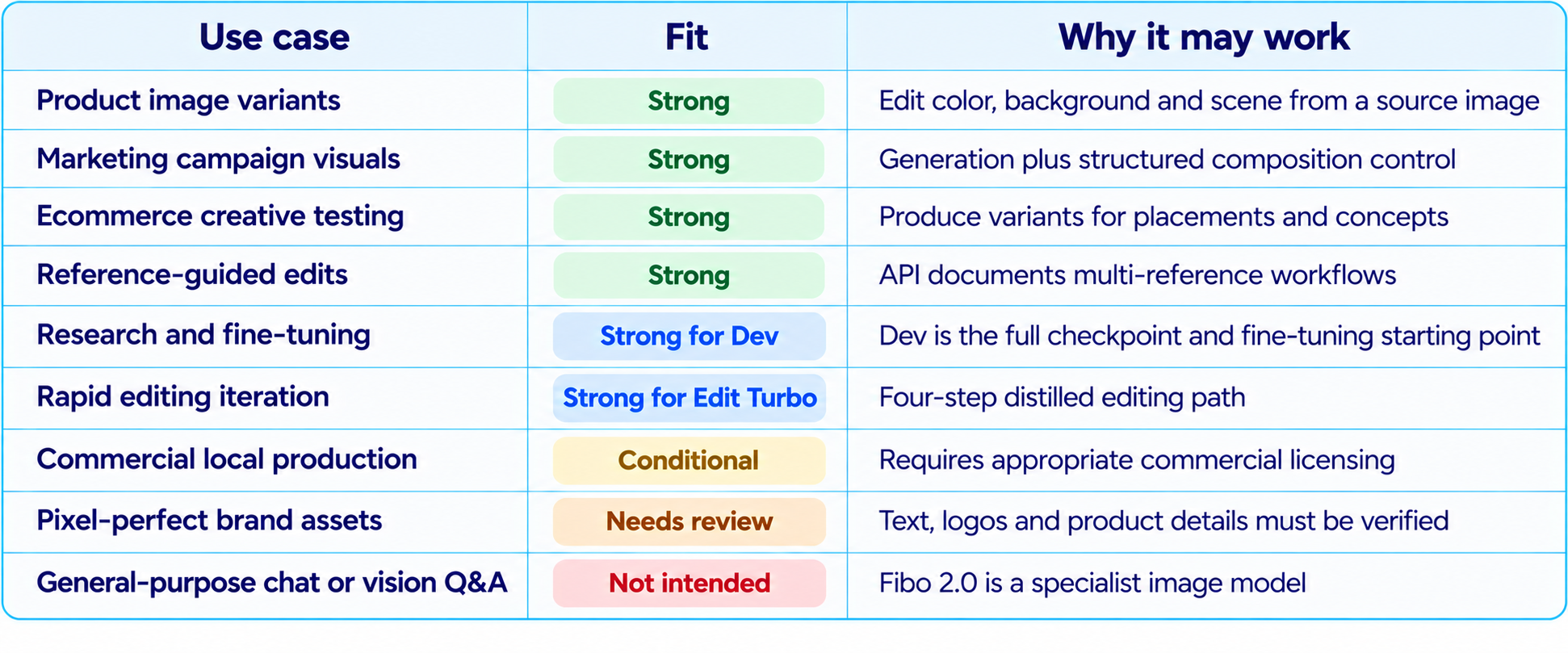
17. How to Test Fibo 2.0 Properly
Do not judge Fibo 2.0 from a handful of showcase images. Build a small evaluation set that mirrors your production tasks, then compare it against the model you currently use. Keep the input image, prompt, resolution and settings consistent wherever possible.
- Text-to-image: test 10 prompts with different compositions, styles and object counts.
- Localized editing: change one object and check whether the rest of the scene stays intact.
- Typography: test short labels, product packaging and poster text, then inspect every character.
- Product consistency: compare the edited output with the original SKU, logo and geometry.
- Multi-reference: test whether subject identity and reference details survive the composite.
- Repeated edits: apply several changes in sequence and track drift across versions.
- Latency and cost: record queue time, inference time, retries and cost per accepted image.
- License and deployment: verify model version, plan, rights and retention terms before production.
Use a scorecard rather than a single subjective rating. A model that creates beautiful scenes but frequently changes a product label may be a poor choice for ecommerce. A model with slightly lower aesthetic preference but reliable localized edits may be better for production.
18. Limitations You Should Know
- The open-weight license is non-commercial by default; commercial use of downloaded weights requires a separate agreement.
- Leaderboard confidence intervals overlap with Qwen-Image-2.1, so Fibo's point-estimate lead does not prove universal superiority.
- Fibo 2.0 Dev and Edit Turbo are not interchangeable: Turbo is an editing-focused four-step checkpoint.
- Structured prompting improves inspectability but does not guarantee perfect prompt adherence.
- Text, logos, anatomy, reflections and product details still need visual quality assurance.
- Local hardware needs vary with precision, pipeline components, resolution and offloading.
- Bria API pricing and other providers' rates may differ; verify the current price and exact endpoint.
- Licensed training data does not remove the need for output-level legal, brand and safety review.
19. Recommended Production Workflow
Fibo 2.0 is best used as part of a repeatable visual production pipeline rather than as a one-shot image generator.
- Write a brief with subject, composition, lighting, materials, camera and required text.
- Use Dev for generation or high-control exploration; use Edit Turbo for fast editing tasks.
- Start from a reference image when identity, packaging or layout must be preserved.
- Use masks for localized changes where the endpoint supports them.
- Inspect or refine the structured VGL prompt when composition misses the brief.
- Generate a small set of candidates, then choose the best rather than endlessly modifying one weak result.
- Check text, logos, product shape, hands, reflections and background edges at full resolution.
- Record the model checkpoint, prompt, settings, input assets and approval status.
- Confirm the commercial license and endpoint terms before integrating the model into a paid workflow.
For a broader look at AI design tools in a creator workflow, our Google Pics Review examines a different approach to AI-assisted image creation and editing.
20. Is Fibo 2.0 Worth It?
Fibo 2.0 is worth testing if you need both image generation and instruction-based editing, value structured visual control, or want a published checkpoint for non-commercial experimentation. Its current open-weight arena results place it among the strongest available options, and Dev and Edit Turbo give users different paths for full-control generation and low-step editing.
The hosted price is understandable for prototyping: Bria currently lists Fibo at $0.03 per image. At scale, measure cost per approved image, including failed attempts and editing calls, instead of multiplying the base price by the number of final assets.
The most important caveat is licensing. If you want to download the weights and use them in commercial work, the published non-commercial license is not enough. The hosted API and enterprise plans may offer different rights, so clarify those terms before selecting Fibo as a production dependency.
21. Final Verdict
Fibo 2.0 is one of the more compelling open-weight image releases of October 2026 because it treats image creation and editing as parts of the same workflow. Its structured VGL prompting system makes the visual brief more inspectable, and its Dev and Edit Turbo checkpoints offer different paths for full-control generation and fast editing.
The benchmark evidence is strong but should be read carefully. Fibo 2.0 is currently the top point estimate among open-weight models on Artificial Analysis's image-editing board at roughly 1,087 Elo, and second on open-weight text-to-image at roughly 1,039 Elo. Qwen-Image-2.1 sits very close on both boards, with overlapping confidence intervals. Fibo is a top-tier option, not an automatic winner for every prompt.
For developers and creative teams, the real question is whether it preserves the right details across the exact edits they need. For businesses, the other question is whether the licensing path matches their deployment. Those checks matter more than the headline rank.
Overall rating: 8.8/10 for editing potential, 8.5/10 for generation, 8.7/10 for structured control, 8.5/10 for hosted value and 8.4/10 overall. The overall rating reflects strong capabilities, balanced against licensing constraints and the need for task-specific validation.
Bottom line: Fibo 2.0 deserves a place on your shortlist if you want a leading open-weight image editor that can also generate images. It is especially interesting for structured creative pipelines, product visual experimentation and developers who need control. Confirm the license before commercial use, and benchmark it on your own assets before committing.
Frequently Asked Questions
What is Fibo 2.0?
Fibo 2.0 is Bria's 8.1B-parameter image model family for text-to-image generation and instruction-based image editing.
Is Fibo 2.0 good for image editing?
It is among the leading open-weight editors in the current Artificial Analysis snapshot, at about 1,087 Elo. Its confidence interval overlaps with Qwen-Image-2.1.
What is the Fibo 2.0 text-to-image score?
The cited open-weight leaderboard snapshot places it at about 1,039 Elo, just behind Qwen-Image-2.1 at about 1,042.
How much does Fibo 2.0 cost?
Bria currently lists Fibo image generation at $0.03 per image. Confirm endpoint and plan pricing before budgeting.
Is Fibo 2.0 open source?
It has downloadable open weights, but the published weights use CC BY-NC 4.0 and are non-commercial by default.
Can I use Fibo 2.0 commercially?
Commercial use of downloaded weights requires a separate agreement. Hosted API rights are governed by the applicable plan and terms.
What is the difference between Dev and Edit Turbo?
Dev is the full checkpoint for generation and editing. Edit Turbo is a distilled four-step checkpoint focused on editing.
Can Fibo 2.0 generate images from text?
Yes, the Dev checkpoint supports text-to-image generation as well as editing.
Can I run Fibo 2.0 locally?
Yes, the weights are available for local experimentation, but hardware needs depend on precision, resolution and the full inference pipeline.
Is Fibo 2.0 better than Qwen-Image-2.1?
Fibo has a slightly higher editing point estimate and Qwen a slightly higher text-to-image point estimate. Confidence intervals overlap, so test both.
Is Fibo 2.0 safe for commercial image generation?
Bria says it is trained on licensed data, but you still need to verify commercial rights and review outputs.
Who should use Fibo 2.0?
Developers, designers and researchers who need image generation, controllable editing, structured prompts or non-commercial local experimentation.
Recommended Blogs
Google Pics Review: Is Google's New AI Design Tool Good Enough to Replace Canva?
Best AI Video Models 2026: Ranked by Quality, Speed, Price & Use Case
Resources & Community
Join our community of 70,000+ AI enthusiasts and learn to build powerful AI applications. Build Fast with AI helps creators, developers and teams understand and implement practical AI.
Agentic AI Launchpad 2026
A structured six-week cohort program that takes you from AI basics to building and deploying real-world agentic AI systems, with live sessions, expert mentorship, project reviews and a builder community.
Explore the program: Agentic AI Launchpad 2026
Free AI Resources
Access free tools, workshops and micro-learning to keep building.