AI Product Photography Prompts: Create Ecommerce Images That Look Professionally Shot
AI product photography has moved beyond placing an item on a plain background. With a good reference image and a precise prompt, creators can build studio packshots, premium lifestyle scenes, close-up material details, seasonal campaigns, marketplace images and social ads without arranging a separate shoot for every concept. The best results come from treating the prompt as a photography brief, not a string of generic quality keywords.
This guide contains 100 copy-paste AI product photography prompts for ecommerce, D2C brands, Shopify stores, marketplaces, product launches and paid social campaigns. Use them with an image generator or an image editor that accepts text prompts and reference images. Replace bracketed details with your product, brand colors, target audience and campaign goal.
One important rule: when you already have a real product, upload a clean reference photo and explicitly tell the model what must remain unchanged. A beautiful image is not commercially useful if the AI changes the bottle cap, package shape, logo, color variant, label or included accessories.
The Product Photography Prompt Formula
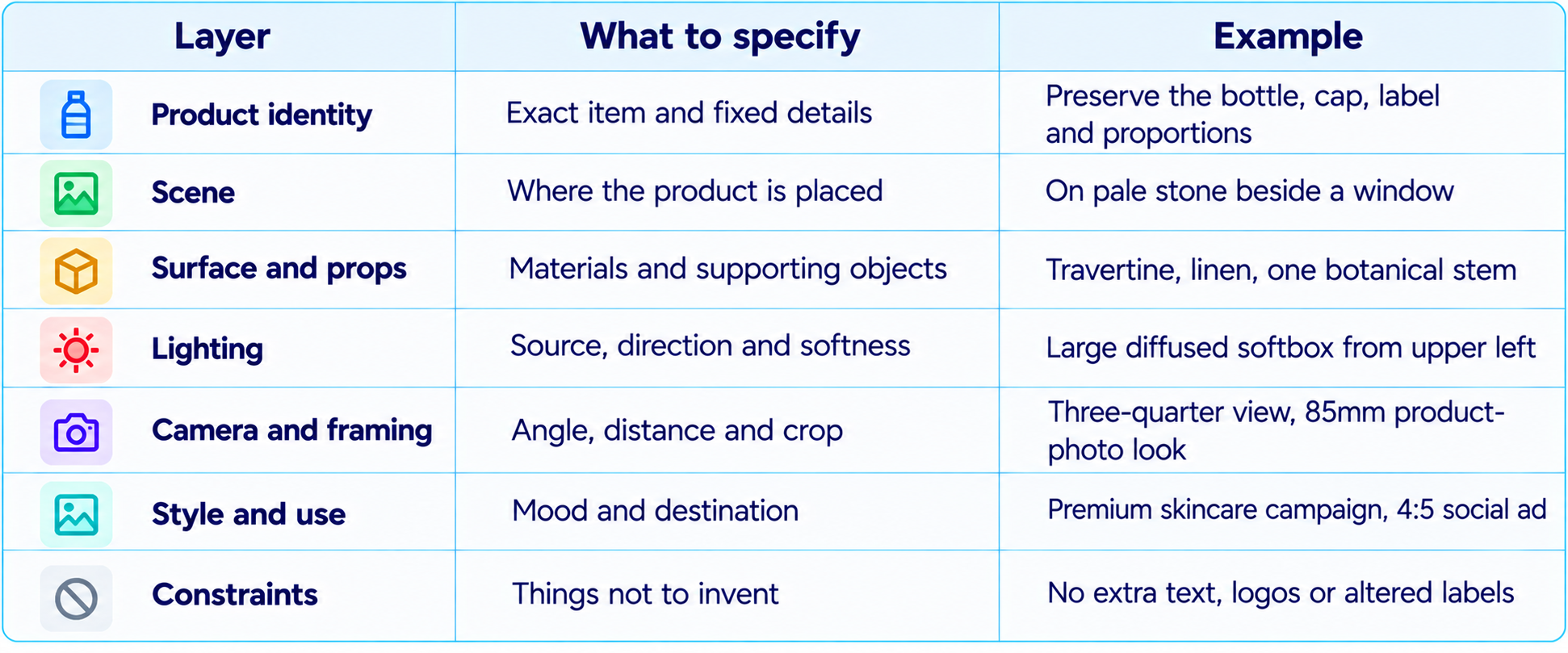
Reusable base prompt: “Create a photorealistic commercial product photograph of [product], using the attached image as the exact product reference. Place it in [scene] on [surface]. Light it with [lighting], frame it from [camera angle], and use [palette and mood]. Preserve the product's real shape, dimensions, materials, color, label, logo and visible details. Do not invent claims, ingredients, text or accessories. Output for [platform/use] in [aspect ratio].”
How to Use These Prompts
- Upload a clear, well-lit photo of the real product whenever product accuracy matters.
- Replace all bracketed placeholders before generating.
- Specify the destination: marketplace listing, product detail page, landing page, social ad or campaign banner.
- Generate several compositions, then refine one variable at a time, such as background, light direction or crop.
- Compare the output against the real product before publishing, especially labels, packaging, color and accessories.
- Use original brand assets only when you have the rights to use them. Do not invent certification marks, reviews or product claims.
Studio and Clean Ecommerce Product Photos
1. Clean White Background Packshot
Create a crisp ecommerce packshot of [product] centered on a pure white seamless background. Use soft, even studio lighting and a subtle contact shadow. Preserve the exact product geometry, color, label and packaging. No props, extra text or watermark.
2. Warm Neutral Catalog Image
Photograph [product] on a warm ivory background with a matte beige surface, diffused light and a gentle shadow. Keep the composition minimal, premium and color-accurate. Preserve every visible product detail and leave generous negative space.
3. Three-Quarter Hero Shot
Create a commercial hero photograph of [product] from a three-quarter angle on a seamless light-gray background. Use a large softbox and subtle fill light to reveal edges and texture. Keep the product proportions and label unchanged.
4. Front-Facing Listing Image
Create a front-facing product listing image of [product], centered with balanced margins and a clean white background. Use neutral studio lighting and sharp focus. Do not rotate, reshape, recolor or rewrite packaging text.
5. Top-Down Flat Lay
Create a top-down ecommerce flat lay of [product] on a matte [surface]. Keep it fully visible and neatly aligned. Use soft overhead light, accurate color and realistic contact shadows. No decorative clutter.
6. Soft Shadow Packshot
Photograph [product] against a pale neutral background with a soft shadow falling toward the lower right. Use a diffused key light and subtle fill. Keep edges clean, materials realistic and the product identical to the reference.
7. Dark Studio Product Shot
Create a premium studio photograph of [product] against a deep charcoal background. Use controlled rim lighting to separate the silhouette and a soft key light to preserve detail. Avoid crushed blacks and altered product features.
8. Floating Product Concept
Create an advertising image of [product] floating slightly above a seamless neutral surface. Add a physically plausible soft shadow beneath it and clean studio lighting. Preserve the product exactly; do not add parts or labels.
9. Macro Material Detail
Create a macro commercial photograph highlighting [specific material detail] on [product]. Use precise focus, soft directional light and a restrained background. Do not fabricate texture, seams, engraving or components.
10. Consistent Catalog Set
Create a catalog image of [product] matching a series with [brand palette], identical lighting direction, camera height, background tone and crop. Preserve the exact item and leave the same amount of space around it.
Lifestyle and In-Context Product Photography
11. Natural Window Light
Place the referenced [product] on a [surface] beside a large window. Use soft morning daylight, realistic shadows and a calm environment. Keep the product sharp and preserve its actual design and label.
12. Minimal Modern Home
Photograph [product] in a modern home with warm wood, natural linen and a neutral palette. Use realistic window light and editorial composition. Props must not cover the product or imply unsupported features.
13. Outdoor Lifestyle Scene
Create a lifestyle photograph of [product] in an outdoor setting relevant to [use case]. Use believable daylight, authentic environmental texture and a clear product view. Preserve the real item and avoid distracting effects.
14. Desk Setup
Place [product] on a clean work desk with only relevant everyday objects. Use soft side lighting, muted colors and an authentic workspace atmosphere. Keep the product unobstructed and realistically scaled.
15. Bathroom Shelf Scene
Place [product] on a bathroom shelf with stone, glass and folded linen. Use diffused daylight, subtle reflections and a fresh palette. Preserve label, cap, bottle shape and product color.
16. Kitchen Counter Scene
Photograph [product] on a tidy kitchen counter with natural materials and soft morning light. Include a few context-appropriate props. Keep the product readable, realistically scaled and visually dominant.
17. Travel Lifestyle Image
Show [product] in a tasteful travel setting that communicates portability. Use natural light and authentic textures. Do not alter dimensions or add travel features absent from the real item.
18. Gym and Active Lifestyle
Create an energetic but realistic photograph of [product] in a clean fitness environment. Use directional daylight and a sharp product foreground. Do not add health claims, performance labels or unsupported accessories.
19. Outdoor Picnic Scene
Place [product] in a tasteful outdoor picnic setting with natural fabric, grass and restrained props. Use soft afternoon light. Keep the product unchanged and avoid artificial-looking staging.
20. Cozy Evening Scene
Photograph [product] in a warm evening environment with practical lamp light and soft shadows. Keep the product fully visible and color-accurate. Preserve the exact label and materials.
Luxury and Premium Product Photography
21. Black-and-Gold Campaign
Create a premium campaign image of [product] on a deep black surface with restrained gold accents and sculpted studio lighting. Keep the result elegant, not flashy. Preserve the exact finish and label.
22. Luxury Stone Plinth
Place [product] on a sculptural stone plinth against a warm neutral backdrop. Use soft directional light, precise shadows and high-end editorial composition. Keep the product shape and color true to the reference.
23. Reflective Surface
Photograph [product] on a dark reflective surface with a controlled reflection and subtle rim lighting. Keep reflections plausible and do not mirror or duplicate label text. Preserve all original details.
24. Museum Display
Present [product] like a design object in a minimal gallery with a pale stone pedestal and architectural shadows. Use generous negative space and refined art direction. The product must remain unchanged.
25. Moody Side Lighting
Create a moody photograph using one soft side light and a dark neutral background. Reveal texture through gradual highlights and shadows without hiding key features. Preserve the actual product.
26. Luxury Gift Presentation
Style [product] as a premium gift on textured paper with a simple ribbon and elegant props. Use soft studio light. Do not alter packaging or add brand marks absent from the reference.
27. Editorial Close-Up
Create an editorial close-up of [product] with shallow depth of field, sophisticated neutrals and controlled highlights. Keep the key label and distinctive design details legible and accurate.
28. Architectural Shadow Play
Photograph [product] with clean architectural shadows across the background, not across essential product information. Use warm off-white tones and realistic studio lighting.
29. Minimalist Luxury Campaign
Create a minimalist luxury campaign image of [product] against a neutral backdrop. Use elegant negative space and a subtle shadow. No extra typography, logos or decorative clutter.
30. Seasonal Premium Launch
Create a premium seasonal campaign for [product] using [seasonal palette] and a few refined props. Keep the art direction sophisticated and the product unchanged. Leave clear space for copy.
Skincare, Beauty and Cosmetics
31. Serum Bottle Hero
Photograph the referenced serum bottle on pale stone with soft window light and a subtle botanical accent. Preserve exact glass color, dropper, label and liquid appearance. Do not invent ingredients or efficacy claims.
32. Moisturizer Texture Campaign
Create a beauty campaign image of [moisturizer] beside a small cream swatch. Use diffused studio light and soft beige tones. Keep the container and label accurate; do not imply an unverified formula.
33. Perfume Editorial
Place [perfume bottle] on a sculptural surface with controlled reflections, soft directional light and an elegant blurred background. Preserve bottle geometry, cap, glass tint and label placement.
34. Lipstick Color Story
Create a studio photograph of [lipstick] with the actual shade visible and a matching restrained palette. Use crisp focus and soft shadows. Do not change the lipstick shape or shade.
35. Makeup Flat Lay
Create a tidy overhead flat lay of [makeup products] on a neutral background. Preserve every package, shade and label. Do not duplicate items or invent product names.
36. Skincare Routine Trio
Arrange the referenced [three skincare products] as a coordinated routine on a clean bathroom surface. Keep original order, package sizes and labels accurate. Use consistent soft lighting.
37. Beauty Water Droplets
Photograph [product] with realistic water droplets on the surrounding surface, without obscuring its label. Use cool diffused light. Do not add droplets if they misrepresent the packaging.
38. Botanical Beauty Campaign
Style [beauty product] with a few botanicals relevant to its verified ingredient story. Use natural light and muted greens. Do not imply ingredients that are not confirmed.
39. Clinical Minimal Skincare
Create a clean clinical-style photo of [skincare product] on a pale surface. Use even light and precise shadows. Do not add medical symbols, endorsements or claims.
40. Beauty Ad with Copy Space
Create a vertical beauty campaign featuring [product] in the lower-right third, with empty space on the left for copy. Use a neutral background. Do not generate text; preserve the real product.
Food, Beverage and Gourmet Products
41. Artisan Coffee Packaging
Photograph [coffee bag or tin] on warm wood with coffee beans used sparingly. Use soft directional light and accurate colors. Preserve the packaging text and bag shape.
42. Beverage Can Splash
Create a dynamic campaign photograph of [beverage can] with a controlled water splash. Keep the label sharp and unchanged, use believable liquid physics and keep the product fully visible.
43. Premium Chocolate
Place [chocolate product] on dark textured paper with a few authentic chocolate pieces. Use soft highlights that reveal texture. Preserve wrapper design and do not invent flavor claims.
44. Honey Jar Natural Scene
Photograph [honey jar] on light wood with a honey dipper and restrained natural props. Use warm window light. Keep the label readable and jar shape accurate.
45. Snack Packaging Hero
Create an advertising image of [snack package] against a bold brand-aligned background. Use crisp studio lighting. Do not add ingredients or nutrition claims absent from the package.
46. Fresh Produce
Photograph [produce item or packaged produce] on natural stone with soft daylight and fresh texture. Keep color true to life and avoid artificial gloss or oversaturation.
47. Tea Packaging Editorial
Place [tea package] beside a simple cup and a few loose tea leaves. Use gentle natural light and a calm premium mood. Preserve package artwork and do not invent origin or wellness claims.
48. Sauce Bottle Kitchen Scene
Photograph [sauce bottle] on a kitchen counter with a small serving suggestion in the background. Keep the label unobstructed. Do not imply ingredients absent from product information.
49. Bakery Box Campaign
Create a premium photograph of [bakery product] in its actual packaging on a clean tabletop. Use soft daylight. Do not change the number, size or appearance of items.
50. Cold Drink Condensation
Create a close-up photo of [cold drink] with subtle condensation and a cool studio background. Keep the label legible and preserve the container shape, color and branding.
Jewelry, Watches and Accessories
51. Minimal Jewelry on Stone
Photograph [jewelry item] on pale stone with soft directional light. Preserve the exact number of stones, setting, metal color and design. Do not add gems or alter the clasp.
52. Luxury Ring Macro
Create a macro photo of the referenced ring with sharp detail on its real setting and metal finish. Use a neutral background. Do not change stone count, shape or ring geometry.
53. Watch Product Hero
Photograph [watch] at a three-quarter angle on a dark matte surface. Use soft rim lighting and a sharp dial. Preserve dial markings and avoid inventing hands or complications.
54. Sunglasses Editorial
Place [sunglasses] on a clean architectural surface with diffused daylight. Keep frame geometry, lens tint and branding unchanged. Avoid reflections that obscure the lenses.
55. Handbag Studio Shot
Create a premium studio image of [handbag] against a warm neutral background. Use soft directional light to show real texture and stitching. Preserve silhouette, handles, seams and hardware.
56. Sneaker Detail Shot
Photograph [sneaker] from a low three-quarter angle on a neutral surface. Highlight actual stitching, sole, materials and colors. Do not add logos or reshape the sole.
57. Wallet Leather Texture
Create a close-up photo of [wallet] on a matte surface with soft side lighting. Reveal real leather grain and stitching. Preserve pockets, seams and fasteners.
58. Eyewear Flat Lay
Create a top-down flat lay of [eyewear] with its actual case and cleaning cloth if supplied. Keep every item accurate and arrange them with clean spacing.
59. Scarf Fabric Detail
Photograph [scarf] draped naturally, showing its true weave, print and edge finish. Use soft light and realistic folds. Do not invent patterns or change colors.
60. Accessory Gift Set
Create a refined gift-set image featuring [accessory] and only packaging items shown in the reference. Use subtle paper textures and soft shadows. Do not add unincluded accessories.
Fashion, Apparel and Wearables
61. Folded Apparel Catalog
Photograph [garment] neatly folded on a light neutral background. Show true color, fabric texture, seams and visible label. Do not add patterns or change construction.
62. On-Model Apparel
Create a realistic fashion photo of a model wearing the referenced [garment]. Preserve color, cut, print, buttons and seams. Use a natural pose; do not redesign the clothing.
63. Fabric Texture Close-Up
Create a close-up of [fabric or garment] showing actual weave, stitching and surface texture. Use soft side lighting and accurate color. Do not smooth away texture or invent embellishments.
64. Footwear Lifestyle
Show [shoe] worn in a natural everyday setting. Keep design, laces, sole and colors identical to the reference. Use believable perspective and natural movement.
65. Bag in Everyday Use
Photograph [bag] being used in a realistic daily setting. Keep its size plausible and preserve handles, straps, pockets and hardware. Do not add compartments or change the silhouette.
66. Activewear Campaign
Create an energetic but believable campaign image of [activewear]. Preserve garment fit, seams, colors and branding. Avoid body distortions and unsupported performance claims.
67. Flat-Lay Outfit Set
Arrange [garment], [accessory] and [shoe] as a coordinated flat lay. Use consistent spacing and soft shadows. Include only supplied items and keep their actual colors.
68. Denim Product Detail
Photograph [denim item] with attention to its real wash, seams, rivets and stitching. Use natural directional light. Do not change the wash pattern or add distressing.
69. Outerwear Outdoor Editorial
Show [jacket or coat] in a natural outdoor scene with realistic fabric movement. Preserve cut, closure, pockets and color. Keep the product visible.
70. Fashion Launch Banner
Create a wide campaign image featuring [fashion product] on one side and clean space on the other for later typography. Preserve actual product details. Do not generate words or logos.
Electronics, Gadgets and Home Products
71. Smartphone Hero Shot
Photograph [smartphone] at a three-quarter angle on a clean dark surface with controlled reflections. Preserve camera placement, buttons, screen proportions and finish. Do not invent ports.
72. Headphones Studio Image
Create a premium photo of [headphones] on a matte neutral pedestal. Use soft rim lighting. Preserve exact shape, controls, materials and logo.
73. Laptop Desk Scene
Place [laptop] on a tidy desk with soft window light. Keep device proportions and keyboard layout accurate. Use a simple abstract screen unless a supplied screen reference exists.
74. Smartwatch Feature Image
Photograph [smartwatch] with its screen visible on a neutral background. Preserve case, strap, crown, sensor placement and screen shape. Do not invent interface text or metrics.
75. Speaker Lifestyle Photo
Place [speaker] in a modern living room with natural materials and soft daylight. Keep grille, buttons and dimensions accurate. Use restrained props.
76. Kitchen Appliance Shot
Photograph [appliance] on a clean kitchen counter. Show actual controls, attachments and proportions. Do not add accessories or change the interface.
77. Desk Lamp in Use
Create a product photo of [lamp] switched on in a simple work setting. Use believable light falloff and shadows. Preserve base, arm, shade and controls.
78. Home Decor Editorial
Place [decor product] in a carefully styled interior with complementary materials and natural light. Keep the product as the focus and preserve dimensions, finish and color.
79. Reusable Bottle Outdoor Shot
Photograph [bottle] on a rock or wooden surface in a tasteful outdoor setting. Use natural light and realistic reflections. Preserve lid, handle, markings and color.
80. Packaging and Unboxing
Create a clean overhead image of [product] with only the actual included packaging components arranged neatly. Use the reference to ensure no item is added or omitted.
Ads, Social Media and Campaign Variations
81. Square Social Ad
Create a square ad featuring [product] against a brand-aligned background. Use clear hierarchy and one strong lighting direction. Leave space for a designer to add headline and CTA; generate no text.
82. Vertical Story Ad
Create a 9:16 campaign visual for [product], with the item in the middle third and space above and below for copy. Use realistic colors. Preserve product details and avoid text or watermarks.
83. Wide Website Hero
Create a 16:9 hero image of [product] on the right, with clean space on the left for headline and button. Use subtle brand colors and commercial lighting. Do not generate typography.
84. Seasonal Sale Campaign
Create a seasonal ad photo for [product] using [season or holiday] cues through color, light and tasteful props. Keep the product unchanged and avoid fake discount labels or text.
85. New Product Launch
Create a polished launch image for [product] on a sculptural surface with dramatic but realistic lighting. Leave room for the headline. Preserve packaging and do not invent features.
86. Problem-Solution Concept
Create an ad visual communicating [verified customer benefit] through a realistic scene. Show [product] clearly and do not include unsubstantiated medical or comparative claims.
87. Three Background Directions
Using the same reference, create three background directions for [product]: clean neutral, warm lifestyle and bold brand-color studio. Keep product size, angle, label and lighting consistent.
88. Retargeting Ad
Create a clean retargeting visual for [product] in a reassuring setting with negative space for copy. Keep the product accurate and avoid fake ratings, testimonials, badges or urgency claims.
89. Marketplace Feature Image
Create a supporting ecommerce image explaining [verified feature] of [product]. Use clear hierarchy. Do not add icons or claims implying features absent from supplied information.
90. A/B Test Visual Pair
Create two ad directions for [product]: A with a clean studio background, B with a realistic lifestyle scene. Keep product scale and visibility similar so the creative concept is the main variable.
Background Editing, Consistency and Retouching
91. Replace Background Only
Edit the supplied photo by replacing only the background with [new background]. Preserve product geometry, label, logo, color and edges as closely as possible. Match the original lighting and add no new details.
92. Remove Distracting Props
Remove [unwanted object]. Keep the product, label, shadows, perspective and all other scene elements unchanged. Reconstruct only the affected background naturally.
93. Fix Lighting Only
Correct lighting to create soft, even commercial illumination. Preserve the product's original color, shape, label and texture. Do not retouch away real material details.
94. Matching Product Variants
Create matching images for [variant A], [variant B] and [variant C] using each supplied reference. Keep angle, background, lighting and crop consistent. Never transfer colors or labels between variants.
95. Build a Product Image Set
Create a coordinated five-image set: front packshot, side detail, macro material shot, lifestyle scene and packaging view. Use one style and preserve the real item in every frame.
96. Marketplace Crop Adaptation
Reframe this photo for [platform and aspect ratio]. Keep the full product visible, maintain accurate proportions and do not stretch or redraw it. Extend background naturally where needed.
97. Natural Shadow Repair
Improve the contact shadow so the product looks grounded. Keep the product unchanged and make shadow direction consistent with the light source. Avoid floating edges and excessive darkness.
98. Color Accuracy Check
Adjust white balance and background so [product] matches the supplied reference color. Do not recolor the product to fit the background. Keep materials and labels intact.
99. Label Preservation Edit
Improve background and lighting while preserving the label exactly as shown. Do not rewrite, translate or invent text. Flag illegible text for manual replacement.
100. Final Commercial Quality Check
Compare this generated image with the reference. Identify mismatches in shape, color, label, logo, material, included accessories and shadows. Make only necessary corrections and list remaining differences for manual review.
How to Get More Realistic AI Product Photos
The most useful prompts are specific about the image and conservative about the product. Describe the environment, lighting, camera angle, framing and mood, then protect the real object's identity with a clear preservation instruction. “Luxury, cinematic, 8K” says little about the actual shot. “Softbox from upper left, pale stone surface, three-quarter angle, neutral color balance, readable label, natural contact shadow” gives the model a clearer brief.
For a production workflow, keep a prompt library organized by product category and channel. Record the source image, prompt version, generated output, edits and approval. When comparing concepts, change one variable at a time. This makes it easier to see whether the background, lighting or framing improved the image.
For image editing, separate what can change from what must stay fixed. Ask for a new background while preserving the product, or a new crop while preserving composition and proportions. A single prompt that requests a new background, new lighting, a new label and a different camera angle increases the risk of unwanted changes.
For an image-first editing workflow, our Google Pics Review explores AI image creation and editing. For campaigns that extend beyond stills, our Best AI Video Models 2026 guide compares video options.
Recommended Blogs
- 100 Best Veo 3 Prompts 2026 (Copy-Paste)
- Google Pics Review: Features, Price & Is It Worth It? (2026)
- Best AI Video Models 2026
- 100 Best Gemini AI Photo Prompts 2026 (Copy-Paste)
- What Is Context Engineering? Complete Guide (2026)
- 100 Best AI Coding Prompts 2026
Frequently Asked Questions
What are AI product photography prompts?
They are instructions describing the composition, setting, lighting, camera angle, visual style and constraints for an image model. A reference image helps when the real product must remain accurate.
How do I write a good product photography prompt?
Name the product, intended use, scene, surface, lighting, camera angle, mood and aspect ratio. With a reference photo, explicitly preserve shape, color, label, logo and materials.
Can AI create ecommerce product photos?
Yes. AI tools can create or edit packshots, lifestyle scenes, campaign images and supporting listing visuals. Check the output carefully so it accurately represents the item being sold.
Are these prompts suitable for Shopify and Amazon?
They can be adapted for product pages, marketplace listings and ads. Follow the current image requirements of each marketplace, especially for primary listing images.
How do I keep a product label accurate?
Use a clear reference photo, instruct the model not to alter branding, and inspect at full resolution. For critical small text, verify or replace it manually.
Can I use AI product photos in paid ads?
Often, subject to platform rules, applicable law and truthful advertising requirements. Do not misrepresent the product, its performance, included items or customer results.
What is a good luxury product photography prompt?
Specify a stone plinth, soft directional lighting, controlled reflections, a neutral palette and generous negative space rather than relying only on the word luxury.
How do I make product photos look realistic?
Use a real reference, believable lighting direction, natural contact shadows, accurate materials, restrained props and consistent perspective.
Can one prompt create a full product catalog?
A reusable template can guide a catalog, but each SKU needs its own reference and details. Keep lighting and crop consistent while checking every variant.
Which AI image generator should I use?
Choose a tool that supports your workflow: text-to-image for concepts, reference-based editing for existing products, or batch/API features for large catalogs. Test with your own products first.
Resources & Community
Join our community of 70,000+ AI enthusiasts and learn to build practical AI applications. Build Fast with AI shares tutorials, prompt libraries and workflows for creators, developers and teams.
- Website - Build Fast with AI
- LinkedIn - Build Fast with AI
- Instagram - @buildfastwithai
- X - Build Fast with AI
- Founder X - @satvikps
Agentic AI Launchpad 2026
Learn to build and deploy real-world agentic AI systems with structured lessons, practical projects and a builder community.
Explore the program: Agentic AI Launchpad 2026
Free AI Resources
References
The following external resources informed the practical prompt-writing guidance. Check current tool features and marketplace policies before publishing production assets.