



100 Best AI Background Change Prompts 2026: Copy-Paste Prompts for Realistic Photo Editing
A good AI background change prompt does more than name a beach, office or studio. It tells the editor what to replace, what to preserve, and how the new scene should match the original photo. Without those instructions, an AI background changer may alter a face, reshape hair, shift clothing, change product details or create lighting that does not belong in the scene.
This library contains 100 copy-paste AI background replacement prompts for portraits, selfies, professional headshots, travel photos, products, ecommerce listings, weddings, social media graphics, cinematic scenes and creative edits. They are written for image-editing tools that accept an uploaded photo and natural-language instructions, including compatible workflows in Gemini, ChatGPT and other AI photo editors. Exact controls and results vary by tool.
For reliable results, start with one background change, keep subject-preservation instructions explicit, and refine lighting or edges in a second pass. These prompts are designed to make the intended edit clear without giving the model unnecessary freedom to regenerate the entire image.
Explore our related guide: 100 Best Gemini AI Photo Prompts 2026
QUICK ANSWER
The best AI background change prompts describe the new setting and explicitly protect the subject. A reliable template is: “Replace only the background with [SCENE]. Keep the subject's face, identity, hair, pose, clothing, body proportions and expression unchanged. Match perspective, light direction, color temperature, depth of field and shadows. Blend edges naturally and preserve original subject details.”
Use the 100 prompts below as starting points. Replace bracketed details, upload a clear source photo, and check hair edges, shadows, reflections, hands, logos and fine text before using the edited image commercially.
How to Use These Prompts
- Upload the original photo into an editor that supports image editing, not just text-to-image generation.
- Replace bracketed placeholders with a specific setting, location, color or intended use.
- State what must stay unchanged before describing optional styling.
- Change one major thing per prompt. Adjust the background first, then refine lighting or blur.
- Use a high-resolution source when hair, jewelry, product edges or identity matter.
- Inspect the result at full size for halos, duplicated objects, inconsistent reflections and mismatched shadows.
Portraits & Selfies
1. Clean Studio Portrait
Replace the background with a clean warm-gray portrait studio. Keep my face, skin texture, hair, expression, clothing and pose unchanged. Add a subtle natural shadow and soft studio light matching the original direction.
2. Luxury Hotel Lobby
Place the unchanged subject in an elegant hotel lobby with marble, warm indirect lighting and a softly blurred background. Preserve facial identity, clothing and proportions; match light and perspective.
3. Cozy Cafe
Replace the background with a cozy cafe, warm window light, wood textures and gentle bokeh. Keep the person untouched and sharp; make the lighting consistent with the scene.
4. Minimal Beige Backdrop
Change only the background to a seamless beige studio. Preserve the subject, hair edges and clothing texture. Add a faint contact shadow and natural editorial finish.
5. Green Garden
Place the subject in a lush garden with soft foliage and dappled morning sunlight. Keep face, pose, clothes and body shape unchanged.
6. City Street Portrait
Replace the background with a modern city street at golden hour. Preserve the subject and match street perspective, ambient color and soft directional sunlight.
7. Bookstore Portrait
Set the subject in a warm bookstore with shelves softly out of focus. Keep the original pose, outfit and facial features; avoid readable fake text on book spines.
8. Rooftop Sunset
Replace the background with a rooftop skyline at sunset, orange light and distant city bokeh. Preserve identity and clothing, with realistic shadows.
9. Art Gallery
Place the subject in a contemporary art gallery with white walls and distant abstract art. Keep the person unchanged and use soft gallery lighting.
10. Home Interior
Replace the background with a naturally lit living room, neutral furniture and indoor plants. Preserve the subject and match the original camera angle.
Professional Headshots & Work Profiles
11. Corporate Office
Replace the background with a modern office with glass walls and soft daylight. Keep face, hair, clothing and expression unchanged.
12. LinkedIn Headshot
Create a clean light-gray professional headshot background. Preserve exact identity, skin texture, hairstyle, suit and expression; avoid plastic-looking retouching.
13. Creative Agency Studio
Place the subject in a tasteful creative studio with a desk, design books and muted decor, softly blurred. Keep the person unchanged.
14. Executive Office
Replace the background with a premium executive office, subtle shelves and a window skyline. Preserve the subject and match light direction and shadows.
15. University Campus
Place the subject on a university campus with academic buildings and greenery. Keep face, outfit and pose unchanged; use natural daylight.
16. Conference Venue
Replace the background with a modern conference venue, stage lighting and blurred attendees. Preserve the subject; avoid invented logos or text.
17. Remote Work Setup
Use a tidy home office with desk, laptop and warm daylight. Keep the person exactly the same and blur the background naturally.
18. Medical Professional
Replace the background with a clean clinical office. Preserve face and clothing; do not invent badges, credentials or medical equipment in the foreground.
19. Real Estate Professional
Place the subject in a bright upscale property interior. Keep identity, clothing and pose unchanged; use a professional, understated look.
20. Speaker Bio Portrait
Replace the background with a dark neutral studio and subtle rim light. Preserve the subject exactly; keep the finish suitable for a speaker profile.
Travel, Nature & Outdoor Scenes
21. Goa Beach
Replace the background with a realistic Goa beach at golden hour, gentle waves and warm sunlight. Keep face, hair, clothing and pose unchanged.
22. Swiss Mountains
Place the subject before an alpine mountain landscape with atmospheric depth. Preserve identity and clothing; match perspective and daylight.
23. Paris Street
Replace the background with a Parisian street, classic architecture and soft afternoon light. Keep the subject unchanged; avoid distorted buildings or fake signage.
24. Tokyo at Night
Place the subject on a Tokyo street at night with colorful signs and realistic neon reflections. Preserve face and clothing; keep signage softly blurred.
25. Forest Trail
Replace the background with a peaceful forest trail, filtered sunlight and natural depth. Preserve the person and blend edges without halos.
26. Desert Dunes
Place the subject in a wide desert landscape with warm dunes and low-angle sunlight. Keep identity, pose and clothing unchanged; align shadows with the sun.
27. Snowy Mountain
Replace the background with a snow-covered mountain under crisp daylight. Preserve the subject and keep skin tones natural.
28. Waterfall Viewpoint
Place the subject at a scenic waterfall viewpoint with mist and lush greenery. Keep the subject unchanged and match atmospheric haze.
29. Countryside Road
Replace the background with a quiet countryside road, fields and soft overcast light. Preserve the subject and horizon height.
30. Tropical Resort
Set the background at a tropical resort with palms and turquoise water. Keep the person unchanged; match shadows and reflections naturally.
Cinematic, Night & Mood Backgrounds
31. Cinematic Blue Hour
Replace the background with a cinematic city at blue hour. Keep the subject unchanged and add only subtle cool ambient light.
32. Rainy Street
Place the subject on a rainy street with wet pavement and reflections. Preserve face, clothing and pose; keep reflections physically plausible.
33. Neon Alley
Replace the background with a tasteful neon alley and shallow depth of field. Keep the subject unchanged and reflected colors subtle.
34. Film Noir
Use a film-noir street with dramatic shadows and distant streetlights. Preserve identity and clothing; use monochrome tones without distorting detail.
35. Golden Hour Field
Place the subject in a field at golden hour with warm backlight. Preserve face and pose; blend hair with natural rim light.
36. Luxury Evening Event
Replace the background with an elegant evening venue, warm chandeliers and blurred guests. Keep the subject unchanged and exposure realistic.
37. Winter Evening
Place the subject on a winter street with snow, shop windows and warm lamps. Preserve identity and clothing; balance cool and warm light.
38. Dramatic Studio
Replace the background with a charcoal studio and controlled side lighting. Keep the subject unchanged; do not reshape the face.
39. Dreamy Pastel
Use a soft pastel studio background in cream, pink and blue. Preserve the subject and keep the effect polished rather than cartoonish.
40. Vintage Film Scene
Place the subject in a believable 1970s-inspired street with period colors and gentle film grain. Preserve face and pose; change only the environment.
Product Photography & Ecommerce
41. Pure White Product
Replace the background with seamless white. Keep product shape, label, logo, color and proportions unchanged. Add a soft contact shadow.
42. Premium Black Studio
Place the product on a matte black studio surface with controlled highlights. Preserve geometry, packaging text and brand marks.
43. Luxury Marble Surface
Replace the background with refined white marble and soft window light. Keep the product unchanged and contact shadow realistic.
44. Skincare Vanity
Place the skincare product on a clean vanity with neutral stone and soft daylight. Preserve bottle, cap, label and text exactly.
45. Coffee Product Scene
Set the coffee package on a warm wooden counter with subtle beans and blurred cafe background. Preserve package artwork and text.
46. Tech Product Setup
Replace the background with a minimal dark tech studio and subtle blue edge lighting. Keep ports, logo, screen, shape and color unchanged.
47. Jewelry Display
Place the jewelry on a premium neutral display with soft highlights. Preserve stone count, metal color, setting and exact design.
48. Shoes in Studio
Use a clean light-gray studio floor and backdrop. Keep shoe shape, stitching, laces, logo and material texture unchanged.
49. Food Product Background
Place the packaged food on a clean kitchen counter with daylight and restrained props. Preserve the packaging label and product details.
50. Marketplace Listing
Create a marketplace-ready white background around the unchanged product. Keep it fully visible, centered and accurately scaled.
Fashion, Beauty & Lifestyle
51. Fashion Editorial
Replace the background with a high-end fashion studio in muted tones. Preserve face, outfit, garment details and pose; add a realistic floor shadow.
52. Luxury Boutique
Place the subject in an elegant boutique with clothing rails softly blurred. Keep the person and outfit unchanged; avoid invented brand logos.
53. Beauty Studio
Replace the background with a clean beauty studio in warm neutral colors. Preserve makeup, skin texture, hairstyle and identity.
54. Streetwear Wall
Set the background against a textured urban wall with subtle graffiti and daylight. Keep clothing, logos, pose and identity unchanged.
55. Fashion Runway
Place the model in a minimalist runway environment with audience silhouettes out of focus. Preserve outfit and proportions.
56. Wedding Venue
Replace the background with an elegant wedding venue, flowers and warm light. Preserve faces, outfits and pose; keep decorations natural.
57. Salon Interior
Place the subject in a modern hair salon with mirrors and stations softly blurred. Keep hairstyle and facial features unchanged.
58. Athleisure Studio
Use a bright fitness studio with neutral equipment and daylight. Preserve body proportions, outfit and pose; do not alter anatomy.
59. Luxury Apartment
Replace the background with a premium apartment interior and soft window light. Keep the subject unchanged and match perspective.
60. Minimal Color Backdrop
Change only the background to a solid [COLOR] studio backdrop. Preserve subject, clothing, hair edges and shadows.
Wedding, Family & Special Occasions
61. Classic Wedding Garden
Place the couple in a garden wedding setting with flowers, greenery and soft light. Preserve both faces, outfits, proportions and pose.
62. Beach Wedding
Replace the background with a quiet beach wedding at sunset. Keep the couple unchanged and match warm light and horizon height.
63. Family Portrait Studio
Use a soft neutral family portrait background. Preserve each person's face, age, expression and clothing; keep everyone at realistic scale.
64. Birthday Celebration
Replace the background with a tasteful birthday setup with balloons and warm lights. Preserve people and avoid fake text on decorations.
65. Graduation Campus
Place the graduate on a university campus. Preserve face, gown, cap and certificate details; do not invent readable university text.
66. Festive Indian Home
Replace the background with a warmly decorated Indian home, festive lights and flowers. Preserve people, clothing and expressions.
67. Diwali Portrait
Place the subject in a tasteful Diwali setting with diyas and warm bokeh. Keep face, outfit and pose unchanged.
68. Engagement Portrait
Replace the background with an elegant engagement venue and soft florals. Preserve both subjects and clothing; keep the result photorealistic.
69. Family Album Garden
Place the family in a natural garden with gentle afternoon light. Preserve every person's identity, age and expression; do not merge or duplicate people.
70. Anniversary Dinner
Use a romantic restaurant background with candlelight and softly blurred tables. Keep the couple unchanged and faces naturally lit.
Social Media, Creator & Personal Branding
71. Instagram Travel Portrait
Replace the background with a photogenic [DESTINATION]. Preserve face, clothing and pose; use realistic depth and a vertical composition.
72. YouTube Creator Setup
Place the subject in a polished creator studio with microphone, monitor and practical lights. Keep the person unchanged and leave space for title text.
73. Podcast Studio
Replace the background with a modern podcast room and acoustic panels. Preserve the subject; keep microphones and equipment in realistic positions.
74. LinkedIn Banner Portrait
Place the subject against a modern office background with negative space on the [LEFT/RIGHT]. Preserve the subject and do not generate words.
75. Reel Cover Portrait
Replace the background with a realistic [THEME] environment. Keep the subject unchanged and leave clear space for a headline.
76. Personal Brand Studio
Use a refined studio background with subtle [BRAND COLORS]. Preserve identity, clothing and pose; keep the image professional.
77. Online Course Instructor
Place the subject in a bright teaching studio with whiteboard and shelves. Keep face and clothing unchanged; leave the board blank.
78. Creator Desk
Replace the background with a tidy desk, laptop and soft ambient lighting. Preserve the person and match the camera angle.
79. Social Profile Headshot
Use a simple blurred background in muted blue-gray. Preserve face, hair, skin texture and expression; crop for a square profile photo.
80. Thumbnail Background
Replace the background with a dark navy technology studio and subtle cyan accents. Keep the person unchanged and leave negative space on one side.
Creative, Fantasy & Conceptual Scenes
81. Sci-Fi City
Place the subject in a believable futuristic city with restrained neon and atmospheric depth. Preserve face, outfit and pose; keep the subject photorealistic.
82. Space Station Window
Replace the background with a clean spacecraft interior and window overlooking Earth. Keep the person unchanged; align reflections and lighting.
83. Fantasy Castle
Place the subject outside a grand fantasy castle at dusk. Preserve identity and clothing; keep the environment photographic rather than illustrated.
84. Underwater Aquarium
Use a large aquarium with blue water, distant fish and soft caustic light. Preserve the subject and avoid unrealistic effects on the face.
85. Cyberpunk Street
Replace the background with a cyberpunk street, colored signage and wet pavement. Keep the subject unchanged and reflected light plausible.
86. Fairytale Forest
Place the subject in a magical forest with glowing fireflies and soft mist. Preserve the person; keep effects behind the subject.
87. Ancient Palace
Use an ornate historical palace courtyard with warm stone, arches and natural sunlight. Preserve the subject and architectural perspective.
88. Art Deco Interior
Replace the background with an Art Deco interior, geometric patterns and brass details. Keep the subject unchanged.
89. Abstract Color Studio
Use a minimal abstract studio with sculptural shapes in [COLORS]. Preserve identity and pose; keep shapes behind the subject.
90. Surreal Floating Landscape
Place the subject in a surreal landscape with floating islands and clouds. Preserve the subject exactly and keep the environment coherent.
Background Cleanup, Blur & Precision Fixes
91. Remove Distracting People
Remove background people and reconstruct the scene naturally. Keep the main subject, architecture, perspective, shadows and composition unchanged.
92. Portrait Mode Blur
Keep the original background but apply natural portrait blur. Preserve hair strands and outline; make the blur gradual and lens-like.
93. Remove Clutter
Remove distracting objects from the background and fill the space with matching wall, floor or landscape texture. Preserve subject and composition.
94. Replace Busy Background
Replace the busy background with a simple muted neutral setting. Keep the subject unchanged and create natural separation without a halo.
95. Transparent Background
Remove the background and export the subject on transparency if supported. Preserve fine hair and translucent edges; do not crop the subject.
96. Extend Background Wider
Extend the background horizontally to [ASPECT RATIO] while keeping the subject's size and position unchanged. Generate scenery only in the new canvas.
97. Extend Background Vertically
Extend the background vertically for a 9:16 composition. Keep face, pose and scale unchanged; continue the environment naturally.
98. Fix Hair Edges
Keep the subject unchanged and refine only hair and clothing edges. Remove halos and jagged lines while preserving individual strands.
99. Match Background Lighting
Keep the replacement but correct light direction, color temperature and shadows to match the subject. Do not alter face, clothing or layout.
100. Final Realism Check
Review the background edit for halos, inconsistent shadows, perspective errors, reflections and mismatched blur. Correct only those defects.
Which Prompt Style Should You Use?
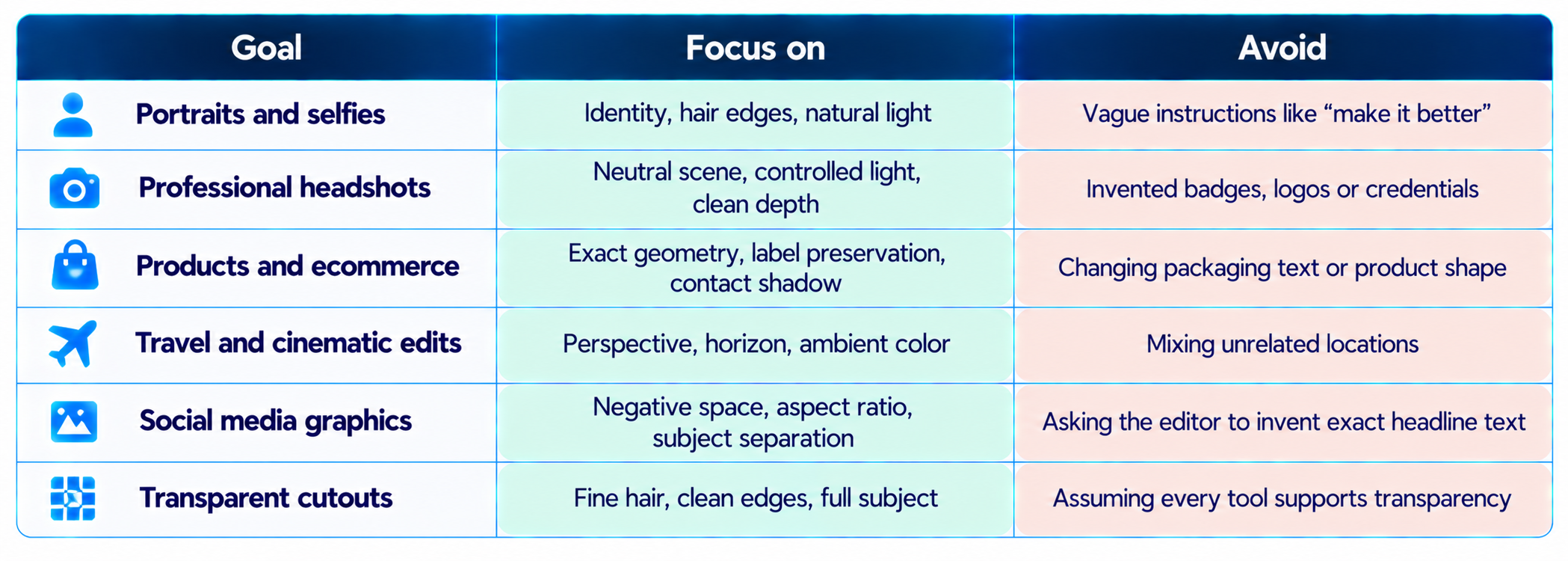
For more prompt ideas, read 100 Best AI Image Prompts 2026 and 100 Trending AI Photo Prompts 2026.
Common Mistakes That Make Background Changes Look Fake
- Describing only the destination. “Put me in London” does not explain what must stay unchanged or how the light should match.
- Leaving out the preservation list. State that face, hair, clothing, pose, body proportions and product details must remain unchanged.
- Ignoring light direction. A bright background with a subject lit from the opposite direction makes the composite look artificial.
- Using the wrong perspective. Horizon height, camera angle and subject scale need to fit the new environment.
- Changing too many things at once. Replace the background first, then request a separate correction for color, blur or edge quality.
- Trusting generated text. AI editors may alter signs, product labels, logos and certificates. Inspect them carefully or add exact text later in a design tool.
- Skipping the final crop check. Social formats can cut off hair, hands, products or important context if the canvas is extended incorrectly.
Frequently Asked Questions
What are AI background change prompts?
They tell an image-editing AI what background to replace, what scene to create and which parts of the original photo must remain unchanged.
How do I change a photo background with AI?
Upload a photo to an editor that supports image editing, describe the new scene, explicitly preserve the subject and ask the tool to match perspective, light, shadows and edges.
How do I change the background without changing my face?
Say: “Keep my exact facial identity, facial features, skin texture, expression, hair and proportions unchanged. Edit only the background.” Then check the output for identity drift.
Which AI tools can use these prompts?
They can be adapted for image-editing workflows in compatible versions of Gemini, ChatGPT and other AI photo editors. Features vary by product and plan.
How do I make a background replacement realistic?
Specify light direction, color temperature, camera angle, subject scale, depth of field and contact shadows. Ask for natural hair edges and no cutout halos.
Can AI replace a product photo background?
Yes, if the editor supports image editing. Preserve product shape, packaging, logo, label text, color and proportions, then inspect the output before publishing.
Can AI make a transparent background?
Some tools support transparent output or background removal. Verify that the exported file actually has an alpha channel.
Are these prompts free to use?
The prompts are templates you can copy and adapt. Access to the image-editing tool may be free, limited or paid depending on the provider.
Why does AI change my clothes or face?
The prompt may give the model too much freedom, or the editor may regenerate more of the image than requested. Add a clear preserve list and make one edit at a time.
Can I use AI background edits commercially?
That depends on the tool's terms, source-image rights, and applicable brand, privacy and disclosure requirements. Check those conditions before commercial use.
Recommended Blogs
Resources & Community
Join our community of 70,000+ AI enthusiasts and learn to build powerful AI applications. Build Fast with AI helps creators, developers and teams understand and implement practical AI.
Agentic AI Launchpad 2026
A structured 6-week cohort program designed to help learners move from AI fundamentals to building and deploying practical agentic AI systems through live sessions, project reviews and a builder community.
Explore the program: Agentic AI Launchpad 2026
Free AI Resources
Explore free learning resources, workshops and short-form AI learning.

