100 Best 3D and Cartoon AI Photo Prompts 2026: Copy-Paste Ideas for Avatars, Portraits and Characters
3D cartoon AI photo prompts can turn an ordinary selfie into a polished animated portrait, a stylized profile picture, a collectible figurine or a character that looks ready for a movie scene. The difference between a generic cartoon and a result worth sharing usually comes down to the details: facial identity, shape language, materials, lighting, framing and a clearly defined art style.
This library brings together 100 copy-paste AI photo prompts for 3D cartoon portraits, animated avatars, family images, pets, toy-like characters, claymation, anime-inspired art, comic-book looks and social media profile pictures. The prompts are designed as starting points for image-capable tools such as ChatGPT, Google Gemini and Nano Banana, with small adjustments for each model.
For an existing photo, upload a clear image and ask the model to preserve the features that make the person recognizable. For a new character, replace the subject details and describe the intended style from the start. Google’s image-prompting guidance recommends specifying the subject, composition, action, location, style and editing instructions rather than relying on vague requests such as “make it cool.”
QUICK ANSWER
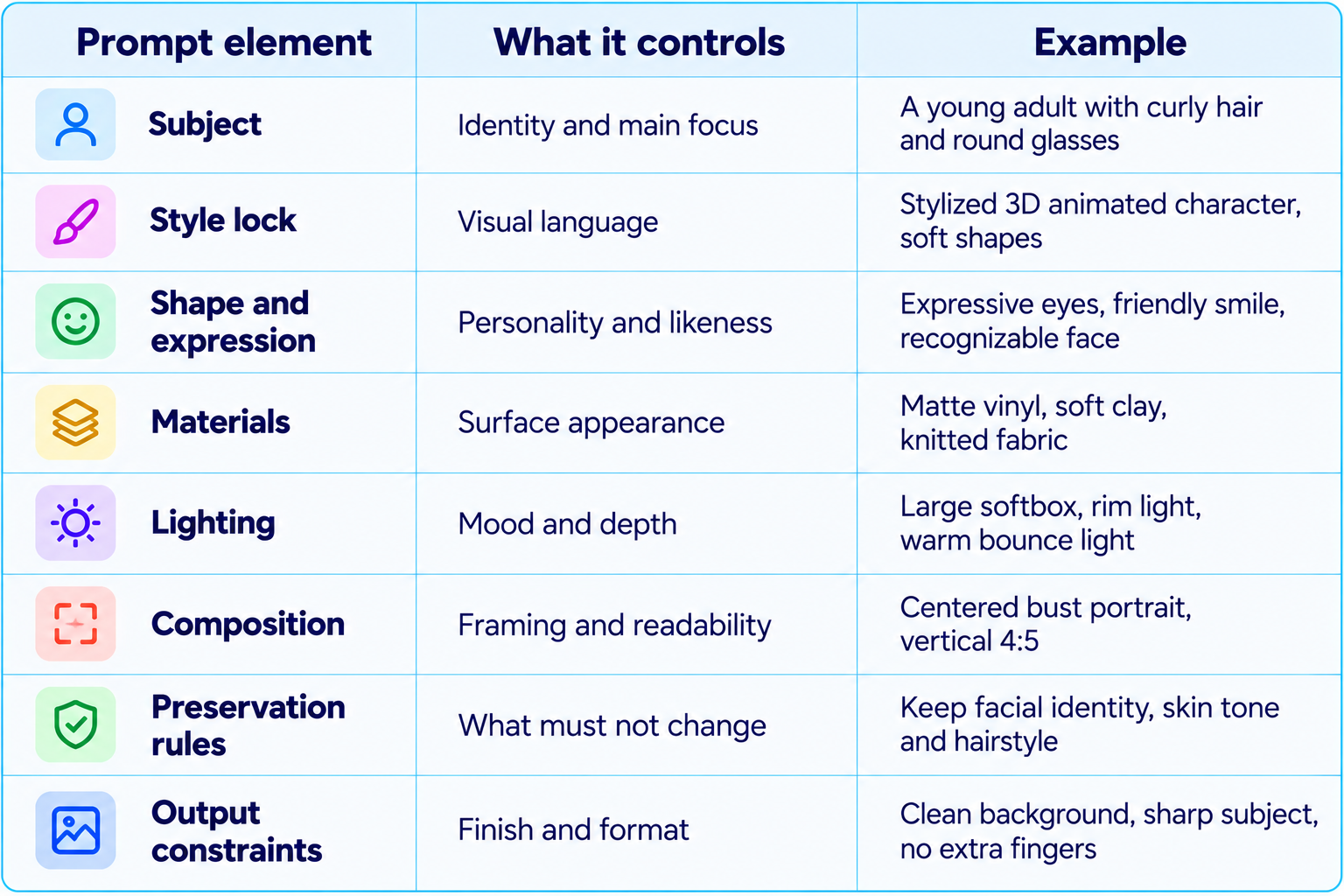
The best 3D and cartoon AI photo prompts describe the subject, chosen cartoon style, pose or expression, lighting and composition, and what must remain consistent. For photo-to-cartoon transformations, explicitly preserve facial identity, hairstyle, skin tone and important clothing details. For a 3D look, name the material and rendering style, such as soft vinyl, polished clay, matte plastic, plush fabric or cinematic 3D animation.
Use these 100 prompts as copy-paste templates for AI cartoon portraits, 3D avatars, cartoon selfies, family portraits, pet characters, collectible figures, profile pictures and creative social posts. Replace bracketed text such as [person], [outfit], [pet] or [background], and make one controlled edit at a time when the first result is close but not quite right.
The 3D Cartoon AI Photo Prompt Formula
How to Use These AI Cartoon Prompts
- For photo transformations, upload a sharp, well-lit reference photo with the face clearly visible.
- Replace all bracketed placeholders before generating.
- Choose one main style per prompt. Avoid combining claymation, anime, photorealism and toy rendering unless a deliberate hybrid is the goal.
- For a consistent avatar series, reuse the same character description, style phrase, palette and lighting setup.
- If the first image is close, edit only the part that needs correction instead of rewriting the entire prompt.
- Check hands, teeth, glasses, jewelry, text, logos and reflections before posting or printing.
- Use 1:1 for profile pictures, 4:5 for portrait social posts or 9:16 for story covers when supported.
Category 1: 3D Cartoon Portraits and Selfies
1. Classic 3D Cartoon Portrait
Transform my uploaded photo into a polished 3D animated portrait. Preserve my recognizable facial identity, skin tone, hairstyle and glasses. Use gently exaggerated expressive eyes, rounded shapes, smooth but believable materials, soft studio lighting and a clean gradient background. Frame from the chest up, with a warm confident expression and a premium animation-studio finish.
2. Cute Cartoon Selfie
Turn this selfie into a cute 3D cartoon version of me. Keep my face recognizable and preserve my hairstyle, skin tone and outfit colors. Use rounded facial features, bright expressive eyes, soft blush, subtle skin shading and warm natural light. Keep the result charming rather than baby-like, with a simple background and vertical 4:5 composition.
3. Cinematic 3D Headshot
Create a cinematic 3D animated headshot based on my reference photo. Preserve my facial structure and identity while stylizing the materials and proportions. Add soft key lighting, a gentle rim light, realistic eye reflections, detailed hair strands and a dark teal studio background. Use a premium feature-animation render, sharp eyes and restrained highlights.
4. Minimal 3D Profile Picture
Convert my photo into a clean 3D cartoon profile picture. Preserve my identity, hair and defining facial features. Use a centered head-and-shoulders composition, simple pastel background, soft shadows, smooth matte materials and a friendly expression. Keep the silhouette readable at small avatar sizes.
5. Funny Exaggerated Portrait
Make a humorous 3D caricature of the person in the uploaded photo. Keep the person recognizable while gently exaggerating distinctive facial features and expression. Use expressive eyebrows, a playful smile, polished clay-like materials and bright studio lighting. Keep the result affectionate rather than insulting.
6. Professional Cartoon Avatar
Turn my headshot into a professional 3D cartoon avatar suitable for LinkedIn and a portfolio. Preserve my facial identity, hair, skin tone and glasses. Use smart casual clothing, confident posture, clean navy-and-light-blue background, balanced studio lighting and subtle material texture. Make it polished and approachable.
7. Side-Profile 3D Portrait
Create a three-quarter side-profile 3D cartoon portrait from my uploaded photo. Preserve my recognizable nose, jawline, hairstyle and skin tone. Use soft sculpted shapes, natural expression, gentle rim lighting and a warm neutral background. Keep head proportions consistent.
8. 3D Portrait with Favorite Color
Transform my photo into a 3D cartoon portrait using [favorite color] as the main accent. Preserve my identity and clothing details. Use coordinated background shapes, subtle colored rim light, smooth high-quality materials and a relaxed smile. Keep the face as the clearest focal point.
9. Retro 3D Cartoon Avatar
Create a retro-inspired 3D cartoon avatar from my reference photo. Preserve my face and hairstyle. Use playful rounded geometry, slightly grainy colors, vintage toy-like materials and warm 1990s-inspired studio lighting. Keep the design original.
10. Premium Creator Portrait
Turn my photo into a premium 3D creator portrait for a YouTube or Instagram profile. Preserve identity, hairstyle and facial hair. Add a confident expression, subtle rim lighting, clean geometric background elements and a refined palette of [two colors]. Make the face readable at thumbnail size.
Category 2: 3D Animated Characters and Full-Body Avatars
11. Full-Body Cartoon Avatar
Use my uploaded photo as the character reference and create a full-body 3D animated avatar. Preserve recognizable facial identity, hairstyle, skin tone and overall proportions. Show the character standing naturally in [outfit] with relaxed hands and a confident pose. Use clean studio lighting, a simple floor shadow and a neutral background.
12. Stylized Hero Character
Turn me into an original 3D animated hero character, preserving my face and hairstyle. Give the character a confident stance, a practical modern outfit in [colors], expressive eyes and softly exaggerated proportions. Use cinematic rim lighting and a dramatic but uncluttered background.
13. Casual Streetwear Avatar
Create a 3D cartoon version of me wearing [streetwear outfit]. Preserve my facial identity, hairstyle and skin tone. Use detailed fabric folds, clean sneaker shapes, a relaxed street pose and a muted urban background. Render with soft global illumination and realistic contact shadows.
14. Student Avatar
Transform my photo into a friendly 3D cartoon student avatar. Preserve my face and hairstyle. Dress the character in a casual college outfit with a backpack and notebook, standing on a bright campus. Use cheerful colors, soft daylight, clean shapes and a welcoming expression.
15. Developer Avatar
Create a 3D cartoon avatar of me as a software developer. Preserve my facial identity and hairstyle. Show me in a casual hoodie beside a laptop with abstract code shapes in the background. Use subtle blue lighting, a modern desk setup and a polished animated-film render.
16. Artist Avatar
Turn my photo into a 3D cartoon artist character. Preserve my face and hair. Add a paint-splashed apron, sketchbook and a few brushes, with colorful but controlled studio lighting. Use expressive hands, soft material textures and a creative workspace background.
17. Adventure Explorer
Create a 3D animated explorer avatar based on my photo. Preserve my recognizable face, hairstyle and skin tone. Dress the character in practical outdoor clothing with a small backpack, standing on a mountain trail at sunrise. Use atmospheric depth and warm rim light.
18. Fantasy Wizard Avatar
Transform me into an original friendly fantasy wizard in 3D cartoon style. Preserve my facial identity and hairstyle. Add a richly textured robe, a small glowing spell orb and a magical library background. Use soft volumetric light and warm highlights. Avoid resembling a named franchise character.
19. Space Explorer
Create a 3D cartoon space-explorer avatar based on my reference photo. Preserve my face and hairstyle inside a clear helmet. Use an original spacesuit with [accent color], soft reflections on the visor and a distant planet in the background.
20. Sporty Cartoon Avatar
Turn my photo into a 3D animated athlete avatar for [sport]. Preserve my facial identity, hairstyle and skin tone. Show a dynamic but anatomically clear pose in appropriate sportswear, with a simple stadium or court background.
Category 3: Viral 3D Cartoon Photo Trends
21. Real Photo and Cartoon Me
Create a split-scene portrait with my original photo on one side and a matching 3D cartoon version of me on the other. Use the uploaded image as the identity reference for both. Keep the same hairstyle, outfit colors and expression. Use a clean vertical divider, matching pose and soft studio light.
22. Tiny Cartoon Me on My Shoulder
Edit my uploaded photo by adding a tiny 3D cartoon version of me sitting on my shoulder. Preserve the original photo and face. Make the miniature character wear the same outfit colors and resemble me clearly. Match scene lighting, camera angle, shadows and depth of field.
23. Giant Cartoon Companion
Add an original oversized 3D cartoon companion standing beside me in the uploaded photo. Preserve my identity and original setting. Design the companion with [color], expressive eyes and rounded shapes. Match light direction, ground contact, shadows and perspective.
24. Cartoon Selfie in a Cafe
Transform my selfie into a 3D animated scene inside a cozy cafe. Preserve my face, hairstyle and outfit. Add a coffee cup, warm window light, soft bokeh and rounded furniture shapes. Use cinematic animated-film lighting and a natural candid pose.
25. Cartoon Rainy-Day Portrait
Turn my photo into a 3D cartoon portrait on a rainy city street. Preserve identity and clothing colors. Add soft raindrops, reflective pavement, a transparent umbrella and warm shop lights. Use rich reflections and gentle depth of field.
26. Dreamy Cloud Portrait
Create a whimsical 3D cartoon portrait of me among soft clouds. Preserve my face and hairstyle. Use pastel blue and pink lighting, floating cloud forms, gentle highlights and a dreamy sky. Keep the character crisp and recognizable.
27. Neon Night Avatar
Transform my photo into a stylized 3D cartoon portrait in a neon-lit city at night. Preserve identity, skin tone and hairstyle. Use controlled cyan and magenta reflections, wet pavement bokeh and a confident pose. Keep facial colors natural.
28. Golden-Hour Cartoon Portrait
Create a warm 3D cartoon version of my photo during golden hour. Preserve facial identity, hairstyle and outfit. Add soft sun rays, warm edge lighting, natural shadows and an outdoor background. Avoid an orange cast on skin.
29. Miniature World Portrait
Turn my photo into a 3D cartoon character standing inside a miniature world themed around [hobby]. Preserve my face and outfit colors. Build tiny props with detailed materials, tilt-shift depth of field and a clear sense of scale.
30. Floating Emoji Reactions
Create a 3D cartoon portrait of me surrounded by a few original floating reaction icons that match my expression. Preserve my identity. Use soft glossy materials, a simple gradient background and carefully spaced objects. Do not cover the face.
Category 4: 3D Figurines, Vinyl Toys and Collectibles
31. Collectible Figure in a Box
Turn the person in my uploaded photo into an original collectible 3D figurine displayed inside premium retail packaging. Preserve facial identity, hairstyle and clothing colors. Add a clear display window, molded insert and three small accessories related to [hobby]. Use realistic plastic reflections and generic packaging.
32. Desk-Sized Vinyl Toy
Create a desk-sized vinyl toy based on my photo. Preserve recognizable facial features while using simplified toy proportions, a large head and compact body. Use matte vinyl, subtle seams and a clean product-photo setup on a neutral desk.
33. Chibi Collectible
Transform my photo into a chibi-style 3D collectible. Preserve hairstyle, skin tone and key facial features while using a large head, small body and short limbs. Use glossy eyes, smooth materials and a simple pastel display base.
34. Action Figure with Accessories
Create an original action figure version of me based on my photo. Preserve face and hairstyle. Place the figure in a clear blister package with accessories representing [three hobbies]. Use molded plastic and a simple backing card. Avoid trademarks and unreadable text.
35. Premium Designer Toy
Turn me into a premium designer toy with a distinctive silhouette and a limited palette of [colors]. Preserve the recognizable face but simplify small details into sculpted shapes. Use matte resin, controlled highlights and a gallery-style product photograph.
36. Miniature Self on a Laptop
Add a tiny 3D figurine version of me sitting on the edge of my laptop in the uploaded photo. Preserve the original device, desk and face. Match light direction and perspective. Give the miniature character the same outfit colors and realistic contact shadows.
37. Toy Collector Shelf
Create a 3D cartoon collectible of [character description] displayed on a shelf beside books and small objects. Use a consistent material finish, soft warm lighting and realistic shelf shadows. Make the figure the main focus and keep labels generic.
38. Transparent Display Cube
Render my 3D cartoon figurine inside a transparent display cube. Preserve facial identity and outfit. Add a nameplate reading [name] only if text rendering is accurate; otherwise leave it blank. Use subtle reflections and a clean studio background.
39. Clay Figurine Portrait
Sculpt a miniature clay figure based on my photo. Preserve key facial features while using hand-shaped forms, tiny fingerprints and slightly imperfect surfaces. Use warm studio light, a small circular base and a plain background.
40. Limited-Edition Toy Product Shot
Create a premium product photograph of an original 3D toy based on my photo. Preserve recognizable face and outfit colors. Use a dramatic softbox, clean reflections, subtle shadow and tasteful display box. Keep branding generic.
Category 5: Cartoon Family, Couple and Friend Portraits
41. 3D Cartoon Couple Portrait
Transform this couple photo into a warm 3D animated portrait. Preserve both people's facial identities, skin tones, hairstyles and clothing colors. Use natural smiles, gentle body language, soft studio lighting and a romantic but uncluttered background.
42. Best Friends Cartoon Portrait
Turn this photo of friends into a 3D cartoon group portrait. Preserve each person's recognizable face, hairstyle and outfit colors. Use relaxed poses, coordinated lighting and a bright simple background. Keep everyone visible and avoid duplicated faces.
43. Family 3D Portrait
Create a polished 3D animated family portrait from the uploaded photo. Preserve every family member's identity, age appearance, skin tone and hairstyle. Use coordinated but not identical clothing, warm indoor lighting and a cozy home background.
44. Parent and Child Portrait
Transform this parent-and-child photo into a gentle 3D cartoon portrait. Preserve both faces and age-appropriate proportions. Use warm colors, soft window light and a simple home setting. Keep the interaction affectionate and natural.
45. Sibling Cartoon Portrait
Create a 3D cartoon portrait of these siblings. Preserve their individual facial identities, hairstyles and skin tones. Use playful expressions, coordinated casual outfits and a clean colorful background. Keep each person's proportions distinct.
46. Wedding Couple 3D Illustration
Turn this wedding photo into an elegant 3D animated illustration. Preserve both faces, clothing colors and important wedding details. Use soft cinematic lighting, tasteful floral elements and a refined background.
47. Long-Distance Friends
Create a split composition of two friends in separate locations, each rendered as a matching 3D cartoon character. Use reference photos to preserve both identities. Connect the scenes with a shared color palette and soft lighting.
48. Group Selfie Cartoon
Transform this group selfie into a clean 3D cartoon illustration. Preserve each person's identity, hairstyle and clothing. Maintain the original number of people and approximate arrangement. Use consistent cartoon proportions and bright soft lighting.
49. Anniversary Cartoon Portrait
Turn this couple photo into a refined 3D cartoon anniversary portrait. Preserve both identities and outfits. Add subtle floral details, warm golden lighting and a clean elegant background.
50. Family as Miniature Figurines
Create miniature 3D figurines based on the family in this photo. Preserve each person's distinctive face, hairstyle and clothing colors. Arrange them together on a display base. Keep the number of figures exactly the same as the source photo.
Category 6: Pets and Animal Cartoon Prompts
51. 3D Cartoon Dog Portrait
Turn my dog's photo into a lovable 3D animated character. Preserve breed cues, coat colors, markings, eye color and distinctive expression. Use soft fur grooming, expressive eyes, gentle studio lighting and a clean background. Avoid extra paws or accessories.
52. 3D Cartoon Cat Portrait
Transform my cat into a polished 3D cartoon character. Preserve fur pattern, eye color, ear shape and recognizable markings. Use soft plush-like fur, expressive eyes and a simple warm background. Keep whiskers and paws clear.
53. Pet as a Tiny Toy
Create a miniature vinyl toy based on my pet photo. Preserve the animal's markings and recognizable silhouette. Use a large head, compact body, smooth matte material and a small display base. Photograph it like a premium collectible.
54. Dog Superhero Character
Turn my dog into an original 3D cartoon hero. Preserve its coat markings and face. Add a simple cape in [color], a confident pose and a bright city-park background. Keep the character friendly and original.
55. Cat Astronaut
Create a 3D cartoon astronaut version of my cat. Preserve its fur pattern, eye color and face. Place the cat inside a clear helmet with an original spacesuit and a distant planet behind it. Use soft reflections and cinematic lighting.
56. Pet and Owner Portrait
Transform this photo of me and my pet into a matching 3D animated portrait. Preserve both identities and the pet's coat markings. Keep the original relationship and pose, with coordinated materials, warm light and a simple background.
57. Animal Bakery Character
Create a cute 3D cartoon [animal] working in a tiny bakery. Use expressive eyes, soft fur or feather detail, a small apron and miniature pastries. Apply warm bakery lighting and realistic contact shadows.
58. Woodland Animal Family
Create a 3D animated portrait of a family of [woodland animals]. Give each animal a distinct face, pose and natural markings. Use soft moss, tiny plants and dappled forest light. Keep the style original.
59. Pet Birthday Portrait
Turn my pet photo into a cheerful 3D cartoon birthday portrait. Preserve the animal's markings and expression. Add a small party hat, a cake prop and colorful confetti in the background. Keep the face unobstructed.
60. Real Pet, Cartoon World
Keep my pet recognizable from the uploaded photo but place it inside an original 3D cartoon world. Preserve its coat, face and body proportions. Use stylized plants, rounded rocks and warm atmospheric light.
Category 7: Anime, Manga and Stylized Cartoon Portraits
61. 3D Anime-Inspired Avatar
Transform my photo into an original 3D anime-inspired avatar. Preserve my recognizable facial identity, hairstyle and skin tone while using stylized expressive eyes and clean sculpted hair. Use a restrained palette and soft cinematic lighting. Avoid named characters.
62. Soft Anime Portrait
Create a soft anime-inspired portrait based on my photo. Preserve facial identity and hairstyle. Use delicate linework, luminous eyes, gentle gradients and a pastel background. Keep facial proportions balanced and expression natural.
63. Manga Panel Portrait
Turn my photo into an original manga-style portrait. Preserve recognizable face shape and hairstyle. Use expressive black-and-white linework, controlled screentone shading and a dynamic but readable composition. Add a simple panel border.
64. Comic-Book Hero Portrait
Create a bold comic-book cartoon portrait of me. Preserve my identity and hairstyle. Use confident ink contours, halftone texture, dramatic side lighting and a limited palette of [colors]. Avoid recognizable superhero logos.
65. Pop-Art Cartoon
Transform my photo into a pop-art cartoon portrait. Preserve facial identity while simplifying shapes into bold color blocks, graphic shadows and clean outlines. Use a balanced four-color palette and a plain graphic background.
66. Retro Saturday-Morning Cartoon
Create an original retro Saturday-morning cartoon portrait from my photo. Preserve key facial features and hairstyle. Use clean outlines, bright flat colors, simple shadow shapes and an upbeat expression. Keep the design original.
67. Watercolor Cartoon Portrait
Turn my photo into a watercolor cartoon portrait. Preserve recognizable facial features and hair. Use soft pigment blooms, visible paper texture, gentle edges and a light wash background. Keep eyes and face crisp enough to recognize.
68. Low-Poly 3D Portrait
Create a low-poly 3D portrait based on my photo. Preserve the face silhouette and hairstyle using geometric facets. Use a controlled palette of [colors], directional studio light and a clean background. Keep geometry deliberate and the face recognizable.
69. Isometric Cartoon Avatar
Create an isometric 3D cartoon avatar of me in a small scene themed around [job or hobby]. Preserve face, hairstyle and outfit colors. Use clean geometric forms, soft ambient shadows and a limited palette.
70. Paper-Cut Cartoon Portrait
Turn my photo into a layered paper-cut cartoon portrait. Preserve the recognizable face and hairstyle using simplified shapes. Use stacked paper layers, visible cut edges, subtle paper fibers and soft directional shadows.
Category 8: Claymation, Plush and Handmade Styles
71. Claymation Self-Portrait
Turn my photo into a handmade claymation character. Preserve my facial identity and hairstyle while using sculpted clay shapes, tiny fingerprints, soft imperfections and expressive eyes. Use warm miniature-set lighting. Avoid glossy plastic surfaces.
72. Stop-Motion Character
Create a stop-motion puppet version of me based on the uploaded photo. Preserve my face and outfit colors. Use fabric clothing, sculpted head details, subtle joint seams and a handcrafted miniature set. Add soft shadows and a charming imperfect finish.
73. Plush Toy Avatar
Transform me into a soft plush character while preserving hairstyle, face shape and defining features. Use stitched fabric, fleece texture, embroidered details and a rounded silhouette. Coordinate the palette with my outfit.
74. Felt Doll Portrait
Create a felt doll version of the person in my photo. Preserve hairstyle, skin tone and clothing colors. Use visible felt fibers, stitched seams and simple embroidered facial details. Light the figure softly and keep it handmade.
75. Crochet Amigurumi Avatar
Turn me into a crochet amigurumi doll. Preserve my hairstyle and outfit colors through yarn choices. Use visible stitches, rounded limbs, button-like eyes and a small seated pose. Photograph against a soft neutral background.
76. Paper-Mache Character
Create a 3D paper-mache cartoon character based on my photo. Preserve the main facial features and hair silhouette. Use layered paper texture, irregular handcrafted surfaces and matte paint. Place the figure on a simple plinth.
77. Soft Foam Mascot
Turn my photo into an original soft-foam mascot character. Preserve my recognizable face while simplifying it into rounded forms. Use matte foam texture, coordinated colors and a clean full-body pose.
78. Handmade Wooden Toy
Create a wooden toy version of me based on my photo. Preserve key facial cues and hairstyle using painted wooden shapes. Show subtle wood grain, rounded edges and a simple base. Use warm workshop lighting.
79. Miniature Felt World
Create a miniature felt world featuring a small character based on my photo. Preserve face and outfit colors. Build the environment from felt hills, stitched trees and fabric props. Use macro photography and warm handcrafted lighting.
80. Hand-Painted Resin Figure
Render a hand-painted resin figurine of me. Preserve recognizable facial features and outfit colors. Show fine brush-painted details, a subtle satin finish and a display base. Use professional product lighting.
Category 9: Social Media, Creator and Brand Cartoon Prompts
81. YouTube Creator Avatar
Create a bold 3D cartoon avatar from my photo for a YouTube channel. Preserve identity and hairstyle. Use an expressive face, high-contrast but controlled colors and clean rim lighting. Leave negative space around the head for circular cropping.
82. Instagram Cartoon Profile
Turn my photo into an Instagram-ready 3D cartoon profile picture. Preserve face and hairstyle. Use a centered composition, clean silhouette, bright tasteful background and polished materials. Ensure the face remains recognizable in a circular crop.
83. LinkedIn Creator Avatar
Create a professional 3D cartoon avatar suitable for LinkedIn. Preserve my face, hairstyle and glasses. Use smart casual clothing, a confident friendly expression, neutral background and soft studio lighting.
84. Streamer Avatar
Transform my photo into a 3D cartoon streamer avatar. Preserve identity and hairstyle. Add subtle gaming-room lighting, a headset and a background with controlled RGB accents. Keep the face well lit and the headset anatomically correct.
85. Podcast Host Character
Create a 3D cartoon character based on my photo as a podcast host. Preserve facial identity and hairstyle. Add a studio microphone, headphones and a warm recording-room background. Use soft practical lighting without props covering the face.
86. Founder Brand Mascot
Turn my photo into an original 3D brand mascot for [company or project]. Preserve recognizable facial cues but simplify the shape language for repeatable use. Use brand palette [colors], clean geometry and a friendly expression. Do not invent a logo.
87. Newsletter Author Avatar
Create a polished cartoon avatar from my photo for a newsletter author profile. Preserve face and hairstyle. Use a simple editorial background, soft colors, neat clothing and a thoughtful expression.
88. App Onboarding Character
Create an original 3D cartoon guide character based on [description] for a mobile app onboarding screen. Use friendly proportions, clear silhouette, a simple outfit and palette [colors]. Leave open space on one side for interface text.
89. Brand Sticker Pack
Create a consistent set of six 3D cartoon sticker expressions for the character in my reference photo: happy, thinking, surprised, celebrating, focused and waving. Preserve face, hair, outfit and material style across all six.
90. Creator Thumbnail Portrait
Transform my photo into a high-impact 3D cartoon portrait for a video thumbnail. Preserve identity and hairstyle. Use a clear emotion, strong natural facial lighting and a simple contrasting background. Leave empty space for a headline.
Category 10: Product, Food and Imaginative Cartoon Scenes
91. 3D Cartoon Coffee Character
Create an original 3D cartoon coffee cup character with expressive eyes and small gloved hands. Use ceramic material, a little steam, warm cafe lighting and a clean tabletop scene. Keep the silhouette simple and charming.
92. Cute Product Mascot
Turn [product] into an original 3D cartoon mascot while preserving its recognizable shape and important design details. Give it a friendly face integrated into the surface, soft studio lighting and a clean background. Do not invent logos or claims.
93. 3D Cartoon Sneaker Scene
Create a stylized 3D cartoon sneaker as the hero object. Preserve the supplied product's color blocking and shape. Use a dynamic floating pose, soft shadows, clean studio reflections and a bold gradient background. Do not add extra brand marks.
94. Dessert Character
Create a cute 3D cartoon character based on [dessert]. Use believable frosting, crumb and glaze materials, expressive eyes and tiny arms. Place it on a clean bakery counter with warm soft light.
95. Friendly Robot Mascot
Design an original friendly 3D cartoon robot mascot for [purpose]. Use rounded panels, expressive LED eyes and palette [colors]. Keep mechanical joints plausible and the silhouette distinctive. Use a neutral studio background.
96. Fantasy Mushroom Character
Create a whimsical 3D cartoon mushroom character with a sculpted cap, tiny boots and an expressive face. Use soft forest light, detailed moss and a miniature woodland environment.
97. Underwater Cartoon Explorer
Create a 3D cartoon underwater explorer character with an original diving suit. Use blue-green ambient light, floating particles, coral shapes and soft caustic patterns. Keep the face visible through the mask.
98. Floating Island Cartoon Scene
Create a stylized 3D cartoon scene with a small floating island, rounded trees, a tiny house and soft clouds. Use a cohesive palette of [colors], atmospheric lighting and a clear isometric view.
99. Tiny Cartoon City
Build a miniature 3D cartoon city with rounded buildings, tiny roads, trees and a few cars. Use warm daylight, soft ambient shadows and a consistent toy-like material style. Keep the city layout legible.
100. Storybook Character Scene
Create an original 3D cartoon storybook scene featuring [character] in [setting]. Use expressive character design, tactile materials, warm cinematic lighting and a clear focal point.
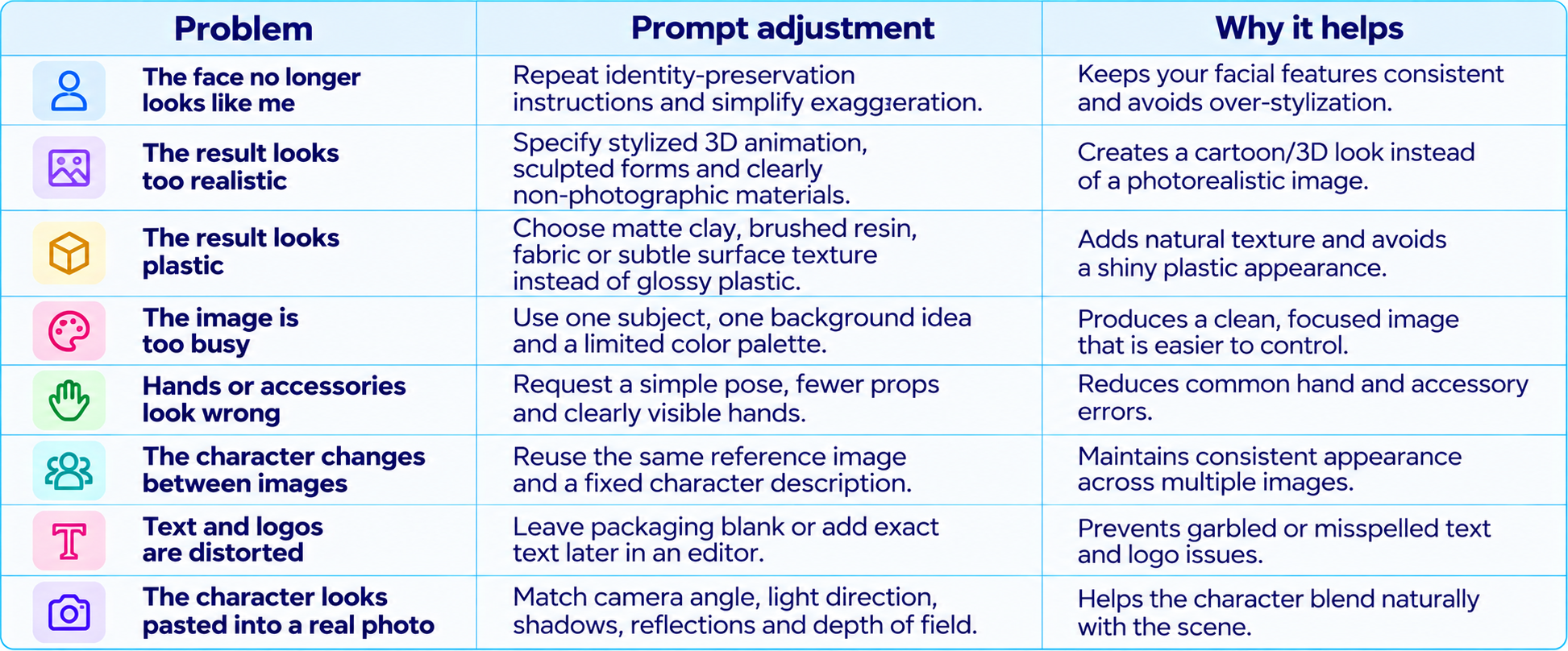
How to Improve a Weak AI Cartoon Result
For a broader library of image styles, continue with 100 Trending AI Photo Prompts 2026 and 100 Best Veo 3 Prompts 2026.
Frequently Asked Questions
What are the best 3D cartoon AI photo prompts?
The best prompts specify the subject, cartoon style, facial identity, pose, materials, lighting, composition and what should remain unchanged.
How do I turn my photo into a 3D cartoon?
Upload a clear photo to an image-capable AI tool and ask it to preserve your face, hairstyle and skin tone while converting the rendering into a defined 3D cartoon style. Refine one detail at a time.
Can I use these prompts in ChatGPT and Gemini?
Yes, use them as starting points in image-capable versions of ChatGPT, Gemini or other image generators. Editing controls vary by tool.
How do I make a cartoon avatar look like me?
Use a clear reference photo, name the features that matter, and ask for stylization without changing facial identity, hairstyle, skin tone or distinctive accessories.
What is the best prompt for a 3D figurine?
Describe likeness, toy proportions, material, accessories, display base, packaging and product-photo lighting. Keep logos generic or add them later.
Can AI turn pets into cartoon characters?
Yes. Include the pet's coat pattern, markings, eye color, ear shape and distinctive features.
Why does my cartoon portrait look generic?
The prompt may be too vague or the reference photo unclear. Add a style lock, specific facial details, material cues and composition instructions.
Should I include negative prompts?
If supported, list relevant exclusions such as extra fingers, duplicate faces, distorted glasses, unreadable text or unwanted photorealism. Otherwise, write them as direct constraints.
What aspect ratio should I use?
Use 1:1 for profile pictures, 4:5 for portrait social posts and 9:16 for stories or vertical covers.
Can I use generated cartoon images commercially?
Commercial-use rules depend on the tool's terms, source-photo rights, and third-party characters or brands. Check provider terms and avoid protected characters or logos without permission.
Recommended Blogs
50 Dussehra AI Photo Prompts 2026: Copy-Paste Gemini & ChatGPT Ideas
Google Pics Review: Features, Price & Is It Worth It? (2026)
100 Best AI Image Prompts 2026 (Nano Banana, Midjourney, Gemini)
100 Best AI Saree & Ethnic Wear Photo Prompts 2026 (Copy-Paste)
Resources & Community
Join our community of 70,000+ AI enthusiasts and learn to build powerful AI applications. Build Fast with AI helps creators, developers and teams understand and implement practical AI.
Agentic AI Launchpad 2026
A structured 6-week cohort program focused on building and deploying real-world agentic AI systems, with live sessions, expert mentorship, project reviews and a builder community.
Explore the program: Agentic AI Launchpad 2026
Free AI Resources
Access free tools, workshops and micro-learning to keep building.