



GPT-Live-1.1 Voices Review: Can OpenAI's New Voice Update Finally Make Multilingual AI Sound Natural?
GPT-Live-1.1 is OpenAI's latest update to the voice model powering ChatGPT Voice, and this release is much more focused on speech quality than the jump from one model number might suggest. OpenAI rolled out GPT-Live-1.1 and GPT-Live-1.1 Quip in ChatGPT Voice on October 15, 2026, with more natural accents across languages, new Live voice options for French, German, Hindi, Japanese, Korean and Mexican Spanish, plus a new English voice called Bubbie. The available voices can vary by region and account.
The important distinction is that GPT-Live-1.1 is not simply a new text-to-speech voice pack. GPT-Live is the conversational voice layer that listens and speaks continuously, handles interruptions and pauses, and can work with web search, memory, text and images inside the same conversation. GPT-Live-1.1 keeps that full-duplex design while improving the way speech sounds and behaves across languages.
That makes this update especially relevant for people who use ChatGPT as a daily voice assistant, language partner, tutor, brainstorming partner or hands-free research tool. The improvement is not only whether the model can pronounce words. It is whether the conversation feels natural when the speaker changes pace, pauses, interrupts, switches languages or asks the assistant to speak differently.
This review focuses on GPT-Live-1.1 voice quality, new accents and languages, conversational behavior, voice selection, multilingual use, accessibility, usage limits, limitations and how the update compares with the previous GPT-Live experience.
QUICK ANSWER
GPT-Live-1.1 is the October 2026 update to OpenAI's real-time ChatGPT voice system. The biggest change is improved accent and language performance, with new Live voice options covering French, German, Hindi, Japanese, Korean and Mexican Spanish, plus Bubbie in English. OpenAI says the exact voices available can vary by region and account.
The underlying experience remains full-duplex. GPT-Live can listen while speaking, handle interruptions, respect pauses, and make conversational decisions continuously instead of waiting for a clean turn boundary. It can also use web search and memory, display supported visual results, and work with text and images in the same chat.
The most important improvement for multilingual users is accent quality. OpenAI expands the voice experience beyond English-first interaction, making Hindi, Japanese, Korean, German, French and Mexican Spanish a much more explicit part of the product. OpenAI has not published a single numerical voice-quality score for each new language, so the strongest conclusion is based on the documented rollout and language-specific voice coverage rather than an invented leaderboard.
My verdict: 9.2/10 for conversational naturalness, 9.3/10 for multilingual voice coverage, 9.0/10 for interruption handling, 8.8/10 for voice selection and 9.1/10 overall. GPT-Live-1.1 is a meaningful upgrade for people who use ChatGPT primarily by voice, especially when language and accent quality matter.
1. What Is GPT-Live-1.1?
GPT-Live-1.1 is the newest model generation in OpenAI's GPT-Live voice family. It follows GPT-Live-1 and GPT-Live-1 mini and is being rolled out in ChatGPT Voice as GPT-Live-1.1 and GPT-Live-1.1 Quip, the mini version. OpenAI's October 15 release notes describe the update as bringing more natural accents across languages and expanding the set of voice options.
GPT-Live should be understood as a conversational model layer rather than a conventional standalone text-to-speech API. Its job is to manage a live spoken interaction. It listens, decides whether to respond or continue listening, generates speech, handles interruptions and can pass more complex work to other models or tools.
That architecture is what made GPT-Live different from older turn-based voice experiences in the first place. GPT-Live-1.1 keeps the same basic interaction model while concentrating the latest release on naturalness, multilingual accents and voice variety.
2. What Changed From GPT-Live-1?
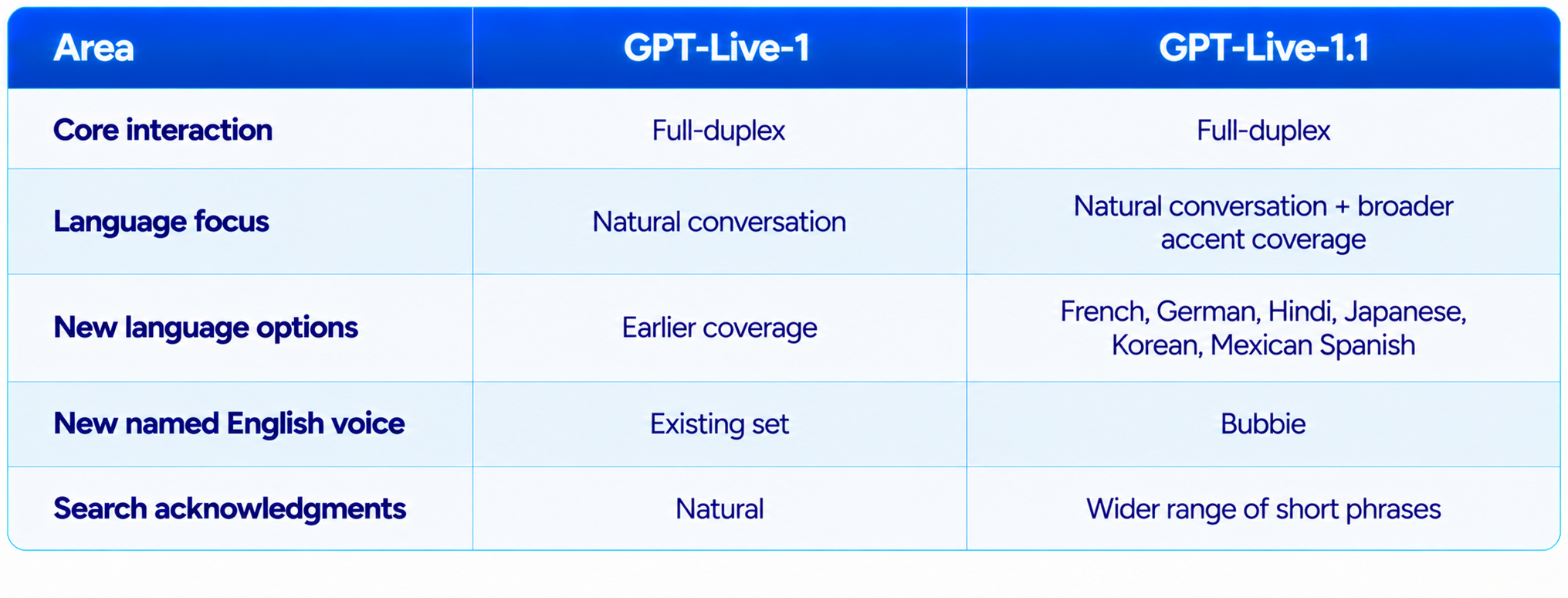
GPT-Live-1.1 is an evolution of GPT-Live rather than a return to the older turn-based voice architecture. The release focuses on speech and language behavior while preserving full-duplex conversation. The most visible changes are new language-specific voice options and more natural accents.
OpenAI also says Live now uses a wider range of short phrases to let users know when it is searching. That sounds like a small interface change, but it matters in a voice conversation because users need to understand whether the assistant is answering immediately or doing work in the background.
For existing GPT-Live users, the upgrade should therefore feel like a refinement of the same conversational system rather than a completely different product.
3. GPT-Live-1.1 Voice Quality
Voice quality is difficult to reduce to one benchmark because a useful voice assistant has several independent requirements. It must pronounce words correctly, maintain a believable rhythm, handle pauses, react to interruptions, avoid awkward turn boundaries and preserve the intended tone.
GPT-Live-1.1's documented focus is particularly important for accents. OpenAI explicitly calls out more natural accents across languages and adds new voice options for French, German, Hindi, Japanese, Korean and Mexican Spanish. That means the update is aimed at a part of speech generation users notice immediately: whether an assistant sounds like it understands the language it is speaking rather than simply converting text into another language.
For multilingual conversations, accent quality matters because pronunciation and prosody affect comprehension as much as raw transcription accuracy. A technically correct sentence can still sound unnatural when stress, rhythm or pronunciation follows the wrong linguistic pattern.
The strongest way to evaluate GPT-Live-1.1 is to test it in the language you actually use. Ask it to read normal conversational sentences, numbers, names, technical terms, questions and emotionally different lines. Then test a real back-and-forth conversation rather than isolated phrases.
4. New GPT-Live-1.1 Voices and Languages
OpenAI's October 15 rollout explicitly adds Live voice options for French, German, Hindi, Japanese, Korean and Mexican Spanish, while Bubbie is the specifically named new English voice. OpenAI also notes that the voices visible to a user can vary by region and account.
OpenAI has not published a complete name-by-name mapping of every new language voice in the announcement. The responsible way to describe the rollout is therefore by language and region rather than inventing names for voices that OpenAI has not publicly named.
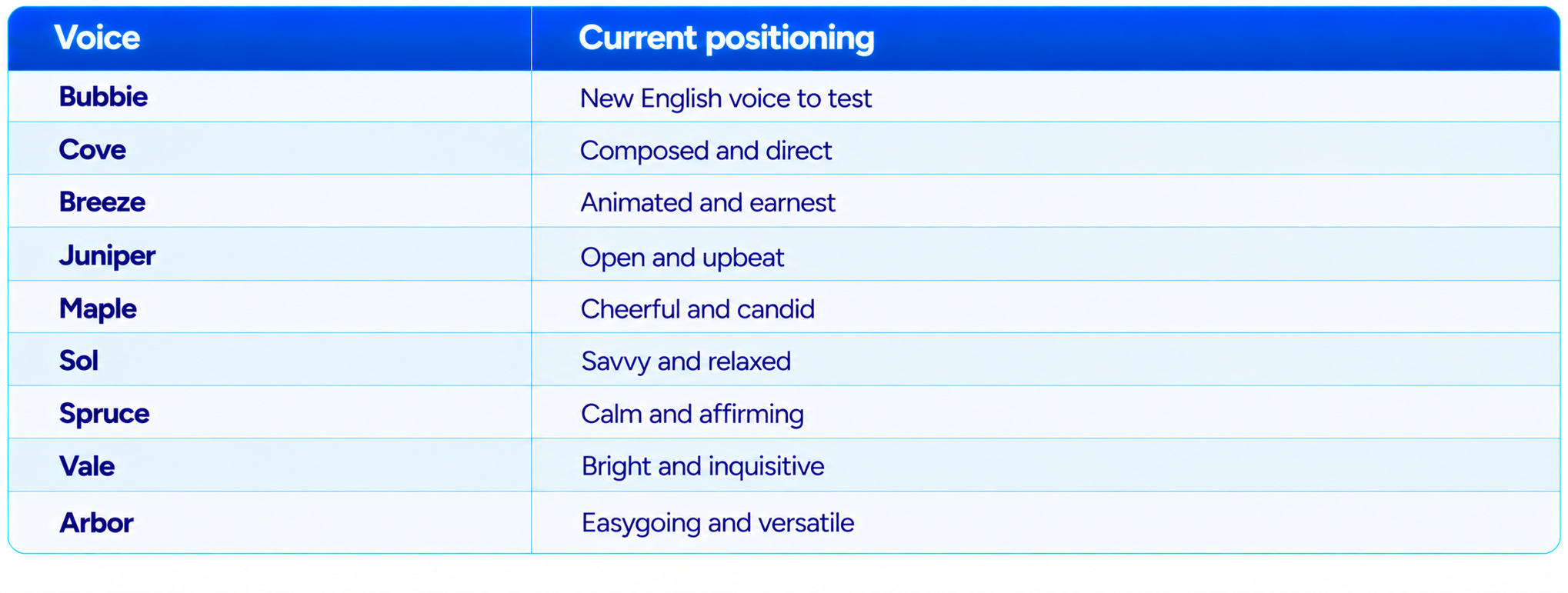
The existing ChatGPT Voice selector also includes established choices such as Arbor, Breeze, Cove, Ember, Juniper, Maple, Sol, Spruce and Vale, with additional regional options. The exact selector depends on account and region.
5. Bubbie: The New English Voice
Bubbie is the specifically named new English voice in the GPT-Live-1.1 rollout. It matters because OpenAI did not position the update purely as a multilingual release. English users also receive another voice option.
Voice selection is subjective. A voice that feels warm and conversational for an everyday assistant may be less appropriate for a technical tutor, customer-support agent or professional workflow. Bubbie gives users another English option without changing the underlying GPT-Live interaction model.
The best way to choose between English voices is to use the same test script across them. Compare sentence endings, questions, numbers, longer explanations, interruptions and changes in speaking pace. This gives you a more useful result than judging a voice from its first few words.
6. Full-Duplex Conversation Is Still the Main Technology
The most important capability inherited from GPT-Live is full-duplex interaction. GPT-Live can listen and speak continuously rather than waiting for a clearly separated turn. That changes the experience in several ways.
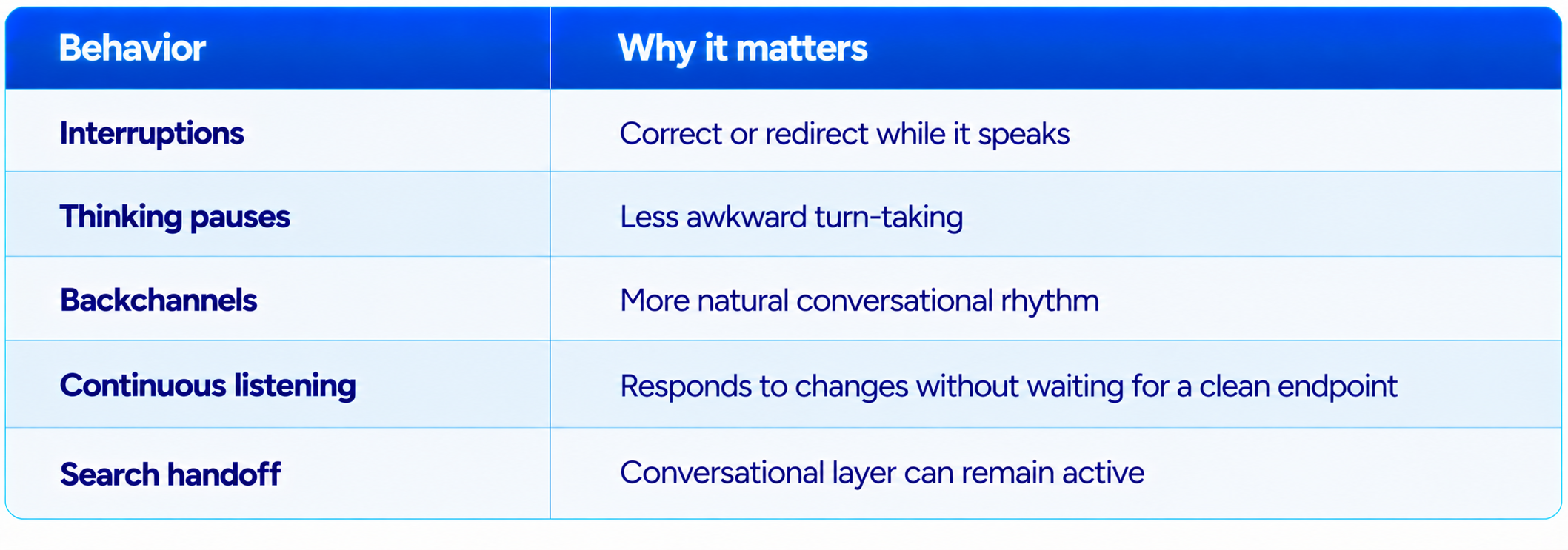
You can correct or redirect the assistant while it is speaking. It can handle thinking pauses without treating every silence as the end of the prompt. Short acknowledgments can make the interaction feel less mechanical. The system can also keep the conversational layer active while other work is performed.
OpenAI's original GPT-Live launch described the model as making interaction decisions many times per second about whether to speak, listen, pause, interrupt or invoke a tool. That full-duplex architecture remains the foundation of GPT-Live-1.1.
7. Interruption Handling
Interruption handling is one of the easiest ways to distinguish a real-time voice model from a speech generator. In a conventional text-to-speech pipeline, the assistant generates audio and plays it. If the user interrupts, the application has to stop playback and decide what to do next.
GPT-Live is designed around the conversation itself. Because the system listens while it speaks, an interruption is part of the interaction rather than an exceptional event. This makes corrections such as 'wait', 'no, I meant the other one', or 'say that more slowly' much more natural.
For users, this is more important than tiny improvements in synthetic voice realism. A slightly imperfect voice that handles interruptions naturally can feel more useful than a beautiful voice that waits for every sentence to finish.
8. Natural Pauses and Backchannels
Human conversations are full of incomplete phrases, pauses and small acknowledgments. GPT-Live's full-duplex design allows it to use short backchannels and respond to the rhythm of the speaker rather than treating every pause as a finished prompt.
The October 2026 update also expands the range of short phrases Live can use to signal that it is searching. This helps clarify what the assistant is doing without forcing a long spoken status message.
The practical benefit is a more continuous conversational rhythm. Instead of a voice assistant alternating between silence and long monologues, the interaction can include brief acknowledgments, interruptions and resumed speech.
9. Multilingual Conversations
GPT-Live-1.1 is especially interesting for users who switch languages during a conversation. OpenAI's new language coverage includes French, German, Hindi, Japanese, Korean and Mexican Spanish.
A good multilingual test is not simply asking the model to translate one sentence. Start in English, switch to Hindi or Japanese, ask a follow-up question, then return to English. Add names, numbers and technical terms. The goal is to see whether the assistant maintains conversational context while changing language and accent.
OpenAI's current Voice documentation allows users to choose a preferred language and notes that selecting the language spoken most often can help ChatGPT understand speech more accurately.
This makes GPT-Live-1.1 more interesting for language learning, travel, multilingual customer support and everyday users who naturally mix languages.
10. ChatGPT Voice Features Beyond the Voice Itself
GPT-Live-1.1 should not be evaluated like a standalone TTS engine because Live is integrated into ChatGPT. The voice experience can use web search and memory, display supported visual results and work with text and images in the same conversation.
That makes the product different from an API-only speech synthesizer. The spoken answer is part of a larger assistant that can search, reason through delegated work and show information alongside speech.
Live does not currently support video or screen sharing. OpenAI continues to direct eligible users to Advanced Voice for those mobile capabilities.
11. GPT-Live-1.1 vs Advanced Voice Mode
Advanced Voice Mode remains relevant because OpenAI still provides it for capabilities that Live does not currently support, especially video and screen sharing on eligible mobile experiences. Live is the newer conversational architecture, while Advanced remains useful for those visual voice workflows.
For ordinary hands-free conversation, GPT-Live-1.1 is the more natural choice. For a mobile session where you need to show ChatGPT your screen or camera feed, Advanced remains the relevant option where available.
The important difference is therefore not that one mode is universally better. Live is optimized around continuous conversation, while Advanced retains capabilities that Live does not currently expose.
12. GPT-Live-1.1 vs GPT-Live-1
GPT-Live-1.1 is an evolutionary update rather than a new interaction architecture. Both generations use the full-duplex approach, so users should not expect the same kind of architectural leap that GPT-Live represented when it replaced the older voice experience.
The improvement is most visible for multilingual users and people sensitive to accent quality. The new voice options also give English users another choice, while broader short search acknowledgments make the assistant's behavior easier to understand.
In other words, GPT-Live-1.1 improves the part of voice AI users hear constantly: the voice itself and the way it behaves in conversation.
13. Voice Selection: Which Voice Should You Use?
OpenAI's current Voice documentation lists established choices including Arbor, Breeze, Cove, Ember, Juniper, Maple, Sol, Spruce and Vale, each with a short personality description. Some regions have additional options. GPT-Live-1.1 adds further choices and language-specific options, but availability can vary.
These are starting points rather than objective rankings. The best voice depends on the task, listener and language. For a serious voice-agent deployment, evaluate voices using the same script and score intelligibility, pacing, interruption handling and user preference.
For everyday English, test Bubbie alongside your existing favorite. For multilingual use, select the language-specific option available to your account and compare it with the voice you previously used.
14. GPT-Live-1.1 for Hindi Voice AI
Hindi is one of the strategically important additions in the current rollout. OpenAI explicitly lists Hindi among the languages receiving new Live voice options.
For Indian users, the important test is not only Hindi pronunciation. Test Hindi-English code-switching, common names, numbers, local terminology and normal conversational speed. Many real conversations in India move between languages naturally, so a voice assistant should be evaluated on that mixed-language behavior rather than isolated Hindi sentences.
This creates useful applications in education, customer support, accessibility and hands-free productivity. The quality of the underlying conversation still matters, but better accent coverage removes one major barrier to comfortable voice interaction.
15. What GPT-Live-1.1 Is Not
GPT-Live-1.1 is not simply a conventional text-to-speech API. It is not a downloadable open-weight voice model, and it is not the same thing as OpenAI's lower-level Realtime API stack. It does not currently provide Live video or screen sharing.
The public October 15 announcement also does not publish separate numerical voice-quality scores for every new language. It tells us what OpenAI rolled out, but it does not justify inventing a language-by-language leaderboard.
Finally, GPT-Live-1.1 does not mean every account will see exactly the same voice list. OpenAI explicitly says voice availability can vary by region and account.
16. How to Test GPT-Live-1.1 Voice Quality Yourself
A proper voice review should use the same script across languages and voices. Do not judge a model from a single greeting. Test a 30-second introduction, numbers and dates, names, technical terms, a longer explanation, an interruption, a thinking pause, a language switch, a tone request and a search request.
Run each test several times. Voice models are nondeterministic, and a single excellent or poor response can distort your impression. OpenAI's evaluation guidance recommends separating audio and interaction quality from reasoning and task quality, and reporting repeated-run latency and completion results when building a voice-agent evaluation.
For consumer testing, keep the scorecard simple: pronunciation, naturalness, pacing, interruption handling, multilingual consistency, clarity and personal preference.
17. Best Use Cases for GPT-Live-1.1
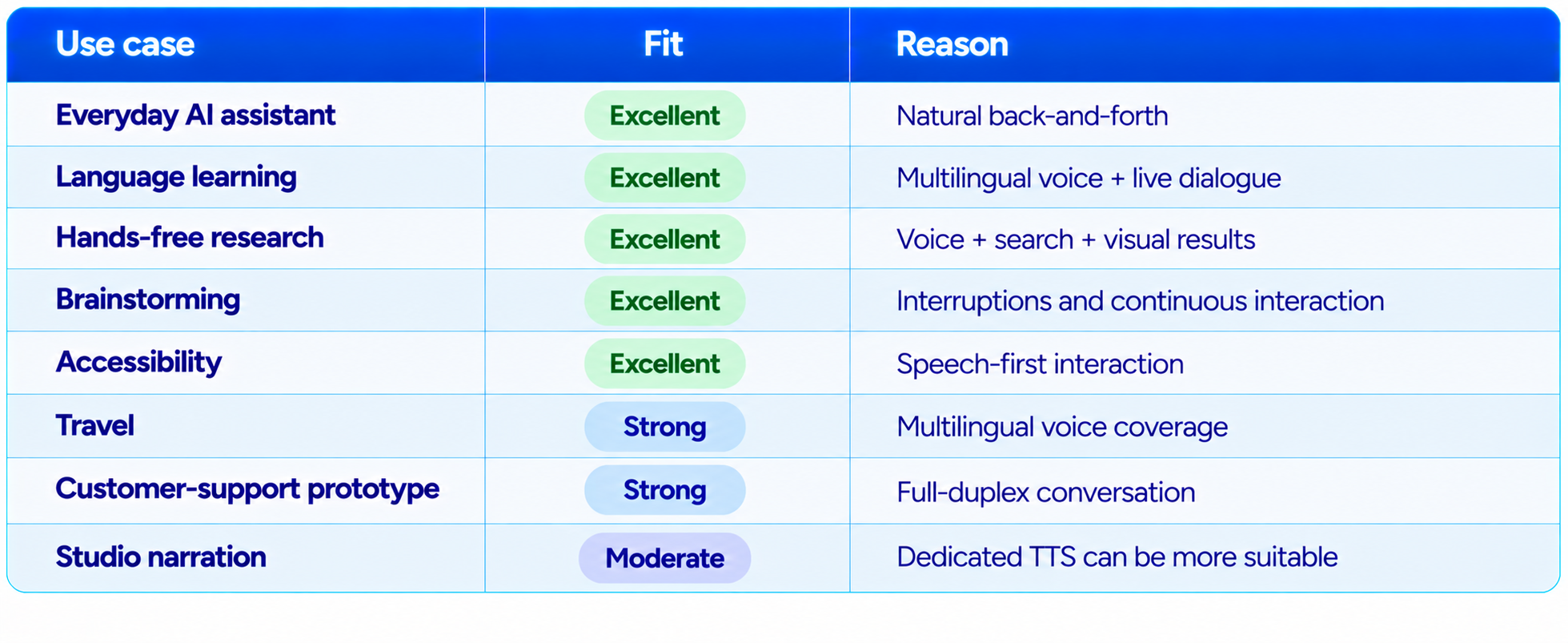
GPT-Live-1.1 is especially well suited to everyday AI assistance, language learning, hands-free research, brainstorming, accessibility, travel conversations and voice-agent prototyping. The common thread is interaction.
If the user needs to interrupt, redirect, change language, ask a follow-up or request a different speaking pace, the Live architecture is much more important than the raw quality of an isolated generated sentence.
For podcasts, audiobooks and final voiceover production, evaluate dedicated TTS tools separately because GPT-Live is designed primarily for conversation rather than studio audio production.
18. Final Verdict
GPT-Live-1.1 is a focused but important upgrade to OpenAI's voice experience. It does not replace the full-duplex architecture that made GPT-Live different. Instead, it improves the part users experience every second: how the assistant sounds, how it handles language and accents, and how naturally it fits into a live conversation.
The strongest change is multilingual voice coverage. OpenAI now explicitly highlights French, German, Hindi, Japanese, Korean and Mexican Spanish, while Bubbie adds another English option. That makes GPT-Live-1.1 considerably more interesting for users who do not want English to be the default language of their AI interaction.
The second strength is the architecture underneath the voice. Full-duplex listening and speaking means interruptions, pauses and conversational redirects are part of the model's normal operating mode. GPT-Live can also combine voice with web search, memory, text, images and visual results inside the same chat.
The main limitation is that OpenAI's public announcement does not provide separate numerical quality scores for each new language. That makes it possible to verify what was added, but not responsibly claim that GPT-Live-1.1 is objectively the best voice model in every language.
My rating: 9.2/10 for conversational naturalness, 9.3/10 for multilingual voice coverage, 9.0/10 for interruption handling, 8.8/10 for voice selection and 9.1/10 overall.
Bottom line: GPT-Live-1.1 is one of the strongest choices for people who want to actually talk with an AI assistant rather than simply generate speech. The update is especially valuable for Hindi, Japanese, Korean, French, German and Mexican Spanish users, while the improved voice variety also makes everyday English conversations more flexible.
Frequently Asked Questions
What is GPT-Live-1.1?
GPT-Live-1.1 is OpenAI's October 2026 update to the GPT-Live voice model family powering ChatGPT Voice.
What changed in GPT-Live-1.1?
The main changes are more natural accents across languages, new voice options for French, German, Hindi, Japanese, Korean and Mexican Spanish, plus the Bubbie English voice.
Is GPT-Live-1.1 better than GPT-Live-1?
It is the newer generation and is specifically focused on improving voice naturalness and multilingual accents while retaining the full-duplex GPT-Live architecture.
Does GPT-Live-1.1 support Hindi?
Yes. Hindi is explicitly included among the languages receiving new Live voice options.
Does GPT-Live-1.1 support Japanese and Korean?
Yes. OpenAI explicitly lists both Japanese and Korean in the new voice rollout.
Does GPT-Live-1.1 support French and German?
Yes. French and German are among the languages highlighted in the October 2026 release.
Does GPT-Live-1.1 support Mexican Spanish?
Yes. Mexican Spanish is explicitly named as a new regional voice option.
What is Bubbie?
Bubbie is a newly introduced English voice in the GPT-Live-1.1 rollout.
Can GPT-Live-1.1 handle interruptions?
Yes. GPT-Live uses a full-duplex architecture designed to listen and speak continuously and handle interruptions naturally.
Can GPT-Live-1.1 use web search?
Yes. Live can use web search where available and can communicate about search activity during the conversation.
Can GPT-Live-1.1 share video or screen?
No. Live currently does not support video or screen sharing. Eligible users can use Advanced Voice for those capabilities on supported mobile experiences.
How do I change my ChatGPT voice?
Open Settings, go to Voice, and select Voice. Available options depend on account and region.
Is GPT-Live-1.1 a TTS model?
It is better understood as a real-time conversational voice model rather than a conventional text-to-speech system.
Is GPT-Live-1.1 available in the API?
The October 15 rollout announcement is for ChatGPT Voice. It does not publish a separate GPT-Live-1.1 API launch or pricing table.
Is GPT-Live-1.1 worth it?
Yes, especially for users who rely on ChatGPT Voice and care about natural conversation, interruptions and multilingual accents.
Recommended Blogs
GPT-Live Review: OpenAI's Full-Duplex Voice Model Explained (July 2026)
Gemini 3.8 Flash TTS Review: Voice Quality, Price & Flash-Lite (2026)
Qwen-Audio-3.1 Review: ASR, TTS, Realtime, Price & Is It Worth It? (2026)
ElevenLabs Eleven v4 Review: Quality, Speed, Price & Is It Worth It? (2026)
Lyria 3.5 Review: Vocals, Quality, Price & Is It Worth It? (2026)
Resources & Community
Join our community of 70,000+ AI enthusiasts and learn to build powerful AI applications. Whether you are a beginner or an experienced developer, Build Fast with AI helps you understand and implement AI in your projects.
Agentic AI Launchpad 2026
A structured 6-week cohort program that takes you from AI basics to building and deploying real-world agentic AI systems. Includes live sessions, expert mentorship, project reviews and a builder community network.
Free AI Resources
Access free tools, workshops and micro-learning to keep building.

