



OmniHuman 2.0 Review: Can ByteDance's New AI Avatar Model Turn One Image Into a Five-Minute Performance?
OmniHuman 2.0 is ByteDance's latest audio-driven human and character video model, released through BytePlus on October 15, 2026. It takes a still image, an audio track and an optional text prompt, then generates a continuous video in which the subject speaks, sings or performs with facial expressions, gestures and body movement driven by the audio.
The important change is not simply better lip sync. BytePlus positions OmniHuman 2.0 around audio understanding: tone, emotion, rhythm and semantic content can influence the generated performance. That makes the model closer to an AI performance generator than a conventional talking-head lip-sync tool.
The second major change is duration. The API accepts audio from 4 to 300 seconds, allowing a single generation of up to five minutes. BytePlus lists native 720p output and a price of $0.07 per second for OmniHuman 2.0, down from the $0.12-per-second price documented for OmniHuman 1.5.
This combination gives OmniHuman 2.0 a very clear position in the AI video market: it is built for turning an existing voice or music track into a complete character performance. It is not a general text-to-video model, and that distinction matters when comparing it with systems such as Veo, Wan or other cinematic video generators.
QUICK ANSWER
OmniHuman 2.0 is a ByteDance model available through BytePlus that generates human and character performance video from one image and an audio track. The audio drives speech, facial expression, rhythm and body movement, while an optional text prompt can control actions, scene elements and camera movement. BytePlus also describes multi-person scenes and support for human, animal and stylized subjects.
The headline upgrade is duration. OmniHuman 2.0 supports 4 to 300 seconds of audio, making five-minute single-shot video possible. The product is listed at native 720p and $0.07 per second, which means a 60-second generation is $4.20 and a full 300-second generation is $21 at the advertised rate.
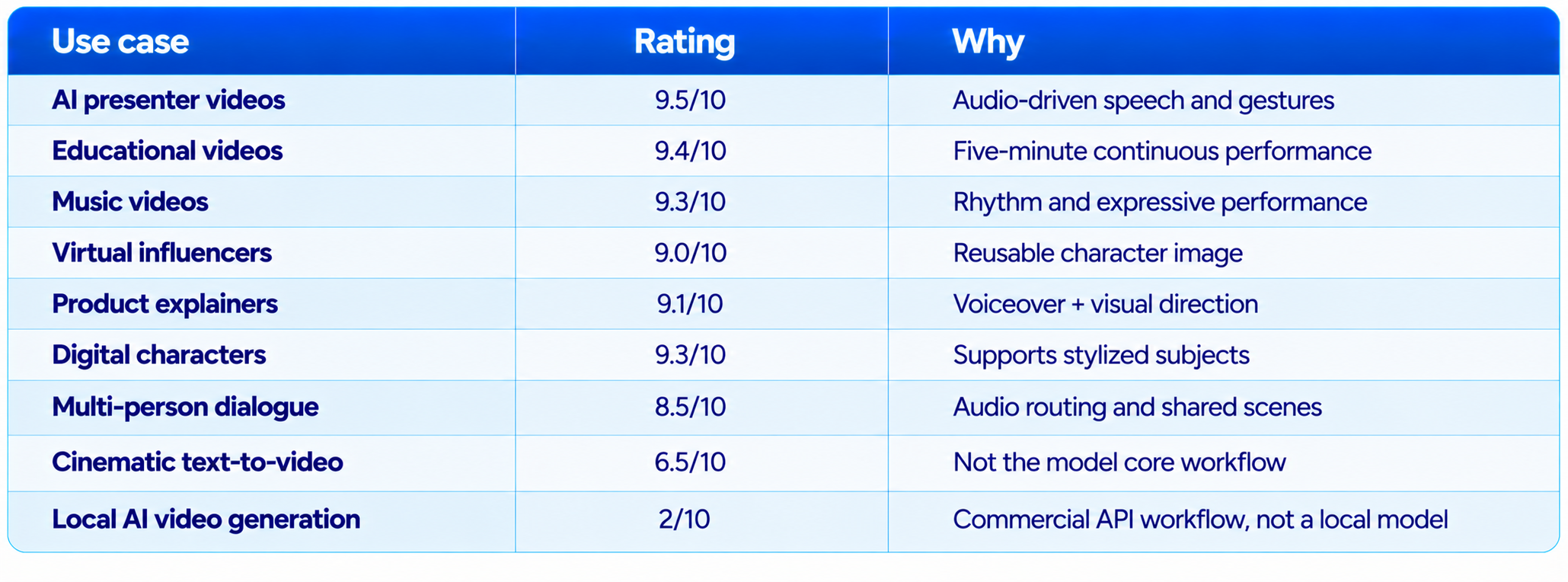
The model is particularly strong for talking presenters, digital humans, music performances, virtual characters, educational videos, advertising and other workflows where the creator already has the voice or soundtrack. It is less suitable when the primary requirement is text-to-video scene generation from scratch.
My verdict: 9.1/10 for audio-driven performance, 9.0/10 for duration, 8.8/10 for price, 8.4/10 for controllability and 8.9/10 overall. OmniHuman 2.0 is one of the most practical AI avatar releases for creators who want a longer continuous performance from a single character image.
1. What Is OmniHuman 2.0?
OmniHuman 2.0 is an audio-conditioned video generation model from ByteDance, distributed commercially through BytePlus. The workflow is simple: provide a reference image, provide audio, optionally add a text prompt, and the model generates the character's performance.
The audio is not treated as a simple lip-sync track. BytePlus describes the system as using speech content, tone, emotion and rhythm to shape the character's facial and body performance. That is particularly useful for speech and music because the same words can require very different physical behavior depending on delivery.
The model also supports non-human or stylized subjects. BytePlus's OmniHuman product materials describe support for people, animals, anthropomorphic characters and cartoons, extending the workflow beyond conventional digital humans.
2. OmniHuman 2.0 Specifications
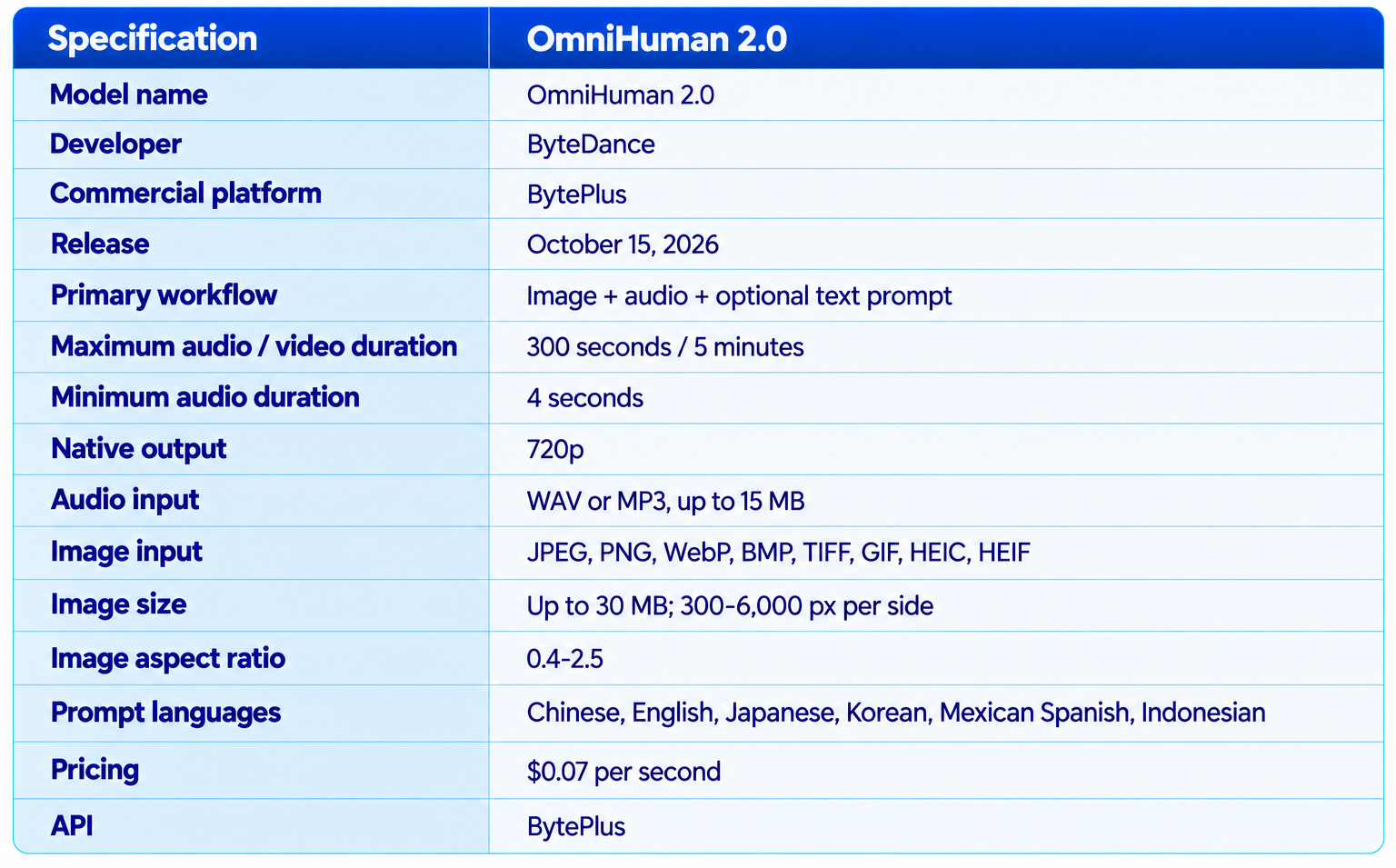
The current 2.0 API specification is materially longer than the older OmniHuman 1.5 workflow. The previous BytePlus documentation lists 1.5 at under 60 seconds of audio and $0.12 per second, while current launch coverage lists 2.0 at up to 300 seconds and $0.07 per second.
3. The Biggest Upgrade: Five-Minute Continuous Video
The five-minute limit is arguably the most practical OmniHuman 2.0 upgrade. Previous OmniHuman 1.5 documentation capped audio below 60 seconds. OmniHuman 2.0 expands the input window to 4-300 seconds, allowing a complete five-minute performance from one generation.
That changes the type of content the model can reasonably target. A 30-second social clip is easy to divide into shots. A five-minute lecture, product explanation, virtual interview or song performance is much harder to manage when every minute has to be generated separately and stitched together.
Single-generation duration can also reduce continuity problems. Every time separate clips are generated, there is an opportunity for changes in facial appearance, clothing, framing or movement style. A continuous generation avoids that particular source of variation, although it does not guarantee perfect consistency throughout a five-minute sequence.
4. Audio Is the Core of the Model
OmniHuman 2.0 is best understood as an audio-to-performance model. Your recording supplies much of the performance direction. A sentence delivered with excitement, hesitation or anger can produce different facial and body behavior than the same words delivered neutrally.
This is a major difference from basic talking-avatar systems. A conventional lip-sync system can make a mouth match speech while leaving the rest of the body relatively static. OmniHuman's design targets a wider relationship between audio and physical performance.
For creators, that means the audio file becomes part of the creative input. A well-recorded voiceover with intentional pauses and expressive delivery can give the model more information to work with than a flat synthetic recording.
5. Speech, Singing and Dialogue
BytePlus positions OmniHuman 2.0 for speech, singing and dialogue. This makes it useful across several categories that normally require different video-generation workflows.
6. Facial Expressions and Lip Sync
Lip synchronization remains an important part of OmniHuman 2.0, but it is only one component of the generation. The system is designed to coordinate mouth movement with facial expression and broader body motion.
That makes it particularly useful for close-to-medium framing where the audience can read the face and upper-body performance. A good source image also matters. The reference image establishes the character's identity, clothing and visual composition, so a clean, well-lit source generally gives the model a better starting point.
Creators should still inspect fast dialogue, emotional transitions and unusual phonetic sequences. A model can be strong overall while producing occasional mouth, hand or facial artifacts in difficult moments.
7. Gesture and Body Movement
OmniHuman 2.0 goes beyond the face by generating body movement that responds to the audio. This matters for presenters because natural communication is not only about the mouth. Hand gestures, head movement, posture and timing contribute to whether a digital person feels like they are actually delivering a message.
The optional text prompt adds another layer of control. BytePlus describes prompts as a way to guide scene details, movements and camera movements. This lets creators combine audio-driven performance with explicit visual direction rather than leaving every movement to the model.
8. Camera Control
The prompt field can be used to direct camera movement. That is useful because a fixed talking-head composition can become visually repetitive over several minutes.
A prompt can request a slow push-in, a pan, a change of framing or a particular camera relationship to the character. The practical goal is not to make every generation cinematic, but to give the creator control over visual rhythm while the audio handles performance.
The best workflow is to keep camera instructions simple and compatible with the source image. Overloading one prompt with too many simultaneous camera and action changes can make it harder to evaluate which instruction caused an unwanted result.
9. Multi-Person Scenes
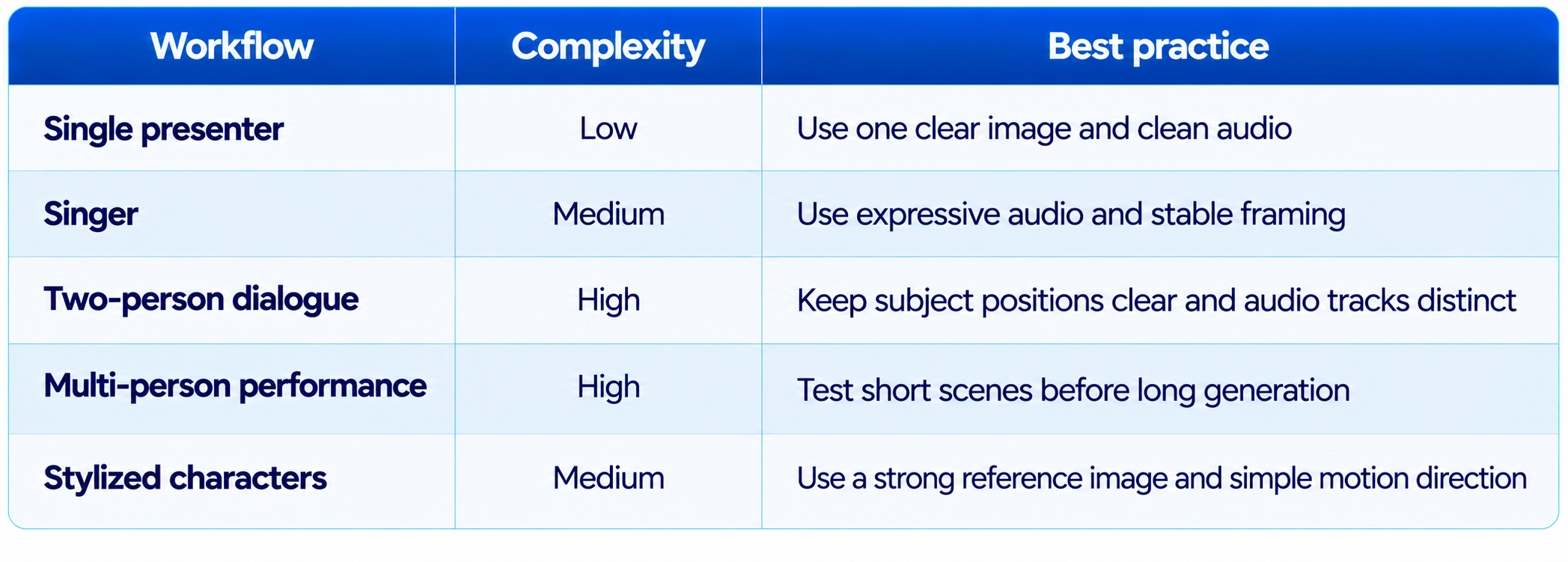
BytePlus's OmniHuman materials describe multi-person performance, including routing different audio tracks to the appropriate subjects in a shared image. That opens a path to dialogue, duet and group-performance workflows.
This is more demanding than single-person animation because the model has to maintain identity, spatial relationships and audio assignment at the same time.
10. Animals and Stylized Characters
One of OmniHuman's interesting characteristics is that the workflow is not limited to realistic human portraits. BytePlus describes support for animals, anthropomorphic subjects and stylized cartoons in its OmniHuman product materials.
That makes the model useful for animated explainers, virtual mascots and character-led storytelling. The underlying workflow remains the same: the image defines the visual subject and the audio provides the performance signal.
Results will depend heavily on the reference image. A character with clear anatomy and a coherent pose gives the model a better basis for deciding how to animate the body.
11. OmniHuman 2.0 Pricing
BytePlus lists OmniHuman 2.0 at $0.07 per second. The rate is based on generated duration, so the cost scales directly with the length of the output.
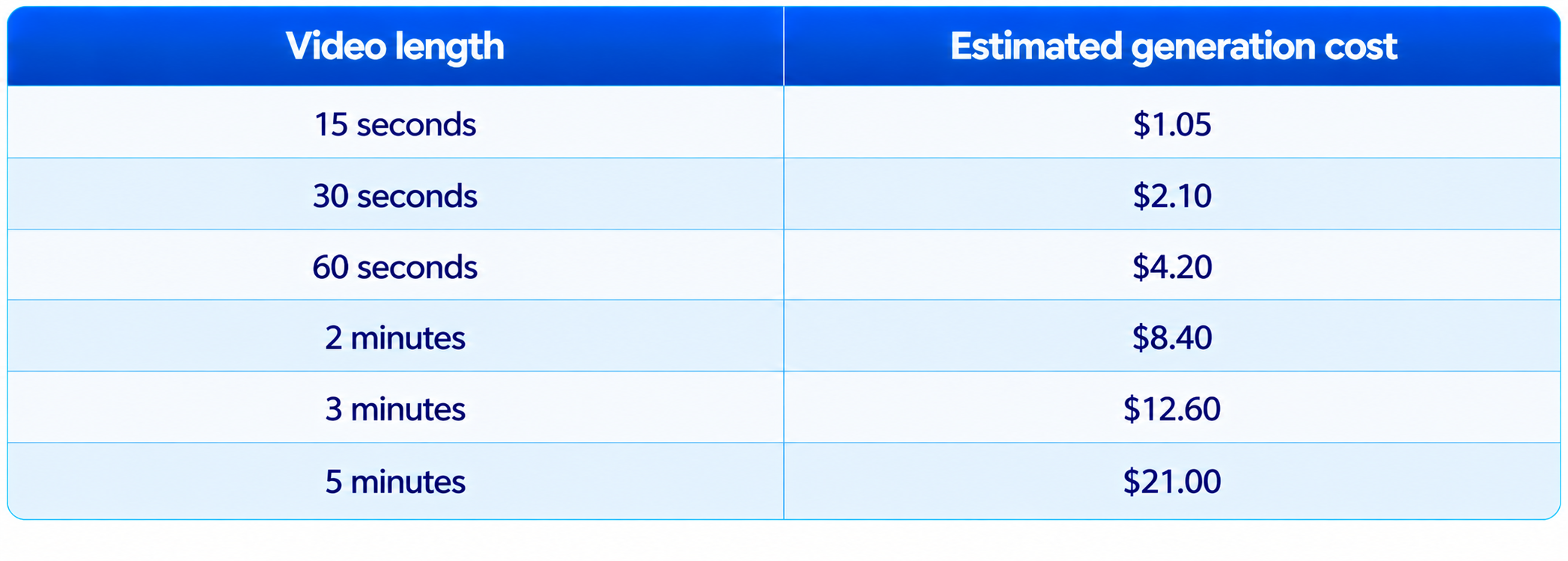
The five-minute price is $21 at the advertised rate. The previous OmniHuman 1.5 price of $0.12 per second would imply $36 for five minutes, but 1.5 itself did not support a five-minute single generation. The useful comparison is therefore the per-second reduction plus the expanded maximum duration, not a claim that 1.5 could produce the same five-minute job.
For production planning, budget for failed generations as well. A $2.10 30-second test is inexpensive compared with many video-production workflows, but multiple iterations can still add up.
12. OmniHuman 2.0 vs OmniHuman 1.5
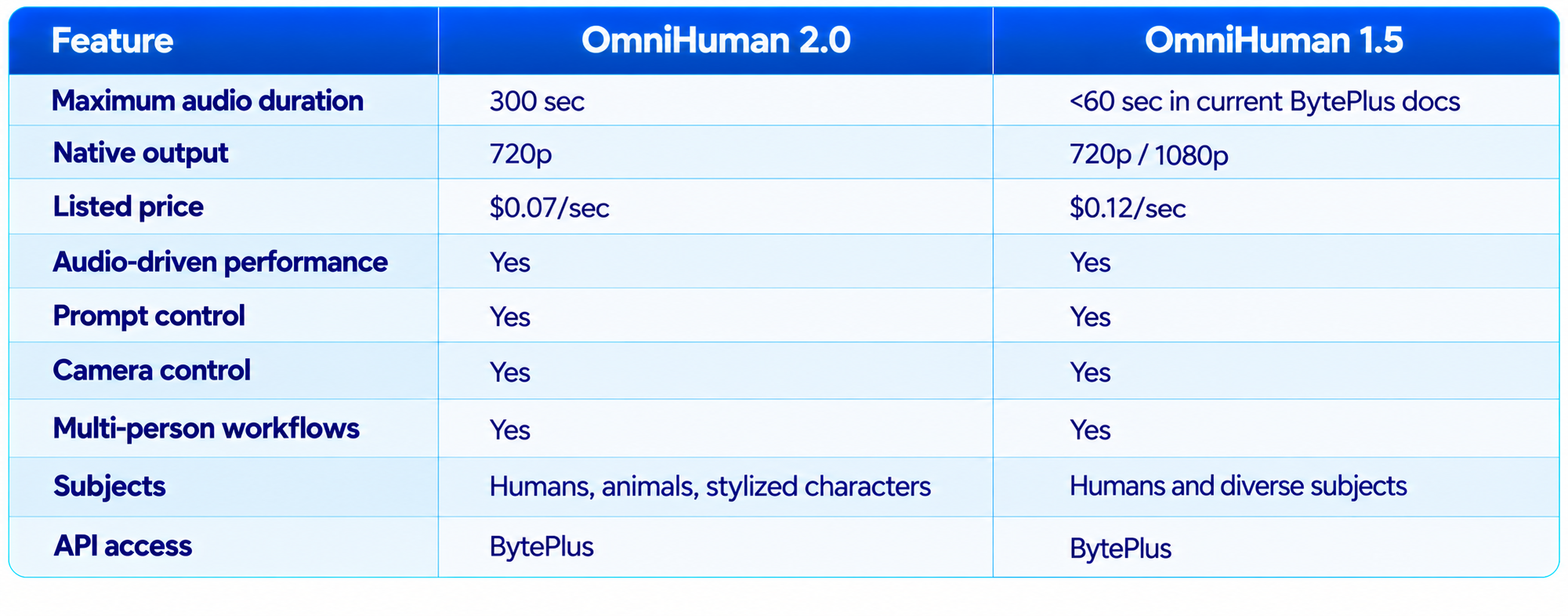
The biggest 2.0 advantages are duration and price. OmniHuman 1.5 has an important advantage on documented output resolution because its BytePlus documentation lists 1080p as an available output option. OmniHuman 2.0 is currently listed with native 720p, so 2.0 is not simply a universal replacement for 1.5 in every resolution-sensitive workflow.
13. OmniHuman 2.0 vs General AI Video Generators
OmniHuman 2.0 should not be evaluated like a general text-to-video model. Its input is fundamentally different. You start with a character image and an audio performance, while models such as Veo and Wan can be used for broader scene generation.
The practical distinction is control direction. OmniHuman starts from a visual identity and audio performance. A general multimodal video system may be more useful when the creator wants to iteratively describe, extend or transform a scene through conversation.
14. OmniHuman 2.0 vs Wan 3.0
Wan 3.0 and OmniHuman 2.0 solve different parts of video creation. Wan is a broader video-generation system, while OmniHuman focuses on audio-driven character performance.
Choose OmniHuman when the voice or song already exists and the visual goal is to make a character perform it. Choose a general model such as Wan when the main challenge is creating the environment, action and cinematic scene itself.
Read our Wan 3.0 Review for the broader video-generation comparison.
15. OmniHuman 2.0 vs Gemini Omni 1.1 Flash
Gemini Omni 1.1 Flash is designed around a broader conversational video workflow, while OmniHuman 2.0 is specialized around turning an image and audio track into a character performance.
The practical distinction is control direction. OmniHuman starts from a visual identity and audio performance. A general multimodal video system may be more useful when the creator wants to iteratively describe, extend or transform a scene through conversation.
See our Gemini Omni 1.1 Flash Review for the other workflow.
16. Input Quality Matters More Than Most Users Expect
OmniHuman 2.0 starts from a single image, so the reference image is part of the model's effective prompt. A blurry face, awkward crop, occluded body or unusual pose gives the generator less useful information.
The current API allows images up to 30 MB, with dimensions from 300 to 6,000 pixels per side and an aspect-ratio range of 0.4 to 2.5. The supported image formats include JPEG, PNG, WebP, BMP, TIFF, GIF, HEIC and HEIF.
The same principle applies to audio. Clean speech, clear timing and intentional expression give the model a stronger performance signal than clipped or noisy recordings.
17. Best Use Cases
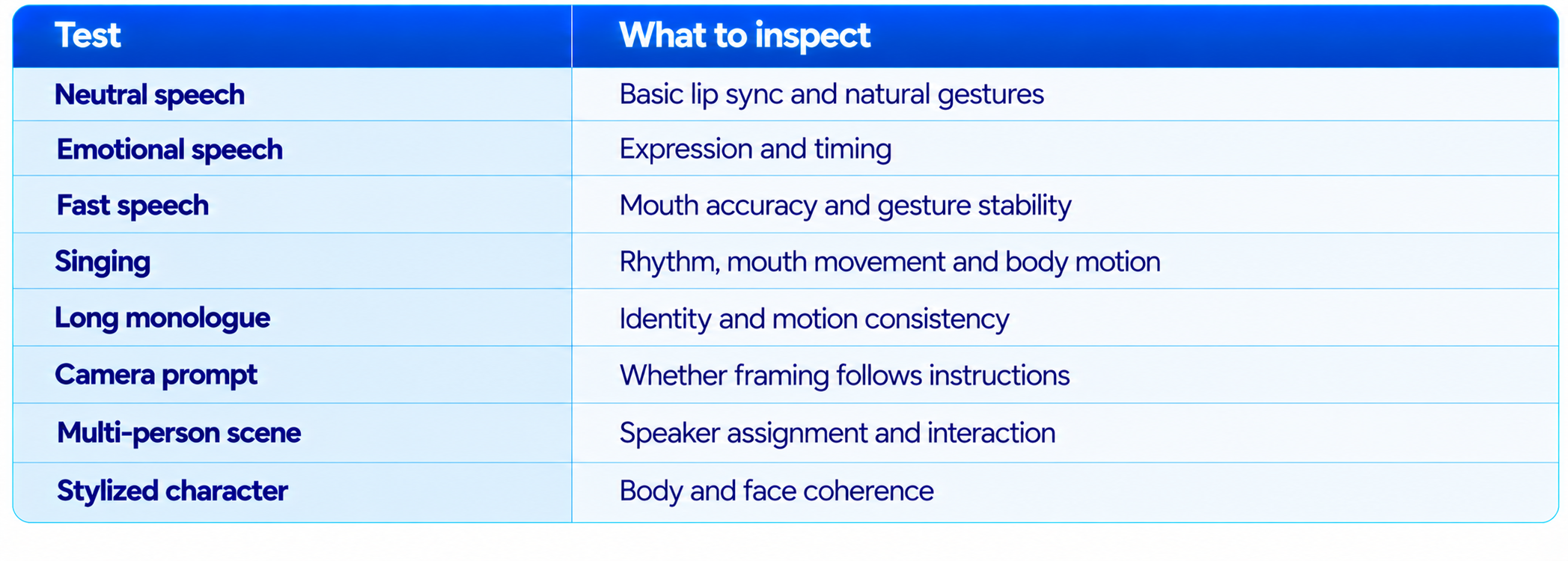
18. How to Evaluate OmniHuman 2.0 Yourself
A useful test should measure performance rather than just visual appeal. Run the same reference image through several audio types and compare the results.
The 2026 OmniHuman research benchmark, OHBench, is a broader benchmark for human-centric audio-video synthesis. It should not be presented as an OmniHuman 2.0 product score without a direct 2.0 evaluation. The current product documentation is more useful for judging 2.0 through its actual inputs, duration, output and production behavior.
19. Limitations You Should Know
- Native output is currently listed at 720p, so it is not a 4K avatar generator.
- The 5-minute capability is a maximum duration, not a guarantee of perfect consistency across five minutes.
- The model requires an audio track rather than generating the voice inside this workflow.
- It is specialized for image-plus-audio performance rather than general text-to-video.
- Complex multi-person scenes are more demanding than single-person presentations.
- Camera and action prompts require testing because not every instruction will be equally reliable.
- The API is billed by duration, so repeated failed generations can increase production cost.
- Public 2.0 documentation currently provides capability and pricing information but not a comprehensive quantitative 2.0 benchmark table.
- Use images and audio for which you have the necessary rights and permissions, especially when creating realistic digital representations of identifiable people.
20. Recommended Production Workflow
- Prepare a clean reference image with a clear subject and useful framing.
- Record or select the final audio before generating.
- Start with a 15-30 second test.
- Use the prompt for visual direction, not for rewriting the spoken script.
- Check lip synchronization, facial expression, hands, posture and camera movement.
- Adjust the image or prompt before increasing duration.
- Generate the longer 1-5 minute version only after the short test works.
- Review the full video for identity drift, unnatural gestures and background changes.
- Keep the final audio and image assets organized so successful generations can be reproduced.
21. Is OmniHuman 2.0 Worth It?
Yes, when the job is audio-driven character performance. The model's strongest advantage is that it starts with assets creators already have: a portrait and a recording. Instead of generating an entire video world from a text prompt, it turns those two inputs into a longer animated performance.
The five-minute limit is especially valuable. A presenter can deliver a longer explanation, a singer can perform a complete section of a song, and an educational character can carry a multi-minute lesson without requiring the creator to manually stitch dozens of short generations.
The $0.07-per-second price also makes experimentation more practical. A 30-second test costs $2.10 at the advertised rate, while a full five-minute generation costs $21. The model is therefore affordable enough for iterative production, although serious workflows still need to account for failed takes.
The main reason to choose another system is when your project is not really an avatar problem. If you need a completely invented environment, complex cinematic action, or text-to-video world building, a broader video generator is likely a better fit.
22. Final Verdict
OmniHuman 2.0 is a focused but important AI video release. It does not try to replace every video-generation model. Instead, it attacks a specific production problem: turning one visual character and an existing audio performance into a convincing, controllable video.
The improvements over OmniHuman 1.5 are substantial where they matter most for this workflow. The maximum audio duration expands from less than 60 seconds in the current 1.5 BytePlus documentation to 300 seconds, while the listed price falls from $0.12 to $0.07 per second. The tradeoff is that the current 2.0 product listing is native 720p, while 1.5 documentation lists 720p and 1080p.
The audio-driven design is the real differentiator. OmniHuman 2.0 is built around the relationship between what a character hears, how the audio sounds and how the character should move. That makes it a particularly good match for presenters, singers, virtual characters, educational content and digital humans.
My rating: 9.1/10 for audio-driven performance, 9.0/10 for long-form avatar generation, 8.8/10 for pricing, 8.4/10 for control and 8.9/10 overall.
Bottom line: OmniHuman 2.0 is worth testing if you already have a character image and voice or music track and want a longer, expressive AI-generated performance. Its five-minute generation limit and $0.07-per-second pricing make it substantially more practical for production than a short-clip-only avatar workflow, while its 720p output and specialized scope keep it from being a universal AI video generator.
Frequently Asked Questions
What is OmniHuman 2.0?
OmniHuman 2.0 is ByteDance's audio-driven video model available through BytePlus. It animates a reference image using an audio track and optional text prompt.
How much does OmniHuman 2.0 cost?
BytePlus lists the model at $0.07 per second of generated video.
How much does a 1-minute OmniHuman 2.0 video cost?
At $0.07 per second, a 60-second generation costs about $4.20.
How much does a 5-minute OmniHuman 2.0 video cost?
At the advertised rate, 300 seconds costs about $21.
Can OmniHuman 2.0 generate five-minute videos?
Yes. The current API accepts audio from 4 to 300 seconds, enabling up to five minutes of generated video.
What resolution does OmniHuman 2.0 support?
The current product listing describes native 720p output.
Does OmniHuman 2.0 support lip sync?
Yes. Audio drives speech and facial performance, including synchronized mouth movement.
Does OmniHuman 2.0 support singing?
Yes. BytePlus positions the model for singing and rhythm-driven performances.
Can OmniHuman 2.0 animate animals or cartoon characters?
BytePlus describes support for animals, anthropomorphic subjects and stylized characters.
Does OmniHuman 2.0 support multiple people?
Yes. The OmniHuman product workflow supports multi-person performance with audio assigned to subjects.
Can I control camera movement?
Yes. The optional text prompt can guide camera movement as well as scene and character actions.
Is OmniHuman 2.0 better than OmniHuman 1.5?
For duration and price, yes. 2.0 supports up to five minutes and is listed at $0.07 per second. However, 1.5 documentation lists 1080p output, while 2.0 is currently listed at native 720p.
Does OmniHuman 2.0 generate voice?
The documented workflow takes audio as an input. It is not described as a text-to-speech model in this product workflow.
Is OmniHuman 2.0 open source?
No. The current commercial workflow is provided through BytePlus API.
Is OmniHuman 2.0 worth it?
Yes for audio-driven presenters, digital humans, singers and character videos. It is less suitable as a general cinematic text-to-video model.
Recommended Blogs
Best AI Video Models 2026: Ranked by Quality, Speed, Price & Use Case
Gemini Omni 1.1 Flash Review: Accuracy, Price & Is It Worth It? (2026)
Google Pics Review: Features, Price & Is It Worth It? (2026)
Gemini 3.8 Flash Review: Accuracy, Price & Is It Worth It? (2026)
Meta Muse Spark 1.3 Review: Coding, Price & Is It Worth It? (2026)
Mercury 2.5 AI Model Review: Speed, Price & Is It Worth It? (2026)
Resources & Community
Join our community of 70,000+ AI enthusiasts and learn to build powerful AI applications. Whether you're a beginner or an experienced developer, Build Fast with AI helps you understand and implement AI in your projects.
Agentic AI Launchpad 2026
A structured 6-week cohort program that takes you from AI basics to building and deploying real-world agentic AI systems. Includes live sessions, expert mentorship, project reviews and a builder community network.
Ready to go from learning to building? Join the next cohort: Agentic AI Launchpad 2026
Free AI Resources
Access free tools, workshops and micro-learning to keep building.

