
Gemini 3.8 Live Extended Thinking Review: Is Google's New Voice AI the Best Yet?
Gemini 3.8 Live is Google's newest real-time dialogue model, and its most important change is not simply better speech. Google is combining natural voice conversation with real-time visual grounding, background tool execution, multilingual switching and a separate Extended Thinking variant designed for harder multi-step tasks. That turns Gemini Live from a conversational interface into a more practical voice-agent platform.
Google announced Gemini 3.8 Live and Gemini 3.8 Live Extended Thinking on September 15, 2026. The standard Live model is designed for scale and cost efficiency, while Extended Thinking targets high-complexity tasks that need more reasoning without stopping the conversation. Both are rolling out through the Gemini API and Google AI Studio, with Gemini 3.8 Live also appearing in Search Live and Extended Thinking rolling into Gemini Live and selected Workspace experiences.
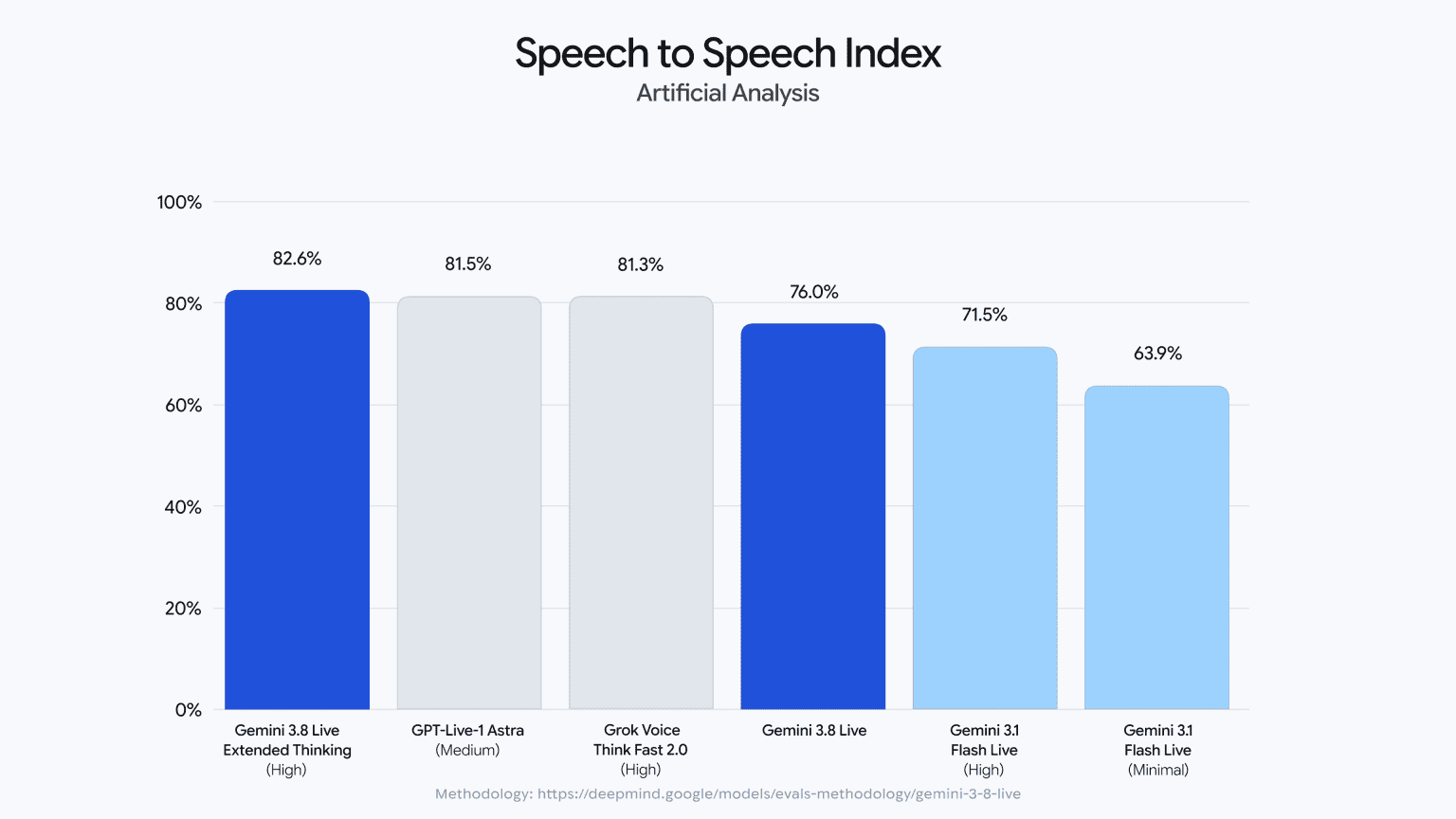
The headline benchmark result belongs to Extended Thinking. Google says it reaches 82.6 on Artificial Analysis's Speech to Speech Quality Index, first overall, while scoring 68.6% on τ-Voice, 35.1% on Sierra's τ-Voice-banking benchmark, and 97.7% on Big Bench Audio. The standard Gemini 3.8 Live model takes second place in Speech Agent Arena. The models can also process visual input in near real time, switch automatically across 97 supported languages, and execute tools and API calls in the background while continuing the conversation.
QUICK ANSWER
Gemini 3.8 Live is Google's new real-time voice model for conversational AI and voice agents, while Gemini 3.8 Live Extended Thinking is the higher-complexity version that can reason more deeply while continuing to speak and maintain the conversation. The two models add real-time visual context, background tool execution and automatic language switching across 97 languages.
The strongest measured result is Gemini 3.8 Live Extended Thinking's 82.6 Speech to Speech Quality Index score, which Google says ranks it first overall. It also reaches 68.6% on τ-Voice, 35.1% on Sierra's τ-Voice-banking benchmark and 97.7% on Big Bench Audio. Standard Gemini 3.8 Live ranks second in the Speech Agent Arena.
The most important product feature is background execution. Gemini 3.8 Live can start a tool or API call, acknowledge the request and keep talking while the action continues. Extended Thinking goes further by giving spoken progress cues as it works through multi-step tasks. That makes the model much more suitable for voice agents than a system that has to go silent whenever it calls a tool.
Google has not yet published a standalone Gemini 3.8 Live token price row on the public developer pricing page. Current Live API billing is token based, including accumulated audio tokens, while third-party reporting of Google's launch chart places 3.8 Live around $0.84 per hour of input audio and Extended Thinking High around $3.50 per hour in the cited Big Bench Audio comparison. Those figures are useful for comparison, but they should be treated as chart-derived rather than a substitute for Google's final model-specific pricing table.
My verdict: 9.4/10 for voice-agent quality, 9.5/10 for conversational intelligence, 9.2/10 for agentic workflow design, and 9.3/10 overall. Gemini 3.8 Live Extended Thinking is especially compelling when the user should be able to keep talking while the AI researches, reasons, calls tools or completes an asynchronous task.
1. What Is Gemini 3.8 Live?
Gemini 3.8 Live is Google's new voice-first model family for real-time dialogue. The standard model is optimized for conversational speed and cost efficiency, while Extended Thinking is designed for complex workflows where the model needs more reasoning before and during execution.
The important shift is that Google is treating voice as an execution interface rather than only a speech interface. The model can see live visual context, use tools, continue speaking and keep the interaction moving while a background task finishes.
That makes Gemini 3.8 Live different from simply adding text-to-speech to a normal LLM. The model is trained and served for continuous audio interaction, interruption handling and near real-time response behavior.
2. Gemini 3.8 Live vs Gemini 3.8 Live Extended Thinking
The two variants are designed around the same real-time interaction pattern, but their priorities are different. Standard 3.8 Live is the scale model. Extended Thinking is the deeper reasoning model.
The easiest way to think about the split is turn latency versus task depth. A receptionist, language practice partner or quick troubleshooting assistant benefits from a fast turn. A voice agent that has to investigate a support issue, coordinate several tools or build a multi-step deliverable benefits from Extended Thinking.
3. Gemini 3.8 Live Benchmarks
Voice models are difficult to compare with a single text benchmark because quality depends on speech naturalness, turn-taking, interruption handling, task completion and tool execution. Google's launch combines several of those dimensions.
The strongest independent metric cited by Google is the Artificial Analysis Speech to Speech Quality Index, where Gemini 3.8 Live Extended Thinking scores 82.6 and takes the overall top position. Google also reports 68.6% on τ-Voice, 35.1% on Sierra's τ-Voice-banking benchmark and 97.7% on Big Bench Audio.
On Speech Agent Arena, standard Gemini 3.8 Live takes second place. That suggests the standard model is not simply a lower-capability version of Extended Thinking. It remains strong when conversational preference and responsiveness matter.
4. Voice Quality: Why 82.6 Matters
An 82.6 Speech to Speech score matters because it evaluates the complete voice interaction rather than judging a text transcript after the fact. For a voice assistant, the quality of the spoken response, conversational timing and interaction behavior are part of the product.
The practical advantage is that the model can acknowledge a request naturally, continue the conversation and use its reasoning or tools without making every pause feel like a system handoff.
That is the direction voice agents have been missing. A technically correct agent can still feel broken when it becomes silent for ten seconds after every tool call. Gemini 3.8 Live is explicitly designed to keep the conversational channel alive while work happens elsewhere.
5. Extended Thinking: The Feature That Changes Voice Agents
Traditional voice assistants are optimized around short turn-taking because users notice latency immediately. Extended Thinking creates a different interaction pattern: the model can reason through a complex task while continuing to speak.
Google says the model uses early verbal cues such as 'Let me check that...' and live progress narration while it works through multi-step background tasks. The user therefore receives evidence that the request was accepted and can keep the conversation going rather than waiting in silence.
This is especially useful for support, tutoring, research and booking workflows. The model does not need to choose between 'answer instantly' and 'think silently'. It can make its progress part of the conversation.
6. Background Tool Execution
Gemini 3.8 Live can execute tools and API calls in the background while continuing the conversation. Google positions this as one of the major improvements for production voice agents.
Imagine a travel agent voice workflow. The user asks for a flight change, the model acknowledges the request, calls the booking service, and continues discussing alternatives while the transaction is being processed. The user does not have to listen to dead air while the external API responds.
This architecture also changes agent design. Tool latency no longer has to equal conversation latency. That separation can make real-time agents feel much more responsive even when the backend task itself takes several seconds.
7. Real-Time Visual Grounding
Gemini 3.8 Live is not audio-only. Google says it processes visual inputs in near real time, which allows the model to ground the conversation in what the user is showing through a camera or shared visual context.
Google demonstrates the model guiding employee onboarding from visual context and playing chess in near real time. The broader use case is any voice workflow where the user needs to say, 'Look at this' and then continue talking while the model interprets the visual scene.
This is particularly useful for technical support, field-service assistance, education, accessibility and hands-on troubleshooting.
8. 97 Languages and Live Language Switching
Gemini 3.8 Live can automatically detect and transition between 97 supported languages during a conversation.
The feature matters more than a large language list on its own. Real conversations are messy. People switch languages, use proper nouns from another language, or speak one language while showing material written in another. Automatic switching removes the need to create a separate language-routing layer for every interaction.
For global customer support and multinational teams, this can simplify the voice-agent architecture significantly.
9. Gemini 3.8 Live Pricing
Google's public developer pricing page has not yet exposed a dedicated Gemini 3.8 Live pricing row. The Live API is token based, and persistent sessions can accumulate audio context across turns. Launch comparisons currently place 3.8 Live around $0.84 per hour of input audio and Extended Thinking High around $3.50 per hour, but those chart figures should be treated as comparison data rather than a substitute for Google's final model-specific pricing table.
Current published Live reference pricing includes Gemini 3.1 Flash Live at $3 per million audio input tokens and $12 per million audio output tokens, with Google giving approximate per-minute equivalents for audio. Gemini 3.8 Live is a newer model family and should be budgeted using the official 3.8 model-specific pricing once that row is available.
Google's launch comparison places Gemini 3.8 Live at about $0.84 per hour of input audio in the referenced Big Bench Audio cost chart and Extended Thinking High at about $3.50 per hour. Those figures are helpful for relative cost analysis, but they come from the launch chart rather than a standalone public pricing table.
10. How Live API Billing Actually Works
Live voice pricing is more complicated than a normal request-response API because sessions are stateful. Google's Live API documentation says billing is based on token usage and that the active context window accumulates across turns. Previous audio remains part of the session context, so tokens can effectively be billed again as the conversation continues.
This is one of the most important operational details for developers. A ten-minute conversation is not necessarily the same cost as ten independent one-minute requests. A long-running session can carry more accumulated context, and transcription output can create additional text-token usage when enabled.
The right production metric is therefore cost per completed conversation or cost per successfully completed voice task, not cost per minute alone.
11. Speech-to-Speech Agent Benchmarks
τ-Voice and Sierra's τ-Voice-banking benchmark are especially relevant because they test whether a voice agent can do something useful rather than simply sound natural. Gemini 3.8 Live Extended Thinking scores 68.6% on τ-Voice and 35.1% on Sierra's banking benchmark in Google's launch reporting.
The banking result is particularly relevant to enterprise support because banking workflows combine conversational interaction with strict procedural steps. A model has to understand the request, ask for the right information and complete tool-driven operations without breaking the conversation.
Big Bench Audio adds another layer. The 97.7% result suggests the extended model has strong general audio reasoning, not just speech synthesis quality.
15. Voice Agents That Can See, Think and Act
The strongest use case for Gemini 3.8 Live is not a basic voice chatbot. It is a voice agent that can combine speech, vision, reasoning and actions.
Consider field support. A technician points a camera at a machine, explains the problem, asks what to check next, and lets the model interpret both the spoken description and the visible equipment. The agent can then call a knowledge base or service API in the background while continuing to talk.
That same pattern applies to sales, onboarding, education, accessibility, customer support, travel and interactive product assistants.
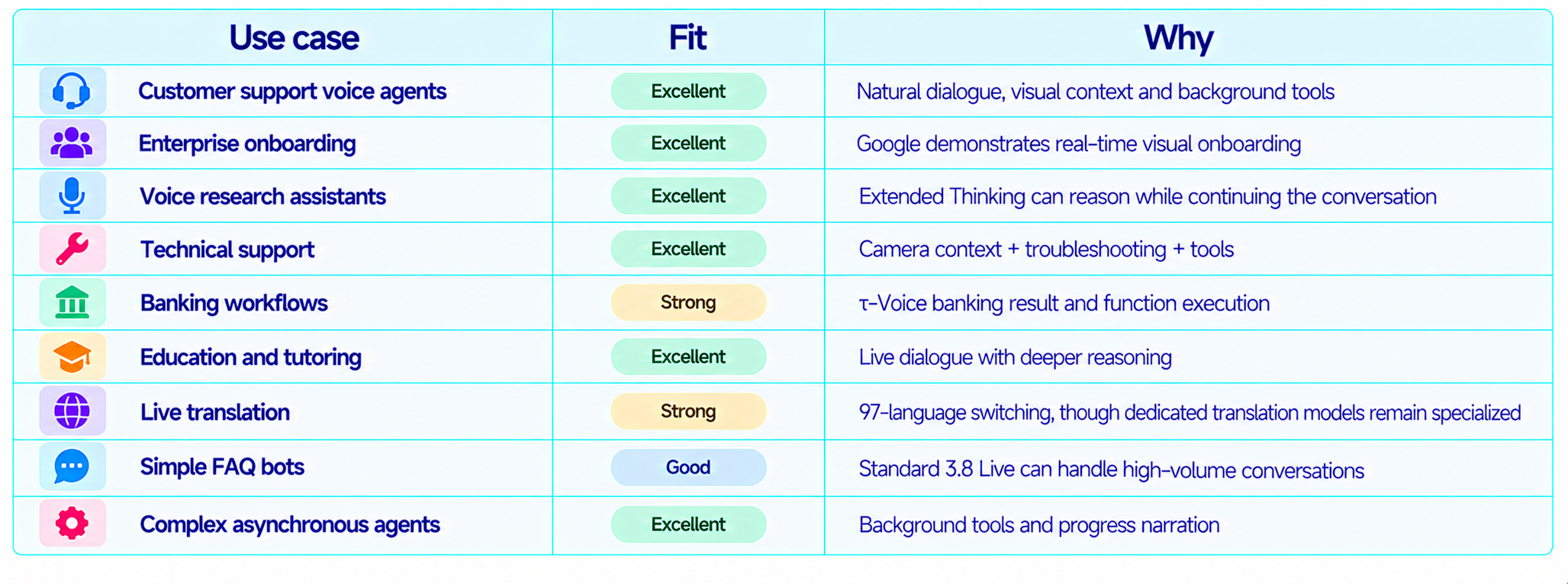
16. Best Use Cases
17. Production Workflow for Gemini 3.8 Live
Design the voice interaction around short acknowledgement turns and asynchronous work. The model should acknowledge a request quickly, start the tool call, and then continue useful conversation rather than waiting silently.
Use standard Gemini 3.8 Live for high-volume or latency-sensitive turns. Use Extended Thinking when correctness and multi-step planning are more important than the shortest possible response.
Keep tool calls narrow and observable. A voice agent should know exactly which action is running, whether it is still pending and when the result is ready.
Use visual grounding only when the visual input changes the decision. Continuous video is powerful, but it can also increase context and infrastructure cost.
Measure cost per completed task, first-response latency, interruption recovery, tool success rate, task completion rate and user satisfaction.
19. Latency: What Actually Makes a Voice Agent Feel Fast?
Voice latency is not just model generation speed. A live interaction also includes audio capture, network transport, turn detection, tool latency and the first spoken response.
Background tool execution matters because the model can keep the conversation moving while a database or external API takes several seconds to return.
Extended Thinking changes what 'fast' means: the model can spend more computation on a hard task while giving the user spoken progress updates.
20. Limitations You Should Know
Gemini 3.8 Live is optimized for real-time interaction, so it is not the right replacement for every text reasoning workload.
Public model-specific pricing is still less straightforward than standard Gemini text models, so production cost modeling should use the current Live billing documentation and Google pricing updates.
Persistent Live API sessions can accumulate context and therefore increase token usage over time.
Background tools improve conversation flow, but developers still need timeouts, permission checks and rollback behavior for external actions.
Visual grounding is powerful, but continuous video or screen input can increase infrastructure and token usage.
Generated audio is watermarked with SynthID, which is useful for transparency but should be part of any product policy for generated voice.
Enterprise availability differs across Gemini API, Workspace, Gemini Enterprise and consumer products, so access should be verified per deployment path.
21. How to Evaluate Gemini 3.8 Live Yourself
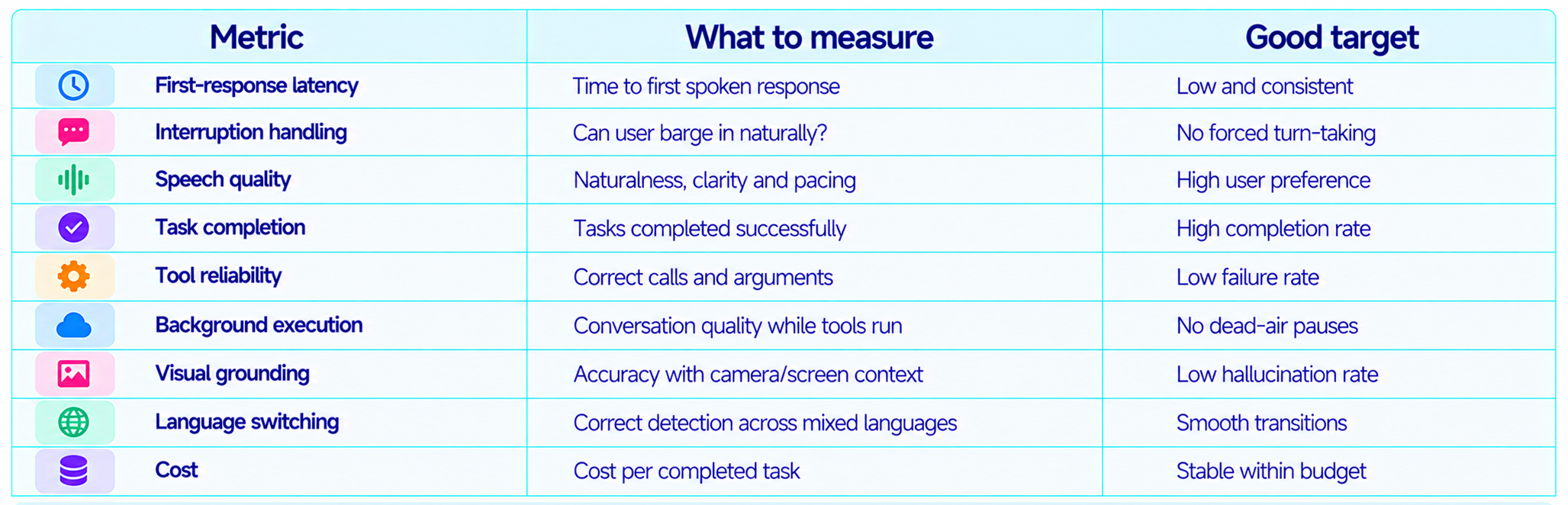
22. Is Gemini 3.8 Live Worth It?
Yes. Gemini 3.8 Live is worth testing if your product needs a voice-first interface that can see, reason, use tools and keep talking while work happens. That combination is much more useful than a voice layer sitting on top of a conventional chatbot.
The standard model is the practical choice for scale. Extended Thinking is the interesting choice for complex workflows where the user is willing to spend more computation in exchange for better reasoning. The ability to narrate progress and continue speaking while background tasks run is the feature most likely to change real-world voice-agent UX.
The biggest adoption question is economics. Google has published a token-based Live billing model and comparison charts, but a clean standalone 3.8 Live price table should be treated as the source of truth once available. Teams should benchmark real conversations, including accumulated context and tool calls, rather than estimating spend from a simple per-minute figure.
23. Final Verdict
Gemini 3.8 Live and Gemini 3.8 Live Extended Thinking mark a meaningful change in how Google approaches voice AI. Instead of treating live speech as a lightweight conversation layer, Google is turning the voice session into a control surface for reasoning, vision and action.
The benchmark evidence is strong. Extended Thinking reaches 82.6 on the Speech to Speech Quality Index, 68.6% on τ-Voice, 35.1% on Sierra's τ-Voice-banking benchmark and 97.7% on Big Bench Audio. Standard Gemini 3.8 Live ranks second in Speech Agent Arena.
The product design is even more important than the scores. Real-time visual grounding, 97-language switching and background tool execution address the exact limitations that make many voice agents feel like demos rather than useful software.
My rating: 9.5/10 for conversational quality, 9.4/10 for agentic voice workflows, 9.2/10 for visual grounding and 9.3/10 overall.
Bottom line: Gemini 3.8 Live Extended Thinking is one of the strongest voice-agent releases of 2026. Use standard Gemini 3.8 Live for fast, scalable conversations and Extended Thinking for complex workflows where the AI needs to reason, act and keep the human informed while it works.
Frequently Asked Questions
What is Gemini 3.8 Live?
Gemini 3.8 Live is Google's September 2026 real-time dialogue model for voice agents, visual grounding and continuous conversational interaction.
What is Gemini 3.8 Live Extended Thinking?
It is the deeper-reasoning variant built for complex workflows that can continue speaking while it reasons and executes background tasks.
What are the Gemini 3.8 Live benchmark scores?
Google reports 82.6 on the Speech to Speech Quality Index for Extended Thinking, 68.6% on τ-Voice, 35.1% on Sierra's τ-Voice-banking benchmark and 97.7% on Big Bench Audio.
Does Gemini 3.8 Live see the user's camera or screen?
Yes. Google says it processes visual inputs in near real time for grounded conversation.
How many languages does Gemini 3.8 Live support?
Google says it can automatically detect and transition between 97 supported languages during a conversation.
Can Gemini 3.8 Live use tools while talking?
Yes. Google specifically highlights background tool and API execution while the conversation continues.
How does Extended Thinking change voice interaction?
It lets the model spend more computation on difficult tasks while giving early spoken acknowledgements and progress narration instead of becoming silent.
How is Gemini Live billed?
The Live API bills by token usage and persistent sessions can accumulate context, including raw audio tokens. Google does not use a simple flat per-minute billing model for all Live usage.
Is Gemini 3.8 Live better than GPT-Live-1 Astra?
The current Google launch benchmarks are very strong, especially for Speech to Speech and agentic voice tasks, but the best choice depends on tool integrations, pricing, latency and your actual workload.
Can Gemini 3.8 Live handle visual troubleshooting?
Yes. Near-real-time visual input makes it suitable for onboarding, technical support, education and other camera or screen-based workflows.
Is Gemini 3.8 Live worth using?
Yes, particularly for voice agents that need reasoning, visual context and background tool execution instead of simple voice chat.
Recommended Blogs
- Gemini 3.8 Flash Review: Accuracy, Price & Is It Worth It? (2026)
- Gemini Omni 1.1 Flash Review: Accuracy, Price & Is It Worth It? (2026)
- Gemini Spark: How Google's 24/7 AI Agent Works
- AI Model Routing in 2026: When to Use Fable, Astra, Gemini or Muse
- Google Antigravity 2.0: The Complete Developer Guide (2026)
- How to Use LangGraph for Multi-Agent Systems (2026)
- How to Automate Your Work with AI Agents (No Code) - 2026
Resources & Community
Join our community of 70,000+ AI enthusiasts and learn to build powerful AI applications! Whether you're a beginner or an experienced developer, Build Fast with AI helps you understand and implement AI in your projects.
- Website - buildfastwithai.com
- LinkedIn - Build Fast with AI
- Instagram - @buildfastwithai
- Founder Twitter - @satvikps
- Twitter - @BuildFastWithAI
Agentic AI Launchpad 2026
A structured 6-week cohort program that takes you from AI basics to building and deploying real-world agentic AI systems. Includes live sessions, expert mentorship, project reviews, and a builder community network.
Ready to go from learning to building? Join the next cohort. Agentic AI Launchpad 2026
Free AI Resources
Access free tools, workshops, and micro-learning to keep building.
- AI Workshops - Free resources, upcoming events & past recordings
- Unrot - Learn AI in 5 minutes a day (free micro-learning app)
For more practical AI model reviews, benchmarks and implementation guides, follow Build Fast with AI and join the newsletter.
References
- Google DeepMind - Introducing Gemini 3.8 Live and Gemini 3.8 Live Extended Thinking
- Google AI Developers - Live API best practices and pricing
- Google AI Developers - Gemini API pricing
- Google Gemini - Introducing Gemini 3.8 Flash
- Google Gemini Live API examples
- Google Gemini Cookbook - Live API quickstart
- Artificial Analysis - Speech to Speech benchmarks cited by Google
- AI Dash - Gemini 3.8 Live launch summary and benchmark details
- All-AI - Gemini 3.8 Live benchmark and pricing chart coverage