



Krea 3 Beta Review: Can Krea's New Image Editing Model Handle Real Creative Work?
AI image generation has become good at producing an impressive first image. The harder job is changing that image without breaking everything that already works: the product shape, a character's identity, the lighting, the typography, or the overall composition. That is the problem Krea 3 is designed to solve.
Krea describes Krea 3 as an image editing model, and its current model page presents Krea 3 Beta as a tool for generating and editing images with reference images, weighted styles and precise edits. The practical focus is not simply creating a new picture from a prompt. It is making controlled changes, preserving the elements that matter, and producing usable variations quickly enough for real creative workflows.
Krea's launch material says Krea 3 generates natively at 2K, supports up to six reference images per edit, and typically completes edits in under eight seconds end to end. Krea lists pricing of $0.03 per image at 1K and $0.06 per image at 2K. These are published claims from Krea, not independent guarantees for every workload.
QUICK ANSWER
Krea 3 Beta is Krea's image generation and editing model for controlled, reference-guided visual work. Its main strengths are native 2K editing, support for up to six reference images, quick iteration, and the ability to preserve products, characters and other parts of an image while changing the requested elements. Krea says most edits take under eight seconds end to end.
Krea's launch article lists the model at $0.03 per 1K image and $0.06 per 2K image. Krea 3 is available through Krea, with access also announced through providers including fal, Hedra, Together AI, Nous Research, OpenRouter and Replicate. Exact access, model naming and billing can vary by provider.
My verdict: Krea 3 is especially worth testing for designers, e-commerce teams, creative studios and marketers who need repeated image edits rather than isolated text-to-image generations. Its strongest use case is controlled editing at production volume. It is less compelling if you need deterministic pixel-level editing or expect every detail to remain unchanged without review.
1. What Is Krea 3 Beta?
Krea 3 is an image editing model developed by Krea. The current Krea model page labels the product Krea 3 Beta and describes prompt-to-image generation, reference support, fast iteration and prompt control. Krea's launch article puts more emphasis on editing: changing a product's setting, replacing materials or colors, and creating campaign variants while leaving unrelated parts of the image intact.
That distinction matters. A conventional text-to-image workflow often starts from a blank canvas for every variation. An editing model starts from an existing visual and tries to change only what the instruction requires. For product photography, campaign localization and design exploration, preserving the original subject can be more valuable than inventing a completely new composition.
Krea positions the model for professional image creation, including marketing assets, concept work, product storytelling and creative production. It is one model within Krea's broader creative platform, which also offers other image models, video generation, upscaling, LoRA training, real-time tools and workflow features.
2. Krea 3 Beta Specifications
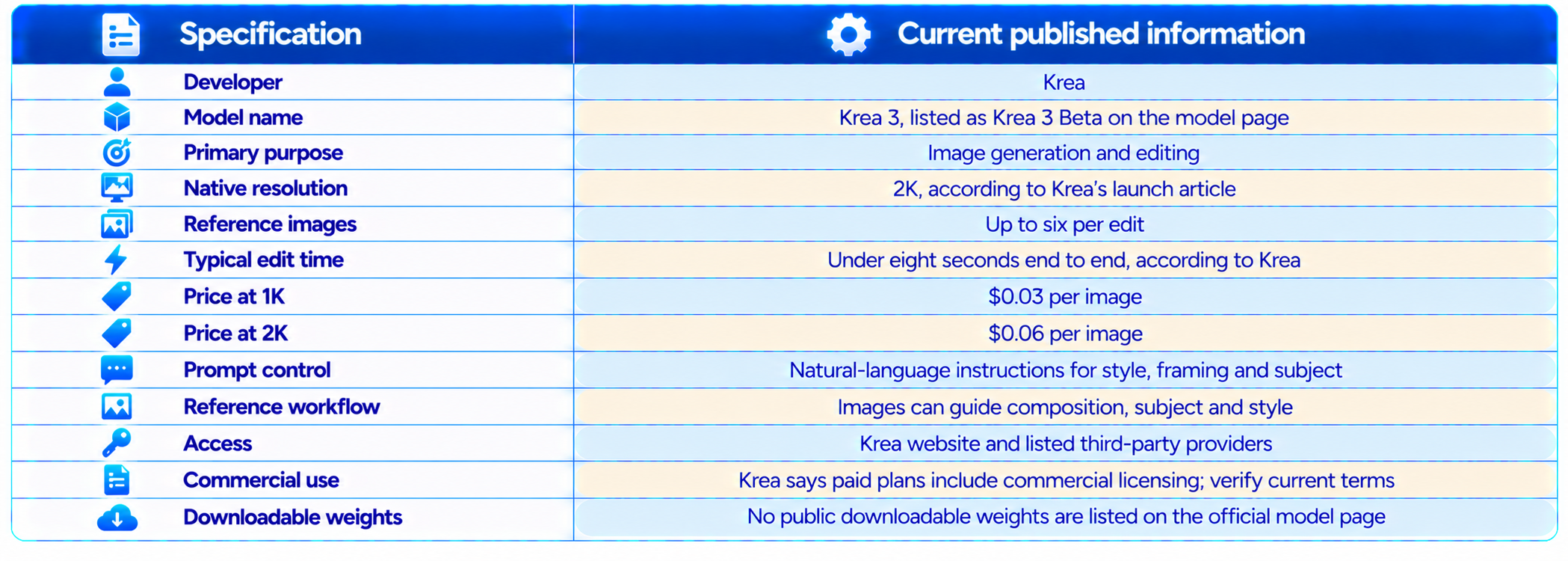
These specifications describe the model and Krea's published launch claims, not a guarantee that every output will have identical latency or fidelity. Actual response time depends on queueing, service load, provider implementation and the complexity of the request. Third-party provider pricing can also differ from Krea's direct price.
3. What Makes Krea 3 Different?
The most important difference is the editing-first approach. The model is meant to change a defined part of an image while preserving the parts that should stay stable. That is more demanding than generating a fresh image because the model must understand both the requested change and the visual information that should remain untouched.
Krea's launch explanation highlights keeping products, characters and text intact while modifying the requested areas. This is the core production promise: fewer accidental changes, less manual cleanup, and more usable variants from one approved source image. It is also the claim worth testing most carefully with your own assets.
The second difference is speed at native 2K. Krea says most edits complete in under eight seconds, with a fastest setup around four to five seconds. This makes the workflow feel closer to iterative editing than waiting for a large render. The numbers are vendor-reported, so treat them as a published performance claim rather than a universal service-level guarantee.
The third difference is per-image pricing. At $0.06 per 2K edit, the model is priced for repeated changes and variant generation. That matters for e-commerce catalogs and marketing teams where the workload is not one hero image but dozens or thousands of related images.
4. Image Quality and Editing Fidelity
For an image editing model, visual quality should not be judged only by whether the output looks attractive. The important questions are whether the edit follows the instruction, whether unchanged areas remain stable, whether details survive, and whether the result is usable without extensive manual repair.
Krea describes Krea 3 as preserving products, characters and text while modifying the requested areas. This is the right target for commercial work, but evaluate it on several image types: a clean product photograph, a person or character, a scene with readable text, and an image containing overlapping objects or complex lighting.
For each test, compare the original and edited image side by side. Check the subject's shape, labels, logos, texture, shadows, reflections, hand placement, edges and background. A polished output can still be a failed edit if a product label changes or the product subtly morphs.
Krea's public page emphasizes professional-quality outputs, but it does not provide a universal independent score that predicts success on every editing task. The most reliable evaluation is a controlled test using the assets your team actually produces.
5. Native 2K Output
Krea says Krea 3 generates natively at 2K. Native generation can preserve fine detail better than generating at a lower resolution and enlarging afterward. It is particularly relevant for product materials, clothing texture, packaging, hair, fine edges and campaign visuals that will be cropped into multiple formats.
The practical benefit is not simply the pixel count. A 2K edit can give designers more flexibility to crop, resize and place the result in a layout. It may also reduce the need for a separate upscaling step, although Krea's wider platform offers dedicated upscaling tools for other workflows.
Do not assume that 2K output is automatically print-ready for every purpose. Resolution is only one part of production readiness. Review intended dimensions, sharpness, artifacts, color treatment, text accuracy and any print-specific requirements before delivery.
6. Reference Images: Up to Six per Edit
Krea's launch material says Krea 3 can work with up to six reference images per edit. References can help communicate a target product, subject identity, composition, material, mood or visual style more concretely than text alone.
A useful workflow is to assign a clear job to each reference. One image can establish the product, another the desired lighting, a third the environment, and another the composition. If every reference expresses a different style or contradictory instruction, the model has a harder problem to solve.
Reference support does not mean pixel-perfect copying or guaranteed identity preservation. The model still interprets the references and generates an output. Check logos, product dimensions, character details and other high-value visual features after every important edit.
7. Speed: Under Eight Seconds per Edit
Krea says most Krea 3 edits take under eight seconds end to end at native 2K, with its fastest setup finishing in around four to five seconds. The benefit is a shorter feedback loop: make a change, inspect it, adjust the instruction and try another variation.
For a designer, that can change how the work is approached. Instead of writing a long prompt and hoping for one perfect result, the designer can explore a sequence of controlled edits. For a marketing team, faster iteration can make it practical to test several backgrounds, seasonal treatments, crops or visual directions before approving the final asset.
Latency varies by service and workload, so measure it on the platform you intend to use. Track median and 95th-percentile time, not only the fastest example. For a large batch, queueing and concurrency can matter as much as the model's per-edit time.
8. Krea 3 Pricing: $0.03 at 1K and $0.06 at 2K
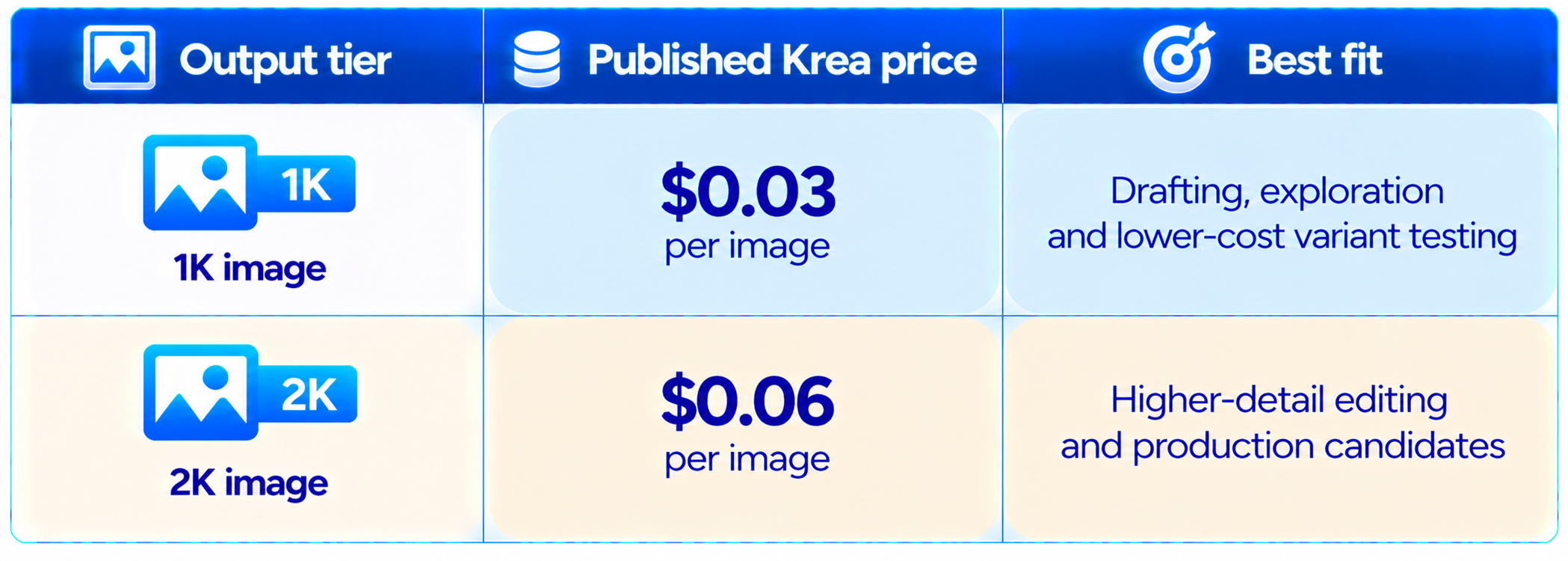
At the published 2K price, 100 edits would cost $6 and 1,000 edits would cost $60 before provider-specific fees or additional workflow costs. At 1K, 1,000 images would cost $30. This is useful for estimating a catalog or campaign budget, but confirm that your provider bills at the same rate and that the price applies to your chosen endpoint.
Krea's launch article compares its 2K price with higher per-image prices for Nano Banana Pro and GPT Image 2. Those are Krea's published comparison figures, not a guarantee that every provider, plan or API has identical pricing. A fair comparison uses the same output requirements, reference inputs and billing assumptions.
The per-image price is attractive only if the output is usable. Budget using cost per approved image: include failed generations, revisions, human review and final retouching. If Krea 3 reduces manual edits and retries, its effective cost can be lower than the raw generation price suggests.
9. Krea 3 vs Nano Banana Pro
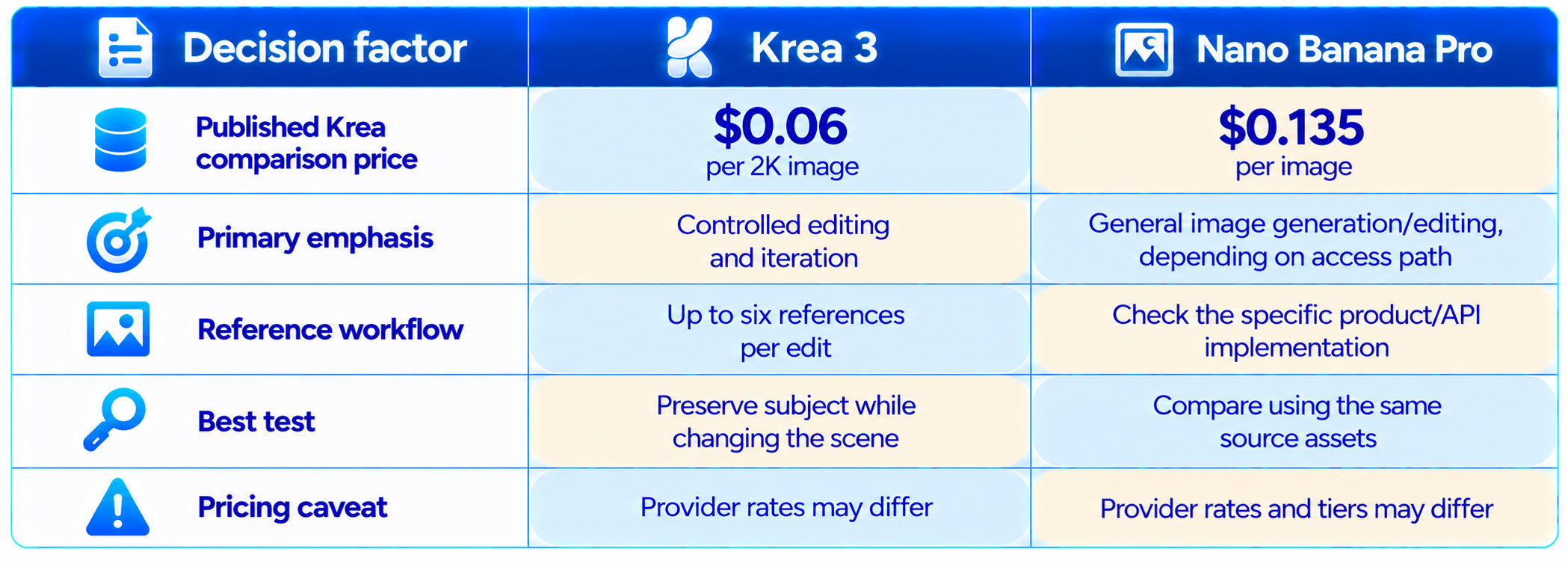
Krea's own launch comparison positions Krea 3 as a lower-cost option for high-volume editing, particularly at native 2K. The product distinction matters more than a simple ranking: Krea 3 is presented as an editing model designed to preserve existing image details while making targeted changes, while Nano Banana Pro may be selected for other generation and editing needs depending on the task.
At launch, Krea cited $0.06 per Krea 3 2K image versus $0.135 per image for Nano Banana Pro in its comparison. This is a provider-published comparison and may not reflect every API or subscription price.
Choose based on your task. Test both models on the same source image, prompt and review checklist. Compare product fidelity, typography, scene quality, reference adherence, latency and the number of revisions needed. A lower list price does not automatically mean a lower cost per approved asset.
10. Krea 3 vs GPT Image 2
Krea's launch article also compares its $0.06 2K edit with a $0.22 per-image figure for GPT Image 2. This signals Krea's pricing strategy, but should not be treated as a universal benchmark because model access, dimensions, request options and provider pricing can change.
If your main task is editing an approved image without changing its subject, test Krea 3 on that workflow. If your task is open-ended image generation, complex instruction following, typography or broader ecosystem integration, run a direct comparison rather than choosing from price alone.
Use the same source image, prompt, target dimensions and quality criteria. Record the number of outputs that pass review and the cost of the accepted result, not just the list price.
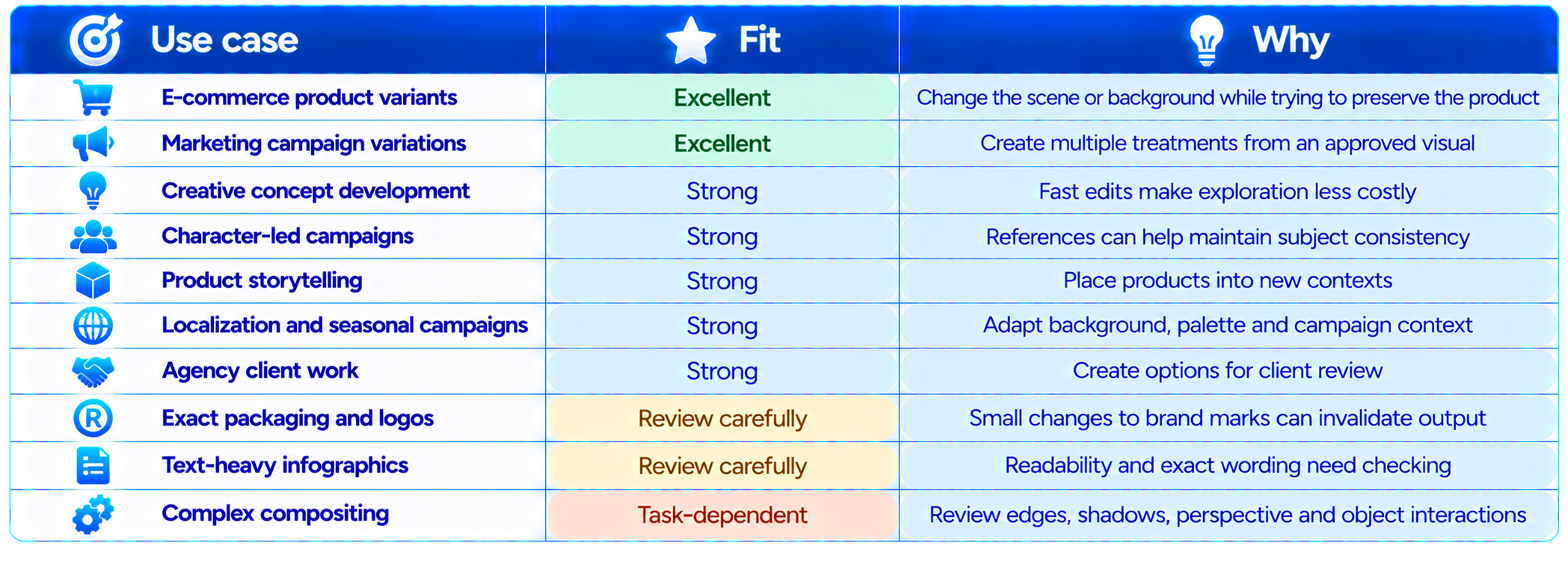
11. Best Use Cases for Krea 3 Beta
12. A Practical Krea 3 Workflow
For the best results, treat Krea 3 as an editing workflow rather than a prompt lottery.
- Start with the strongest source image available. Better input gives the model less to reconstruct.
- State what must remain unchanged, such as product shape, logo, character identity or camera angle.
- Describe only the intended changes in concrete terms: background, material, lighting, color, crop or environment.
- Add reference images with a clear role for each reference. Avoid references that contradict one another.
- Explore at 1K where supported, then use 2K for the selected direction.
- Inspect the output against the source image. Check labels, edges, reflections, proportions and small details.
- Use a second prompt for one correction at a time rather than changing five variables at once.
- Save the approved result and record the prompt and references so the process can be repeated.
- Before publishing, review brand accuracy, text, rights and visual defects.
This process makes it easier to identify whether an issue came from the source image, the reference set or the prompt. It also creates a repeatable process that creative teams can document and improve.
13. Prompting Tips for Better Krea 3 Edits
Krea recommends detailed prompts that describe subject, style, composition, lighting, camera angle, mood and constraints. For editing, the most important addition is an explicit preservation instruction.
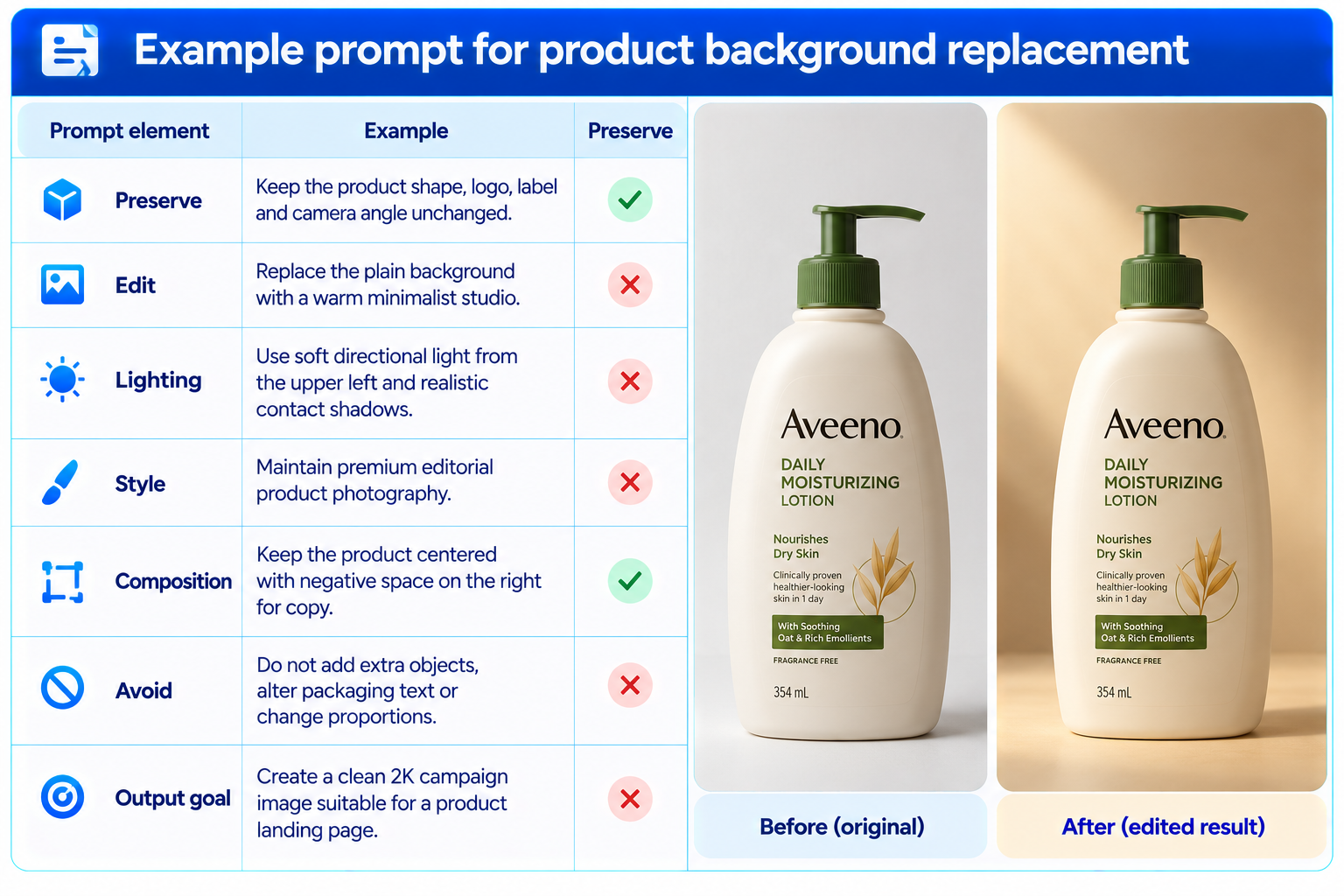
Reusable prompt template: “Edit the supplied image. Preserve [elements that must not change]. Change only [requested areas]. Use [lighting, style and composition]. Keep [brand details, subject identity and proportions] consistent. Do not add [unwanted elements]. The final image should be suitable for [placement or audience].”
For more prompt-engineering ideas, see our 100 Best Veo 3 Prompts 2026 (Copy-Paste).
14. Commercial Use and Licensing
Krea's model page says outputs can be used for commercial work on paid Krea plans, including campaigns, products and client deliverables. Krea's pricing page also lists a commercial license among plan features. Because licensing terms can change and may vary by plan or workspace, review the current terms before using generated images in paid advertising or client work.
A commercial license is not a guarantee that every output is free of intellectual-property or trademark concerns. If an image contains a recognizable brand, person, copyrighted character or third-party asset, verify that you have the necessary rights for the intended use. For enterprise campaigns, keep source files, prompts, reference permissions and approval records.
15. Availability and API Access
Krea 3 is available through Krea's website, where the model page explains how to choose Krea 3 Beta in the Image Tool and optionally add reference images. Krea's launch article also lists access through fal, Hedra, Together AI, Nous Research, OpenRouter and Replicate, while enterprise teams can contact Krea for access.
The exact interface, model identifier, available parameters, billing and queue behavior can differ between Krea's own app and third-party providers. Developers should consult current documentation for their chosen provider and run a small test before integrating the model into production.
16. Limitations You Should Know
Preservation is a goal, not a guarantee. Inspect product details, logos, labels and character identity after every important edit.
Krea's under-eight-second figure is a vendor-reported typical result, not a guaranteed response time for every provider or workload.
The $0.03 and $0.06 per-image prices come from Krea's launch material. Verify live pricing and any provider fees before budgeting.
Native 2K resolution does not automatically mean an image is print-ready or free of artifacts.
Reference images guide the model but do not guarantee exact reproduction of every detail.
Text and typography should be checked manually when exact wording is important.
Commercial use depends on the applicable plan and terms, and users remain responsible for rights in supplied references and final assets.
The public product page does not list downloadable model weights, so do not assume Krea 3 can be run locally.
- Preservation is a goal, not a guarantee. Inspect product details, logos, labels and character identity after every important edit.
- Krea's under-eight-second figure is a vendor-reported typical result, not a guaranteed response time for every provider or workload.
- The $0.03 and $0.06 per-image prices come from Krea's launch material. Verify live pricing and any provider fees before budgeting.
- Native 2K resolution does not automatically mean an image is print-ready or free of artifacts.
- Reference images guide the model but do not guarantee exact reproduction of every detail.
- Text and typography should be checked manually when exact wording is important.
- Commercial use depends on the applicable plan and terms, and users remain responsible for rights in supplied references and final assets.
- The public product page does not list downloadable model weights, so do not assume Krea 3 can be run locally.
17. Who Should Use Krea 3?
Krea 3 is a strong candidate for designers, marketing teams, e-commerce brands, creative agencies and product teams that repeatedly edit existing visuals. Its value is clearest when a team already has an approved product image or campaign concept and needs multiple controlled variants.
It is less compelling for users who only generate occasional images from scratch, need highly deterministic pixel-level editing, or cannot spend time reviewing outputs. Teams that produce large volumes should test it against their current workflow and calculate the cost per accepted asset rather than relying on per-image pricing alone.
18. Is Krea 3 Beta Worth It?
Yes, for the right workflow. Krea 3's combination of native 2K editing, up to six reference images, fast iteration and published per-image pricing makes it especially interesting for commercial image production. The model is built around the repetitive work that follows the first good image: changing a background, adjusting a product scene, exploring campaign treatments and generating alternatives without rebuilding everything.
The strongest reason to test it is workflow economics. At Krea's published $0.06 per 2K edit, a large set of variations can be affordable if the model preserves the important details and reduces manual cleanup. Its speed claim also supports a more iterative creative process.
The main reason to be cautious is fidelity. A single changed logo, product label or facial feature can make an otherwise attractive image unusable. Treat Krea 3 as a fast creative editor that still needs quality control, not as an automatic replacement for design review.
19. Final Verdict
Krea 3 Beta is a practical image-editing release to evaluate if your work involves repeated changes to existing visuals. Krea's focus on reference-guided editing, native 2K output and preserving products, characters and text addresses a real production problem: creating many variants without losing the details that make the original asset valuable.
The published performance and price claims are attractive. Krea says most edits take under eight seconds end to end, supports up to six reference images, and lists prices of $0.03 at 1K and $0.06 at 2K. These claims make the model worth testing for campaign production, product imagery, e-commerce and creative iteration.
Rating: 8.7/10 for creative workflow value, 9/10 for speed potential, 8.8/10 for price at scale, and 8.2/10 for production reliability pending task-specific validation.
Bottom line: Krea 3 Beta is worth trying when you need fast, reference-guided image editing at 2K. Its real advantage is not simply generating another attractive image. It is the promise of making controlled changes at a cost and speed that support everyday creative production.
Frequently Asked Questions
What is Krea 3 Beta?
Krea 3 Beta is Krea's image generation and editing model for reference-guided creative work and fast iteration.
What is the main feature of Krea 3?
Its central focus is editing an existing image while preserving important elements such as products, characters and text.
Does Krea 3 support 2K image?
Krea says Krea 3 generates natively at 2K.
How much does Krea 3 cost?
Krea's launch article lists $0.03 per 1K image and $0.06 per 2K image. Confirm current rates on your chosen platform.
How fast is Krea 3?
Krea says most edits complete in under eight seconds end to end, with its fastest setup around four to five seconds.
How many reference images can I use?
Krea's launch material says Krea 3 supports up to six reference images per edit.
Can Krea 3 preserve product details?
That is a central design goal, but outputs should be checked for changes to logos, labels, proportions and fine details.
Is Krea 3 available through an API?
Krea lists third-party access through providers including fal, Hedra, Together AI, Nous Research, OpenRouter and Replicate. Availability can vary.
Can I use Krea 3 images commercially?
Krea says paid plans include commercial licensing. Check the current plan and terms before commercial use.
Is Krea 3 better than Nano Banana Pro?
It depends on the task. Krea emphasizes controlled editing and low per-image cost; compare both on the same source images and criteria.
Is Krea 3 open source?
Krea's public model page does not list downloadable weights. Treat it as a hosted model unless Krea publishes another distribution option.
Who should use Krea 3?
Designers, marketing teams, agencies and e-commerce businesses that need many controlled image edits and variants.
Recommended Blogs
Google Pics Review: Is Google's New AI Design Tool Good Enough to Replace Canva?
Best AI Video Models 2026: Ranked by Quality, Speed, Price & Use Case
Resources & Community
Join our community of 70,000+ AI enthusiasts and learn to build powerful AI applications. Build Fast with AI helps creators, developers and teams understand and implement practical AI.
Agentic AI Launchpad 2026
A structured 6-week cohort program that takes you from AI basics to building and deploying real-world agentic AI systems, with live sessions, expert mentorship, project reviews and a builder community.
Explore the program: Agentic AI Launchpad 2026
Free AI Resources
Access free tools, workshops and micro-learning to keep building.

