



Most failed AI projects were doomed before a line of code was written, because they picked the wrong workflow. Everyone obsesses over which model to use, when the far more important question is which workflow to point it at. A great model on a bad-fit workflow fails; a decent model on a well-chosen workflow pays for itself. Before you spend a rupee, six questions will tell you whether a workflow is actually ready for AI, or whether you are about to fund another pilot that never ships.
I use these six questions to triage every AI idea, and they save enormous amounts of wasted budget. They are simple, honest, and answerable in a meeting, no data science required. Run any workflow through them and you get a clear read: ready, not ready, or ready with fixes. Let me give you all six, how to score them, and which workflows tend to pass or fail.
Why the Right Workflow Matters More Than the Model
Choosing the right workflow matters more than choosing the right model, because workflow fit determines whether AI can deliver value at all, while model choice only affects how well. The best model in the world cannot rescue a workflow with no countable baseline, inaccessible data, or no owner, and a modest model thrives on a workflow that is repetitive, measurable, and well-owned. Yet teams pour energy into model comparisons and almost none into workflow selection, which is why so many technically fine projects deliver nothing.
This is the cheapest, highest-return decision in any AI initiative, and it happens before you spend on building. Pick a well-suited workflow and the rest of the project gets easier: the data is there, success is measurable, mistakes are survivable, and someone owns the outcome. Pick a poorly-suited one and no amount of engineering saves it, because the problem is structural, not technical. The six questions below are how you make this decision deliberately instead of by hope.
It connects directly to why so many pilots die, which we cover across this series and in why AI POCs never reach production. A poorly chosen workflow is one of the earliest and most avoidable causes of failure. Get the workflow right, and you have removed a whole category of risk before you start.
Question 1: Is It Repetitive and High-Volume?
The first question is whether the workflow is repetitive and high-volume, because AI pays off most where the same kind of task happens over and over. A process a team does hundreds or thousands of times, drafting similar replies, processing similar documents, checking similar records, is ideal, because the time saved multiplies across volume and the pattern is learnable. A one-off or rare task rarely justifies the cost of building and maintaining an AI system.
Volume is what turns small per-task savings into a large total return. Saving two minutes on a task done five times a month is noise; saving two minutes on a task done five thousand times a month is a person's job reclaimed. Repetition also means the workflow has a consistent shape the AI can handle reliably, rather than endless bespoke variation. If your candidate workflow is high-volume and repetitive, it clears the first and most important gate.
The quick test: could you write a rough set of instructions that would cover most cases of this task? If yes, it is repetitive enough. If every instance is a unique judgment call with no common pattern, AI will struggle and the volume to justify it probably is not there either. High volume plus a repeatable pattern is the strongest single signal that a workflow is ready for AI.
Question 2: Is There a Countable Baseline?
The second question is whether the workflow has a countable baseline, a current cost in time or money you can measure, because without one you can never prove the AI worked. If you can say this task takes three people six hours a day today, you have a baseline, and after deployment you can measure the improvement and calculate return. If you cannot quantify the current state, you cannot justify the project or prove its value, which is how good deployments still get killed for lack of evidence.
A countable baseline is also what makes the business case fundable. Leadership approves AI projects that show a clear before-and-after in rupees or hours, and kills the ones that promise vague improvement. Back-office workflows usually have the cleanest baselines, a measurable number of hours on a defined task, which is one reason they make the best first AI projects. Customer-facing or strategic workflows often lack a clean baseline, which makes their value harder to prove even when it is real.
Measure the baseline before you build, not after, as we stress in what AI deployment actually costs in India. A two-week measurement of the current process gives you the number to justify the project and to prove the return later. No baseline, no ROI, and a workflow with no countable baseline is not ready for AI until you create one.
Question 3: Is the Data Accessible?
The third question is whether the data the workflow needs is actually accessible, because AI cannot work on data it cannot reach. This means the information exists in a form the AI can get to: in systems you can read, in documents you can process, in a place that is not locked away or purely in someone's head. A workflow whose knowledge lives only in an expert's memory, or in a system nobody can extract from, is not ready until that data is made accessible.
Accessibility is not the same as clean. Data can be messy, scanned, or multilingual and still be accessible, because handling mess is solvable, as we cover in our post on automating a system with no API. What kills a workflow is data that genuinely cannot be reached: trapped in a system with no export and no automatable interface, or knowledge that was never written down. Before committing, confirm you can actually get the inputs the AI needs and write its outputs somewhere useful.
The practical check: for every input the workflow needs, can you name where it lives and how the AI would read it, and for every output, where it goes? If you can answer for all of them, even if some require OCR or automation, the data is accessible. If some inputs have no reachable source, fix that first, or pick a different workflow, because inaccessible data is a hard stop.
Question 4: Is There a Clear Definition of Correct?
The fourth question is whether there is a clear definition of a correct output, because AI works best where right and wrong are well defined. If you can look at an output and say confidently whether it is correct, extracting the right invoice total, classifying a ticket correctly, drafting a reply that matches the facts, then the AI has a target to hit and you can evaluate it. If correctness is subjective, contested, or endlessly nuanced, both building and measuring the AI become far harder.
A clear definition of correct is what makes evaluation possible, and evaluation is what separates a system from a lucky demo. When you can score outputs against a known right answer, you can build evals, catch regressions, and prove reliability. When correctness is fuzzy, you cannot measure quality, so you cannot trust or improve the system. Workflows with objective right answers are far more ready for AI than those requiring subjective judgment with no agreed standard.
This does not mean AI only suits perfectly objective tasks, but the clearer the definition of correct, the readier the workflow. If correctness is partly subjective, you can still proceed by defining the best available standard and keeping a human in the loop for judgment calls. But a workflow where nobody can agree what a good output even looks like is not ready, because you will have no way to tell whether the AI is helping or hurting.
Question 5: Is a Mistake Recoverable?
The fifth question is whether a mistake in the workflow is recoverable rather than catastrophic, because it determines how much autonomy the AI can safely have. If an error can be caught and corrected with little harm, a misclassified ticket, a draft a human reviews, then AI can run with high autonomy and the workflow is very ready. If a single mistake is irreversible or dangerous, a wrong payment, a legal filing, an unrecoverable data change, then either the workflow needs a human-in-the-loop safeguard or it is not a good early AI candidate.
This question is really about risk, and it shapes the design rather than ruling AI out entirely. High-stakes workflows can still use AI, but they need the AI to prepare and a human to approve the consequential step, the approval boundary we discuss in why AI pilots fail. Low-stakes, recoverable workflows are ideal first projects precisely because you can let the AI do more with less risk, which means faster value and an easier path to trust.
The guidance for a first AI project is to favour workflows where mistakes are cheap and reversible, because they let you move fast, build trust, and learn safely. Save the high-stakes, irreversible workflows for later, once you have a track record and the discipline to design the right human safeguards. A recoverable-mistake workflow is ready now; an irreversible-mistake one is ready only with careful human-in-the-loop design.
Question 6: Will a Named Person Own It?
The sixth question is whether a named person will own the AI system once it is live, because a workflow with no owner produces a pilot that dies on Monday. Someone must be accountable for running it, approving its output, handling exceptions, and fixing it when it breaks. If you cannot name that person before you build, the workflow is not organisationally ready for AI, no matter how well it fits the other five questions, because unowned systems decay.
Ownership is the question teams most often skip, and it is the one that most reliably predicts whether a project survives, as we argue in why AI pilots fail. A workflow is only ready for AI when there is a real person who will take responsibility for the result, not a vague team or the assumption that someone will handle it. The best candidate owner is usually the person who runs or manages the workflow today, because they understand it and have a stake in it working.
Make ownership a precondition, not an afterthought. Before greenlighting an AI project on a workflow, get a named person to accept ownership of the eventual system. If nobody will, that is a strong signal the organisation is not ready to support the project, and a technically perfect deployment with no owner will still fail. Owned workflows ship; orphaned ones join the graveyard.
Why Teams Skip This and Pay for It
Most teams skip workflow readiness entirely and jump straight to which model or which tool, and they pay for it with failed pilots. The reason is that model choice feels like the exciting, technical decision, while workflow selection feels like boring due diligence. So teams spend weeks comparing models and zero time asking whether the workflow they chose can even support an AI system. Then the project fails, not because the model was wrong, but because the workflow was never ready.
The cost of skipping this is enormous and invisible. A team picks an appealing but unready workflow, builds for months, and produces a system that cannot prove value because there was no baseline, or cannot get the data it needs, or has no owner to keep it alive. The money is spent, the pilot dies, and the organisation concludes AI does not work, when the real problem was a five-minute question that never got asked. One skipped readiness check can waste an entire AI budget.
The fix costs nothing: run the six questions before you commit. They take a single meeting, require no technical work, and they catch the structural problems that engineering cannot fix later. Teams that make workflow readiness a standard first step stop wasting budget on doomed pilots and start picking projects that pay off. It is the cheapest quality gate in the whole AI process, and skipping it is the most expensive habit.
Scoring Your Workflow
Turn the six questions into a quick score, giving one point for each clear yes, and you get an honest read on whether a workflow is ready for AI.
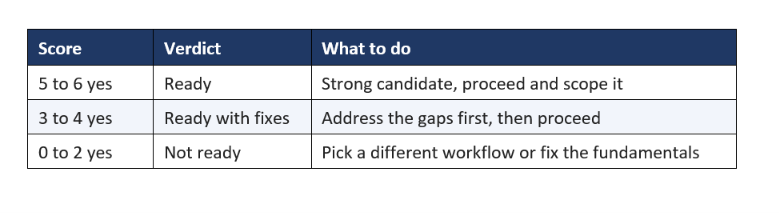
A workflow scoring five or six is a strong first project: proceed with confidence. A three or four is workable once you fix the gaps, for example by creating a baseline or making data accessible before you build. A zero to two is not ready, and forcing AI onto it will waste budget and produce another failed pilot. The score is not a verdict on AI, it is a verdict on this workflow right now, and the fix is usually to choose a better workflow, not a better model.
A Real Example: Two Workflows, One Ready
Here is an illustrative comparison of two AI ideas at the same company, scored against the six questions, so the framework feels concrete. The company considers two projects: an AI to automate invoice processing, and an AI to generate its overall business strategy. Both sound appealing, and only one is ready.
Invoice processing scores six out of six. It is repetitive and high-volume (thousands of invoices), has a countable baseline (three people, several hours a day), the data is accessible (invoices arrive by email and land in an inbox), correct is clearly defined (the right vendor, amount, and date), mistakes are recoverable (a human reviews flagged ones), and the finance-ops lead will own it. This is a ready workflow, and it is exactly the kind of unglamorous back-office win that pays off fast.
The strategy generator scores maybe one out of six. It is a one-off, not repetitive; there is no countable baseline for good strategy; much of the needed context lives in executives' heads, not accessible data; there is no objective definition of a correct strategy; a bad strategy is high-stakes and hard to recover from; and no one would meaningfully own an AI-generated strategy. It fails almost every question, and no model, however advanced, changes that. The lesson is that the exciting-sounding idea was the wrong first project, and the boring one was the right one, which is what the six questions reveal before you spend a rupee.
Workflows That Are Usually Ready, and Usually Not
Certain kinds of workflows tend to pass the six questions and certain kinds tend to fail, and knowing the patterns speeds up your triage. The usual winners are repetitive back-office processes with clear right answers, accessible data, and recoverable mistakes. The usual losers are one-off, high-stakes, or highly subjective tasks with fuzzy success criteria and no clean baseline.
Usually ready
- Document processing and data entry, high volume, clear answers, countable baseline.
- Internal knowledge search and support drafting, repetitive, recoverable, measurable.
- Classification and routing of tickets, records, or emails, objective and high-volume.
- Report and summary generation from accessible data, repetitive with clear correctness.
Usually not ready (yet)
- One-off strategic decisions, no volume, no repeatable pattern, no baseline.
- Irreversible high-stakes actions with no room for a human safeguard.
- Highly subjective creative or relational work with no agreed definition of correct.
- Anything whose data lives only in someone's head or an unreachable system.
The pattern is clear and it points the same way as the rest of this series: start with the repetitive, measurable, recoverable, owned back-office workflow, not the flashy customer-facing idea. The unglamorous workflow that passes the six questions will pay off and build the confidence, and the budget, for the harder projects later. Choose the workflow that is ready, and AI stops being a gamble and becomes a reliable investment.
So before your next AI project, spend the hour it takes to run the six questions, because it is the single cheapest way to avoid a failed pilot. Model choice can wait; workflow choice cannot, because it decides whether value is even possible. Ask whether the workflow is repetitive, measurable, accessible, definable, recoverable, and owned, and let the honest answers pick your project for you. The teams that win with AI are not the ones with the best models, they are the ones that pointed a good-enough model at a workflow that was actually ready.
Frequently Asked Questions
How do I know if a workflow is ready for AI?
Ask six questions: is it repetitive and high-volume, is there a countable baseline, is the data accessible, is there a clear definition of correct, is a mistake recoverable, and will a named person own it. A workflow that answers yes to most is ready and likely to pay off. Several nos mean it is not ready, and forcing AI onto it wastes budget.
Which workflows should I automate with AI first?
Start with repetitive, high-volume back-office workflows that have a countable baseline, accessible data, clear right answers, and recoverable mistakes, such as document processing, classification, or internal knowledge search. These pass the six readiness questions, prove value quickly, and carry low risk, which makes them ideal first AI projects.
What makes a good AI use case?
A good AI use case is repetitive and high-volume, has a measurable current cost, uses data the AI can access, has a clear definition of a correct output, tolerates recoverable mistakes, and has a named owner. The more of these it has, the more likely it is to deliver value. Workflow fit matters more than which model you choose.
Which workflows should not use AI?
Workflows that are one-off, have no countable baseline, rely on data trapped in someone's head or an unreachable system, have no clear definition of correct, or involve irreversible high-stakes actions with no room for a human safeguard are poor AI candidates. Forcing AI onto them wastes budget and usually produces a failed pilot.
How do I choose my first AI project?
Score candidate workflows against the six readiness questions and pick the one that scores highest, favouring a repetitive back-office process with a clear baseline and recoverable mistakes. A strong first project proves value fast at low risk, which builds the confidence and budget for bigger AI work later. Avoid starting with a flashy but poorly-fitting workflow.
Does the workflow matter more than the AI model?
Yes. Workflow fit determines whether AI can deliver value at all, while model choice only affects how well. A great model cannot rescue a poorly-chosen workflow with no baseline, inaccessible data, or no owner, whereas a modest model thrives on a well-suited one. Choosing the right workflow is the cheapest, highest-return decision in an AI project.
What is the most important of the six questions?
No single question is sufficient, but the countable baseline and the named owner are the two that most reliably predict success. Without a baseline you cannot prove value and the project loses funding; without an owner the system decays after launch. If you can only check two questions, check whether the workflow is measurable and whether a real person will own the result.
What if my workflow scores only 3 or 4?
A score of three or four means the workflow is workable once you fix the gaps. Address the missing pieces first, for example create a countable baseline, make the data accessible, or name an owner, then proceed. Fixing the fundamentals before building is far cheaper than discovering them mid-project, and it turns a shaky candidate into a ready one.
Can high-stakes workflows use AI at all?
Yes, but they need a human-in-the-loop safeguard rather than full autonomy. For a workflow where a mistake is irreversible, design the AI to prepare the work and a human to approve the consequential step. This captures most of the value while controlling the risk, and it is why the recoverability question shapes the design rather than ruling AI out entirely.
How long does it take to check if a workflow is ready?
Checking a workflow against the six questions takes a single meeting, often under an hour, because each question is answerable by the people who run the workflow without any technical work. That small investment catches structural problems, like no baseline or inaccessible data, before you spend on building. It is the cheapest quality gate in the AI process and the easiest to skip, which is exactly why so many pilots fail.
Should I start with a customer-facing or back-office workflow?
For a first AI project, start with a back-office workflow, because it usually has a clearer baseline, more accessible data, more recoverable mistakes, and a definable notion of correct. Customer-facing workflows are higher-stakes and harder to measure, which makes them riskier first bets. Prove value on a back-office workflow, then move to customer-facing ones once you have a track record.
Recommended Blogs
- Why AI POCs Never Reach Production (2026 Blueprint)
- What AI Deployment Actually Costs in India (2026)
- 11 Things That Separate a Real AI System From a Demo
- AI Pilots Don't Fail on Accuracy. Nobody Owns Them on Monday.
- Forward Deployed Engineer Salary India 2026 (Bands)

