Indra OCR Review: Can a 1M-Parameter Model Make Document Processing Fast Enough for CPU-Only Workflows?
OCR is often treated as a solved step: take a PDF, extract the words, and pass the text to the next system. In real document pipelines, that is only half the job. The system also has to preserve reading order, separate headings from body text, identify tables and captions, and return an output that downstream software can use. Those requirements are usually handled by a larger document-parsing pipeline, and that extra processing can become the slowest part of a high-volume workflow.
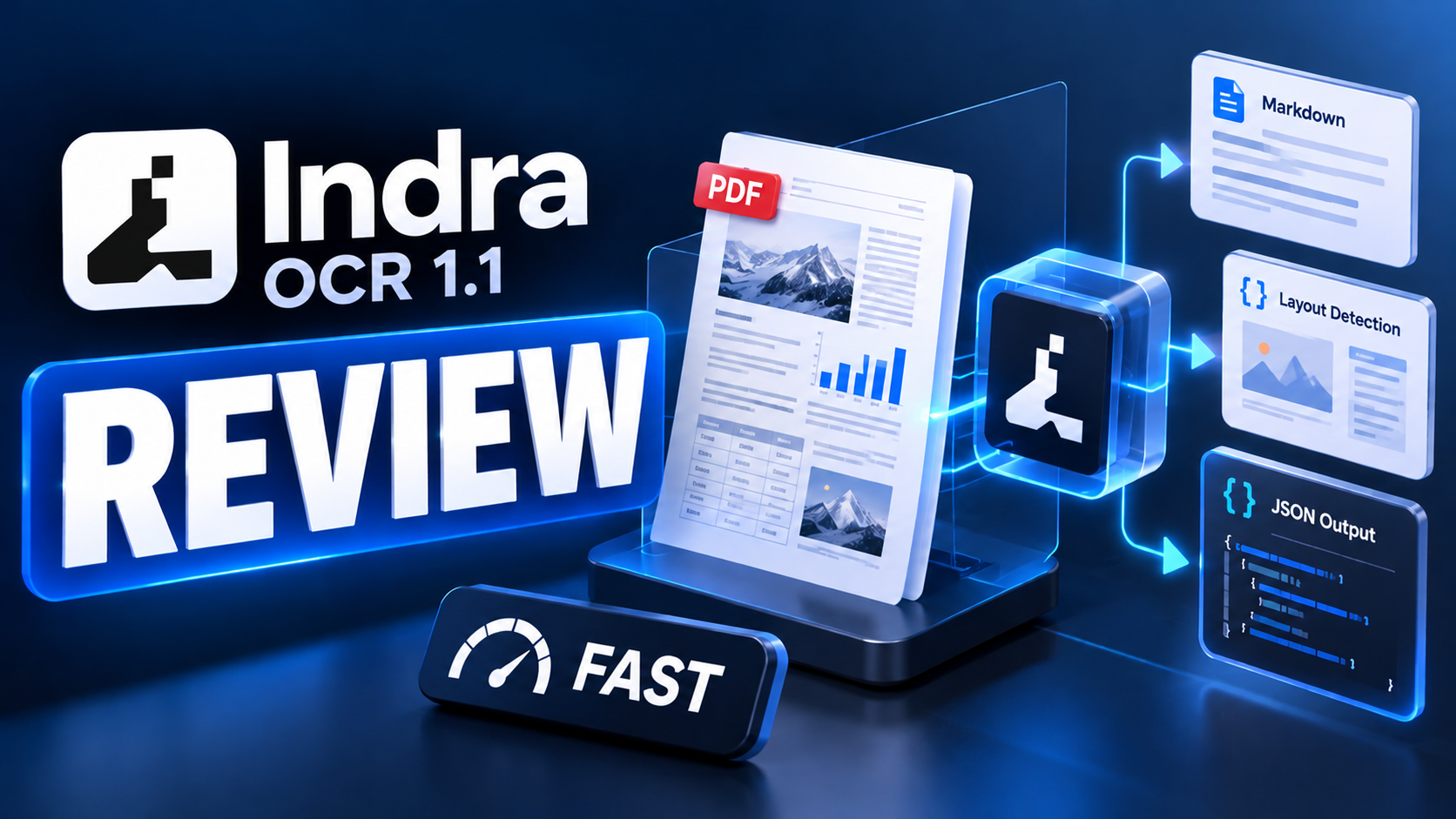
Indra OCR from Datalab takes a different approach. Its main recognizer has about one million parameters, the complete model bundle is roughly 18 MB, and it runs through ONNX Runtime without requiring PyTorch or a GPU. Datalab reports around 230 milliseconds per page on four x86 CPU cores and throughput of roughly 49 pages per second on 32 cores. The package converts PDFs and images into Markdown, plain text or JSON, including line boxes, layout blocks and reading order.
The headline result is a 62.1 score on Datalab's OmniParseBench, compared with 58.4 for PaddleOCR PP-StructureV3 in the published setup. That result needs context: Indra OCR is faster and stronger on the combined headline score in this evaluation, but PaddleOCR's full pipeline scores better on text alone in the default Indra configuration. Indra's optional math mode changes that comparison, and handwriting remains a clear weakness. The practical question is not whether Indra OCR wins every OCR task. It is whether its speed, small footprint and structured output make it the right first stage for your document workload.
For a different document-intelligence profile, our Sarvam Vision 2.1 review looks at a model built around multilingual Indian-language documents, while our GLM OCR vs GLM-5-Turbo comparison explains where specialized OCR fits in a larger automation stack.
QUICK ANSWER
Indra OCR is a lightweight OCR and document-layout package from Datalab. It reads scanned PDFs and images, uses an existing digital PDF text layer when it passes its checks, and exports Markdown, plain text or JSON. The JSON output can include line-level text and bounding boxes, layout blocks, block labels, reading order, confidence values and timing information. The main recognizer has about 1M parameters, and the model files total roughly 18 MB.
In Datalab's published OmniParseBench evaluation, Indra OCR's default mode scores 62.1 overall, 41.3 for text, 56.4 for tables and 88.6 for layout, with a median 228 ms per page on four x86 vCPUs. With the optional --math mode, the overall score rises to 66.8 and the text score to 57.5, but throughput falls. The benchmark contains 16,288 pass/fail tests across 2,937 pages. These are vendor-published results from a common test setup, not a guarantee for every document collection.
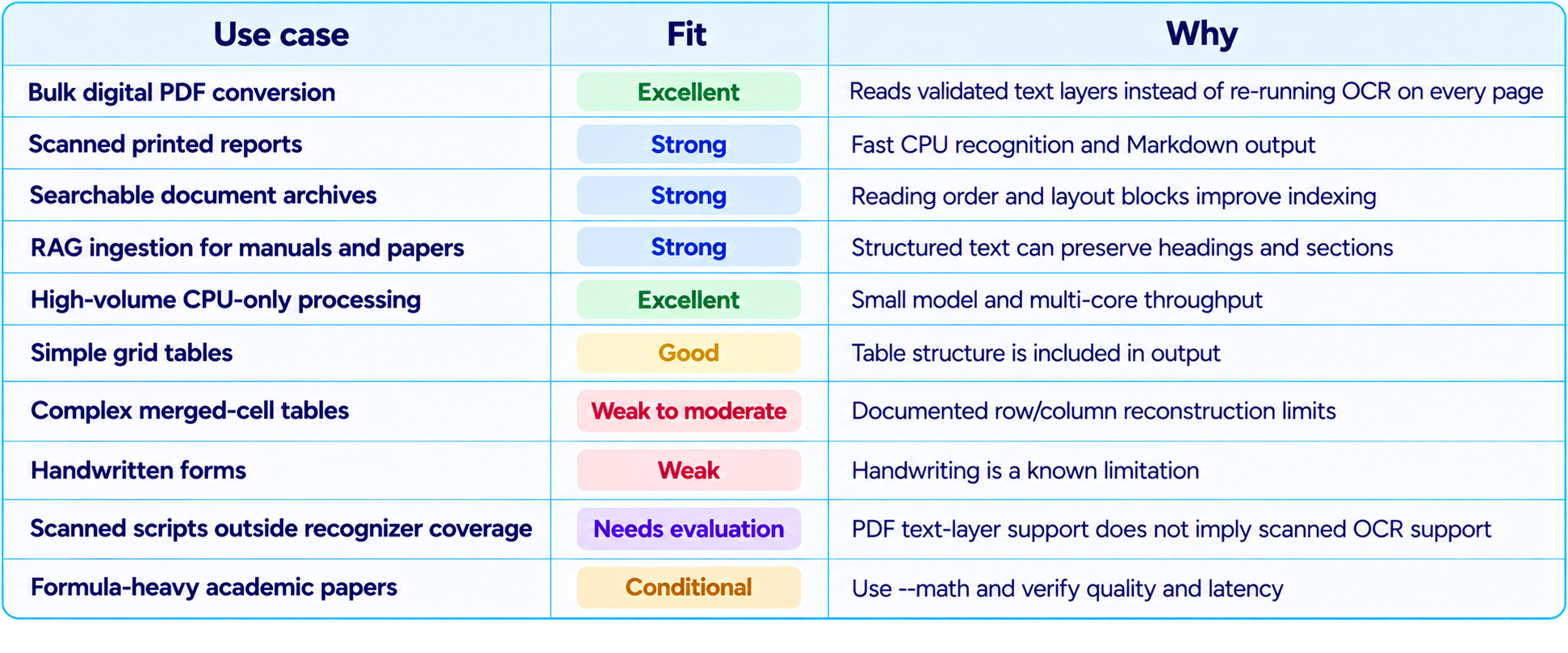
The best fit is high-volume processing of clean printed documents where CPU cost, throughput and layout-aware output matter more than handwriting or difficult table reconstruction. Indra OCR is not a universal replacement for advanced document-intelligence services. Complex merged-cell tables and handwriting are known limitations, and scanned text in scripts outside its OCR recognizer coverage needs a separate evaluation. For teams with a large queue of digital PDFs, invoices, reports, manuals or research papers, however, it is a compelling model to benchmark.
1. What Is Indra OCR?
Indra OCR is a small document-reading system released by Datalab. It combines line detection, character recognition, reading-order handling and document-layout output in a package designed to run on CPU hardware. Instead of returning only a flat string, it can produce a structured representation of a page: lines, coordinates, blocks, labels and an ordered Markdown rendering.
That distinction matters because downstream software rarely needs text in isolation. A document search engine may need the heading associated with a paragraph. A form-processing system needs fields to stay associated with their labels. A retrieval-augmented generation pipeline needs chunks that preserve the section they came from. A document archive may need page-level coordinates to show where a result appeared in the original scan.
Indra OCR aims to make those outputs available without deploying a large vision-language model. Its recognizer is approximately 1M parameters, and the published package uses ONNX Runtime, OpenCV and pypdfium2 rather than PyTorch. This makes it attractive for local document processing, CPU-only servers and workloads where running a GPU service for every page would be excessive.
A naming note for people searching for “Indra OCR 1.1”: the public product is consistently called Indra OCR. The GitHub package release page lists version 0.3.1, while some Hugging Face file metadata displays a v1.1.0 label. Public sources do not consistently identify the product itself as “Indra OCR 1.1,” so this review evaluates the current Indra OCR release and its documented model files rather than assuming a separate 1.1 product edition.
2. Indra OCR Specifications at a Glance
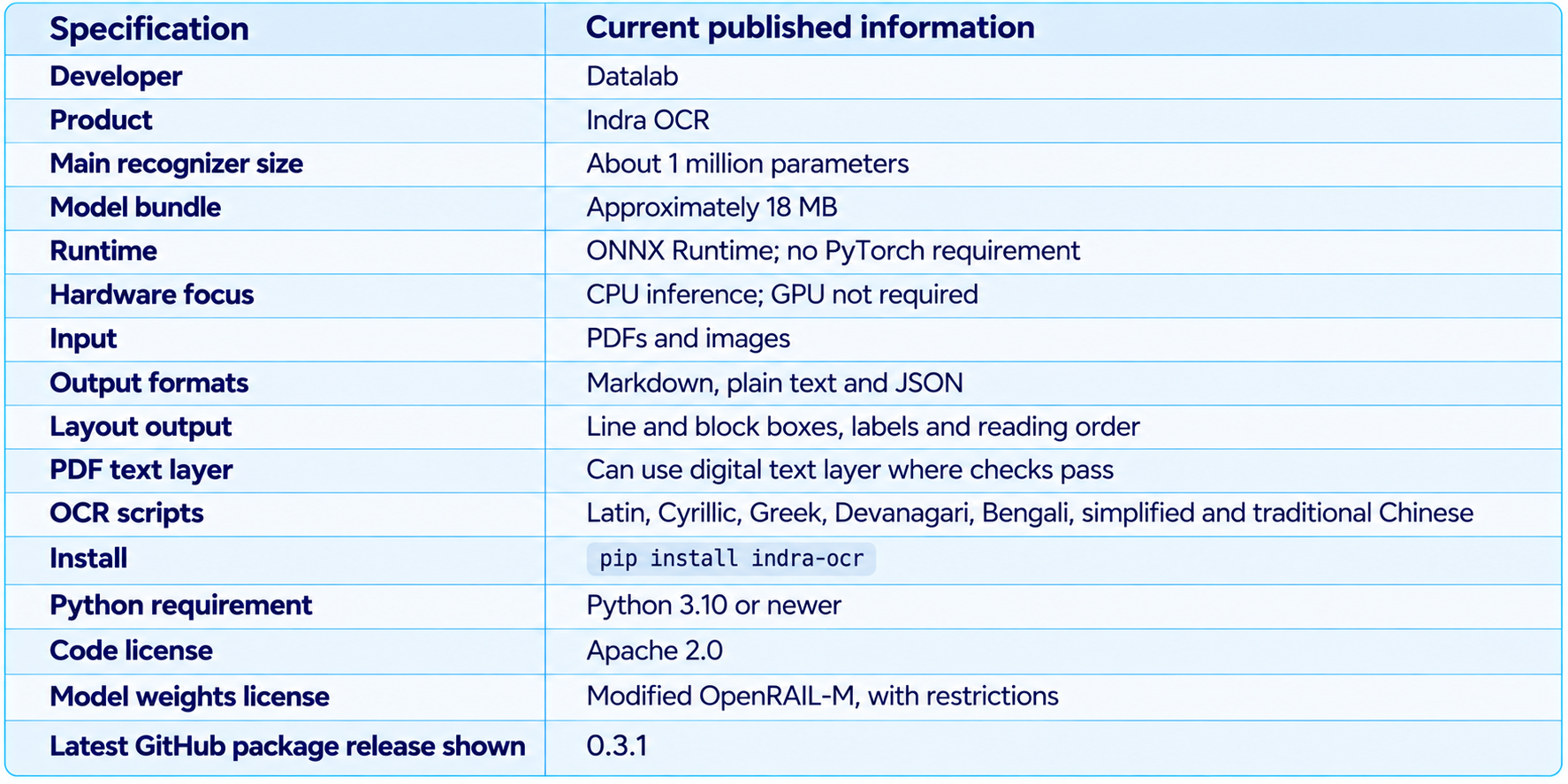
The distinction between code and weights licensing is important. The repository code is Apache 2.0, but the model weights use a modified OpenRAIL-M license. The repository describes free use for research, personal use and startups under $20 million in funding or revenue, with restrictions including competitive use against Datalab's API. Teams planning commercial deployment should read the actual license and contact Datalab if their use falls outside its stated terms.
3. Benchmark Results: What Does 62.1 Mean?
Datalab evaluates Indra OCR on OmniParseBench, a benchmark it describes as containing 16,288 pass/fail tests across 2,937 pages. The published comparison runs each engine on the same x86 machine with four vCPUs, one page at a time, using the same pages and scorer. The headline score averages the text, tables and layout families. This is more useful than comparing unrelated benchmark numbers collected under different hardware or evaluation rules.
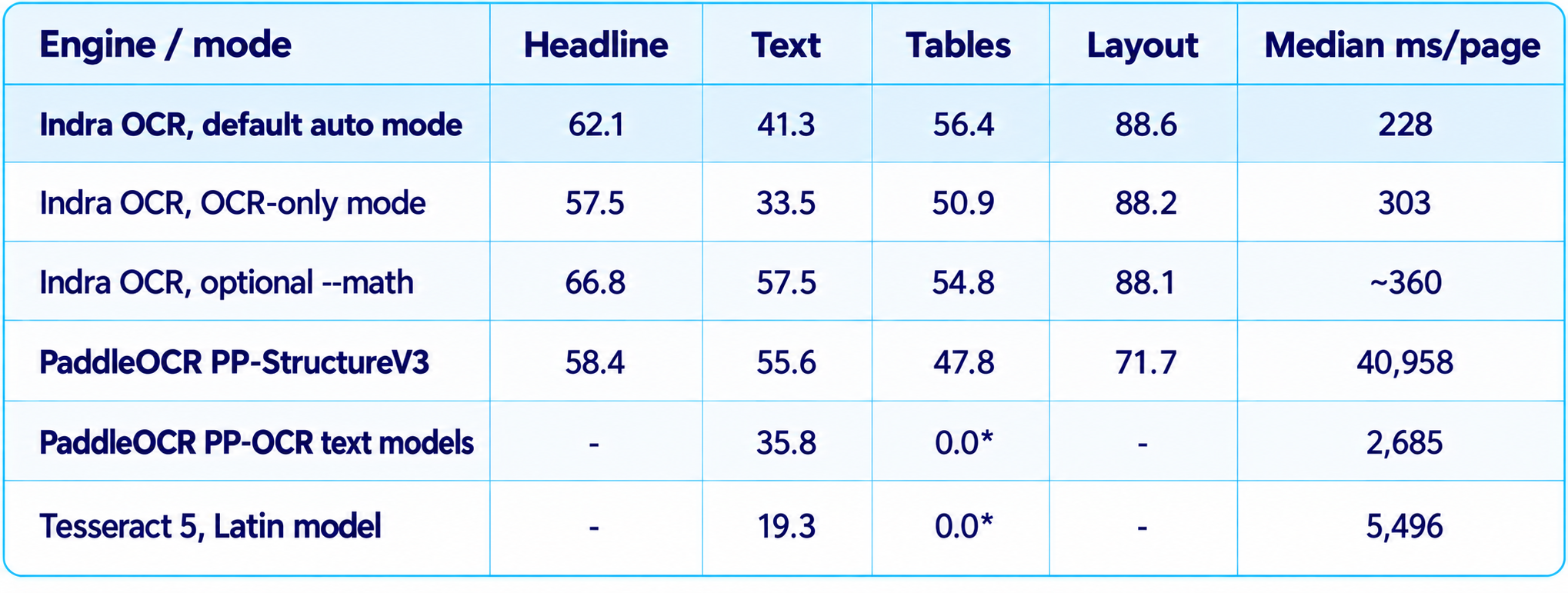
*The text-only OCR engines output lines rather than structured tables and layout blocks, so the benchmark does not score those categories in the same way. PP-StructureV3 is a full document pipeline, and its published run used a time-capped subset of pages; Datalab notes that its timing should be treated as an upper bound in this comparison.
The right interpretation is nuanced. Indra OCR's default pipeline has the best headline score in this listed comparison and a particularly strong layout score. But its default text score, 41.3, is below PP-StructureV3's 55.6. The optional --math mode raises Indra OCR's text score to 57.5 and headline score to 66.8, but it is slower. For a workflow dominated by clean text recognition, the right mode may differ from a workflow that needs fast layout extraction.
4. CPU Speed: The Main Reason to Pay Attention
Indra OCR's most distinctive advantage is the combination of speed and structure on ordinary CPU hardware. Datalab reports around 230 milliseconds per page on four x86 vCPUs in the benchmark, with single-threaded workers that can be run in parallel across cores. Its 32-core throughput run reached 49.4 pages per second. The same published run measured 4.28 pages per second for PaddleOCR's PP-OCR text models and 2.92 for Tesseract 5.
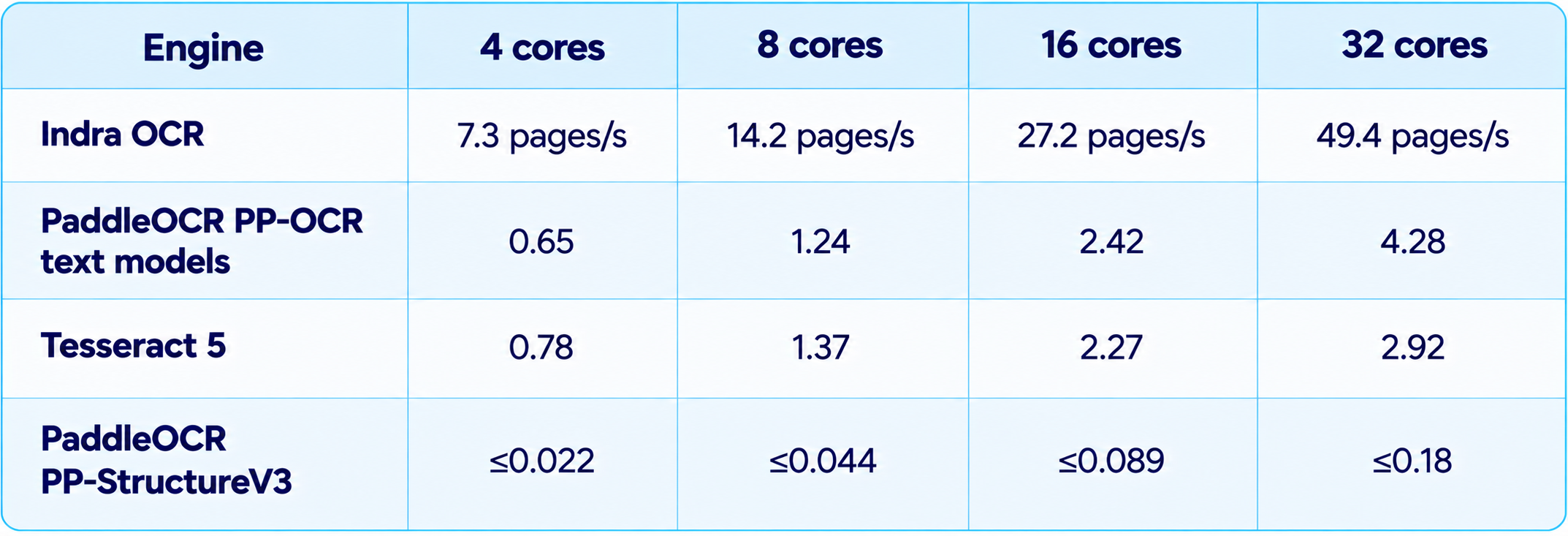
The comparison is meaningful because all engines used the same x86 machine and the same 300 OmniParseBench pages, with one single-threaded worker per core and OCR mode enabled. Under that setup, Indra OCR was 11.5 times faster than the PP-OCR text models and 16.9 times faster than Tesseract at 32 cores. The much larger difference against PP-StructureV3 reflects a comparison with a more complete layout-and-table pipeline, and the timing is an upper bound because that pipeline ran a time-capped subset.
Do not treat 49 pages per second as a fixed speed on every computer. CPU model, core count, file type, page resolution, image quality, worker count, model loading and the proportion of digital PDFs all affect throughput. Datalab also notes that the 300-page run including model loading reached 37.7 pages per second on 32 cores, lower than the warmed-up throughput result. Use the number as evidence of the system's design goal, then benchmark your own documents.
5. Digital PDFs vs Scanned PDFs
One of Indra OCR's practical design choices is that it does not OCR every page by default. In auto mode, it checks whether a PDF has a usable text layer and reads that layer when it passes validation, using OCR for content that is missing or fails the checks. Digital PDFs can therefore be faster than scanned pages because the system can avoid full image recognition where the original text is already available.
Datalab reports a median of about 130 milliseconds per page for digital PDF pages in its throughput run, compared with 304 milliseconds for pages that needed OCR. The exact gain depends on the document, but the principle is sound: do not spend compute re-recognizing text that is already present and trustworthy.
This hybrid approach is useful for archives that mix digitally generated PDFs with scans, exported reports, photocopied documents and pages that contain both selectable text and image-based content. It also means developers should test both auto mode and OCR-only mode. OCR-only is valuable when the digital text layer is broken, out of order or does not represent the visible page.
6. Table Extraction: Useful, With Important Limits
Indra OCR's default table score is 56.4, and the optional math mode scores 54.8 on the same published comparison. These results make it useful for many ordinary printed tables, but the benchmark also shows that table reconstruction is not the same thing as recognizing the text inside a table.
The model documentation explicitly warns about complex tables: merged or spanning cells, wrapped cell text, nested headers and tables without ruling lines can place content in the wrong rows or columns. This is an important limitation for financial statements, scientific papers, invoices with complicated line items and reports that use multi-level headers.
A practical deployment should validate table cells against the source page. If your documents use simple grid tables, Indra OCR may be a good fit. If your workload is dominated by complex financial tables or scientific formulas, compare it with a larger document-intelligence model and consider using Indra OCR as a fast first pass with a more capable fallback for uncertain pages.
7. Handwriting, Math and Difficult Scans
Indra OCR is designed around speed on clean printed text. Datalab identifies handwriting as a limitation and reports only about 8% on the OmniParseBench handwriting tests. That is not suitable for a workflow where handwritten forms, notes, signatures or annotations carry important information.
The optional --math flag is a separate tradeoff. It changes the output behavior for mathematical content, producing formulas as LaTeX and improving the reported text and headline scores on the benchmark. It also makes the pipeline slower: Datalab reports lower pages-per-second throughput when the option is enabled. Enable it only when the document set contains equations or mathematical notation that needs the extra handling.
For faded scans, skewed pages, low-resolution photocopies, unusual fonts and dense diagrams, build a test set before choosing a production threshold. A system that is excellent on clean print can still fail on a small number of degraded pages, and those pages may contain the most important information in the collection.
8. Installation: How to Run Indra OCR
The project supports Python 3.10 or newer and can be installed from PyPI. The first run downloads the model files, around 18 MB in total, from Hugging Face. It installs ONNX Runtime, OpenCV and pypdfium2, and does not require PyTorch.
Install the package
pip install indra-ocrConvert a PDF to Markdown
indra-ocr paper.pdfProcess multiple PDFs
indra-ocr *.pdf --out results/Export layout and line data as JSON
indra-ocr scan.png --format jsonForce OCR instead of using the PDF text layer
indra-ocr paper.pdf --mode ocr --timingsRender math as LaTeX
indra-ocr paper.pdf --mathFor Python applications, the project exposes an indra_ocr package. A basic workflow loads the converter and iterates through pages returned by convert(). For bulk processing, convert_many() can distribute pages across worker processes. On macOS and Windows, the project documentation warns that multiprocessing code should use the standard if name == '__main__' guard.
The project also provides a local viewer that displays the page, line and layout boxes, reading order, rendered Markdown, JSON and timing information. That is useful for debugging document extraction because it connects a questionable text result to the exact region on the original page.
9. Licensing and Commercial Use
The source code is Apache 2.0, but the model weights use a modified OpenRAIL-M license. Those terms are not interchangeable. A company should not infer that the weights have unrestricted commercial rights simply because the code is permissively licensed.
The repository says the model is free for research, personal use and startups below $20 million in funding or revenue, and restricts use that competes with Datalab's API. For a commercial product, a large company, a regulated deployment or a service that directly competes with Datalab, read the full license and obtain clarification before rollout. This is especially important when model weights are bundled into an internal service or redistributed as part of a product.
10. Best Use Cases for Indra OCR
11. Limitations You Should Know
- The default text score trails PP-StructureV3 in Datalab's published benchmark, even though Indra OCR wins on the headline score and layout.
- Complex tables with merged cells, nested headers or wrapped cell text can be reconstructed incorrectly.
- Handwriting is not a target strength; Datalab reports about 8% on the benchmark's handwriting tests.
- The optional math mode improves formula handling and reported scores but reduces throughput.
- The OCR recognizer's script coverage is narrower than the scripts readable from a usable digital PDF text layer.
- The headline 49-page-per-second figure depends on 32 CPU cores and a benchmark workload; it is not a single-core speed claim.
- The first run downloads model files, and multiprocessing requires care in some environments.
- The model weights have a modified OpenRAIL-M license, so commercial rights need separate review.
12. Recommended Production Workflow
The safest way to deploy Indra OCR is to treat it as a fast document-ingestion stage with explicit validation, not as an unquestioned source of truth.
- Start with representative PDFs and images, including clean pages, scans, tables, rotated pages and low-quality scans.
- Run auto mode first so the pipeline can use trustworthy PDF text layers and OCR the parts that need recognition.
- Use OCR-only mode for documents whose embedded text is missing, scrambled or inconsistent with the visible page.
- Choose Markdown for search and RAG, plain text for lightweight text processing, and JSON when downstream systems need coordinates or structured blocks.
- Enable --math only for document sets that need formula extraction, then measure the speed tradeoff.
- Build validation checks for critical fields such as dates, invoice totals, identifiers, table rows and legal references.
- Route uncertain pages, handwriting and complex tables to a stronger document model or a human reviewer.
- Track pages per second, error rate, correction time and total cost per accepted page rather than optimizing for speed alone.
If extracted documents will feed an AI agent or retrieval system, our context engineering guide explains how to preserve useful source context, while our guide to AI agents covers the next stage: turning retrieved information into tool-driven actions.
13. Is Indra OCR Worth It?
Yes, if your workload is dominated by printed documents and you want high-throughput OCR without a GPU. Indra OCR's small model footprint, ONNX Runtime deployment, PDF text-layer handling and layout-aware output make it a compelling option for document ingestion, searchable archives and RAG preparation. The published speed numbers are strong, and the benchmark shows that its layout quality can make up for weaknesses in default text recognition on the combined score.
It is less suitable when handwriting, complex tables, difficult scans or broad scanned-script coverage are central requirements. In those cases, test a larger document model or use Indra OCR as a first-pass filter with a specialist fallback. Also review the modified OpenRAIL-M model-weight license before commercial deployment.
My verdict: 9.2/10 for CPU speed, 8.8/10 for layout extraction, 7.8/10 for default text recognition, 6.0/10 for handwriting and 8.8/10 overall for its intended use case. These are editorial ratings based on the published feature set and benchmark profile, not official benchmark scores.
14. Final Verdict
Indra OCR is interesting because it targets a practical bottleneck rather than chasing the largest model. A recognizer with about one million parameters, an approximately 18 MB model bundle and CPU-first execution can make document processing cheap enough to run close to where files are stored. Its structured output also gives it a role beyond extracting a wall of text.
The strongest evidence is the published OmniParseBench comparison: 62.1 overall in default mode, 88.6 for layout and 228 milliseconds median page latency on four x86 vCPUs. The optional math mode reaches 66.8 overall and 57.5 for text, with a slower runtime. On a 32-core CPU, Datalab reports 49.4 pages per second in its throughput run. These are substantial results for a lightweight OCR pipeline, provided the workload resembles the published tests.
The important caveat is that Indra OCR is not the answer to every document problem. It does not make handwriting easy, and its documentation warns that complex tables can be reconstructed incorrectly. Its scanned-image language coverage also differs from the broader coverage available when reading a digital PDF's text layer. A production team should validate the exact document types and scripts it handles.
Bottom line: Indra OCR is worth testing for CPU-only PDF conversion, printed document archives, high-volume ingestion and layout-aware RAG preparation. Treat it as a fast first stage, measure accuracy on your own pages, and route difficult documents to a stronger model. For those workloads, its speed-to-footprint ratio is the reason to pay attention.
Frequently Asked Questions
What is Indra OCR 1.1?
Indra OCR is Datalab's lightweight OCR and document-layout package. Public sources consistently call the product Indra OCR; the package release and model metadata use different version labels, so “1.1” is not a consistently stated product name.
How many parameters does Indra OCR have?
The main recognition model has about 1 million parameters, and the full model bundle is approximately 18 MB.
How fast is Indra OCR?
Datalab reports a median of about 228 milliseconds per page on four x86 vCPUs and throughput around 49 pages per second on 32 CPU cores in its published test.
What is Indra OCR's OmniParseBench score?
The default mode scores 62.1 overall, with 41.3 for text, 56.4 for tables and 88.6 for layout. Optional --math mode scores 66.8 overall.
Can Indra OCR convert PDFs to Markdown?
Yes. It can convert PDFs and images to Markdown, plain text or JSON.
Does Indra OCR require a GPU?
No. It is designed for CPU inference and uses ONNX Runtime.
Does Indra OCR support handwriting?
Handwriting is a documented weakness. Datalab reports about 8% on the benchmark's handwriting tests.
Is Indra OCR open source?
The code is Apache 2.0, but the model weights use a modified OpenRAIL-M license with additional restrictions.
Is Indra OCR good for RAG?
It can be a strong ingestion component for printed PDFs because it exports structured Markdown and JSON, but validate reading order, tables and source references before indexing the output.
Recommended Blogs
Sarvam Vision 2.1 Review: Benchmarks, Price, OCR & Is It Worth It? (2026)
GLM OCR vs GLM-5-Turbo: Which AI Model Should You Use? (2026)
Latest AI Models Comparison 2026: GPT-6 Astra vs Fable 5.1 vs Gemini 3.8 Flash & More
Resources & Community
Join our community of 70,000+ AI enthusiasts and learn to build powerful AI applications. Build Fast with AI helps creators, developers and teams understand and implement practical AI.
Agentic AI Launchpad 2026
A structured 6-week cohort program that takes you from AI basics to building and deploying real-world agentic AI systems. Includes live sessions, expert mentorship, project reviews and a builder community.
Ready to go from learning to building? Join the next cohort: Agentic AI Launchpad 2026
Free AI Resources
Access free tools, workshops and micro-learning to keep building.