



Ideogram 4.5 Review: Can Its New Precise Editing Finally Make AI Images Production-Ready?
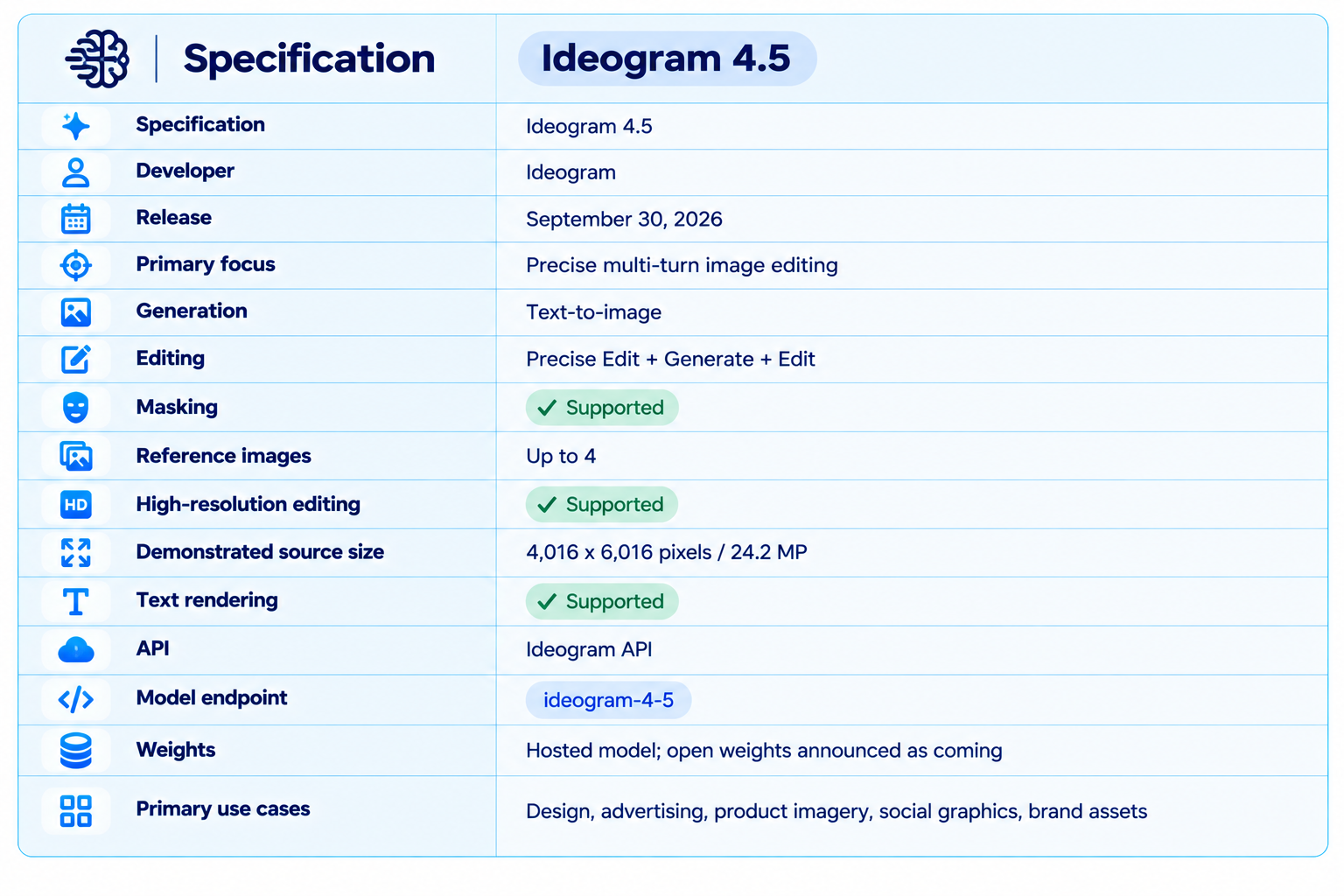
Ideogram 4.5 is the latest image model from Ideogram, released on September 30, 2026 with a very specific focus: precise image editing that remains stable across multiple revisions. Instead of treating every edit as a new generation, Ideogram 4.5 is designed to change the part you ask it to change while preserving the rest of the image.
That distinction matters for real creative work. A marketing team may start with a product image, change the color, adjust the material, replace the background, update the typography and then create several regional variants. Traditional generative editing can introduce small shifts at every step. Ideogram says 4.5 reduces that drift, preserving shape, texture, color and other untouched details through multi-turn edits. This is a vendor claim, but it is also the exact behavior the product is designed to address.
The model is available in the Ideogram app and through the developer API. The API exposes separate generation and precise-edit endpoints, supports masked edits, and allows up to four reference images to guide an edit. Ideogram also demonstrates editing a 4,016 x 6,016 pixel, 24.2-megapixel source without downscaling the original image.
QUICK ANSWER
Ideogram 4.5 is a specialized AI image generation and editing model built around precise, repeatable edits. Its biggest improvement is not simply better image generation. It is the ability to make a series of targeted changes while keeping the rest of an image stable.
The model supports text-to-image generation, precise image editing, masked edits, reference-image guidance and high-resolution editing. Ideogram's API documentation says Precise Edit can preserve untouched pixels from the input and return the result at the input image's own width and height. It also supports up to four reference images for product, material or style guidance.
Current subscription pricing lists Plus at $15 per month when billed annually, Pro at $42 per month annually and Team at $20 per user per month annually. API usage is separately credit-based and metered according to text and image tokens, output resolution and quality settings.
The most important competitive point is workflow. Ideogram 4.5 is particularly attractive for brand assets, product photography, advertising creatives, posters, social graphics, packaging concepts and other work where the same image must survive several controlled edits. It is less compelling when the only goal is generating a beautiful one-off image from a prompt.
1. What Is Ideogram 4.5?
Ideogram 4.5 is Ideogram's September 2026 image model focused on precise editing and consistency across revisions. Ideogram describes it as its most precise edit model and specifically targets pixel shifts, color changes and texture artifacts that can accumulate when an image is edited repeatedly.
This makes Ideogram 4.5 different from a typical text-to-image upgrade. The central product promise is edit stability. You can start with an image you already like, tell the model what to change, and continue editing instead of regenerating the entire composition.
The model can also generate images from scratch. That means it can sit at both ends of a creative workflow: generate the initial visual, then use precise editing to refine it.
2. Ideogram 4.5 Specifications
3. What Makes Precise Edit Different?
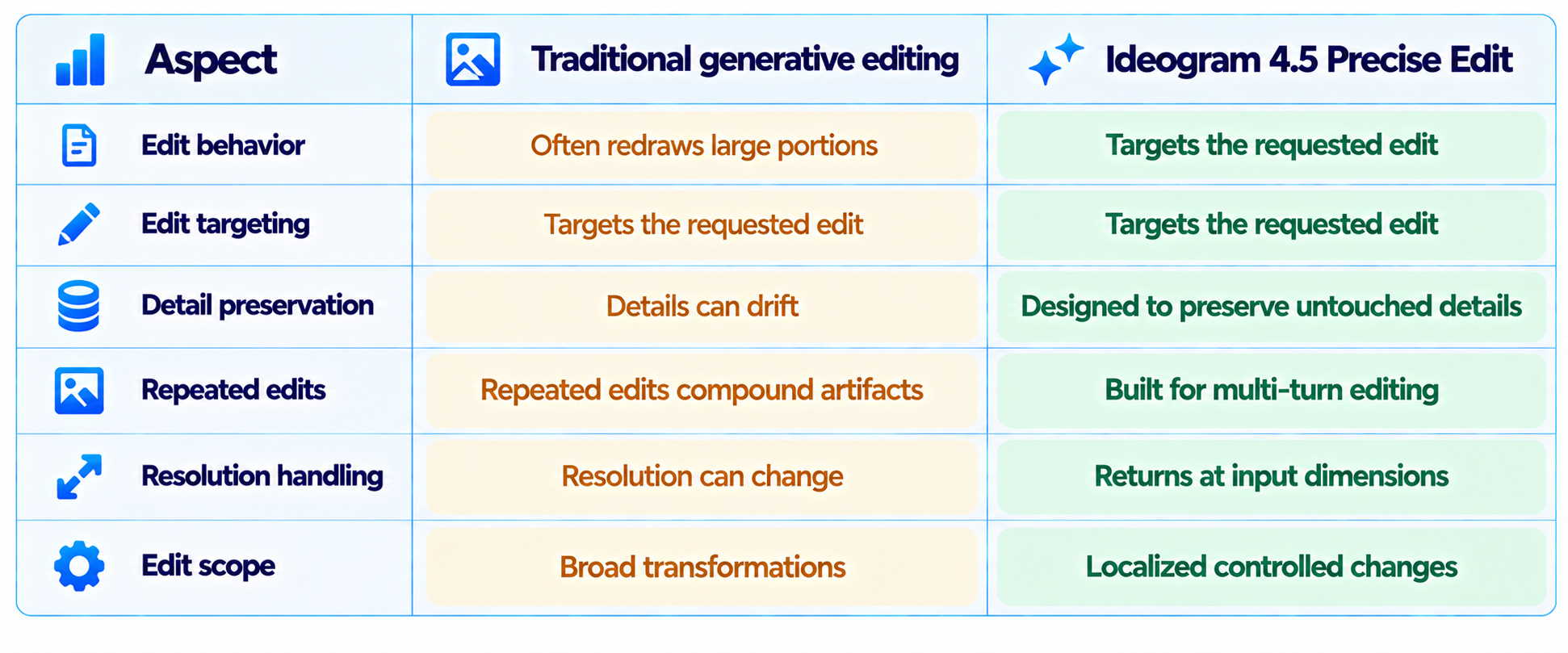
The key feature is Precise Edit. Ideogram's API documentation states that pixels outside the requested edit can be copied from the input image, while the edited result keeps the input image's width and height. This is a different workflow from asking a model to regenerate the entire canvas with a similar prompt.
Consider a product photograph of a sneaker. You may want to change only the material from leather to knit, then change the color, then alter the sole. A conventional image-to-image workflow can subtly change the shoe's shape, camera angle or lighting on every pass. Precise Edit is designed specifically to reduce those unwanted changes.
The strongest value is therefore preservation. Generation quality matters, but production designers also need the model to avoid changing things they did not ask it to change.
4. Multi-Turn Editing Is the Main Upgrade
The real test for Ideogram 4.5 is not the first edit. It is the fifth edit.
A production image rarely stops after one instruction. A designer may first remove a distracting object, then change the product color, then adjust lighting, then translate the headline and finally create another campaign variant. The more times an image is regenerated, the more opportunities there are for small inconsistencies to accumulate.
Ideogram explicitly built 4.5 around this problem. Its model page demonstrates repeated edits against other image models and says 4.5 maintains cleaner results as edits accumulate. This is a vendor demonstration rather than a neutral benchmark, so the correct conclusion is that Ideogram has built and demonstrated a workflow specifically optimized for multi-turn editing.
5. Image Editing Accuracy
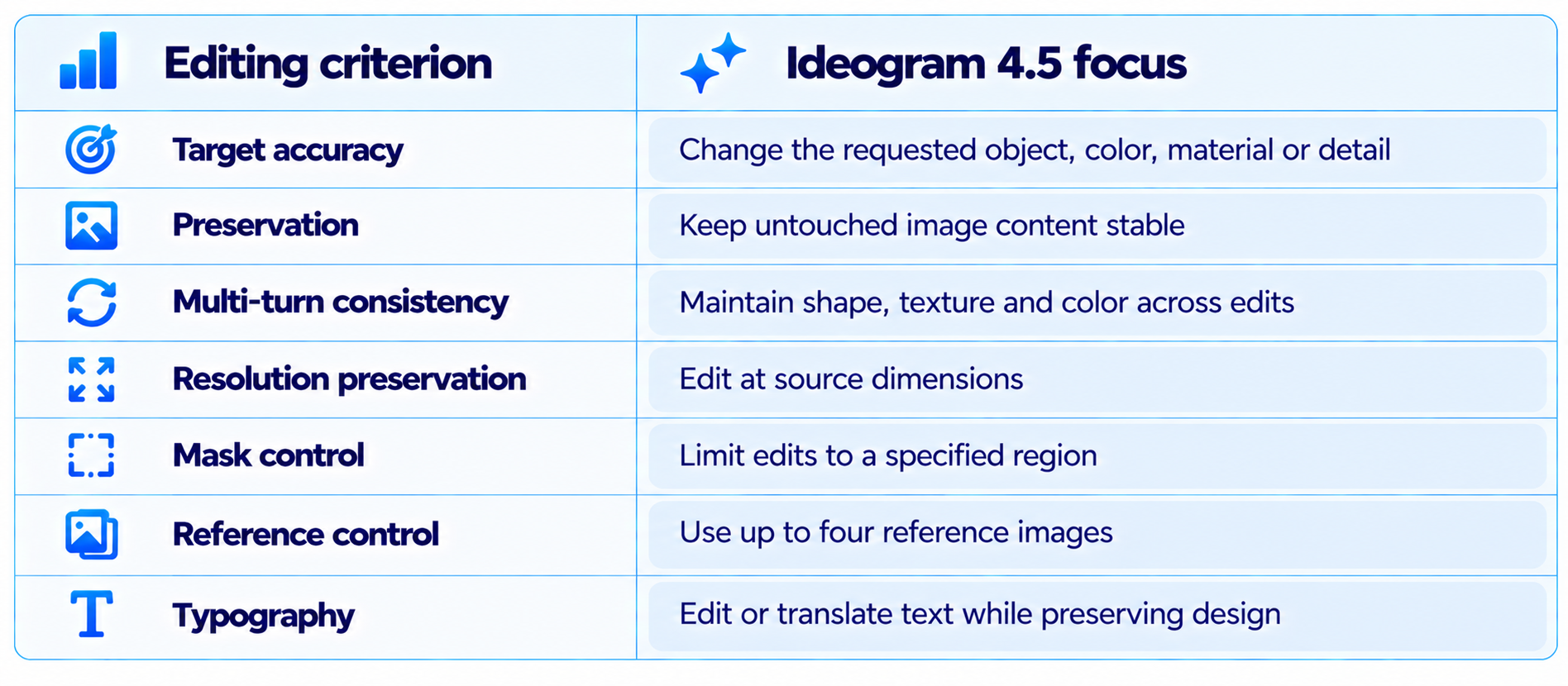
For an editing model, accuracy means more than visual quality. A useful evaluation asks whether the requested region changed, whether the requested change was correct, and whether everything else stayed stable.
The strongest documented evidence is the API behavior itself. Ideogram says Precise Edit preserves untouched pixels and can work directly at the input image's own dimensions. That is a concrete product capability rather than a generic quality claim.
For professional workflows, this can reduce manual cleanup. A product photographer or marketing designer can focus on the requested variation instead of repeatedly fixing unrelated changes introduced by a full regeneration.
6. Text Rendering and Typography
Ideogram has long differentiated itself around text inside generated images, and 4.5 continues that positioning. The current Ideogram homepage describes the model around sharper prompt fidelity and readable type in every layout.
That matters for posters, advertisements, thumbnails, packaging, social media graphics, event creatives and presentation visuals. In these workflows, a visually strong image with broken typography still requires manual repair.
Ideogram 4.5 also makes text editing part of the editing workflow. Instead of rebuilding the entire graphic to change a headline or translate a piece of text, the model is designed to preserve the surrounding design while changing the requested text.
7. High-Resolution Editing
Ideogram's most concrete resolution claim is unusually specific. The model page demonstrates editing a 4,016 x 6,016 pixel image, equivalent to 24.2 megapixels, while preserving the edges of the edited crop so the result can be stitched back into the original.
That is important for commercial design because large images often need to survive close inspection. A model that forces the source down to a smaller canvas before editing can introduce a quality bottleneck even when the edit itself looks correct.
The 24.2 MP example is a vendor demonstration, so it should not be interpreted as a universal maximum for every API configuration. The important capability is that 4.5 is designed for in-place editing without requiring the original image to be downsized.
8. Reference Images and Masking
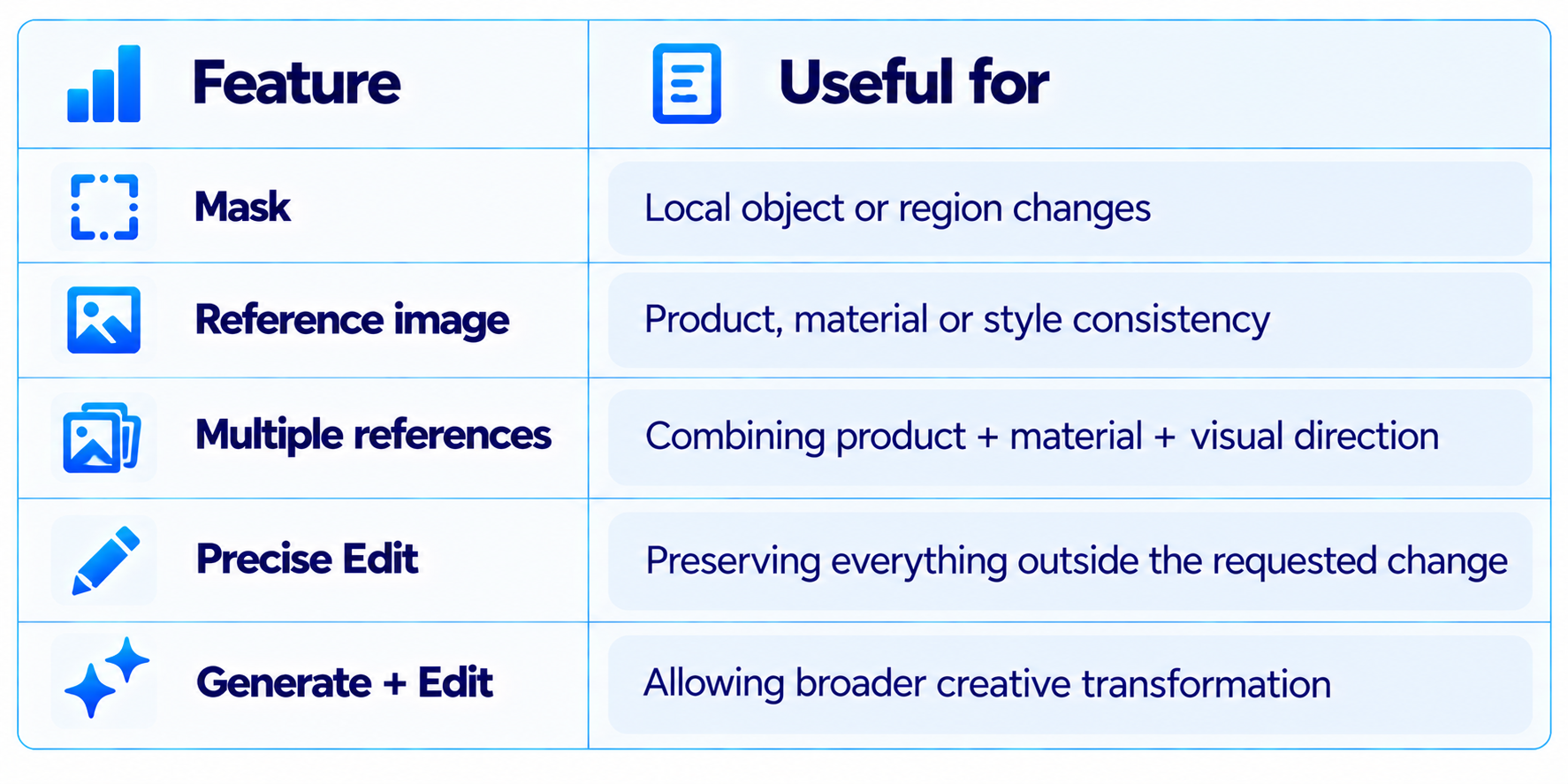
The Ideogram 4.5 API supports masked edits and up to four reference images. References can guide a product, material or style, while masks restrict the edit to a particular region.
This combination is useful for controlled commercial imagery. A product team can provide a source product, a material reference and a visual style reference, then use a mask to tell the model exactly which part should change.
The result is closer to art direction than simple prompting: the source image establishes the composition, references establish identity, and the mask establishes where the model is allowed to make a change.
9. Generate + Edit vs Precise Edit
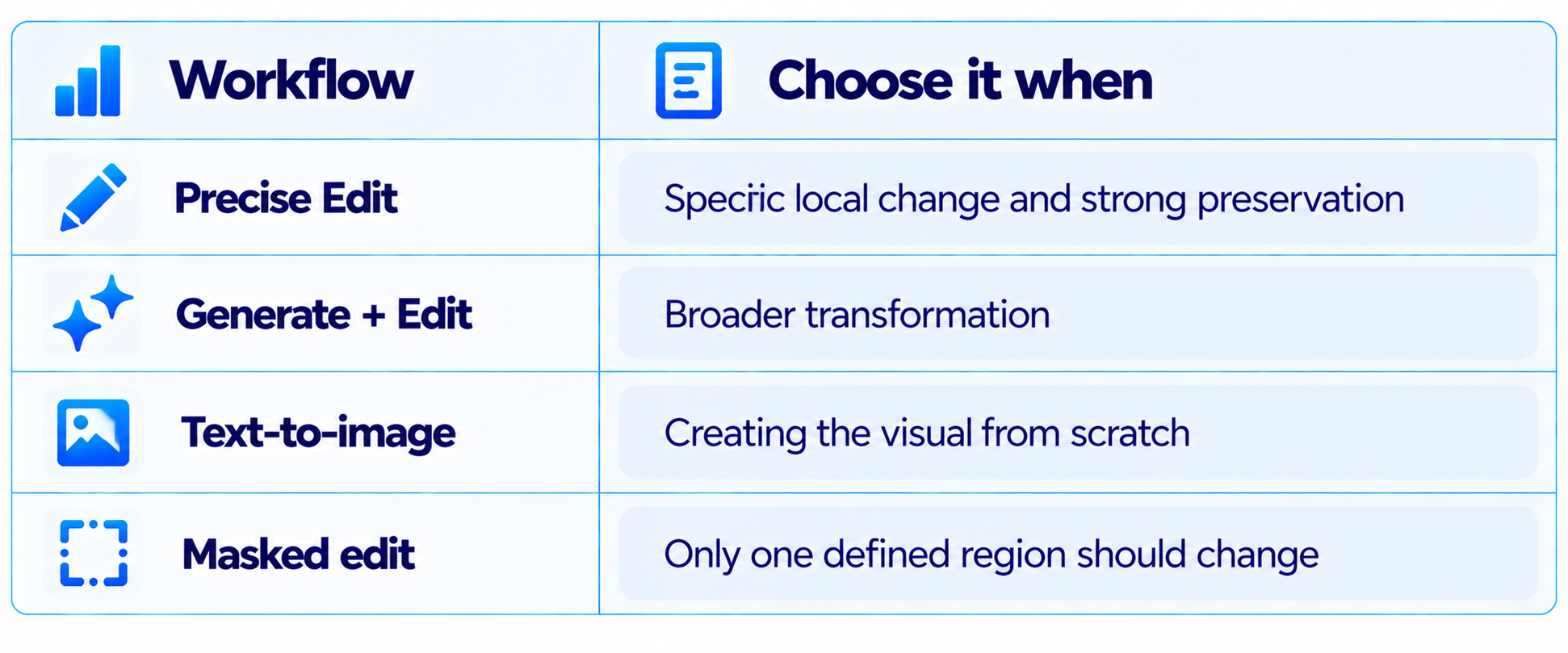
Ideogram's current API separates two editing behaviors. Precise Edit is optimized for preserving the source while making targeted changes. Generate + Edit gives the model more room to reinterpret the image.
This distinction matters because not every editing task should be maximally constrained. Changing a product color should be precise. Turning a daytime street into a cinematic night scene may require the model to alter shadows, reflections and environmental lighting across a much larger portion of the image.
Use Precise Edit for preservation. Use Generate + Edit when the desired transformation is broad enough that strict preservation becomes a limitation.
10. Ideogram 4.5 Pricing
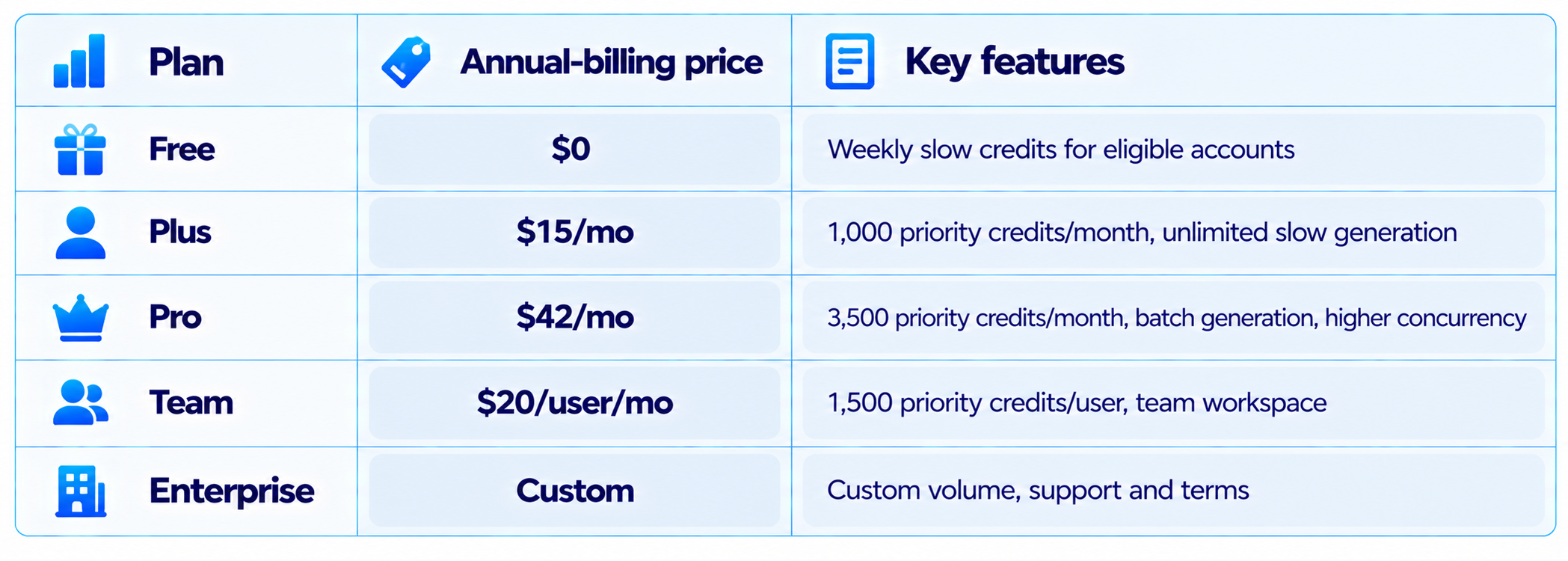
Ideogram's current subscription pricing lists Plus at $15 per month when billed annually, Pro at $42 per month annually, Team at $20 per user per month annually and Enterprise at custom pricing. Free accounts receive weekly slow credits when eligible.
Ideogram's API uses a separate usage-based system. Current API pricing is token-based for text and image inputs and outputs, with estimated per-image costs depending on resolution and quality. The API documentation also explains that requests draw down a prepaid credit balance.
For teams evaluating the model, the correct cost comparison is not simply subscription price. Compare priority generations, repeated edits, output resolution, API usage and the amount of manual design work saved.
11. Ideogram 4.5 API
The developer API exposes Ideogram 4.5 at the ideogram-4-5 model endpoint. The same API framework can handle image and video models, making it easier for developers to build creative pipelines without maintaining separate authentication and billing systems for every model family.
The current API documentation provides generation and precise-edit examples in Python, TypeScript and cURL. API image URLs are temporary, so applications should download outputs they need to retain.
This is especially useful for automated marketing systems. An application can generate a base creative, apply a sequence of product or regional edits, produce multiple variants and send finished assets into a content-management workflow.
12. Ideogram 4.5 vs GPT Image
Ideogram's own model comparison positions 4.5 around multi-turn edit consistency and includes GPT Image as a comparison point. This is a vendor comparison, so it should be read as product evidence rather than a neutral leaderboard result.
For a workflow dominated by repeated local edits, Ideogram's architecture is more directly aligned with that task. For broader general-purpose image reasoning and generation, the comparison depends heavily on the specific GPT Image model and endpoint being used.
13. Ideogram 4.5 vs Nano Banana
Nano Banana models are strong competitors in image generation and editing, but Ideogram 4.5 is differentiated by how explicitly it targets multi-turn edit stability. Ideogram's own 4.5 comparison includes Nano Banana Pro and Nano Banana 2 as reference points.
The practical choice depends on the job. If the workflow requires repeatedly changing one asset while preserving its exact composition, test Precise Edit. If the task is broader multimodal generation and transformation, Nano Banana may offer a different balance of capabilities.
14. Ideogram 4.5 vs Midjourney
Midjourney remains strongly associated with aesthetic image generation and visual exploration, while Ideogram's 4.5 positioning is more production-oriented around editable graphics and controlled revisions.
This is not a claim that one model produces better-looking images in every prompt. The important difference is workflow design: Ideogram 4.5 is built around controlled editing, while Midjourney is widely used for visual ideation and aesthetic generation.
15. Best Use Cases for Ideogram 4.5
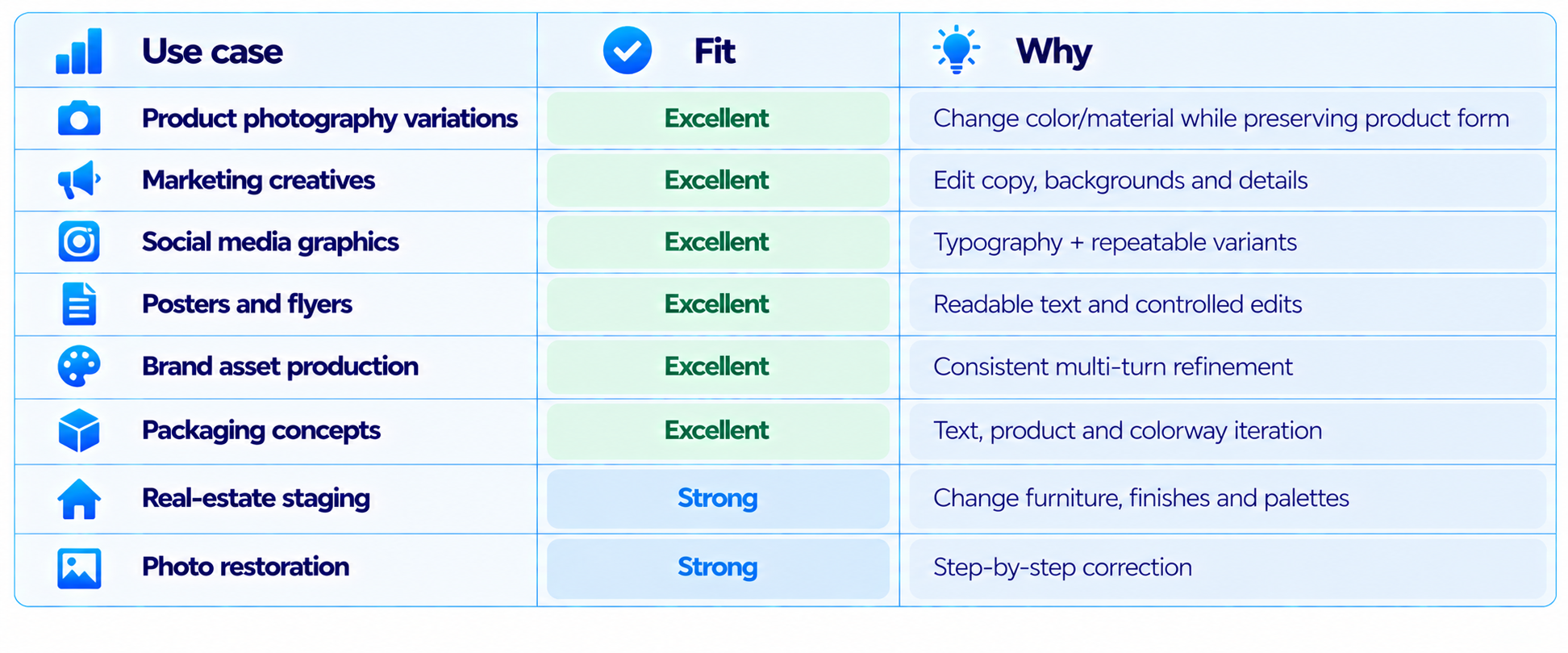
Ideogram 4.5 is particularly well suited to product photography variations, marketing creatives, social media graphics, posters, packaging concepts, brand assets, real-estate staging and step-by-step photo restoration.
The common thread is not image type. It is revision behavior. The more often an asset needs to be changed without redesigning everything else, the more useful Precise Edit becomes.
16. What Ideogram 4.5 Is Not
Ideogram 4.5 is not primarily a video model, a local open-weight workflow or a general-purpose multimodal assistant. Its value comes from image creation and controlled image editing.
If you need a local model that can run completely offline, the hosted Ideogram 4.5 workflow is not the right category. If you need video generation, use a dedicated video model. Ideogram's broader platform can access video models through its unified API, but those are separate models rather than capabilities of Ideogram 4.5 itself.
17. Open Weights and Self-Hosting
Ideogram has indicated that open weights for the new model are coming, but the currently available 4.5 product is a hosted model. The company's licensing page distinguishes hosted API access, commercial self-hosting and research open-weight access.
Do not treat the announcement of future weights as current availability. Teams evaluating deployment today should plan around the hosted Ideogram application or API.
18. Limitations You Should Know
The strongest 4.5 claims are focused on editing, not a universal text-to-image leaderboard lead. Many of the multi-model visual comparisons on Ideogram's site are vendor-produced demonstrations. The 24.2 MP editing example is a demonstrated source size, not a blanket statement that every workflow has identical limits. API pricing depends on image and text token usage, output size and selected quality. Priority credits are required for AI-powered editing features in the consumer product. Ideogram 4.5 is hosted today; open-weight availability is a future product direction rather than a current deployment option. Broad transformations can naturally require more image regeneration than small localized changes.
19. Recommended Workflow for Designers
The most effective way to use Ideogram 4.5 is to separate generation from controlled refinement. Generate the strongest base composition first. Use Precise Edit for small changes such as color, material, text or object details. Use masks whenever only a defined region should change. Add reference images when product, material or style identity matters. Make one meaningful edit at a time. Use Generate + Edit when the desired transformation is broad. Export the final high-resolution asset only after the design is approved.
This workflow reduces the common problem of asking an image model to solve generation, editing, typography, product consistency and layout changes in one prompt.
20. Recommended Workflow for Marketing Teams
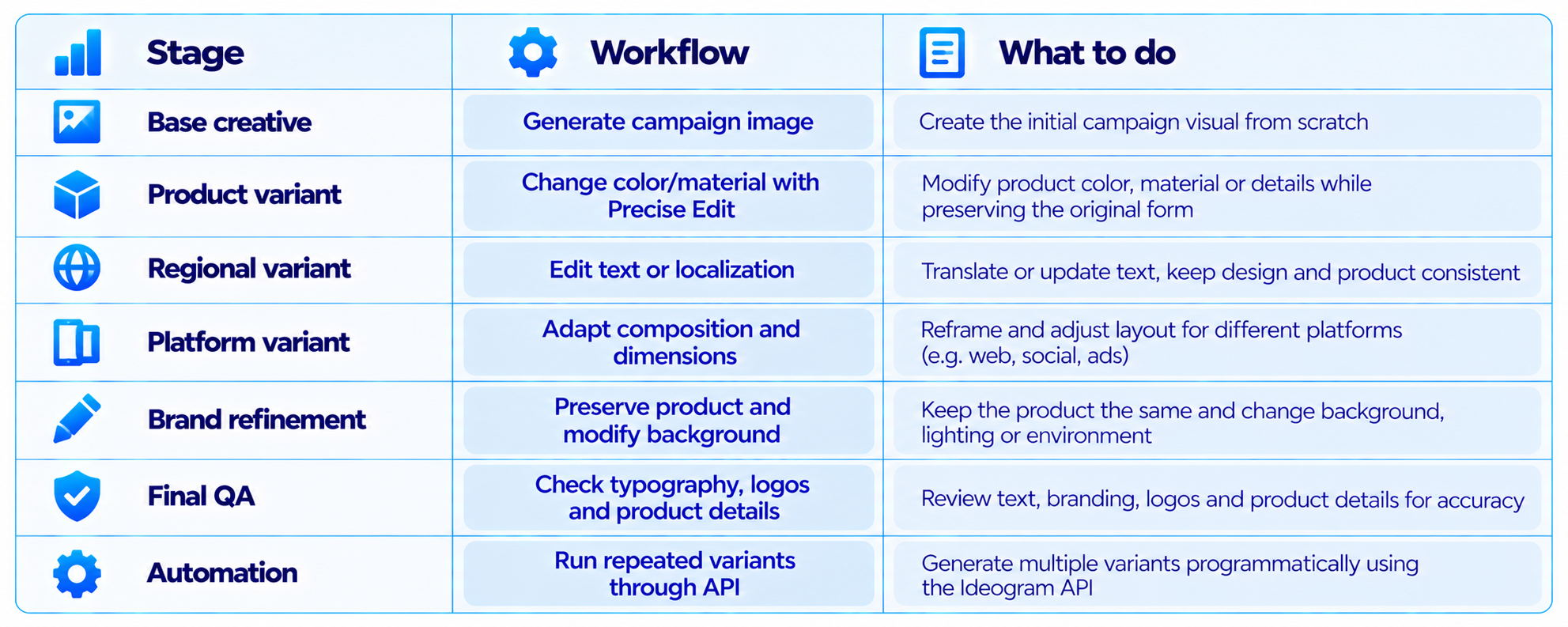
Ideogram 4.5 becomes more valuable when the same creative needs many variants. Start with the campaign image, create product colorways, localize copy, adapt platform formats, refine the background and then run final visual and typography checks. The API makes the same sequence automatable.
That turns the model from a simple image generator into part of an asset-production pipeline. The productivity gain comes from reducing manual recreation, not from generating a single image faster.
21. How to Evaluate Ideogram 4.5 Yourself
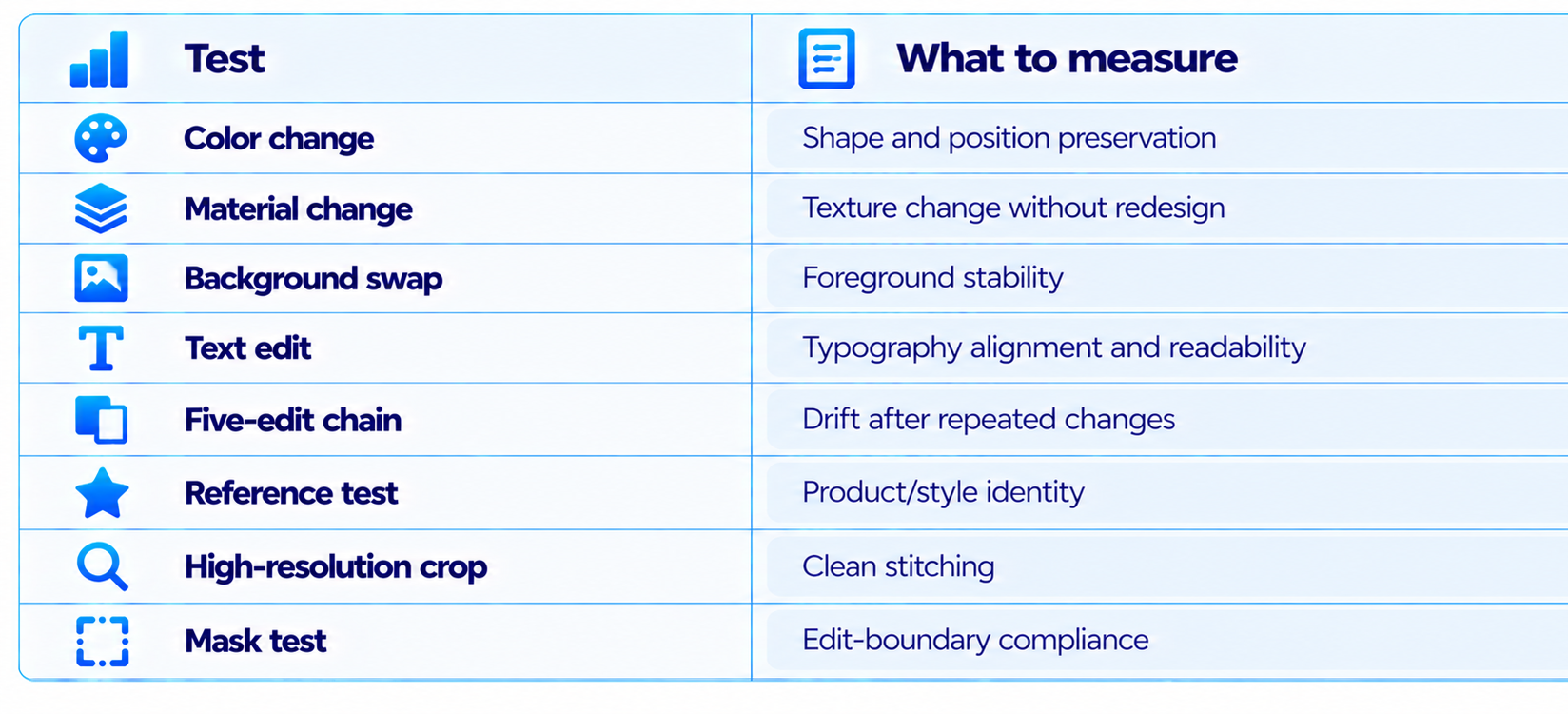
A good Ideogram 4.5 test should measure edit stability, not only first-generation quality. Run color-change, material-change, background-swap, text-edit, five-edit-chain, reference, high-resolution crop and mask tests.
Measure whether the requested region changed, how much unrelated content moved, how many corrections were required, how many generations were needed and the final cost. Compare those numbers against the image editor or generator you already use.
22. Is Ideogram 4.5 Worth It?
Ideogram 4.5 is worth considering when your workflow involves repeated, localized image edits. Its strongest documented capabilities are exactly the ones that tend to cause problems in production: preserving untouched details, maintaining consistency across multiple edits, working at source-image dimensions and controlling edits with masks and references.
It is less compelling if your workflow is almost entirely one-shot image generation. In that case, independent image-generation preference tests and your own prompt set should carry more weight than an editing-focused feature set.
The pricing is reasonable for professional creative teams, but the economics depend on how much priority generation and API usage you consume.
23. Final Verdict
Ideogram 4.5 is a focused upgrade rather than a generic image-model refresh. Its most important contribution is treating image editing as a sequence of controlled operations instead of a collection of independent regenerations.
The product evidence is unusually concrete. Ideogram documents Precise Edit, preservation of untouched pixels, source-resolution output, masked editing and up to four reference images. It also demonstrates editing a 24.2-megapixel source without downsampling the full image.
The model's strongest use cases are product photography, advertising creatives, posters, social media graphics, packaging concepts, brand assets and any workflow where one image needs to survive several revisions.
My rating: 9.4/10 for precise editing, 9.2/10 for multi-turn consistency, 9.0/10 for typography and design workflows, 8.5/10 for pricing and 9.0/10 overall.
Bottom line: Ideogram 4.5 is one of the most interesting AI image tools for production workflows in 2026 because it focuses on the part of generative design that becomes difficult after the first generation: changing one thing without breaking everything else.
Frequently Asked Questions
What is Ideogram 4.5?
Ideogram 4.5 is Ideogram’s September 2026 image generation and editing model focused on precise multi-turn editing and preservation of image details.
What is the biggest feature of Ideogram 4.5?
Precise Edit is the central feature. It is designed to change a requested area while preserving the rest of the image and can return the result at the input image dimensions.
Does Ideogram 4.5 support image-to-image editing?
Yes. The API provides Precise Edit and Generate + Edit workflows, with masks and reference images.
How many reference images can Ideogram 4.5 use?
The current API documentation says up to four reference images can guide an edit.
Can Ideogram 4.5 edit high-resolution images?
Yes. Ideogram demonstrates editing a 4,016 x 6,016 pixel, 24.2-megapixel source.
Is Ideogram 4.5 good for text in images?
Yes. Readable typography is a major part of Ideogram’s product positioning, and 4.5 continues that focus.
How much does Ideogram cost?
Current subscription pricing lists Plus at $15/month annually, Pro at $42/month annually and Team at $20/user/month annually. API usage is separately metered.
Does Ideogram 4.5 have an API?
Yes. The model is available through the Ideogram API using the ideogram-4-5 model endpoint.
Is Ideogram 4.5 open source?
The current 4.5 product is hosted. Ideogram has indicated that open weights are coming, but those should not be treated as currently available.
Is Ideogram 4.5 better than Midjourney?
They emphasize different workflows. Ideogram 4.5 is particularly focused on precise repeated editing, while Midjourney is widely used for visual ideation and aesthetic generation.
Is Ideogram 4.5 worth it?
It is particularly valuable for production teams that repeatedly edit product images, advertisements, posters, social graphics and other brand assets.
Recommended Blogs
Google Pics Review: Is Google’s New AI Design Tool Good Enough to Replace Canva?
Gemini 3.8 Flash Review: Accuracy, Price & Is It Worth It? (2026)
Meta Muse Spark 1.3 Review: Coding, Price & Is It Worth It? (2026)
Best AI Video Models 2026: Quality, Speed, Price & Use Cases
How to Secure AI Coding Agents: Permissions, Sandboxing, MCP & Secrets
Resources & Community
Join our community of 70,000+ AI enthusiasts and learn to build powerful AI applications. Build Fast with AI helps creators, developers and teams understand and implement practical AI.
Agentic AI Launchpad 2026
A structured 6-week cohort program that takes you from AI basics to building and deploying real-world agentic AI systems. Includes live sessions, expert mentorship, project reviews and a builder community network.
Join the next cohort: Agentic AI Launchpad 2026
Free AI Resources
Access free tools, workshops and micro-learning to keep building.

