



Gemini Skills vs Gems: What Changes in Google's AI Workflow System
Google Gemini has moved from simple saved prompts toward reusable AI workflows. Gems were the first major step: create a customized version of Gemini with instructions, preferences and knowledge files, then return to that setup whenever you need the same kind of work. Skills take that idea further by turning reusable instructions into capabilities that can be invoked inside ordinary Gemini chats, automatically selected when relevant, and combined with other Skills.
The distinction matters because Google is not positioning Skills and Gems as two competing products that will coexist indefinitely. Google has announced that Gems are being transitioned into Skills. For personal Google accounts, Gems are scheduled to go away in November 2026, with automatic migration to Skills. Workspace business, enterprise and nonprofit accounts follow in March 2027, while Workspace education accounts follow in June 2027.
That makes the practical question different from a normal feature comparison. Instead of asking only whether Gemini Skills or Gems are better, the useful question is what a Gem becomes when it moves into the Skills system, what capabilities change, and how should you build reusable Gemini workflows now?
Google says existing Gems will automatically transition to Skills, including supported files. Users can also manually recreate a Gem as a Skill before the transition.
QUICK ANSWER
Gemini Gems are customized versions of Gemini built around repeatable instructions and preferences. Gemini Skills are reusable instruction packages designed to work across chats and tasks, with automatic relevance detection, direct invocation using /, support for combining multiple skills, and reference files such as documents, PDFs and images.
The biggest difference is workflow scope. A Gem is a dedicated customized Gemini experience that you open and chat with. A Skill is more like a reusable capability that Gemini can bring into an existing conversation when the task matches its description. Skills can also be stacked, so one chat can use multiple Skills for different parts of a workflow.
Google is replacing Gems with Skills rather than maintaining both systems as equal long-term choices. Personal-account Gems are scheduled for removal in November 2026, followed by Workspace business, enterprise and nonprofit accounts in March 2027 and education accounts in June 2027.
For new workflows, Skills are the direction to build toward. Gems still matter because they remain available during the transition and because many users already have custom instructions and knowledge files stored inside them.
My practical rating: 9.3/10 for Skills as the future Gemini workflow layer, 8.4/10 for Gems as the current dedicated customization model, and 9.0/10 overall for the transition.
1. What Are Gemini Gems?
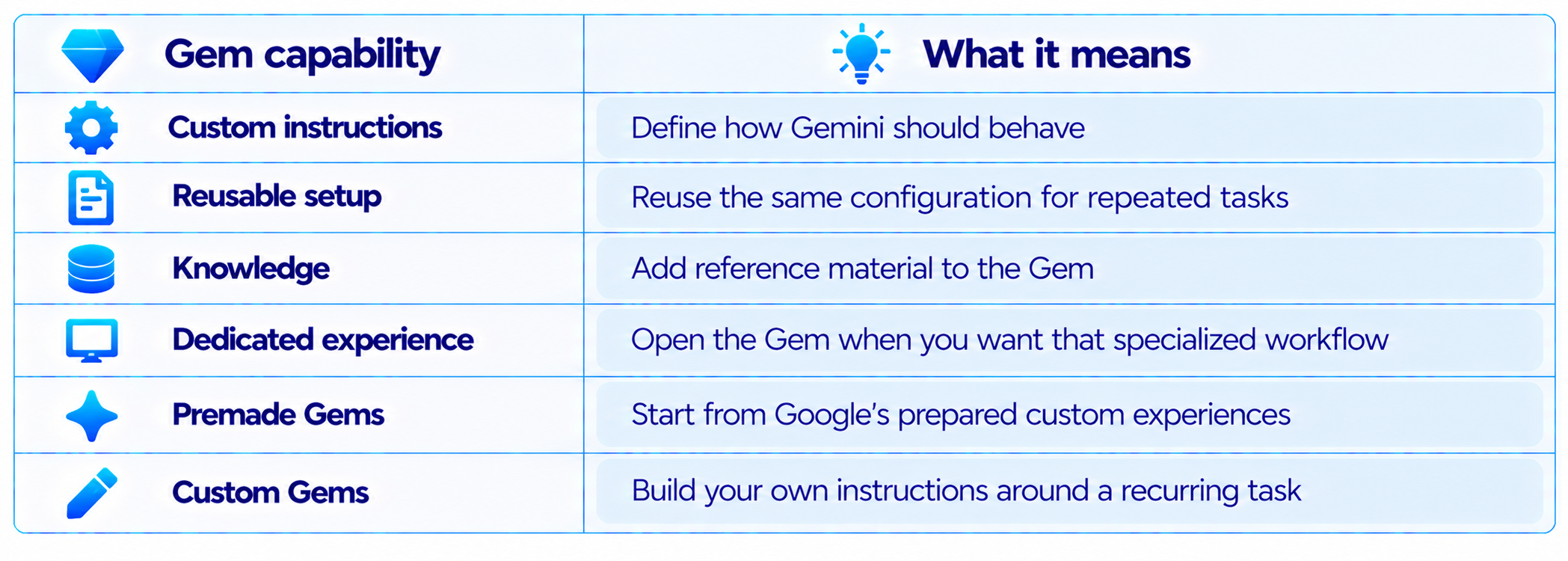
Gems are customized versions of Gemini that let you save instructions, goals and preferences for repeated work. Google describes them as a way to create specific and repeatable instructions for Gemini so you do not have to restate the same requirements every time.
A Gem can be designed around a recurring role such as a writing editor, study tutor, research assistant, coding helper or business analyst. Instead of starting a normal Gemini chat and pasting a long system prompt, you open the Gem and work inside that customized setup.
Gems can also use knowledge files. This makes them more than a saved prompt because the instructions can be paired with reference material that Gemini can use while answering.
2. What Are Gemini Skills?
Skills are reusable instructions that teach Gemini how to handle a specific type of task. Google describes a Skill as a set of instructions and preferences that captures a user's process, formatting rules, templates and common mistakes to avoid.
The important design difference is that a Skill does not have to be the destination of the conversation. It can become part of the conversation. Gemini can recognize that a Skill is relevant to a prompt, load its instructions, and apply them to the task.
You can also explicitly call a Skill by typing / and selecting its name. Google says this invocation mechanism is available now, with @ planned as the future trigger.
Skills can also be combined. For example, a writing-style Skill can work alongside a brand-guidelines Skill, allowing one task to inherit multiple reusable instruction sets instead of forcing everything into one giant prompt.
3. Gemini Skills vs Gems: The Core Difference
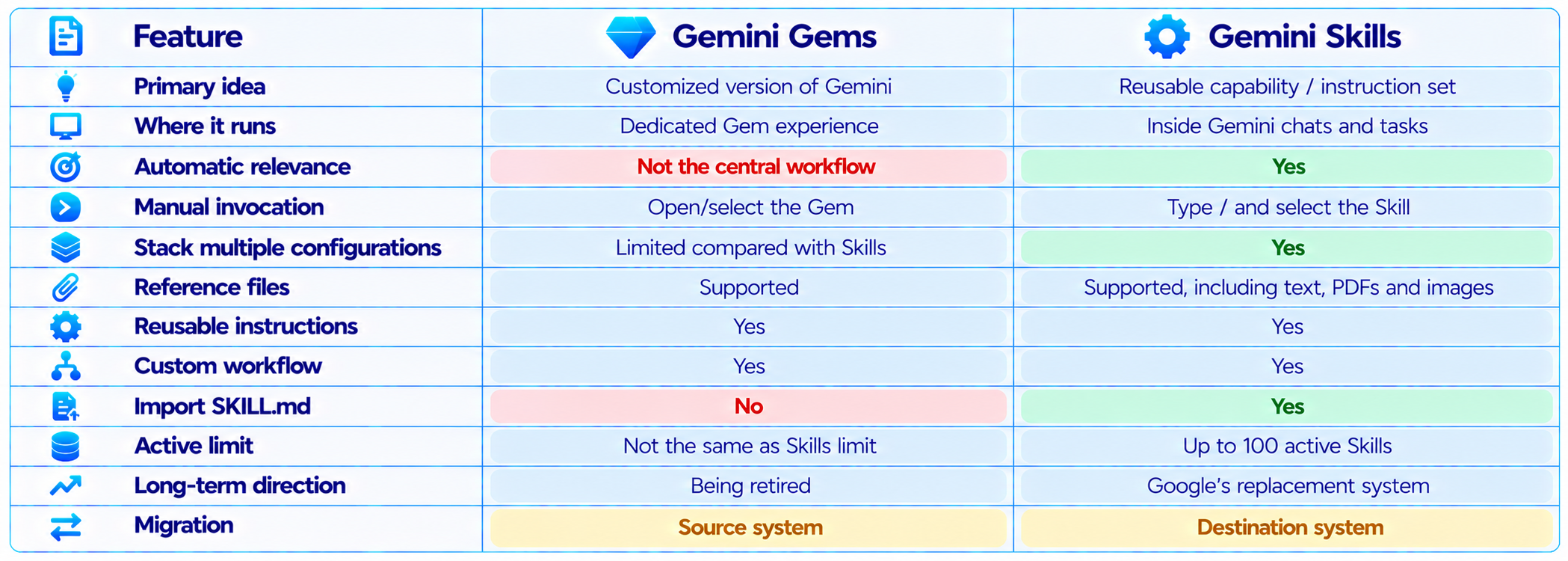
The table captures why this is more than a naming change. Gems organize customization around a specialized Gemini experience. Skills organize customization around reusable capabilities that can be pulled into broader workflows.
4. Why Google Is Moving From Gems to Skills
Google's stated reason is flexibility. Skills can be used directly in the current chat rather than requiring users to switch into a separate Gem. They can also be combined, which allows a larger workflow to be assembled from smaller capabilities.
That architecture is closer to how modern AI workflows are built. Instead of creating one enormous custom prompt containing every rule a user has, you can separate the instructions into reusable modules.
For example, a content workflow could have a writing-style Skill, an SEO Skill, a brand-voice Skill and a fact-checking Skill. A task could use one or several of those depending on what the user asks Gemini to do.
Google also says Skills can be used with Connected Apps such as Workspace apps, although not every Gemini feature currently supports Skills.
5. Automatic Skill Selection Changes the Experience
One of the biggest changes is automatic relevance detection. Google says Gemini checks a Skill's name and description to determine whether it is relevant, and only then reads the full instructions. This helps avoid loading every Skill into every prompt.
That means the Skill description becomes part of the system design. A vague description such as 'writing helper' gives Gemini little information about when the Skill should activate. Google recommends descriptions that explicitly explain what the Skill does and when it should be used.
This is one reason Skills should be designed around task types rather than individual prompts. A Skill should teach Gemini a repeatable process, not encode one single answer.
6. Skills Are Designed to Be Stackable
Stacking is probably the most important architectural difference between Skills and Gems. Google explicitly describes Skills as composable, meaning multiple Skills can work together in one task.
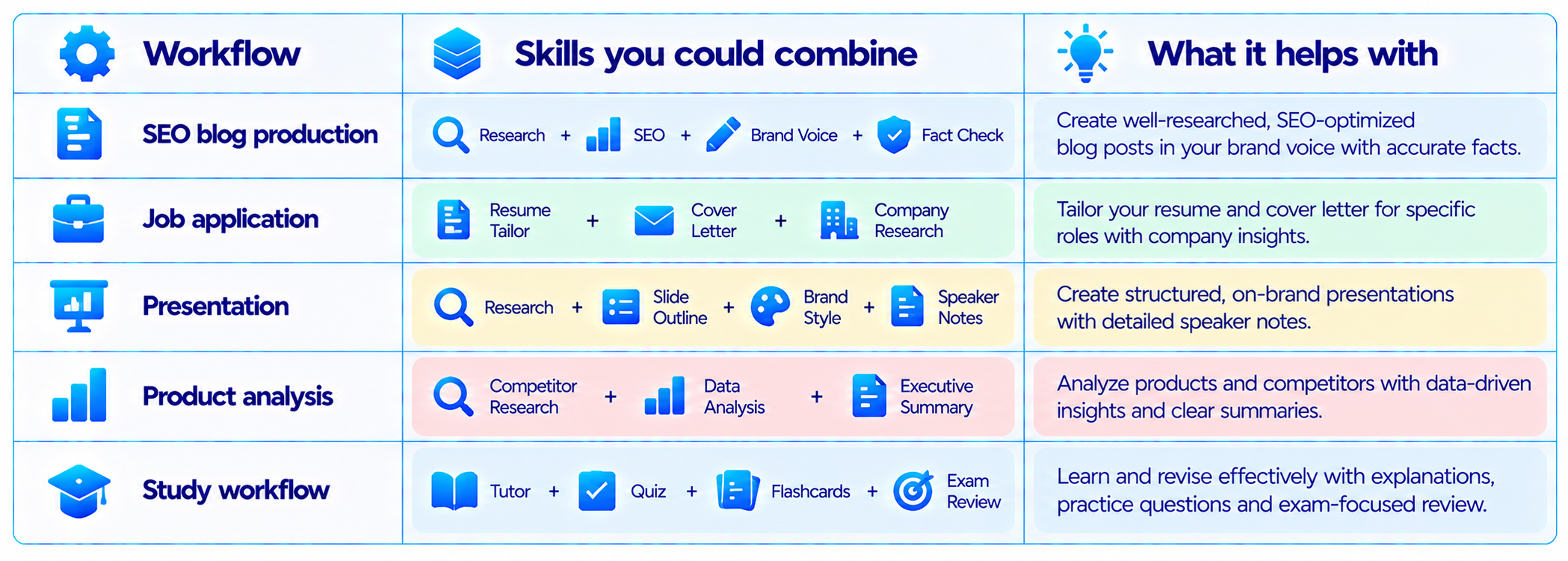
This modular approach also makes maintenance easier. When your brand voice changes, you can update the brand Skill rather than rewriting every workflow that contains the same instructions.
7. Files: Gems vs Skills
Both systems can work with reference material, but Skills introduce a more explicit file-based workflow. Google says Skills can include plain text documents, PDFs and images, and users can upload a folder containing a SKILL.md file plus supported reference files.
Skills currently have a 100 MB total upload limit for a Skill folder. Google also documents a SKILL.md format and says users can import Skills created on other platforms by uploading their SKILL.md files.
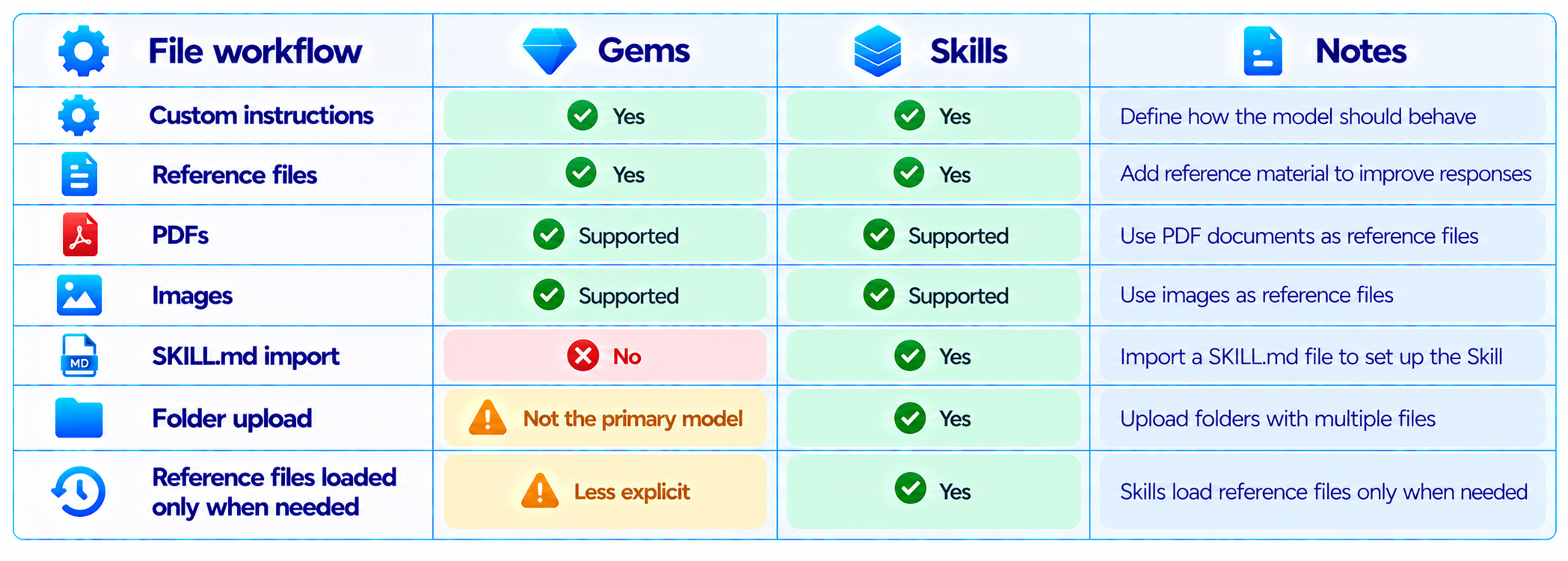
This is an important shift for technical users because a Skill can become a portable workflow artifact rather than only a configuration stored inside the Gemini UI.
8. SKILL.md Makes Skills More Portable
Google's current Skills system supports uploading a SKILL.md file. The file contains the Skill's instructions, and a folder can also contain its reference files. Google specifies lowercase names with hyphens for Skill names, such as my-new-skill.
This creates a more file-oriented workflow for advanced users. A team can maintain Skill instructions alongside supporting templates or reference documents instead of treating customization as something that exists only inside a chat interface.
Google also says Skills created on other platforms can be imported when they use the supported SKILL.md format. That gives Skills a level of portability that traditional Gems did not emphasize.
9. Gems Still Have an Advantage During the Transition
Gems should not be dismissed simply because Google is replacing them. They remain useful for people who already have established custom workflows, and Google has designed the transition so those existing configurations can move into Skills.
A Gem is also conceptually simple. If you want a specialized version of Gemini for one recurring job, the Gem model is easy to understand: create it, add instructions and knowledge, then open it whenever you need that workflow.
The important point is that new users should not interpret the current Gem interface as Google's long-term architecture. Google has explicitly announced the migration timeline and automatic conversion to Skills.
10. The Gemini Gems to Skills Migration
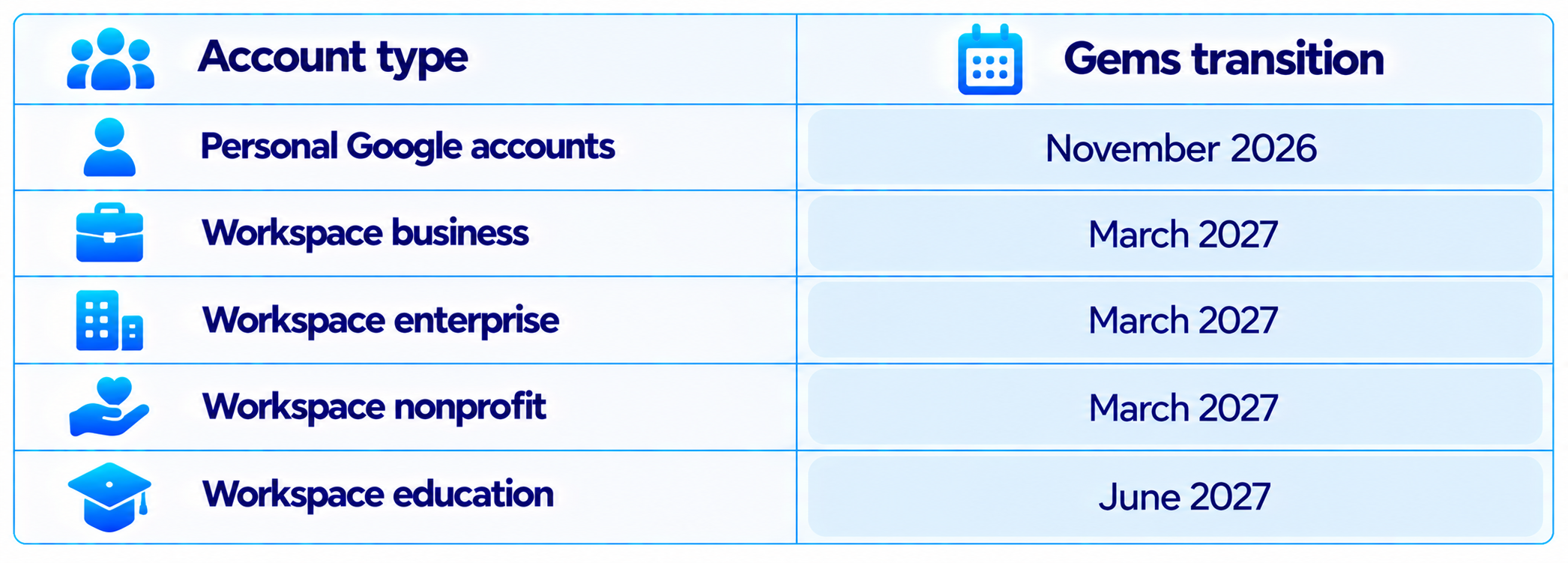
Google says existing Gems will automatically become Skills when Gems are removed. Supported files will migrate as well. Users who want to move earlier can manually recreate a Gem as a Skill.
For manual migration, Google recommends opening the Gem, downloading its knowledge files, creating a Skill, copying the Gem's name, description and instructions, and then adding the files to the Skill folder when required.
That means there is no reason to rebuild every Gem immediately unless you specifically want to use the Skill workflow before the automatic transition.
11. What Skills Can Do Today
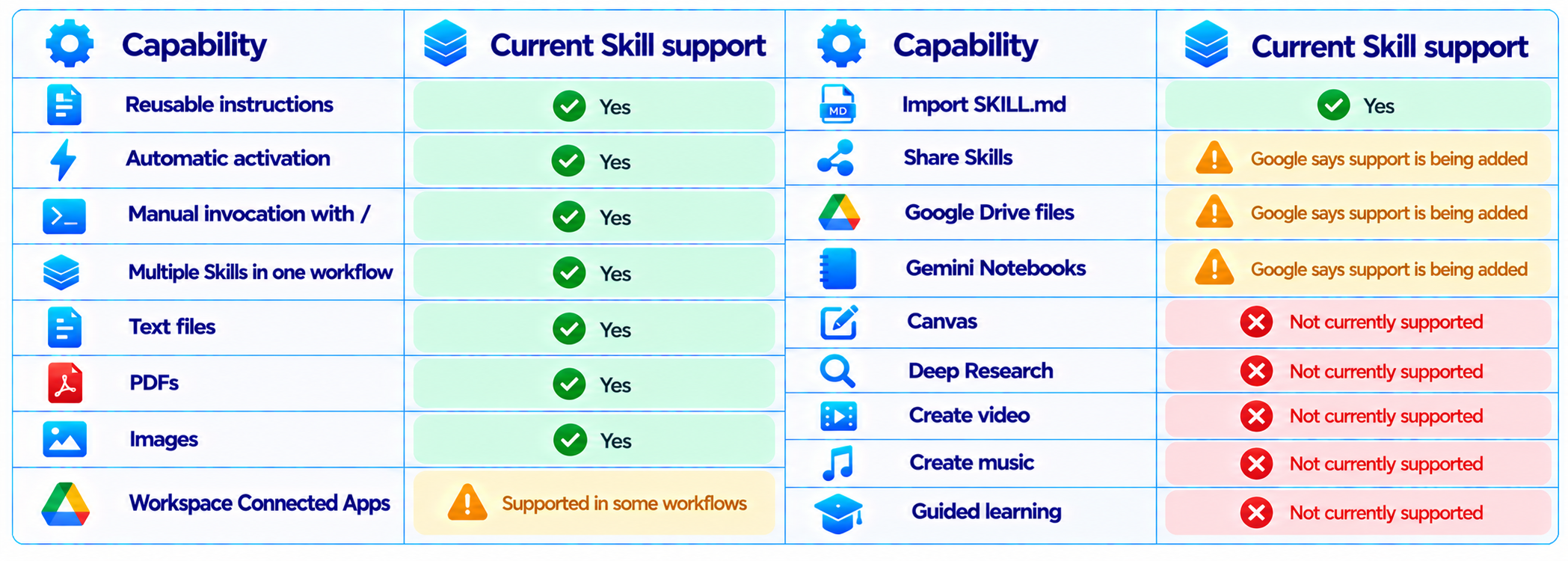
The limitations matter. Google explicitly says Skills do not yet work with Canvas and Deep Research, and several default tools available in Gems do not currently work with Skills, including video creation, music creation and Guided Learning.
So the migration is not simply a one-to-one feature copy at this exact moment. Google says additional Gem capabilities are being brought into Skills, but the current feature set has gaps.
12. Skills vs Gems for Content Creation
For content teams, Skills are particularly useful because content production naturally breaks into reusable stages. One Skill can enforce a brand voice, another can define SEO requirements, another can convert long-form content into social posts, and another can perform a final quality check.
Google's own Skill examples include repurposing a blog post for LinkedIn, X and Instagram while following a brand voice and generating an infographic.
A Gem can perform the same type of work, but the workflow is more centered around entering that dedicated Gem. Skills make the individual capabilities reusable across broader Gemini conversations.
13. Skills vs Gems for Developers
Developers are likely to benefit from Skills because technical workflows often require stable instructions, repository conventions, output formats and reusable checklists.
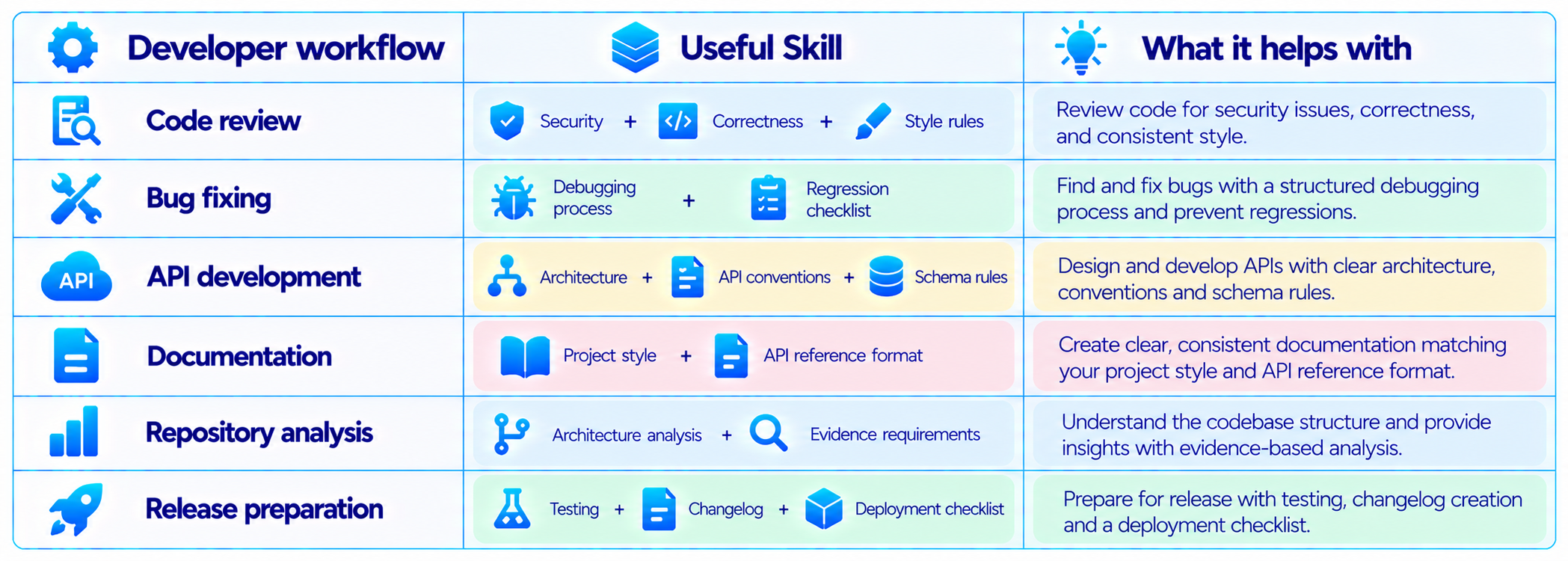
A Skill can also include templates and reference files. Google recommends keeping Skill instructions concise and focused on the unique workflow, formatting rules and common mistakes to avoid.
14. Skills vs Gems for AI Agents and Automation
Skills fit agentic workflows because they describe reusable behavior rather than one conversation. A larger task can invoke several Skills for different phases.
For example, a research agent could use a source-analysis Skill, a fact-checking Skill and a report-formatting Skill. A business workflow could combine a CRM-analysis Skill, an email-writing Skill and a meeting-summary Skill.
This modular approach is closely related to context engineering and multi-agent design. Instead of stuffing every instruction into one prompt, you keep specialized knowledge and behavior separated into reusable components.
15. How to Create a Gemini Skill
- Open Gemini at gemini.google.com and go to Settings > Skills.
- Choose Create with Gemini, a recommended template, or Create manually.
- Give the Skill an action-oriented name using lowercase words separated by hyphens.
- Write a description that clearly states what the Skill does and when Gemini should use it.
- Add concise instructions covering the workflow, output format and common mistakes.
- Add supported reference files when the workflow depends on templates, policies or examples.
- Test the Skill with several real prompts instead of one example.
- Refine the description so Gemini can identify the right situations for automatic use.
Google recommends action-oriented names and descriptions that explain the capability and include specific situations where the Skill should be used. The description can be up to 1,024 characters.
16. A Better Skill Prompt Structure
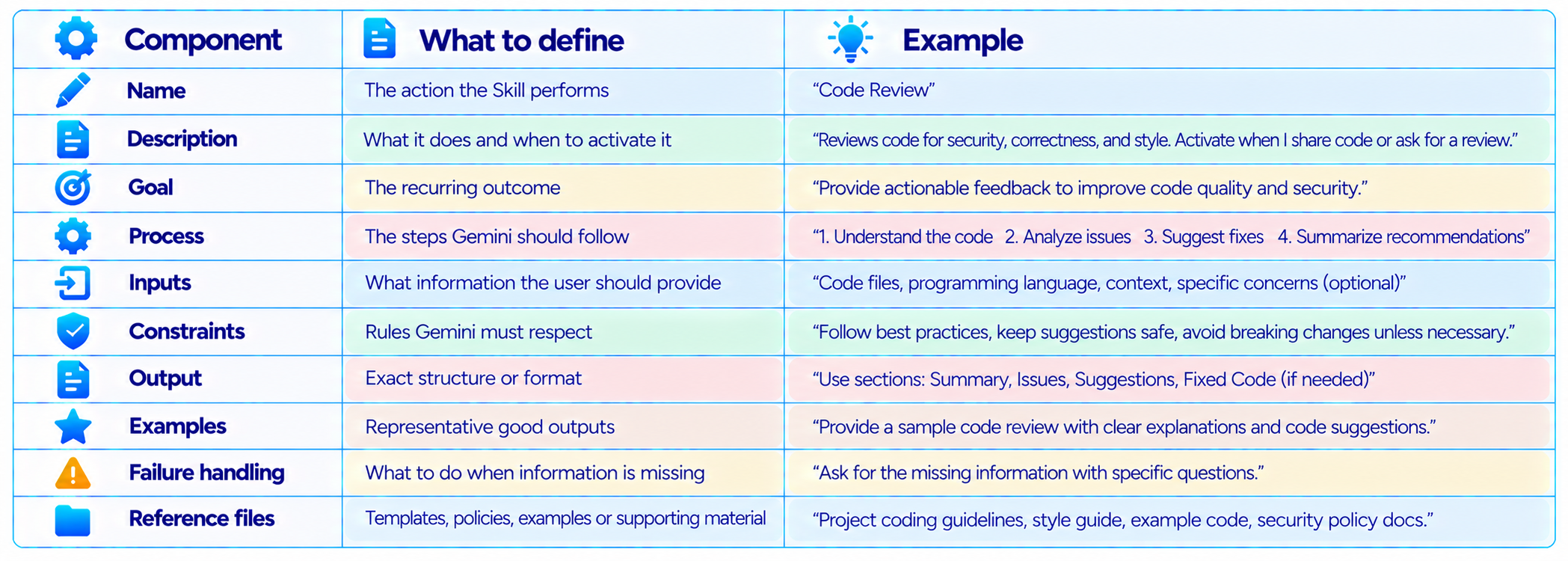
The most important change from a normal prompt is that the Skill should describe a category of tasks. Google specifically recommends avoiding instructions that only work for one individual result and instead teaching Gemini how to handle a type of task.
17. Example: Turn a Gem Into a Skill
Suppose you have a Gem called SEO Blog Writer with instructions such as: write 3,000-word articles, use a specific tone, include SEO keywords, add FAQs and finish with internal links.
A Skill version should be written as a reusable workflow rather than a one-off blog prompt:
Name: write-seo-blog
Description: Writes search-focused long-form articles using the specified brand voice, keyword targets, structure, internal-link rules and FAQ requirements. Use when creating or substantially revising an SEO blog article.
Instructions should define the repeatable process: inspect the topic, identify search intent, use supplied keyword targets, structure the article, avoid unsupported claims, add FAQs, and return the required sections.
That structure gives Gemini enough information to recognize when the Skill is relevant without forcing the Skill to contain every possible blog topic.
18. What Happens to Your Existing Gems?
Google says existing Gems will be automatically migrated to Skills when Gems are removed. Supported knowledge files will also transition. Users can manually recreate their Gems earlier if they want to use the Skill format before the scheduled shutdown.
There is one important distinction for users of advanced Gem workflows: Google says some Gem functionality is still being brought into Skills. It specifically lists sharing, Google Drive files and Gemini Notebook support as capabilities being added, while several current tools are not yet supported by Skills.
So migration should be understood as an evolving product transition rather than assuming every Gem feature behaves identically on day one.
19. Limitations of Gemini Skills
- Skills do not currently support every Gemini feature that Gems can access.
- Canvas and Deep Research are currently excluded.
- Some default tools such as video creation, music creation and Guided Learning are not yet supported.
- Automatic activation depends heavily on a clear Skill name and description.
- Only 100 Skills can be active at once.
- Skills are currently rolling out across account types, so availability can vary.
- Some sharing and Connected App capabilities are still being expanded.
Google says up to 100 Skills can be active at one time. Users can create more, but they must disable an active Skill before enabling another once that limit is reached.
20. The Best Way to Use Skills in a Real Workflow
The strongest approach is not to create one Skill that tries to do everything. Build small, reusable Skills around stable capabilities.
- Create one Skill for brand voice.
- Create another for SEO structure.
- Create another for technical fact checking.
- Create another for social-media repurposing.
- Combine them only when the task requires all of them.
- Keep frequently changing business information outside the Skill instructions when possible.
- Use reference files for stable templates, examples and policies.
- Test automatic activation with realistic prompts.
- Review outputs and refine the Skill description when Gemini selects it incorrectly.
This approach mirrors modular software design. Smaller Skills are easier to test, update and reuse than one giant instruction block.
21. Gemini Skills vs Gems: Which One Should You Use?
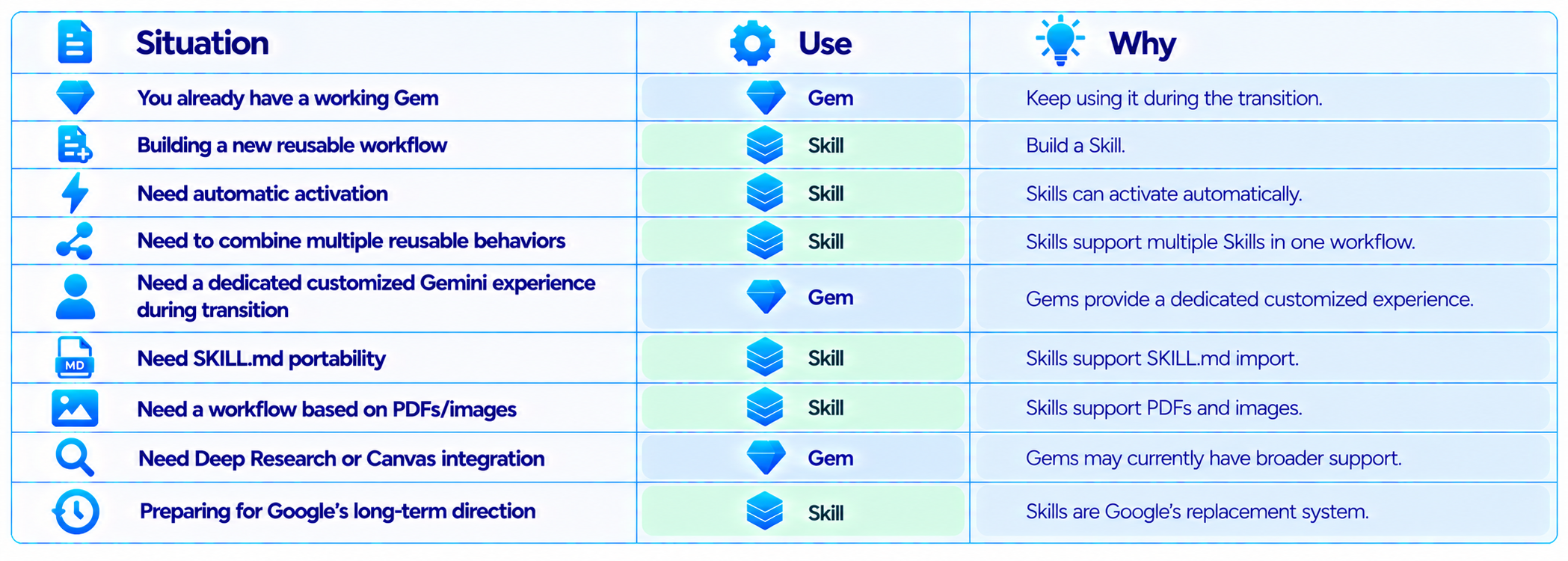
For new work, Skills are the logical direction because Google is moving the product toward them. Existing Gem users do not need to rebuild everything immediately because Google says the migration will be automatic.
22. Gemini Skills vs Gems: Final Verdict
Gemini Skills are the next generation of Gemini customization. Gems introduced the idea of saving a specialized Gemini configuration, while Skills turn that concept into reusable capabilities that can participate in ordinary chats and larger workflows.
The biggest improvements are automatic relevance detection, direct invocation, stacking, file-based Skill packages and the SKILL.md format. Those features make Skills better suited to modular AI workflows, especially when users have multiple recurring processes.
Gems are still important because they are the system many users already rely on. Google is deliberately giving those users a migration path rather than forcing them to rebuild from scratch. Personal Gems are scheduled to transition in November 2026, with Workspace business, enterprise and nonprofit accounts following in March 2027 and education in June 2027.
The main caveat is that Skills do not yet have every Gem capability. Canvas, Deep Research and several default tools remain unsupported, although Google is continuing to expand the Skill feature set.
My rating: 9.3/10 for Skills as the future of reusable Gemini workflows, 8.4/10 for Gems during the transition, and 9.0/10 for Google's overall customization architecture.
Bottom line: if you are creating a new reusable Gemini workflow today, build it as a Skill. If you already have Gems, keep using them while Google handles the migration, then review the resulting Skills and split large configurations into smaller reusable capabilities where useful.
Frequently Asked Questions
What is the difference between Gemini Skills and Gems?
Gems are customized versions of Gemini designed around repeatable instructions and preferences. Skills are reusable instruction packages that Gemini can automatically apply inside chats and combine with other Skills.
Are Gemini Skills replacing Gems?
Yes. Google has announced a transition from Gems to Skills, with personal-account Gems scheduled for removal in November 2026.
When will Gemini Gems go away?
Personal Google-account Gems are scheduled to go away in November 2026. Workspace business, enterprise and nonprofit accounts are scheduled for March 2027, and Workspace education accounts for June 2027.
Will my Gems automatically become Skills?
Yes. Google says existing Gems and supported files will automatically transition to Skills when Gems are removed.
Are Gemini Skills better than Gems?
For new reusable workflows, Skills provide broader workflow features such as automatic activation and stacking. Gems can still have feature coverage that Skills do not yet support during the transition.
Can I still use Gemini Gems?
Yes, during the transition period. The exact retirement date depends on the account type.
How do I create a Gemini Skill?
Open Gemini, go to Settings > Skills, then create one with Gemini, use a template, create it manually, or upload a supported Skill file or folder.
Can Gemini Skills use files?
Yes. Skills can include supported reference files such as text documents, PDFs and images.
What is SKILL.md?
SKILL.md is the file format Google supports for importing and creating Skills. A Skill folder can contain the SKILL.md file and supporting reference files.
Can I stack Gemini Skills?
Yes. Google designed Skills so multiple Skills can be combined in the same workflow.
Can Gemini automatically choose a Skill?
Yes. Gemini checks the Skill name and description for relevance and can automatically use a relevant Skill.
Can Skills use Deep Research?
Not currently. Google says Skills do not yet work with Deep Research or Canvas.
How many Gemini Skills can I activate?
You can create as many as you want, but up to 100 can be active at one time.
Should I build a Gem or Skill now?
For a new reusable workflow, Skill is the forward-looking choice because Google is transitioning Gems into Skills.
Recommended Blogs
Gemini 3.8 Flash Review: Accuracy, Price & Is It Worth It? (2026)
Gemini 4 Argon Review: Benchmarks, Price, Coding & Is It Worth It? (2026)
Gemini Omni 1.1 Flash Review: Accuracy, Price & Is It Worth It? (2026)
How to Secure AI Coding Agents: Permissions, Sandboxing, MCP & Secrets
Resources & Community
Join our community of 70,000+ AI enthusiasts and learn to build powerful AI applications. Whether you're a beginner or an experienced developer, Build Fast with AI helps you understand and implement AI in your projects.
Agentic AI Launchpad 2026
A structured 6-week cohort program that takes you from AI basics to building and deploying real-world agentic AI systems. Includes live sessions, expert mentorship, project reviews and a builder community network.
Free AI Resources
Access free tools, workshops and micro-learning to keep building.

