
100 Best Gemini AI Photo Prompts 2026: Viral, Realistic, Cinematic & Ready to Copy
Gemini has become much more useful for AI photography because you can describe both what you want to create and what you want to change in an existing photo. The current Gemini image workflow uses Nano Banana 2 in Gemini Apps, with support for image generation, local edits, multi-image editing, stronger instruction following, better text rendering and improved character consistency. That makes detailed prompts more valuable than short phrases such as 'make this photo cinematic.'
Google's current Gemini help pages specifically recommend starting image prompts with words such as create, generate or draw, then describing the visual style and the subject, action and setting in detail. For edits, Gemini can work from an uploaded image, a previously generated image or multiple uploaded images. Google also highlights local edits, character consistency and better text rendering in Nano Banana 2. With a Google AI plan, Gemini Apps can download generated images at 2K, while the no-plan download path is 1K.
QUICK ANSWER
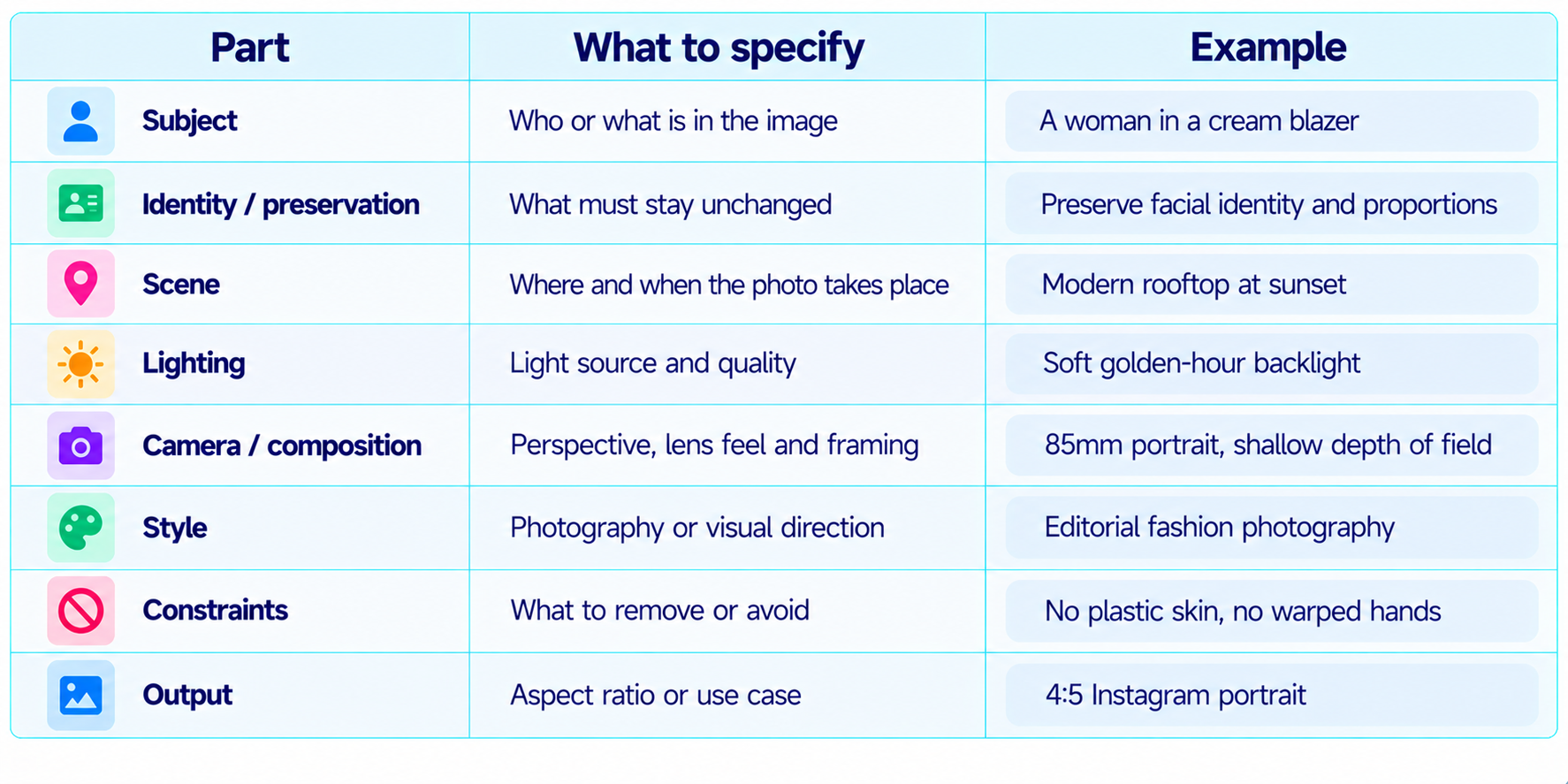
The best Gemini AI photo prompts are specific about the subject, pose, environment, lighting, camera perspective, visual style and the parts of the image that must remain unchanged. For photo edits, upload the source image first and explicitly say what to change and what to preserve. For a recognizable person, state that the facial structure, skin tone, age and distinctive features should remain consistent.
For 2026, some of the highest-interest Gemini photo prompt categories include viral 80s and 90s transformations, cinematic selfies, professional AI headshots, fashion editorials, couple photos, wedding photos, travel portraits, product photography and realistic photo fixes. These prompts are intentionally written around those search intents rather than repeating 100 variations of the same generic portrait.
You can use the prompts with Gemini's current image workflow and adapt them for Nano Banana 2. Google's current documentation says Nano Banana 2 is designed for high-fidelity image generation and editing, with better instruction following, character consistency, local edits and text rendering. For the strongest editing results, use a clear source image and make one major change at a time.
THE GEMINI AI PHOTO PROMPT FORMULA
How to Use These Prompts
- Replace every bracketed placeholder before generating.
- Upload a clear reference photo when the prompt is an edit, transformation or identity-preservation task.
- For an existing photo, say exactly what should change and what should remain unchanged.
- For realistic photography, describe lighting, lens perspective, depth of field and natural skin texture instead of relying only on 'ultra realistic.'
- Use 4:5 for portrait-focused social content, 1:1 for profile and product images, and 16:9 when you need a landscape composition.
- Change one major variable at a time when refining an image. This makes it easier to identify which instruction improved the result.
- Inspect the finished image for hands, faces, text, reflections, object geometry and background consistency before publishing.
Realistic Portraits & Headshots
1. Professional Studio Portrait
Create a photorealistic professional portrait of [PERSON]. Preserve recognizable facial structure, natural skin texture, age and proportions. Dress the subject in [OUTFIT]. Use soft studio key light, subtle fill, a clean neutral backdrop and an 85mm portrait-lens look. Editorial photography, natural expression, realistic skin detail, 4:5.
2. Golden-Hour Portrait
Create a photorealistic portrait of [PERSON] during golden hour. Preserve identity and natural facial proportions. Use warm low sunlight from behind the subject, gentle rim light, realistic skin texture, a softly blurred outdoor background and an 85mm lens look. Natural color grading, no artificial skin smoothing, 4:5.
3. Window-Light Portrait
Turn the uploaded photo into a realistic editorial portrait beside a large window. Preserve the person's exact identity, age and body proportions. Use soft north-facing window light, subtle shadow falloff, neutral interior tones and shallow depth of field. Real camera texture, natural pores and believable exposure, 4:5.
4. Black-and-White Portrait
Create a high-end black-and-white portrait of [PERSON]. Preserve facial identity and expression. Use directional studio lighting, rich midtone contrast, controlled highlights and subtle film grain. Classic 85mm portrait composition with natural skin texture and no beauty-filter look, 4:5.
5. Documentary Portrait
Create a candid documentary photograph of [PERSON] at [LOCATION]. Preserve the person's recognizable face and proportions. Use available light, natural posture, realistic environmental detail, shallow but believable depth of field and authentic documentary color. Avoid a staged studio appearance, 3:2.
6. Close-Up Beauty Portrait
Create a photorealistic close-up beauty portrait of [PERSON]. Preserve exact facial structure, skin tone and distinctive features. Use soft diffused beauty lighting, crisp eyes, realistic skin texture, subtle catchlights and a clean neutral background. No excessive retouching, 4:5.
7. Environmental Portrait
Create an environmental portrait of [PERSON] working as a [PROFESSION] in [WORKPLACE]. Preserve identity, natural proportions and believable hands. Include realistic tools and background details relevant to the profession. Documentary editorial photography, soft directional light, 3:2.
8. Rainy Street Portrait
Create a cinematic but photorealistic street portrait of [PERSON] standing on a rainy city street at night. Preserve identity and clothing silhouette. Wet pavement reflections, realistic rain, soft neon practical lights, subtle atmospheric haze, 50mm lens look, natural skin texture, 4:5.
9. Minimalist Fine-Art Portrait
Create a restrained fine-art portrait of [PERSON] against a warm off-white studio wall. Preserve facial identity and natural skin texture. Minimal wardrobe, soft side lighting, gentle shadows, muted tones and quiet expression. Contemporary editorial photography, 4:5.
10. Passport-Style Professional Portrait
Create a clean professional ID-style portrait from the uploaded photo. Preserve facial identity, age, skin tone and proportions exactly. Use even frontal lighting, neutral background, natural expression, centered framing and realistic skin texture. No beauty retouching, 4:5.
Viral Selfies & Social Media Photos
11. Cinematic Selfie
Transform this selfie into a cinematic lifestyle photograph. Preserve my face, hairstyle and recognizable identity. Keep a natural arm-length selfie perspective, but improve lighting with soft golden-hour highlights and a realistic city background. Add subtle lens depth, natural skin texture and polished cinematic color, 4:5.
12. Mirror Selfie
Create a realistic luxury mirror selfie from the uploaded photo. Preserve my face, body proportions and clothing identity. Place me in a stylish modern hotel bathroom with warm practical lighting, realistic reflections, accurate phone perspective and subtle editorial color grading, 4:5.
13. Cafe Selfie
Turn my uploaded selfie into a natural candid cafe photograph. Preserve identity and expression. Place me beside a window with soft morning light, a coffee cup, realistic background people softly out of focus and an 85mm photography feel. Natural skin and believable shadows, 4:5.
14. Travel Selfie
Recreate this selfie as a realistic travel photograph in [CITY]. Preserve my exact facial identity and outfit silhouette. Use recognizable but believable local architecture, natural daylight, realistic perspective and candid travel-photography color. Keep the person as the clear focal point, 4:5.
15. Elevator Selfie
Transform my photo into a polished elevator mirror selfie. Preserve face, pose and outfit. Use a premium modern elevator with brushed metal surfaces, warm ceiling lights, realistic reflections and subtle smartphone-camera characteristics. Do not create duplicate reflections, 4:5.
16. Night-Out Selfie
Create a photorealistic nightlife selfie from the uploaded image. Preserve identity and facial proportions. Use a dim restaurant or rooftop setting with warm practical lights, shallow depth of field and realistic low-light camera noise. Keep skin natural and avoid overexposure, 4:5.
17. Gym Selfie
Turn this uploaded selfie into a realistic post-workout gym photograph. Preserve identity and body proportions. Use authentic gym equipment, cool overhead lighting, natural sweat, realistic fabric texture and a candid phone-camera perspective. Avoid exaggerated muscles or artificial skin, 4:5.
18. Airport Selfie
Recreate this photo as a realistic airport travel selfie. Preserve my face, hair and clothing. Add believable airport architecture, carry-on luggage and soft daylight from large windows. Keep the camera perspective natural and the background slightly blurred, 4:5.
19. Beach Selfie
Transform my uploaded photo into a realistic beach selfie at late afternoon. Preserve my exact identity and natural proportions. Use warm sunlight, ocean reflections, soft wind in clothing and realistic skin texture. Keep the composition casual rather than posed, 4:5.
20. Streetwear Social Photo
Create a realistic social-media fashion photo of [PERSON] wearing [STREETWEAR]. Preserve facial identity and proportions. Use an urban street, overcast daylight, subtle editorial contrast, a 50mm lens feel and natural candid body language. Leave clean negative space on the right, 4:5.
Professional, LinkedIn & Career Photos
21. LinkedIn Headshot
Turn the uploaded photo into a professional LinkedIn headshot. Preserve the person's exact facial identity, age, hairline and natural skin texture. Use a clean neutral background, soft studio lighting, confident but natural expression and realistic 85mm portrait perspective, 1:1.
22. Executive Portrait
Create a premium executive portrait of [PERSON]. Preserve identity and natural proportions. Dress the subject in a tailored [SUIT COLOR] suit, use a modern office background with subtle depth of field, soft side lighting and restrained corporate color grading. Photorealistic, 4:5.
23. Founder Profile Photo
Create a modern founder profile photograph from the uploaded photo. Preserve identity and facial structure. Use a contemporary office, natural window light and a confident candid pose, with shallow depth of field and authentic editorial business photography, 4:5.
24. Doctor Profile Photo
Create a professional medical profile portrait of [PERSON]. Preserve exact identity. Use a clean clinic setting with soft daylight, a professional [COAT/SCRUB] outfit, natural expression and realistic skin texture. Keep medical props subtle and believable, 4:5.
25. Lawyer Portrait
Turn this image into a premium lawyer profile portrait. Preserve the person's identity, expression and proportions. Use a refined office or library setting, warm side lighting, tailored formal clothing and restrained editorial contrast, 4:5.
26. Real Estate Agent Headshot
Create a polished but approachable real-estate agent headshot. Preserve identity and natural facial features. Use a bright upscale interior, soft daylight, business-casual clothing and a welcoming expression. Photorealistic professional photography, 4:5.
27. Creator Profile Photo
Create a professional creator profile image from the uploaded photo. Preserve face and hairstyle. Use a clean studio with subtle creative props related to [NICHE], dramatic but flattering key light and modern editorial color grading, 1:1.
28. Speaker Photo
Create a conference-speaker portrait of [PERSON]. Preserve identity and body proportions. Show a modern stage or auditorium softly blurred behind them, subtle event lighting and an authentic public-speaking pose. Professional editorial photography, 4:5.
29. Resume Photo
Create a conservative professional resume photo from the uploaded image. Preserve facial identity, skin tone and natural proportions. Neutral light-gray background, even soft light, centered framing and a natural expression. No beauty filter, 1:1.
30. Team Member Photo Set
Using the uploaded reference photo of each team member, create a consistent set of professional portraits. Preserve each person's unique identity and facial features. Use the same neutral background, lens perspective, lighting ratio, crop and color grading across all portraits, 4:5.
Fashion & Editorial Photography
31. Luxury Fashion Editorial
Create a high-fashion editorial portrait of [PERSON] wearing [OUTFIT]. Preserve facial identity and natural body proportions. Use dramatic studio side lighting, a sculptural background, controlled shadows and luxury-magazine styling. Realistic fabric texture and high-end photography, 4:5.
32. Street Fashion Editorial
Create a realistic street-style fashion photograph of [PERSON] wearing [OUTFIT]. Preserve identity and body proportions. Use an urban location, natural overcast light, authentic candid movement and editorial color grading. Keep the background believable, 4:5.
33. Minimalist Fashion Cover
Create a fashion magazine cover portrait of [PERSON]. Preserve face and distinctive features. Use a minimalist studio background, sculptural outfit, soft directional light and sophisticated editorial composition. Leave clear negative space for a headline, 4:5.
34. Luxury Evening Look
Transform the uploaded photo into a luxury evening-fashion portrait. Preserve facial identity and pose. Dress the subject in [OUTFIT], use warm moody lighting, elegant architecture and subtle reflections. Photorealistic fabric detail and premium editorial styling, 4:5.
35. Monochrome Fashion
Create a monochrome fashion photograph of [PERSON]. Preserve identity and body proportions. Use black, white and gray styling, hard directional light, clean geometry and a modern magazine aesthetic. High detail without artificial skin smoothing, 4:5.
36. Denim Campaign
Create a commercial fashion photograph featuring [PERSON] in a premium denim outfit. Preserve identity. Use a simple urban background, natural daylight, believable denim texture, relaxed pose and commercial editorial color grading, 4:5.
37. Luxury Jewelry Portrait
Create a close fashion portrait of [PERSON] wearing [JEWELRY]. Preserve exact facial identity and natural skin texture. Use soft beauty lighting, subtle reflections on the jewelry and a clean dark background. Make the jewelry sharp without making the skin look plastic, 4:5.
38. Beauty Campaign
Create a premium beauty campaign image of [PERSON]. Preserve facial features and skin tone. Use soft studio beauty lighting, realistic makeup detail, natural pores, glossy but believable hair and a minimal pastel background, 4:5.
39. Saree Editorial
Create a photorealistic high-fashion editorial portrait of [PERSON] wearing an elegant [SAREE COLOR] saree with refined styling. Preserve exact identity and natural proportions. Use warm studio light, subtle jewelry and contemporary magazine composition, 4:5.
40. Kurta Editorial
Create a premium editorial photograph of [PERSON] wearing a refined [KURTA COLOR] kurta. Preserve identity, skin tone and body proportions. Use architectural Indian textures in the background, soft directional light and sophisticated fashion photography, 4:5.
Couples, Weddings & Family
41. Romantic Couple Portrait
Create a photorealistic romantic portrait of the two people in the uploaded reference images. Preserve both identities and proportions. Place them in a softly lit outdoor setting at golden hour, natural body language, realistic skin texture and subtle cinematic color grading, 4:5.
42. Wedding Portrait
Turn the uploaded couple photo into a premium wedding portrait. Preserve both faces exactly. Use elegant [VENUE], soft warm lighting, realistic wedding attire, subtle floral detail and shallow depth of field. High-end wedding photography, 4:5.
43. Indian Wedding Couple
Create a photorealistic Indian wedding portrait using the uploaded couple as identity references. Preserve both faces, skin tone and natural proportions. Use authentic [WEDDING TRADITION] attire, refined jewelry, warm venue lighting and realistic ceremonial details, 4:5.
44. Engagement Photo
Create a realistic engagement portrait of the uploaded couple. Preserve their exact identities and expressions. Use a modern outdoor location, golden-hour light, natural interaction and elegant editorial composition, 4:5.
45. Anniversary Portrait
Transform this couple photo into a warm anniversary portrait. Preserve both identities and recognizable features. Use soft evening light, an intimate restaurant or garden setting and natural candid body language, with restrained cinematic color grading, 4:5.
46. Best Friends Photo
Create a realistic best-friends photograph of the uploaded people. Preserve every person's identity, age and proportions. Use a casual city setting, natural daylight, candid laughter and authentic documentary photography, 4:5.
47. Family Portrait
Create a natural family portrait from the uploaded reference photos. Preserve each person's face and body proportions. Use a bright home setting, soft window light, coordinated but realistic clothing and relaxed expressions. Avoid overly perfect posing, 4:5.
48. Generational Family Photo
Create a photorealistic family portrait showing three generations together. Preserve each person's identity from the uploaded references. Use a warm home interior, natural window light, believable body language and subtle family-album realism, 4:5.
49. Wedding Reception Candid
Recreate the uploaded couple as a candid wedding-reception photograph. Preserve identity and clothing details. Add realistic ambient lighting, guests softly blurred in the background, natural movement and a documentary wedding-photography look, 3:2.
50. Family Album Update
Transform this modern family photo into a polished contemporary family-album image. Preserve everyone exactly. Use natural window light, realistic colors, gentle contrast and authentic expressions. Keep it warm and believable rather than highly stylized, 4:5.
Travel, Lifestyle & Street Photography
51. Paris Street Portrait
Transform the uploaded photo into a realistic travel portrait in Paris. Preserve identity and clothing silhouette. Use a believable Parisian street, soft morning light, subtle depth of field, natural pedestrians in the background and documentary travel photography, 4:5.
52. New York Street Photo
Create a cinematic street photograph of [PERSON] walking through New York at blue hour. Preserve identity and body proportions. Use realistic storefronts, taxis, wet pavement reflections and practical city lighting. Handheld 35mm photography feel, 3:2.
53. Tokyo Night Photo
Create a realistic night street portrait of [PERSON] in Tokyo. Preserve facial identity and clothing. Use authentic neon signs, crowded but believable streets, wet pavement reflections, controlled depth of field and realistic low-light camera texture, 4:5.
54. Kerala Backwater Portrait
Transform the uploaded photo into a realistic Kerala backwater travel portrait. Preserve identity and proportions. Use lush greenery, calm water, soft tropical daylight and authentic local visual details. Natural travel photography, 4:5.
55. Rajasthan Travel Portrait
Create a photorealistic travel portrait of [PERSON] in Rajasthan. Preserve exact identity. Use warm architecture, realistic sandstone textures, late-afternoon sunlight and authentic clothing details. Cinematic travel editorial style, 4:5.
56. Beach Vacation
Turn this photo into a realistic luxury beach-vacation photograph. Preserve identity and body proportions. Use turquoise water, soft late-afternoon sunlight, realistic wind in clothing and natural skin texture. Premium travel photography, 4:5.
57. Mountain Travel Photo
Create a realistic mountain travel photograph using the uploaded person as the reference. Preserve face and proportions. Place them on a mountain viewpoint with believable atmospheric perspective, cool daylight and subtle cinematic color, 3:2.
58. Road Trip Photo
Create a candid road-trip photograph of [PERSON] beside a vintage car on an open highway. Preserve identity. Use warm afternoon light, realistic roadside detail, natural posture and documentary travel photography, 3:2.
59. Cafe Travel Snapshot
Turn the uploaded photo into a realistic travel cafe snapshot. Preserve identity and clothing. Use a local cafe in [CITY], natural window light, coffee and food details, shallow depth of field and authentic everyday photography, 4:5.
60. Airport Travel Editorial
Create a premium travel editorial photo of [PERSON] in an airport. Preserve identity and outfit. Use large glass windows, luggage, natural daylight, subtle motion in the background and realistic 50mm photography, 4:5.
Retro 80s, 90s & 2000s Photos
61. Authentic 1980s Portrait
Transform the uploaded photo into an authentic 1980s photograph. Preserve exact facial identity, age, skin tone and proportions. Use era-accurate hairstyle, clothing and accessories, warm analog lighting, subtle 35mm grain and slightly faded consumer-film colors. Remove modern objects, 4:5.
62. 1980s Family Album
Recreate this image as a believable 1980s family-album photograph. Preserve every person's face. Use a modest home interior, period furniture, era-accurate clothing, on-camera flash, warm consumer-film colors and imperfect framing. Make it feel like a real printed photo, 4:5.
63. 1980s Bollywood-Inspired Studio
Transform the uploaded portrait into a fictional 1980s Bollywood-inspired studio photograph. Preserve the person's recognizable identity. Use period-accurate fashion, hair, makeup, warm studio lighting and realistic 35mm film grain. Do not copy any specific actor or copyrighted poster, 4:5.
64. 1980s College Photo
Turn the uploaded image into an authentic late-1980s college photograph. Preserve identity. Use period clothing, books, a simple campus setting, warm sunlight and analog film texture. Slightly imperfect framing, family-album realism, 4:5.
65. 1990s Point-and-Shoot Snapshot
Recreate the uploaded photo as a realistic 1990s point-and-shoot snapshot. Preserve identity and expression. Use casual clothing, direct flash, slightly cool consumer-film colors, mild grain and imperfect framing, 4:5.
66. 1990s Family Photo
Transform the uploaded family image into a believable 1990s family photograph. Preserve all faces. Use casual denim and knitwear, simple home decor, direct flash and authentic 35mm consumer-film color, 4:5.
67. 1990s College Portrait
Create a realistic 1990s college portrait from the uploaded photo. Preserve identity. Use casual campus clothing, a simple college corridor, direct flash, muted colors and subtle point-and-shoot softness, 4:5.
68. Late-1990s Y2K Transition
Transform the uploaded image into a late-1990s portrait with early-Y2K styling. Preserve identity. Use restrained metallic accessories, casual denim, compact-camera flash and subtle consumer-film texture. Keep the styling clearly late 1990s, not full 2000s, 4:5.
69. Early-2000s Digital Camera
Recreate the uploaded photo as an authentic early-2000s digital-camera snapshot. Preserve identity. Use direct flash, slightly sharp digital noise, casual clothing, modest color saturation and realistic compact-camera framing, 4:5.
70. Retro Travel Album
Turn the uploaded travel photo into a believable 1990s or early-2000s vacation album image. Preserve the person's identity and pose. Use period luggage, local signage, consumer-camera flash and authentic analog or early-digital texture, 4:5.
Product, Food & Commercial Photography
71. Premium Product Hero
Create a photorealistic premium product hero shot of [PRODUCT]. Preserve the product's shape, logo placement, color and material. Use controlled studio lighting, soft shadow, subtle reflection and a clean luxury backdrop. Commercial product photography, 1:1.
72. Ecommerce White Background
Create a clean ecommerce product image of [PRODUCT]. Preserve exact product proportions, branding and surface detail. Use even softbox lighting, pure white background, grounded contact shadow and accurate color. Front three-quarter view, 1:1.
73. Beauty Product Campaign
Create a premium cosmetic campaign image for [PRODUCT]. Preserve the exact packaging text and logo. Use soft diffused lighting, realistic reflections, water droplets or botanical accents, clean luxury composition and 4:5 framing.
74. Tech Product Lifestyle Shot
Create a realistic lifestyle product photo of [DEVICE] on a modern desk. Preserve the product's exact shape and branding. Use natural window light, subtle screen glow, realistic shadows and a premium editorial technology look, 4:5.
75. Luxury Watch Macro
Create a photorealistic macro product shot of [WATCH]. Preserve the dial, hands and brand details exactly. Use dramatic directional light, realistic metal reflections, shallow depth of field and a dark luxury background, 3:2.
76. Restaurant Hero Dish
Create a realistic professional food photograph of [DISH]. Preserve the exact ingredients and serving style. Use soft side light, appetizing natural texture, subtle steam where appropriate and shallow depth of field. High-end restaurant photography, 4:5.
77. Coffee Campaign
Create a premium coffee campaign image featuring [COFFEE DRINK]. Use realistic crema, glass or ceramic material response, warm morning light and a refined cafe background. Commercial lifestyle photography, 4:5.
78. Bakery Product Photo
Create a photorealistic bakery product photograph of [PASTRY]. Preserve realistic texture and proportions. Use warm window light, subtle crumbs, natural shadows and a handcrafted editorial food-photography look, 4:5.
79. Amazon-Style Product Main Image
Create a clean marketplace product image of [PRODUCT]. Preserve exact packaging, colors, logo and proportions. Use neutral white background, even studio light, crisp edges and realistic grounding shadow. No props, no extra text, 1:1.
80. Product on Luxury Set
Transform this product photo into a premium luxury advertising image. Preserve the product exactly. Place it on [SURFACE] with [LIGHTING], controlled reflections, subtle atmospheric effects and sophisticated commercial photography, 4:5.
Cinematic, Film & Creative Photography
81. Cinematic Night Portrait
Create a cinematic night portrait of [PERSON]. Preserve identity and natural facial structure. Use practical street lighting, subtle rain or haze, shallow depth of field and a restrained teal-and-warm color contrast. Photorealistic movie-still photography, 4:5.
82. Film Still
Turn the uploaded photo into a believable cinematic film still. Preserve identity, pose and wardrobe silhouette. Use realistic set lighting, atmospheric depth, natural skin texture and subtle 35mm film characteristics, 2.39:1.
83. Neo-Noir Portrait
Create a photorealistic neo-noir portrait of [PERSON]. Preserve identity and body proportions. Use hard side light, deep shadows, reflective pavement and a dark urban setting. Subtle film grain, realistic lens behavior, 4:5.
84. Golden Cinema Frame
Create a warm cinematic frame of [PERSON] at sunset. Preserve identity and proportions. Use natural backlight, soft lens flare, realistic environment, subtle film grain and a restrained cinematic color grade, 16:9.
85. Documentary Street Scene
Create a photorealistic documentary street photograph of [SCENE]. Use believable human behavior, realistic architecture, natural light and imperfect framing. Avoid staged poses and over-clean details, 3:2.
86. Vintage 35mm Film
Create a realistic 35mm film photograph of [SUBJECT] at [LOCATION]. Use natural exposure, subtle grain, gentle halation, realistic color response and slight optical imperfections. Preserve natural skin and material texture, 3:2.
87. Polaroid-Style Photo
Recreate the uploaded photo as an authentic instant-film photograph. Preserve identity and composition. Use soft flash, modest contrast, slightly warm tones and natural instant-film texture. Avoid excessive vintage effects, 1:1.
88. Black-and-White Street Photo
Create a high-contrast documentary black-and-white street photograph of [SUBJECT]. Preserve realistic anatomy and perspective. Use directional daylight, strong geometric shadows and authentic film texture, 3:2.
89. Magazine Cover Portrait
Create a premium editorial magazine cover image featuring [PERSON]. Preserve identity. Use sophisticated lighting, polished styling, clean composition and generous negative space for a headline. Photorealistic fashion photography, 4:5.
90. Cinematic Travel Poster
Create a cinematic travel photograph of [PERSON] in [CITY]. Preserve identity and proportions. Use realistic local architecture, atmospheric depth, strong but natural lighting and a premium film look. Leave clean negative space for typography, 2:3.
Photo Editing, Restoration & Precise Fixes
91. Remove Background People
Edit the uploaded photo: remove the distracting background people while preserving the main subject, architecture, perspective, shadows and overall composition. Reconstruct the background naturally with matching texture and lighting, photorealistic result.
92. Change the Background
Edit this photo: replace the background with [NEW BACKGROUND]. Keep the person's exact face, body proportions, clothing, pose and lighting direction unchanged. Match the new environment's depth, shadows and color so the edit looks native to the original image.
93. Outfit Change
Edit this photo: change only the outfit to [NEW OUTFIT]. Preserve the person's face, hairstyle, pose, body proportions and background. Make the new fabric, folds, seams and shadows physically believable.
94. Fix the Lighting
Edit this photo: improve only the lighting. Preserve identity, clothing, composition and background. Replace harsh or uneven illumination with [LIGHTING STYLE], keeping realistic skin texture and natural shadow direction.
95. Restore an Old Photo
Restore this damaged photograph. Remove scratches, dust, creases and faded areas while preserving the original faces, expressions, clothing and composition. Recover natural contrast and color without making the image look newly generated.
96. Remove an Unwanted Object
Edit this photo: remove [OBJECT]. Keep everything else unchanged, including the main subject, face, clothing, background geometry and lighting. Reconstruct the hidden area naturally and match surrounding texture exactly.
97. Correct Facial Details
Edit this portrait carefully: correct only visible facial distortions caused by the image generation. Preserve the person's identity, age, skin tone, expression and hairstyle. Make eyes, ears, teeth and facial proportions natural without beautifying or changing the person.
98. Fix Hands and Fingers
Edit this image: correct only the hands and fingers so the anatomy is natural. Preserve pose, clothing, face, lighting, background and composition. Keep the number of fingers correct and match realistic skin texture and shadows.
99. Fix Text and Logo
Edit this image: correct the text or logo so it reads exactly '[TEXT]' and matches the existing design, font style, spacing, perspective and lighting. Preserve the rest of the image unchanged.
100. Final Photorealism Pass
Apply a restrained final photorealism pass to this image. Preserve the subject, composition and creative direction. Correct obvious face, hand, reflection, lighting, texture and geometry artifacts without changing the intended scene. Keep natural imperfections and believable camera behavior.
Gemini Photo Prompt Tips That Improve Results
- Use a clear, high-resolution reference photo when identity matters.
- Say 'preserve my facial identity and natural proportions' instead of only saying 'keep me the same.'
- Describe realistic light direction so the new environment matches the subject.
- Specify the type of photo you want, such as candid snapshot, editorial fashion photo, documentary photo or commercial product shot.
- Use one strong visual style rather than stacking unrelated aesthetics.
- Add a camera perspective when it matters: 24mm wide, 50mm documentary, 85mm portrait, macro, top-down or eye level.
- For realistic skin, ask for natural pores, believable texture and restrained retouching.
- For text-heavy images, provide exact copy in quotes and define hierarchy, placement and alignment.
- For edits, make one major change at a time and then refine in a second pass.
- Always inspect hands, eyes, teeth, reflections, logos, small text and background geometry before publishing.
Frequently Asked Questions
What are the best Gemini AI photo prompts in 2026?
The strongest prompts are specific about the subject, lighting, composition, style and constraints. For edits, they also say exactly what should change and what must remain unchanged.
Can Gemini edit existing photos?
Yes. Google says Gemini Apps can edit generated images, uploaded images and multiple uploaded images with Nano Banana 2.
What is Nano Banana 2?
Nano Banana 2 is Google's current Gemini image generation and editing model in Gemini Apps. Google highlights improved instruction following, local edits, character consistency and better text rendering.
How do I preserve my face in Gemini AI photos?
Upload a clear reference image and explicitly preserve facial identity, skin tone, age, distinctive features and natural proportions.
What are the best Gemini prompts for realistic photos?
Use detailed prompts that specify subject, scene, lighting, camera perspective, style and natural imperfections instead of relying only on generic phrases such as 'ultra realistic.'
Can Gemini create 80s and 90s AI photos?
Yes. Use a reference photo and specify the decade, clothing, hair, camera character, setting, lighting and film texture. The current retro-photo trend is especially strong for 1980s and 1990s transformations.
Can Gemini make professional headshots?
Yes. Prompts 21-30 are designed for LinkedIn, resumes, executive profiles, doctors, founders, speakers and team portraits.
What aspect ratio should I use for Instagram?
4:5 is a strong starting point for portrait-style social posts. Use 1:1 for profile-style images and square product shots, and 16:9 for landscape posts, banners or thumbnails.
How do I make Gemini photo edits look realistic?
Describe the edit precisely, lock the elements that must stay fixed, and match lighting, perspective, texture and shadows between the changed area and the original photo.
Can Gemini fix text in an image?
Yes. Google highlights improved text rendering in Nano Banana 2. For the best result, provide the exact text in quotes and specify its placement, hierarchy and visual style.
Recommended Blogs
Resources & Community
Join our community of 70,000+ AI enthusiasts and learn to build powerful AI applications. Whether you're a beginner or an experienced developer, Build Fast with AI helps you understand and implement AI in your projects.
Agentic AI Launchpad 2026
A structured 6-week cohort program that takes you from AI basics to building and deploying real-world agentic AI systems. Includes live sessions, expert mentorship, project reviews and a builder community network.
Ready to go from learning to building? Join the next cohort: Agentic AI Launchpad 2026
Free AI Resources
Access free tools, workshops and micro-learning to keep building.