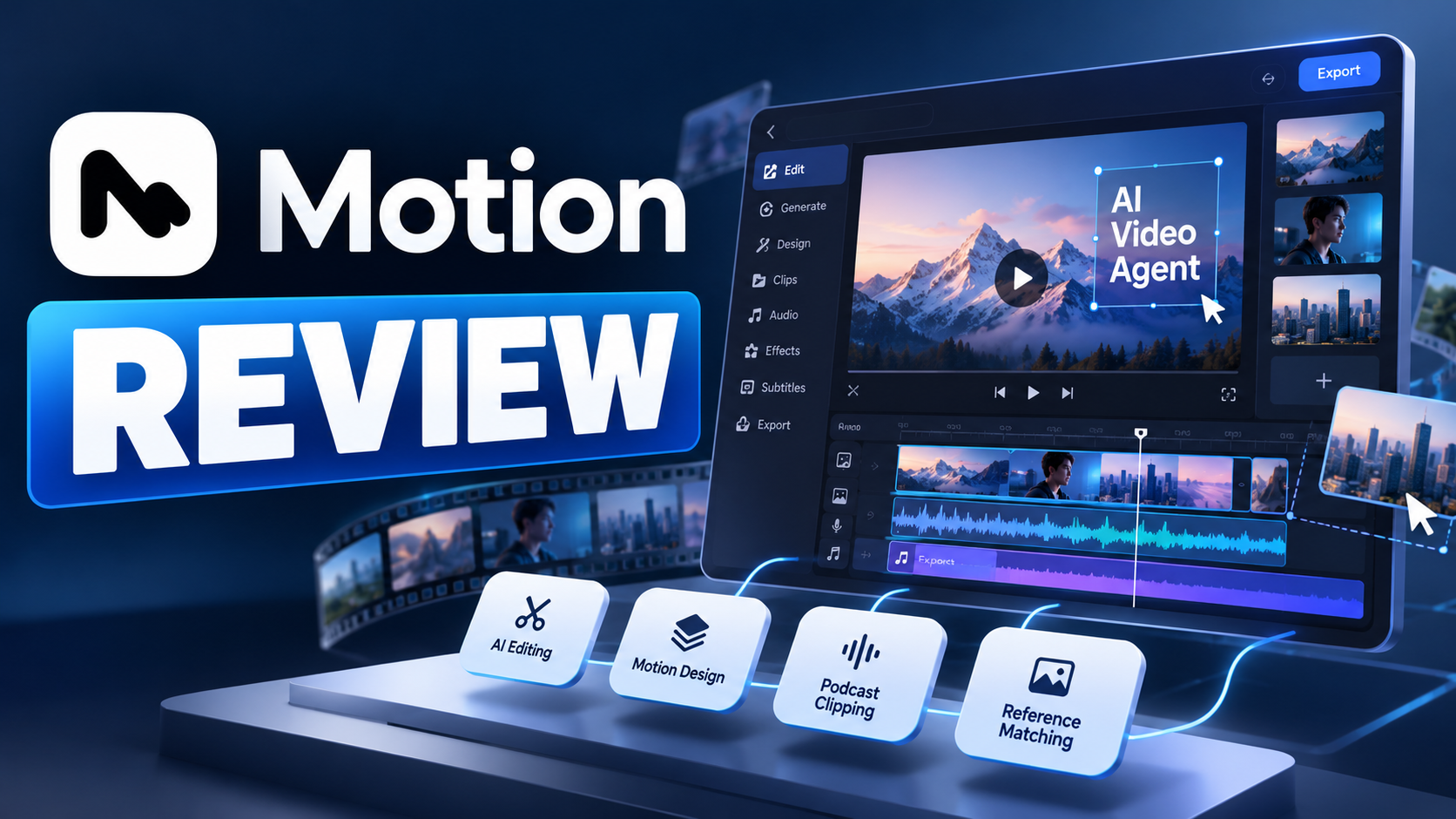
Motion Review: Can the General Video Agent Handle the Whole Creative Workflow?
Most AI video tools start with a narrow promise: generate a clip from text, animate a still image, or apply an effect to footage. Motion is aiming at a broader job. Its General Video Agent is designed to understand a video brief, work with existing footage or generate new material, plan the edit, add motion design, synchronize audio, and let the user keep refining the result after the first cut.
That distinction matters because a usable video is rarely just a generated shot. A launch video needs a story, pacing, branded typography, transitions, sound, and a clear ending. A podcast clip needs the right moment, clean cuts, readable captions, and framing that keeps the active speaker visible. A product explainer needs a sequence that helps the audience understand a feature rather than merely decorating it. Motion positions itself as the agent that coordinates these connected jobs.
The launch material demonstrates workflows such as cutting a multicamera podcast into short clips, making a product launch video, animating a logo, adapting a reference video's typography and transitions, and turning an essay into a narrated film. It also describes direct edits in a preview, timeline editing, and project handoff to professional tools such as Premiere Pro, After Effects, and DaVinci Resolve.
The important question is not whether Motion can make a video from a prompt. It is whether the agent can reduce the work between a rough brief and a publishable edit without taking creative control away from the person making the final decisions.
QUICK ANSWER
Motion's General Video Agent is an AI video production system for editing, motion design, video creation, and video understanding. It can work from existing footage or generate new material, interpret a creative brief and reference video, plan scenes, select podcast moments, reframe speakers, handle motion graphics and audio synchronization, and let users refine elements in the preview or timeline.
Its biggest differentiator is the complete workflow rather than one generation mode. Motion is designed to move from brief to structured cut, then support revisions and handoff into tools including Adobe Premiere Pro, After Effects, and DaVinci Resolve. It also describes support for agent-oriented video frameworks such as Remotion and HyperFrames, although supported editing features vary by destination.
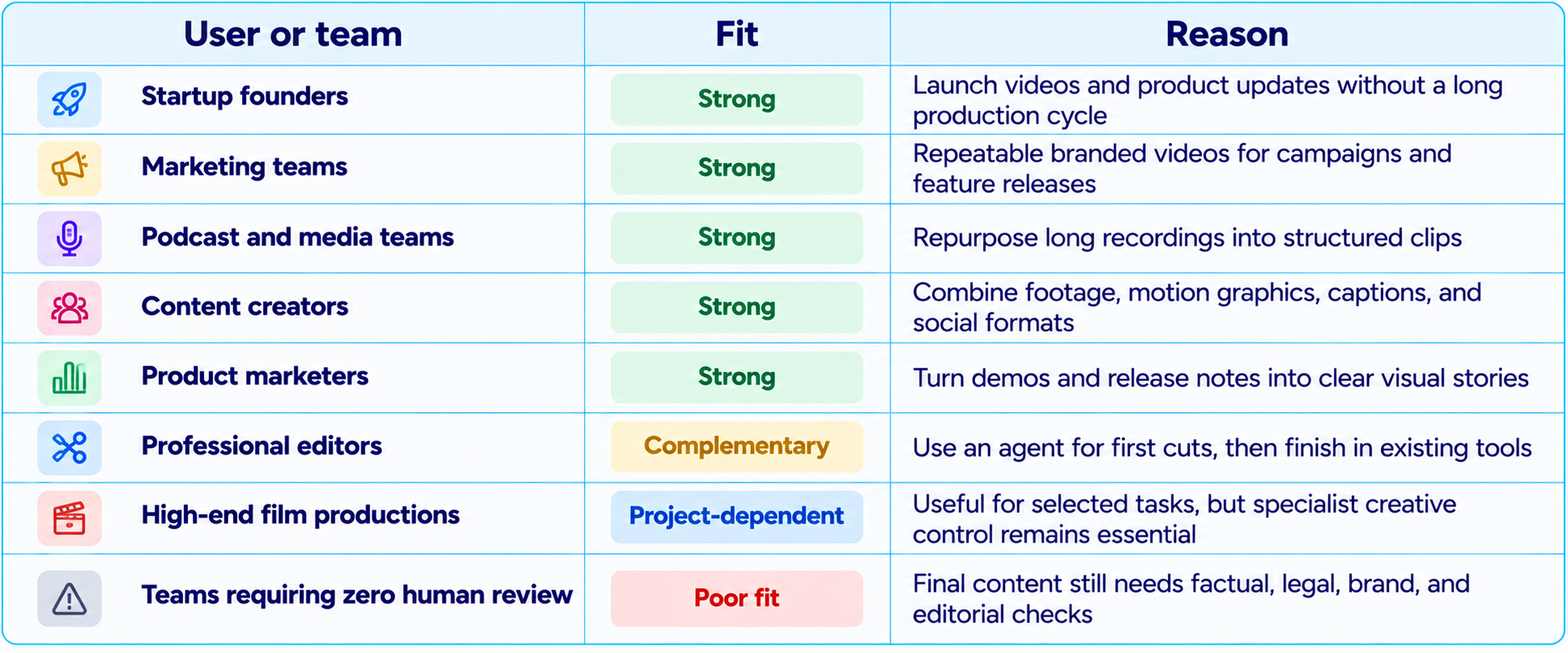
The best fit is likely to be founders, marketing teams, content creators, and production teams that repeatedly need launch videos, social clips, product demos, explainers, podcast highlights, and branded motion graphics. It is less suitable as a promise of fully autonomous, zero-review production for every high-stakes film. The final creative and factual review still matters, and the official launch material does not provide a public standardized benchmark suite or a full pricing table for the General Video Agent.
Verdict: Motion is worth evaluating if video production is slowed down by the work of planning, editing, motion design, and revision. Its strongest proposition is an editable agentic workflow that connects these stages, rather than a one-shot text-to-video generator.
1. What Is Motion's General Video Agent?
Motion describes its General Video Agent as a system for video editing, motion design, and video understanding. The word general is important: the product is not framed as a single-purpose model that only creates new footage. It is intended to work with material a user already has, create additional material when needed, and coordinate the stages that turn those assets into a finished film.
A user can provide a brief, brand assets, or a reference video. Motion says it studies the reference's pacing, typography, and transitions, plans shots, and checks the edit before presenting it. For an existing interview or podcast, it can identify strong moments, reframe around the active speaker, and prepare short-form edits. For a new product launch, it can create a sequence with cuts, motion graphics, color grading, and audio sync.
This places Motion in the growing category of AI creative agents. Instead of asking the user to operate every editing control, the agent takes a goal, works through multiple production steps, and returns an artifact that can still be edited. For a broader explanation, see our What Is an AI Agent? Beginner Guide With Examples (2026).
2. What Makes Motion Different From a Standard AI Video Generator?
A standard AI video generator is usually evaluated on the clip it creates: visual quality, motion, prompt adherence, consistency, duration, and resolution. Those remain important, but they do not describe the full workload of producing a finished video. Editors also need to select shots, structure a story, animate text, align audio, apply a visual identity, handle aspect ratios, and revise individual elements.
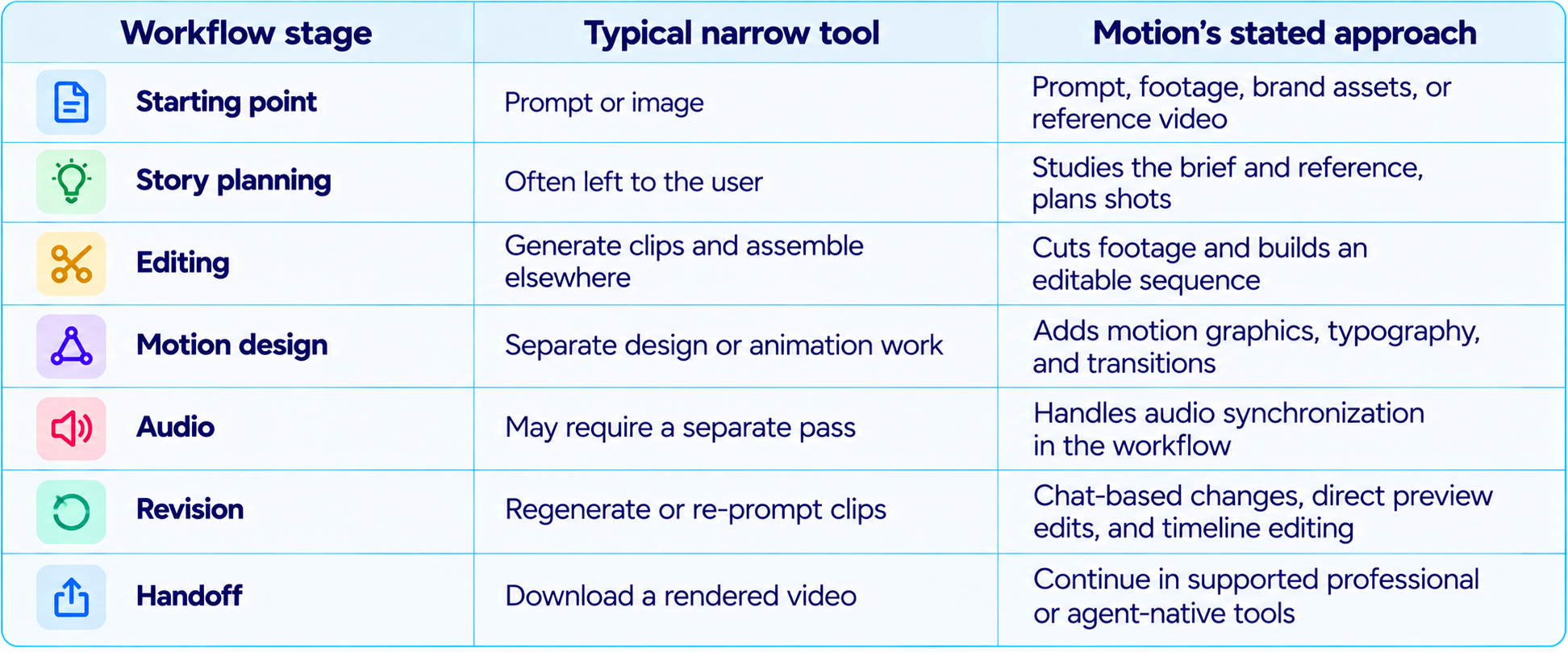
The product's central idea is that the project should survive beyond the first render. The user can request changes, draw on the video to communicate a visual adjustment, change text and elements in the preview, or work in a timeline. That is a more practical model for professional content than treating every generated result as a finished, uneditable file.
3. Motion General Video Agent: Features at a Glance
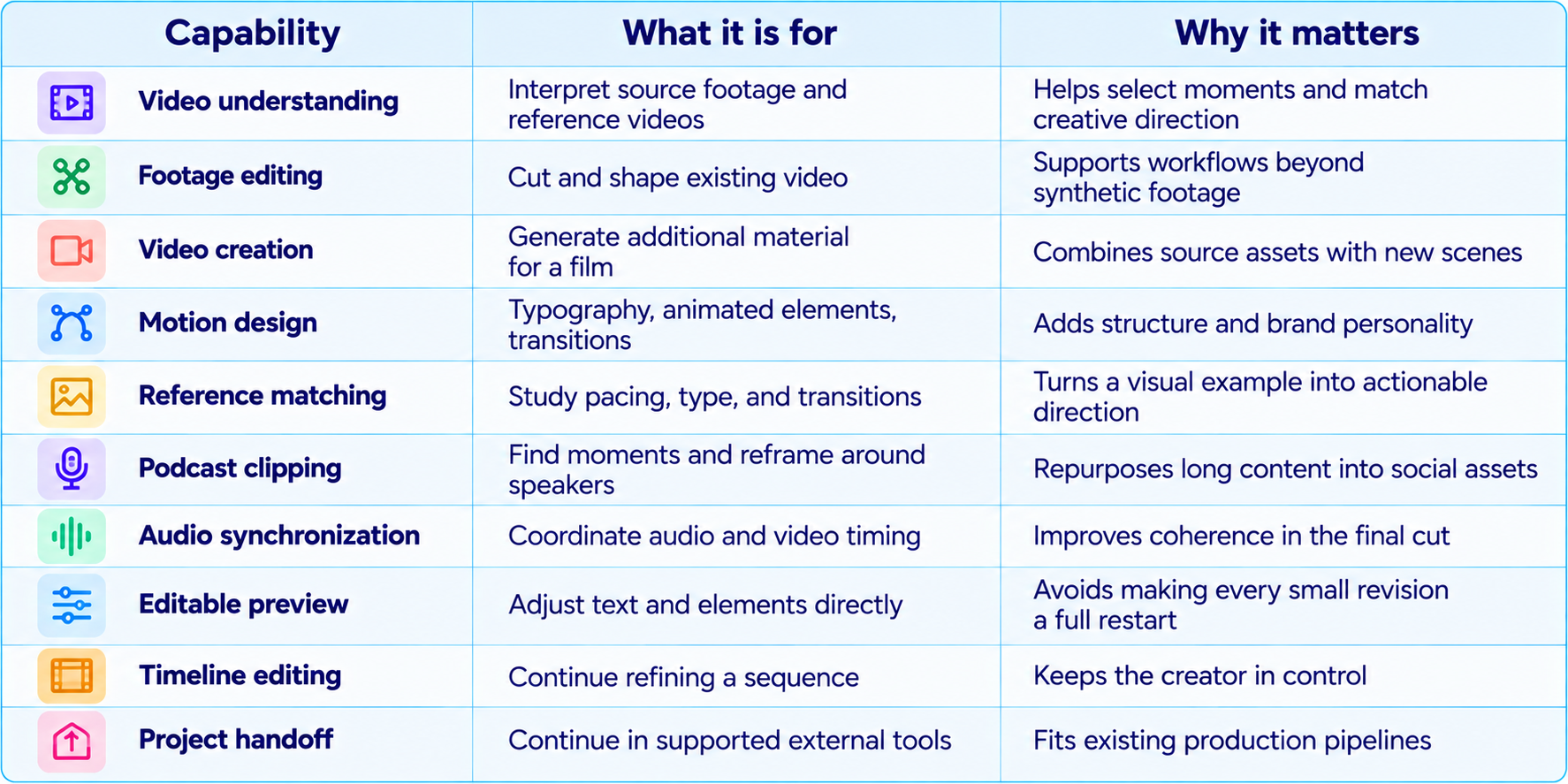
These are capabilities described by Motion's own launch materials, not a claim that every operation is flawless in every project. Source quality, the complexity of the brief, brand constraints, and the destination format affect the amount of human revision required.
4. From Brief to Finished Cut: How the Workflow Works
The simplest way to think about Motion is as a production workflow with an agent coordinating the steps. You begin by describing the result you want, then provide context that helps the system make decisions. The agent interprets the brief, plans the video, produces an initial cut, and gives you ways to revise it.
Step 1: Define the outcome
Specify the audience, purpose, length, platform, tone, and one message the viewer should remember. 'Make a product video' is too broad; 'make a 45-second launch video for developers, open with the problem, show the feature in use, and end with one CTA' gives the agent a usable brief.
Step 2: Add source material
Upload footage, product screenshots, logos, brand assets, written copy, or a reference video when relevant. A reference should explain style, pacing, typography, or framing, not simply be attached without a reason.
Step 3: Let Motion plan the edit
The launch description says Motion studies the reference, plans shots, and checks the cut before showing it. Review whether the proposed sequence supports the message rather than accepting a visually impressive but confusing story.
Step 4: Generate and assemble
Motion can work with existing footage and create new material for the film. It also handles cuts, motion design, color grading, and audio sync as part of the stated workflow.
Step 5: Revise the actual artifact
Ask for a tighter opening, change a title, adjust a visual element, or use the preview and timeline. Be specific about what should change and what must remain untouched.
Step 6: Export or hand off
Continue in a supported destination such as Premiere Pro, After Effects, DaVinci Resolve, Remotion, or HyperFrames when that fits the team's process. Feature support varies by destination, so validate the handoff on the actual project.
5. Video Editing: Working With Footage You Already Have
One of Motion's most useful claims is that it can work with existing footage. Businesses and creators often have more raw material than they can edit: interviews, product demos, customer calls, event recordings, webinars, podcasts, and founder updates. The bottleneck is frequently not recording footage but turning it into a coherent story.
For an interview, the agent may need to identify the strongest statement, remove dead space, create a clear opening, use cutaways where appropriate, and keep the speaker framed well. For a product demo, it may need to sequence the problem, product action, result, and final message. These are editorial decisions, not just visual-generation tasks.
The best way to test this capability is to use a real recording rather than a polished demo. Give Motion a clear target runtime and audience, then compare the first cut with your manual edit. Check whether it preserves meaning, avoids awkward jump cuts, handles speaker changes, and selects moments that make sense without the original context.
6. Podcast Clips and Short-Form Video Repurposing
Podcast clipping is one of the clearest examples of a general video agent solving a repeated production task. A long recording may contain several strong ideas, but each short clip needs a hook, a self-contained point, readable captions, and framing that makes the conversation easy to follow on a phone.
Motion's launch page demonstrates a workflow that selects multiple podcast topics, creates clips to a target length, reframes around the active speaker, and can use stacked boxes when two speakers matter. It also describes applying branding, captions, and an outro. That combination is more useful than simply cutting a fixed interval every few minutes.
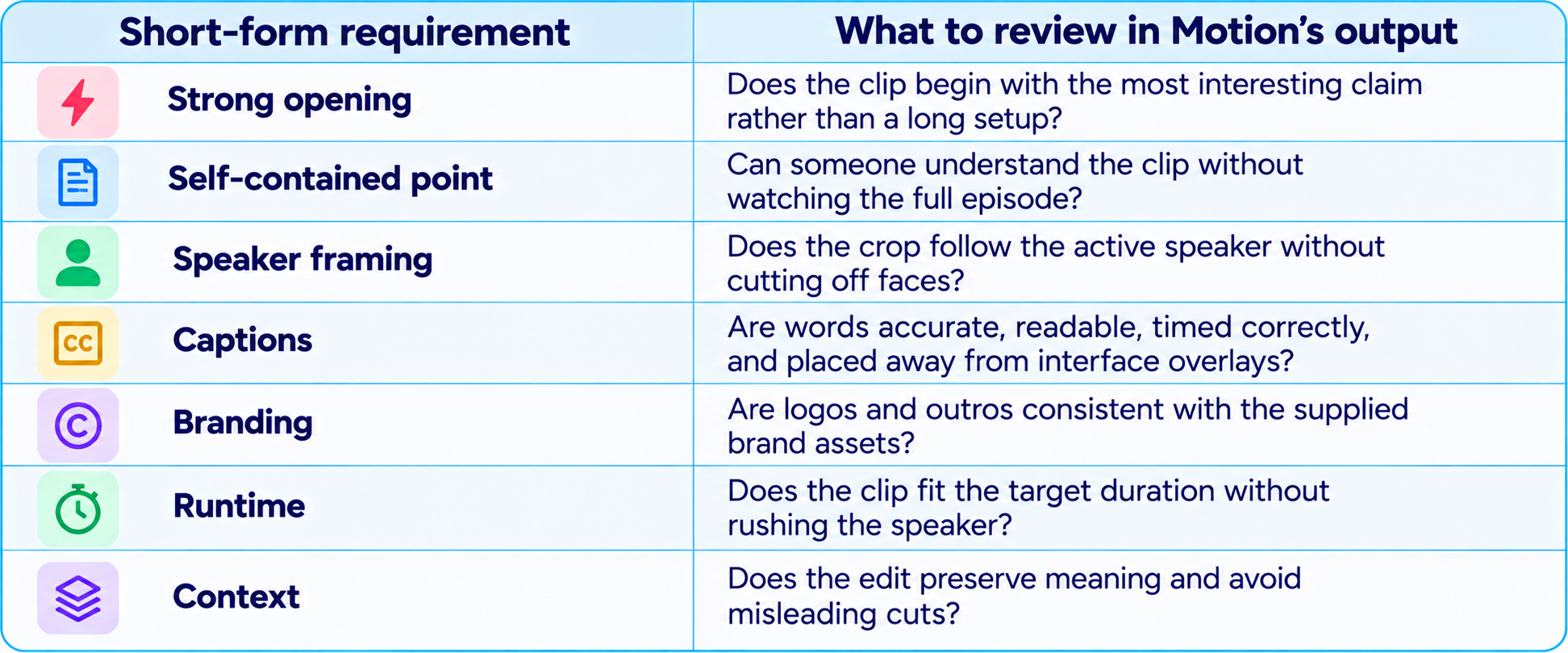
For teams publishing clips every week, the main benefit is repeatability. A reusable brief can specify duration, hook style, aspect ratio, caption treatment, branding, and output count. Human review should still verify the clip's meaning, particularly when an isolated quote could be misleading.
7. Motion Design, Typography, and Brand Consistency
Motion is not only an editor; it is also positioned as a motion-design agent. Motion design includes animated titles, callouts, transitions, lower thirds, logo treatments, diagrams, and visual emphasis that help a video communicate. These elements can make a launch video feel like a designed product rather than a sequence of unrelated shots.
The reference-matching workflow is particularly relevant here. Motion says it can study a reference video's typography, pacing, and transitions. That can reduce the gap between a team's description of a desired style and a concrete first draft. A reference such as 'clean, bold, editorial, fast-paced' is subjective; a real example makes those choices easier to interpret.
Reference matching is not a guarantee of exact replication. A brand may have precise typefaces, color values, logo clear-space rules, or legal requirements that must be checked. Supply official assets and brand guidance, then inspect typography, contrast, logo use, and any text generated inside the video before publishing.
8. Creating Launch Videos, Product Demos, and Explainers
Motion is a natural fit for content teams that repeatedly announce features, launch products, explain workflows, or produce sales assets. These videos share a common structure: establish a problem, show the change, demonstrate why it matters, and finish with a clear takeaway or action.
A good launch video is not a narrated feature list. It should make one promise memorable. Start with the audience's problem, show the product doing something concrete, explain the benefit, and end with a single next step. This is also why a video agent can be useful: it can help turn a written brief and product assets into a first cut that the team can refine.
For a practical example of turning a launch brief into a clear video narrative, read our guide on how to turn a product launch into a video people actually watch.
The strongest use case is repeatable content with a clear goal, not necessarily a once-in-a-year brand film. A founder update, feature walkthrough, release announcement, product demo, or social campaign can benefit from a faster first draft. A major campaign may still require a specialist director, designer, editor, and detailed creative approvals.
9. Turning Articles and Documents Into Video
Motion's launch material also describes turning an essay into a narrated film. This opens a useful workflow for blogs, research explainers, newsletters, educational material, and product documentation. The challenge is not reading every sentence aloud; it is identifying the central argument and translating it into a sequence that works visually.
A good article-to-video prompt asks the agent to extract the core claim, choose two or three pieces of evidence, design a visual progression, and end with the implication. It should not try to fit an entire long article into a short runtime. The output is a new format with its own pacing, not an audio version of the original page.
Our coverage of AI video generation and model workflows through the Wan 3.0 review is useful background if your workflow also depends on generated visual footage rather than editing and packaging existing material.
Before publishing, verify that the video has not simplified a claim so much that it becomes inaccurate. Numbers, quotes, product names, and technical terms should be checked against the source article. If the video includes voiceover, check pronunciation and timing as well.
10. Editing After Generation: Preview, Timeline, and Handoff
Editable output is one of Motion's strongest product ideas. In many generation workflows, a small change can require a new prompt and a full regeneration. Motion describes a more granular process: ask for a change, draw on the video to communicate it, adjust text or elements in the preview, or continue editing on a timeline.
That can be important when the first draft is mostly correct. If the only problem is a title's position, the opening's pacing, or one visual element, it is wasteful to rebuild the entire sequence. The ability to edit individual components makes the system more compatible with normal production practice, where a video improves through rounds of specific feedback.
Motion also says projects can move into Premiere Pro, After Effects, DaVinci Resolve, Remotion, and HyperFrames, with destination capabilities varying. Teams should test what actually transfers: timeline structure, text layers, timing, effects, audio, fonts, and editable assets. Do not assume every destination preserves every element identically.
11. Integrations and Agentic Workflows
Motion's earlier product materials describe access through an API and an MCP integration, enabling other AI agents to request video work. Its General Video Agent launch also presents Motion alongside conventional editing software and agent-native frameworks. This makes the product relevant to teams that want video production to become a step inside a larger content workflow rather than a separate manual task.
For example, a marketing workflow could begin with a release note, extract the main feature, draft a video brief, create a launch cut, generate social variants, and route them for review. The video agent would handle the production portion, while the surrounding workflow manages source data, approval, distribution, and analytics. A human still needs to approve the claims and creative output.
If you are designing workflows that coordinate multiple specialized agents, our guide to using LangGraph for multi-agent systems explains how to define handoffs, state, and control flow.
A useful principle is to keep deterministic steps outside the model where possible. File naming, approval gates, aspect-ratio requirements, and publishing permissions can be enforced by the surrounding system. Motion can focus on creative decisions that require interpretation.
12. Motion vs Traditional Video Editing Software
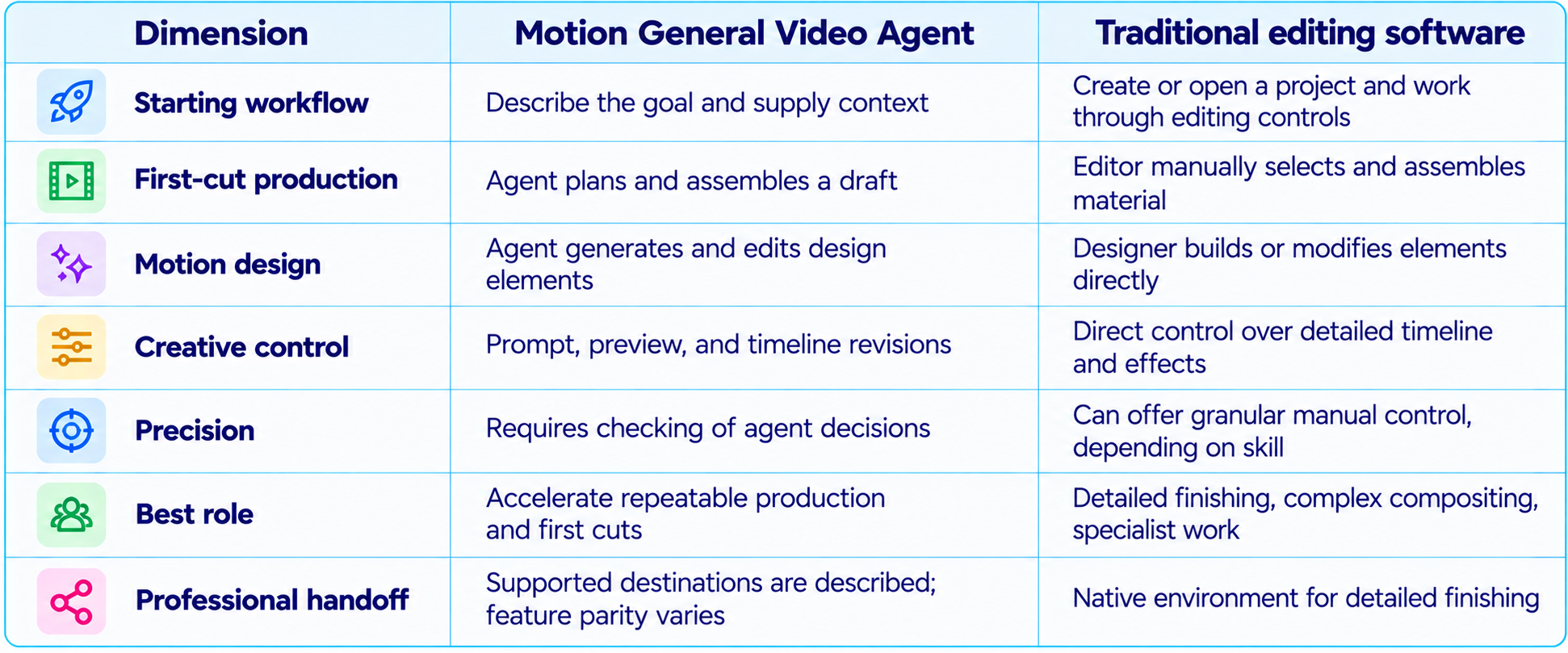
This is not a simple replacement contest. Motion aims to reduce the amount of manual work required to get to a strong first cut and keep revisions conversational or visual. Traditional editors remain valuable for precise finishing, complex compositing, intricate sound work, and projects that depend on established production conventions. Motion's own support for handoff suggests a workflow in which the agent and editing software can complement one another.
13. Motion vs AI Video Generation Models
A video agent and a video generation model solve overlapping but different problems. A generator focuses on synthesizing footage. A general video agent coordinates footage selection, editing, motion design, sound, and revisions. Some projects need both: an agent to build the narrative and edit, plus a generation model to create a missing shot.
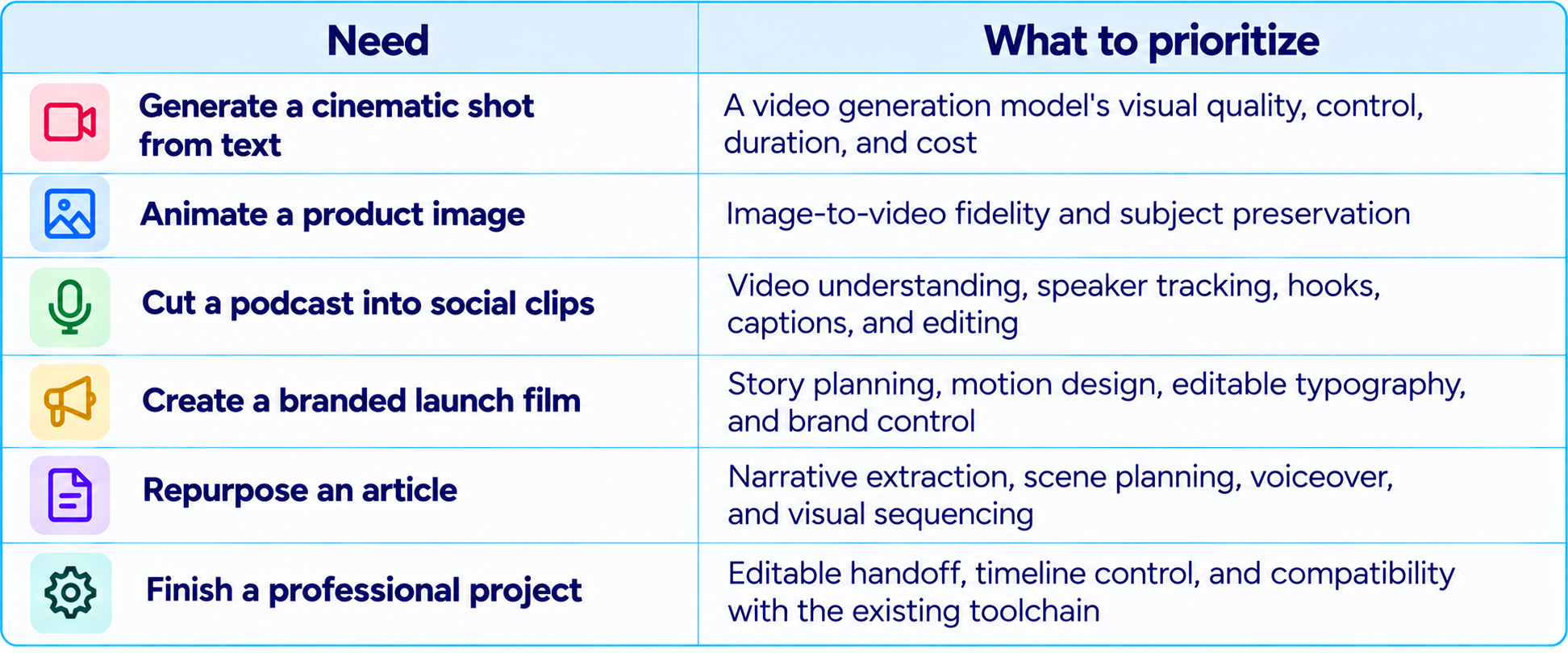
For a closer look at generation-focused video systems, compare the workflows in our MiniMax H3 Max review and Seedance 2.5 review. Those reviews cover model-level video generation, while Motion's main pitch is orchestration across the production workflow.
14. Pricing and Availability: What Is Confirmed?
Motion's public General Video Agent launch page focuses on capabilities and demonstrations. The materials reviewed for this article do not provide a complete, standardized pricing table for the new General Video Agent, so it would be misleading to invent a monthly subscription, credit allowance, or per-minute video rate.
Before committing to a production workflow, confirm the current plan, access requirements, generation or usage limits, export options, project retention, and whether integrations are included in the package you intend to use. For teams comparing costs, measure the cost of an accepted deliverable rather than only the cost of generating a draft.
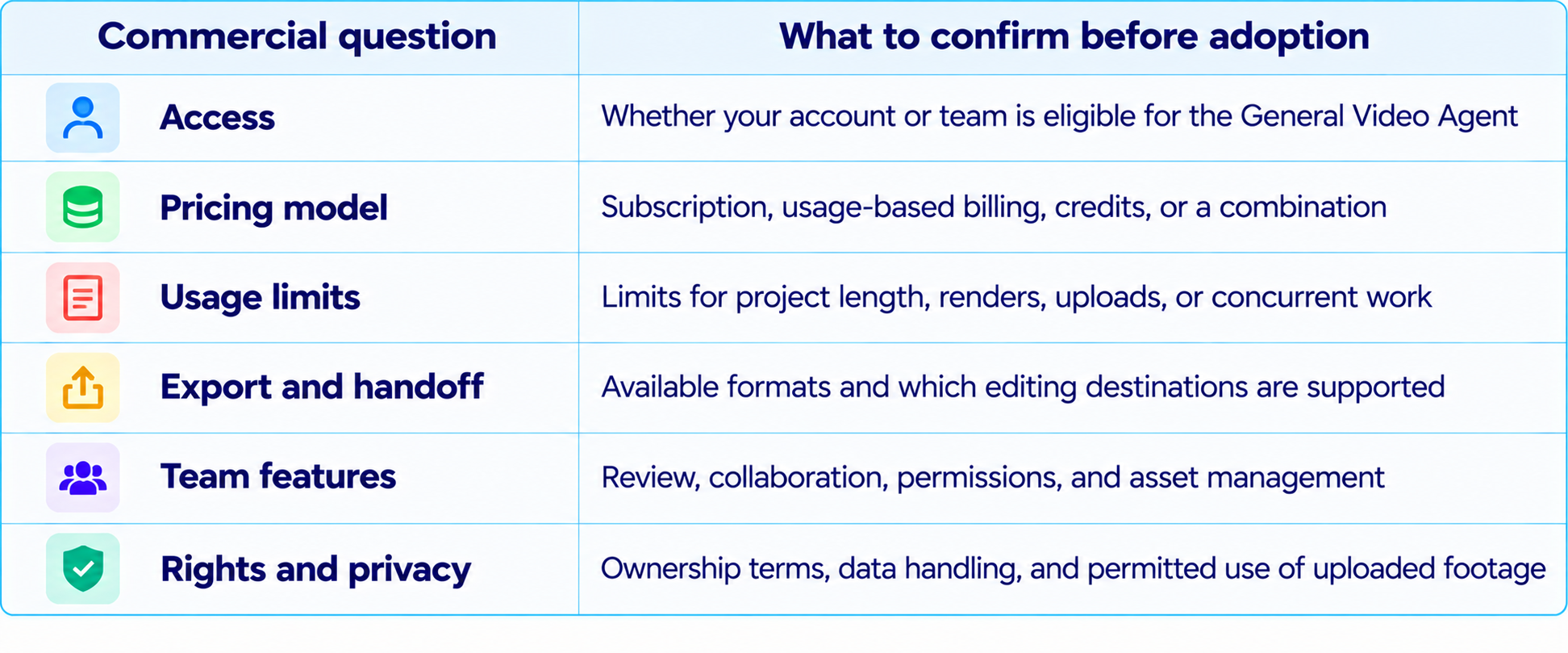
This distinction matters for a fair Motion AI review. Product capability and commercial terms are separate questions, and pricing may vary by access tier or change after launch. Verify the live terms before budgeting a campaign or promising a fixed production cost to a client.
15. Limitations and Risks to Check
- Creative judgment still matters. An agent can make a coherent cut that is not the best editorial choice for the audience.
- Reference matching is not a guarantee of exact brand replication. Inspect fonts, logo placement, colors, spacing, and transitions.
- Captions and spoken content need verification. Incorrect words or misleading cuts can undermine trust.
- Source quality affects the result. Poor audio, shaky footage, missing camera angles, or inconsistent lighting may still require manual correction.
- Generated material can introduce continuity problems. Check product details, people, text, and visual consistency across shots.
- Destination support varies. Confirm which layers, timing, and assets remain editable after handoff.
- The public launch material does not provide a standardized independent benchmark suite for overall video-agent quality, so evaluate it on representative tasks.
- The launch material reviewed here does not publish a complete price card. Confirm current access and billing directly before estimating costs.
- Sensitive or regulated content needs human review. Check rights, permissions, privacy, factual claims, and required approvals before publication.
16. Who Should Use Motion?
17. A Practical Workflow for Better Results
Motion is more likely to deliver a useful first cut when the brief gives it a clear objective and boundaries. The following workflow works for a product launch, an explainer, or a batch of social clips.
- Write one sentence describing what the viewer should understand or do after watching.
- Name the audience, channel, aspect ratio, and target duration.
- Provide official logos, fonts, product screenshots, and relevant footage rather than relying on vague descriptions.
- Attach one or two reference videos and explain what to borrow, such as pacing or typography, and what not to copy.
- Specify a narrative structure: hook, problem, demonstration, proof, takeaway, and optional CTA.
- Ask for a first cut with editable elements, not just a final rendered file.
- Review the opening first. If the hook does not work, fix the story before polishing transitions.
- Give revision requests one at a time and distinguish required changes from optional preferences.
- Check captions, names, numbers, audio sync, product details, and branding before approval.
- Test the exported file on the target platform and verify the handoff if a professional editor will finish it.
18. Example Prompt for a Product Launch Video
Use a brief like this as a starting point, then replace the bracketed fields with your real product details:
Create a 45-second launch video for [product] aimed at [target audience]. The single message viewers should remember is [core benefit]. Open with the problem in the first three seconds, show the product solving it with real supplied screenshots or footage, and finish with one clear takeaway. Use our supplied logo, colors, and type guidance. Match the reference's pacing and typography, but do not copy its exact scenes or wording. Keep on-screen text concise and readable on mobile. Synchronize voiceover, music, and transitions. Make titles and visual elements editable. Before presenting the cut, check that every product claim matches the supplied source material, the logo is correct, captions are accurate, and the ending is not abrupt.
This prompt makes the goal, audience, structure, brand boundaries, and quality checks explicit. It also separates style inspiration from direct copying and asks for an editable result. That is more useful than a generic instruction to 'make it look professional.'
19. How to Evaluate Motion Before Using It at Scale
Run a small pilot using real projects from your content calendar. Do not judge the product only on the best example shown in a launch video. Pick a mix of footage types and compare Motion's first cut, revision effort, and final accepted result against your current workflow.
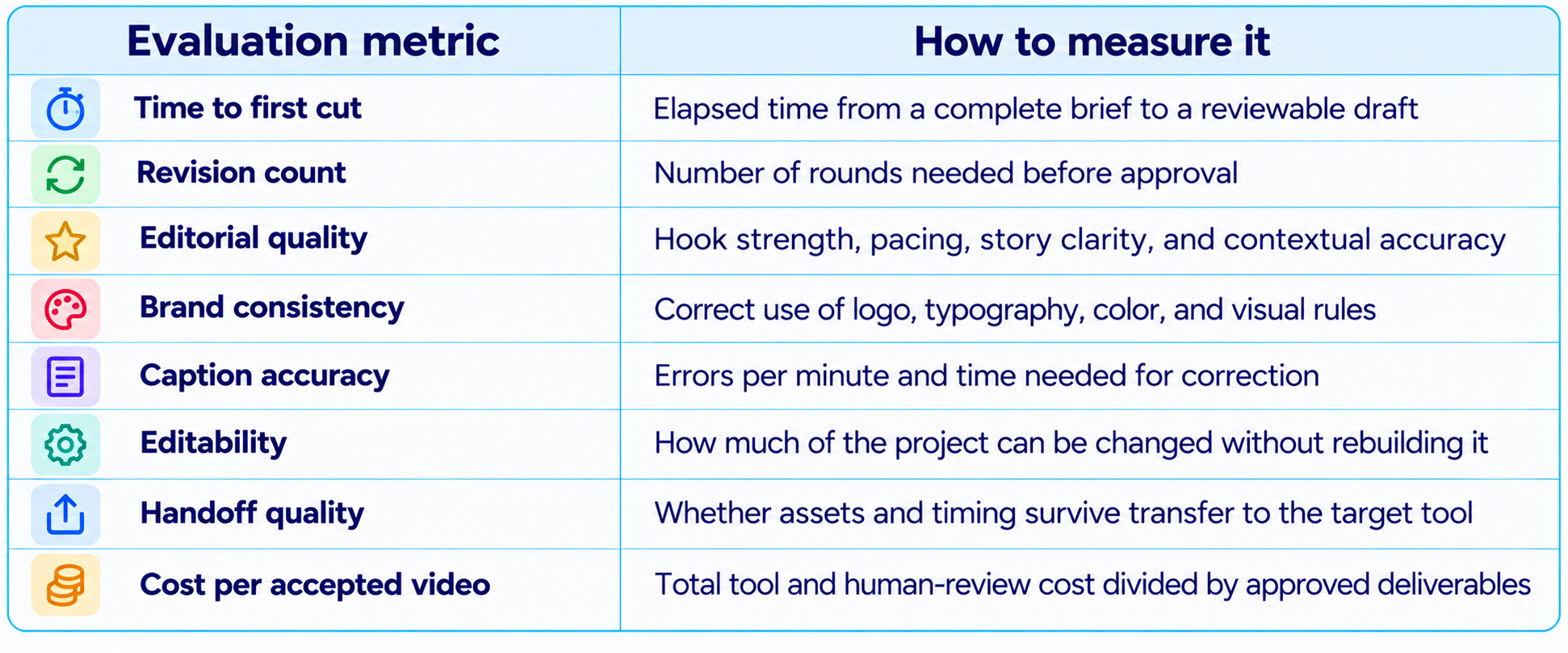
Include difficult cases in the test: a speaker who moves around, a product demo with tiny interface text, a reference with fast transitions, and footage with poor audio. These cases reveal where human intervention is still necessary. Keep the same acceptance checklist for Motion and your existing workflow to avoid comparing a carefully reviewed output against an unreviewed draft.
20. Is Motion Worth It?
Motion is worth evaluating for teams that make videos repeatedly and spend too much time moving between the brief, storyboard, footage, design elements, edit, and revisions. Its strongest proposition is not simply AI-generated footage. It is the attempt to coordinate editing, motion design, video understanding, and iterative refinement in one agentic workflow.
The product looks especially relevant for launch videos, product demos, podcast clips, social cutdowns, explainers, and article-to-video content. These formats have recurring structures, clear acceptance criteria, and enough repetition that a good first cut can save time. The ability to continue editing in a preview or timeline, and to hand projects to other tools, makes the workflow more credible for teams that need control.
The decision should still depend on actual output and total production economics. If the first cut is consistently close to publishable and revisions are fast, Motion can reduce the production bottleneck. If every result requires extensive factual correction, brand cleanup, or rebuilding in another editor, the benefit will be smaller. Because the launch material does not provide a complete public price card or independent standardized benchmark, a representative pilot is the most reliable way to judge value.
21. Final Verdict
Motion's General Video Agent is an ambitious move from AI video generation toward AI-assisted production. It is designed to work with footage already on hand, create new material when needed, understand references, plan shots, edit clips, add motion design, synchronize audio, and preserve an editable path for revisions.
The most compelling examples are practical ones: turning a podcast into multiple social clips, building a launch video from a brief and brand assets, animating a logo, or translating a written article into a narrated film. Those are recurring production tasks where coordination between editing and design can take longer than generating a single shot.
Its differentiator is editability and workflow coverage. Users can request changes, draw on the video, adjust elements in a preview, edit in a timeline, and continue in supported tools such as Premiere Pro, After Effects, DaVinci Resolve, Remotion, or HyperFrames. The caveat is that destination support varies, and final creative judgment remains with the team.
My verdict: Motion is a strong candidate for teams looking to accelerate repeatable video production, especially launch videos, product demos, podcast clips, and branded social content. Treat it as a production agent and creative collaborator, not as a guarantee that every first render is ready to publish. Confirm current access and pricing, then measure time saved and cost per accepted deliverable on your own projects.
Frequently Asked Questions
What is Motion, the General Video Agent?
Motion is an AI system for video editing, motion design, creation, and understanding. It can work with existing footage or generate new material and help assemble a finished, editable video.
Can Motion create videos from text prompts?
Yes. Motion's product materials describe prompt-based creation for launch videos, explainers, logo animations, and other video formats, with the ability to supply assets and reference videos.
Can Motion edit existing footage?
Yes. Motion says it can work with footage users already have, including workflows such as cutting multicamera podcasts and selecting strong moments from long recordings.
Can Motion make podcast clips?
Its launch page demonstrates selecting topics, creating short clips, reframing around the active speaker, and applying captions and branding.
Can I edit a Motion-generated video?
Motion describes chat-based revisions, drawing on the video, direct changes to text and elements in the preview, and timeline editing.
Does Motion work with Premiere Pro and After Effects?
Motion says projects can continue in Premiere Pro, After Effects, and DaVinci Resolve. It also describes workflows with Remotion and HyperFrames. Supported features vary by destination.
Can Motion match a reference video?
Motion says it studies reference pacing, typography, and transitions to inform the planned edit. This is style guidance, not a guarantee of exact replication.
Does Motion generate audio?
Motion's General Video Agent description includes audio synchronization. The exact audio-generation and editing behavior should be checked against the current product workflow.
How much does Motion cost?
The public launch material reviewed for this article does not provide a complete standardized pricing table for the General Video Agent. Check current access and billing terms before budgeting.
Is Motion a replacement for Premiere Pro?
Not necessarily. Motion aims to accelerate planning and production, while professional editors remain useful for detailed finishing. Motion also supports handoff to Premiere Pro and other tools.
Who should use Motion?
Founders, marketers, creators, and production teams that repeatedly make launch videos, explainers, product demos, podcast clips, and branded social content are the clearest fit.
Is Motion worth trying?
It is worth piloting if video production is slowed by repetitive editing and motion-design work. Evaluate the first cut, revision time, editability, handoff quality, and cost per accepted video.
Recommended Blogs
Resources & Community
Join our community of 70,000+ AI enthusiasts and learn to build powerful AI applications. Build Fast with AI helps creators, developers, and teams understand and implement practical AI.
Agentic AI Launchpad 2026
A structured cohort program for learning to build and deploy real-world agentic AI systems, with guided learning, project work, and a builder community.
Explore the program: Agentic AI Launchpad 2026
Free AI Resources
Access free tools, workshops, and micro-learning to keep building.