
Qwen-Image-2.1 Review: Can a 7B Open-Weight Model Really Compete With the Best Image Generators?
Qwen-Image-2.1 is Alibaba Qwen's newest open-weight image model, and its biggest advantage is not simply image quality. It combines text-to-image generation and image editing in one 7B visual generation component while adding native transparent RGBA output, 2K generation, multi-reference editing and more precise local editing controls.
Qwen released Qwen-Image-2.1 on September 20, 2026 with weights on Hugging Face and ModelScope. The model uses a 32-layer Single-Stream DiT with 7B parameters in the visual generation component, a Qwen3-VL 8B text and vision encoder, and a 64-channel RGBA VAE with 16x spatial compression. It is designed to generate ordinary or transparent images, edit existing images, preserve people and product identity, and work with up to 10 reference images.
The release also comes with a strong benchmark result. Qwen's Qwen-Image-Bench chart gives Qwen-Image-2.1 an overall score of 60.28, placing it ahead of Nano Banana 2.0 at 59.82 and GPT Image 1.5 at 59.65, while remaining behind several higher-scoring systems in the published comparison. The key context is that Qwen-Image-Bench is Qwen's own evaluation framework, built around Q-Judger and 1,000 bilingual prompts, so 60.28 is a vendor benchmark rather than an independently reproduced industry score.
QUICK ANSWER
Qwen-Image-2.1 is one of the strongest open-weight image generation releases of September 2026 because it puts generation, editing, transparency and multi-reference composition into one 7B visual model. It natively supports 2K output, transparent RGBA images, up to 10 reference images, local edits through circles or masks, and identity preservation for people and products.
On Qwen-Image-Bench, Qwen-Image-2.1 scores 60.28 overall. That places it above Nano Banana 2.0 at 59.82, GPT Image 1.5 at 59.65 and FLUX 2 Max at 55.33 in Qwen's published comparison. The benchmark evaluates Quality, Aesthetics, Alignment, Real-world Fidelity and Creative Generation.
The biggest practical advantage is workflow flexibility. You can generate an image, edit it, combine reference images, extract a subject to transparency, or make a local change without switching to another model. It also has Day-0 support in Diffusers, ComfyUI, vLLM-Omni, SGLang and LightX2V.
There is one major business limitation: the weights use the Qwen Research License Agreement. The current license permits non-commercial research and evaluation, while commercial use requires a separate license from Qwen. That makes the model much more attractive for research and local experimentation than for unrestricted commercial deployment.
My verdict: 9.2/10 for editing, 9.3/10 for local flexibility, 9.0/10 for generation quality, 8.0/10 for commercial readiness and 9.0/10 overall. Qwen-Image-2.1 is a strong choice when local control and image editing matter more than a managed commercial API.
1. What Is Qwen-Image-2.1?
Qwen-Image-2.1 is a unified text-to-image and image-editing model from Alibaba's Qwen team. The visual generation component contains 7B parameters across 32 Single-Stream DiT layers. Instead of splitting creation and editing into separate systems, Qwen uses one model family for both workflows.
That makes the model more useful for real creative work. A user can generate a product shot, modify the background, change the clothing, remove an object, add typography and then export the subject with a transparent background. The same model is responsible for the generation and the subsequent edits.
The architecture also focuses on inference efficiency. Qwen describes mixed-granularity attention and prefix KV-cache reuse so that static text and reference-image context can be reused through the denoising process. This matters most when editing with several reference images.
2. Qwen-Image-2.1 Specifications
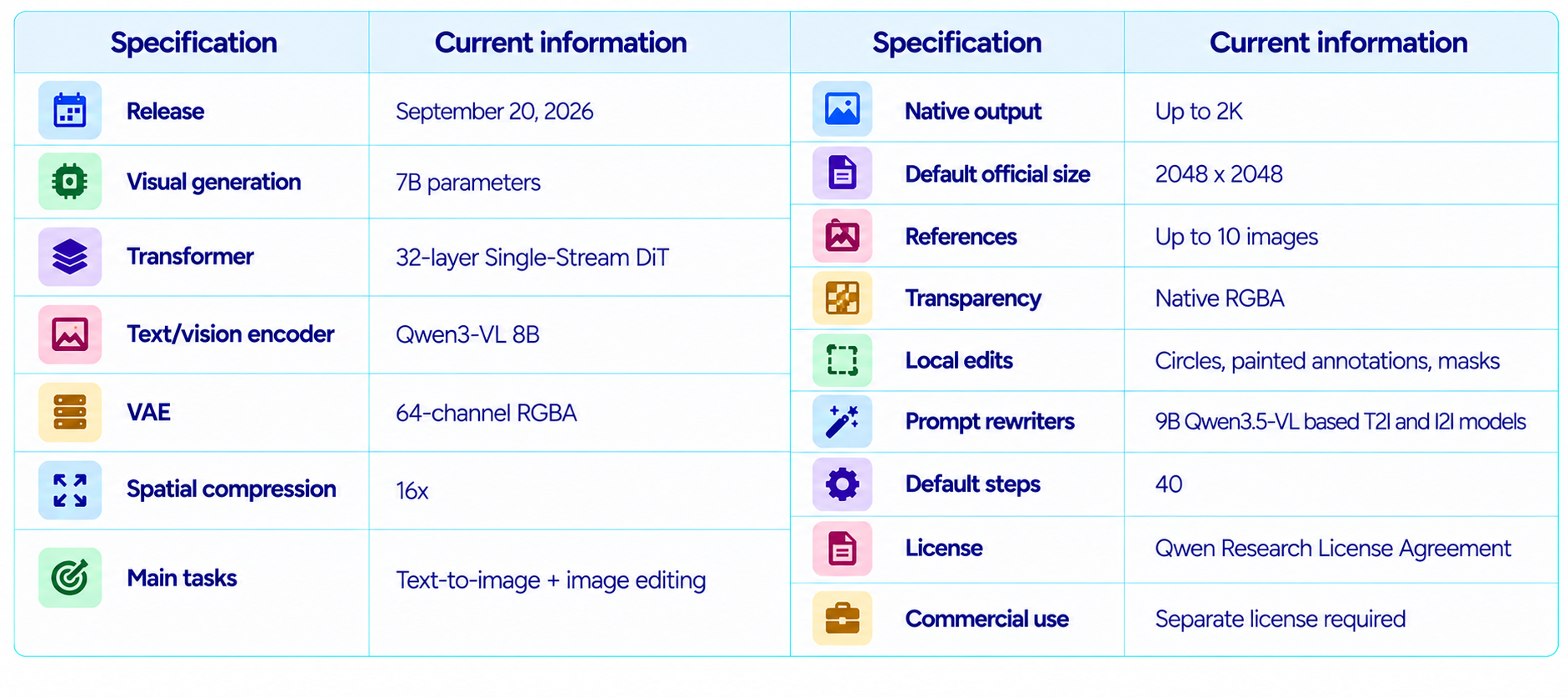
The official repository documents seven recommended aspect ratios: 1:1, 4:3, 3:4, 3:2, 2:3, 16:9 and 9:16. The listed 16:9 size is 2752 x 1536, while the 1:1 default is 2048 x 2048.
3. Qwen-Image-2.1 Benchmark Performance
Qwen-Image-Bench is the main published evaluation for the release. It was created around professional creative workflows and uses five top-level dimensions, 23 sub-capabilities and 56 fine-grained evaluation facets. The dataset contains 1,000 bilingual prompts and the judging system is Q-Judger.
The published Qwen comparison gives Qwen-Image-2.1 a 60.28 overall score. That is a strong position, but the result should be labeled accurately: it is Qwen's benchmark, not an independent cross-lab test.
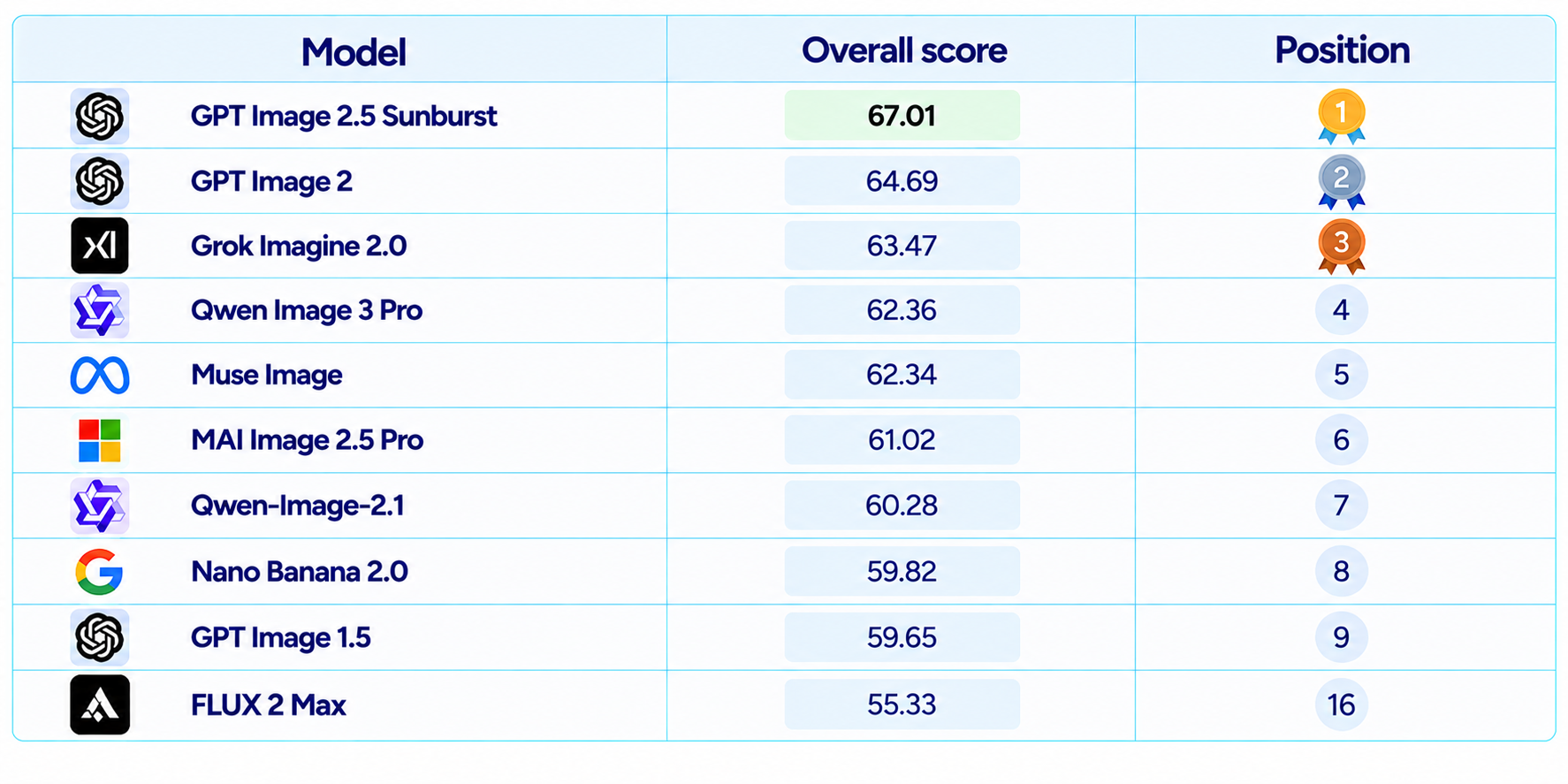
The result is notable because the image-generation component is only 7B parameters, while several higher-scoring models are proprietary. Parameter count is not directly comparable across closed systems, but the result does support the case that Qwen is getting substantial capability from a compact visual generation core.
4. What Qwen-Image-Bench Actually Measures
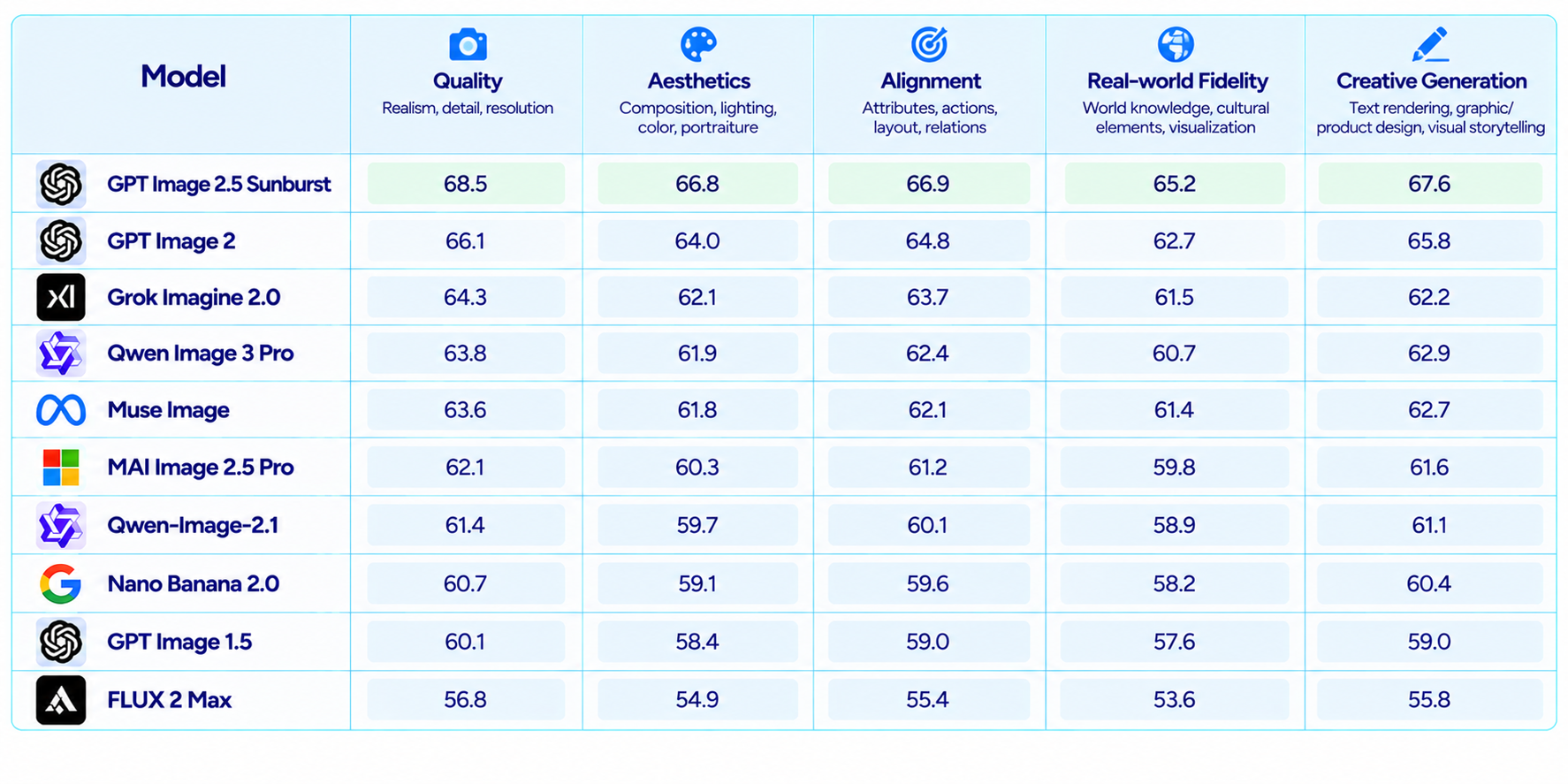
The benchmark goes beyond simple prompt-image similarity. Quality covers realism, detail and resolution. Aesthetics evaluates composition, color harmony, lighting, portraiture and style control. Alignment covers attributes, actions, layout, relationships and scenes. Real-world Fidelity includes world knowledge and cultural elements, while Creative Generation covers imagination, text rendering, graphic design and visual storytelling.
That structure fits Qwen-Image-2.1 unusually well because several of its headline features are production-oriented. Typography, product fidelity, reference composition, design applications and transparent asset creation matter more to a working designer than one overall beauty score.
5. Text-to-Image Quality
Qwen describes Qwen-Image-2.1 as improving typography, portrait lighting, realistic textures and fine detail. The benchmark score of 60.28 supports a strong text-to-image position in the published comparison.
The more useful difference is that generation does not have to be the final step. When a first image is close but one attribute is wrong, the same model can edit the existing image instead of starting over. That makes the generation quality more useful in practice because the workflow tolerates imperfect first passes.
6. Typography and Text Rendering
Text rendering is a specific focus of the release. Qwen-Image-Bench treats Text Accuracy, Text Layout, Font and Cross-lingual Generation as distinct facets under Creative Generation.
That makes Qwen-Image-2.1 useful for posters, packaging, presentation graphics, social media creatives, product labels and infographics. As with any image generator, exact wording should be checked at final resolution, especially with long text, tiny fonts or complex multilingual copy.
7. Native Transparent RGBA Images
Qwen-Image-2.1 can generate RGBA images directly. The alpha channel is supported by the model's 64-channel VAE rather than being added by a separate background-removal stage.
This is a meaningful workflow improvement. Instead of generating an object, running background removal and repairing fine edges, a creator can ask for a transparent asset directly. The same capability also allows editing of transparent layers and extraction of subjects from photographs.
8. Image Editing Is the Bigger Story
Qwen-Image-2.1 combines generation and editing in the same pipeline. You can feed one image for a straightforward change or several images for composition and identity-preserving edits.
Local control is also explicit. Circles, painted annotations and masks can define where the change should happen, which is far more precise than asking the model to infer a region only from a sentence.
For example, you can circle a watch and ask to remove it, mark a hairstyle and request a different color, or mask clothing and replace the garment while keeping the person in the same scene.
Google Pics Review: Features, Price & Is It Worth It? (2026)
9. Up to 10 Reference Images
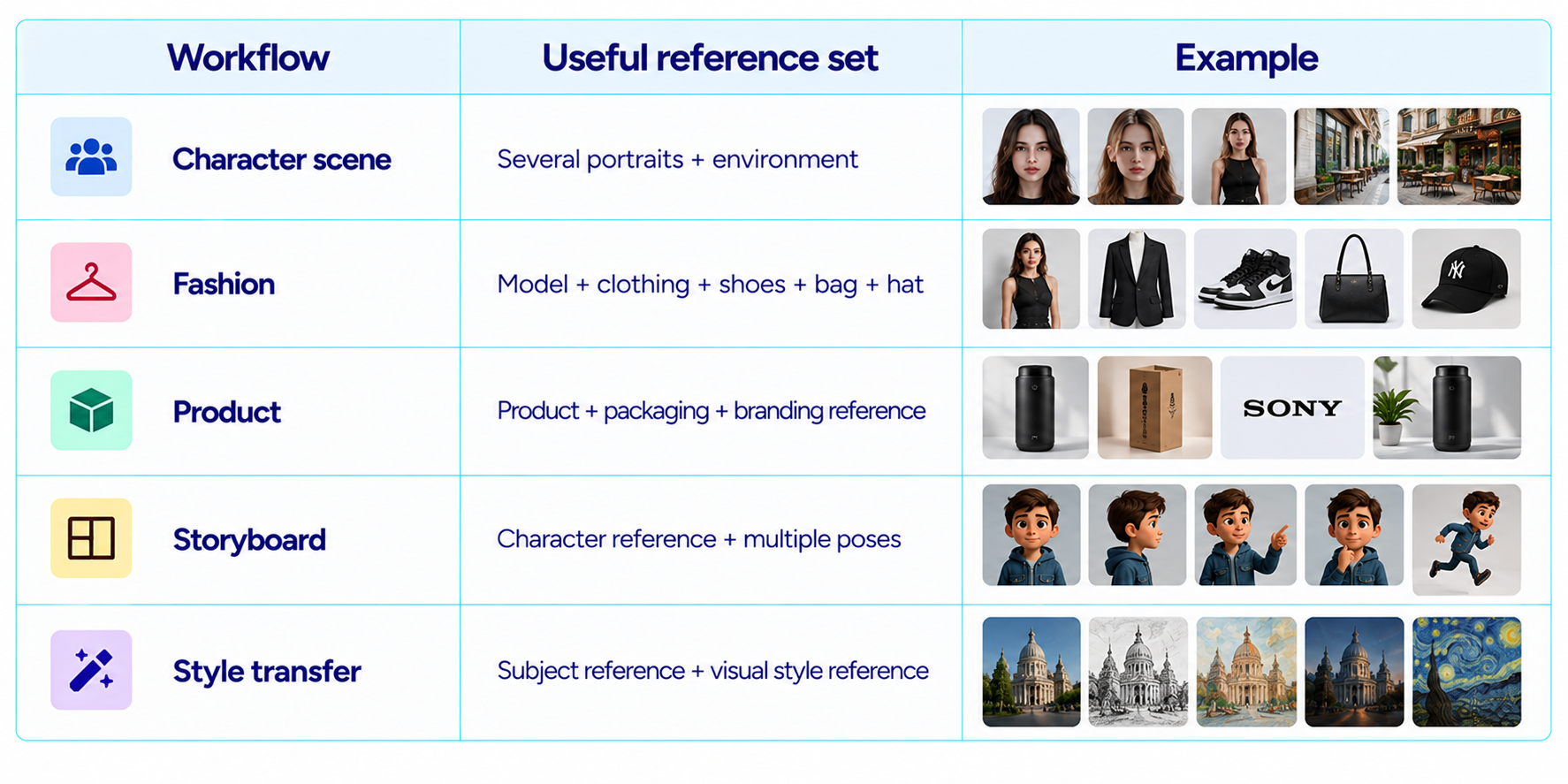
Qwen-Image-2.1 supports up to 10 reference images in a single request. Qwen's examples include multi-person composition and full outfit assembly using separate references for a person, clothing and accessories.
The practical advantage is compositional control. Instead of describing every reference verbally, the model can directly inspect the images. That is useful for character identity, fashion, product variations and scene construction.
More references also create a harder task. Ten images give the model more information, but identity and attribute consistency still depend on the complexity of the final composition and how clearly the prompt assigns each reference.
10. Local Editing Controls
The model supports circle-guided edits, painted annotations and standalone masks. These options give the user three levels of precision: describe a local target, draw roughly around it, or provide a specific mask.
That makes Qwen-Image-2.1 feel closer to an AI-native graphics editor than a conventional one-shot image generator. The strongest use cases are workflows where only part of an image needs to change.
11. Native 2K Output and Aspect Ratios
Qwen-Image-2.1 supports native 2K generation. The official model repository lists 2048 x 2048 as the default official size and provides recommended dimensions for seven aspect ratios.
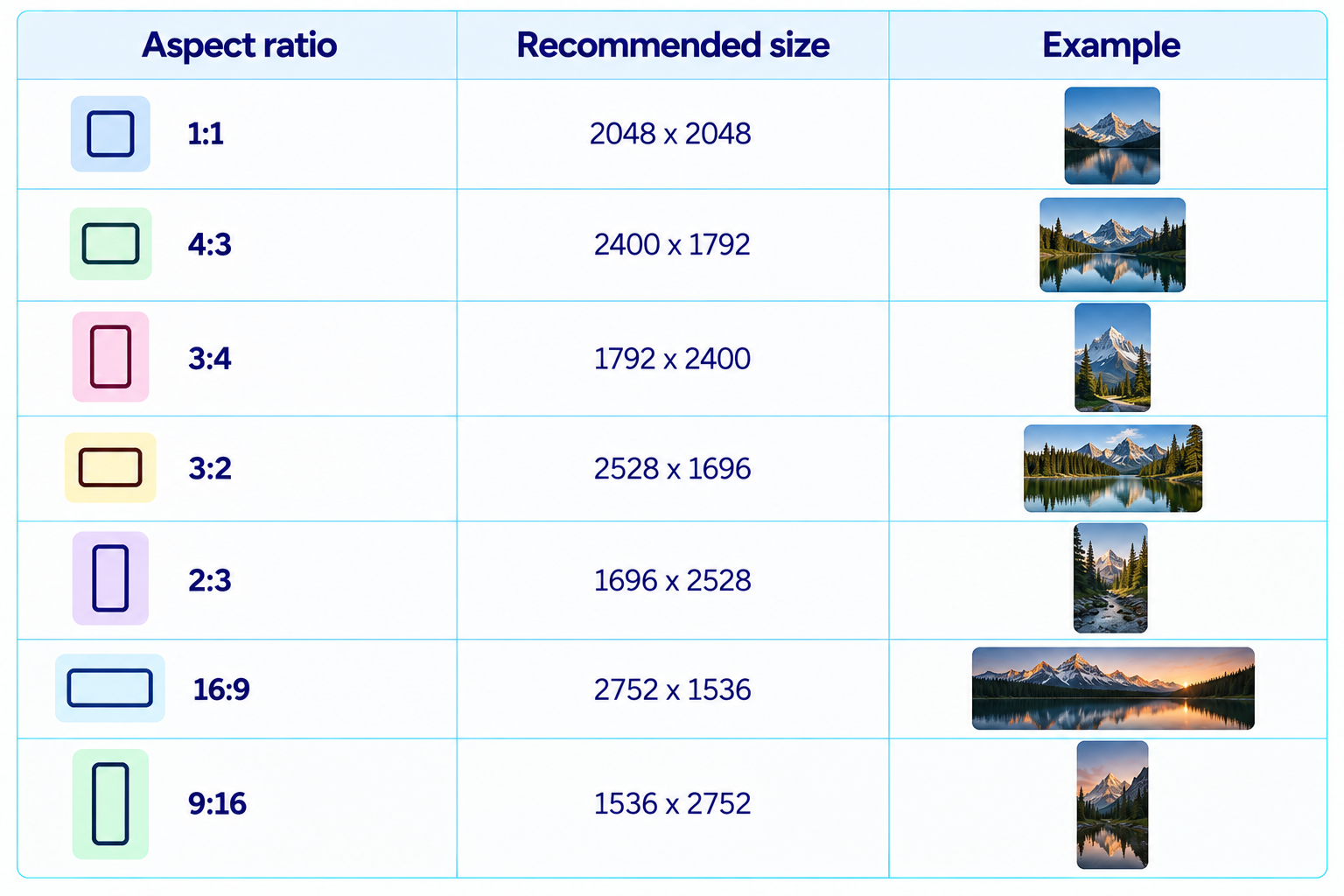
This is useful for social graphics, presentation art, product photography and mobile layouts because the model can work in the target composition instead of generating square and requiring a second-stage crop.
12. Architecture and Inference Efficiency
Qwen-Image-2.1 uses a 32-layer Single-Stream DiT with a Qwen3-VL 8B encoder and an RGBA VAE. Its mixed-granularity attention design allows static text and reference-image context to be reused through prefix KV caching.
The cache is especially relevant for editing. The reference images and edit instruction stay fixed across the denoising steps, so recomputing them each time would be wasteful. Qwen's architecture reuses the encoded condition instead.
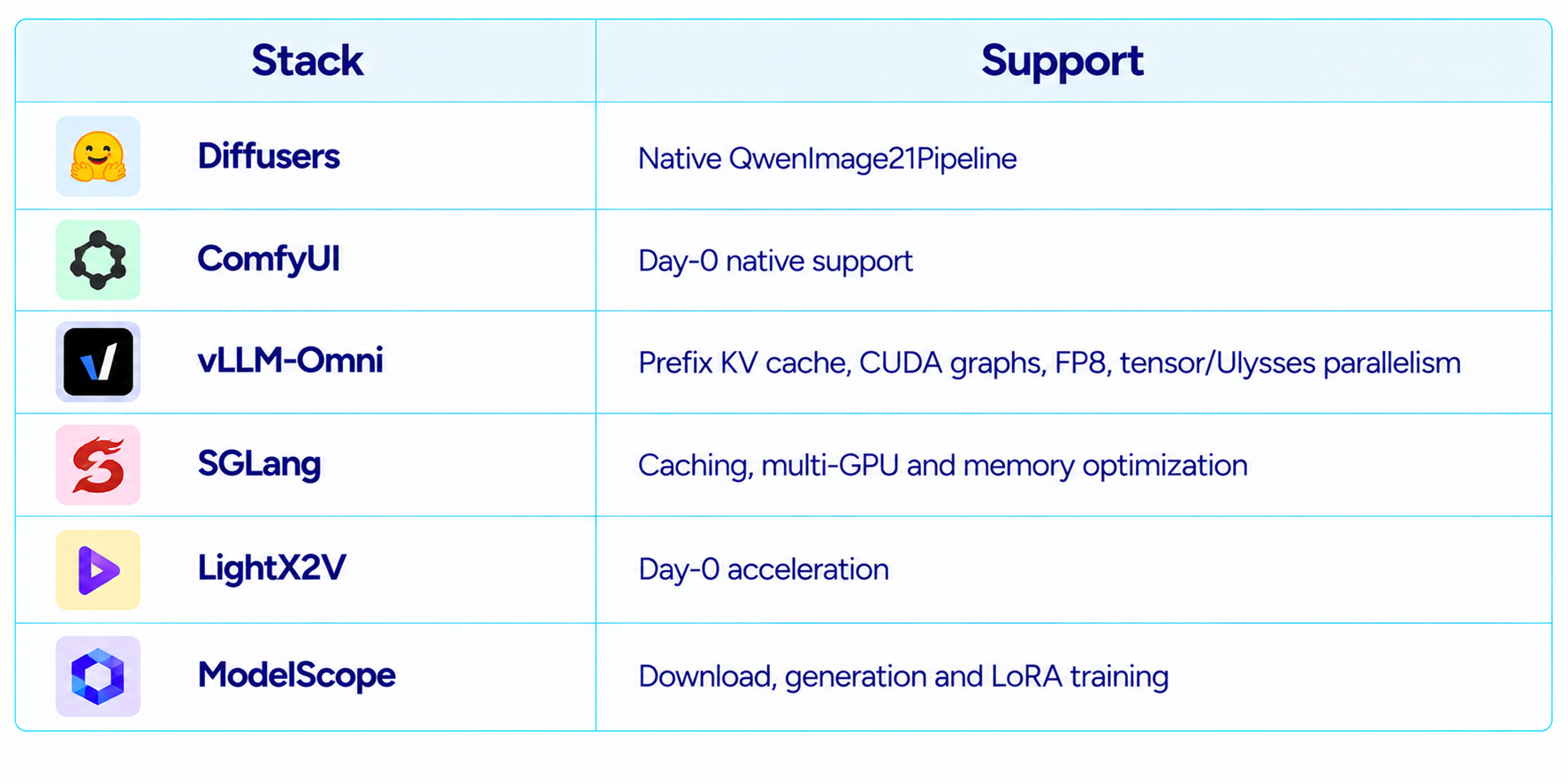
The release also has Day-0 support for optimized serving with vLLM-Omni and SGLang, including FP8 quantization, CUDA graphs and multi-GPU parallelism.
13. Prompt Rewriting Models
Qwen released two 9B prompt-rewriting models alongside the main image checkpoint: one for text-to-image and one for image editing. Both are fine-tuned from Qwen3.5-VL 9B.
The idea is useful when a user gives a short instruction such as 'make this a product ad in a luxury studio.' The rewriter can expand the request into a more detailed prompt before sending it to Qwen-Image-2.1.
This creates a modular system where the language model handles instruction expansion and the 7B visual model handles image generation and editing.
14. ComfyUI, Diffusers and Local Ecosystem
Qwen-Image-2.1 launched with Day-0 ecosystem support. Diffusers provides QwenImage21Pipeline, ComfyUI has native workflows, vLLM-Omni provides high-performance serving, SGLang provides optimized diffusion serving, and LightX2V provides acceleration.
15. Hardware and Local Deployment
The 7B visual generation component does not mean the entire inference stack is only 7B. The pipeline also includes the Qwen3-VL 8B encoder and VAE. Memory use therefore depends on precision, resolution and offloading.
Qwen documents CPU offloading for limited-memory GPUs, while ComfyUI's packaged model includes BF16, INT8 and W4A8 encoder variants. This gives users several paths to fit the pipeline to different hardware budgets.
The model is therefore much more practical for local use than a very large image generator, but it should not be described as a lightweight one-click model for every consumer GPU.
16. Qwen-Image-2.1 vs Qwen Image 2.0 Pro
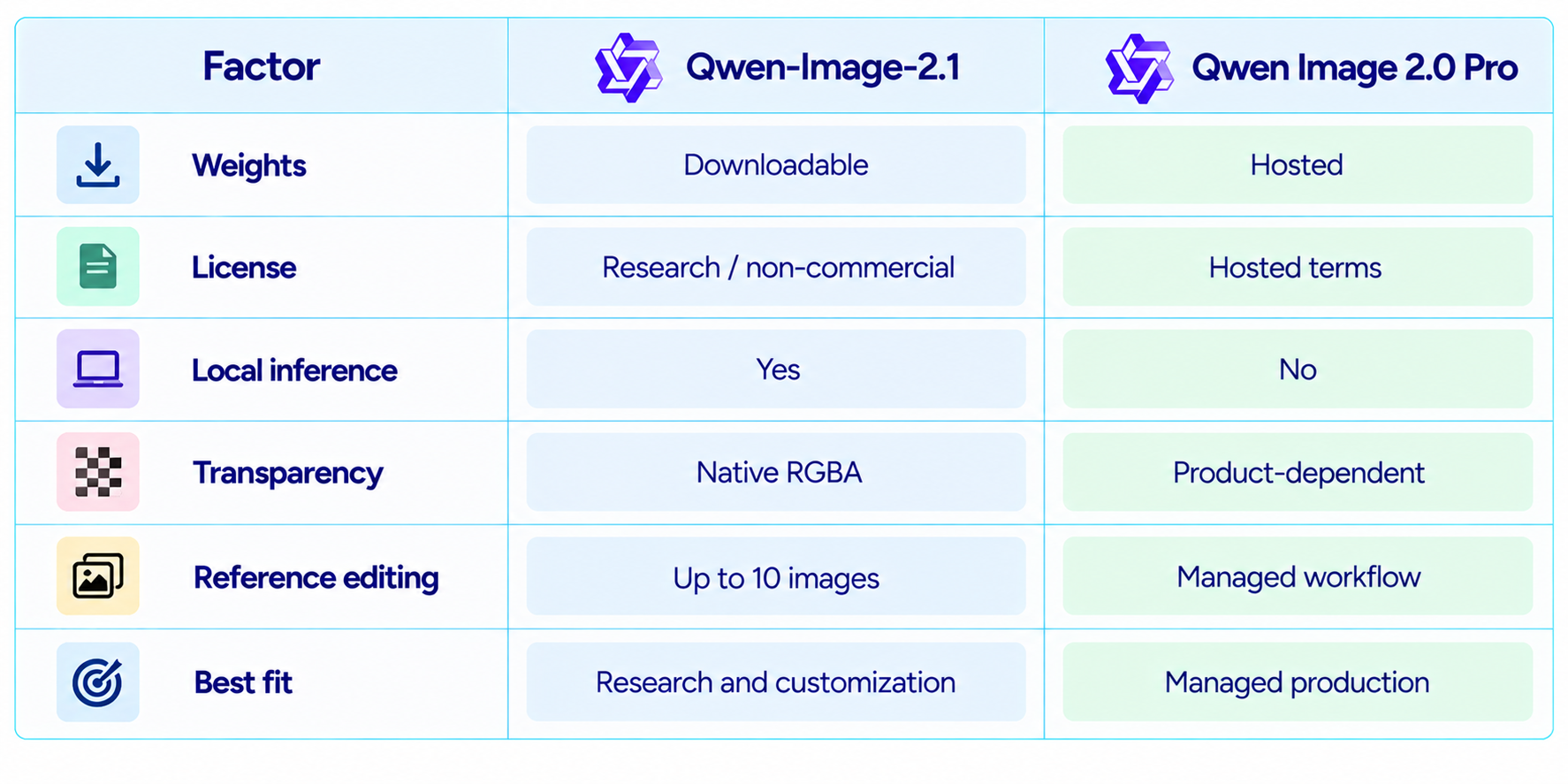
The most important difference is deployment. Qwen-Image-2.1 is downloadable and designed for local inference and customization. Qwen Image 2.0 Pro is part of the managed Qwen image product line.
17. Qwen-Image-2.1 vs Nano Banana 2
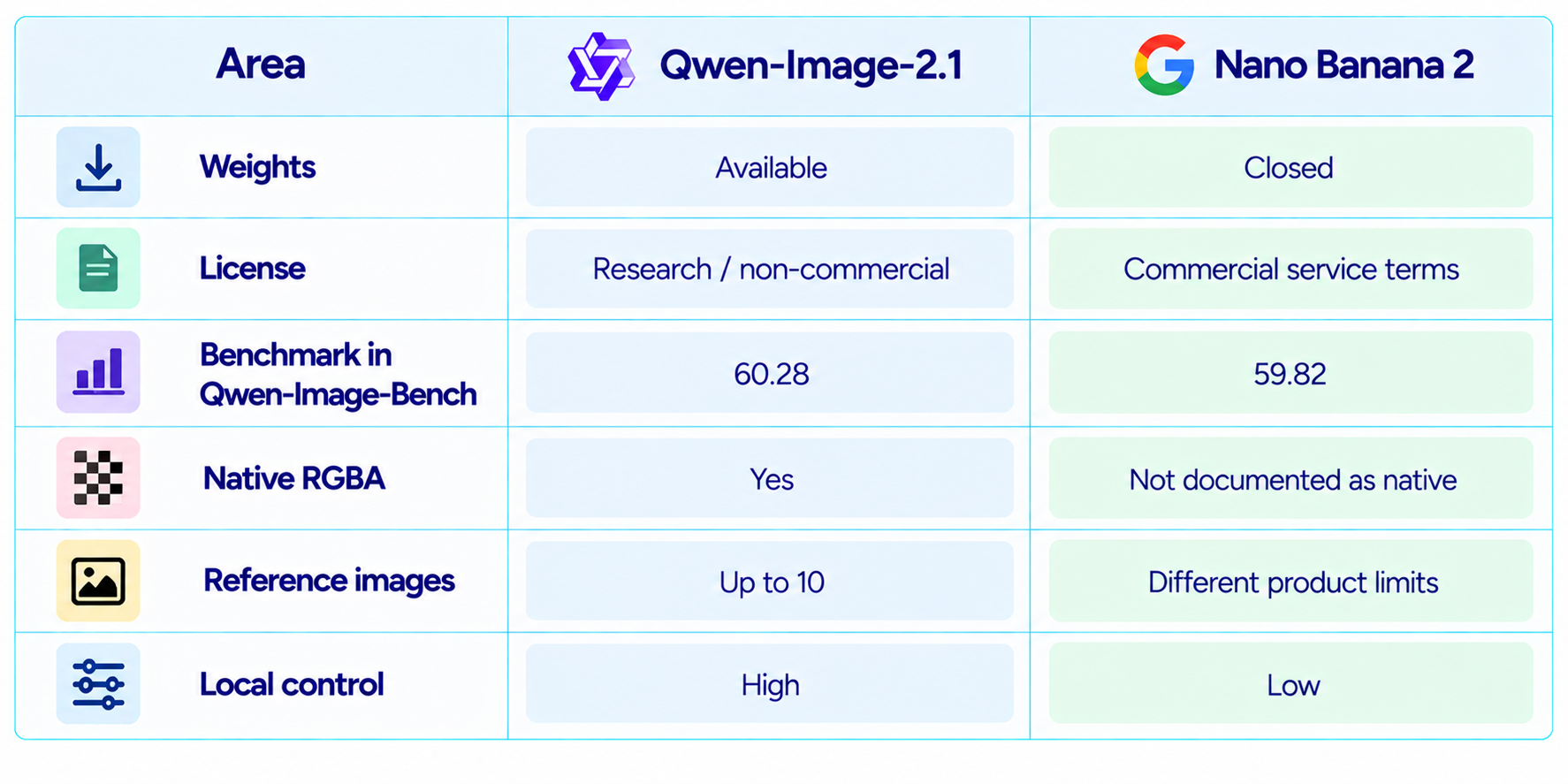
Qwen's benchmark puts Qwen-Image-2.1 at 60.28 and Nano Banana 2.0 at 59.82. That is a useful data point, but it should not be turned into a universal winner claim because the benchmark is Qwen's own evaluation pipeline.
The more meaningful difference is product model. Qwen-Image-2.1 gives developers downloadable weights, local control, native RGBA and ten-reference editing. Nano Banana 2 is a commercial managed service. One emphasizes ownership of the inference stack; the other emphasizes convenience.
18. The License Is the Biggest Business Limitation
Qwen-Image-2.1 is distributed under the Qwen Research License Agreement. The license permits non-commercial research and evaluation, while commercial use requires a separate license from Qwen.
This is a significant distinction from earlier Qwen-Image releases that used more permissive licenses. For researchers, students, model testing and personal experimentation, the downloadable weights remain valuable. For an agency, SaaS product or commercial image generator, the model cannot simply be dropped into production under the research terms.
In practice, licensing is part of the technical decision. A model that is free to download but requires a separate commercial agreement can still be economically attractive, but its business case is different from a permissively licensed open model.
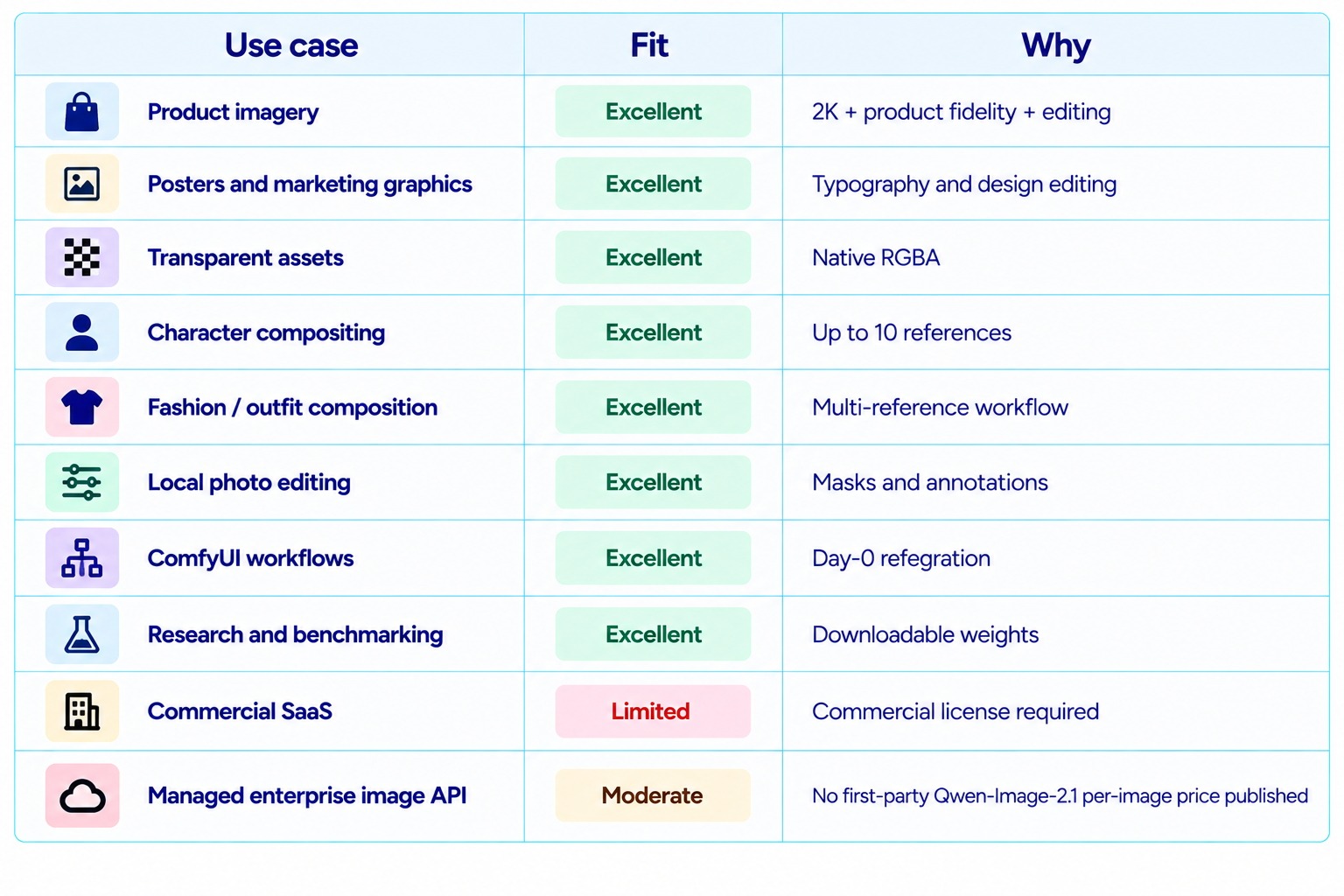
19. Best Use Cases
20. Recommended Production Workflow
Use Qwen-Image-2.1 as a creation-and-refinement pipeline rather than a one-shot generator.
- Start with the target aspect ratio and output size.
- Use the prompt-rewriter model when the brief has many visual requirements.
- Generate the first composition with a fixed seed for easier iteration.
- Use local circles, painted annotations or masks for small corrections.
- Add multiple references only when they add useful information.
- Use transparent RGBA generation when the asset will be composited into another design.
- Move to the full 2K size after the composition is correct.
- Verify text, faces, logos, hands and product details before export.
- Resolve the Qwen Research License before any commercial use.
21. How to Evaluate Qwen-Image-2.1 Yourself
Image models are highly task-dependent, so build a small evaluation set around your actual work rather than relying on one benchmark number.
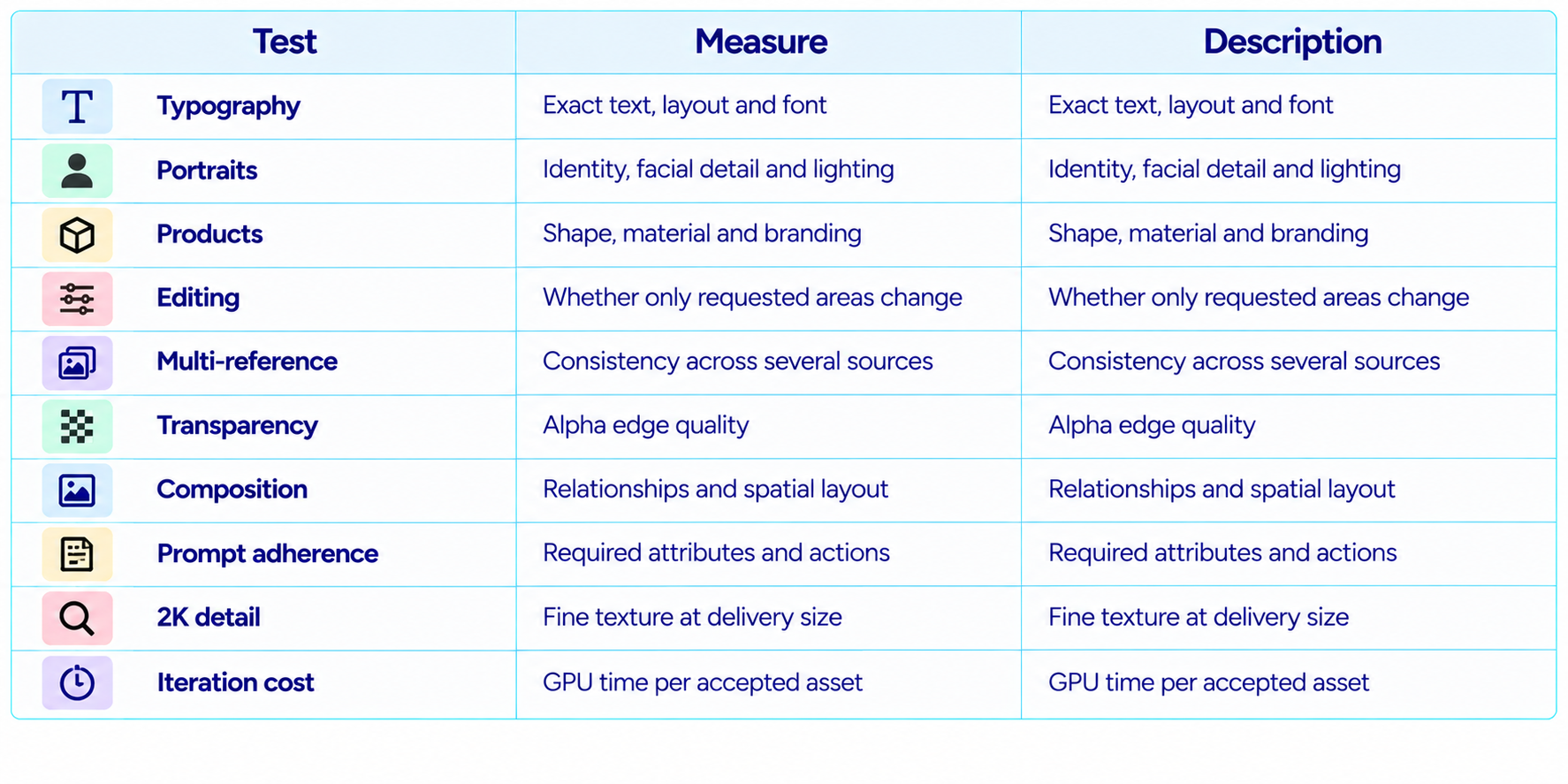
The useful metric is cost per accepted image. A model that reaches a production-ready result in two edits can outperform a model that creates a beautiful first image but fails when the user asks for precise changes.
22. Is Qwen-Image-2.1 Worth It?
Yes, for research, local experimentation and image workflows where editing matters as much as initial generation. The combination of 7B visual generation, 2K output, RGBA transparency, ten-reference editing and broad local ecosystem support makes the model unusually versatile.
The Qwen-Image-Bench result strengthens the case. A 60.28 overall score places the model ahead of Nano Banana 2.0, GPT Image 1.5 and FLUX 2 Max in Qwen's published comparison.
The main constraint is licensing. Qwen-Image-2.1 is much easier to justify for research and non-commercial creative work than for unrestricted commercial deployment.
23. Final Verdict
Qwen-Image-2.1 is one of the strongest open-weight image-generation releases of September 2026. Its value comes from combining generation, editing, transparency, multi-reference composition and local deployment rather than trying to win only on a single image-quality score.
The 60.28 Qwen-Image-Bench score puts it seventh in the published 29-model comparison and ahead of Nano Banana 2.0, GPT Image 1.5 and FLUX 2 Max in that evaluation. It is an important benchmark result, but it remains a Qwen-run benchmark and should be labeled accordingly.
The product features are arguably more important for daily work. Native RGBA output can remove a background-removal step. Ten-reference editing can simplify complex compositing. Masks and painted annotations make local edits easier. ComfyUI, Diffusers, vLLM-Omni and SGLang provide multiple deployment paths.
The biggest limitation is the license. The Qwen Research License permits non-commercial research and evaluation, with commercial use requiring separate permission from Qwen. That means commercial teams should resolve licensing before putting the model into a customer-facing workflow.
My rating: 9.3/10 for editing, 9.2/10 for local flexibility, 9.0/10 for image quality, 9.4/10 for feature breadth, 7.5/10 for commercial readiness and 9.0/10 overall.
Bottom line: Qwen-Image-2.1 is worth testing if you want a powerful local image model for generation, editing, transparent assets and multi-reference composition. For commercial deployment, the license must be treated as a core part of the decision.
Frequently Asked Questions
What is Qwen-Image-2.1?
Qwen-Image-2.1 is Alibaba Qwen's unified text-to-image and image-editing model with a 7B visual generation component.
When was Qwen-Image-2.1 released?
Qwen released it on September 20, 2026 with weights on Hugging Face and ModelScope.
What is the Qwen-Image-2.1 benchmark score?
Qwen-Image-Bench gives it a 60.28 overall score in the published 29-model comparison.
Does Qwen-Image-2.1 support 2K images?
Yes. The official repository documents native 2K output with 2048 x 2048 as the default official size.
Can Qwen-Image-2.1 generate transparent images?
Yes. It supports native RGBA generation and transparent-layer editing.
How many reference images can it use?
Up to 10 reference images can be supplied in a single editing or composition workflow.
Does Qwen-Image-2.1 work with ComfyUI?
Yes. ComfyUI supports it natively and provides example text-to-image and image-editing workflows.
Can Qwen-Image-2.1 run locally?
Yes. The weights are available publicly and the model is supported by Diffusers and other local inference stacks.
Is Qwen-Image-2.1 free for commercial use?
No. The current Qwen Research License is for non-commercial research and evaluation. Commercial use requires a separate license.
Is there an official Qwen-Image-2.1 API price?
The release materials do not publish a first-party per-image API price for this model; the main documented path is self-hosting and compatible community infrastructure.
Is Qwen-Image-2.1 better than Nano Banana 2?
Qwen-Image-Bench scores Qwen-Image-2.1 at 60.28 and Nano Banana 2.0 at 59.82, but that is a vendor-run benchmark comparison rather than a universal quality verdict.
What GPU do I need?
Memory depends on precision, resolution and offloading. The full pipeline includes a 7B image transformer, Qwen3-VL 8B encoder and VAE, with quantized and offloaded options available.
Recommended Blogs
Google Pics Review: Features, Price & Is It Worth It? (2026)
Gemini Omni 1.1 Flash Review: Accuracy, Price & Is It Worth It? (2026)
MiniMax H3 Turbo Review: Speed, Quality, Price & Is It Worth It? (2026)
Resources & Community
Join our community of 70,000+ AI enthusiasts and learn to build powerful AI applications. Whether you're a beginner or an experienced developer, Build Fast with AI helps you understand and implement AI in your projects.
Agentic AI Launchpad 2026
A structured 6-week cohort program that takes you from AI basics to building and deploying real-world agentic AI systems. Includes live sessions, expert mentorship, project reviews and a builder community network.
Ready to go from learning to building? Join the next cohort: Agentic AI Launchpad 2026
Free AI Resources
Access free tools, workshops and micro-learning to keep building.