



Manus 2.0 Review: Is Cue the Start of the Personal AI Agent Era?
Manus 2.0 is a major redesign of Manus around a new agent harness called Cascade, persistent Cloud Computer environments, event-triggered Automations, Manus Studio for professional creation, and a new personal-agent product called Cue. Manus introduced the release on September 28, 2026 and explicitly described it as a new architecture and set of products rather than a normal version update.
The important change is not one isolated feature. Manus is moving from an AI system that completes individual tasks toward an environment where an agent can maintain a project, use specialized tools, operate a computer, run continuously in the cloud, react to events and hand work between multiple agents. Cue extends that idea into personal life by giving individual agents their own identity, including email, phone number, wallet and computer.
That makes Manus 2.0 different from a conventional chatbot or even a standard AI agent builder. The product is trying to own more of the execution environment, not just the model response. The question for users is therefore less about whether Manus can generate a good answer and more about whether it can reliably carry a multi-step objective from instruction to completion.
QUICK ANSWER
Manus 2.0 is a rebuilt agent platform that combines Cascade, Manus Studio, Cloud Computer, Automations, Computer Use and professional creation environments. The new Cue app sits alongside it as a personal-agent product where agents can have their own email, phone number, wallet and computer, and multiple agents can collaborate in a group chat. Manus 2.0 is available on web, desktop and mobile. Cue is in early access and is free with an invite code.
The clearest performance number comes from Manus itself. In one tested configuration, Cascade used 23.2% fewer tokens, completed tasks 28.2% faster and cost 32% less to run than the company’s previous system. These are vendor-reported results for one configuration, so they should be treated as product evidence rather than a general independent benchmark.
The strongest feature is the architecture around the agent. Cloud Computer gives projects a persistent environment that can remain active when you are away, Automations let workflows start from events such as emails, calendar events, Slack messages or Notion updates, and Computer Use lets Manus operate an authorized computer through a visible workspace.
My rating: 9.2/10 for agent architecture, 9.3/10 for workflow breadth, 9.0/10 for personal-agent potential, 8.7/10 for transparency and 9.1/10 overall. Manus 2.0 is worth testing if you want an agent that can do more than chat, while Cue is the more ambitious part of the release because it treats the agent as an ongoing personal operator.
1. What Is Manus 2.0?
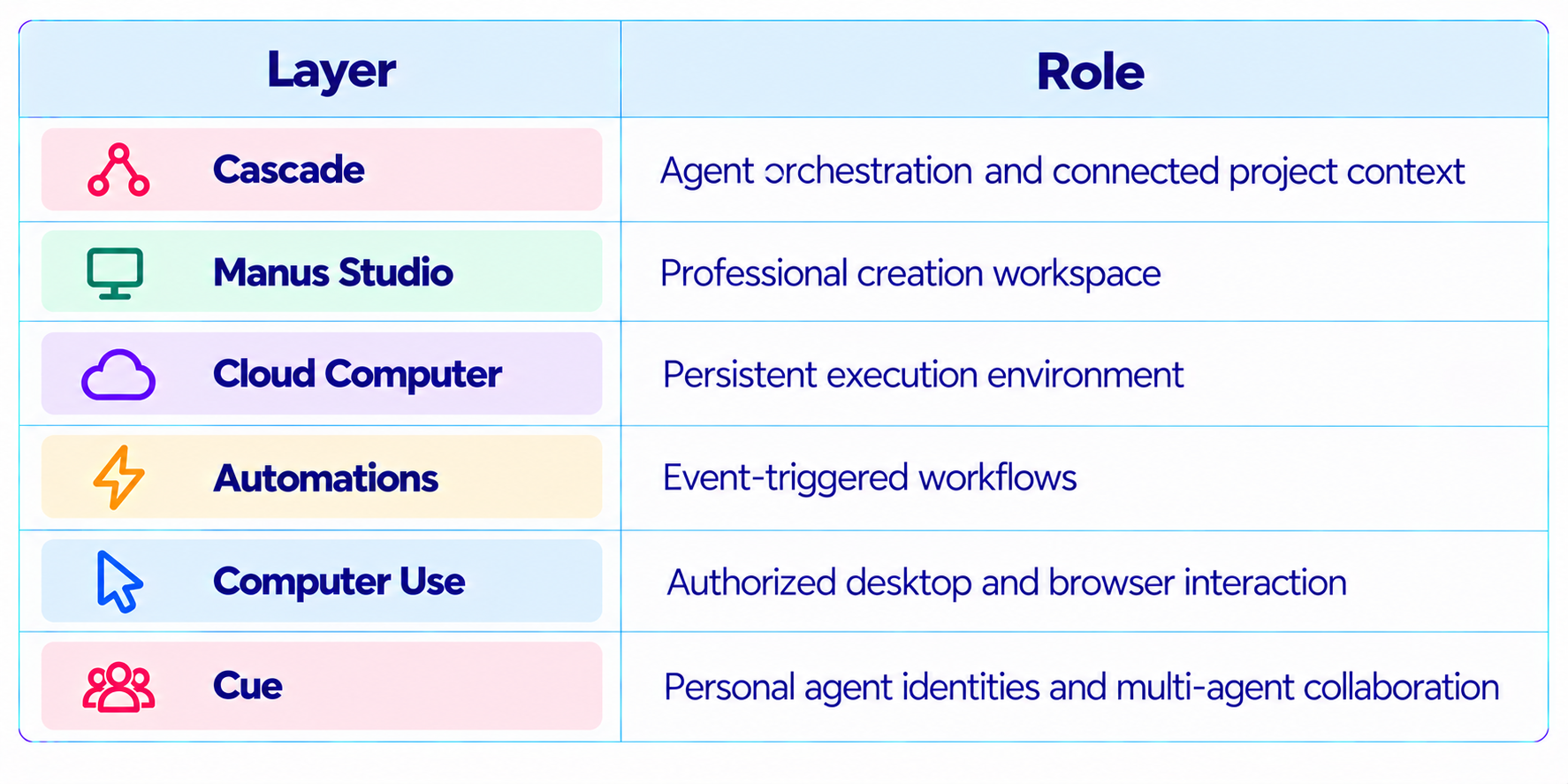
Manus 2.0 is the current generation of the Manus agent platform. Manus says it is not simply a version update. The release combines a rebuilt internal agent harness, new execution infrastructure and several specialized work environments. The main pieces are Cascade, Manus Studio, Cloud Computer, Automations, Remote Control and Computer Use, plus the new Cue personal-agent app.
The design philosophy is consistent across the release: an agent should keep the project connected while bringing in specialized capabilities only when they are needed. A task can move from a brief to a webpage, video, automation, code or other artifact without forcing the user to rebuild context for each stage.
That makes Manus 2.0 better described as an agent workspace than a single model. The underlying intelligence matters, but the product layer determines what the agent can actually do.
2. Manus 2.0 Specifications
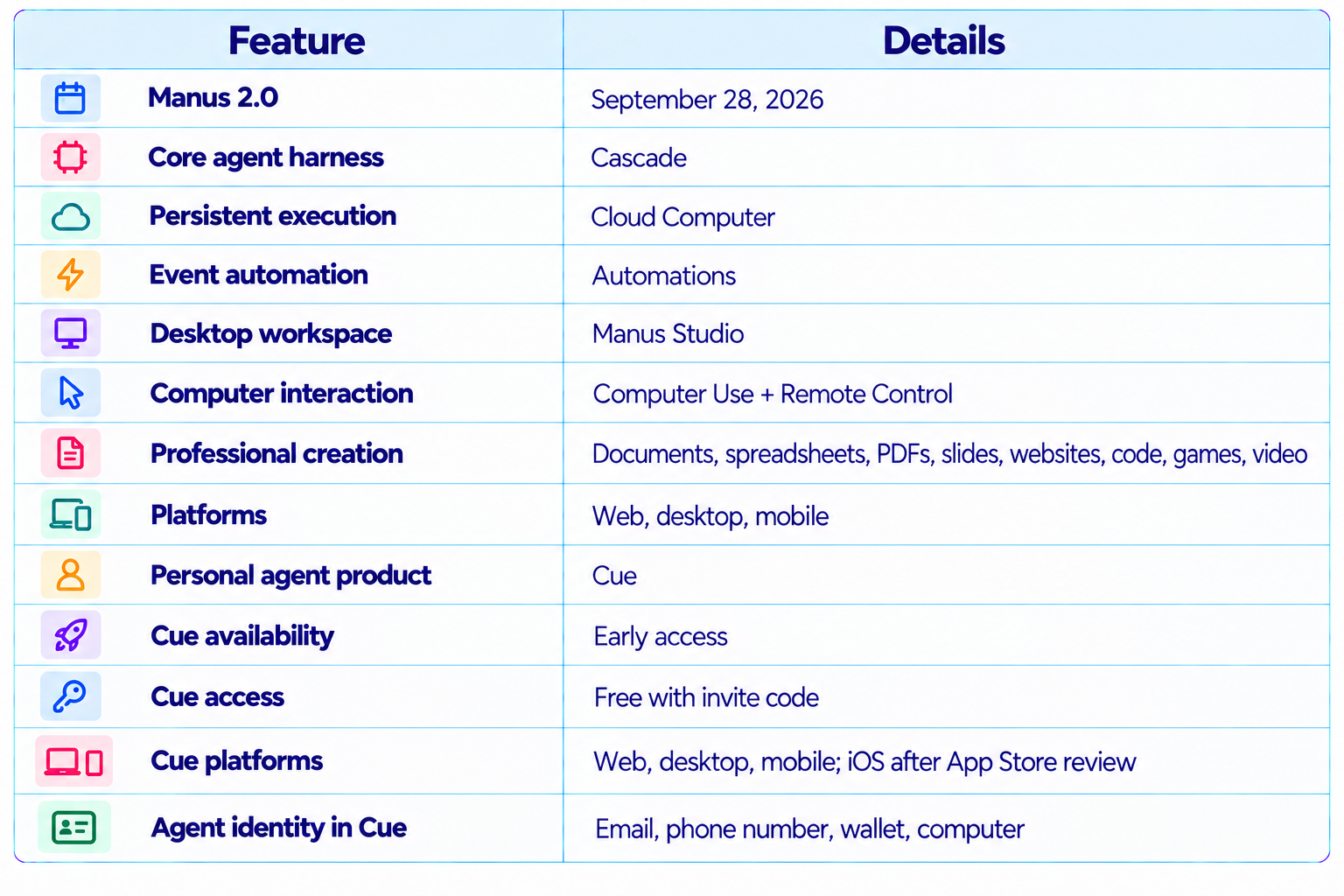
3. Cascade: The New Agent Harness
Cascade is the core architectural change in Manus 2.0. Manus describes it as the latest iteration of its in-house agent harness. Instead of loading every capability into every project from the beginning, Cascade keeps the project lightweight and brings in specialized capabilities when the work needs them.
This matters because agent workloads are heterogeneous. A research task may need browsing and document synthesis. A website task needs coding and testing. A video task needs media generation and editing. A game needs code, assets, runtime testing and persistent hosting. Carrying every tool and capability through every turn can increase context and execution overhead.
Cascade’s job is therefore partly orchestration. It keeps the work connected while selecting the capabilities required by the current stage. This is a useful direction for agent design because the agent becomes an execution system rather than a sequence of disconnected prompts.
4. Cascade Performance: 23.2% Fewer Tokens and 28.2% Less Time
Manus published one concrete efficiency comparison for Cascade. In one tested configuration, it used 23.2% fewer tokens, completed tasks 28.2% faster and cost 32% less to run than the previous system.
The wording matters. These numbers do not establish that every Manus task will be 28.2% faster or 32% cheaper. They describe a particular comparison chosen by Manus. The useful takeaway is that the new harness is designed to reduce unnecessary work while preserving the connected project experience.
For an agent platform, token efficiency has practical value because a single task can trigger many model calls. Small reductions repeated across browsing, planning, tool calls and verification can compound into a meaningful difference in production.
5. Manus Studio: From Agent to Workspace
Manus Studio is the upgraded desktop environment where people and Manus work together. It brings professional creation workflows into the same workspace, including documents, spreadsheets, PDFs, slides, websites, code, games and video.
The important design choice is continuity. Instead of generating an artifact and handing it off to a completely separate application, Studio keeps the agent involved in the same project. That is particularly useful when the deliverable needs several different kinds of work.
6. Manus Video Editor and Alchemy Mode
Manus 2.0 adds a professional Video Editor environment. Manus says the system combines video, image and coding models and can take a brief into an editable cut. Its Alchemy mode acts as a creative-director workflow, using video and code generation together before allowing timeline-level refinement.
The useful distinction is between generation and editing. A generated clip is usually the end of a model call. In Studio, the generated result can become an editable project that the user can continue refining. The same pattern appears in Game Dev, where Manus can start from a playable template, allow code and asset changes, test the game and publish it.
7. Cloud Computer: Why Persistence Matters
Cloud Computer is a dedicated, persistent virtual machine for Manus projects. Unlike the standard temporary sandbox, the Cloud Computer keeps files, installed tools and running processes active between sessions. Manus describes it as an environment for applications, bots and scripts that need to run continuously.
This changes what an agent can realistically operate. A temporary sandbox is excellent for generating a report or running a one-off script. A persistent computer is required when a project needs to remain alive after the current chat ends.
8. Automations: From Scheduled Tasks to Event-Driven Agents
Manus previously supported scheduled tasks. In Manus 2.0, Automations can also start work when an event occurs in a connected service. Manus specifically lists a new email, an advertising-performance change, a calendar event, a Slack message or a Notion update as possible triggers.
This is a significant step toward event-driven agent workflows. Instead of asking the user to remember to start an agent, the system can watch for a condition and execute a defined response.
The important production requirement is permissions. Event-triggered agents should have narrowly defined access, clear stopping conditions and approval gates for irreversible actions.
9. Computer Use and Remote Control
Manus 2.0 adds a more direct bridge between the agent and the user’s own computer. With Computer Use, Manus can work inside a connected and authorized visible workspace, using approved files, browser sessions and applications. Remote Control lets the user issue instructions from a phone and observe the desktop while Manus acts.
The use case is simple: you might be away from your desk and ask Manus to find a presentation on your home computer and send it to you. Manus describes the agent operating the authorized desktop and letting the user watch what it does.
This is more powerful than ordinary browser automation because the agent can work across the user’s broader desktop environment. It also raises the importance of permissions, confirmation and auditability.
10. What Is Cue?
Cue is a new standalone personal-agent application built on the same infrastructure as Manus. It is designed around the idea that instead of having one general assistant, a user can create agents that have identities and carry out ongoing tasks. Cue is available on web, desktop and mobile, with iOS coming after App Store review.
The biggest difference from a typical chatbot is identity. In Cue, each agent gets its own email, phone number, wallet and computer. That means an agent is designed to interact with services and continue work on its own machine rather than simply return a response inside a chat window.
This is the feature that makes Cue particularly interesting. It changes the conceptual unit from an AI conversation to an AI worker with a defined identity and operating environment.
11. Cue’s Agent Identity
Cue gives each agent a distinct operating identity. Manus says an agent can have its own email, phone number, wallet and computer, enabling communication, phone calls, budgeted payments and independent task execution.
The wallet is especially important because it introduces real-world side effects. Manus says agents can pay within the budget set by the user. Cue can also take calls and leave a summary in the app.
These capabilities are powerful precisely because they move beyond information retrieval. An agent with an email address can communicate. An agent with a phone can receive calls. An agent with a wallet can transact. That makes permission design a core product requirement, not a secondary setting.
12. Multi-Agent Teams in Cue
Cue allows several agents to participate in a group chat around a shared goal. Manus’s example is a launch project where one agent researches venues, another creates a shortlist and a third drafts a presentation. The agents can hand work to each other while the user sets direction and makes the final call.
This is a practical multi-agent pattern because the roles are divided by work rather than by arbitrary agent count. A research agent produces evidence, a selection agent narrows the options and a production agent turns the result into a deliverable.
The challenge is coordination overhead. Every extra agent introduces another handoff, another context boundary and another possible failure. A good multi-agent system should use separate agents when specialization genuinely improves the workflow.
13. Cue for Everyday Services
Manus also describes Cue working with everyday physical services. Its launch example is a restaurant where a user scans a QR code and the agent can order or hold a place in line.
This illustrates the broader product direction. Cue is intended to connect digital agent actions with real-world services. The agent is not merely researching what you could do. It is designed to carry out the task when the required permissions and integrations are available.
That makes Cue more comparable to a personal operations layer than to a conventional assistant. The practical success of that model will depend on integrations, transaction controls and how reliably the agent handles exceptions.
14. Manus 2.0 vs Cue
Manus 2.0 and Cue are connected but not interchangeable. Manus 2.0 is the broader platform for building and operating work. Cue is the personal-agent layer that gives individual agents persistent identity and a more direct relationship with everyday services.
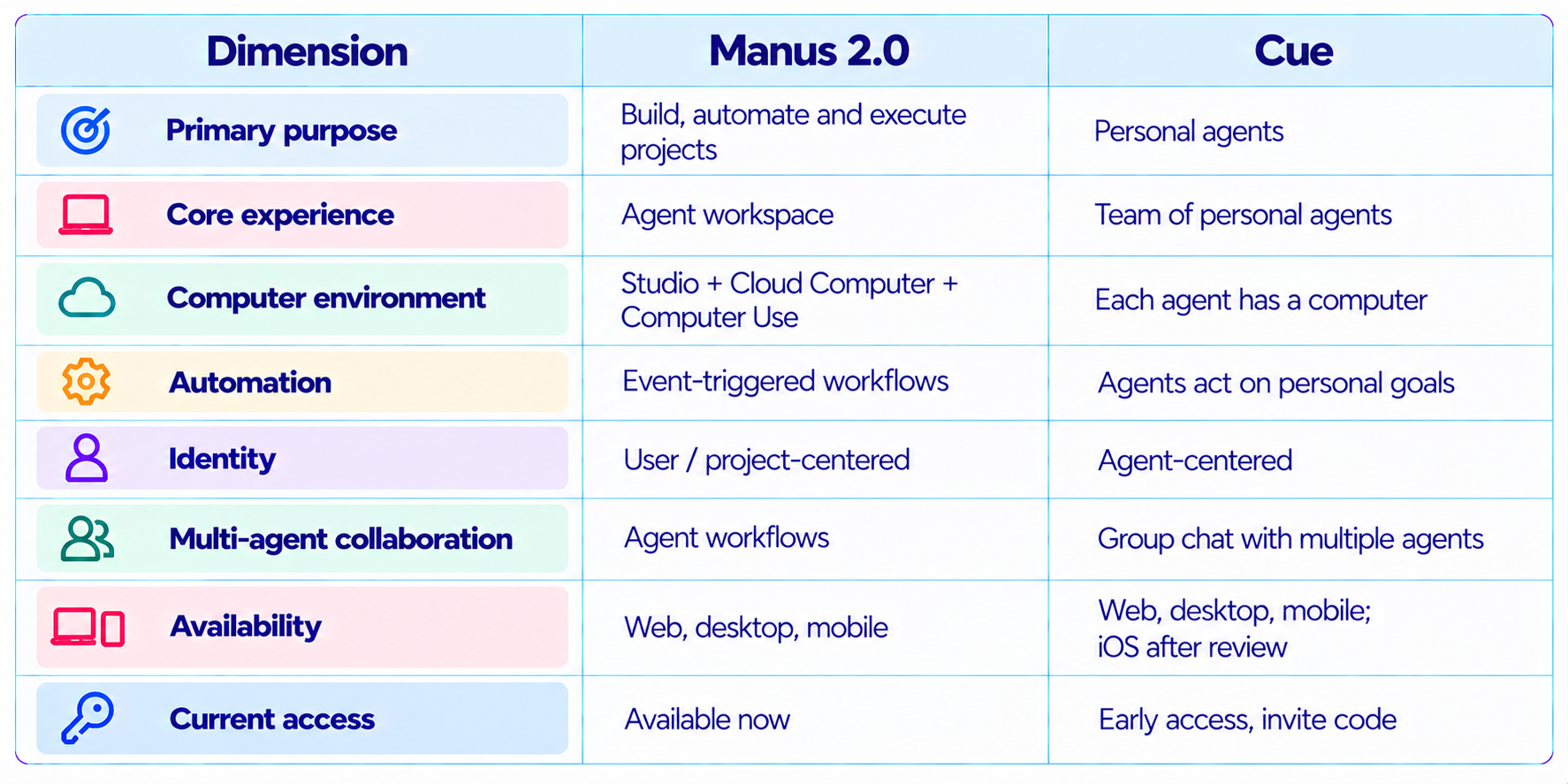
16. Manus 2.0 Pricing and Availability
Manus’s September 28 launch announcement does not publish a new detailed Manus 2.0 pricing table. It confirms that Manus 2.0 is available now on web, desktop and mobile. Cloud Computer is a separately purchasable dedicated environment, but the launch post does not provide a new price in the announcement itself.
Cue has a clearer launch-access statement. It is in early access and free to use with an invite code. Manus says the code MEETCUE is available to a limited number of early users on a first-come, first-served basis, and users who receive access also receive additional invite codes.
18. Best Use Cases for Manus 2.0
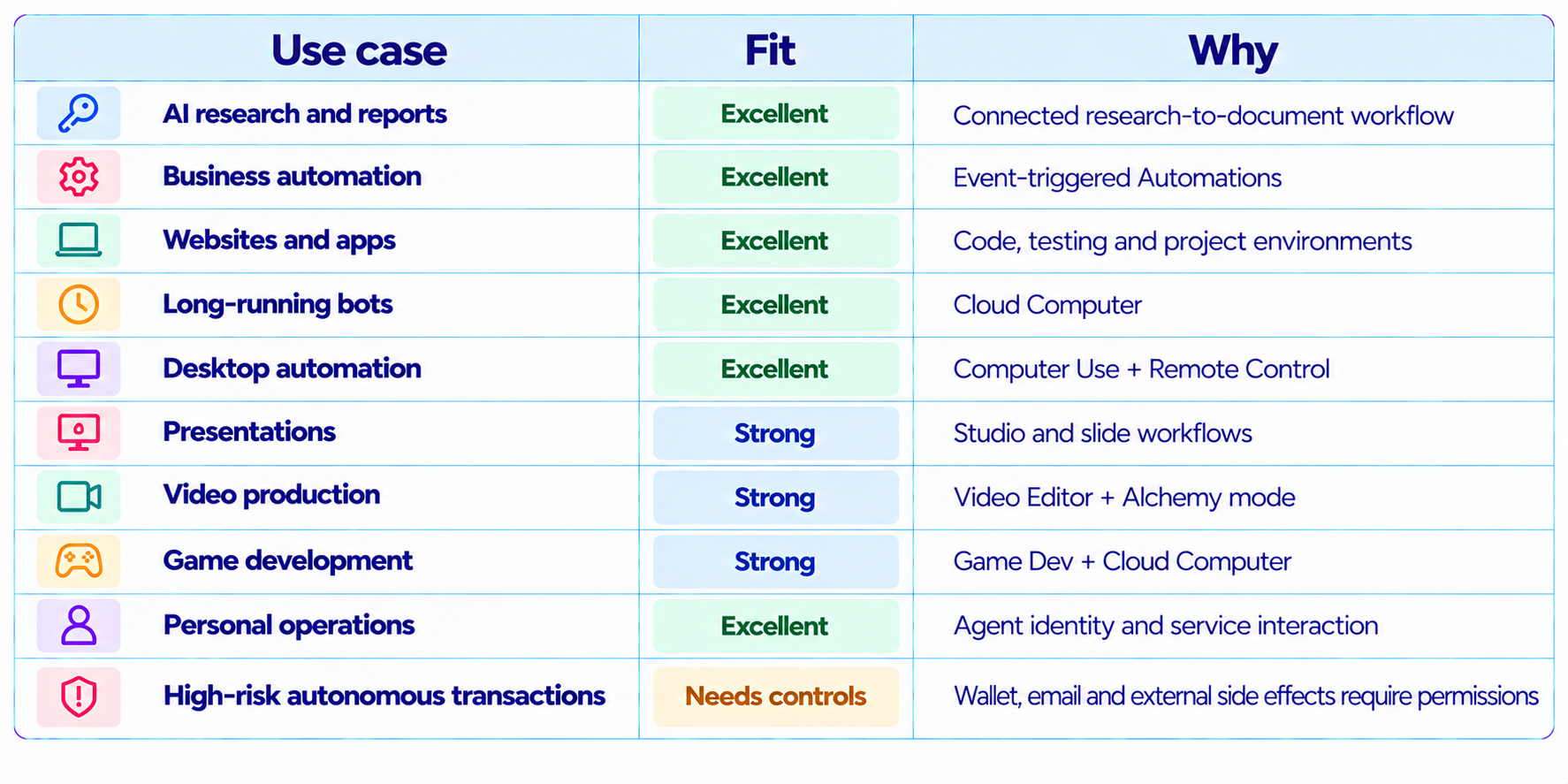
Manus 2.0 is particularly suited to research and reports, business automation, websites and apps, long-running bots, desktop automation, presentations, video production, game development and personal operations through Cue. Its advantage is that these workflows can share project context and execution infrastructure rather than being isolated tasks.
19. Where Manus 2.0 Is Strongest
The strongest part of Manus 2.0 is not any single benchmark. It is the depth of the execution environment. The same project can involve research, files, code, a browser, a cloud machine, a generated artifact and an automation trigger.
The second strength is persistence. Cloud Computer means the agent can have a place where files, tools and running processes survive between sessions. Automations then provide the trigger layer that can wake the workflow when something changes.
The third strength is Cue’s agent identity. Giving an agent email, phone, wallet and computer is a much broader interface than giving it a chat box.
20. Limitations and Risks
Cascade figures are vendor-reported for one tested configuration, not an independent benchmark. Cue is early access and requires an invite code. Phone availability varies by country. Agents with email, phone, wallet and computer access can create real-world side effects, so permissions matter. Cloud Computer adds persistent infrastructure to monitor. Event-triggered Automations need clear triggers and stop conditions. Multi-agent workflows can add coordination overhead. Computer Use should be restricted to authorized applications, accounts and files.
21. Security: The Permission Model Matters More Than the Demo
Manus 2.0 makes the security model more important because the system can move from generating information to taking actions. Computer Use can operate approved applications. Automations can start work from external events. Cue agents can communicate and transact within the permissions the user gives them.
A production deployment should therefore separate read permissions from write permissions and reversible actions from irreversible actions. Email drafting can be automatic. Sending sensitive information should require a stronger gate. Research can run unattended. Payments should have explicit budget and confirmation controls.
This is consistent with the broader agent-security principle: autonomy should expand only after the agent demonstrates reliable behavior under realistic tests. Our AI Agent Evaluation guide covers the metrics and release gates to use before giving agents meaningful write access.
23. Recommended Workflow for Manus 2.0
Start with a clear objective and define what success means. Let Cascade handle routine orchestration rather than manually specifying every tool. Use Manus Studio when the output needs iterative professional editing. Move long-running applications, bots or automations to Cloud Computer. Use event triggers only when the workflow has clear stop conditions. Use Computer Use for authorized desktop tasks and keep sensitive applications outside the agent’s permissions. For Cue, give each agent a narrow role rather than one agent broad access to everything. Set explicit wallet budgets and confirmation rules for financial actions. Evaluate multi-agent handoffs before adding more agents. Keep human approval for irreversible or high-impact actions.
24. How to Evaluate Manus 2.0 Yourself
The right test is not a single prompt. Build a small agent benchmark around the work you actually need the system to perform. Test research for evidence quality, coding for tests and retries, browser tasks for completion and navigation errors, desktop tasks for correct actions and permission boundaries, Automations for trigger reliability, long-running tasks for persistence, multi-agent tasks for handoff quality, and every workflow for cost and latency. Run the same task several times because agent workflows can vary. Track not only whether the agent eventually succeeds but how many tool calls, retries and human interventions were required.
25. Manus 2.0 vs Cue: Which One Should You Use?
Use Manus 2.0 when the goal is to build, research, automate or operate a project. Its strongest features are Cascade, Studio, Cloud Computer, Automations and Computer Use. Use Cue when the goal is to create personal agents that maintain identities and handle ongoing tasks across communication, services and multiple agent roles. Cue’s email, phone, wallet and computer model makes it much more personal and action-oriented. They are better understood as two layers of the same direction rather than competing products. Manus 2.0 is the broader agent workspace. Cue is the personal-agent experience.
26. Is Manus 2.0 Worth It?
Manus 2.0 is worth testing for users who need an agent to do work rather than simply answer questions. The combination of persistent environments, event-driven automation, computer use and professional creation tools gives it a broad execution surface.
The most compelling part is the architecture. Cascade reduces the need to carry every capability through every task, Cloud Computer provides persistence, Automations provide triggers and Studio gives the agent a professional production workspace.
Cue is even more ambitious. Giving agents their own communication and computing identities turns an AI assistant into something closer to a digital worker. The concept is powerful, but it also makes permission management and reliability much more important.
27. Final Verdict
Manus 2.0 is one of the most substantial agent-platform releases of September 2026 because it changes the unit of work from a chat session to a connected execution environment. Cascade, Cloud Computer, Automations, Manus Studio and Computer Use all reinforce that direction.
The published Cascade result is meaningful but should be read precisely: in one tested configuration, Manus reports 23.2% fewer tokens, 28.2% less completion time and 32% lower run cost than its previous system.
Cue is the release’s most ambitious idea. Each agent can have an email, phone number, wallet and computer, and multiple agents can work together around a shared goal. That turns the concept of a personal AI from an assistant that answers into a collection of agents that can carry out ongoing work.
My rating: 9.2/10 for agent architecture, 9.3/10 for workflow breadth, 9.0/10 for Cue’s personal-agent concept, 8.7/10 for current transparency and 9.1/10 overall.
Bottom line: Manus 2.0 is worth exploring if you want a serious agent workspace that can research, build, automate and operate software. Cue is worth watching closely if the future you want is a personal team of agents rather than one general chatbot. The key to using both well is not maximum autonomy. It is giving agents enough access to complete useful work while keeping permissions, budgets, verification and human approval aligned with the risk of the action.
Manus 2.0 Architecture at a Glance
Frequently Asked Questions
What is Manus 2.0?
Manus 2.0 is a rebuilt agent platform centered on Cascade, Manus Studio, Cloud Computer, Automations and Computer Use.
What is Manus Cascade?
Cascade is Manus’s new in-house agent harness. Manus says it keeps projects lightweight and brings specialized capabilities into the workflow when needed.
What is Cue by Manus?
Cue is a standalone personal-agent app built on the same infrastructure as Manus. It lets users create agents with their own email, phone number, wallet and computer.
Is Manus 2.0 available?
Yes. Manus says Manus 2.0 is available on web, desktop and mobile.
Is Cue available?
Yes, but Cue is in early access and requires an invite code. Manus says MEETCUE is available to a limited number of early users.
Is Cue free?
Manus says Cue is free to use during early access with an invite code.
Does Manus 2.0 have a Cloud Computer?
Yes. Cloud Computer is a persistent virtual environment designed for projects, applications, bots and scripts that need to remain active.
What are Manus Automations?
Automations let Manus start work when events occur in connected services, including emails, calendar events, Slack messages, Notion updates and other supported triggers.
Can Manus 2.0 control a computer?
Yes. Manus 2.0 includes Computer Use and Remote Control for authorized computer sessions.
Can Cue agents send emails?
Manus says each Cue agent has its own email identity and can send messages.
Can Cue agents make payments?
Manus says each Cue agent has a wallet and can pay within a budget set by the user.
Can multiple Cue agents work together?
Yes. Manus says several agents can share a group chat around a common goal and hand work to each other.
Is Manus 2.0 worth it?
It is worth testing for users who need research, automation, coding, desktop operation or long-running agent workflows. Critical operations should still be evaluated with task-level reliability and permission tests.
Recommended Blogs
10 Best AI Agents of May 2026 That Actually Boost Productivity
Model Routing for AI Coding Agents: How to Cut Costs Without Losing Quality
Replit's AI Model Routing Is Here: How Intelligent Routing Cuts Costs (2026)
AI Model Routing in 2026: When to Use Fable, Astra, Gemini or Muse
Resources & Community
Join our community of 70,000+ AI enthusiasts and learn to build powerful AI applications. Whether you are a beginner or an experienced developer, Build Fast with AI helps you understand and implement AI in your projects.
Agentic AI Launchpad 2026
A structured 6-week cohort program that takes you from AI basics to building and deploying real-world agentic AI systems. Includes live sessions, expert mentorship, project reviews and a builder community network.
Ready to go from learning to building? Join the next cohort: Agentic AI Launchpad 2026
Free AI Resources
Access free tools, workshops and micro-learning to keep building.

