
How to Use Nano Banana for Free: A Step-by-Step Guide to Google's AI Image Generator
Nano Banana has become one of Google's most recognizable names for AI image generation and editing, but in 2026 it is better understood as a family of Gemini image models than as one standalone product. The current consumer experience uses Nano Banana 2 for image creation and editing, while Google's developer platform exposes several Nano Banana models for different speed, quality and production needs.
The good news is that you do not need a paid Google AI subscription just to start generating images. Google's current Gemini Apps documentation says Nano Banana 2 image generation is available without a Google AI plan, with standard usage limits. Google Search AI Mode provides another free path, and Google currently lists up to 25 images in a 24-hour period for users without a Google AI plan.
For creators, students, marketers and developers, that makes Nano Banana one of the easiest ways to experiment with modern AI image generation without committing to a subscription. The important part is knowing which free route to use, what each limit actually applies to, how to edit images instead of starting over, and when AI Studio or the API becomes a better fit.
QUICK ANSWER
Yes, you can use Nano Banana for free in 2026. The easiest option is Gemini Apps, where Google currently provides Nano Banana 2 image generation and editing without requiring a Google AI subscription, subject to standard limits. Google says Gemini Apps limits can change with demand and availability.
A second route is Google Search AI Mode. Google's current help page lists up to 25 image generations in a 24-hour period for users with no Google AI plan. That quota applies specifically to Search AI Mode and should not be treated as a universal Nano Banana limit across every Google product.
For developers, Google AI Studio is free to access for prototyping, but the current Gemini API pricing page lists no free-tier price for Nano Banana 2 image generation. That means Gemini and Search are the clearest free consumer options, while AI Studio and the API are better for building applications and production workflows.
My recommendation: start with Gemini for personal image creation, use Search AI Mode when you want another free generation route, and move to AI Studio or the Gemini API when you need programmatic control.
1. What Is Nano Banana in 2026?
Nano Banana is Google's name for Gemini's native image-generation and image-editing capabilities. Google's current developer documentation lists four related models: Nano Banana 2 Lite, Nano Banana 2, Nano Banana Pro and the legacy Nano Banana model.
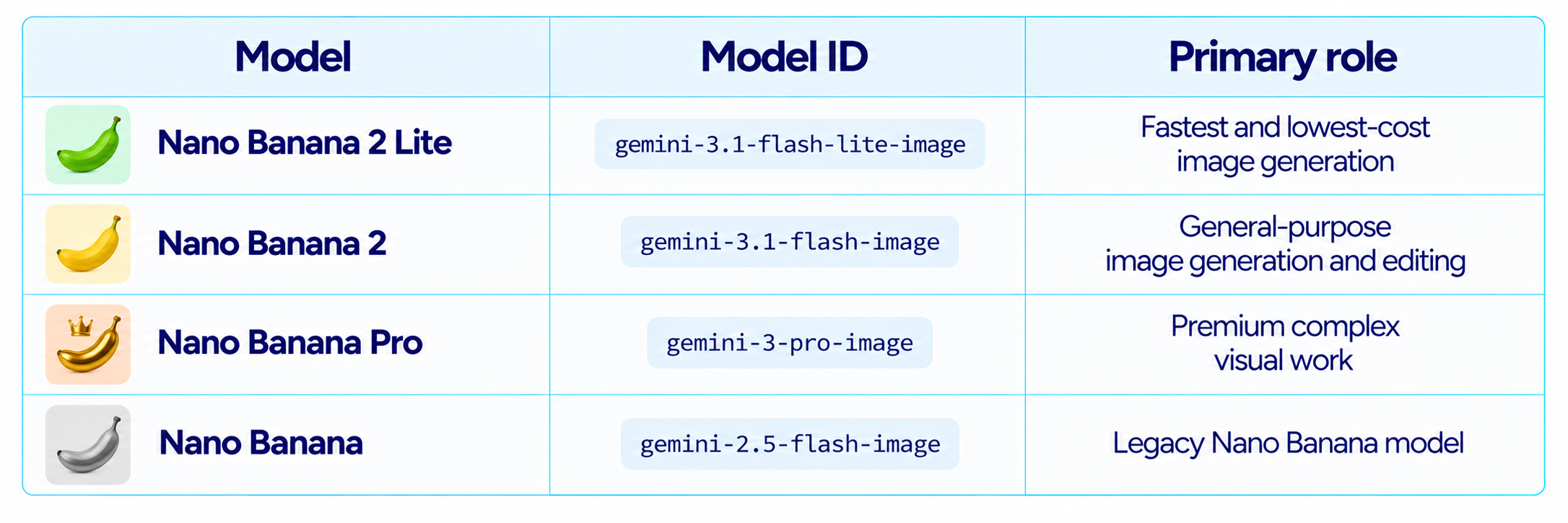
For a normal free user, the model you will most often encounter is Nano Banana 2 inside Gemini. Google’s consumer help page explicitly describes Gemini Apps as using Nano Banana 2 for image generation and editing.
2. Can You Really Use Nano Banana for Free?
Yes. Google currently makes Nano Banana 2 image generation available to users without a Google AI plan in Gemini Apps. The free experience comes with usage limits rather than unlimited generation. Google's Gemini help page describes free users as having standard limits, with higher limits on Google AI subscription plans.
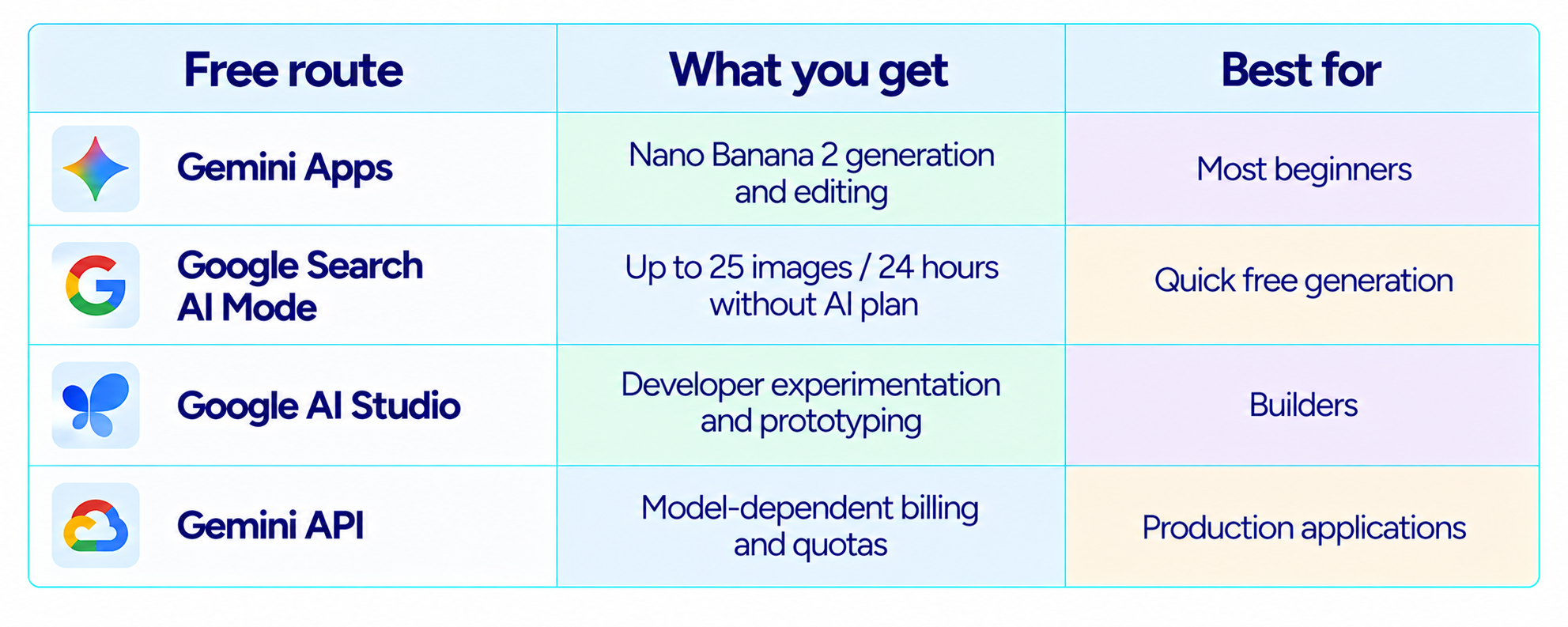
The critical distinction is consumer access versus API access. Google's current Nano Banana 2 API pricing page lists its free-tier price as not available. So 'Nano Banana is free' is accurate for several consumer entry points, but it does not mean unlimited API image generation.
3. Method 1: Use Nano Banana for Free in Gemini
Step 1: Open Gemini - Open Gemini on the web or in the mobile app and sign in with your Google account.
Step 2: Start a new conversation - Use a clean chat for the image task so previous instructions do not interfere.
Step 3: Ask Gemini to create an image - Try: "Create a premium product photograph of a matte-black mechanical keyboard on a dark walnut desk, soft window light, shallow depth of field, realistic materials, editorial technology photography."
Step 4: Refine the image - Ask for a specific edit instead of writing a completely new prompt.
Step 5: Download the result - Google says free users can download Nano Banana 2 images at 1K; 2K downloads require a Google AI plan.
Google lists local edits, character consistency, better text rendering and improved instruction following among Nano Banana 2's current capabilities.
4. Method 2: Use Nano Banana Free in Google Search AI Mode
Google Search AI Mode provides a separate route for image generation and editing. On supported accounts and surfaces, you can create an image directly from the Ask anything bar and then ask AI Mode to edit it.
Step 1 - Open Google Search and enter AI Mode.
Step 2 - Select Image in the Ask anything bar.
Step 3 - Choose Create Images.
Step 4 - Describe the image you want.
Step 5 - Use a follow-up instruction to edit the generated result.
Google currently lists up to 25 generated images in a 24-hour period for users without a Google AI plan. Google also notes that limits can change based on capacity and demand.
5. Nano Banana Free Limits Explained
There is no single Nano Banana quota shared by every Google product. Gemini Apps, Search AI Mode and the Gemini API have different usage systems.
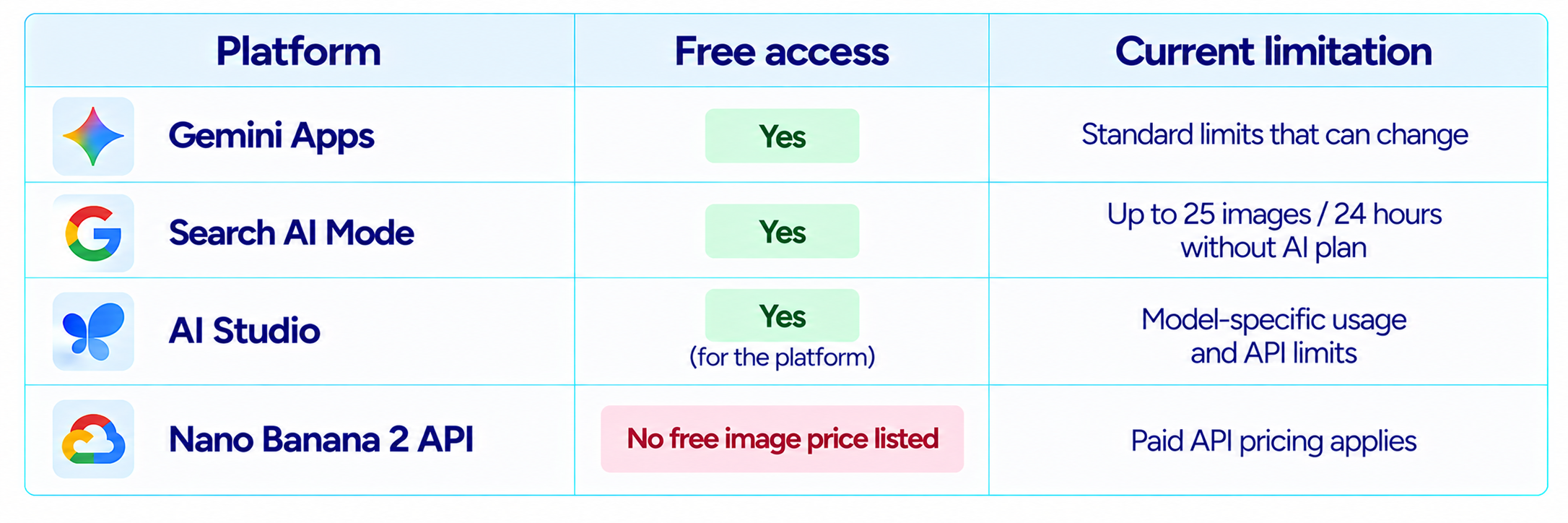
This is why older tutorials that promise a fixed number of 'free Nano Banana images every day' can become inaccurate. Google explicitly says Gemini Apps limits may change based on testing, experimentation, availability and capacity.
6. What Can Nano Banana 2 Do for Free?
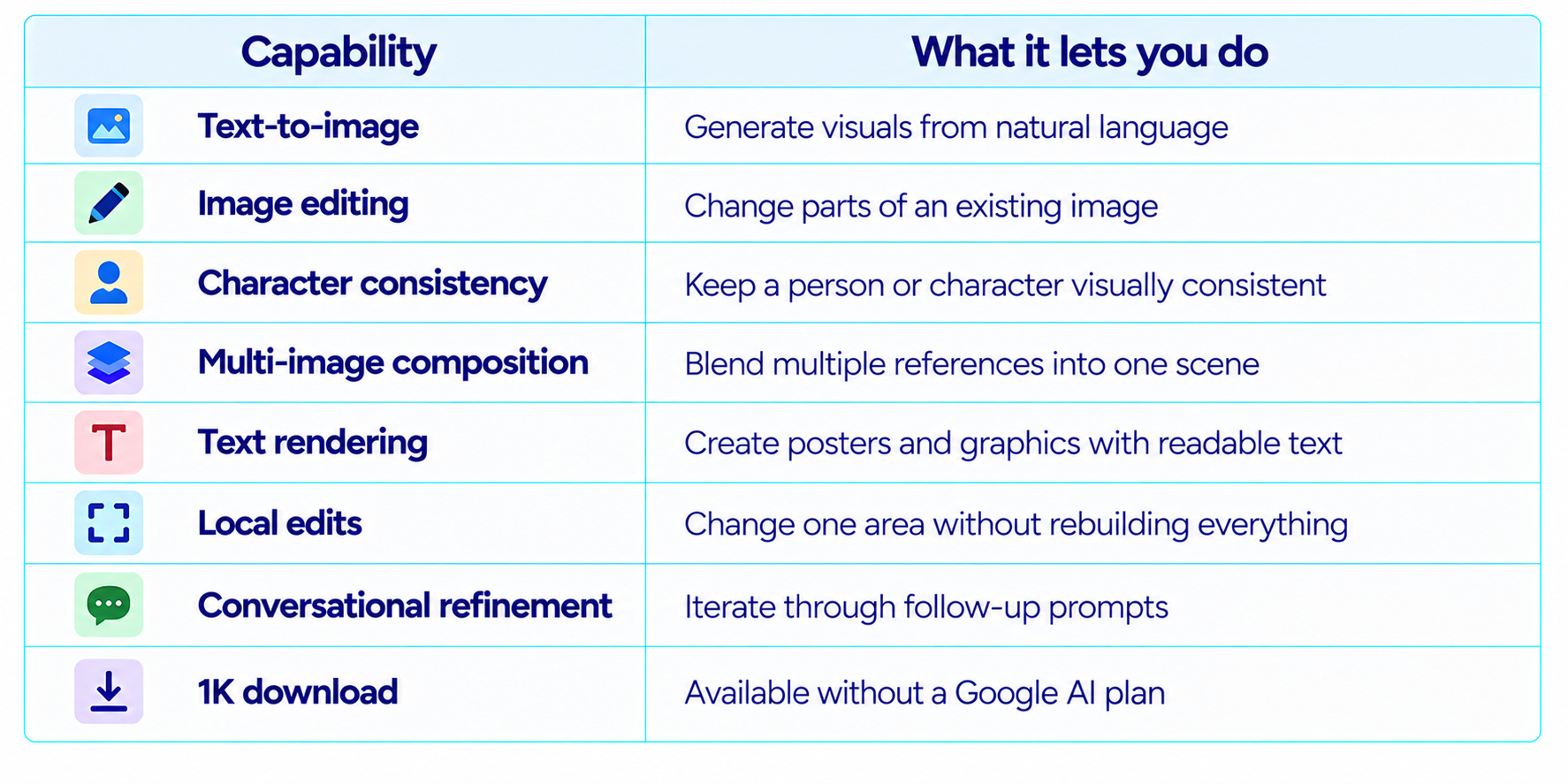
Google's current Nano Banana 2 documentation specifically highlights improved world knowledge, character consistency, local edits, better text rendering and enhanced instruction following.
7. The Best Free Nano Banana Prompt Formula
For consistent results, describe the image as a visual brief rather than a one-line object request.
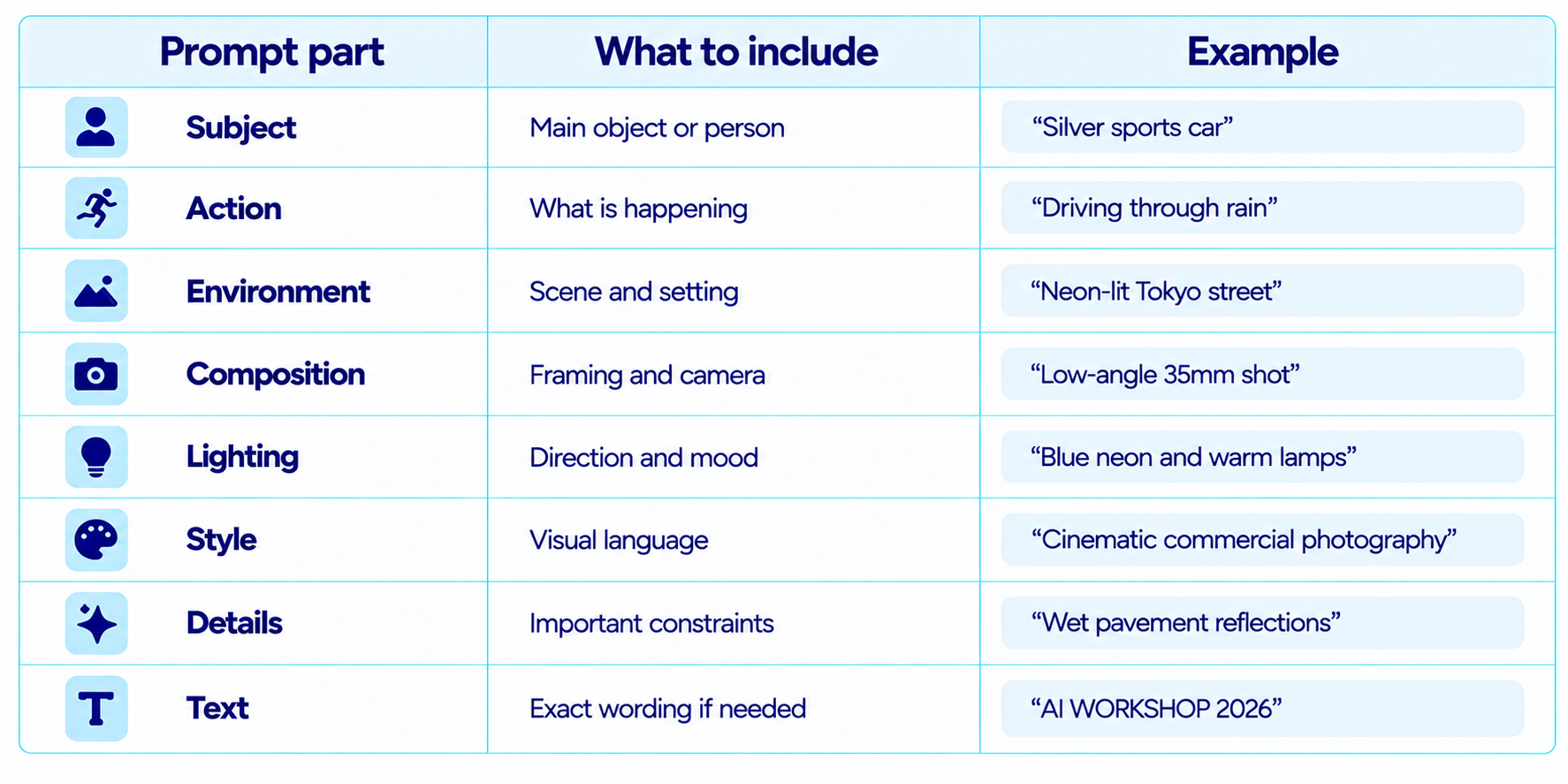
You do not need every field in every prompt. Use the structure when accuracy matters more than speed.
8. 10 Free Nano Banana Prompts to Try
1. Product Photography
Create a premium studio product photograph of [product] on an off-white surface, soft directional lighting, realistic materials, subtle shadows, commercial advertising quality.
2. YouTube Thumbnail
Create a premium 16:9 YouTube thumbnail about [topic], strong central subject, dark navy background, subtle cyan accents, large readable headline "[TEXT]", high contrast, minimal editorial design.
3. Instagram Poster
Create a polished square social media poster for [event/product], premium typography, strong hierarchy, generous negative space and a clean professional layout.
4. Cinematic Portrait
Create a cinematic portrait of [person/character], natural skin texture, soft rim light, shallow depth of field, realistic facial detail, premium film-still look.
5. Infographic
Create a clean infographic explaining [topic], accurate labels, simple icons, clear hierarchy, white background and dark navy typography.
6. Food Photography
Create a realistic editorial food photograph of [dish], natural window light, visible texture, premium table setting and shallow depth of field.
7. Before and After
Create a split-screen before-and-after visual showing [transformation], identical camera angle, consistent subject placement and clean labels.
8. UI Mockup
Create a realistic desktop UI mockup for [product], modern SaaS design, cards, charts, navigation and clean typography, with no placeholder lorem ipsum.
9. Travel Scene
Create a photorealistic travel photograph of [place], golden-hour light, realistic architecture, natural people placement and premium travel-magazine composition.
10. Character Sheet
Create a character reference sheet for [character], front, side and three-quarter views, consistent identity, clothing and facial features, neutral background.
For more Nano Banana prompts check out our blog 100 Best Nano Banana Prompts 2026
9. How to Edit Existing Images With Nano Banana
Nano Banana becomes much more useful when you treat the first image as a working draft instead of a final output. Generate once, then edit the specific element that needs to change.
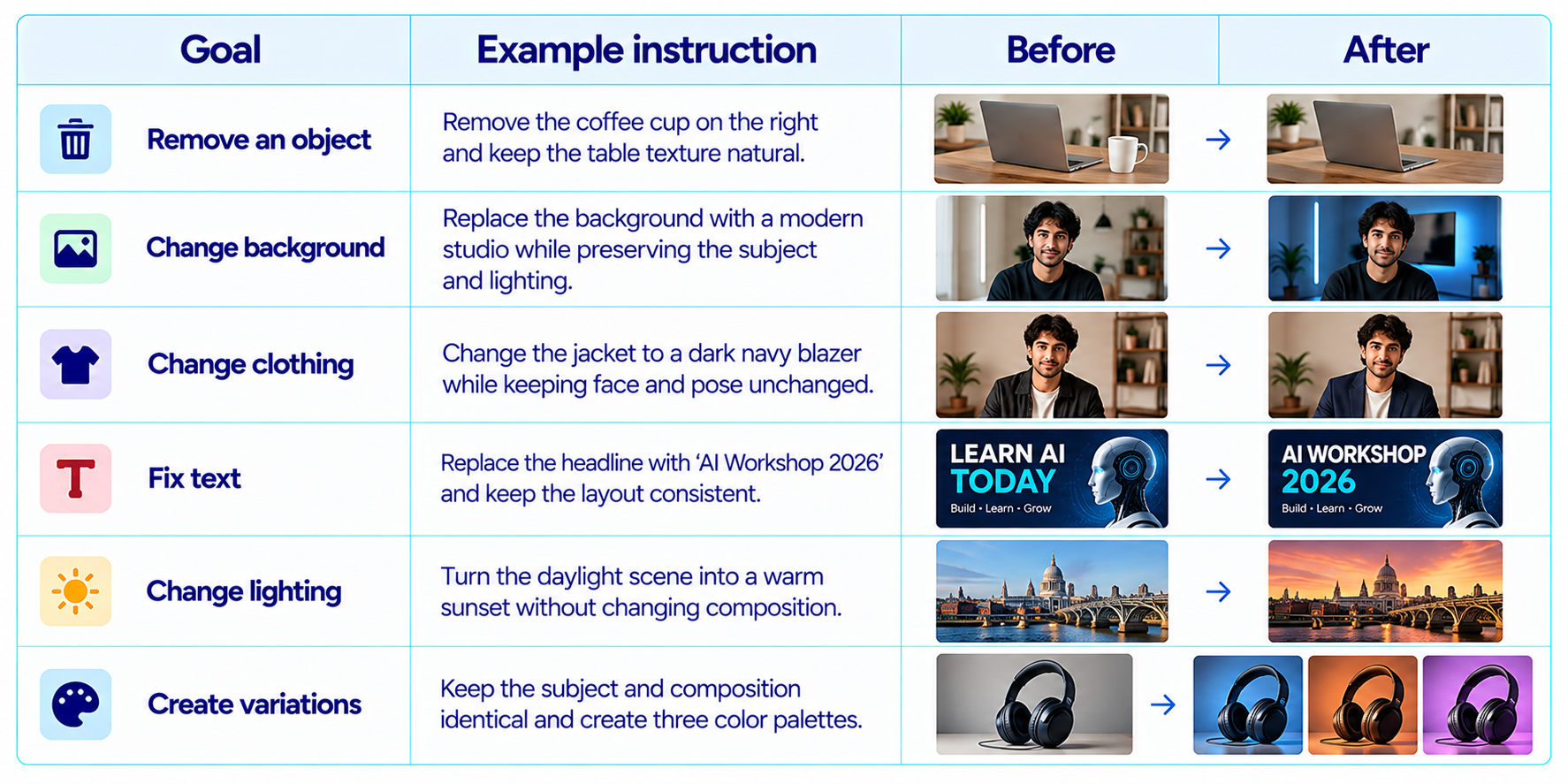
Google specifically highlights local edits and conversational refinement in Nano Banana 2.
10. How to Keep Characters Consistent
Character consistency improves when you explicitly identify the features that should stay fixed. Mention hairstyle, face shape, clothing, accessories, age, skin tone and other stable details. During an edit, say what must remain unchanged.
Example: "Keep the exact character identity, hairstyle, face shape, clothing and color palette. Change only the environment from a coffee shop to a futuristic train station."
Google lists character consistency and multi-image composition as Nano Banana 2 capabilities.
11. How to Make Text in Images Work Better
Nano Banana 2 improves text rendering, which is especially useful for posters, thumbnails, advertisements, presentation graphics and social media designs. Google says the model can render text more accurately across supported languages.
Give exact wording in quotation marks. Example: "Create a minimal poster with the exact headline \"BUILD WITH AI\" in large bold white type at the top center. Do not add any other words."
For important brand assets, still inspect every word before publishing. AI-generated typography can improve dramatically while remaining imperfect on long, dense copy.
12. Nano Banana 2 vs Nano Banana Pro
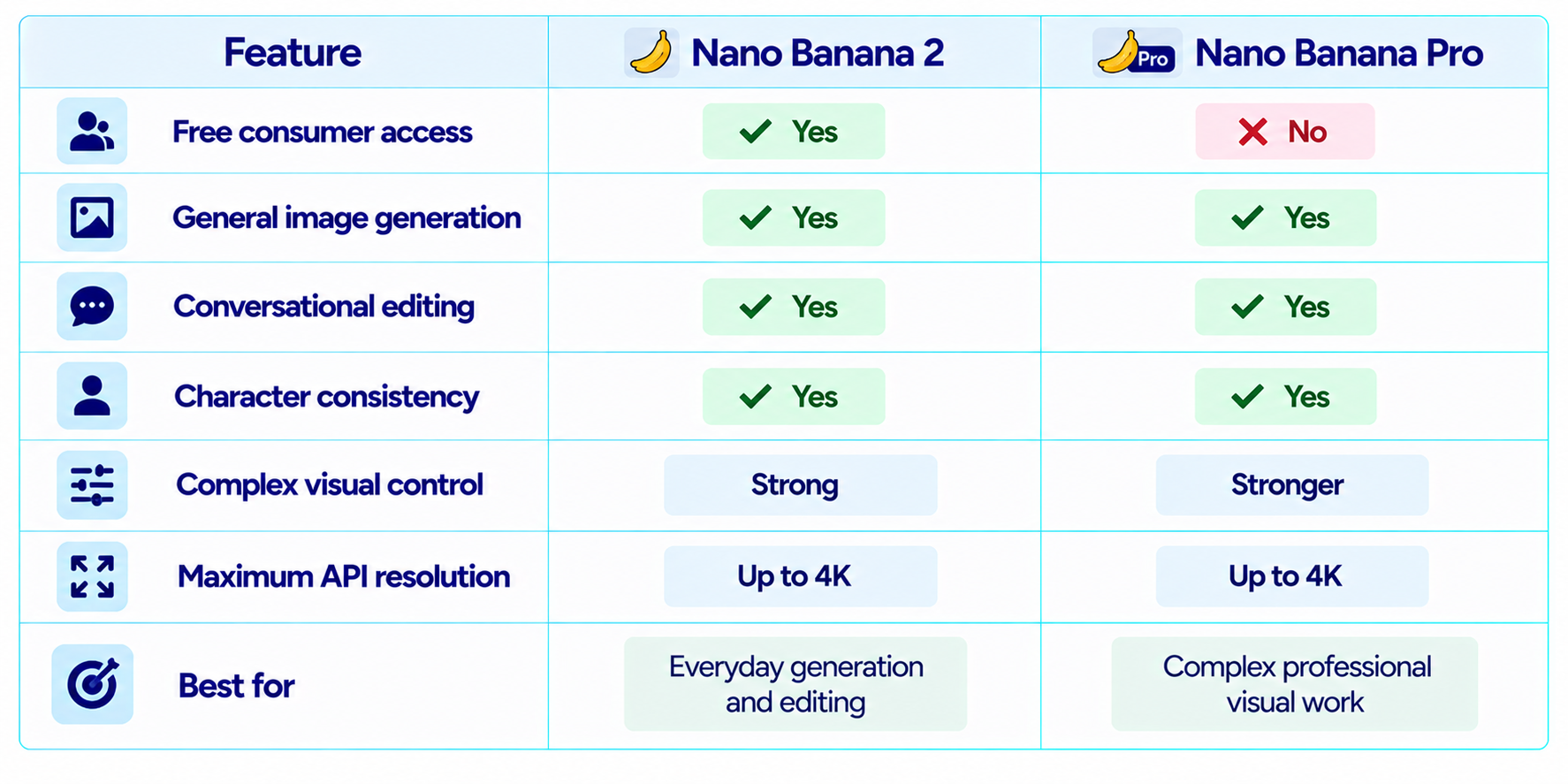
Google describes Nano Banana 2 as the general-purpose workhorse image model and Nano Banana Pro as the premium choice for complex visual tasks, advanced localization, brand consistency and high-end control.
13. Can You Use Nano Banana for Free in Google AI Studio?
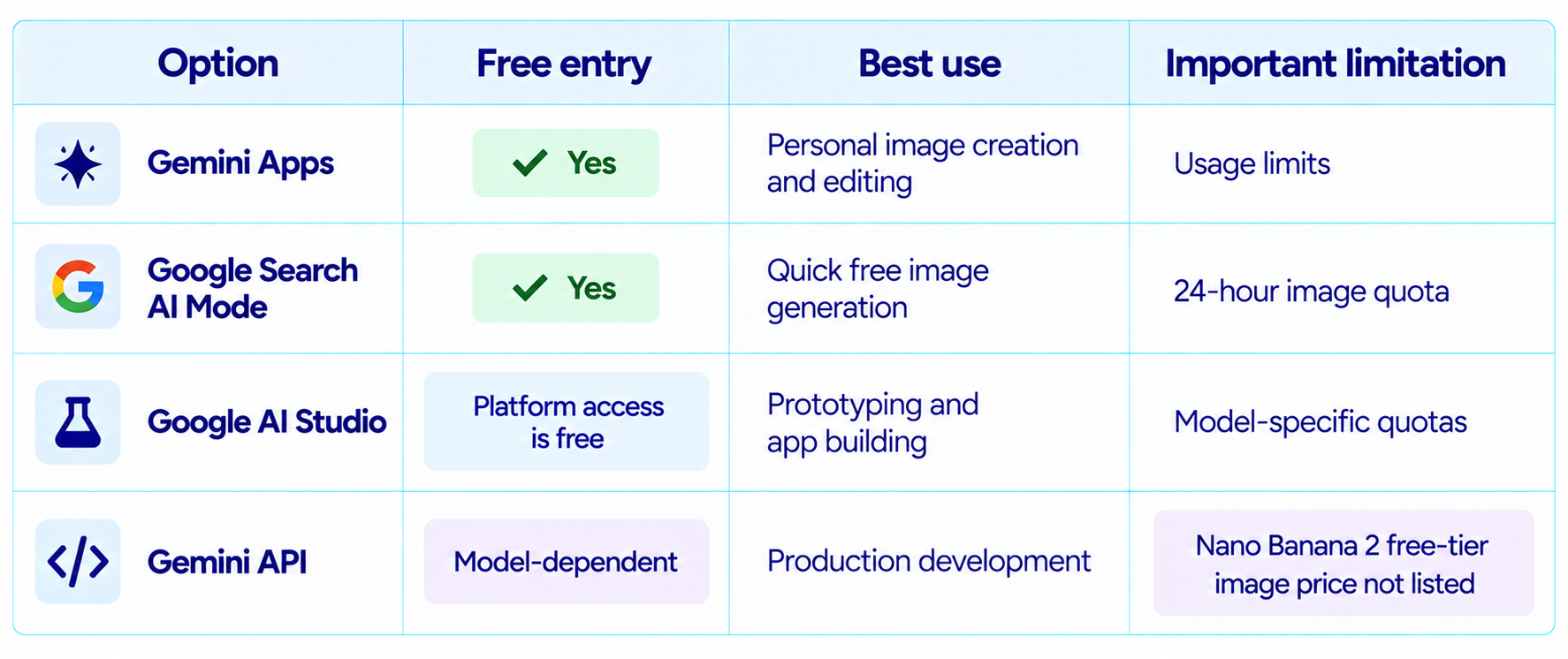
AI Studio is free to access for experimentation, but that does not make every model's API usage free. Google's billing documentation says new Gemini API accounts begin on a Free Tier for eligible models. The current Nano Banana 2 pricing page, however, lists its free-tier price as not available.
Use AI Studio when your goal is to prototype an application, build an interface or experiment with the model as a developer. Use Gemini or Search AI Mode when your goal is simply to create images without paying.
Google AI Studio also supports building apps that use Nano Banana inside the generated application experience, which makes it useful when the end goal is more than a one-off image.
14. Nano Banana Free vs AI Studio vs API
15. What Happens When You Hit the Free Limit?
Gemini limits are not permanent fixed numbers. Google says usage limits can change based on testing, experimentation, availability, capacity and other factors. When you reach a limit, you can wait for the quota to refresh or use a higher-tier plan.
For Search AI Mode, Google currently documents a 24-hour window and up to 25 images for users without a Google AI plan.
This is why a good free workflow uses generation strategically: refine prompts before spending generations, edit successful images instead of restarting, and save good base compositions for later variations.
16. Can You Use Nano Banana Images Commercially?
You should review Google's current terms and the rights attached to your specific use case before commercial publication. Google's Gemini help documentation reminds users that generated content can involve copyright and privacy considerations and that users should not violate third-party rights.
For commercial images containing recognizable people, brands, logos, copyrighted characters or uploaded third-party images, evaluate permissions and applicable rights separately from the model's technical ability to generate the asset.
17. Best Free Nano Banana Workflow for Creators
- Start in Gemini and create the first composition.
- Describe the subject, environment, style, lighting and framing clearly.
- Generate a few strong directions instead of changing everything after every attempt.
- Use conversational editing for local changes.
- Keep identity and product details explicit when consistency matters.
- Use Search AI Mode when you want another free generation route.
- Download the free result at 1K when that resolution is sufficient.
- Move to a paid plan when higher limits or higher-resolution production justify the cost.
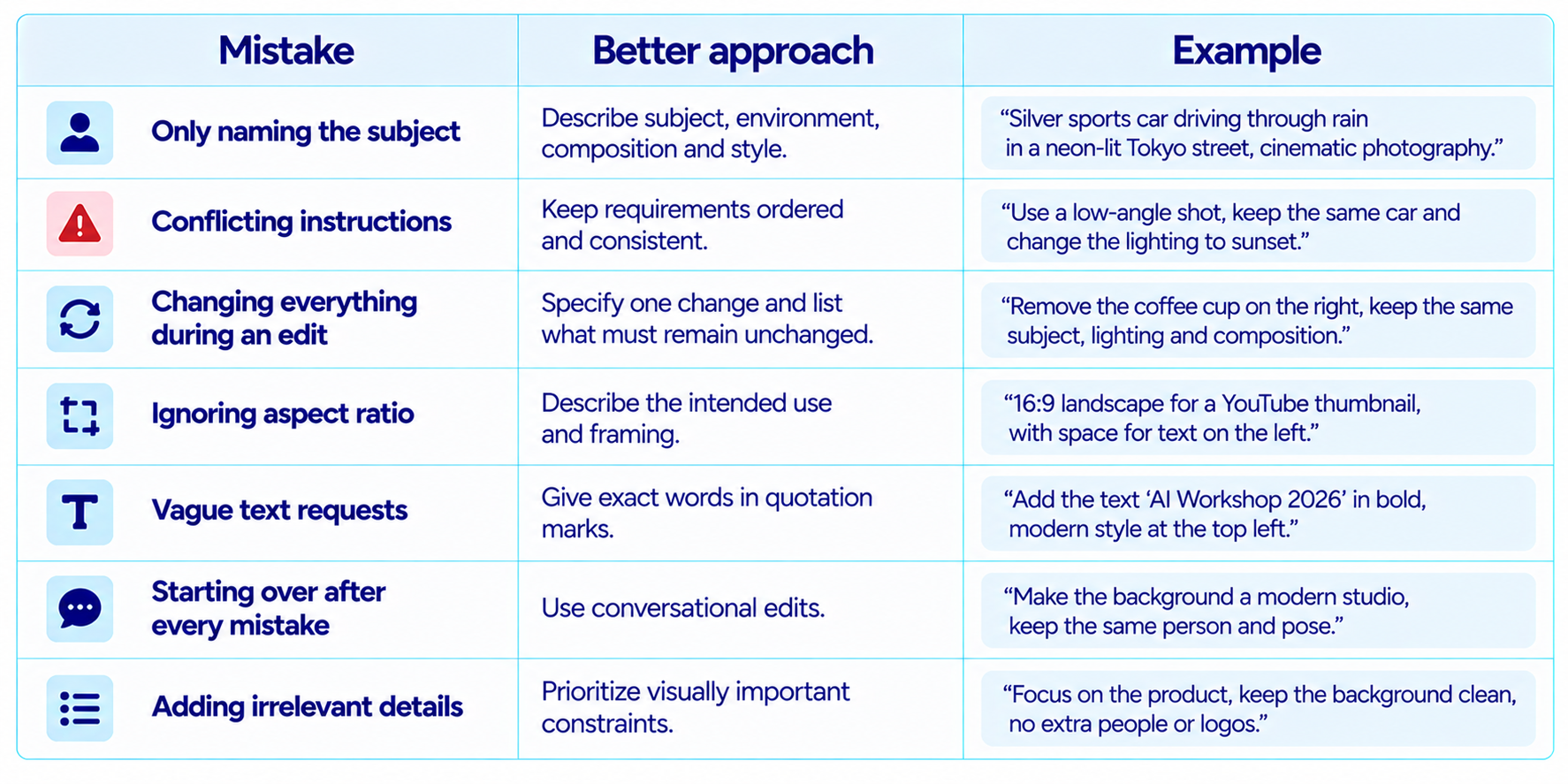
18. Common Nano Banana Prompt Mistakes
19. Step-by-Step Example: Make a YouTube Thumbnail for Free
Suppose you want a thumbnail for a video about a new AI model. You can create and refine the full visual in Gemini without paying for a Google AI subscription.
Prompt 1: "Create a premium 16:9 YouTube thumbnail about a new AI model. Dark navy background, futuristic model card in the center, subtle cyan accents, clean white typography, strong depth, high contrast and generous negative space. Add the exact headline \"NEW AI MODEL\" in large bold letters."
Edit prompt: "Keep the composition and subject exactly the same. Replace the headline with \"GPT-6 ASTRA\" and make the text larger. Do not add any other text."
Variation prompt: "Keep the same design system but create three alternate versions: one focused on coding, one focused on reasoning and one focused on speed."
The advantage of the workflow is that the model can edit an existing result rather than forcing you to regenerate the entire visual after every change.
20. Reusable Nano Banana Prompt Template
Create [image type] showing [subject] in [environment]. The subject is [key details]. Use [style] with [lighting]. Compose the scene as [camera angle/framing]. The color palette should be [palette]. Include [specific text or object requirements]. Keep [elements that must remain consistent]. Avoid [unwanted elements].
For editing: Keep the existing image unchanged except for [specific edit]. Preserve [identity/composition/lighting/style].
This simple structure turns 'make me an image' into a more reliable visual brief without requiring an overly long prompt.
21. Final Verdict: Is Nano Banana Free Worth Using?
Yes. In 2026, Nano Banana is one of the easiest ways to experiment with advanced AI image generation without paying immediately. Gemini Apps currently provide Nano Banana 2 image generation and editing without requiring a Google AI subscription, and Search AI Mode provides another free route with a published allowance of up to 25 images in 24 hours for users without a Google AI plan.
The value is not only the number of free generations. Nano Banana 2 supports conversational editing, character consistency, multi-image composition, better text rendering and stronger instruction following, making the free access useful for real design work.
The main limitation is that free access is quota-based. Gemini limits can change, Search has its own quota, and the API currently does not list free-tier image pricing for Nano Banana 2. So the right workflow depends on whether you are a casual creator, a designer producing many assets or a developer building an application.
My rating: 9.5/10 for accessibility, 9.2/10 for editing, 9.0/10 for free value and 9.3/10 overall.
Bottom line: start with Gemini if you want Nano Banana for free today. Use Search AI Mode as a second free option, and move to AI Studio or the Gemini API when you need programmatic control. You do not need a Google AI subscription just to start creating images.
Frequently Asked Questions
Can I use Nano Banana for free?
Yes. Google currently provides Nano Banana 2 image generation and editing in Gemini Apps without requiring a Google AI subscription, subject to usage limits.
How do I use Nano Banana 2 for free?
Open Gemini, sign in and ask it to create or edit an image. Google Search AI Mode also provides a free image-creation path where available.
How many free Nano Banana images can I make?
Google Search AI Mode currently lists up to 25 images in a 24-hour period for users without a Google AI plan. Gemini Apps have separate standard limits.
Can I download Nano Banana images for free?
Yes. Google currently says users without a Google AI plan can download Nano Banana 2 images at 1K resolution.
Is Nano Banana the same as Nano Banana 2?
Nano Banana is the family name. Nano Banana 2 is the current general-purpose image model, while the original Nano Banana model is the legacy Gemini 2.5 Flash Image model.
Can Nano Banana edit photos?
Yes. Nano Banana 2 supports local edits and conversational image refinement.
Can I use Nano Banana in Google Search?
Yes. Google Search AI Mode supports image creation and editing where the feature is available.
Is Nano Banana free in Google AI Studio?
AI Studio is free to access for experimentation, but the current Nano Banana 2 API pricing page does not list a free-tier image price.
Can I use Nano Banana commercially?
Review Google's current terms and applicable copyright, privacy and publicity-rights requirements for your specific use case.
Is Nano Banana worth using?
Yes. It is particularly useful for free image creation, editing, thumbnails, social graphics, concept art and rapid visual iteration.
Recommended Blogs
Google Pics Review: Features, Price & Is It Worth It? (2026)
Gemini 3.8 Flash Review: Accuracy, Price & Is It Worth It? (2026)
Best AI Video Models 2026: Ranked by Quality, Speed, Price & Use Case
Resources & Community
Join our community of 70,000+ AI enthusiasts and learn to build powerful AI applications. Whether you're a beginner or an experienced developer, Build Fast with AI helps you understand and implement AI in your projects.
Agentic AI Launchpad 2026
A structured 6-week cohort program that takes you from AI basics to building and deploying real-world agentic AI systems. Includes live sessions, expert mentorship, project reviews and a builder community network.
Ready to go from learning to building? Join the next cohort: Agentic AI Launchpad 2026
Free AI Resources
Access free tools, workshops and micro-learning to keep building.