



100 Nano Banana Prompts for AI Images, Photo Editing, Product Shots & Creative Design (2026)
Nano Banana has become much more than a text-to-image shortcut. Google's Gemini image family is built for creating new visuals, editing existing photos, combining references, preserving subjects across variations and placing readable text inside generated designs. The latest Nano Banana 2 model, also known as Gemini 3.1 Flash Image, adds faster advanced editing, stronger instruction following, improved world knowledge, native aspect ratios and support for output up to 4K.
That makes prompt quality more important, not less. A short request such as "make this cinematic" can produce something attractive, but a structured brief gives the model much more control over the subject, composition, lighting, materials, camera perspective, background, typography and what must remain unchanged. Google's own prompting guidance recommends describing the subject, setting, composition, action and style in detail, while its Nano Banana Pro guidance adds specific editing instructions, camera details, lighting and text requirements.
This library gives you 100 copy-paste Nano Banana prompts across portraits, selfies, fashion, products, marketing, food, travel, retro transformations, anime, posters, typography, infographics and detailed photo editing. The prompts are written for the current Nano Banana family, with Nano Banana 2 as the general-purpose workhorse and Nano Banana Pro for more demanding visual control.
QUICK ANSWER
The best Nano Banana prompts read like compact creative briefs rather than keyword lists. Start with the subject, then define the composition, action or edit, environment, lighting, visual style, important materials or textures, and the final format. For photo editing, explicitly state what must change and what must stay unchanged.
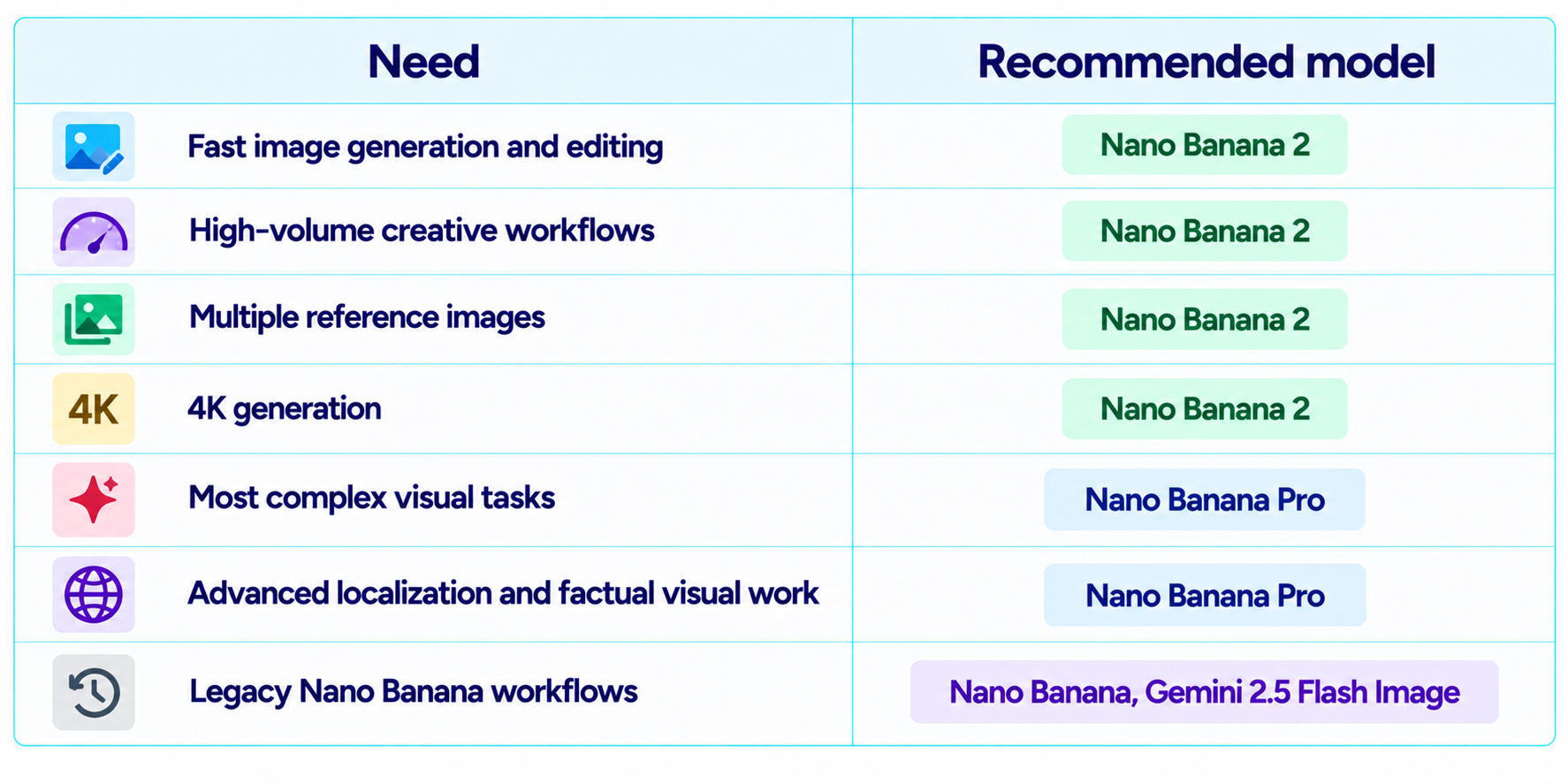
Nano Banana 2 is particularly useful for high-volume image creation and editing because Google lists improved instruction following, advanced editing, better text rendering, multiple reference-image handling, world knowledge and 4K generation. Nano Banana Pro is positioned for more complex visual tasks where maximum factual accuracy, localization and creative control matter.
The 100 prompts below are designed to be pasted directly into Gemini image generation or adapted for the Gemini API. Replace bracketed placeholders when a prompt includes a brand, product, person, location or campaign detail. For reference-based edits, upload the image first and then describe the change precisely.
How to Use These Prompts
- Copy the prompt first, then replace bracketed fields such as [PRODUCT], [BRAND], [LOCATION] or [TEXT].
- Upload a clear reference image whenever the prompt depends on a real person, product or existing design.
- For edits, describe the change and then explicitly preserve the parts you do not want altered.
- Change one major variable at a time when testing variations. This makes it easier to understand which instruction affected the result.
- For text-heavy designs, put the exact copy in quotation marks and specify where it should appear.
- Review faces, hands, logos, reflections, small text and geometry before publishing commercial imagery.
Photorealistic Portrait Prompts
1. Golden-Hour Portrait
Create a photorealistic portrait of a [PERSON] standing beside a large cafe window at golden hour. Use warm directional sunlight, natural skin texture, subtle freckles, realistic hair strands, an 85mm portrait-lens look, shallow depth of field and a softly blurred interior. Preserve natural facial proportions. 4:5.
2. Professional LinkedIn Headshot
Create a premium professional headshot of [PERSON] wearing a [OUTFIT], shoulders and upper torso visible, neutral confident expression, soft grey studio background, large diffused key light, gentle fill, clean catchlights and realistic skin texture. Keep the result polished but natural, not overly retouched. 1:1.
3. Editorial Black-and-White Portrait
Create a high-end black-and-white editorial portrait of [PERSON], three-quarter pose, dramatic side lighting, deep controlled shadows, realistic skin texture, subtle film grain, 85mm lens look and a dark studio background. Maintain recognizable facial structure and natural age. 4:5.
4. Candid Street Portrait
Create a candid street portrait of [PERSON] walking through a busy [CITY] neighborhood, natural expression, late-afternoon light, realistic storefront reflections, shallow depth of field, documentary photography style and believable street details. Avoid staged posing and preserve natural proportions. 4:5.
5. Luxury Beauty Campaign
Create a luxury beauty campaign portrait of [PERSON] with luminous natural skin, refined [MAKEUP STYLE], sculptural lighting, soft neutral background, subtle rim light and premium cosmetic-advertising photography. Preserve facial identity and avoid plastic-looking skin. 4:5.
6. Warm Family Portrait
Create a natural family portrait of [PEOPLE] sitting together in a cozy living room, soft window light, realistic skin tones, candid smiles, natural body proportions, warm home textures and an authentic lifestyle-photography feel. Keep everyone recognizable and avoid artificial-looking skin. 4:5.
7. Studio Fashion Portrait
Create a studio fashion portrait of [PERSON] wearing [OUTFIT], standing against a seamless [COLOR] background, controlled softbox lighting, subtle shadow on the floor, editorial magazine styling, crisp fabric texture and realistic skin. 4:5.
8. Moody Cinematic Portrait
Create a cinematic portrait of [PERSON] in a dimly lit [LOCATION], cool ambient shadows with one warm practical light, shallow depth of field, realistic skin texture, restrained film grain and dramatic but believable contrast. 2:3.
9. Environmental Founder Portrait
Create an environmental portrait of [PERSON], a [ROLE], working inside a modern [WORKSPACE]. Show authentic tools, materials and background details related to the job, with soft directional light, realistic depth and editorial documentary photography. 3:2.
10. Natural Outdoor Portrait
Create a realistic outdoor portrait of [PERSON] in [LOCATION] during early morning light. Use soft backlight, natural wind in the hair or clothing, realistic skin texture, subtle environmental detail and a shallow depth of field. Avoid excessive HDR. 4:5.
AI Selfie & Social Media Prompts
11. Cinematic Smartphone Selfie
Transform the uploaded selfie into a cinematic but realistic smartphone portrait. Preserve exact facial identity, face shape, skin tone, hairstyle and age. Improve only the lighting and environment, using soft golden-hour light, natural depth and subtle background separation. 4:5.
12. Luxury Travel Selfie
Use the uploaded selfie as the identity reference and place the person naturally at [DESTINATION]. Preserve face, hair and body proportions. Add realistic travel clothing, believable local architecture, natural daylight, subtle crowd depth and authentic photographic detail. 4:5.
13. Coffee-Shop Lifestyle Selfie
Edit the uploaded selfie into a premium lifestyle photo inside a stylish coffee shop. Preserve facial identity exactly. Add warm window light, realistic reflections, natural skin texture, a cup of coffee in the foreground and shallow depth of field. 4:5.
14. Rainy Neon Selfie
Transform the uploaded selfie into a realistic nighttime city portrait under rain and neon signs. Preserve facial identity and proportions. Add wet pavement reflections, soft cyan and red lighting, realistic raindrops and cinematic depth without changing the person's expression. 4:5.
15. Airport Travel Selfie
Turn the uploaded selfie into a believable airport travel photo. Keep the person's face and clothing recognizable. Add modern airport architecture, rolling luggage, realistic window light, natural background passengers and documentary travel photography. 4:5.
16. Mountain Adventure Selfie
Place the person from the uploaded selfie on a realistic mountain viewpoint at sunrise. Preserve exact facial identity and natural proportions. Add appropriate outdoor clothing, atmospheric mountain depth, soft sunrise light and realistic wind. 4:5.
17. Festival Selfie
Transform the uploaded selfie into a vibrant festival photo at [EVENT]. Preserve the subject's identity and outfit silhouette. Add realistic lights, crowd depth, confetti, natural skin texture and authentic smartphone-camera perspective. 4:5.
18. Formal Event Selfie
Turn the uploaded selfie into a polished event portrait at a [TYPE OF EVENT]. Preserve facial identity and proportions. Add realistic formal attire, warm venue lighting, subtle background bokeh and premium event photography without over-retouching. 4:5.
19. Streetwear Social Post
Create a realistic social-media fashion photo using the uploaded person as the identity reference. Preserve face and body proportions. Style the outfit as [STREETWEAR STYLE], place the subject in a modern urban setting and use editorial flash photography. 4:5.
20. Minimal Creator Profile Photo
Transform the uploaded photo into a clean creator profile image. Preserve facial identity exactly. Use a softly lit neutral background, natural skin texture, subtle depth of field, centered composition and a premium modern personal-brand aesthetic. 1:1.
Fashion & Editorial Prompts
21. Luxury Street Fashion
Create a high-end street-fashion editorial featuring a model wearing [OUTFIT], walking through [LOCATION]. Use directional afternoon light, realistic fabric texture, subtle motion in clothing, 35mm editorial framing and sophisticated color grading. 4:5.
22. Magazine Cover Portrait
Create a premium fashion magazine cover image featuring [MODEL], dramatic studio lighting, clean composition, luxury styling and realistic skin texture. Leave intentional negative space at the top and sides for typography. Do not add any text unless explicitly requested. 4:5.
23. Runway Backstage
Create a documentary-style backstage fashion photograph of [MODEL] preparing for a runway show, garment racks and makeup stations in the background, mixed practical lighting, realistic skin and fabric texture, candid movement and editorial photography. 3:2.
24. Minimalist Fashion Campaign
Create a minimalist fashion campaign image featuring [OUTFIT] against a clean architectural background. Use soft directional daylight, precise composition, realistic fabric folds, subtle shadows and a premium luxury-brand aesthetic. 4:5.
25. Denim Campaign
Create a realistic denim campaign featuring [MODEL] wearing [DENIM PRODUCT], outdoors in an urban environment, low-angle composition, warm natural sunlight, authentic denim texture, subtle grain and premium commercial photography. 4:5.
26. Sneaker Editorial
Create a dynamic sneaker editorial featuring [SHOE] on a model moving through [LOCATION]. Freeze natural motion, show realistic shoe materials, directional lighting and a modern sports-fashion campaign aesthetic. 4:5.
27. Luxury Jewelry Portrait
Create a close editorial portrait highlighting [JEWELRY]. Preserve realistic skin, hair and facial identity, use controlled studio lighting, subtle highlights on the jewelry and a dark elegant background. 4:5.
28. Avant-Garde Fashion
Create an avant-garde fashion editorial featuring [MODEL] wearing an experimental [OUTFIT], sculptural architecture, directional hard light, unusual but believable composition, premium magazine photography and precise material textures. 2:3.
29. Color-Block Campaign
Create a fashion campaign built around three coordinated color fields: [COLOR 1], [COLOR 2] and [COLOR 3]. Feature [MODEL] in [OUTFIT] with clean geometry, soft studio lighting and modern editorial styling. 4:5.
30. Luxury Perfume Campaign
Create a premium perfume campaign featuring [BOTTLE] on a sculptural stone surface, dramatic directional light, subtle mist, realistic glass and liquid refraction, elegant negative space and luxury advertising photography. 4:5.
Product Photography & Ecommerce Prompts
31. Hero Product Shot
Create a premium ecommerce hero image of [PRODUCT] centered on a clean [BACKGROUND]. Use soft studio lighting, realistic material reflections, subtle contact shadow, accurate proportions and a minimal luxury-product aesthetic. 1:1.
32. Floating Product
Create a commercial product image of [PRODUCT] floating above a clean background, carefully controlled soft light, realistic cast shadow beneath the object, crisp edges, accurate materials and premium technology advertising style. 1:1.
33. Lifestyle Product Scene
Create a realistic lifestyle product photograph of [PRODUCT] being used naturally in [SETTING]. Preserve accurate product shape, color and branding while adding believable props, soft window light and shallow depth. 4:5.
34. Cosmetic Flat Lay
Create a top-down beauty flat lay featuring [PRODUCT] with coordinated [PROPS], soft diffused daylight, realistic shadows, premium editorial arrangement, clean negative space and accurate packaging details. 4:5.
35. Tech Product Campaign
Create a cinematic product photograph of [DEVICE] on a dark reflective surface, cool rim lighting, subtle volumetric atmosphere, realistic metal and glass, sharp product edges and premium technology-advertising composition. 16:9.
36. Food Packaging Product
Create a commercial packshot of [FOOD PRODUCT] with the real package centered and front-facing. Preserve all visible packaging geometry and requested branding. Use appetizing but realistic supporting ingredients, soft studio light and clean ecommerce composition. 1:1.
37. Watch Macro
Create an ultra-detailed macro product shot of [WATCH] on [SURFACE], precise dial details, believable metallic reflections, controlled spotlight, shallow depth of field and luxury catalog photography. Keep the watch proportions accurate. 3:2.
38. Furniture Showcase
Create a realistic interior-design photograph featuring [FURNITURE] as the hero object in a [ROOM STYLE] space. Preserve accurate proportions and materials, add natural daylight, believable shadows and premium architectural photography. 4:5.
39. Product Comparison
Create a clean product comparison image showing [PRODUCT A] and [PRODUCT B] side by side on the same neutral studio surface. Keep proportions accurate, use identical lighting and camera angle, and leave clear negative space for comparison labels. 16:9.
40. Ecommerce Background Swap
Edit the uploaded product photo by replacing only the background with a premium [BACKGROUND STYLE]. Preserve the exact product shape, color, labels, branding, perspective, scale and lighting direction. Match the new background shadows to the original product. 1:1.
Social Media, Ads & Branding Prompts
41. Instagram Launch Post
Create a polished Instagram campaign image for [BRAND] promoting [PRODUCT]. Feature the product clearly, use [BRAND COLORS], premium lifestyle composition, realistic lighting and intentional negative space for a short headline. 4:5.
42. Story Ad
Create a vertical mobile-first advertisement for [PRODUCT]. Use a strong hero composition, clear visual hierarchy, brand colors, realistic product detail and a clean empty area near the top for headline text. 9:16.
43. YouTube Thumbnail
Create a high-contrast YouTube thumbnail for [TOPIC]. Feature [SUBJECT] prominently, use strong facial expression or visual action, bold color separation, dramatic lighting and clear negative space for a short 3-to-5-word headline. 16:9.
44. LinkedIn Thought-Leadership Graphic
Create a premium LinkedIn visual for [TOPIC] using a clean editorial design, one central concept, restrained brand colors, subtle depth and an empty area for a short headline. Professional, modern and not overly decorative. 1:1.
45. Product Launch Banner
Create a website hero banner for [PRODUCT LAUNCH], featuring the product on the right and clean negative space on the left for headline and CTA. Use premium lighting, realistic materials and brand-consistent colors. 16:9.
46. Brand Moodboard
Create a sophisticated brand moodboard for [BRAND] combining [COLOR PALETTE], [MATERIALS], [TYPOGRAPHY STYLE], [PHOTOGRAPHY STYLE] and [VISUAL MOTIFS]. Make every element visually coherent and professionally art-directed. 16:9.
47. Minimal Logo Presentation
Create a clean brand presentation showing the logo for [BRAND] centered on a premium neutral background with subtle paper or architectural texture. Preserve the exact logo geometry and colors from the reference image. 1:1.
48. Campaign Concept Board
Create a visual campaign concept board for [CAMPAIGN] with four coordinated scenes featuring the same subject, color palette and brand mood. Keep visual continuity across all panels and leave clean space for labels. 16:9.
49. Seasonal Promotion
Create a premium seasonal promotional graphic for [PRODUCT] with [SEASON] visual cues, realistic lighting, controlled decoration and strong product focus. Use the brand palette and leave clear negative space for price and CTA. 4:5.
50. App Store Creative
Create a polished app-promotion visual for [APP], showing the phone interface naturally inside a modern lifestyle scene. Keep UI elements legible, preserve the supplied interface design and use realistic reflections and lighting. 4:5.
Posters, Typography & Text-Heavy Designs
51. Event Poster
Create a premium event poster for '[EVENT NAME]' with the date '[DATE]' and location '[LOCATION]'. Use a [STYLE] visual, strong hierarchy, clean typography, accurate spelling and intentional space around all text. 4:5.
52. Concert Poster
Create a dramatic concert poster for '[ARTIST]' performing '[EVENT NAME]'. Use [VISUAL STYLE], strong lighting, dynamic composition and clearly legible text reading exactly '[TEXT]'. Keep all wording exactly as provided. 4:5.
53. Cafe Menu
Create a stylish cafe menu titled '[CAFE NAME]' with these exact sections and items: [MENU CONTENT]. Use clean readable typography, consistent spacing, appetizing but restrained food imagery and a print-ready layout. 4:5.
54. Sale Banner
Create a retail sale banner with the exact text '[SALE TEXT]' and '[DISCOUNT]'. Use a bold but clean commercial layout, strong visual hierarchy, realistic product imagery and clear negative space. Do not alter spelling or numbers. 16:9.
55. Book Cover
Create a professional book cover for '[TITLE]' by '[AUTHOR]'. Use [GENRE] visual language, strong central imagery, accurate typography and clear hierarchy. Preserve exact title and author text. 2:3.
56. Podcast Cover
Create a modern podcast cover for '[PODCAST NAME]' with the exact subtitle '[SUBTITLE]'. Use [MOOD], bold composition, strong focal subject and readable typography at small thumbnail size. 1:1.
57. Infographic Poster
Create an educational infographic titled '[TITLE]' using exactly these five points: [POINTS]. Use a clean grid, simple icons, readable typography, clear visual hierarchy and a restrained color palette. 4:5.
58. Quote Graphic
Create a premium quote graphic containing exactly: '[QUOTE]'. Use [STYLE], sophisticated typography, subtle visual texture and generous negative space. Do not add or change any words. 4:5.
59. Map Poster
Create a stylized travel poster for '[LOCATION]' with a simplified illustrated map, three recognizable landmarks and the exact title '[TITLE]'. Use a modern vintage-poster aesthetic and clean typography. 4:5.
60. Educational Diagram
Create a clear educational diagram explaining '[CONCEPT]'. Use labeled components, arrows showing relationships, consistent iconography, readable text and a clean professional layout. Keep labels concise and accurate. 16:9.
Infographics, Presentations & Visual Explanations
61. Process Flow
Create a clean infographic showing the process '[PROCESS]' from step 1 through step 6. Use simple icons, arrows, concise labels, consistent spacing and a professional technology presentation style. 16:9.
62. Comparison Chart
Create a visual comparison of '[A]' versus '[B]' across these criteria: [CRITERIA]. Use a clean two-column grid, accurate labels, clear hierarchy and a neutral professional design. 16:9.
63. Timeline
Create a visual timeline for '[TOPIC]' covering [DATES / EVENTS]. Use chronological ordering, short labels, clear connectors and balanced spacing. Keep all provided dates and names exact. 16:9.
64. Dashboard Mockup
Create a polished dashboard mockup for [PRODUCT] showing cards for [METRICS], a chart for [TREND] and a simple navigation structure. Keep the UI realistic, readable and consistent with modern SaaS design. 16:9.
65. Architecture Diagram
Create a professional architecture diagram for [SYSTEM]. Show clients, services, databases, APIs and arrows for data flow using simple technical icons and concise labels. Prioritize clarity over decoration. 16:9.
66. Feature Explainer
Create a visual explainer for [FEATURE] with one central illustration and four labeled callouts describing [BENEFITS]. Use a clean modern editorial style, readable text and strong hierarchy. 16:9.
67. Data Visualization
Create a clean data visualization showing [DATA]. Use a suitable chart type, accurate labels and an accessible layout. Emphasize the key trend without inventing data or values not supplied. 16:9.
68. Product Roadmap
Create a professional product roadmap for [PRODUCT] with milestones [MILESTONES]. Arrange them chronologically, use concise labels and a clean modern visual system suitable for a board presentation. 16:9.
69. Investor Slide
Create a polished investor presentation slide for [COMPANY] explaining [CORE MESSAGE]. Use one central visual, three concise supporting points and a premium technology-company aesthetic with clean negative space. 16:9.
70. How-It-Works Graphic
Create an easy-to-understand visual explaining how [PRODUCT / SYSTEM] works in four steps. Use numbered stages, simple illustrations, short labels and a clear left-to-right reading order. 16:9.
Anime, Illustration, 3D & Stylized Creative Prompts
71. Anime Character Sheet
Create an anime character sheet for [CHARACTER] showing full-body front, side and three-quarter views. Keep hairstyle, outfit, colors and facial features consistent across all views. Clean line art, polished cel shading, neutral background. 16:9.
72. Warm Hand-Painted Animation
Create a warm hand-painted animated-film illustration of [SCENE] with expressive characters, soft natural backgrounds, gentle sunlight, painterly textures and cozy environmental detail. Focus on original character design rather than copying a specific copyrighted character. 16:9.
73. 3D Toy Render
Create a premium 3D collectible toy render of [CHARACTER / OBJECT] standing on a small display base, soft studio lighting, realistic plastic materials, subtle contact shadow and a clean product-catalog background. 1:1.
74. Claymation Scene
Create a charming handcrafted claymation scene featuring [CHARACTER] in [SETTING], visible clay texture, miniature props, soft studio lighting and playful cinematic composition. 16:9.
75. Comic Book Panel
Create a dynamic comic-book panel showing [SCENE]. Use bold ink lines, controlled halftone texture, expressive poses, dramatic perspective and comic-style visual storytelling. Leave space for speech bubbles but do not add text unless specified. 16:9.
76. Watercolor Travel Illustration
Create a detailed watercolor travel illustration of [LOCATION], with recognizable architecture, soft paper texture, loose brush edges, layered washes and delicate atmospheric perspective. 4:5.
77. Pixel Art Scene
Create a polished pixel-art scene of [SCENE] using a limited [COLOR] palette, crisp pixel clusters, strong silhouette and readable environmental storytelling. 16:9.
78. Isometric 3D City
Create an isometric 3D miniature city based on [CITY / THEME], with recognizable landmarks, tiny vehicles, layered streets, realistic materials and soft daylight. Keep the overall composition clean and balanced. 1:1.
79. Fantasy Character Portrait
Create a cinematic fantasy portrait of [CHARACTER] wearing [OUTFIT / ARMOR], dramatic environmental lighting, detailed materials, atmospheric background and realistic facial anatomy with a polished concept-art finish. 4:5.
80. Cute Mascot Design
Create a friendly mascot character for [BRAND / PRODUCT], simple recognizable silhouette, [COLOR PALETTE], expressive face, clean 3D or illustrated finish and several subtle visual details that communicate [BRAND VALUE]. 1:1.
Travel, Food, Lifestyle & Everyday Scenes
81. Luxury Hotel Scene
Create a photorealistic interior photograph of a luxury [HOTEL TYPE] room in [LOCATION], floor-to-ceiling windows, warm morning light, elegant materials, realistic textiles and editorial architectural photography. 16:9.
82. Travel Magazine Cover
Create a premium travel-magazine cover featuring [DESTINATION], recognizable local architecture and landscape, cinematic morning light and sophisticated editorial photography. Leave clear negative space for the title and cover lines. 4:5.
83. Street Food Portrait
Create a realistic food photograph of [DISH] being prepared by a vendor at a busy [LOCATION]. Show steam, believable ingredients, textured surfaces, natural ambient light and documentary food photography. 4:5.
84. Fine-Dining Dish
Create a premium fine-dining photograph of [DISH] plated on a minimalist ceramic plate, dramatic side lighting, realistic food texture, subtle shadows and high-end restaurant photography. 4:5.
85. Recipe Step
Create a clean overhead recipe image showing [DISH] at the [STEP] stage, ingredients neatly arranged around the main subject, natural daylight, realistic textures and clear instructional composition. 4:5.
86. Cozy Home Morning
Create a peaceful lifestyle photograph of a person enjoying [ACTIVITY] in a cozy home during early morning. Use soft window light, natural materials, realistic textures and candid editorial composition. 4:5.
87. Wellness Campaign
Create a premium wellness campaign image for [BRAND / PRODUCT] featuring [PERSON] practicing [ACTIVITY] in a calm [LOCATION], soft natural light, neutral colors and authentic lifestyle photography. 4:5.
88. Modern Kitchen Scene
Create a photorealistic modern kitchen scene featuring [PRODUCT / PERSON], natural morning light, realistic wood and stone textures, subtle everyday details and premium interior photography. 16:9.
89. Urban Travel Scene
Create a realistic travel photograph of [DESTINATION] at [TIME OF DAY], people moving naturally through the scene, accurate architecture, believable weather and cinematic documentary framing. 16:9.
90. Weekend Lifestyle Campaign
Create a warm lifestyle campaign image showing [PEOPLE] enjoying [ACTIVITY] in [LOCATION]. Use natural expressions, realistic clothing, believable environment, soft daylight and premium commercial photography. 4:5.
Photo Editing, Restoration, Compositing & Advanced Edits
91. Background Replacement
Edit the uploaded photo by replacing only the background with [NEW BACKGROUND]. Preserve the person's exact face, body proportions, clothing, hair, lighting direction and foreground objects. Make the new background perspective and shadows match the original image. 4:5.
92. Object Removal
Remove [OBJECT] from the uploaded image and reconstruct the background naturally. Preserve everything else exactly, including people, facial features, clothing, shadows, reflections and overall composition. Do not crop the image. Keep the original aspect ratio.
93. Change Clothing
Edit the uploaded photo so the person wears [NEW OUTFIT]. Preserve the exact face, hair, body proportions, pose, camera angle and background. Make the clothing fit naturally with believable fabric folds and lighting.
94. Change Hair
Modify only the hairstyle in the uploaded photo to [HAIRSTYLE]. Preserve facial identity, age, skin tone, expression, clothing and background exactly. Make the new hair direction, volume and strands realistic.
95. Color Grade
Apply a cinematic [COLOR STYLE] color grade to the uploaded photo while preserving the original composition, facial identity, skin texture and object details. Do not add or remove objects.
96. Old Photo Restoration
Restore this scanned photograph by removing scratches, dust, tears and severe fading while preserving the original faces, clothing, architecture and composition. Reconstruct missing areas conservatively and keep the restored image historically believable.
97. Low-Light Enhancement
Improve the uploaded low-light photo by recovering natural exposure, reducing noise and improving local contrast while preserving facial identity, colors, textures and the original mood. Avoid artificial sharpening or plastic skin.
98. Photo to Professional Headshot
Transform the uploaded casual photo into a professional headshot. Preserve exact facial identity and natural proportions. Use clean studio lighting, subtle background separation, realistic skin texture and a polished but believable corporate-photo finish.
99. Multi-Image Character Consistency
Using the uploaded reference images, create a new scene featuring the same person. Preserve facial structure, hairstyle, skin tone, age and recognizable features across the references. Place the subject in [NEW SCENE] with [LIGHTING] and [STYLE].
100. Composite Multiple References
Combine the uploaded [IMAGE 1], [IMAGE 2] and [IMAGE 3] into one coherent photorealistic scene. Keep the key subject and object characteristics from each reference, match lighting and perspective, remove visual conflicts and make the final composition look like one real photograph.
Nano Banana 2 vs Nano Banana Pro: Which Should You Prompt?
Nano Banana 2, Google's Gemini 3.1 Flash Image model, is positioned as the versatile workhorse for image generation and editing, with faster advanced editing, world knowledge, multiple reference-image processing, reliable text rendering and 4K generation. Nano Banana Pro, based on Gemini 3 Pro Image, is positioned for more complex visual tasks where advanced localization, factual accuracy and creative control matter.
Frequently Asked Questions
What are the best Nano Banana prompts?
The strongest prompts are specific creative briefs that define the subject, composition, action or edit, environment, lighting, style, text and output format.
What is Nano Banana 2?
Nano Banana 2 is Google's Gemini 3.1 Flash Image model, positioned as the versatile workhorse of the current Nano Banana family.
What is Nano Banana Pro?
Nano Banana Pro is Google's Gemini 3 Pro Image model, designed for more complex image-generation and editing tasks that require advanced visual control.
Can Nano Banana edit an existing photo?
Yes. The Nano Banana family is designed for natural-language image editing. Upload the image and describe exactly what should change and what should remain unchanged.
How do I keep a face consistent?
Use a clear reference image and explicitly preserve facial structure, age, skin tone, hairstyle and recognizable features. Avoid changing several unrelated identity variables at once.
Can Nano Banana generate text in images?
Yes. Google's current image models emphasize improved text rendering. For important text, provide the exact wording and specify hierarchy and placement.
Can Nano Banana use multiple images?
Nano Banana 2 is designed for multiple reference-image processing and consistency. Explain what each reference contributes instead of uploading several images without context.
What aspect ratios can I use?
Nano Banana 2 supports a broad range of aspect ratios, including standard portrait, landscape and square formats plus extended ratios for specialized designs.
Are these prompts only for Gemini?
They are written specifically for the Nano Banana family, but many of the creative-brief patterns also work in other modern image models.
How do I make Nano Banana outputs more realistic?
Describe realistic lighting, materials, camera perspective, skin texture and environmental detail. For edits, preserve identity and geometry rather than relying only on generic phrases.
Can I use these Nano Banana prompts for Instagram?
Yes. The collection includes portrait, social-media, advertising, product and vertical creative prompts that can be adapted to 4:5 and 9:16 formats.
What is the best prompt structure for Nano Banana?
A reliable structure is subject + composition + action or edit + environment + lighting + style + detail + text + aspect ratio + constraints.
Recommended Blogs
100 Best AI Image Prompts 2026 (Nano Banana, Midjourney, Gemini)
Google Pics Review: Features, Price & Is It Worth It? (2026)
Resources & Community
Join our community of 70,000+ AI enthusiasts and learn to build powerful AI applications. Whether you're a beginner or an experienced developer, Build Fast with AI helps you understand and implement AI in your projects.
Agentic AI Launchpad 2026
A structured 6-week cohort program that takes you from AI basics to building and deploying real-world agentic AI systems. Includes live sessions, expert mentorship, project reviews and a builder community network.
Ready to go from learning to building? Join the next cohort: Agentic AI Launchpad 2026
Free AI Resources
Access free tools, workshops and micro-learning to keep building.

