



FLUX 3 Image Klein Review: Can a 5.6B Open Model Beat Much Larger AI Image Generators?
Black Forest Labs has taken a different approach with FLUX 3 Image Klein. Instead of releasing another enormous image generator and leaving developers to choose between quality and local deployment, the company has released a 5.6-billion-parameter open-weights model designed to handle generation, editing and multi-reference composition in one system.
FLUX 3 Image Klein can generate images from text, edit an existing image, combine up to 10 reference images, render text, use bounding boxes to control layout and generate at native 4K resolution. Black Forest Labs released a base checkpoint for fine-tuning and a distilled checkpoint for faster inference, plus FP8, INT8 and NVFP4 variants. These details come from the official release and model repository.
The model is available as open weights and through the BFL API. That makes it relevant to creators who want a hosted image generator and developers who want to run, fine-tune or integrate an image model on their own infrastructure.
The important part is the workflow. Klein is not simply a smaller text-to-image model. It is designed to create an image, bring in references, make targeted edits, control placement and keep iterating without rebuilding the entire scene from scratch.
QUICK ANSWER
FLUX 3 Image Klein is a 5.6B-parameter open-weights image model from Black Forest Labs for text-to-image generation, single-image editing and multi-reference image generation. It accepts up to 10 reference images and adds bounding-box layout control, text rendering, native 4K generation and targeted editing.
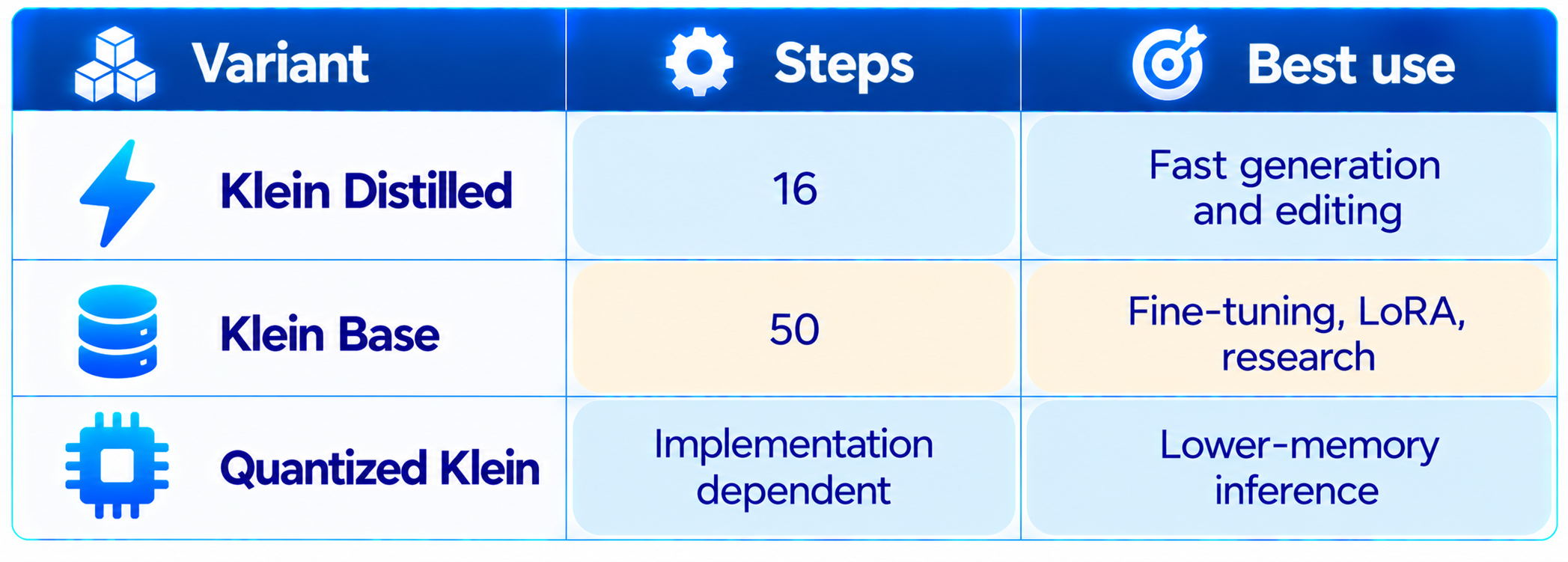
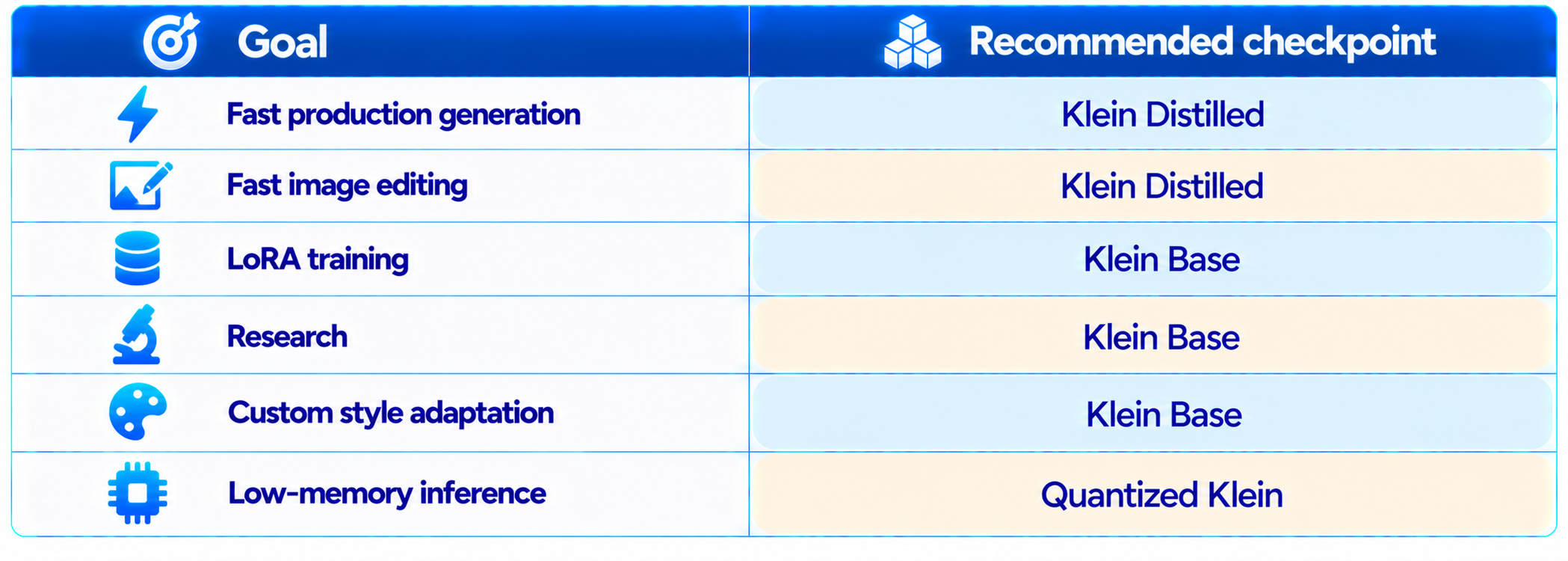
There are two main checkpoints. The distilled version uses 16 steps with no classifier-free guidance and is intended for fast generation and editing. The base version uses 50 steps with guidance and is intended for fine-tuning, LoRA training and research.
Black Forest Labs reports that its internal evaluations place Klein first among the compared open-weights models for text-to-image, multi-reference generation and image editing. BFL also reports a 91-Elo improvement in text-to-image and 70-Elo improvement in image editing versus FLUX.2 Klein 9B, despite using 38% fewer parameters. Those are BFL internal results, not a universal independent leaderboard.
The BFL API starts at $0.009 per 1K image. The weights can also be self-hosted, with quantized builds and support for ComfyUI, Diffusers, TensorRT-LLM, SGLang Diffusion and vLLM-Omni.
My verdict: 9.2/10 overall. FLUX 3 Image Klein is one of the most compelling open-weight image models of 2026 for users who want strong generation, editing control, references and local deployment.
1. What Is FLUX 3 Image Klein?
FLUX 3 Image Klein is the smaller open-weights image model in Black Forest Labs' FLUX 3 Image family. Its image transformer has 5.6 billion parameters, while the complete inference package also includes a separate Qwen3-VL-4B-Instruct text encoder and image autoencoder. The 5.6B figure therefore refers specifically to the image generator, not every component loaded during inference.
Klein is designed as a general image creation and editing model rather than a narrowly optimized text-to-image checkpoint. The same model handles text-to-image, single-reference edits and multi-reference compositions.
This matters for real creative work. A typical workflow starts with a concept, adds a product reference, changes an object, adjusts layout and generates another version. Klein puts those steps into one model instead of forcing developers to maintain separate generation and editing systems.
2. FLUX 3 Image Klein Specifications
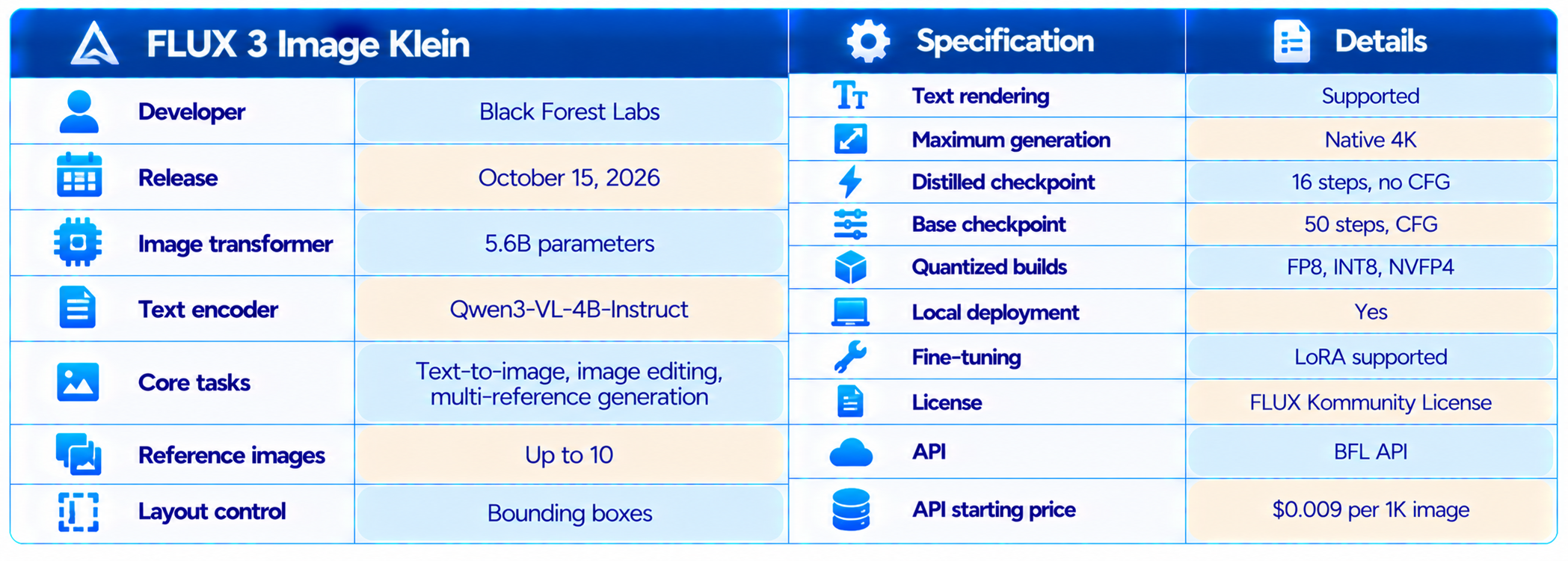
The specifications make Klein unusually complete for an open-weights image model. The combination of editing, references, layout control, quantization and fine-tuning is more important for developers than the parameter count alone.
3. Why the 5.6B Parameter Count Matters
Model size is not a direct measure of image quality, but it matters for deployment. A 5.6B image transformer is easier to adapt and serve than a much larger generator, especially when quantized variants are available.
Black Forest Labs specifically optimized Klein for consumer GPUs and says the smaller model makes local deployment and adaptation practical. NVIDIA measurements published with the release show the base model generating a 1024×1024 image in 43.8 seconds on DGX Spark, while larger accelerator systems are substantially faster.
Do not translate 5.6B parameters directly into a universal VRAM number. The text encoder, autoencoder, runtime, resolution and quantization format all affect actual memory use. The Hugging Face model page explicitly notes that quantized checkpoint file size is not a measurement of total GPU memory consumption.
4. FLUX 3 Image Klein Benchmarks
Black Forest Labs reports that FLUX 3 Image Klein leads its internal comparisons for text-to-image, multi-reference generation and image editing. The comparison includes open-weight models such as Qwen-Image 2.1 and Krea 2, FLUX.2 Klein 9B, and selected closed models including Ideogram V4.5 and FLUX.2 Pro.
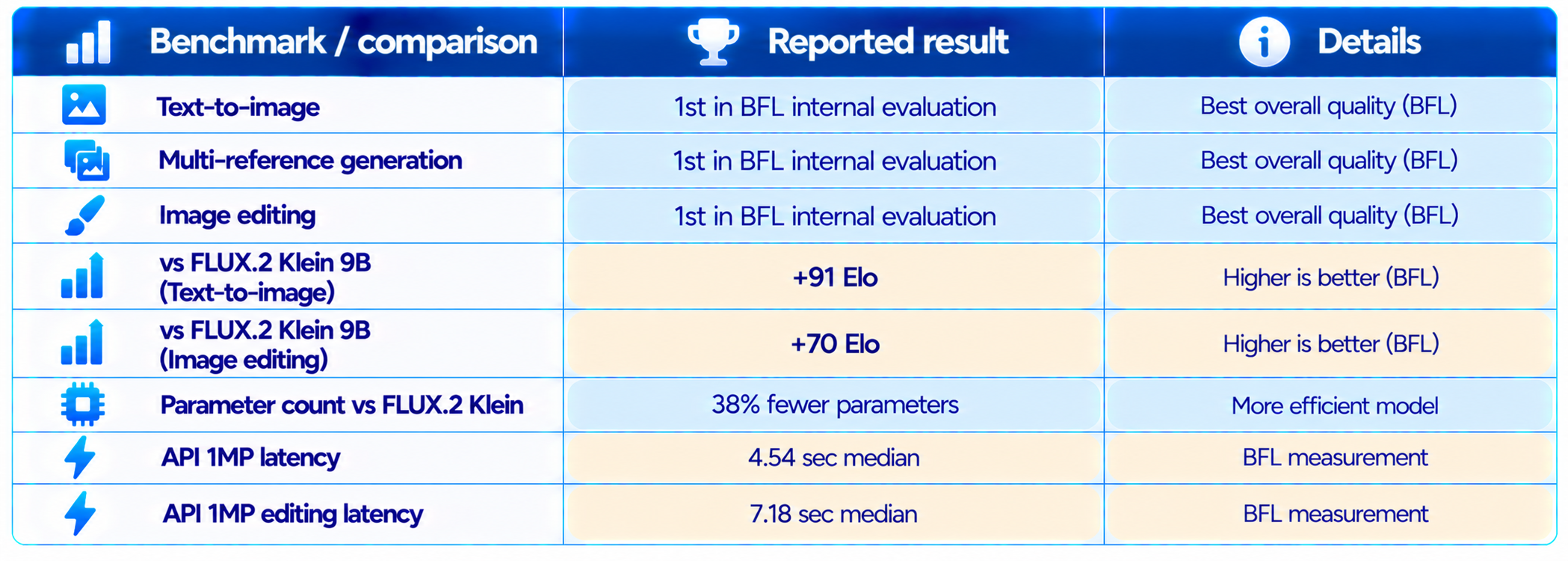
These results need source context. The quality rankings and Elo gains are BFL internal evaluations. The latency comparison is also based on BFL's measurement setup, while competitors were measured from the client and may include different queueing and network effects. It is useful as a practical API indicator, not a universal hardware benchmark.
An independent launch-day test from Kingy.ai found Klein distilled passed all four scored checks on 24 of 32 text-to-image outputs, compared with 31 of 32 for both Nano Banana 2.1 and GPT Image 2.5 Flare. That test disabled Klein's prompt expansion, so it is a useful external snapshot rather than a definitive overall ranking.
5. Text-to-Image Quality
Text-to-image remains the core task, and Klein is designed to compete with much larger image generators while keeping the model small enough to deploy locally.
The strongest evidence is the combination of BFL's internal Elo results and independent testing. BFL reports that Klein leads its selected comparison, while independent testing shows that the model can satisfy detailed visual checks consistently, although it did not match the best closed-model scores in that particular test.
Klein is particularly interesting when the prompt contains multiple important objects. Its layout features and reference system give the model more information than a plain text prompt and make it easier to control a composition.
6. Image Editing Is a Major Strength
Klein supports single-reference image editing and can preserve the parts of an image that were not targeted. BFL describes its editing approach as pixel-perfect, while the released workflow lets users define areas through bounding boxes and describe what should change.
This is useful for product images, advertising creatives, fashion, interiors and social graphics. Instead of regenerating the entire scene because one object is wrong, the user can target the weak area and preserve the rest.
Klein is therefore more useful as an iterative design system than a one-shot generator. Generate, inspect, edit, introduce a reference, adjust placement and continue refining.
7. Multi-Reference Generation
Klein supports up to 10 reference images in a single generation workflow. Multiple references can carry identity, product appearance, materials, characters or visual style while the prompt defines the desired scene.
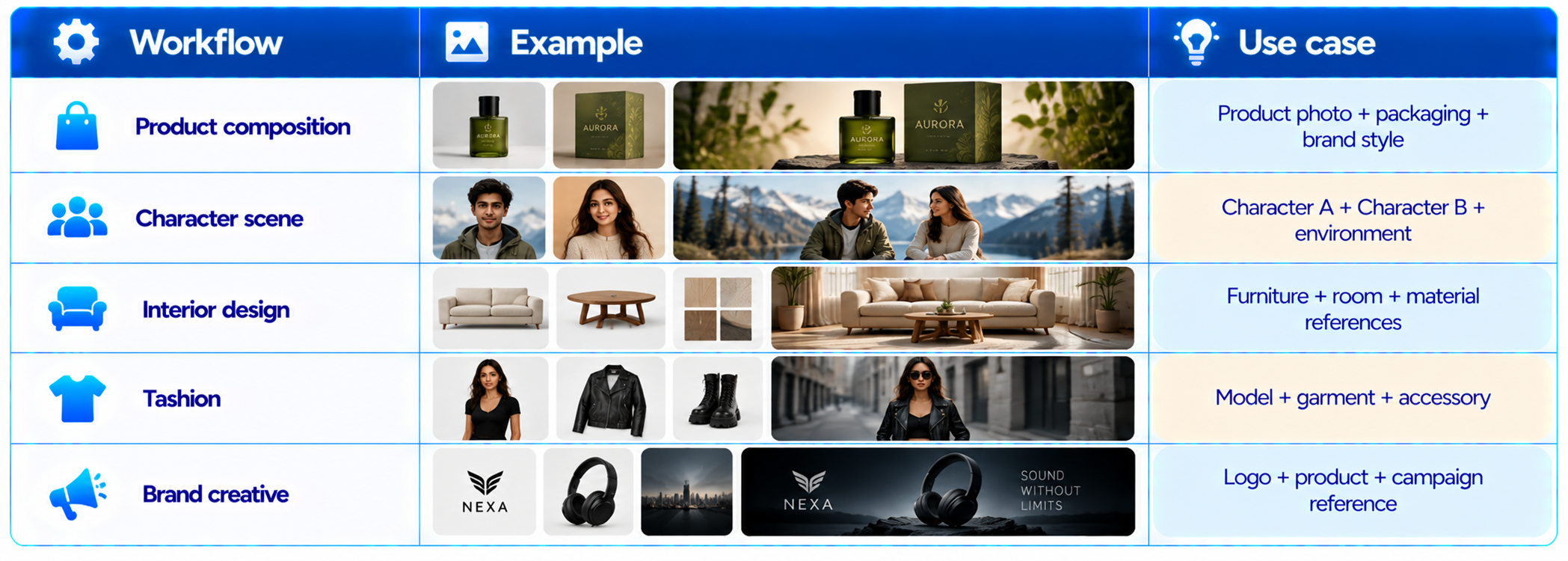
This is one of the strongest reasons to choose Klein over a basic text-to-image model. The references reduce the amount of visual information that has to be expressed only in words.
8. Bounding Box Layout Control
Klein adds layout control through bounding boxes on a 0 to 1000 coordinate grid. Developers can specify where important elements should appear and guide their scale and placement.
This is valuable for posters, advertising graphics, product mockups, thumbnails and other designs where composition matters. Instead of repeatedly regenerating because an object lands in the wrong area, the developer can give the model a spatial plan.
The boxes guide placement and scale rather than acting as hard pixel masks. The model still generates the actual pixels inside the specified region.
9. Text Rendering
FLUX 3 Image Klein supports text rendering inside generated images. This makes it suitable for posters, advertising concepts, product labels, social graphics and visual mockups where words are part of the image.
Generated text should still be checked before production use. A strong workflow is to generate the composition, inspect all typography, then make targeted edits or finish exact brand copy in conventional design software when precision is critical.
10. Native 4K Image Generation
Klein retains native 4K generation from the larger FLUX 3 Image family. Native high-resolution generation can preserve fine textures, faces and small objects better than simply upscaling a low-resolution output.
For rapid ideation, however, 1MP or 1024px-class outputs are more efficient. Move to 2K or 4K after the composition is approved so compute is spent on the image you actually intend to keep.
11. FLUX 3 Image Klein Speed
The distilled checkpoint uses 16 steps, compared with 50 steps for the base checkpoint. It is specifically intended for low-latency generation and editing.
BFL reports median end-to-end API latency of 4.54 seconds for a 1MP text-to-image request and 7.18 seconds for editing. BFL notes that its measurements include queueing and that competing systems were measured from the client, so these figures should not be treated as perfectly controlled hardware comparisons.
12. FLUX 3 Image Klein API Pricing
BFL lists Klein API pricing starting at $0.009 per 1K image. Generation and editing are priced per image at the selected resolution tier.
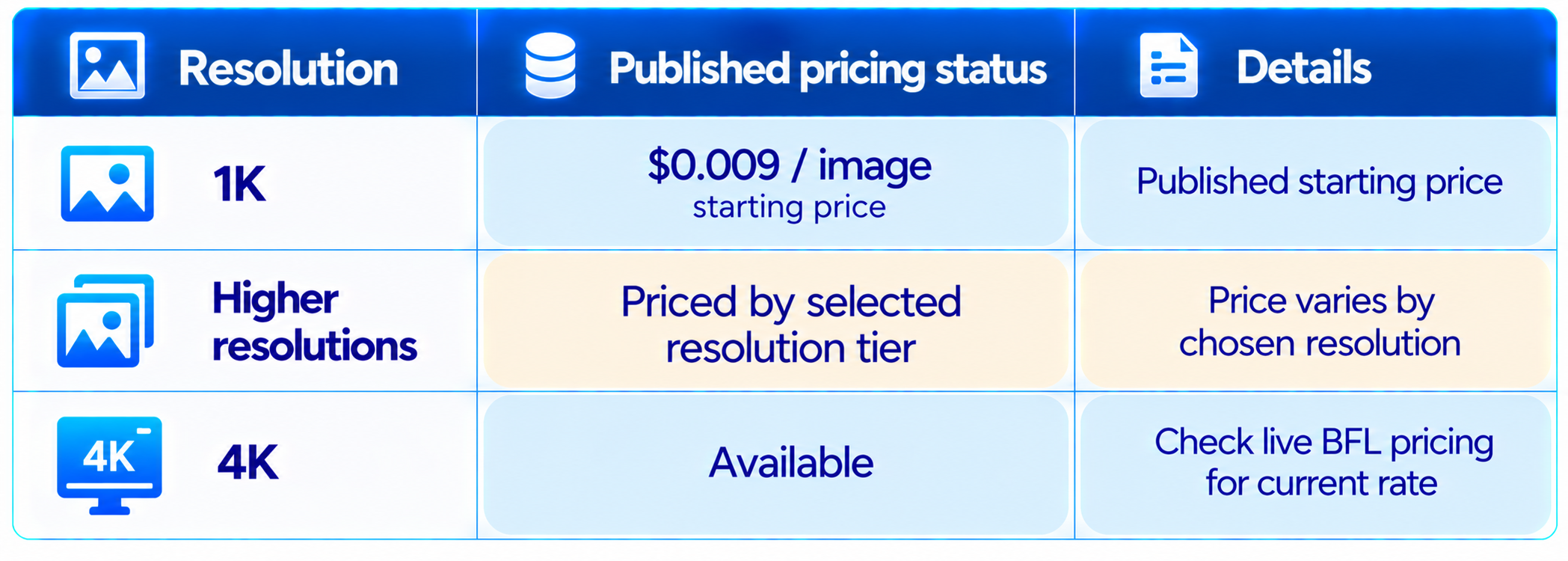
For production budgeting, use the live BFL pricing page because prices and promotions can change. The key point is that Klein is priced for high-volume image generation rather than only occasional premium use.
13. Can You Run FLUX 3 Image Klein Locally?
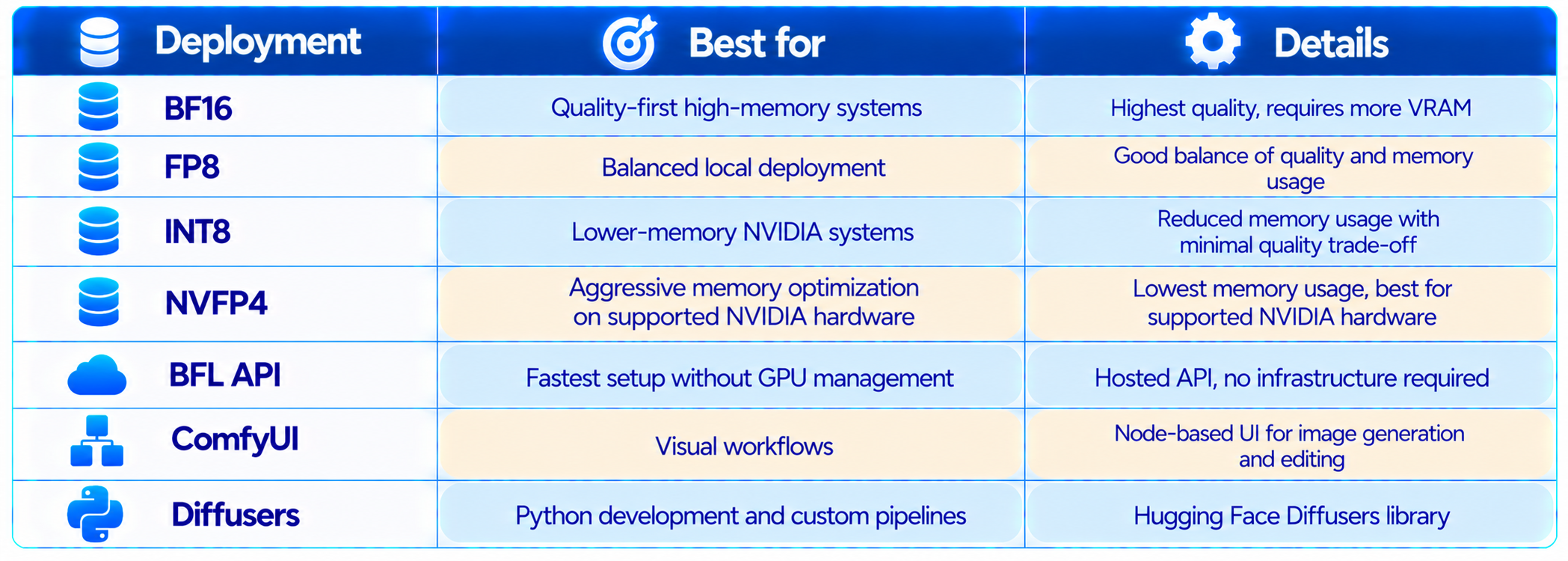
Yes. BFL released the weights publicly, and the model has support across Hugging Face Diffusers, ComfyUI and several optimized inference stacks.
The release includes BF16, FP8, INT8 and NVFP4 variants. Quantization can reduce memory requirements, but the exact VRAM requirement depends on the complete pipeline, resolution and backend.
14. FLUX 3 Klein VRAM Requirements
There is no single VRAM number that applies to every Klein setup. The 5.6B image transformer is only one part of the pipeline, and the text encoder, VAE, precision, resolution and runtime all affect memory.
BFL emphasizes consumer-GPU deployment, while independent launch analysis reports an optimized INT8 path compatible with NVIDIA RTX hardware starting around 8GB VRAM. Treat that as a compatibility-oriented lower bound for a particular quantized setup, not a guarantee that every workflow or resolution will run comfortably in 8GB.
For serious local use, leave headroom for the text encoder, autoencoder, application and output resolution. Quantization makes Klein more accessible, but it does not eliminate the memory cost of the complete pipeline.
15. FLUX 3 Image Klein and ComfyUI
Klein has day-one support in ComfyUI, making it attractive to users already building node-based image workflows. BFL also lists support for Diffusers, TensorRT-LLM, SGLang Diffusion and vLLM-Omni.
ComfyUI is especially useful because Klein is compositional. A workflow can combine references, generation, editing, masks, upscaling and downstream processing instead of treating the model as a single prompt box.
16. FLUX 3 Klein for LoRA and Fine-Tuning
The base checkpoint is intended for fine-tuning and research. BFL says Diffusers and Ostris AI Toolkit support LoRA training, while NVIDIA NeMo AutoModel provides recipes for the released checkpoints.
17. FLUX 3 Image Klein vs FLUX.2 Klein 9B
This is the most important internal comparison because BFL specifically reports a major improvement over FLUX.2 Klein 9B. The company says Klein gains 91 Elo in text-to-image and 70 Elo in image editing while using 38% fewer parameters.
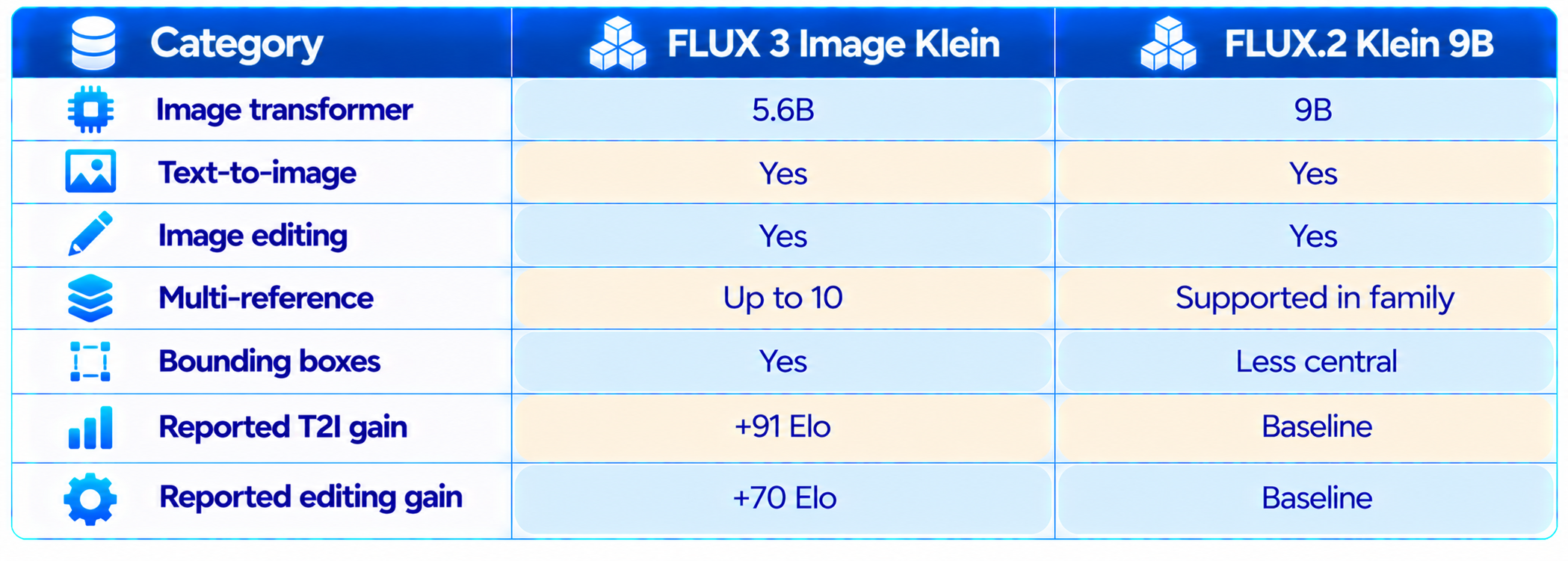
The result is significant because Klein is not simply a smaller model. According to BFL's internal evaluation, it is simultaneously smaller and stronger on the selected comparisons. The independent question is how consistently that advantage transfers to a team's own prompts.
18. FLUX 3 Klein vs Qwen-Image 2.1
Qwen-Image 2.1 is one of the open models included in BFL's comparison. Klein's main advantage is the integrated workflow: generation, editing, multi-reference input and layout control in one 5.6B image model.
Qwen-Image remains relevant for teams already invested in the Qwen ecosystem, but Klein offers a strong alternative for local creative workflows. BFL reports Klein ahead of Qwen-Image 2.1 in its internal text-to-image, multi-reference and editing comparisons, so teams should still run their own prompt set before making a production decision.
19. FLUX 3 Klein vs Closed AI Image Generators
The comparison with closed models is less about declaring a universal winner and more about workflow economics.
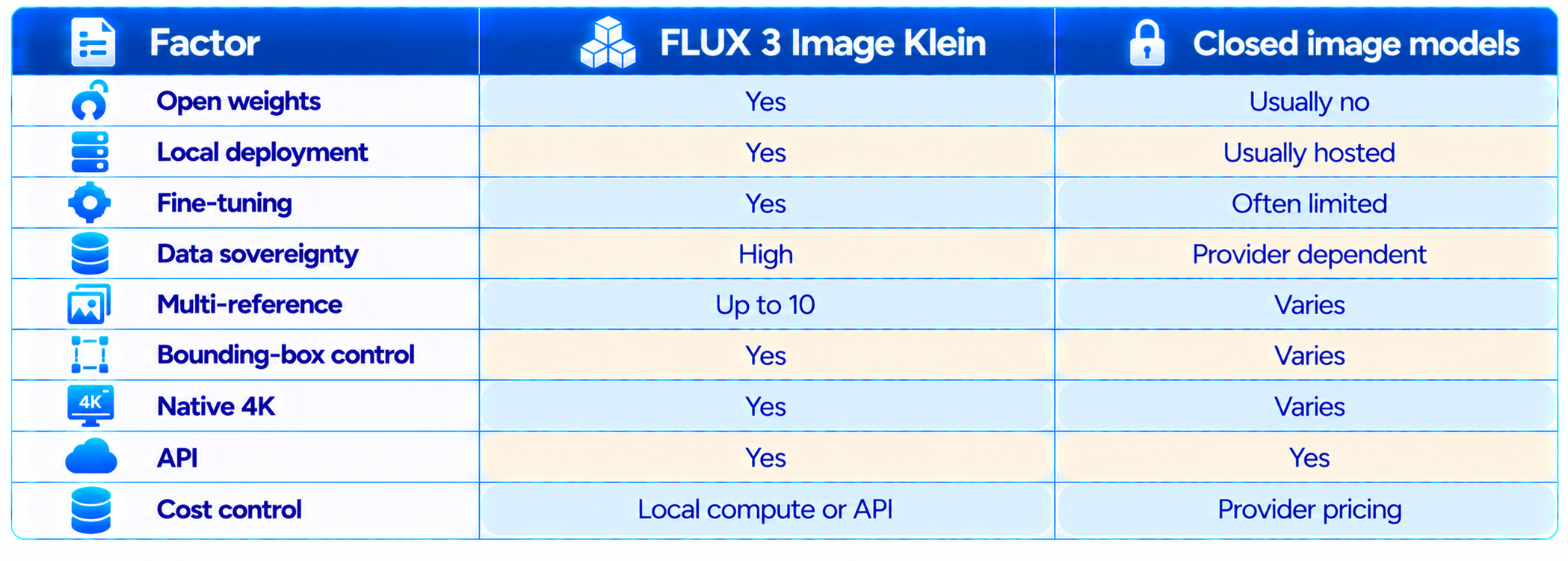
Closed models can still win on convenience, managed infrastructure and specific quality dimensions. Klein's advantage is control: developers can deploy it locally, fine-tune it and integrate it into their own infrastructure.
20. License and Commercial Use
FLUX 3 Image Klein is released under the FLUX Kommunity License. BFL states that the license allows free commercial use for individuals and companies with annual revenue under $5 million, alongside research and non-commercial use. Larger organizations can use BFL self-hosted licensing options or the API.
The exact license terms matter for production. Revenue eligibility, output use, redistribution and other conditions should be checked against the current license text before deployment. Open weights do not automatically mean unrestricted commercial software licensing.
21. Best Use Cases
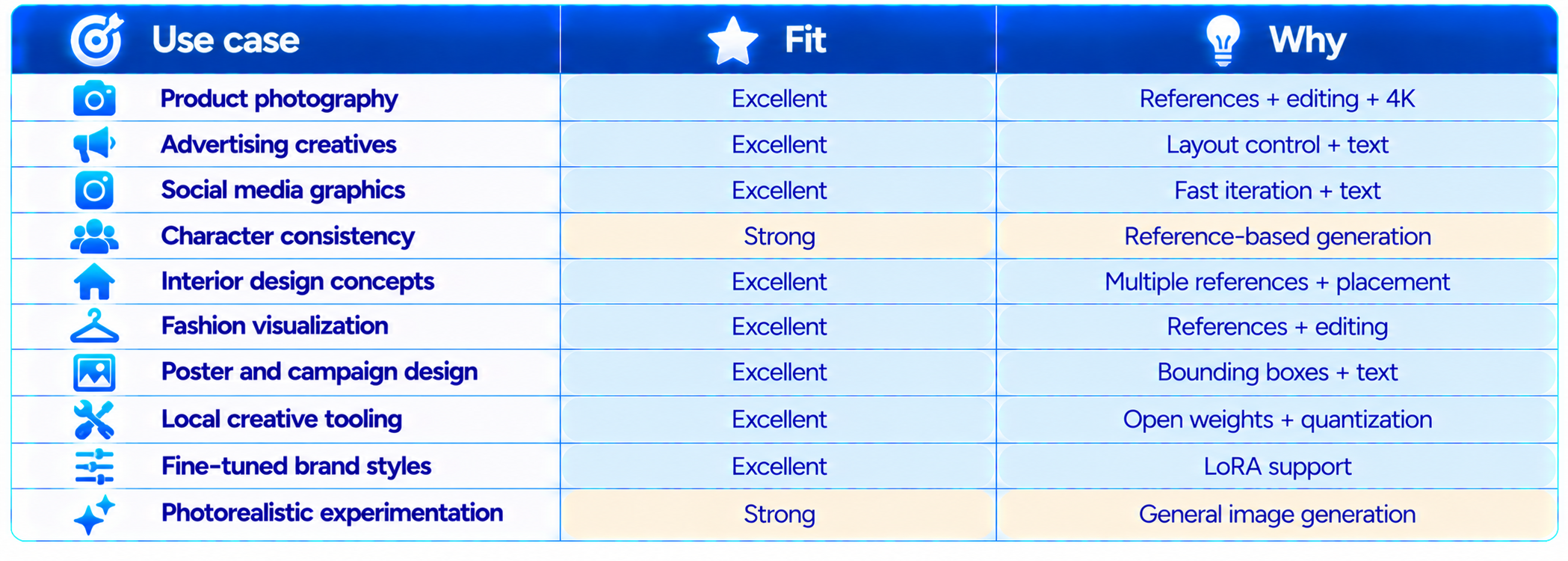
22. Limitations You Should Know
- Most published quality rankings in the launch announcement are BFL internal evaluations.
- The 5.6B parameter count applies to the image transformer, not the complete inference stack.
- VRAM requirements vary by precision, backend, resolution and complete pipeline.
- An 8GB compatibility claim applies to an optimized quantized path and is not a universal requirement.
- Exact text should still be checked before publishing production graphics.
- Native 4K generation is much more computationally expensive than 1MP generation.
- The FLUX Kommunity License has eligibility and commercial-use conditions.
- API pricing can change, so production budgets should use the live BFL pricing page.
- Closed image models may still outperform Klein on specific prompts or provide a simpler managed experience.
23. Recommended Production Workflow
The best way to use Klein is to separate exploration from final rendering.
- Start with the distilled checkpoint for rapid concept generation.
- Use only the references needed to establish identity or composition.
- Use bounding boxes for posters, product scenes and complex layouts.
- Generate around 1MP while the composition is changing.
- Edit the accepted image instead of regenerating the entire scene.
- Use the base checkpoint when a custom LoRA or fine-tuning workflow is required.
- Move to 2K or 4K after the composition is approved.
- Check every piece of generated text before publishing.
- Track VRAM and generation time separately for your exact hardware.
- Use the API when infrastructure maintenance costs more than local inference.
24. How to Evaluate FLUX 3 Image Klein Yourself
Do not judge the model only from showcase images. Build a small benchmark that represents the work you actually do.
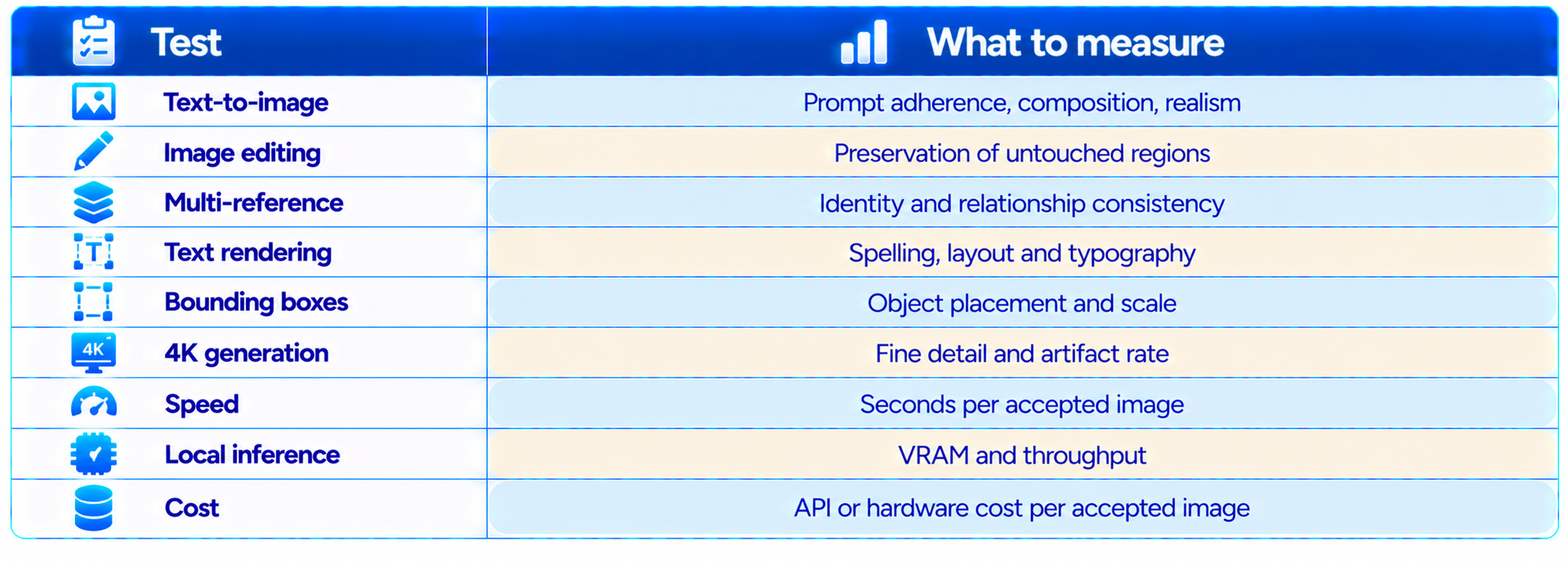
Compare accepted outputs, not simply average generation quality. The cheapest model is not necessarily the cheapest workflow if it takes many more attempts to get an image that can actually be published.
25. Is FLUX 3 Image Klein Worth It?
Yes. For developers and creators who want open weights, Klein is one of the most compelling image-model releases of 2026. It combines generation, editing, multi-reference composition and layout control in a 5.6B image transformer, then adds quantized variants and local tooling.
The price is also attractive. BFL's API starts at $0.009 for a 1K image, while local deployment gives teams another path when they need privacy, customization or predictable infrastructure economics.
The main caveat is benchmark interpretation. BFL's headline quality leadership comes from its own internal evaluation, while independent launch-day testing shows a more mixed picture against the best closed models. That does not weaken the release. It means the right reason to choose Klein is the full combination of quality, control, editing, references, speed and deployability.
26. Final Verdict
FLUX 3 Image Klein is a major open-weights image-model release because it makes the model itself only part of the story. Black Forest Labs is delivering a complete workflow: fast distilled inference, a base checkpoint for fine-tuning, quantized variants, LoRA support, local deployment, ComfyUI and Diffusers integration, multi-reference generation and layout control.
At 5.6B parameters, Klein is substantially smaller than many competing image generators, yet BFL reports that it leads its internal comparisons for text-to-image, multi-reference generation and image editing. The company also reports +91 Elo in text-to-image and +70 Elo in editing against FLUX.2 Klein 9B.
The practical advantage is flexibility. A creator can use the API for convenience, a developer can run the weights locally, an AI team can fine-tune the base model, and a ComfyUI user can build a visual pipeline around the same model.
My rating: 9.4/10 for flexibility, 9.2/10 for image editing, 9.1/10 for local deployment, 9.0/10 for price-to-performance and 9.2/10 overall.
Bottom line: FLUX 3 Image Klein is worth testing if you want a serious open-weights alternative for AI image generation and editing. Its strongest advantage is not simply image quality. It is the combination of quality, references, precise layout control, 4K output, local deployment and a small enough model to make customization practical.
Frequently Asked Questions
What is FLUX 3 Image Klein?
FLUX 3 Image Klein is Black Forest Labs' 5.6B-parameter open-weights model for text-to-image generation, image editing and multi-reference image generation.
Is FLUX 3 Image Klein open source?
It is released as open weights under the FLUX Kommunity License. Exact commercial rights depend on the current license terms.
How many parameters does FLUX 3 Image Klein have?
The image transformer has 5.6 billion parameters. The complete inference package also includes a separate Qwen3-VL-4B-Instruct text encoder and image autoencoder.
Can FLUX 3 Klein edit images?
Yes. It supports single-reference editing and targeted edits using bounding-box guidance.
How many reference images does FLUX 3 Klein support?
It can use up to 10 reference images in one generation workflow.
Can FLUX 3 Klein generate 4K images?
Yes. BFL says the FLUX 3 Image family supports native 4K generation, and Klein retains that capability.
How much does FLUX 3 Klein cost?
BFL lists API pricing starting at $0.009 per 1K image. Higher resolution tiers have different prices.
Can I run FLUX 3 Image Klein locally?
Yes. BFL released the weights and provides BF16, FP8, INT8 and NVFP4 variants, with support across several local inference frameworks.
How much VRAM does FLUX 3 Klein need?
There is no single universal figure. Memory depends on precision, resolution, backend and the complete pipeline. An optimized INT8 path has been reported as compatible with NVIDIA RTX hardware starting around 8GB VRAM.
Does FLUX 3 Klein work with ComfyUI?
Yes. BFL lists day-one ComfyUI support.
Can I fine-tune FLUX 3 Klein?
Yes. The base checkpoint is intended for fine-tuning and LoRA training, with support from Diffusers, Ostris AI Toolkit and NVIDIA NeMo AutoModel.
Is FLUX 3 Klein better than FLUX.2 Klein?
BFL reports significant internal Elo gains over FLUX.2 Klein 9B, including +91 Elo for text-to-image and +70 Elo for image editing, while using fewer parameters.
Is FLUX 3 Image Klein worth it?
Yes for developers, creators and teams that value open weights, local deployment, image editing, multi-reference generation and low-cost API access.
Recommended Blogs
Google Pics Review: Is Google's New AI Design Tool Good Enough to Replace Canva?
Best AI Video Models 2026: Ranked by Quality, Speed, Price & Use Case
Meta Muse Spark 1.3 Review: Coding, Price & Is It Worth It? (2026)
How to Secure AI Coding Agents: Permissions, Sandboxing, MCP & Secrets
Resources & Community
Join our community of 70,000+ AI enthusiasts and learn to build powerful AI applications. Whether you're a beginner or an experienced developer, Build Fast with AI helps you understand and implement AI in your projects.
Agentic AI Launchpad 2026
A structured 6-week cohort program that takes you from AI basics to building and deploying real-world agentic AI systems. Includes live sessions, expert mentorship, project reviews and a builder community network.
Ready to go from learning to building? Join the next cohort: Agentic AI Launchpad 2026
Free AI Resources
Access free tools, workshops and micro-learning to keep building.

