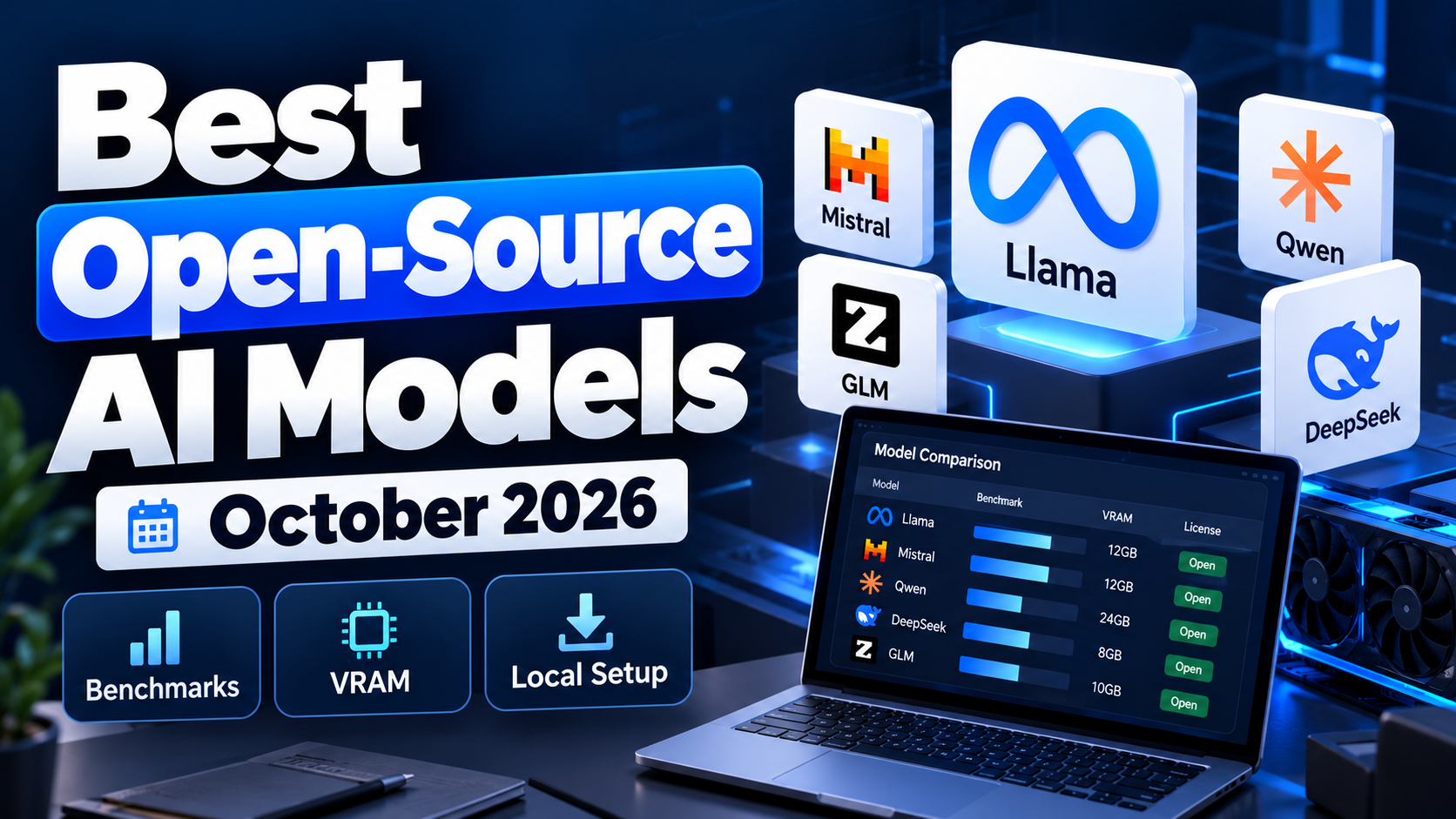
Best Open-Source AI Models of October 2026: Which LLM Should You Actually Run?
The best open-source AI model in October 2026 depends on whether you want the highest benchmark score, a capable coding agent, a model that fits on a single GPU, or a system you can deploy across your own infrastructure. The strongest open-weight models now span everything from compact models that run on consumer hardware to mixture-of-experts systems with hundreds of billions or even more than a trillion total parameters.
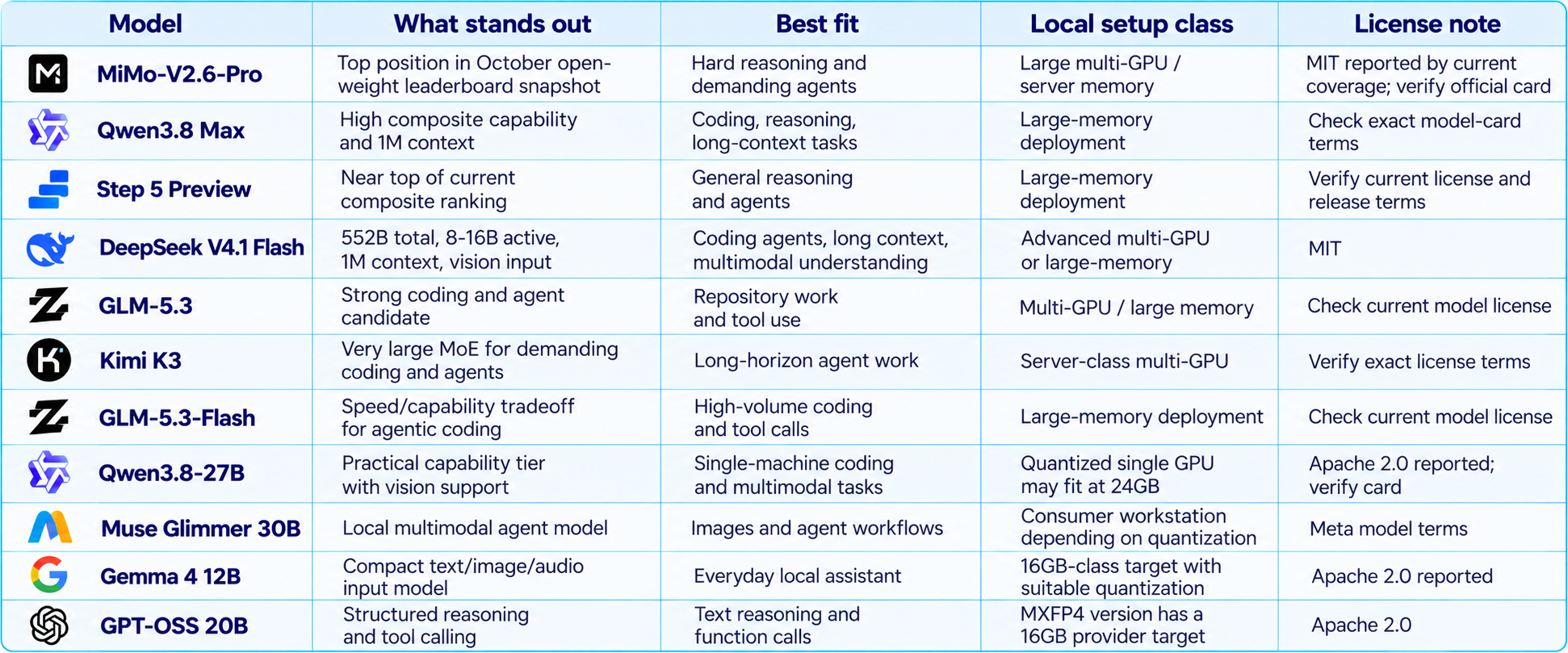
The headline ranking has shifted again. BenchLM's October 19 leaderboard places Xiaomi's MiMo-V2.6-Pro first among its tracked open-weight models, followed by Qwen3.8 Max and Step 5 Preview. Other models remain more practical for local deployment: DeepSeek V4.1 Flash emphasizes a 1M context and relatively low active parameter count, GLM-5.3-Flash targets agentic coding, while Qwen3.8-27B and Muse Glimmer 30B are more realistic single-machine candidates than trillion-parameter systems.
One important distinction: “open-source AI” is often used loosely. Some providers publish weights under permissive licenses such as MIT or Apache 2.0; others publish weights under custom terms or usage policies. Open weights do not automatically mean unrestricted use, and a model that can be downloaded is not necessarily small enough to run on your computer.
This guide compares the best open-weight LLMs of October 2026 by benchmark position, coding and reasoning, context length, hardware fit, licensing considerations and deployment route. It also explains how to choose a model by VRAM instead of buying hardware based on parameter count alone.
QUICK ANSWER
For raw open-weight benchmark position, start by evaluating MiMo-V2.6-Pro, Qwen3.8 Max and Step 5 Preview. For agentic coding and long-context work, compare DeepSeek V4.1 Flash, GLM-5.3 and Kimi K3 against your actual repository tasks. For a practical single-GPU setup, begin with Qwen3.8-27B, Gemma 4 12B, GPT-OSS 20B or Muse Glimmer 30B, depending on whether you prioritize coding, multimodal input, structured reasoning or hardware fit.
For hardware-specific recommendations, our 24GB VRAM AI Models guide breaks down what actually fits on a 24GB card, including the memory overhead that model download sizes do not show.
1. How We Chose the Best Open-Source AI Models
This is a practical shortlist, not a claim that one leaderboard can identify a universal winner. We considered five dimensions: published capability benchmarks, coding and agent usefulness, local deployment feasibility, context and modality, and license clarity. Models are grouped by the job they do well rather than ranked as if a 12B local model and a trillion-parameter MoE system were interchangeable.
- Capability: use a current composite leaderboard to identify models worth testing, not as a guarantee for every task.
- Coding and agents: prioritize repository completion, tool use, test execution, recovery from errors and reliable handoffs.
- Hardware fit: account for quantization, KV cache, runtime buffers, context length and concurrency, not just parameter count.
- License: inspect the exact checkpoint license and any usage policy before commercial deployment.
- Deployment maturity: confirm runtime support, supported quantization and availability of reproducible setup instructions.
Benchmark numbers should be compared only when the evaluation, model variant and scoring method match. A vendor-reported SWE-bench result, an independent composite score and a local quantized model's throughput answer different questions. Treat the leaderboard as a discovery tool, then run your own workload tests.
2. Best Open-Weight Models at a Glance
3. MiMo-V2.6-Pro: Best for Capability-First Evaluation
MiMo-V2.6-Pro sits at the top of the BenchLM open-weight composite leaderboard in its October 19 snapshot, with Qwen3.8 Max and Step 5 Preview close behind. This makes it a sensible first candidate for teams seeking high-end open-weight reasoning, especially when the work involves long multi-step tasks rather than simple chat.
The practical question is not just whether a model scores first. It is whether the published result transfers to your workload, serving stack and context length. Before adopting MiMo-V2.6-Pro, test tool-call correctness, repository changes, long-context retrieval and task completion using the exact quantization and inference engine you plan to deploy.
Hardware expectations should be realistic. A model in the trillion-parameter class requires substantial memory for full-precision weights. Quantization can reduce the footprint, but it does not make a very large model equivalent to a 20B local model. If you do not already have a multi-GPU or high-unified-memory system, compare a smaller distilled model before planning an upgrade.
4. Qwen3.8 Max and Qwen3.8-27B: Capability vs Practicality
Qwen3.8 Max ranks near the top of current open-weight composite leaderboards and is aimed at demanding reasoning and coding tasks. Its 1M context positioning makes it attractive for long repository analysis, document-heavy research and agents that need to preserve a large amount of working context. The full Max model belongs in a different deployment class from a 27B checkpoint.
Qwen3.8-27B is the more practical local candidate for many developers. Current local-model roundups place it in the 24GB-to-large-memory range depending on quantization and context. That does not mean every 27B checkpoint fits comfortably into 24GB. A 4-bit file may consume around the high-teens in gigabytes before runtime buffers and KV cache, leaving less headroom for long conversations or concurrent users.
Use the smaller model when you need a local coding assistant, private repository analysis or experimentation without a server. Choose the Max model when its stronger capabilities justify the infrastructure and deployment complexity. Our Qwen 3.8 Max 0902 review covers the model's benchmark and API profile in more detail.
5. DeepSeek V4.1 Flash: Long Context and Agentic Coding
DeepSeek V4.1 Flash is one of the more technically interesting releases for self-hosting. The current vLLM recipe describes a 552B vision-language mixture-of-experts model with roughly 8B active parameters during prefill and 16B during output, a 1M-token context, and support for text and multimodal tasks. The model is available under MIT terms, and its architecture requires current serving support rather than an arbitrary older inference package.
The low active-parameter count can improve compute efficiency, but it should not be mistaken for a small download. The full expert weights still have to be stored or distributed across devices. For a serious local deployment, plan for advanced multi-GPU or large-memory hardware and use a compatible recent vLLM build or the supported runtime recommended in the model documentation.
DeepSeek V4.1 Flash is best evaluated for long-context coding agents, repository tasks, multimodal document understanding and tool use. Do not assume that a one-million-token context is free: long contexts increase KV-cache memory, prefill latency and the amount of information the model must process. The right context is the smallest one that reliably contains the relevant evidence.
Our DeepSeek V4 review explains the broader family, while the GLM-5.3 vs DeepSeek V4-Pro vs Kimi K3 comparison is useful when choosing an open coding model.
6. GLM-5.3 and GLM-5.3-Flash: Coding and Agent Work
GLM-5.3 is worth considering when your local or self-hosted workload is primarily software engineering. Repository navigation, patch creation, test execution, debugging and multi-step tool use are more informative than a general chat score for this type of model. GLM-5.3-Flash offers a different tradeoff, targeting faster agentic coding at the cost of some capability compared with the larger model.
Neither should be treated as a normal desktop download simply because weights are available. Current model deployment guides describe GLM-5.3 as a multi-hundred-gigabyte checkpoint that generally needs server-class hardware for full-model inference. Mixture-of-experts activation reduces the amount of computation per token, but does not eliminate the memory needed to hold the experts.
If your goal is a working local deployment, follow the model-specific runtime guidance rather than copying a generic Transformers command. Our How to Run GLM-5.3 Locally guide covers the hardware, VRAM, supported runtimes and setup considerations.
7. Kimi K3: For Demanding Coding and Long-Horizon Agents
Kimi K3 is another large open-weight candidate for advanced coding and agentic work. It is frequently discussed alongside GLM and DeepSeek because the comparison is not only about code generation: a useful agent must plan, inspect the repository, make changes, use tools, recover from errors and verify its result.
Its large mixture-of-experts footprint makes it a server-class choice rather than a model to casually load onto a single 24GB graphics card. Before choosing it, establish the minimum supported GPU topology, quantization format and runtime from the current official model card. A community quantization may make deployment possible, but that does not guarantee the same performance or output quality as the original checkpoint.
Kimi K3 makes most sense when you already have the hardware and need to compare it directly against other strong coding models. Use the same repository tasks, tests, tool permissions and timeout settings for each candidate. That is more meaningful than comparing scores collected under different harnesses.
8. Muse Spark Open and Muse Glimmer: Local Multimodal Options
Meta's Muse Spark Open is a large open-weight multimodal model released in October. Its model card describes 816B total parameters, around 42B active per token and a context window of up to one million tokens, with text, image, audio and video capabilities. It is aimed at coding, multi-step reasoning and agentic task completion.
Muse Spark Open is not a small desktop model. Meta provides BF16 and NVFP4 weights, and the NVFP4 checkpoint can lower the weight footprint, but this remains a high-memory deployment. The model uses the Muse Model License and a usage policy, so do not label it unrestricted open source without checking the terms. The license grants broad rights to use, modify and distribute subject to its conditions and policy.
Muse Glimmer 30B is the more realistic local option for developers interested in Meta's multimodal agent approach without operating an 816B model. Meta's model collection lists Glimmer 30B, GGUF variants and ExecuTorch builds. Actual hardware needs still depend on quantization, context and whether image/audio pathways are enabled.
9. Gemma 4 and GPT-OSS 20B: Smaller Models That Are Easier to Deploy
Not every useful open model needs to be a frontier-scale mixture of experts. Gemma 4 12B is a practical compact option for local assistance and multimodal input. Current model summaries list text, image and audio input and a 256K context window. GPT-OSS 20B is another practical candidate for text reasoning, function calling and structured outputs; OpenAI says its MXFP4 representation can run within 16GB of memory. That is a specific provider claim for that representation, not a guarantee for every runtime or context size.
For 8GB to 16GB systems, prioritize small models and quantized artifacts. For 24GB cards, a 20B to 30B model may be a better balance than attempting a 70B or much larger model with aggressive offloading. For multimodal work, confirm that the inference engine supports the model's vision or audio components, not just its text decoder.
These models can also be useful as worker models in an agent stack. A small model can classify tasks, extract fields, summarize retrieved documents or draft routine code, while a larger model handles difficult reasoning. Our What Is an AI Agent? guide explains how that division of labor works.
10. VRAM Guide: Which Models Fit Your Hardware?
VRAM is often the deciding factor in local LLM deployment, but parameter count alone does not tell you whether a model will run. Weight precision, quantization, context length, KV cache, runtime buffers, GPU layers and concurrent sessions all affect the final memory requirement.
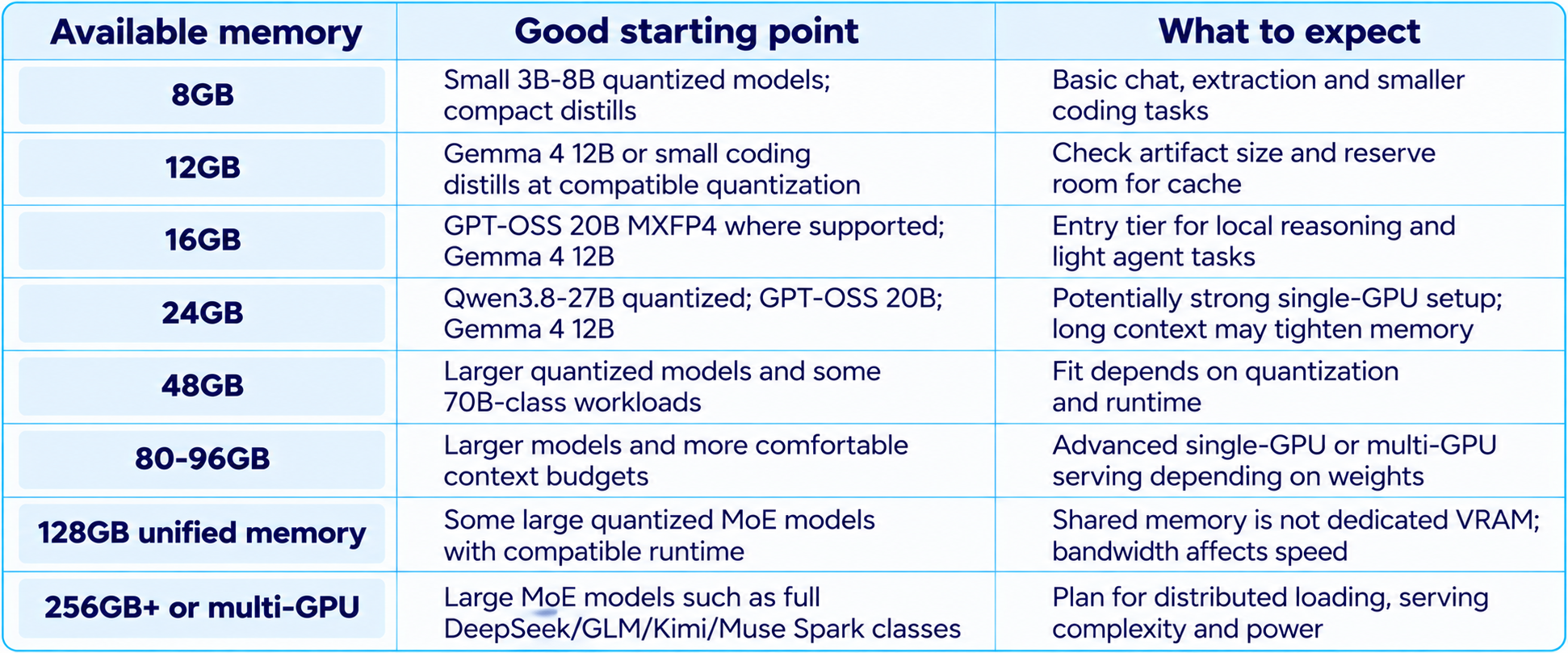
These are starting points, not hard guarantees. A model file that is 20GB cannot fit entirely into a 16GB GPU, and a model that barely fits leaves little room for long context. The runtime may offload some layers to system RAM, but this usually changes speed substantially.
For a more exact hardware decision, read our 24GB VRAM AI Models guide. It explains why model weight size, context cache and available memory need to be calculated together.
11. Quantization: Q4, Q5, Q8 and Lower-Bit Weights
Quantization reduces the number of bits used to represent model weights. Q8 generally preserves more of the original weight precision but uses more memory than Q4. Q4 is a common compromise for local use, while lower-bit formats can make larger models fit at the cost of greater risk to quality, compatibility or stability. The exact impact depends on architecture and quantization method.
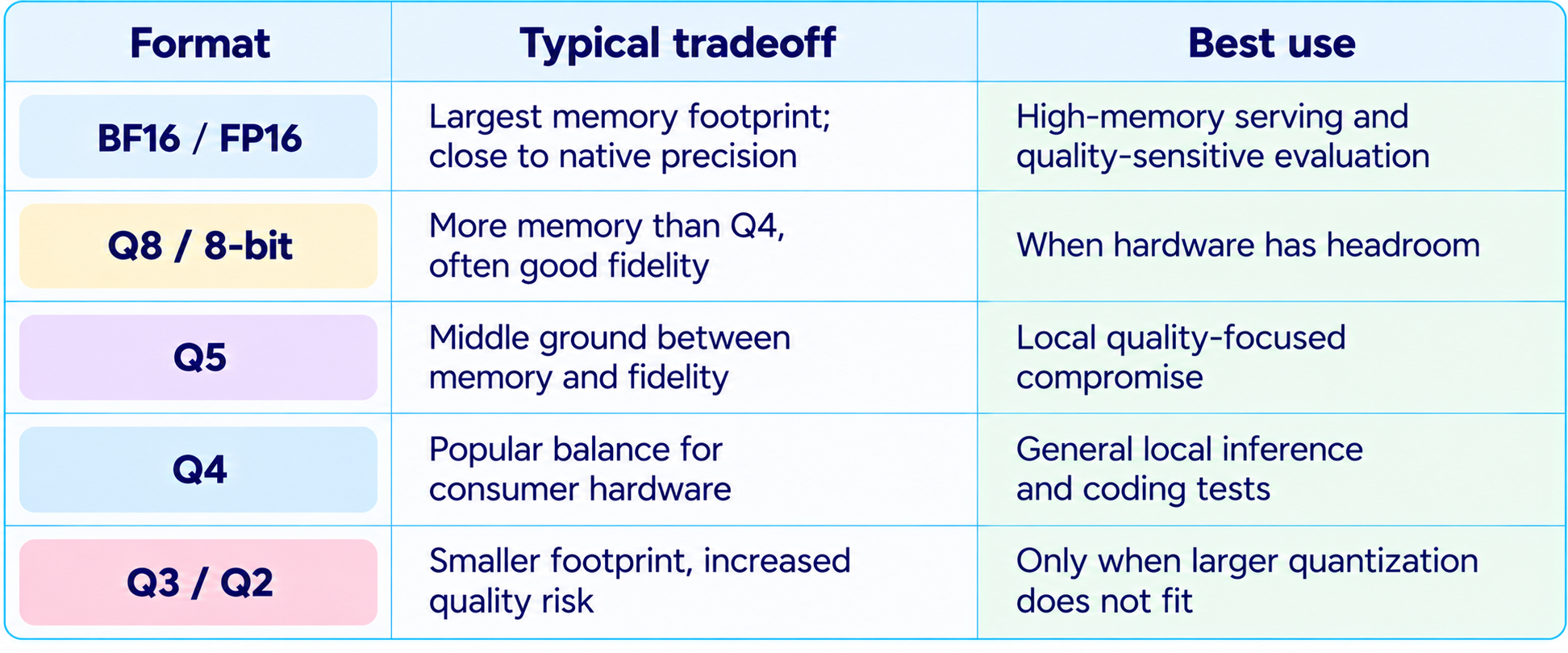
Never compare a Q4 community build against a full-precision benchmark as if the results are interchangeable. Evaluate the exact quantized file you will deploy, particularly for coding agents where one incorrect edit or failed tool call can erase a speed advantage.
12. Local Setup: Choose the Runtime Before Downloading
The simplest way to waste time is to download a huge checkpoint before confirming that your runtime supports its architecture and quantization. Choose the model and runtime together.
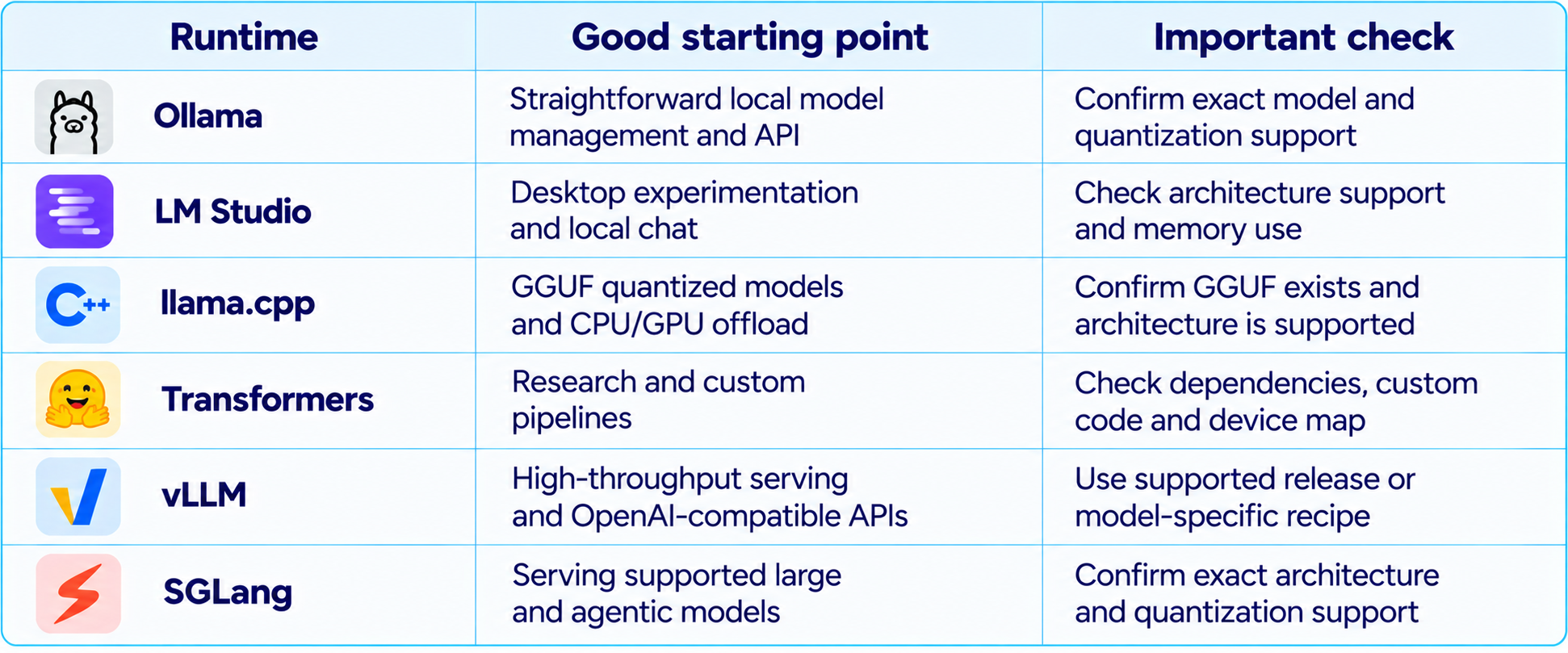
A safe setup sequence is straightforward:
- Check the official model card, license, context length and supported modalities.
- Choose the exact checkpoint and quantization before estimating memory.
- Confirm runtime support and required versions from the model's own documentation.
- Estimate memory for weights, KV cache, runtime buffers and concurrent requests.
- Start with a short context and small test prompt, then increase context gradually.
- Measure tokens per second, time to first token, memory use and failure rate on your hardware.
- Expose a local API only after setting authentication, network boundaries and tool permissions.
For large models, follow model-specific instructions instead of assuming a generic ollama run command will work. Our GLM-5.3 local setup guide is an example of why hardware and runtime planning must come before downloading weights.
13. Open Source vs Open Weights: Check the License
The phrase “open source” can hide important differences. A model may publish weights but impose additional use conditions. Another may use a recognized permissive license, such as MIT or Apache 2.0, that generally gives users broader freedom, subject to the license text and applicable law. Some releases include a separate acceptable-use policy that also governs deployment.
- Read the license for the exact checkpoint, not just the model family.
- Check whether commercial use, redistribution, fine-tuning and derivative models are permitted.
- Review acceptable-use rules and any revenue, scale or deployment thresholds.
- Check whether code, weights, tokenizer and training details have separate terms.
- Record the license version and model revision used in production.
This matters especially for Muse Spark Open and other custom-licensed models. Meta's Muse Model License grants broad rights but incorporates a usage policy. That is materially different from claiming that every use is unrestricted. If license freedom is the primary requirement, verify the official card before choosing a model.
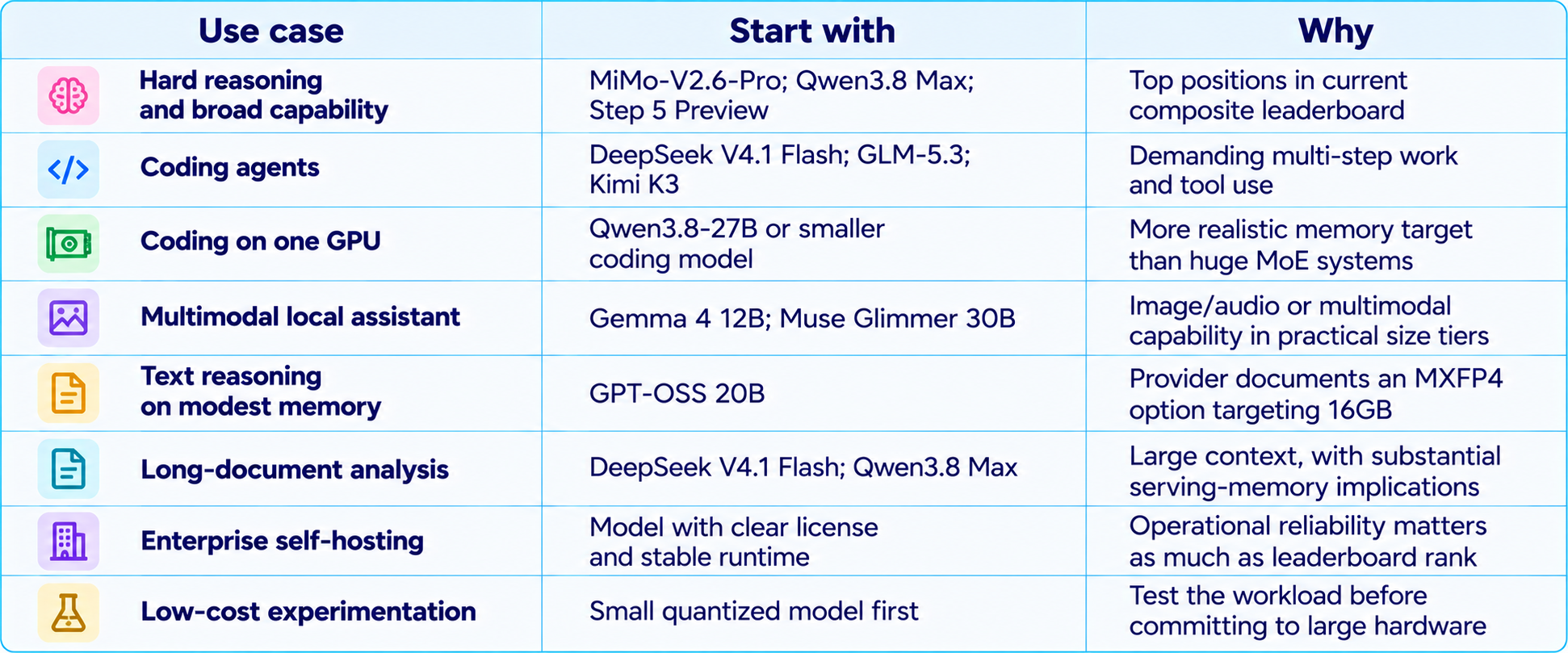
14. Best Model by Use Case
15. How to Benchmark a Local Model Properly
A hosted benchmark does not predict exactly how the same model behaves after quantization on your GPU. Local throughput changes with inference engine, context length, batch size, CPU offload, GPU memory bandwidth and quantization.
Use a small, repeatable evaluation suite based on your actual work:
- Five to ten coding tasks from your repository, with tests as the success criterion.
- Long-context questions whose answers can be traced to specific sections of a source document.
- Tool-calling tasks that require multiple steps and explicit success conditions.
- Structured-output tasks validated against a JSON schema.
- Multimodal examples if image, audio or video input is part of the use case.
- Repeated runs to measure variance, time to first token, output speed and memory use.
- Failure tracking: hallucinated APIs, broken tests, invalid JSON, tool errors and incomplete tasks.
The best model is the one that completes your workload accurately and reliably at an acceptable cost. Tokens per second is useful, but task success per minute and cost per completed task are better operational measures.
16. Recommended Local AI Architecture
For many applications, the most reliable approach is not to force one large model to do everything. Use a router or workflow to send easy tasks to a small model and difficult tasks to a stronger one. A compact model can classify requests, extract metadata and summarize documents. A larger model can handle complex code changes, ambiguous reasoning and multi-step plans.
Keep tools deterministic where possible. Use the model to choose a tool and interpret its result, but validate arguments, restrict permissions and verify the output before performing a consequential action. This is especially important when a locally hosted model can access private repositories, terminals or internal files.
For orchestration, our How to Use LangGraph for Multi-Agent Systems guide explains how to structure state, routing and handoffs. Our AI coding agent security guide covers permissions, sandboxing, secrets and tool boundaries.
17. Common Mistakes When Choosing an Open-Weight LLM
- Choosing by total parameter count without checking active parameters, quantization and memory.
- Assuming a 1M context window means the model can serve 1M tokens quickly on your machine.
- Treating open weights as synonymous with an OSI-approved open-source license.
- Comparing benchmark scores from different versions, harnesses or reasoning settings.
- Downloading a checkpoint before confirming runtime support.
- Testing only easy prompts instead of real coding, document or agent tasks.
- Measuring generation speed without including prefill, tool calls, retries and verification.
- Exposing a local inference server or tool-enabled agent without authentication and permission limits.
18. Final Verdict: Which Open-Source AI Model Should You Choose?
October 2026 offers more choice than ever, but the best model is not simply the first name on a leaderboard. MiMo-V2.6-Pro, Qwen3.8 Max and Step 5 Preview deserve attention for capability-first evaluations. DeepSeek V4.1 Flash, GLM-5.3 and Kimi K3 are important candidates for demanding coding and agent workloads, but their large weight footprints mean local deployment requires serious planning.
For developers using a single consumer GPU, the practical shortlist is different. Start with Qwen3.8-27B, GPT-OSS 20B, Gemma 4 12B or Muse Glimmer 30B, then select a quantization that fits while leaving memory for context and runtime overhead. A model that loads comfortably and passes your tests is more useful than a larger model that constantly offloads or runs out of memory.
The biggest recommendation is to choose the model and hardware together. Verify the license, choose a supported runtime, test the exact quantized artifact and evaluate task completion rather than relying on headline benchmarks. If you are upgrading a workstation, establish workload and context requirements before buying a GPU.
Bottom line: for the highest open-weight capability, test the current leaderboard leaders. For local AI, choose based on VRAM, quantization, runtime support and the tasks you actually need to complete. The best open-source LLM is the one you can deploy legally, run reliably and measure against your own requirements.
Frequently Asked Questions
What are the best open-source AI models in October 2026?
Current open-weight leaderboard snapshots put MiMo-V2.6-Pro, Qwen3.8 Max and Step 5 Preview near the top. DeepSeek V4.1 Flash, GLM-5.3, Kimi K3 and smaller models are worth evaluating for specific coding, agent and local use cases.
What is the best open-source AI model for coding?
For demanding agentic coding, compare DeepSeek V4.1 Flash, GLM-5.3 and Kimi K3 on your repository. For a single GPU, start with Qwen3.8-27B or a smaller quantized coding model.
Can I run a large open-weight model on 24GB VRAM?
Some 20B-30B models can fit with suitable quantization and context settings. Huge DeepSeek, GLM, Kimi or Muse Spark families require much more memory or aggressive offloading.
Is DeepSeek V4.1 Flash open source?
Current model metadata lists open weights under MIT terms. Confirm the exact checkpoint and official model card before commercial deployment.
Is Muse Spark Open truly open source?
It publishes downloadable weights under Meta's Muse Model License and usage policy. Read those terms rather than assuming it is unrestricted or identical to MIT/Apache licensing.
How much VRAM do I need for a 30B model?
It depends on precision, quantization, context length and runtime. A 4-bit weight file may fit on a 24GB card, but KV cache and runtime overhead can make long-context use tighter.
What is the difference between open-source and open-weight AI?
Open-weight means model weights are available. Open source usually implies broader access and rights under a license. The exact license and accompanying usage policy determine what you can do.
Should I use Ollama, llama.cpp, Transformers or vLLM?
Choose based on model support and deployment goal. Ollama and LM Studio are convenient for local experiments, llama.cpp is common for GGUF, Transformers for research, and vLLM or SGLang for supported large models.
Does a 1M-token context mean I can use 1M tokens locally?
Not necessarily. The model may support that context in a suitable server configuration, but KV cache and prefill can require substantial memory and time.
How should I compare two local models?
Use the same prompts, quantization conditions, context size and tools. Measure task success, latency, memory, tool errors and cost per completed task.
Recommended Blogs
24GB VRAM AI Models: What Can You Actually Run Locally in 2026?
Qwen 3.8 Max 0902 Review: Benchmarks, Price & Is It Worth It? (2026)
How to Secure AI Coding Agents: Permissions, Sandboxing, MCP & Secrets
Best Open-Source AI Models 2026 | Qwen, GLM, DeepSeek & Llama Compared
Resources & Community
Join our community of 70,000+ AI enthusiasts and learn to build practical AI applications. Build Fast with AI helps developers, creators and teams understand new models and implement them in real projects.
Agentic AI Launchpad 2026
A structured six-week cohort program focused on building and deploying real-world agentic AI systems, with live sessions, mentorship, project reviews and a builder community.
Explore the program: Agentic AI Launchpad 2026
Free AI Resources
Explore practical learning resources, workshops and short-form AI lessons.
References
External model cards, benchmark trackers and deployment documentation used for specifications and current rankings: