



ChatGPT Dots Review: Can OpenAI's GPT-6 Astra Agent Actually Work for You in the Background?
ChatGPT Dots is OpenAI's new always-on AI agent product, introduced on September 29, 2026 at DevDay. Instead of waiting for a prompt inside a normal chat, a Dot can keep working on an assigned goal in the background, use a cloud computer, interact with a web browser and connected applications, and send progress updates while it works. OpenAI says Dots can work across more than 4,000 supported apps and can connect to tools such as Slack and Microsoft Teams. That makes Dots less like a chatbot and more like a persistent digital coworker.
The system is powered by GPT-6 Astra, the high-capability model OpenAI also exposes through GPT-6 Pro and ChatGPT Work and Codex. OpenAI's documentation describes Astra as a model for especially demanding work, with access depending on plan and product. For Dots, however, Astra is only one layer. The agent also needs persistent task state, a cloud execution environment, connected apps, permissions and rules that determine when it can act.
The important question is therefore not simply whether GPT-6 Astra is capable. It is whether Dots turns that capability into reliable background work. This review looks at Dots as a product: what it does, how its autonomy works, which integrations matter, who gets access, how safety controls work, where it fits into AI automation, and where a human should remain in control.
QUICK ANSWER
ChatGPT Dots is OpenAI's new always-on AI agent that can continue working after you leave the chat. A Dot runs on a cloud computer, can access a browser and more than 4,000 connected apps, and can communicate through ChatGPT, voice, Slack and Microsoft Teams. It is powered by GPT-6 Astra and is designed to manage ongoing goals rather than answer isolated prompts.
The strongest feature is persistence. You can assign a goal, let the Dot work through multiple steps, receive updates and questions while it works, and inspect its cloud computer to see what it is doing. OpenAI also provides custom action rules and an auto-review mechanism intended to check whether an action is allowed before it happens.
Initial access is aimed at paid professional users. OpenAI is rolling Dots out to ChatGPT Pro, Business Premium and Enterprise users, while also testing specialist Dots for organizational roles. OpenAI says conversations with Dots do not count toward ChatGPT usage limits.
There is not a separate public standalone Dot price in the launch reporting. Dots are tied to eligible ChatGPT plans at launch, while OpenAI says future scaling will allow users to increase a Dot's speed or the amount of work it can perform per month.
Overall, Dots is most compelling when the task involves multiple applications and several connected steps. Its biggest advantage is not better chat. It is delegated execution.
1. What Are ChatGPT Dots?
A Dot is a persistent AI assistant that is assigned an ongoing job instead of a single response. OpenAI describes Dots as always-on agents capable of working in the background across connected applications. Once you give a Dot a task, it can continue through the workflow, provide progress updates, ask questions when needed and return completed work.
This changes the unit of interaction. A chatbot is usually request-driven: you ask, it answers, and the session ends. A Dot is goal-driven: you define what needs to happen, and the system manages a sequence of actions until it reaches a stopping point or needs your input.
For example, a developer could ask a Dot to use customer feedback to build and test an application update. A content creator could ask it to review an interview transcript, find moments to clip, create show notes and draft social posts. These are not isolated generations. They are chains of work.
QUICK COMPARISON
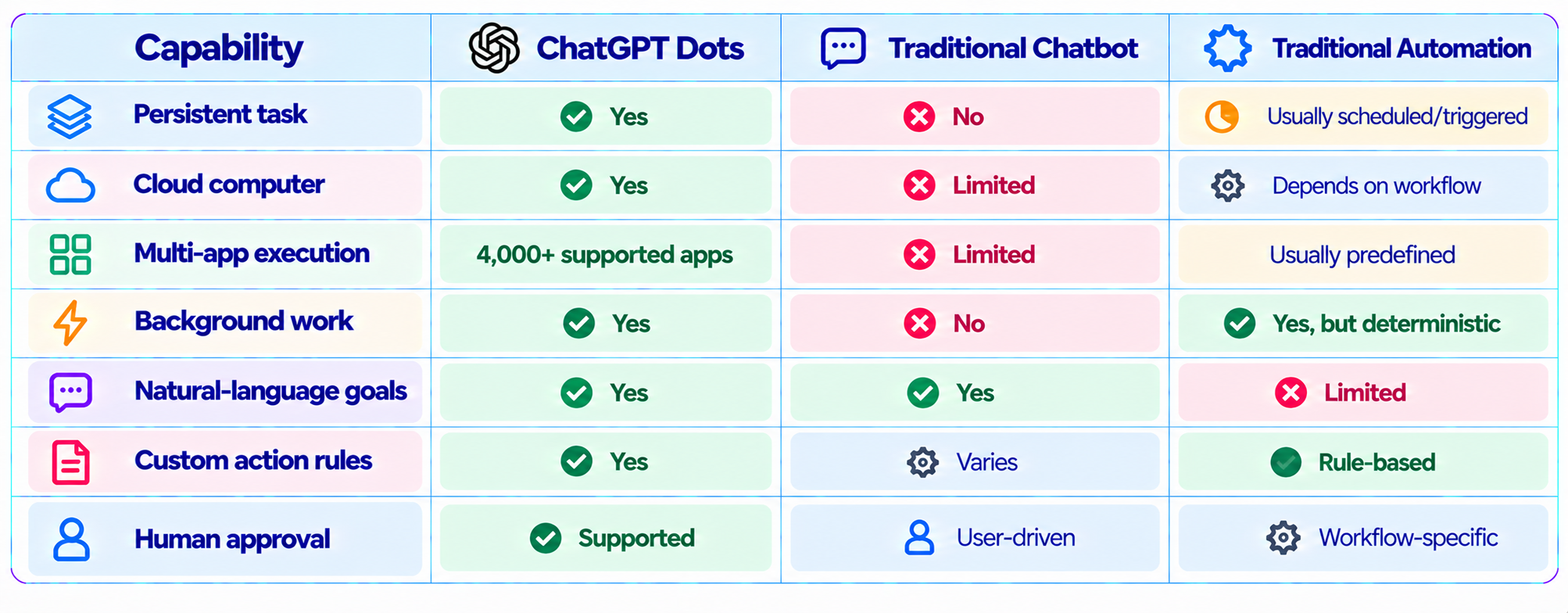
2. What Makes Dots Different From ChatGPT?
The difference is not simply a larger tool list. Dots change the workflow from interactive assistance to delegated execution. A conventional ChatGPT conversation can help you plan an operation, but a Dot is designed to carry the operation forward across connected tools.
3. GPT-6 Astra: The Model Behind Dots
Dots are powered by GPT-6 Astra. OpenAI describes Astra as a model for especially demanding work. It is available through GPT-6 Pro for eligible Pro, Business and Enterprise plans, and through ChatGPT Work and Codex for Plus and higher plans. Astra usage depends on the product, plan, task and settings.
For Dots, the important point is that the model is only one part of the system. The agent layer gives Astra a task, execution environment, connected tools, state and permission boundaries. That combination is what turns a language model into a persistent agent.
4. The Cloud Computer Is the Key Feature
Each Dot can work through its own cloud computer. OpenAI says users can access that environment to follow the agent's progress while it works. The cloud computer gives the Dot a place to browse the web and interact with software instead of simply generating instructions for a human to execute.
This matters because the agent can continue from one operation to another. It can retrieve information, use it in another application, inspect the result and continue toward the original goal. That is much closer to computer-use automation than ordinary chat.
5. 4,000+ App Integrations
OpenAI says Dots can work across more than 4,000 supported apps. The launch examples include Slack and Microsoft Teams, while the broader integration model is designed to let Dots operate across the applications where users already work.
The scale of the app ecosystem matters because the last mile often limits an agent. A powerful model that cannot reach the user's actual systems remains an assistant. A model that can safely interact with those systems becomes part of the workflow.
6. Dots Can Work Through Slack and Teams
Dots can connect to Slack and Microsoft Teams and carry context across sessions and devices. That lets users assign work and receive updates from communication channels that already sit at the center of many organizations.
For teams, this creates a useful pattern: assign a goal in a conversational environment, let the agent work across connected systems, and intervene when the workflow reaches a decision that needs human approval. OpenAI has also said text-message interaction is planned, but that should be treated as a future capability rather than current access.
7. How Autonomous Are ChatGPT Dots?
Autonomy is the defining feature of Dots, but OpenAI is not describing unrestricted access. Dots have built-in rules for when they can act independently, and users can add custom rules that block actions or require permission. OpenAI also says Dots include an auto-review feature that checks whether an action complies with custom rules and safety requirements.
A good agent policy should separate low-risk actions from irreversible ones. Reading public information and preparing a draft can usually be automated more aggressively than changing credentials, publishing externally or modifying production infrastructure.
8. Custom Action Rules
Custom action rules are one of the most important features for serious deployments. A useful rule is specific: the Dot may create a draft but cannot publish it; it may prepare a sales proposal but cannot send it externally; it may run tests but cannot deploy to production.
Clear boundaries reduce ambiguity and make the agent easier to monitor. They also create a foundation for scaling autonomy gradually rather than granting broad permissions on day one.
9. Auto-Review Adds Another Safety Layer
OpenAI says Dots include auto-review to check whether proposed actions follow custom rules and safety requirements. The system can also hand tasks back to the user when an action should not be performed autonomously, such as changing a password.
This is useful because agent safety is not just a model problem. It is a workflow problem. Permission rules, action review, human approval, logging and least-privilege access all matter when an AI can interact with real systems.
10. ChatGPT Space: Dots for Teams
OpenAI also introduced ChatGPT Space, a collaborative environment where users and colleagues can work with Dots together. This turns the agent from a private assistant into a potential shared worker for a project.
For content, engineering and operations teams, shared agent state can be valuable. The team can coordinate around the same goal, review the Dot's work and decide where human judgment is required.
11. What Can You Actually Use Dots For?
Software development is a natural fit. A Dot can work from customer feedback, inspect an application, make changes, run tests and report back. Content production is another strong workflow: a transcript can become clip candidates, show notes, social drafts and a review package.
Sales operations, research, project operations, marketing and internal knowledge workflows are also natural candidates. The common pattern is not the industry. It is the existence of a repeatable multi-step task that crosses more than one application.
12. Dots for Developers
For developers, Dots move beyond code generation into the surrounding software workflow. A feature request can involve understanding the requirement, inspecting a repository, editing files, running tests, diagnosing failures and communicating the result.
Production access should still be tightly controlled. A Dot that can edit code should not automatically receive unrestricted credentials to production systems. Use least privilege, separate environments and approval gates for irreversible actions.
13. Dots for Content Creators
The content workflow is one of the clearest Dots use cases. OpenAI's launch example has a Dot review an interview transcript, find moments to clip, create show notes and write social posts.
The value comes from chaining the steps. Instead of moving outputs manually between prompts, the agent carries the context forward and manages the sequence. The human can remain responsible for editorial judgment while the Dot handles repetitive transformation work.
14. Dots vs Traditional AI Automation
Traditional automation is usually deterministic: when X happens, run Y, then Z. AI agents add a reasoning layer that can interpret unstructured information, choose tools and adapt when the workflow changes.
The strongest production systems will probably combine both. Deterministic automation should handle predictable operations, while an agent handles interpretation, planning and adaptation where fixed rules are too rigid.
15. ChatGPT Dots vs Meta Muse
Meta Muse and OpenAI Dots are targeting a similar product category: persistent AI assistants that can act across applications. Dots are entering this category with GPT-6 Astra, a 4,000+ app ecosystem, cloud-computer execution and a strong workplace focus.
The practical choice depends on where work already happens. Dots emphasize workplace integrations such as Slack and Teams and collaborative ChatGPT Space, while Muse has a broader personal-assistant positioning. This is a product-scope comparison, not a universal quality ranking.
16. ChatGPT Dots Availability and Access
OpenAI is initially rolling Dots out to ChatGPT Pro, Business Premium and Enterprise users. The company is also testing specialist Dots for organizational roles. Enterprise access to GPT-6 Astra can depend on workspace model permissions.
Availability can change as the rollout expands, so the initial launch access should not be treated as a permanent plan matrix.
17. ChatGPT Dots Pricing
OpenAI's launch reporting does not give Dots a separate standalone consumer price. Access is initially tied to eligible ChatGPT plans. OpenAI says future scaling will allow users to increase a Dot's speed or the amount of work it can perform per month.
For context, OpenAI's current enterprise token-based rate card lists GPT-6 Astra at $10 per million input tokens, $1 per million cached input tokens and $50 per million output tokens for supported ChatGPT Work and Codex activity. These are Astra model rates, not a standalone Dots price.
18. Do Dots Count Against ChatGPT Limits?
OpenAI says conversations with a Dot will not count toward ChatGPT usage limits. Astra usage elsewhere in ChatGPT Work and Codex has separate plan-based allowances. OpenAI notes that Astra can consume allowance faster than GPT-5.6 Sol depending on the task, input and output size, reasoning settings and Fast mode.
The important distinction is between the Dots product's stated usage treatment and general Astra usage in other ChatGPT experiences.
19. Privacy and Business Data
Agents make data handling more important because they can interact with workplace systems. OpenAI has said business data is not used for training by default. Organizations should still review connected-app permissions, workspace settings, retention requirements and security policies before granting a Dot access to sensitive systems.
Security is broader than model training. A persistent agent may have access to messages, documents, browser sessions and applications. Least-privilege access is therefore essential.
20. What Dots Still Cannot Replace
Dots should not replace human approval for irreversible business actions, security review for production credentials, domain expertise for high-impact decisions, deterministic automation where identical behavior is required, or human editorial judgment for public-facing content.
The strongest model is not one that removes humans from every workflow. It is one that moves humans toward decisions requiring judgment while the agent handles repetitive execution.
21. How to Use ChatGPT Dots Effectively
Agent performance depends heavily on the delegated goal. 'Handle my marketing' creates unnecessary ambiguity. A stronger instruction defines the outcome, context, allowed applications, constraints, approval boundaries and expected deliverables.
Give the Dot a specific goal, connect only the systems it needs, define automatic actions, require approval for external publishing and sensitive changes, and specify when the task is complete. This creates a much more predictable agent workflow.
22. A Practical Dots Workflow for a Small Team
Start with a narrow recurring workflow. Connect only the communication and document tools required, define a weekly objective, establish action rules, require approval for external publishing or production changes, and ask the Dot for progress updates at meaningful checkpoints.
Measure the workflow using time saved, correction rate, failed actions and the percentage of tasks completed without human intervention. This turns Dots from an experiment into something the team can evaluate operationally.
23. Strengths and Weaknesses
Strengths include persistent background execution, GPT-6 Astra, a large app ecosystem, cloud-computer access, Slack and Teams integration, custom action rules, auto-review and collaborative ChatGPT Space.
Weaknesses include limited initial availability, the need for careful permissions, no separate standalone Dot price at launch, security responsibility that grows with app access, and the fact that one Dot per user is the initial model.
24. Is ChatGPT Dots Worth It?
ChatGPT Dots is worth testing when your work contains repetitive multi-step tasks that currently require moving information between applications. Its strongest advantage is persistence: the agent can keep working after the chat window is no longer the center of attention.
The 4,000+ app ecosystem is equally important. Agents become more valuable as the distance between reasoning and action gets smaller. Instead of explaining what to do in Slack, a Dot can potentially interact with Slack. Instead of giving you a checklist for a browser task, it can work through the browser.
The main reason to deploy carefully is the permission surface. Every connected application expands what the agent can see and potentially change. The safest rollout is narrow, observable and approval-based.
25. Final Verdict
ChatGPT Dots is one of OpenAI's clearest moves from chatbot software toward persistent AI agents. It combines GPT-6 Astra with a cloud computer, connected applications, background execution, progress updates and configurable action rules. That is much closer to a digital coworker than a conventional chatbot.
The 4,000+ app integration claim gives Dots a broad execution surface, while Slack, Microsoft Teams and ChatGPT Space make it relevant to real workplace workflows. The ability to inspect the agent's cloud computer also adds transparency to a system that is designed to keep working in the background.
The safety architecture is equally important. Custom action rules, auto-review and human handoffs make permission design part of the product. They do not remove operational risk, but they give organizations a framework for deciding what the agent can and cannot do.
My rating: 9.2/10 for agent architecture, 9.1/10 for integrations, 9.0/10 for background automation, 8.8/10 for control and safety, and 9.0/10 overall.
Bottom line: ChatGPT Dots is worth paying attention to if you want an AI agent that can continue working across your applications instead of waiting for your next prompt. Its biggest opportunity is turning repetitive coordination, research, content processing and software workflows into delegated work while keeping humans in control of important decisions.
Frequently Asked Questions
What are ChatGPT Dots?
ChatGPT Dots are OpenAI's always-on AI agents designed to work on assigned goals in the background across connected applications.
What model powers ChatGPT Dots?
Dots are powered by GPT-6 Astra.
How many apps can ChatGPT Dots connect to?
OpenAI says Dots can work across more than 4,000 supported apps.
Can ChatGPT Dots use Slack and Microsoft Teams?
Yes. OpenAI says Dots can connect to Slack and Microsoft Teams.
Do ChatGPT Dots work in the background?
Yes. Background execution is a central part of the product.
What is the ChatGPT Dots cloud computer?
It is the cloud execution environment a Dot uses to browse and interact with software while completing tasks.
Can ChatGPT Dots act without approval?
They can act independently within built-in and user-defined rules, while sensitive actions can require approval.
What are custom action rules?
They are rules that can block actions or require the Dot to ask before performing them.
What is Dots auto-review?
OpenAI says auto-review checks whether proposed actions comply with custom rules and safety requirements.
Who can use ChatGPT Dots?
The initial rollout is for ChatGPT Pro, Business Premium and Enterprise users.
How much does ChatGPT Dots cost?
OpenAI has not published a separate standalone Dot price in the launch reporting. Initial access is tied to eligible ChatGPT plans.
Do Dots count toward ChatGPT usage limits?
OpenAI says conversations with Dots do not count toward ChatGPT usage limits.
Can users create multiple Dots?
At launch, users can create one Dot. OpenAI says it plans to support multiple Dots in the future.
What is ChatGPT Space?
ChatGPT Space is a collaborative environment where users and colleagues can work with Dots together.
How is Dots different from Meta Muse?
Both target persistent agent workflows, but Dots emphasize OpenAI's workplace integrations, GPT-6 Astra and ChatGPT Space, while Muse has broader personal-assistant positioning.
Is ChatGPT Dots worth it?
Dots are particularly useful for repetitive multi-step work across connected applications where background execution can save substantial manual effort.
Recommended Blogs
How to Secure AI Coding Agents: Permissions, Sandboxing, MCP & Secrets
Model Routing for AI Coding Agents: How Intelligent Routing Works (2026)
Claude Fable 5.1 Review: Benchmarks, Pricing & Is It Worth It? (2026)
Meta Muse Spark 1.3 Review: Coding, Price & Is It Worth It? (2026)
Qwen 3.8 Max 0902 Review: Benchmarks, Price & Is It Worth It? (2026)
Mercury 2.5 AI Model Review: Speed, Price & Is It Worth It? (2026)
Resources & Community
Join our community of 70,000+ AI enthusiasts and learn to build powerful AI applications. Whether you're a beginner or an experienced developer, Build Fast with AI helps you understand and implement practical AI in your projects.
Agentic AI Launchpad 2026
A structured 6-week cohort program that takes you from AI basics to building and deploying real-world agentic AI systems. Includes live sessions, expert mentorship, project reviews and a builder community network.
Ready to go from learning to building? Join the next cohort: Agentic AI Launchpad 2026
Free AI Resources
Access free tools, workshops and micro-learning to keep building.

