



Best Free AI Image Generators for Indian Creators, Students and Businesses in 2026
AI image generation has moved from a specialist creative tool to an everyday productivity feature. In India, you can now create product visuals, Instagram posts, YouTube thumbnails, posters, illustrations, concept art, presentation graphics and realistic photographs without paying for a premium image subscription.
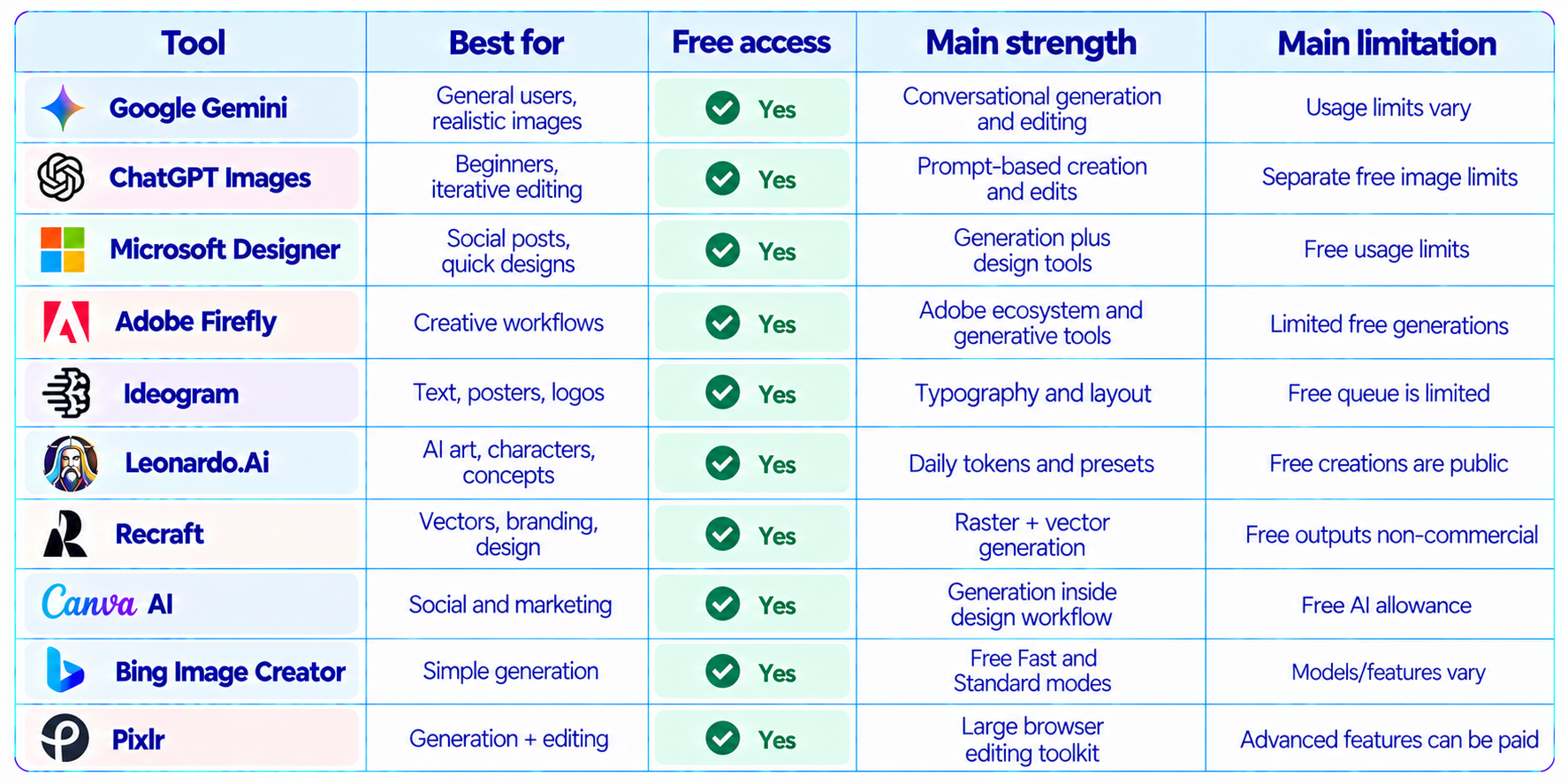
The important word is free. Most AI image generators are not unlimited. Free plans usually use daily or weekly credits, monthly AI allowances, slower queues, limited models or reduced editing features. A tool can therefore be free to start without being a good choice for heavy production work.
This guide compares the best free AI image generators available to Indian users in 2026, focusing on free access, image quality, prompt following, text rendering, editing, speed, commercial-use considerations, watermarks, ease of use and usefulness for students, creators, freelancers and businesses.
The shortlist includes Google Gemini, ChatGPT Images, Microsoft Designer, Adobe Firefly, Ideogram, Leonardo.Ai, Recraft, Canva AI, Bing Image Creator and Pixlr. The goal is not to pretend one tool wins every category. Each platform has a different reason to use it.
QUICK ANSWER
Google Gemini is one of the easiest starting points for Indian users. Google’s India subscription page lists the free Gemini tier at ₹0 and includes image generation and editing. Google’s Imagen 4 family is also designed for photorealistic images, improved typography and up to 2K output, although access depends on the Google product and plan.
ChatGPT is another strong general-purpose option. Its free tier supports image creation, while the current Images experience supports both generation and editing, including targeted edits and different aspect ratios. Image generation has separate free-tier limits.
Microsoft Designer and Adobe Firefly are useful for design-heavy work. Designer has a free plan with AI image creation and editing, while Firefly Free provides limited daily generations across selected image, video and audio features.
Ideogram is especially useful when readable text is central to the image. Its free plan currently gives eligible accounts weekly slow credits. Recraft offers up to 30 free daily credits, but its free outputs are public and not licensed for commercial use.
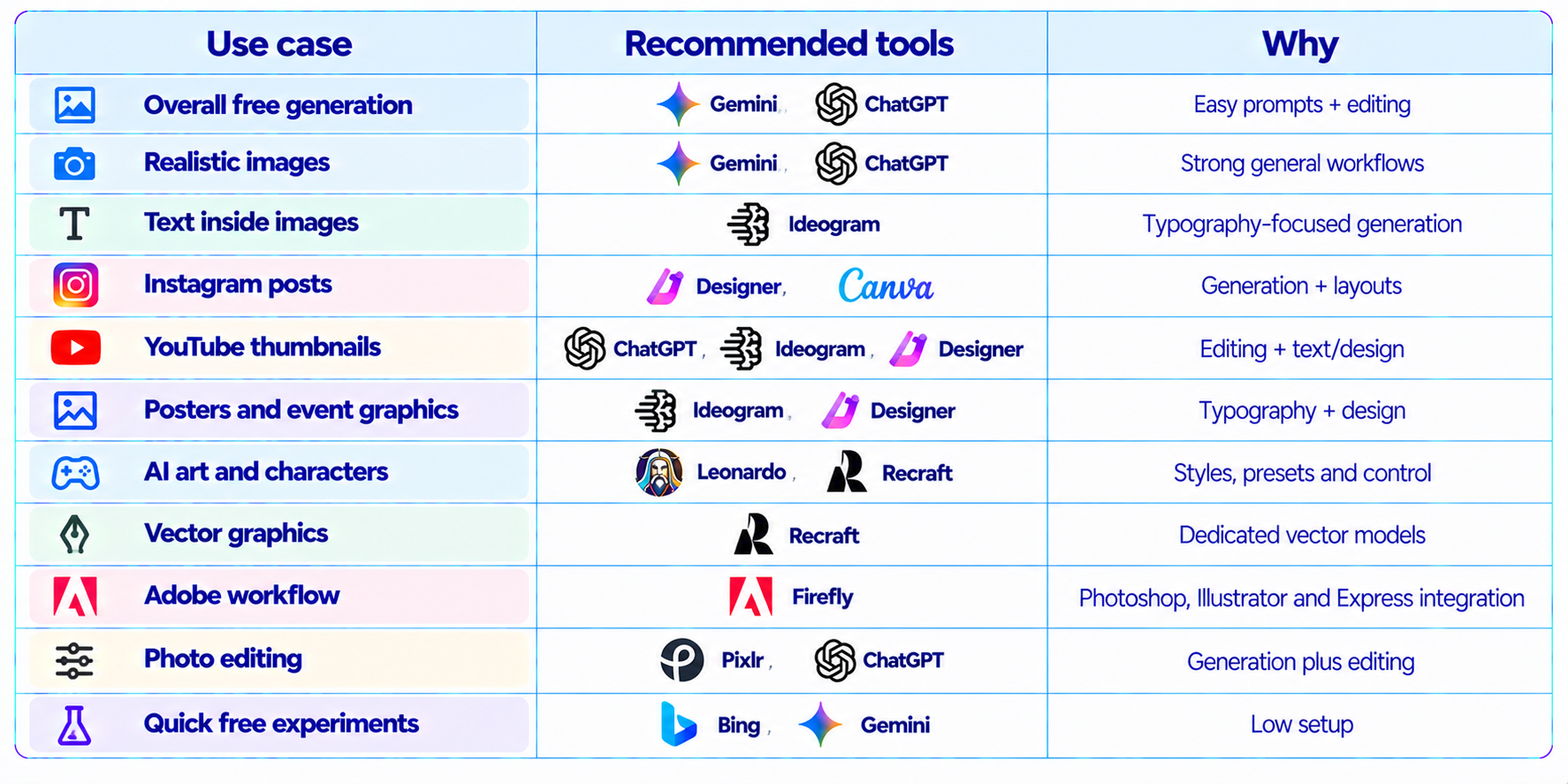
For the widest practical choice, use Gemini or ChatGPT for conversational generation and editing, Ideogram for typography, Recraft for design and vectors, Leonardo for AI-art experimentation, Designer for quick social graphics, Firefly for Adobe workflows, Canva for image-to-design work, Bing for simple free generation and Pixlr for generation plus editing.
1. Best Free AI Image Generators in India: At a Glance
2. Google Gemini: Best Free AI Image Generator for Most Users
Google Gemini is one of the most accessible choices for Indian users because the free Gemini experience is available in India and includes image generation and editing. Google’s India page currently lists the free tier at ₹0 per month and explicitly includes image generation and editing.
The advantage is not only text-to-image generation. Gemini lets you work conversationally. You can ask for an image, inspect it, then request changes to the background, composition, lighting, clothing, aspect ratio or visual style. That makes it useful for creators who do not want to learn a separate image-generation interface.
Google’s Imagen 4 technology is designed for photorealistic images, stronger typography, richer detail and up to 2K output. Access to specific Imagen models depends on the Google product and plan, so users should distinguish the free Gemini experience from paid or developer-facing Imagen access.
3. ChatGPT Images: Best for Conversational Image Editing
ChatGPT’s free tier includes image creation, and the current Images experience supports generating new images and editing existing images. Users can select part of an image or describe the edit directly in the conversation, and different aspect ratios are supported.
The biggest advantage is iteration. Instead of writing a completely new prompt every time, you can say what should change and preserve the rest of the design. This is useful for posters, thumbnails, product concepts and social creatives where the first generation is rarely the final one.
The free tier has separate image-generation limits. OpenAI does not promise unlimited free image creation, so high-volume users will eventually encounter usage limits.
4. Microsoft Designer: Best Free AI Image Generator for Quick Social Designs
Microsoft Designer has a free plan that includes AI image creation and editing. Microsoft lists image creation, stickers, greeting cards, collages, invitations, wallpapers, avatars and other design assets among its free capabilities. It also supports removing distractions, changing backgrounds, cropping and adding text.
Designer is different from a pure text-to-image generator because it connects generation to a design workflow. That is useful for Instagram posts, invitations, event graphics and marketing creatives.
Microsoft says Designer is free, although a subscription can be required for more frequent creation. Its support documentation also notes that generated images carry content-credentials metadata and that generated text can contain spelling errors.
5. Adobe Firefly: Best Free AI Image Generator for Creative Workflows
Adobe Firefly has a free tier with limited daily generations across selected standard and premium features. Adobe’s India site currently lists Firefly Free at ₹0 and says users can start generating selected image, video and audio content.
Firefly becomes more useful when you already use Adobe products. Adobe integrates generative models into Firefly, Photoshop, Illustrator and Express, and its partner-model documentation lists Google image models alongside Adobe and other models. Availability can vary by country and product.
The free tier is better for experimentation than continuous production. Adobe uses generative credits and limits some advanced features, while paid plans increase those allowances.
6. Ideogram: Best Free AI Image Generator for Text and Typography
Ideogram is one of the most useful choices when the generated image needs readable text. That includes posters, quote cards, advertisements, thumbnails, event graphics, logos and title treatments.
Its current free plan provides weekly slow credits for eligible accounts. Ideogram’s FAQ states that free users receive 10 weekly credits, which can represent up to 40 images depending on generation settings.
The tradeoff is speed. Free generations use the slow queue, while paid plans add priority credits and private generation. Ideogram also states that it does not claim ownership of generated images and allows commercial use subject to its terms and applicable rights.
7. Leonardo.Ai: Best Free AI Art Generator for Daily Experimentation
Leonardo.Ai offers a free plan with 150 Fast Tokens per day and a 150-token bank. Its current pricing page describes the free plan as suitable for casual creators exploring AI art, with public creations and basic quality settings.
Leonardo is useful for concept art, character design, game assets, fantasy scenes and stylized visual exploration. Its preset-oriented workflow makes it approachable for users who want more control than a simple chat interface provides.
The important limitation is the public nature of free creations. If a project depends on private assets, review the plan conditions before uploading proprietary concepts or client material.
8. Recraft: Best Free AI Image Generator for Vectors and Branding
Recraft is especially useful when an image needs to behave like a design asset rather than only a raster illustration. Its current free plan provides 30 daily credits, and the platform includes Recraft V4, V4 Pro, V4 Vector and V4 Pro Vector.
That makes Recraft valuable for icons, logos, vector illustrations, patterns, marketing graphics and design exploration. It also supports image editing, recoloring, outpainting and restyling.
There is an important licensing distinction: Recraft says paid plans include commercial rights, while free-plan images are public and are not licensed for commercial use.
9. Canva AI: Best Free AI Image Generator for Social Media and Marketing
Canva is useful because image generation does not have to be the end of the workflow. You can create an image and immediately place it into a poster, presentation, Instagram post, thumbnail, flyer or marketing design.
Canva’s current AI documentation says its free plan includes access to some AI tools with a monthly AI allowance, while more advanced AI features are reserved for paid plans. Image generation with Canva AI is part of the AI usage system.
Canva also provides dedicated pages where users can generate AI images without first creating a design, then open the result in the Canva editor for further work.
10. Bing Image Creator: Simple Free AI Image Generation
Bing Image Creator remains a convenient option for straightforward free image generation. Microsoft’s current page advertises free creation modes, including 10 free Fast creations and unlimited Standard creations, with guest limits resetting daily and additional access after signing in.
The exact models and limits available to an account can change, so Bing is best treated as a flexible free-generation option rather than a fixed model specification.
Its main advantage is simplicity. It is useful when you want to test an idea quickly without building a more advanced creative workflow.
11. Pixlr: Best Free Option for Generation Plus Editing
Pixlr combines AI image generation with a browser-based photo editor. Its current site describes the free version as providing AI image generation and a broad set of editing tools, while its AI stack includes models from Flux, Recraft, Google, Qwen and other providers.
This makes Pixlr different from a single-model generator. You can generate an image, remove objects, expand the canvas, upscale, remove backgrounds and continue editing without switching applications.
For users who want a free Photoshop-style environment alongside AI generation, Pixlr is one of the more practical browser options.
12. Best Free AI Image Generator by Use Case
13. Which Free AI Image Generator Is Best for Indian Students?
Students usually need free access, low setup, fast iteration and useful outputs for presentations, project reports, posters, college events and social content. Gemini and ChatGPT are easy general-purpose choices. Designer and Canva are better when the output needs to become a finished presentation or social graphic. Ideogram is useful for posters containing exact words, while Leonardo and Recraft are better for visual experimentation.
For college work, start with the tool that lets you make the final asset fastest. A beautiful raw image is less useful if you still need another application to add the headline, dimensions, logo and layout.
14. Which Free AI Image Generator Is Best for Indian Businesses?
Businesses should evaluate more than image quality. Licensing, privacy, repeatability, brand consistency, editing and commercial rights matter.
Adobe Firefly is attractive for teams already using Adobe’s ecosystem. Canva is strong for marketing teams that need to turn generated images into complete designs. Ideogram can help with text-heavy promotional graphics. Recraft can be useful for brand assets, but its free-plan commercial restriction means businesses should review licensing before using free outputs commercially.
Do not assume that a tool being free means its output automatically has unrestricted commercial rights. Always check the current terms of the specific platform and plan.
15. Free Does Not Mean Unlimited
This is the biggest mistake people make when searching for a free AI image generator. A platform can be free while still limiting the number of images you can create.
Common limits include daily credits, weekly credits, monthly AI allowances, slow queues, public generations, resolution caps, model restrictions and paid-only editing. The best free AI image generator is therefore the one whose limits match your workload, not necessarily the one with the longest feature list.
16. How to Get Better Results From Free AI Image Generators
Free generations are limited, so prompt quality matters. Instead of writing a vague request such as “make a cool product photo,” specify the subject, environment, composition, lighting, camera perspective, visual style, aspect ratio and what must appear in the final frame.
For typography-heavy designs, ask the image model to generate the visual without critical copy when accuracy matters, then add the final text in Canva, Designer, Photoshop or another editor. This avoids wasting free generations on misspelled headlines.
A strong prompt structure is: subject + environment + composition + lighting + camera + style + aspect ratio + constraints. The more important the output, the more useful it is to define what should not change as well as what should change.
17. How to Choose the Right Tool in India
Start with Gemini or ChatGPT for conversational image generation and editing. Use Ideogram when readable text is central. Use Recraft for vector graphics, icons and branding concepts. Use Leonardo for character art and stylized scenes. Use Designer or Canva when the image must become a finished marketing asset. Use Firefly when your workflow already depends on Adobe. Use Bing for simple free generation and Pixlr when editing is as important as generation.
18. Commercial Use and Copyright: What Indian Creators Should Check
There is no universal “AI-generated images are free to use” rule. The relevant question is what the platform’s current terms say about ownership, licensing, public visibility and commercial use for the exact plan you are using.
Ideogram states that it does not claim ownership and permits commercial use subject to its terms. Recraft makes a different distinction, stating that paid plans include commercial rights while free-plan images are public and not licensed for commercial use. These examples show why users should check platform-specific terms instead of copying a generic AI copyright statement from another website.
For client work, advertising, product packaging or paid campaigns, keep a record of which platform and plan produced the image and check the current commercial-use terms before publishing.
19. Best Free AI Image Generator for YouTube Thumbnails
For thumbnails, the ideal tool needs strong composition, readable visual hierarchy and reliable editing. ChatGPT is useful for iterative composition and edits, Ideogram is useful when typography is part of the image, and Designer or Canva are useful for adding the final headline, logo and layout.
20. Best Free AI Image Generator for Instagram Posts
Instagram creators usually need more than a single generated image. They need a repeatable visual style, square or vertical formats, typography, captions and quick editing. Canva and Microsoft Designer are therefore especially practical because the generation step can flow directly into the design workflow. Gemini and ChatGPT are useful upstream for developing the concept and generating visual variations.
21. Final Verdict: Which Free AI Image Generator Should You Use?
There is no single free AI image generator that dominates every use case. The strongest option changes depending on whether you care most about realism, text rendering, design, editing, daily volume, commercial use or ease of use.
Free AI Image Generator Comparison: Final Shortlist
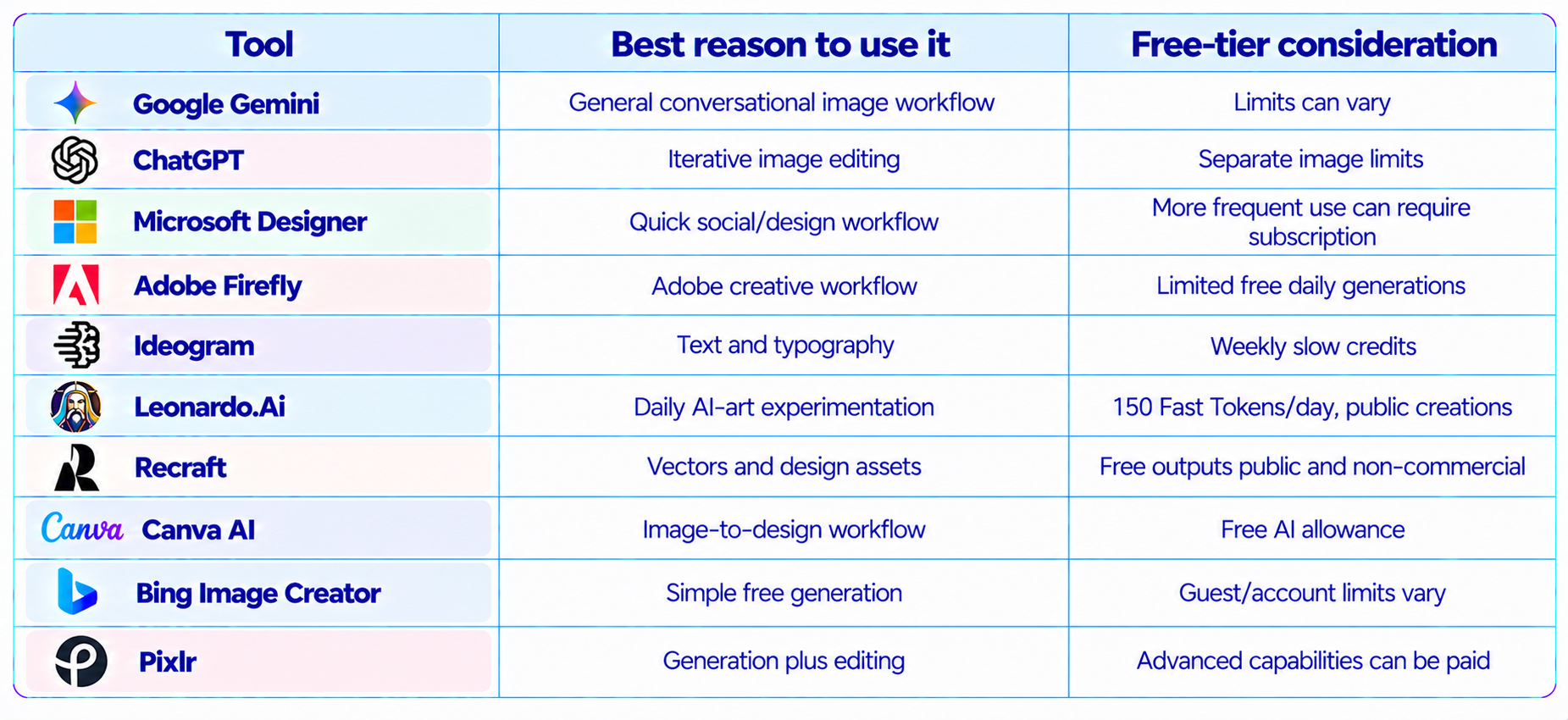
For most Indian users, start with Gemini or ChatGPT. Move to Ideogram when text accuracy matters. Use Designer or Canva when the output needs to become a finished marketing asset. Choose Leonardo for AI art and character experimentation, Recraft for vectors, Firefly for Adobe workflows, Bing for simple free generation and Pixlr when editing is as important as generation.
The practical advantage in 2026 is that you do not need to choose one platform permanently. Free tiers make it possible to build a small image-generation toolkit and use each tool for the task it handles best.
The most important rule is simple: check the current free limits and licensing terms before starting a production workflow. Free access changes frequently, and a tool that is ideal for personal experiments may have different rules for commercial client work.
Frequently Asked Questions
What is the best free AI image generator in India in 2026?
Google Gemini and ChatGPT are strong general-purpose starting points, while Ideogram, Recraft, Designer and Firefly are better for specific workflows.
Which AI image generator is completely free?
Several services have free tiers, but most impose usage limits. “Free” generally means free access with a daily, weekly or monthly allowance rather than unlimited generation.
Can I use AI image generators for free in India?
Yes. Gemini, ChatGPT, Microsoft Designer, Adobe Firefly, Ideogram, Leonardo, Recraft, Canva, Bing Image Creator and Pixlr all provide free access or free tiers, although availability and limits vary.
Which free AI image generator is best for realistic images?
Gemini, ChatGPT and Firefly are useful starting points for realistic image workflows. Results depend on the prompt and model available to your account.
Which free AI image generator is best for text in images?
Ideogram is particularly useful for typography-heavy images such as posters, advertisements and title cards.
Is Leonardo AI free in India?
Leonardo.Ai has a free plan with 150 Fast Tokens per day and a 150-token bank. Free creations are public.
Is Recraft free?
Yes. Recraft offers a free plan with 30 daily credits, but it states that free-plan images are public and not licensed for commercial use.
Is Microsoft Designer free?
Yes. Microsoft lists a free Designer plan with AI image creation and editing, although more frequent use can require a subscription.
Is Adobe Firefly free?
Adobe offers a Firefly Free plan with limited daily generations across selected features.
Can I use free AI-generated images commercially?
It depends on the platform and plan. Check the current terms for commercial rights, ownership, public visibility and restrictions before using an image in paid work.
Which free AI image generator is best for YouTube thumbnails?
ChatGPT, Ideogram and Microsoft Designer are useful choices, especially when you combine generation with a final text and layout pass.
Which free AI image generator is best for Instagram?
Canva and Microsoft Designer are especially convenient because generation can flow directly into a finished social-media design.
Do free AI image generators add watermarks?
This varies by service, model and plan. Some have no visible watermark but may attach provenance metadata. Check the current platform terms.
Can I generate AI images without signing up?
Some tools allow limited guest use, but many require an account. Bing currently offers guest creation with daily limits, while other services may require sign-in.
Recommended Blogs
Google Pics Review: Features, Price & Is It Worth It? (2026)
Meta Muse Spark 1.3 Review: Coding, Price & Is It Worth It? (2026)
Gemini 3.8 Flash Review: Accuracy, Price & Is It Worth It? (2026)
Mercury 2.5 AI Model Review: Speed, Price & Is It Worth It? (2026)
Qwen 3.8 Max 0902 Review: Benchmarks, Price & Is It Worth It? (2026)
24GB VRAM AI Models: What Can You Actually Run Locally in 2026?
Resources & Community
Join our community of 70,000+ AI enthusiasts and learn to build powerful AI applications. Whether you are a beginner or an experienced developer, Build Fast with AI helps you understand and implement AI in your projects.
Agentic AI Launchpad 2026
A structured 6-week cohort program that takes you from AI basics to building and deploying real-world agentic AI systems. Includes live sessions, expert mentorship, project reviews and a builder community network.
Ready to go from learning to building? Join the next cohort: Agentic AI Launchpad 2026
Free AI Resources
Access free tools, workshops and micro-learning to keep building.

