Every CTO with a 15-year-old ERP has typed some version of this into a search box: do I have to replace this before I can use AI? The honest answer, and the one nobody selling a modernization project will give you, is no. You can put AI to work on top of the systems you already run, legacy warts and all, and in most cases replacing them first is the slowest and most expensive way to get there. This post shows you exactly how, with the three patterns that actually work in the Indian mid-market.
I have watched companies freeze on AI for a year because they believed a rip-and-replace had to come first. It almost never does. The AI does not care that your software is old. It cares whether it can read the data and write the result somewhere useful, and there is always a way to do that. Let me walk you through when to use an API, when to automate the screen, and when to keep a human in the loop, plus the honest cost of modernizing versus layering AI on top.
Can AI Work With Legacy Systems? The Short Answer
Yes, AI works with legacy systems in almost every case, and replacing the legacy system first is rarely required. Modern AI integration does not need your software to be new, it needs a reliable way to get data in and out. Where a system has an API, the AI connects directly. Where it does not, an automation layer drives the system the way a human would, and where even that is impossible, a human-in-the-loop step bridges the gap. One of those three always applies.
The reason this matters is money and time. A legacy modernization project can run for a year and cost a fortune before it delivers a single AI outcome, while layering AI on top of the existing system can ship a working result in weeks. The rip-and-replace instinct feels responsible, but it usually delays the value and inflates the budget for no real gain. You can always modernize later, once the AI has proven its worth on the system you already have.
This is the FDE way of thinking: solve the workflow, not the software. A Forward Deployed Engineer looks at the actual process, finds the fastest reliable path to read and write the data, and ships. For the broader context on why this role exists and what it earns, see our guide to the forward deployed engineer salary in India.
Your Legacy System Is Not the Problem
The real bottleneck in most companies is not the legacy software, it is the people manually moving data between systems. Look closely at any slow process and you will usually find two or three or four people who spend their days copying numbers from one screen into another, reconciling a spreadsheet against an ERP, or re-keying an email into a portal. That manual bridge, not the old software, is the cost and the delay, and it is exactly what AI is good at removing.
This reframe changes the whole project. Once you see that the problem is the human data-shuffling, not the legacy system, the goal is not to modernize the software, it is to automate the bridge. The legacy ERP can stay exactly as it is. The AI simply takes over the reading, the transforming, and the writing that a person was doing by hand between it and the next system. The old software becomes a data source and a destination, not an obstacle.
The quotable version: your legacy system is not the problem. The four people moving data between systems by hand are, and that is exactly the work AI can take over.
This is why the modernize-first instinct is so often wrong. It aims the budget at the software when the cost lives in the workflow. Fix the workflow with AI, and you get the outcome without the year-long replacement project. Aim at the software first, and you spend a fortune modernizing a system whose real problem was never the software at all.
The 3 Patterns to Connect AI to Legacy Software
There are exactly three patterns to connect AI to a legacy system, and a real deployment uses whichever fits each integration point. You do not pick one for the whole project, you pick the right one for each system the workflow touches. Here they are at a glance, in order of preference.
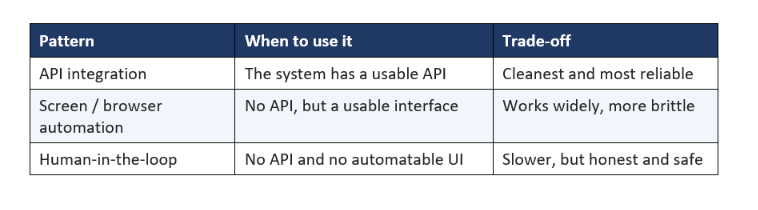
The mistake most teams make is assuming pattern one exists everywhere, budgeting for it, and discovering in month two that the core system is a desktop app from 2011 with no API at all. A serious deployment maps every system up front, confirms which pattern applies to each, and costs the ugly ones honestly. Let me break down each pattern.
Pattern 1: Use the API If One Exists
If a legacy system has a usable API, connecting AI to it is straightforward and the most reliable path. Many systems that feel old still expose an API, a database connection, an export, or a webhook, and where one exists, the AI reads and writes through it directly with no fragile workarounds. This is always the first choice, because it is stable, fast, and does not break when someone changes a screen layout.
The catch is that a lot of Indian mid-market software either has no API or hides it behind a licensing tier nobody bought. Before you assume pattern one, confirm it: ask the vendor, check for a database you can read, look for a scheduled export. Sometimes the API is there and forgotten. When it is, use it, because a clean integration is worth far more over time than a clever hack. For how modern AI connects to tools and data cleanly, our explainer on the Model Context Protocol (MCP) is a useful primer.
My rule: spend real effort finding an API before giving up on one. An hour confirming a database connection saves months of maintaining brittle automation later. But if there genuinely is no way in through code, do not force it, move to pattern two, which is exactly what it is for.
Pattern 2: Automate the Screen When There Is No API
When a legacy system has no API, the AI can drive it through the screen, the same way a human does, using browser or desktop automation. This is the pattern that unlocks the systems everyone said were impossible: the old portal, the desktop application, the internal tool nobody can extend. The automation logs in, navigates, reads the fields, and enters the data, and the AI supplies the intelligence about what to read and what to write.
This is powerful and it is honest about its limits. Screen automation is more brittle than an API, because it depends on the interface staying stable, so it needs monitoring and the occasional fix when a layout changes. But it works on almost anything with a usable interface, which is exactly why it is the workhorse of real legacy AI projects. The 400-person company whose ERP has no API is not blocked, it just needs pattern two done well, with error handling for when the screen does not behave.
The engineering that makes this reliable, the retries, the checks, the fallback when a screen fails, is the same discipline that separates a system from a demo. For the tools that power this kind of automation and agentic control, our roundup of the best AI coding agents of 2026 is a good reference, and our beginner guide to agentic AI explains the agent behaviour underneath.
Pattern 3: Human-in-the-Loop as an Honest Last Resort
When a legacy system has no API and no automatable interface, the honest answer is a designed human-in-the-loop step, not a pretend full automation. Sometimes a system genuinely cannot be reached by code or screen automation, or the risk of an error is too high to let the AI act alone. In those cases, the AI does the heavy lifting, reading, drafting, and deciding, and a human performs the final action into the untouchable system. That is not a failure, it is a mature design choice.
The key word is designed. A good human-in-the-loop step is deliberate: the AI does 90 percent of the work and hands a human a clean, reviewed result to enter or approve, so the person spends seconds instead of minutes and the error stays out of the system. A bad design pretends the automation is complete and quietly relies on people to fix its mistakes. The difference is whether the human step is planned and minimal, or accidental and constant.
This pattern is also the safe bridge for high-stakes actions. Deciding what the AI may do alone and what needs a human is a governance decision, and for a payment, a legal filing, or an irreversible change, a human-in-the-loop step is often the right answer regardless of whether an API exists. Draw that line on purpose, early, because most teams draw it far too late.
Modernize vs Add AI on Top: The Real Cost
Adding AI on top of a legacy system is almost always faster and cheaper than modernizing it first, and the cost comparison is stark. A modernization or replacement project is a multi-quarter, high-budget effort that delivers no AI value until it is done, and it carries real risk of overrun and disruption. Layering AI on top of the existing system, using the three patterns, can ship a working outcome in weeks at a fraction of the cost, because you are not rebuilding the software, you are automating the workflow around it.
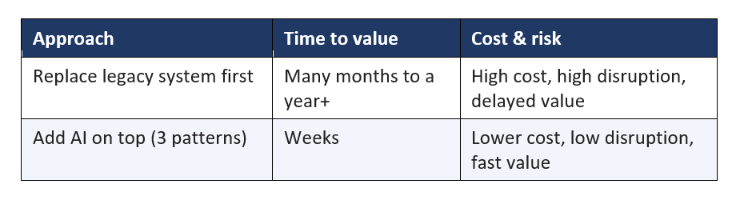
This does not mean you never modernize. It means you sequence it right: get the AI-driven outcome first on the system you have, prove the value, and modernize later if and when it makes independent sense. Leading with a replacement project is how AI initiatives die in committee, because the value is always a year away. Leading with AI on top is how they get funded and shipped this quarter. If capability-building is also on your mind, our corporate AI training cost guide for India covers upskilling the team alongside the deployment.
When You Should Actually Modernize First
To be fair, there are cases where modernizing before adding AI is the right call, and pretending otherwise would be dishonest. If the legacy system is actively failing, unsupported and a security risk, or so unstable that even humans cannot rely on it, then AI on top just automates a broken foundation. In those cases, the modernization is not about AI at all, it is a fix the business needed regardless, and AI is a reason to prioritize it, not the thing waiting on it.
The distinction is whether the legacy system works for the people using it today. If staff can run the process manually, however slowly, then AI can automate that same process on top, and modernization can wait. If the system is genuinely broken, replace it, but do that as its own project with its own justification, not as a prerequisite you invented to delay the AI. The mistake is not modernizing when it is truly needed. The mistake is assuming it is always needed when it usually is not.
My honest rule: default to AI on top, and only modernize first when the legacy system is failing on its own terms. Nine times out of ten in the mid-market, the software works well enough for a human, which means it works well enough for AI to automate around. Reserve the expensive replacement for the rare case that actually earns it.
Signs a Legacy Integration Will Be Harder Than It Looks
Some legacy integrations are quick and some are genuinely hard, and you can spot the hard ones early if you know the signals. Catching these up front is what keeps a project on schedule, because the nasty surprises in legacy AI work are almost always discovered late, when they are most expensive to handle.
- No API and a constantly changing interface, which makes screen automation brittle and high-maintenance.
- Data locked in scanned images or PDFs rather than structured records, adding an OCR and cleanup layer.
- A system that requires a physical device, a VPN, or a login nobody can automate cleanly.
- Actions with real financial or legal consequence, which need a human-in-the-loop step by design.
- Nobody left in the company who understands how the legacy system actually works.
None of these makes a project impossible, but each adds time and cost, and each should be surfaced in scoping, not discovered in month two. When you see two or more of these signals, plan for a longer timeline and a more human-in-the-loop design, and price it honestly. The teams that get surprised are the ones that assumed a clean integration and never looked for these flags.
Risks and How to De-Risk a Legacy AI Project
The main risks of putting AI on legacy systems are brittleness, bad data, and unbounded actions, and all three are manageable with the right design. Brittleness comes from screen automation breaking when interfaces change, and you de-risk it with monitoring and quick fixes. Bad data comes from the messy reality of legacy records, and you de-risk it by testing on real, ugly data and handling the unreadable cases explicitly. Unbounded actions come from letting the AI act alone where it should not, and you de-risk that with a clear approval boundary.
- Brittleness: monitor screen automations and alert on failures, so a layout change is a quick fix, not a silent outage.
- Bad data: test on a real sample including the messy and unreadable records, and design a fallback for what the AI cannot handle.
- Unbounded actions: define what the AI may do alone versus what needs a human, especially for irreversible steps.
- No owner: assign a named person to run and fix the integration, because an unowned automation decays fast.
None of these risks is a reason to avoid AI on legacy systems. They are a reason to deploy with discipline rather than optimism. The teams that get burned are the ones that treated a legacy integration like a clean demo. The teams that succeed designed for the mess from day one, which is exactly what the FDE approach is built to do.
A Real Example: AI on a No-API ERP
Here is an illustrative example that shows all three patterns in one project. A 400-person manufacturing company wants to automate purchase-order processing. Orders arrive by email, someone reads them, checks stock in a 12-year-old ERP with no API, and enters the order into a separate portal. Three people spend most of their day on this manual bridge. The instinct was to replace the ERP first, a year-long project. Instead, they layered AI on top.
The build used each pattern where it fit. Email reading was pure AI, extracting order details from messy, sometimes Hinglish emails, including the scanned attachments. The ERP stock check, with no API, used screen automation to log in and read availability the way a human did. The final order entry into the portal, a step with real financial consequence, was kept as a human-in-the-loop approval: the AI prepared the complete entry and a person clicked confirm. Three patterns, one workflow, no ERP replacement.
The result, illustratively, was the three-person manual process reduced to a fraction of the time, shipped in weeks, with the legacy ERP untouched. The lesson is the whole argument of this post: they solved the workflow, not the software. Had they led with a modernization project, they would still be waiting a year later, with nothing live. Instead they got the outcome now and kept the option to modernize for whenever it independently made sense.
How to Start: A Practical Blueprint
Starting an AI-on-legacy project is a five-step sequence that front-loads the integration reality instead of discovering it late. Follow this and you avoid the trap that stalls most legacy AI efforts.
- Map the workflow, not the software. List every system the process touches and every point where a human moves data by hand. That manual bridge is your target.
- Classify each integration point. For each system, decide the pattern: API, screen automation, or human-in-the-loop. Confirm, do not assume.
- Test on real, messy data. Pull an actual sample including the ugly records, and design for the cases the system cannot cleanly handle.
- Build with monitoring and an approval line. Add error handling for brittle automations and define what needs a human before the AI acts.
- Ship the workflow, modernize later. Deliver the AI outcome on the system you have now, prove the value, and only then consider replacing the legacy software.
The whole point is that you do not wait for a modernization that may never come. You solve the workflow on today's systems, get the value now, and keep the option to modernize open for later. That sequencing is the difference between an AI project that ships and one that is still stuck behind a replacement roadmap. For the models that power these builds, our best AI models of 2026 ranking keeps your options current.
If you remember one thing from this post, make it this: your legacy system is almost never the reason you cannot use AI. The reason is that nobody has automated the manual bridge around it, and that is a solvable problem in weeks, not a year-long replacement. Pick the workflow that hurts most, classify each integration point, and ship AI on top of the software you already own. The old ERP can wait. The value should not.
FAQ
Can AI integrate with legacy systems?
Yes, AI can integrate with almost any legacy system using one of three patterns: a direct API where one exists, screen or browser automation where there is no API, or a human-in-the-loop step for systems that cannot be reached by code. The age of the software rarely blocks AI, because there is almost always a reliable way to read and write the data.
Do I need to replace legacy systems to use AI?
No, you almost never need to replace legacy systems before using AI. Layering AI on top of your existing software with the three integration patterns is faster and cheaper than a rip-and-replace, and it delivers value in weeks instead of after a year-long modernization. You can modernize later, once the AI has proven its worth.
How does AI connect to software with no API?
When software has no API, AI connects through screen or browser automation, driving the interface the way a human would: logging in, navigating, reading fields, and entering data. The AI provides the intelligence and the automation provides the hands. This is more brittle than an API, so it needs monitoring, but it works on almost any system with a usable interface.
Is it cheaper to modernize or to add AI on top?
Adding AI on top of a legacy system is almost always cheaper and faster than modernizing it first. Modernization is a multi-quarter, high-cost project that delivers no AI value until complete, while AI on top can ship a working outcome in weeks at a fraction of the cost. Sequence it right: get the AI value first, modernize later if it makes independent sense.
What is the risk of AI on legacy systems?
The main risks are brittleness in screen automation, messy legacy data, and letting the AI take unbounded actions. Each is manageable: monitor automations and fix layout changes quickly, test on real messy data with fallbacks, and define a clear approval boundary for what needs a human. Deploy with discipline, not optimism, and legacy AI projects are low-risk.
What is the real bottleneck in legacy AI projects?
The real bottleneck is usually the people manually moving data between systems, not the legacy software itself. Slow processes are typically held up by staff copying data between an old ERP and other tools by hand. AI removes that manual bridge, which is why solving the workflow beats replacing the software.
How long does it take to add AI to a legacy system?
Layering AI onto a legacy system typically takes weeks, not the many months a full modernization needs, because you are automating the workflow rather than rebuilding the software. The timeline depends mostly on how many systems the workflow touches and whether they have APIs, but a single focused workflow on top of legacy software is usually a weeks-long project.
Is screen automation reliable enough for production?
Yes, screen automation is production-ready when it is built with monitoring, error handling, and quick fixes for interface changes. It is more brittle than an API, so it needs maintenance, but it reliably powers real legacy integrations every day. The key is treating it like engineering, with alerts and fallbacks, not like a one-off script.
Recommended Blogs
- Why AI POCs Never Reach Production (2026 Blueprint)
- What AI Deployment Actually Costs in India (2026)
- Forward Deployed Engineer Salary India 2026 (Bands)
- What Is Agentic AI? Complete Beginner's Guide
- What Is MCP (Model Context Protocol)? Complete 2026 Guide