



How to Keep Claude Code Working After You Close Your Laptop in 2026
Claude Code is no longer limited to the traditional workflow where a developer opens a terminal, starts an agent, keeps the computer awake and watches the task until it finishes. Anthropic now provides cloud-based Claude Code workflows that let coding work continue away from the local machine, including scheduled cloud jobs and Claude Code on the web.
The important detail is where the task is actually running. A Claude Code process running directly on your laptop still depends on that computer. If the laptop sleeps, the local process cannot keep executing. Cloud-based Claude Code tasks are different: execution happens remotely, so closing the laptop does not stop the cloud job. Anthropic explicitly distinguishes local recurring work such as /loop from cloud jobs created with /schedule.
Claude Code on the web can also work on GitHub repositories remotely. You select a repository, describe the task and leave the page; the remote task continues and can create a pull request when it finishes. This turns Claude Code from a tool you watch into a system you can delegate bounded engineering work to.
This guide explains exactly how the workflow works, what /schedule does, how Claude Code on the web differs from a local terminal session, how background agents and Agent View fit in, how to design overnight coding tasks and where the boundaries still matter.
QUICK ANSWER
Yes, Claude Code can keep working after you close your laptop, but the task must be running in a cloud-based Claude Code workflow. A normal Claude Code process running locally on your laptop does not continue executing once the machine sleeps.
The easiest mental model is simple: local Claude Code uses your machine, while cloud Claude Code uses a remote execution environment. Claude Code on the web lets you select a GitHub repository, describe a task and leave the browser. The remote task continues independently and can produce a pull request for review.
For recurring automation, /schedule is especially useful. You can schedule a cloud job such as reviewing recently merged pull requests, updating documentation or running another repeatable repository workflow. Unlike /loop, which is local, scheduled jobs run in the cloud.
The result is a new development pattern: start work before dinner, close the laptop, let the remote agent continue and return later to inspect the completed diff or pull request. The safest approach is to give the agent a tightly scoped task, define success criteria, require tests, use an isolated branch or worktree and review the result before merging.
1. What Actually Changed in Claude Code?
The biggest shift is not simply another interface. Claude Code now has remote sessions, cloud jobs, background sessions, scheduling and multi-session management. Together these features make asynchronous software work practical.
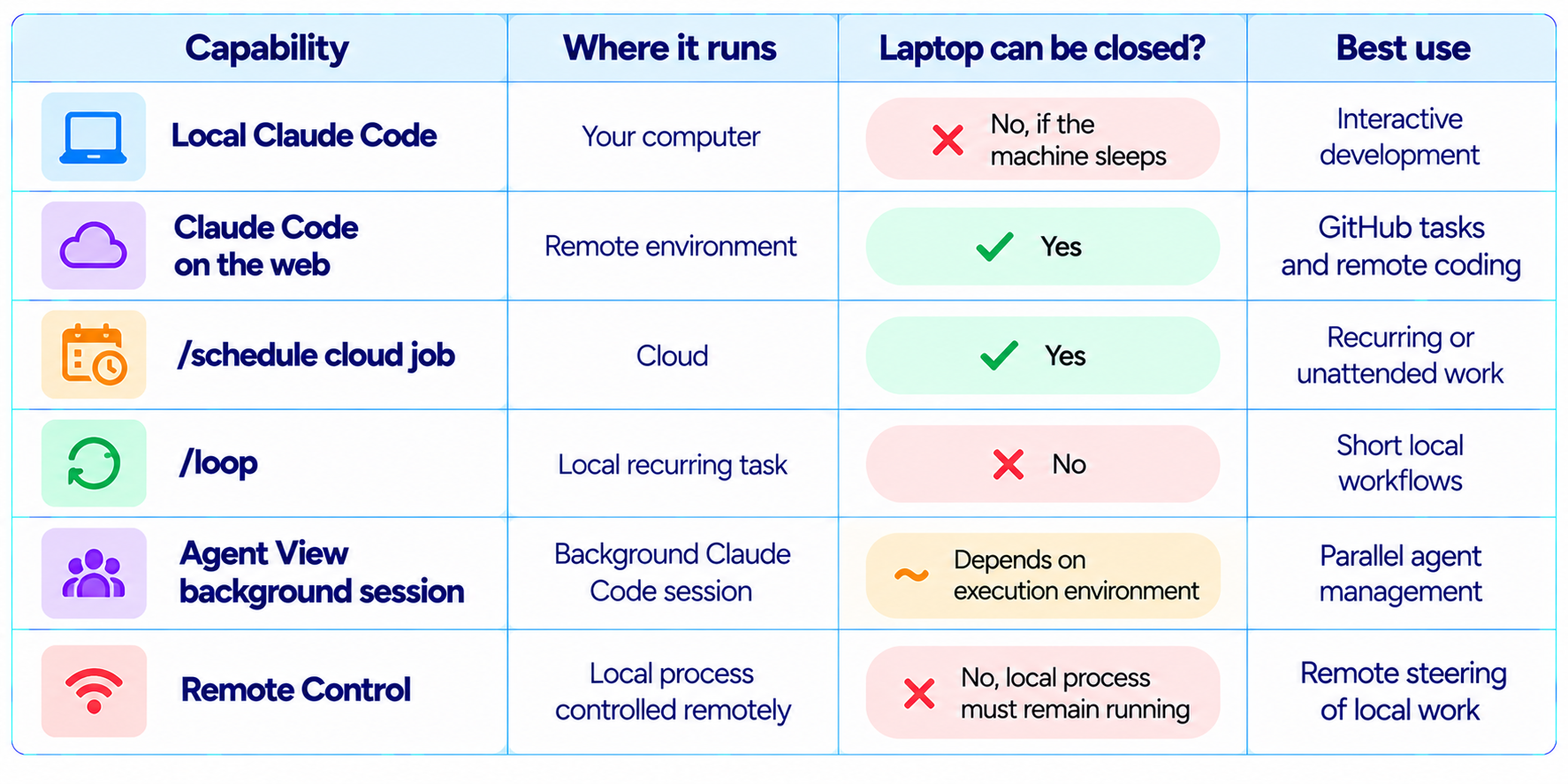
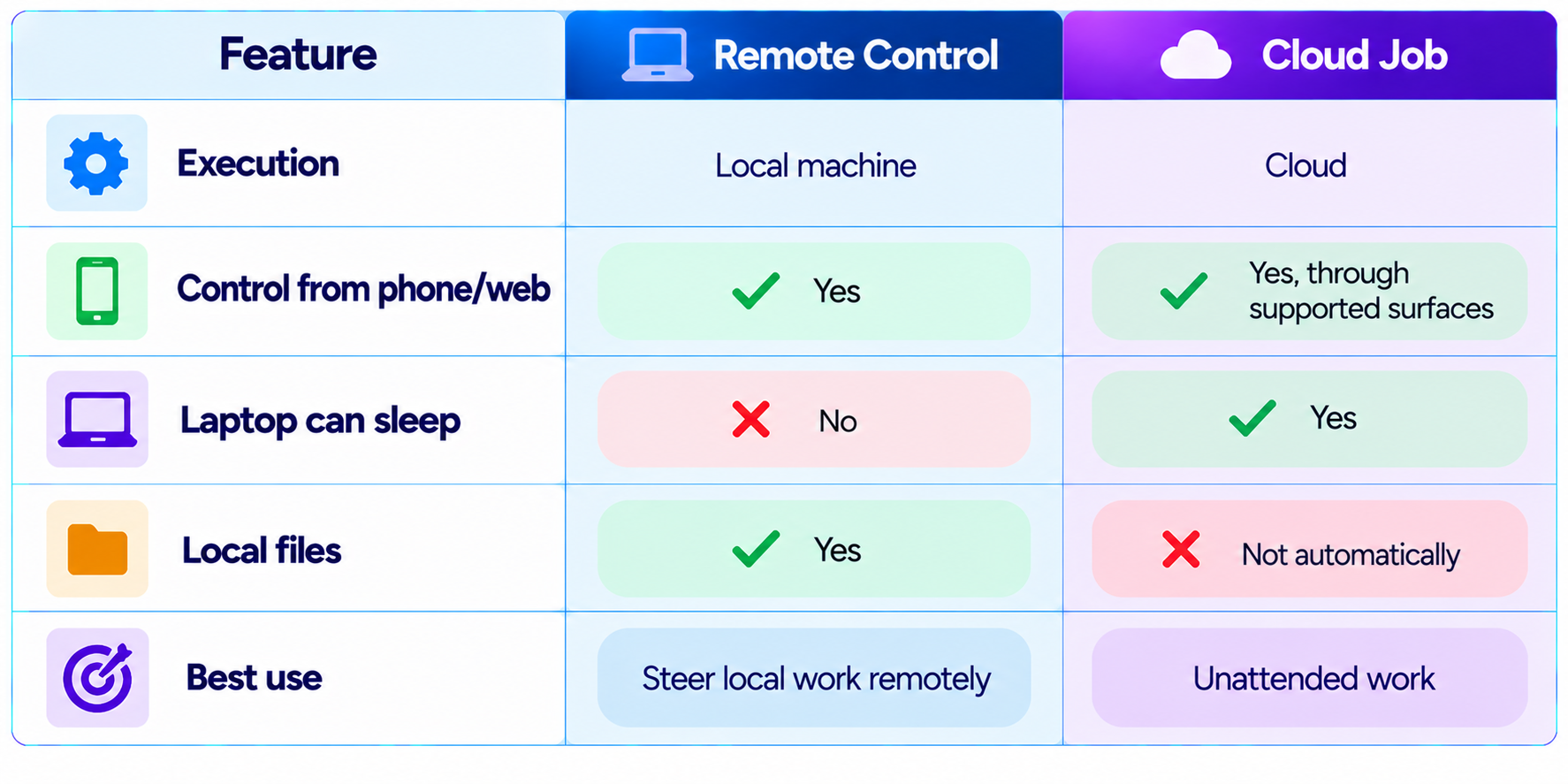
This distinction prevents a common misunderstanding. Remote Control does not turn a local Claude Code process into a cloud process. It lets you control local work remotely. Cloud jobs and web sessions solve the laptop dependency by moving execution to a remote environment.
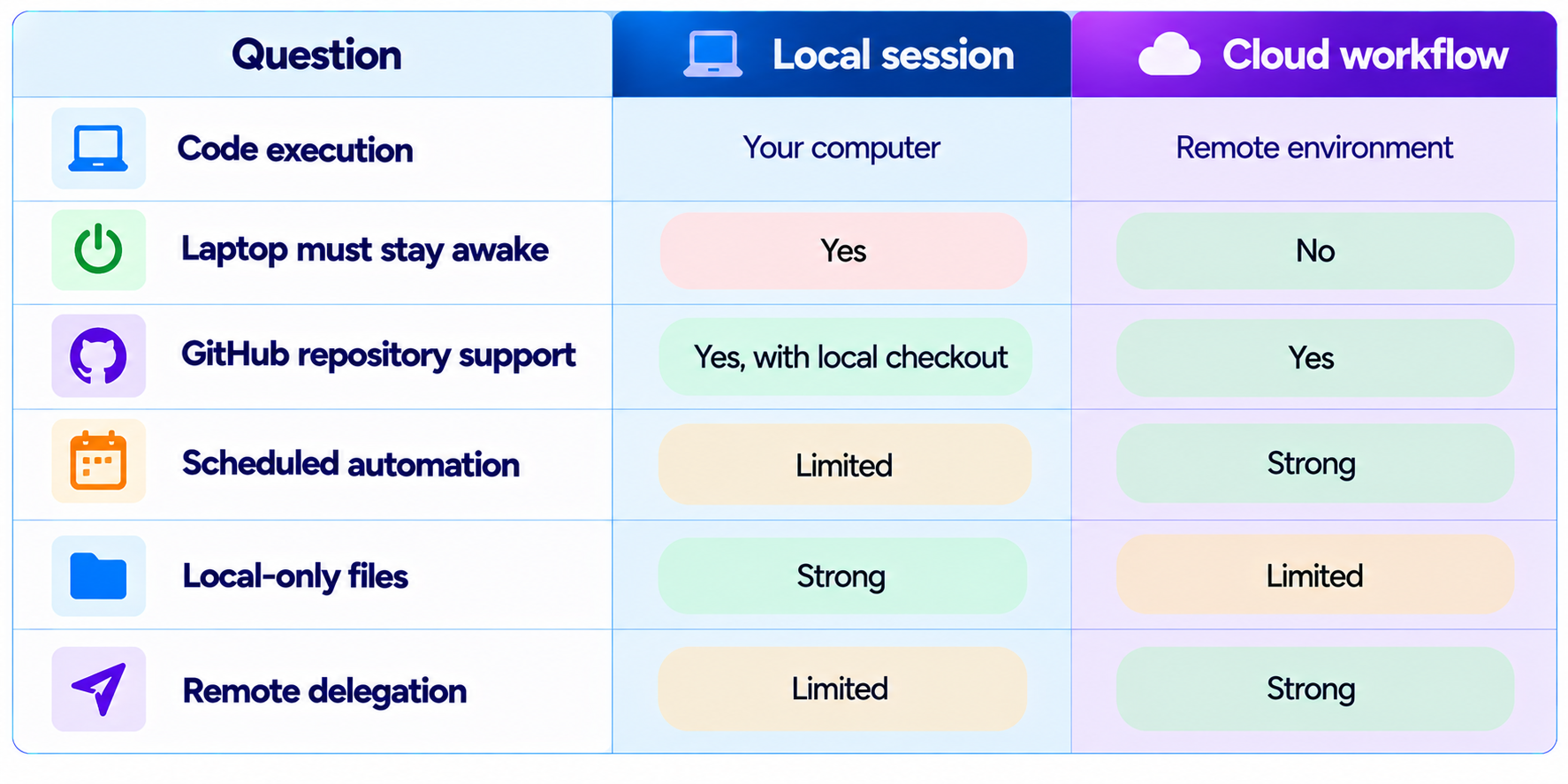
2. Local vs Cloud Claude Code
Think about Claude Code as having two execution locations. In the first, Claude operates through a process running on your computer. It can inspect your repository, execute commands, modify files and run tests, but those operations happen on your machine. In the second, the coding task is created in a remote environment. The agent gets the repository and tools it needs there, executes there and returns a reviewable result.
3. What Is Claude Code on the Web?
Claude Code on the web moves the coding-agent experience into a remote workflow. You choose a GitHub repository, describe the task and let Claude work remotely. You can leave the page, and when the task is finished Claude can create a pull request containing the changes for review.
This is particularly useful when the task is repository-scoped rather than machine-scoped: a bug fix, dependency update, documentation change, test improvement or isolated feature can be delegated without first configuring the entire local environment.
It also changes the interaction model. You do not have to watch Claude type code. You give it a goal, let the remote environment execute the task and return when you have time to inspect the result.
4. What Is /schedule in Claude Code?
/schedule is the key command behind the close-your-laptop workflow. Anthropic describes scheduled jobs as cloud jobs. Unlike /loop, which schedules recurring work locally, /schedule creates work that runs in the cloud and continues even when your laptop is closed.
Example: /schedule a daily job that reviews new pull requests, runs the repository checks, and updates the engineering changelog
The important part is a repeatable trigger, clear scope and reviewable output. Cloud scheduling turns Claude Code from a session you manually start into automation that operates on a cadence.
5. /schedule vs /loop
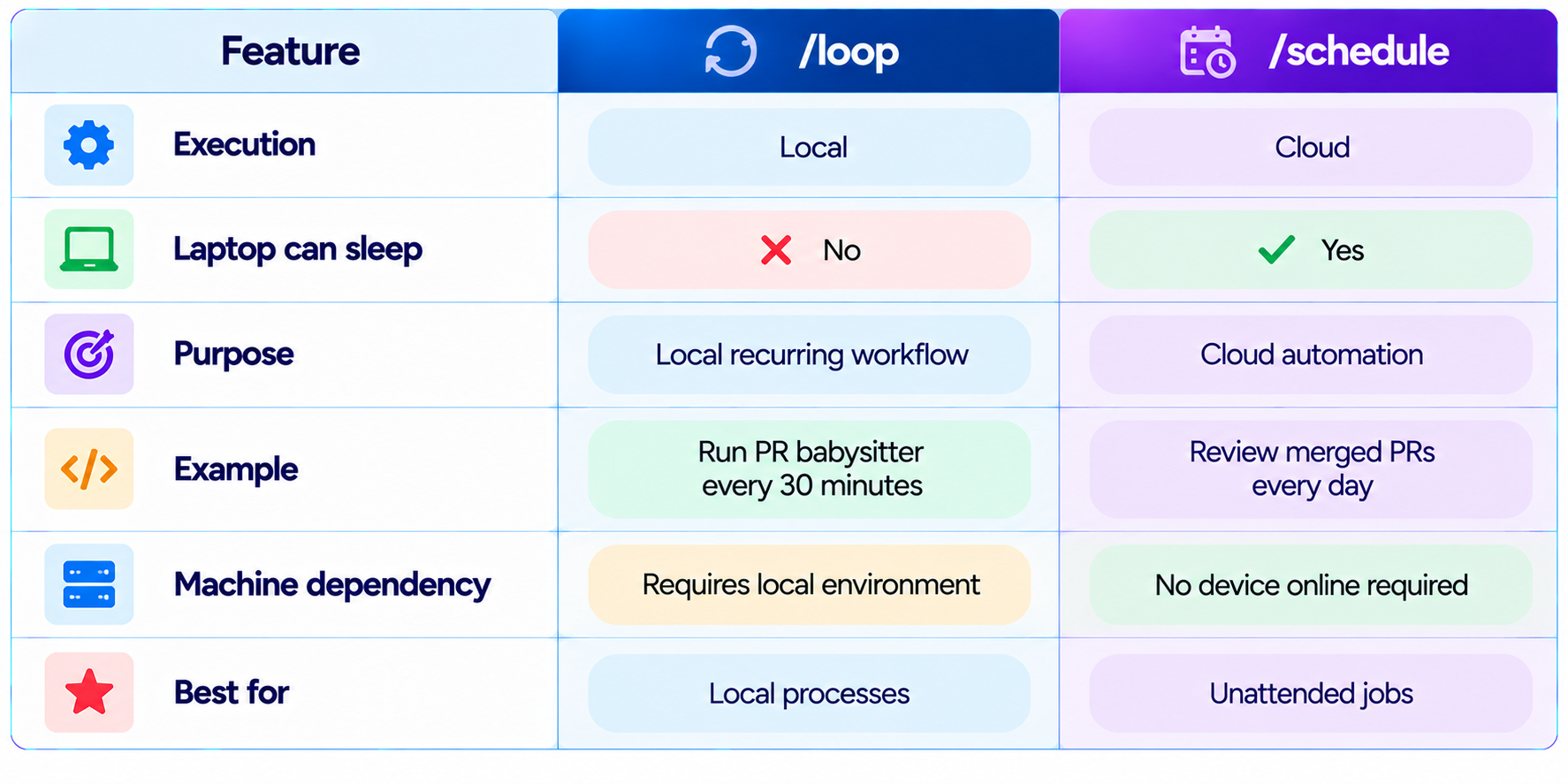
If the requirement is "keep doing this while I am away," use a cloud-capable workflow. If the requirement is "repeat this while my development environment is running," /loop can be appropriate.
6. How to Make Claude Code Work While You Sleep
- Choose a task that can be completed without frequent human decisions.
- Use a GitHub repository or another supported remote project context.
- Define exactly what should change and what must not change.
- Tell Claude which tests, lint checks or build commands must pass.
- Ask it to summarize files changed, tests run and unresolved issues.
- Keep the task isolated from production credentials and destructive operations.
- Start the remote task before closing the laptop.
- Return later and review the diff, test results and pull request instead of merging automatically.
7. A Good Overnight Claude Code Prompt
A long-running coding task should read more like an engineering ticket than a casual chat message. The agent needs an objective, boundaries, validation requirements and a stopping condition.
Example prompt: Work on the authentication module in this repository. Fix the failing session-refresh flow without changing the public API. First inspect the implementation and tests. Implement the smallest safe change. Add regression tests for expired access tokens, valid refresh tokens and invalid refresh tokens. Run the authentication suite and the standard project test command. Do not modify unrelated files. If the repository state prevents a safe fix, stop and report the blocker instead of guessing. At completion, summarize the root cause, changed files, tests run, results and remaining risks.
8. Why This Matters for AI Coding Agents
The biggest advantage is not battery life. It changes how developers allocate attention. Traditional coding assistance is synchronous: you ask, watch, approve, run commands and repeat. A cloud coding agent can make the work asynchronous. You can start one task, move to another and inspect the first result later.
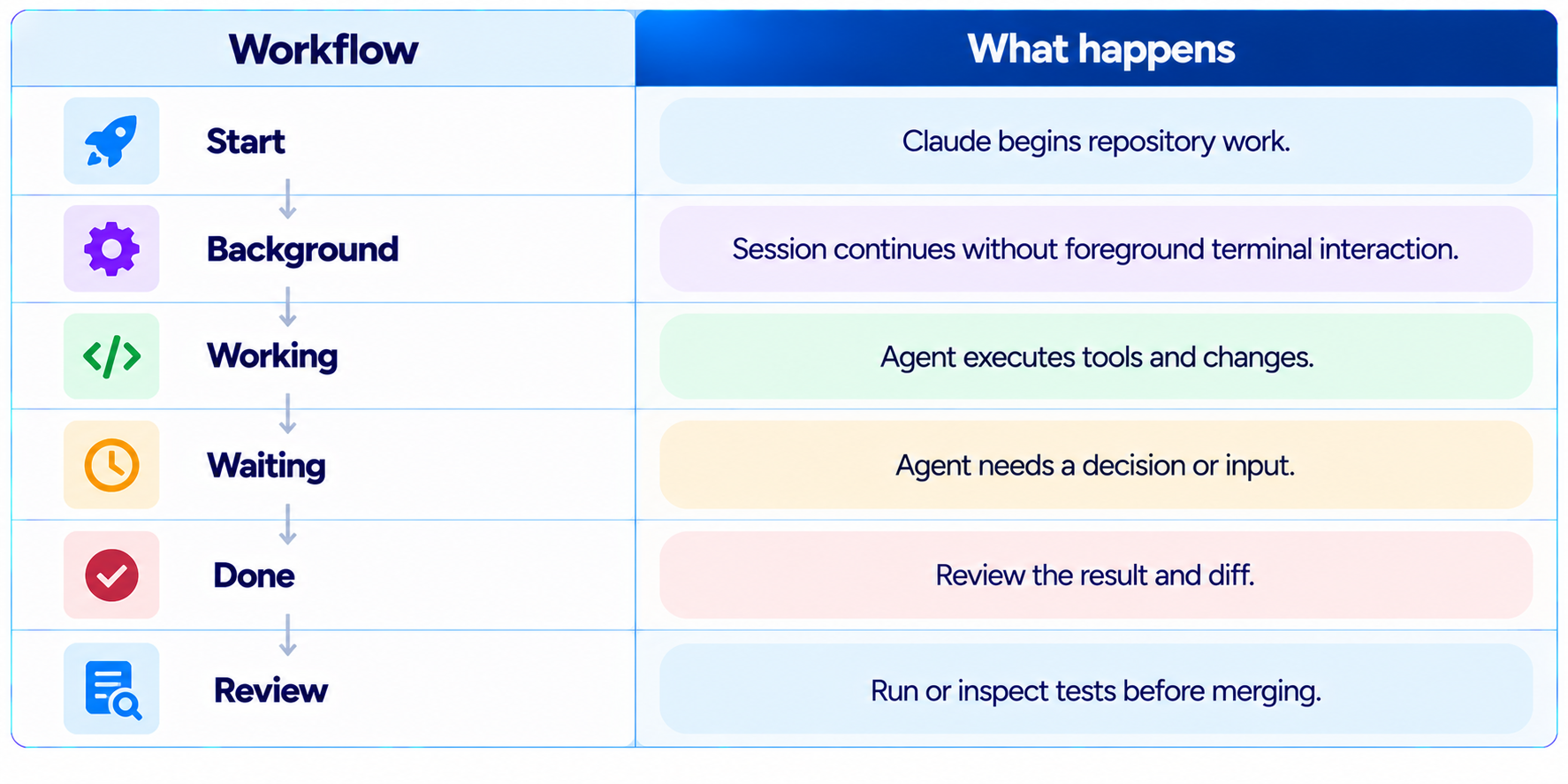
This becomes especially powerful with background sessions and Agent View. Agent View lets developers see sessions that are working, waiting or finished, send sessions into the background and manage multiple agents from one place.
Read our Claude Code Agent View guide
9. Agent View Makes Background Work Manageable
Background execution creates a new problem: once several agents are running, you need to know which ones need attention. Agent View addresses that by presenting active Claude Code sessions in a single interface.
Anthropic says developers can open Agent View with claude agents, send existing sessions to the background with /bg, or start a background session with claude --bg [task]. The interface shows session state and lets you inspect or re-enter a session when it needs a decision.
10. Remote Control Is Different
Remote Control lets you control a Claude Code session running locally from another device. It does not move execution into the cloud. The local process still needs to remain running, so Remote Control is useful for remote steering but is not the same solution as cloud execution.
11. Can Claude Code Work on GitHub While You Are Away?
Yes. Claude Code on the web is designed for remote GitHub repository tasks. You can select a repository, describe the task and leave the page while Claude continues working. When finished, Claude can create a pull request with the changes for review.
GitHub becomes the shared state between developer and agent: the developer defines the work, the agent changes the code and the pull request becomes the review boundary.
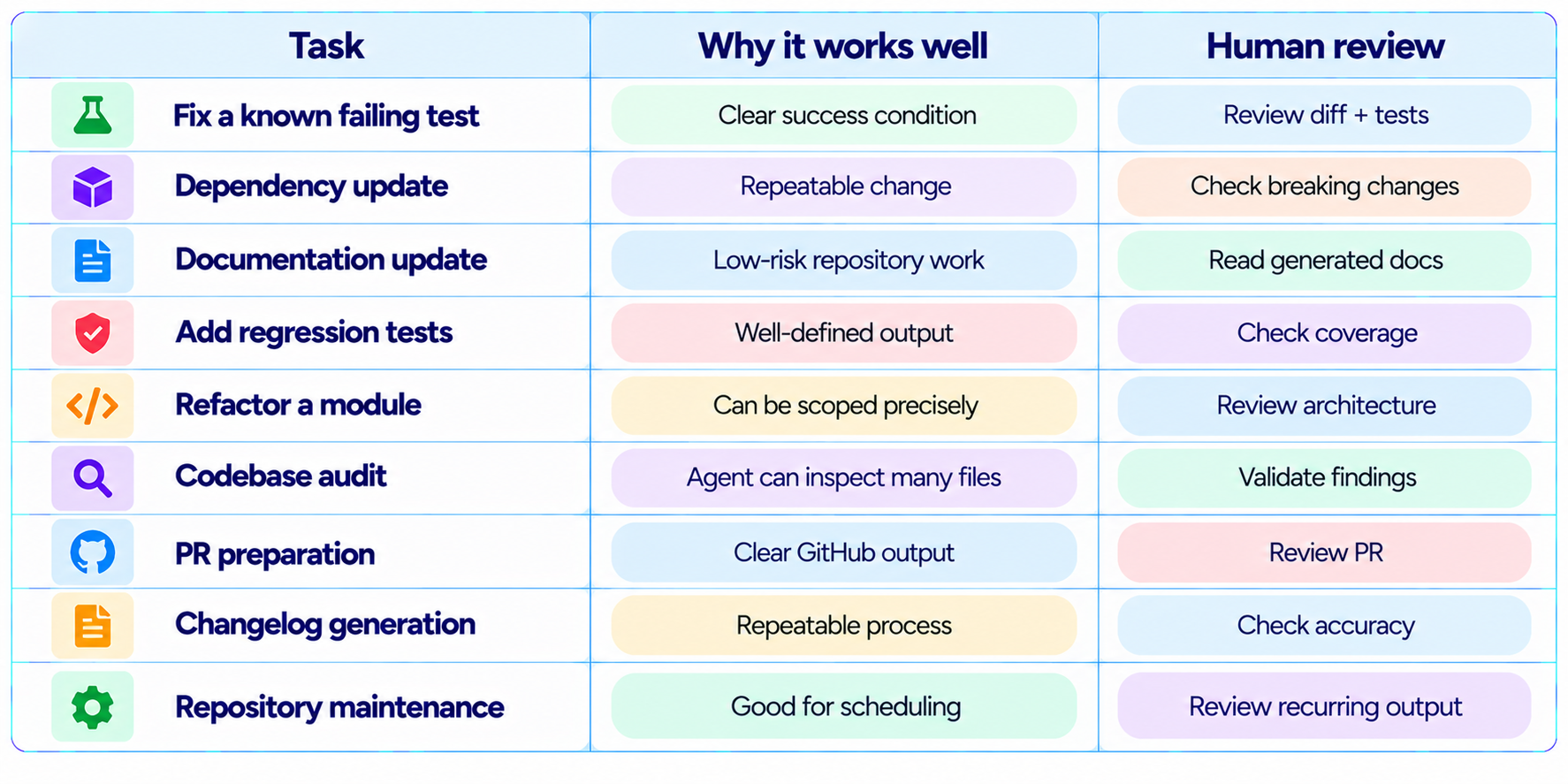
12. Best Tasks to Run After Closing Your Laptop
13. Tasks You Should Not Leave Unsupervised
Remote execution increases convenience, but it also increases the importance of task boundaries. Anthropic recommends starting with low-risk scheduled work and being cautious with sensitive data and consequential actions.
- Production infrastructure changes
- Deleting large groups of files or resources
- Tasks involving production credentials
- Financial or purchasing actions
- Sending external messages without review
- Database migrations against production
- Security-sensitive changes without validation
- Tasks where the correct decision depends on missing business context
14. Auto Mode Makes Long Tasks More Practical
Auto mode addresses a related bottleneck: permission interruptions. Anthropic designed it so Claude Code can make lower-risk permission decisions while a safety classifier checks tool calls for potentially destructive or unsafe actions. Auto mode is intended to let Claude work autonomously for longer stretches without requiring approval for every routine operation.
This matters because an unattended workflow cannot depend on a developer approving every file write or shell command. But auto mode does not make every action safe or eliminate human review. Anthropic recommends isolation and says safeguards do not eliminate all risk.
Read our Claude Code Auto Mode guide
15. The Role of CLAUDE.md in Unattended Coding
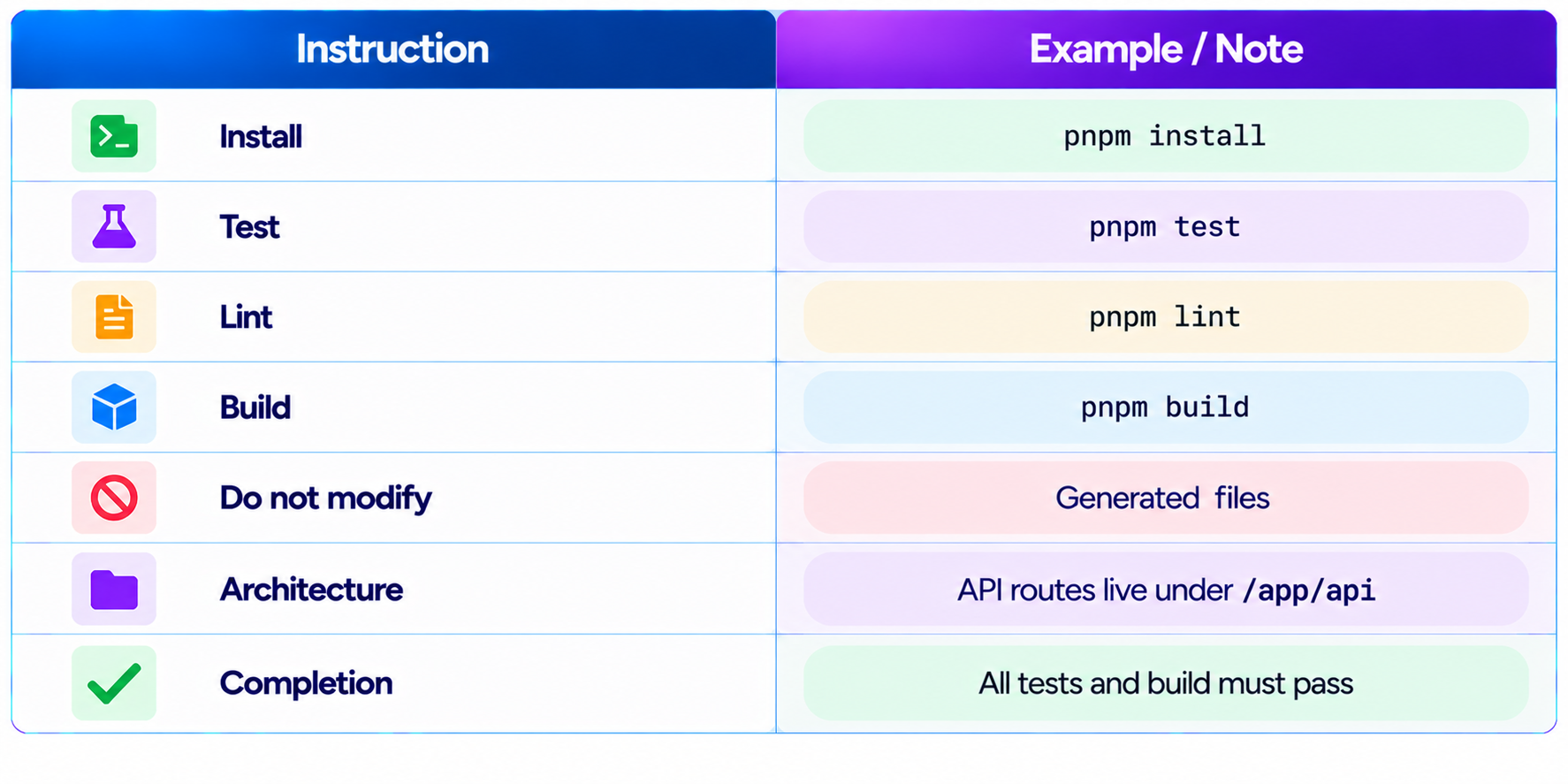
A strong CLAUDE.md file can improve long-running tasks by putting repository-specific rules in one persistent place. Instead of repeating conventions in every prompt, define architecture rules, test commands, style conventions and boundaries once.
16. Use Git as the Safety Boundary
Git is especially important when an agent works without you watching. A clean starting state, isolated branch or worktree and reviewable diff make it much easier to understand exactly what happened.
- Start from a clean repository state.
- Use a dedicated branch or isolated worktree for autonomous tasks.
- Ask Claude to avoid unrelated changes.
- Require tests before declaring success.
- Inspect the final diff.
- Review dependency and configuration changes separately.
- Merge only after human review.
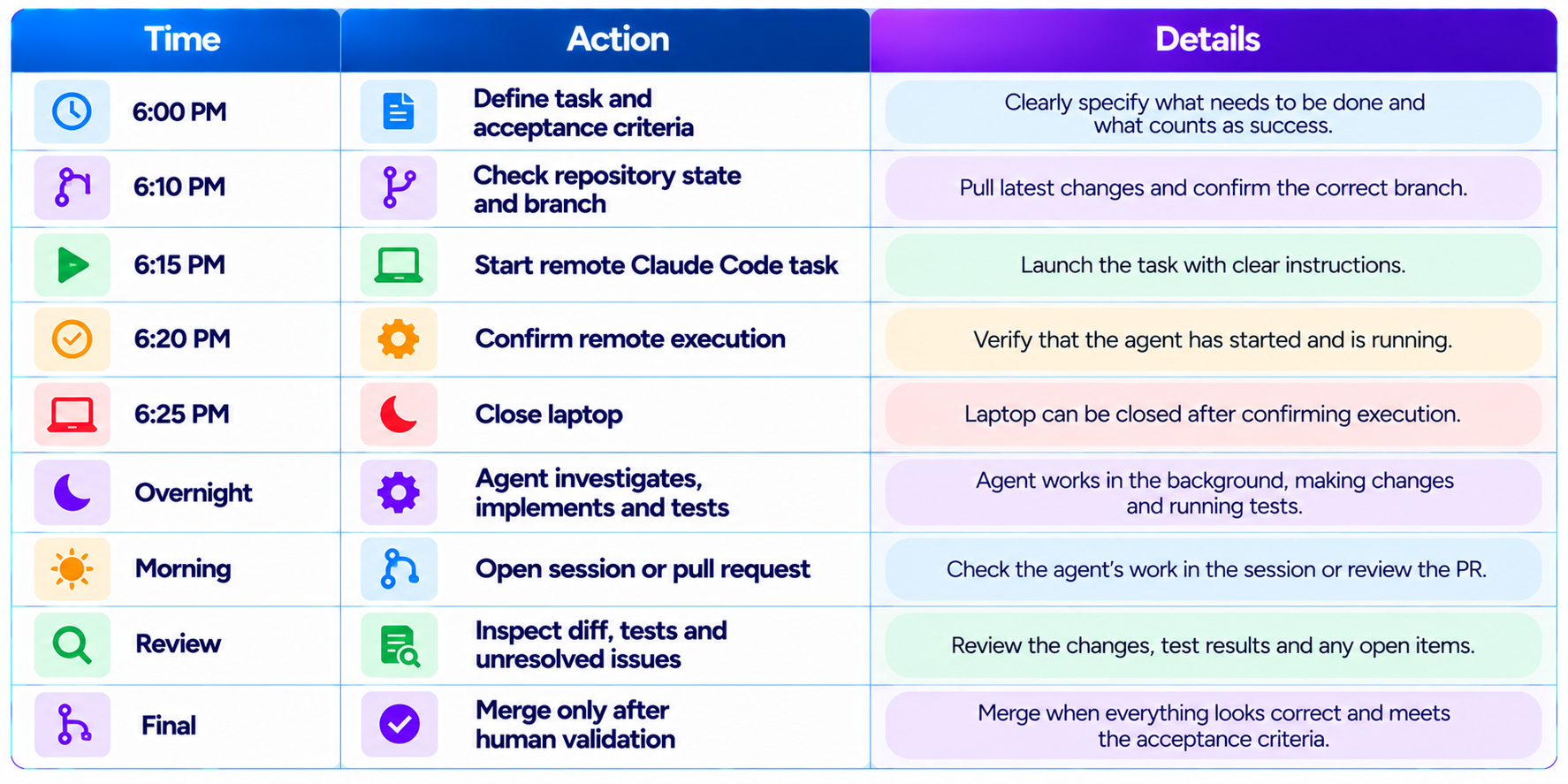
17. A Practical Overnight Workflow
18. How to Build a Reliable Cloud Coding Task
Reliability comes from reducing ambiguity. A remote agent should not have to ask what "done" means.
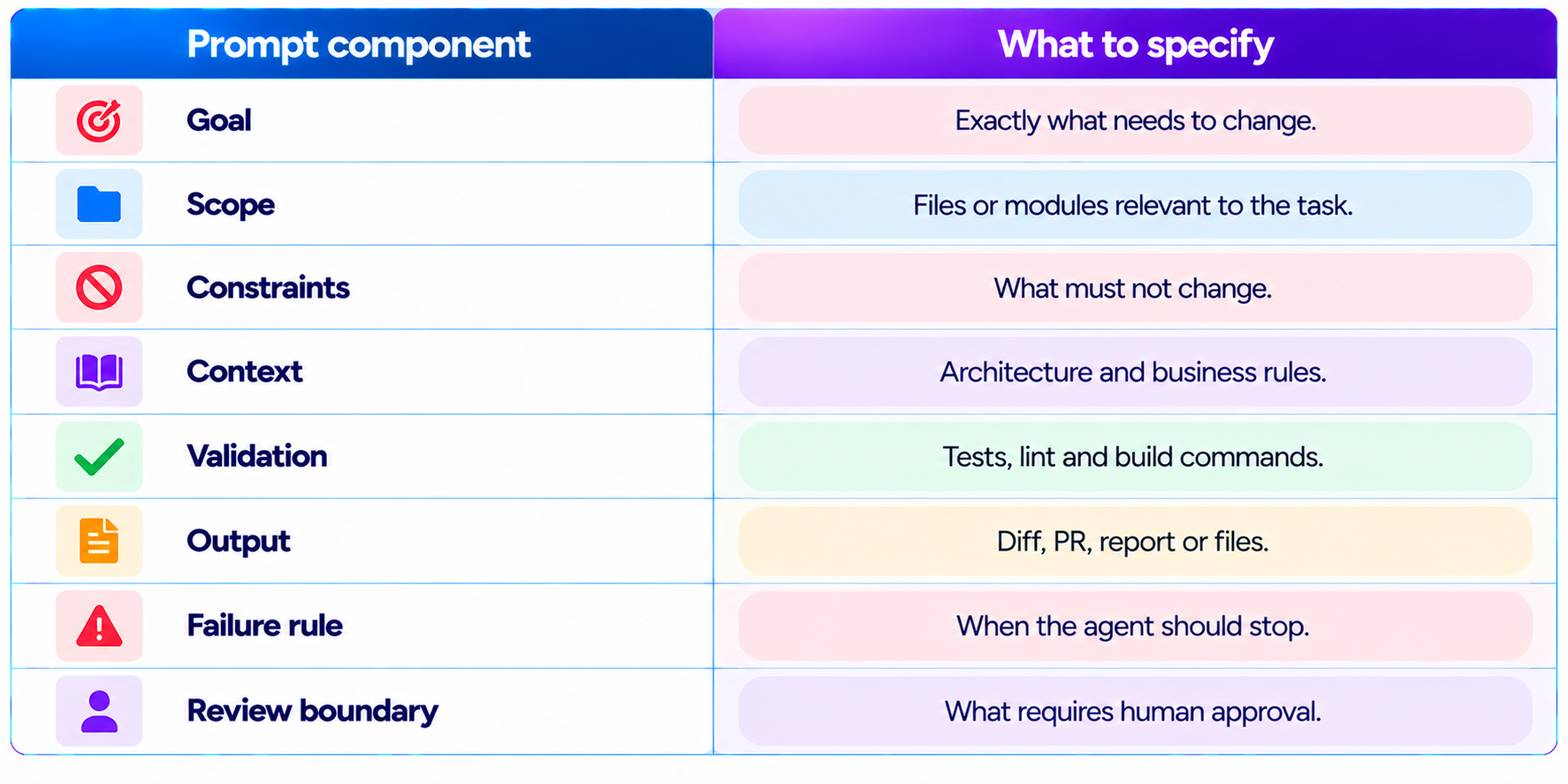
This structure makes the workflow portable between Claude Code on the web, local sessions, background agents and scheduled workflows.
19. Scheduled Claude Code Use Cases
Scheduled cloud jobs are useful when the work is repetitive. Anthropic gives the example of a daily job that reviews pull requests and updates documentation using an MCP integration.
- Daily pull request review
- Weekly dependency review
- Documentation synchronization
- Repository health reports
- Stale issue analysis
- Changelog preparation
- Test failure summaries
- Engineering status reports
- Recurring code-quality checks
Scheduled automation should be treated as a separate class of workflow from a one-time autonomous coding task. The longer a job can run without supervision, the more important narrow permissions and reviewable outputs become.
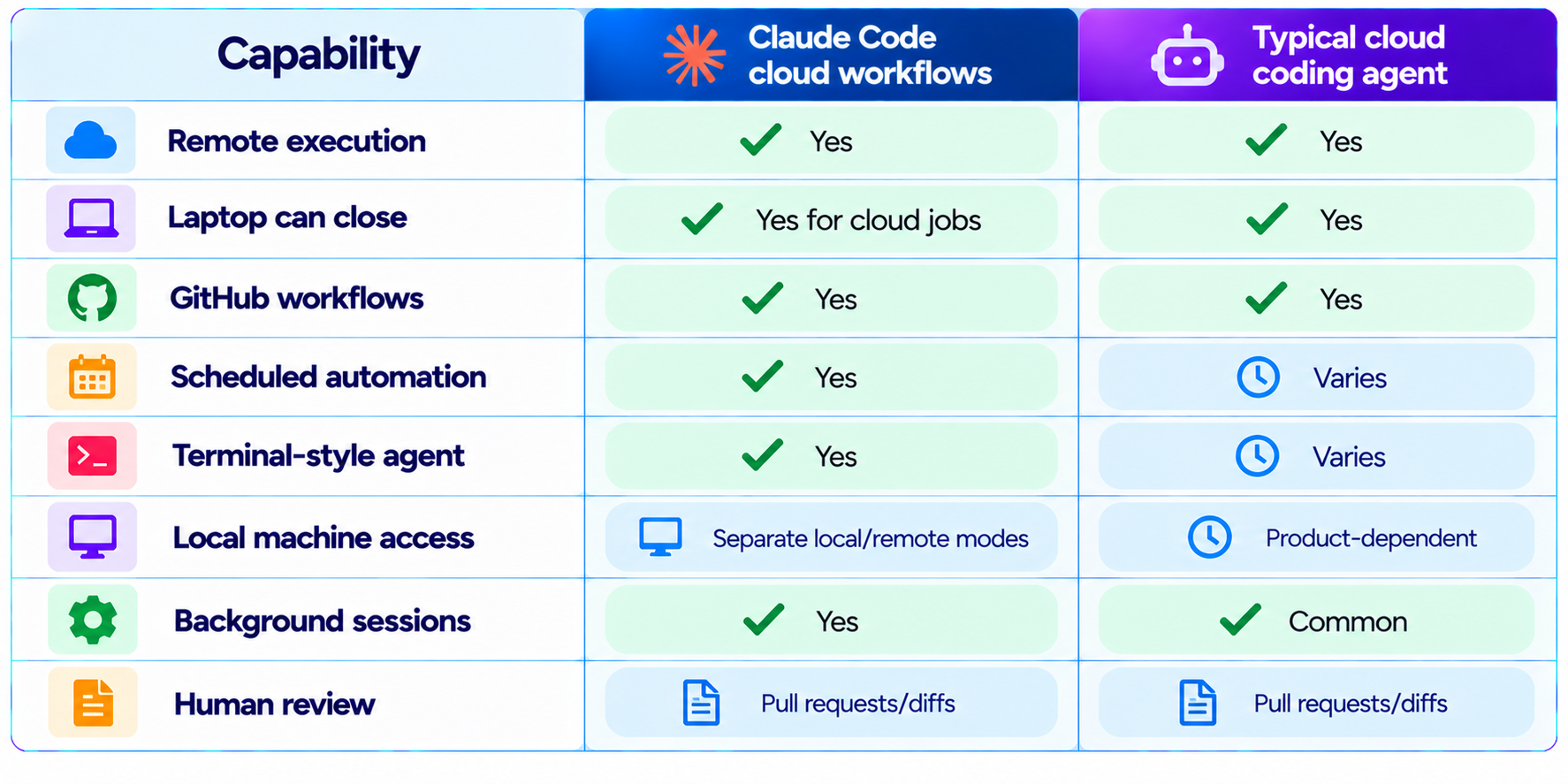
20. Claude Code Cloud vs Cursor Cloud Agents
Claude Code is not the only AI coding system moving execution into the cloud. Cloud coding agents from other vendors use the same broad idea: the agent runs remotely so the developer does not need to keep a laptop open.
21. Why This Is a Bigger Change Than It Looks
Cloud execution, scheduled jobs, background sessions, Agent View and auto mode all reduce the amount of time developers need to spend directly supervising routine agent actions.
22. Limitations You Should Know
- A local Claude Code process still depends on the local computer.
- Remote Control is not the same as cloud execution.
- Cloud tasks cannot automatically access arbitrary files on your laptop.
- Repository permissions and connected tools determine what an agent can actually do.
- Unattended tasks can still make incorrect changes.
- Long-running agents need explicit success criteria and stop conditions.
- Sensitive credentials and consequential actions require additional controls.
- Auto mode reduces interruptions but does not eliminate risk.
- Scheduled jobs should be reviewed regularly rather than treated as permanently trusted automation.
- Cloud availability and supported features can change as Claude Code evolves.
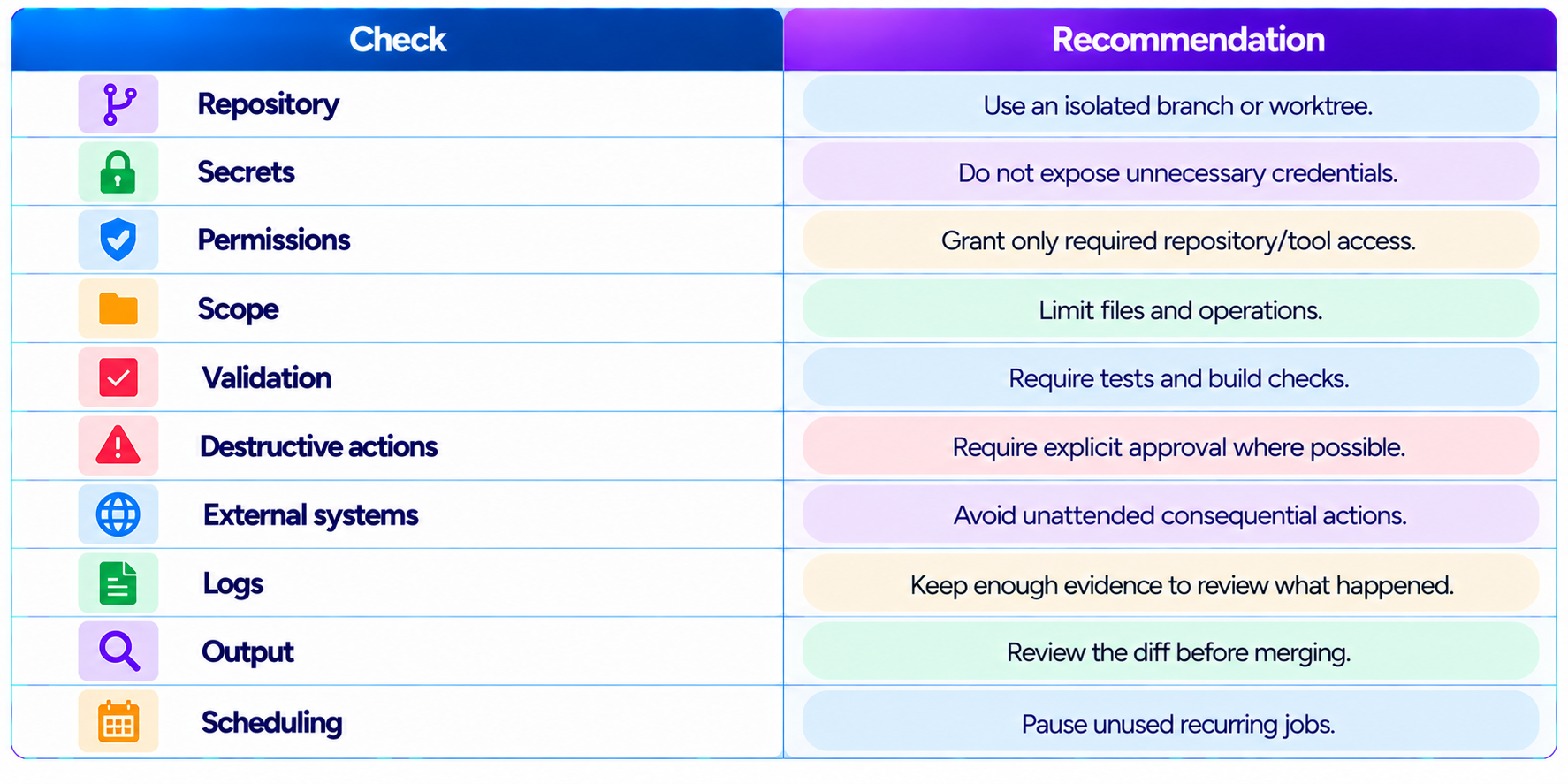
23. Security Checklist for Unattended Claude Code
24. Best Practices for Better Results
- Give Claude a concrete engineering objective rather than "improve the code".
- Include the exact tests that define success.
- Tell Claude what not to touch.
- Use repository instructions instead of repeating conventions.
- Ask for a final summary of changes and validation.
- Keep autonomous tasks small enough to review.
- Use cloud execution for repository-scoped work and local execution for machine-specific tasks.
- Use Agent View when several background sessions are running.
- Use /schedule for recurring cloud automation and /loop for local recurring work.
- Review every unattended change before merging.
25. Is Claude Code Becoming an Autonomous Software Engineer?
The terminology matters. Claude Code is still a tool operated within permissions, environments, repositories and human-defined objectives. But the workflow is becoming increasingly asynchronous.
A modern Claude Code setup can receive a task, work in the background, run tests, use tools, manage multiple sessions, operate remotely and return a reviewable result. That is much closer to delegating a bounded engineering task than asking an AI to autocomplete a function.
The developer role shifts toward task design and verification: defining acceptance criteria, providing the right context, designing safe permissions, evaluating agent output and knowing when a task should remain human-controlled.
What Is an AI Agent? Complete Beginner Guide
26. Final Verdict
Claude Code can keep working after you close your laptop, with an important technical qualifier: the work must be running in a cloud-based workflow. A local Claude Code process still depends on the machine it is running on. Cloud jobs created through /schedule and remote Claude Code workflows remove that dependency.
That distinction reveals the larger change. Claude Code is moving from an interactive terminal assistant toward an asynchronous coding-agent platform. Cloud execution, scheduled jobs, background sessions, Agent View, remote workflows and auto mode all reduce how much time developers need to spend directly supervising the agent.
The most useful workflow is not unlimited autonomy. It is well-defined work that can be validated: a scoped refactor, regression-test task, dependency update, documentation pass or pull-request preparation job is a much better unattended workload than an ambiguous production change.
My rating: 9.3/10 for asynchronous coding workflows, 9.2/10 for cloud delegation, 9.0/10 for background-agent management and 9.1/10 overall.
Bottom line: Claude Code can continue coding after you close your laptop when the work is delegated to its cloud execution workflow. The result is a development model where you start the task, step away and come back to a pull request, test results or completed work instead of keeping a terminal open all night.
Frequently Asked Questions
Can Claude Code keep working after I close my laptop?
Yes, when the task is running in a cloud-based Claude Code workflow. A local process does not continue if the laptop sleeps.
What is /schedule in Claude Code?
It creates cloud jobs for recurring or scheduled work. Unlike /loop, scheduled jobs run in the cloud.
Does Claude Code on the web keep working when I leave?
Yes. Remote GitHub tasks can continue after you leave the page and can produce a pull request.
What is the difference between /loop and /schedule?
/loop is for local recurring tasks; /schedule is for cloud jobs independent of your laptop.
Can Claude Code work overnight?
Yes, for appropriately scoped cloud tasks with clear validation and stop conditions.
Can Claude Code work while my laptop is asleep?
Cloud jobs can. A local Claude Code process cannot.
Can I control local Claude Code from my phone?
Yes, Remote Control can control a local session, but the local process must remain running.
Can Claude Code create a pull request while I am away?
Claude Code on the web can work on a GitHub repository and create a pull request when the task is complete.
Is Claude Code fully autonomous?
It can perform long autonomous workflows, but it remains bounded by permissions, tools, repositories and human-defined tasks.
Is /schedule better than /loop?
Neither is universally better. Use /schedule for cloud execution and /loop for local recurring work.
Is it safe to leave Claude Code unattended?
Use narrow scopes, isolated branches, tests, limited credentials and reviewable outputs. Avoid unattended consequential actions.
What is Agent View?
It is Claude Code’s interface for managing background and parallel sessions and seeing which agents are working, waiting or finished.
Recommended Blogs
Claude Code Agent View: Manage Multiple AI Agents in One Dashboard
Claude Code Auto Mode: Unlock Safer, Faster AI Coding (2026 Guide)
Claude Code Desktop Redesign: Multi-Sessions + Routines (2026)
How to Secure AI Coding Agents: Permissions, Sandboxing, MCP & Secrets
Resources & Community
Join our community of 70,000+ AI enthusiasts and learn to build powerful AI applications. Build Fast with AI helps creators, developers and teams understand and implement practical AI.
Agentic AI Launchpad 2026
A structured cohort program for building and deploying real-world agentic AI systems with live sessions, mentorship, project reviews and a builder community.
Free AI Resources
Access free tools, workshops and micro-learning to keep building.

