



Claude Code Desktop Multi-Session Update: How Parallel AI Coding Changes the Developer Workflow
Claude Code Desktop is moving from a single-agent coding interface toward a workspace for managing multiple coding sessions at the same time. Anthropic's desktop experience treats parallel agent work as a first-class workflow: developers can keep several sessions active, move between them from one sidebar, isolate repository work with Git worktrees, open side chats without polluting the main task, and arrange the terminal, editor, preview and diff panes around the work they are doing. Anthropic introduced the redesigned desktop experience in April 2026, and the current Desktop 2.37337.1 rollout has added another major change to how sessions and environments are organized.
The important change is not simply that Claude Code can open more than one conversation. The workflow is becoming closer to an AI-native development control room. One session can handle a bug fix, another can investigate a repository, another can write tests, and another can work on documentation. Git worktrees keep independent repository changes separated, while the desktop UI gives the developer a central place to monitor what is active and what needs attention.
That changes the role of the developer. Instead of waiting for one agent to finish before starting the next task, the developer can distribute independent work, inspect results, redirect sessions and review changes as they arrive. The result is a more parallel software-development workflow, but it also creates new requirements around isolation, permissions, review and session organization.
QUICK ANSWER
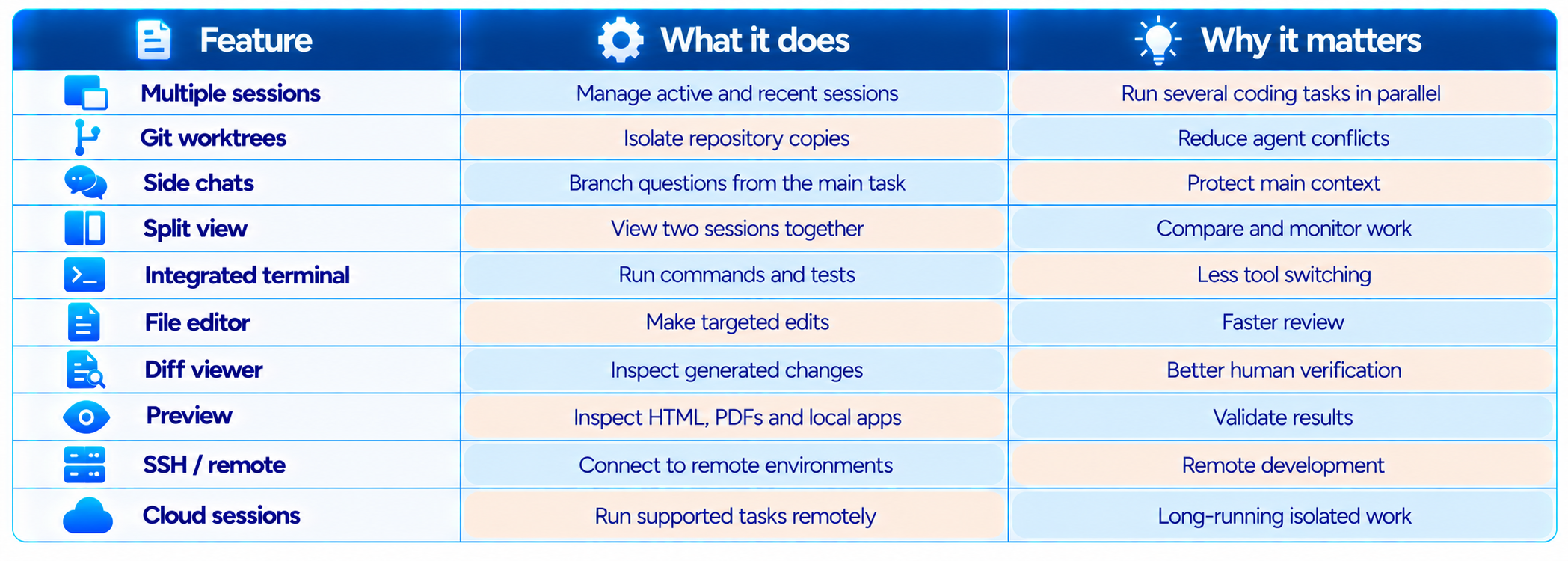
The Claude Code Desktop multi-session update turns the desktop app into a more capable control surface for parallel AI coding. You can run multiple Claude Code sessions in the sidebar, work on independent tasks simultaneously, use Git worktrees for isolated repository copies, open two sessions side by side, and use side chats for questions that should not alter the main task context. The desktop app also brings the terminal, file editor, diff viewer and preview into the same workspace.
The current Desktop 2.37337.1 rollout also introduces a new environment-oriented session organization layer. Current reports show that the rollout changes how some users' sessions are grouped in the sidebar, with environments becoming a central organizing concept. The rollout has also generated migration and grouping issues for some users, including reports of project folders being moved into a Default group. These are product rollout issues, not evidence that sessions or repository work were deleted.
The biggest practical improvement is parallelism. Instead of using Claude Code as one long conversation, developers can treat sessions as separate work streams. Git worktrees make that safer when several agents modify the same repository, while the desktop UI makes those sessions easier to monitor. Anthropic's own guidance recommends separating independent work into separate worktrees and keeping tasks that touch the same files in one session.
My verdict: 9.2/10 for parallel workflow, 9.0/10 for session management, 9.1/10 for developer productivity and 8.8/10 overall. The update is a major step toward an AI-native development environment, but the new session organization layer needs careful handling during the current rollout.
1. What Is the Claude Code Desktop Multi-Session Update?
Claude Code is Anthropic's agentic coding tool. It can inspect a repository, edit files, run commands, execute tests and work through multi-step software tasks. The desktop version packages those capabilities into a graphical workspace rather than requiring developers to live entirely inside a terminal.
The multi-session design changes how that workspace is organized. Instead of treating one conversation as the whole development environment, the app exposes active and recent sessions together. Anthropic describes the redesign as being built around the way agentic development actually works: several tasks can be in flight while the developer acts as the orchestrator.
This is different from simply opening several browser tabs. Each Claude Code session has its own conversation and task context. When Git worktrees are used, the sessions can also receive isolated copies of the repository, reducing the risk that simultaneous agents overwrite each other's changes.
2. What Changed in Claude Code Desktop?
The most important changes are centered on session management and keeping the developer inside one workspace. The feature set now connects parallel sessions with repository isolation, visual review and multiple execution environments.
3. Why Multiple Claude Code Sessions Matter?
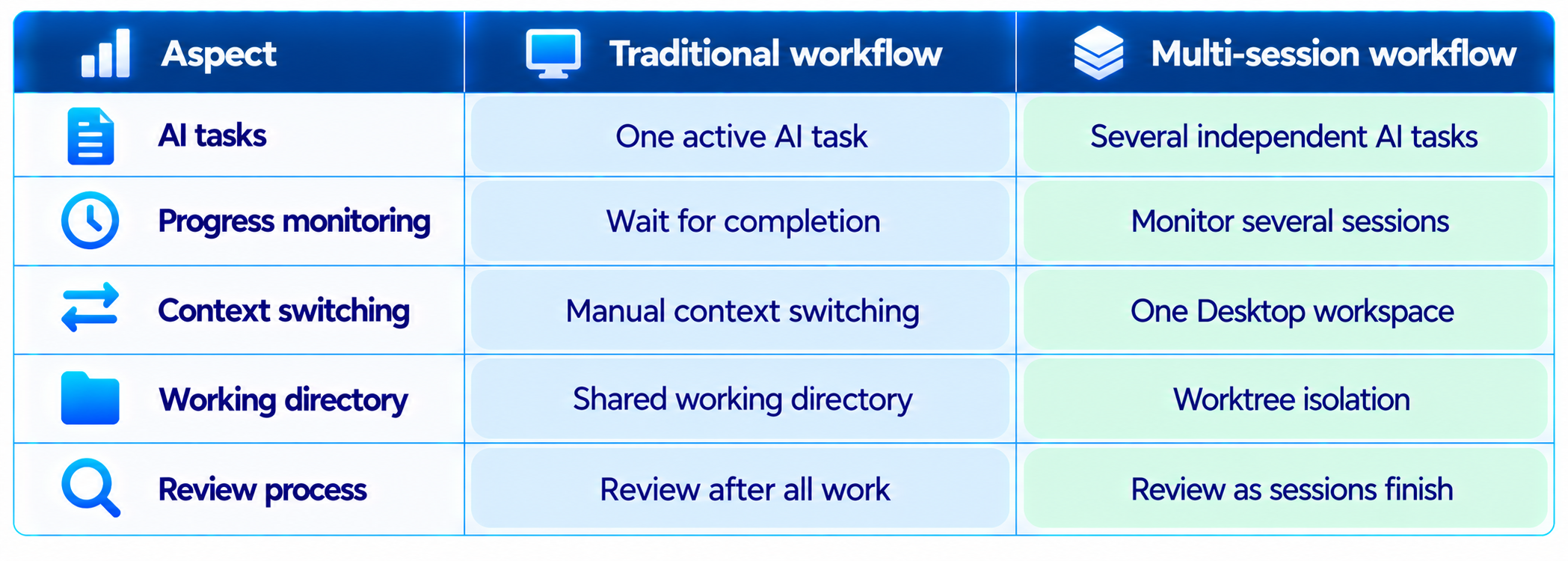
The main productivity gain is concurrency. Traditional AI coding often follows a sequence: ask the model to implement something, wait, inspect the result, fix problems, then start the next task. Parallel Claude Code sessions change that sequence.
A developer can start a backend refactor in one session, ask another session to write missing tests, send a third session to investigate a production bug, and use a fourth for documentation. Each task can make progress while the developer reviews the others.
The productivity benefit is not that one developer can blindly run ten agents. The real benefit is that waiting time can become useful work time. Anthropic's Claude Academy recommends starting with two or three parallel sessions and increasing concurrency only while the developer can still review the resulting changes properly.
4. Git Worktrees Are the Key to Safe Parallel Coding
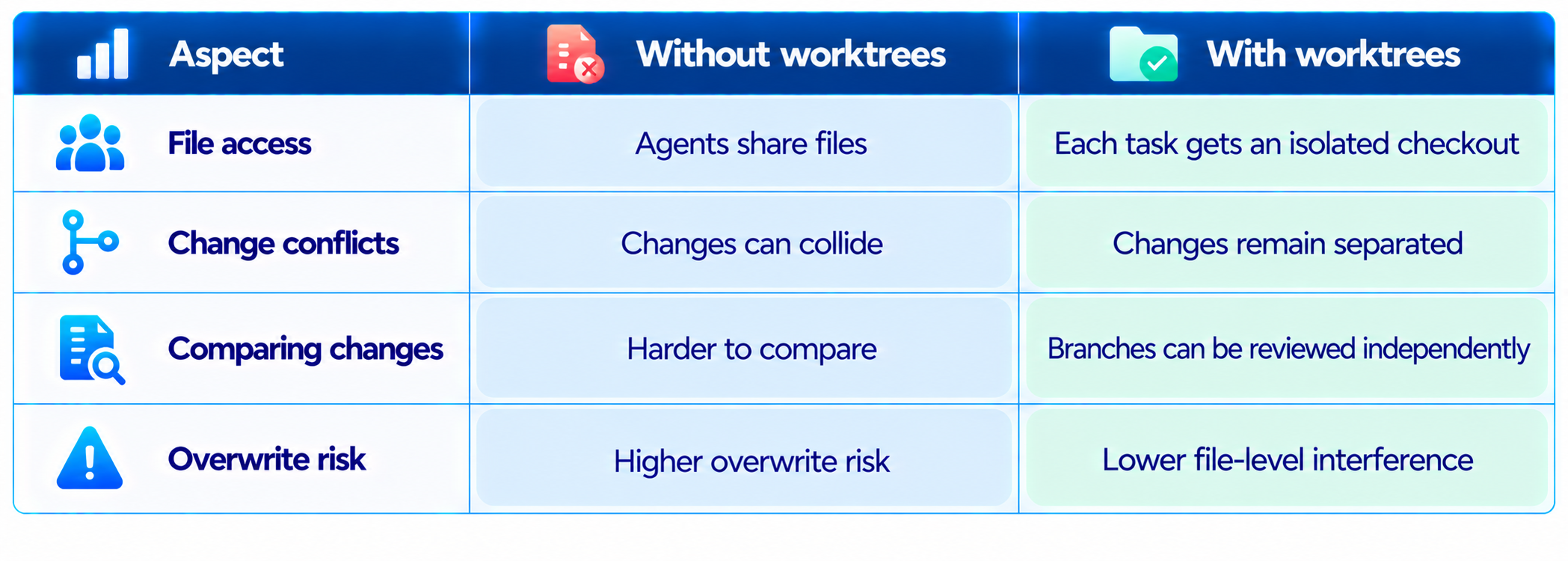
Parallel agents become dangerous when they share the same working directory. Two sessions may edit the same file, change the same configuration, start conflicting processes or leave the repository in a state that neither session understands.
Git worktrees solve much of this problem by giving each session a separate working directory connected to the same repository. Claude Code Desktop can create a worktree for a session, while the CLI also supports worktree-based workflows. Anthropic's guidance specifically recommends separate worktrees for independent parallel tasks.
There is still a merge problem. Worktrees prevent simultaneous file conflicts while the agents are working, but they do not eliminate conflicts when changes are eventually combined. The developer still needs to review the resulting branches and resolve legitimate merge conflicts.
5. Running Two Claude Code Sessions Side by Side
Desktop supports viewing two sessions simultaneously. This is useful when one session is implementing a change while another is running tests, reviewing the repository or investigating a related issue.
Side-by-side sessions are especially useful for verification. One session can implement a feature while another checks the resulting behavior from an independent context. That creates a lightweight reviewer pattern without forcing every task into one giant conversation.
The limitation is human attention. Two visible sessions do not mean both deserve equal attention every second. The useful pattern is to let independent tasks run and then focus the developer's attention on the session that needs a decision or approval.
6. Claude Code Side Chats: Ask Questions Without Polluting the Task
Side chats are designed for questions that should not change the direction of the main coding session. Anthropic's desktop redesign describes the feature as a way to branch off a question while keeping the main thread focused. The side chat can use the main thread's context, but its discussion does not feed back into the main task.
This is useful when you suddenly need to ask, "Why did this dependency change?" or "What does this API function do?" while an agent is performing a long refactor. Instead of inserting that question into the implementation conversation, the developer can investigate separately.
For context engineering, this is a meaningful feature. A long-running coding agent benefits when its main context stays focused on the actual task. Unrelated questions consume context and can subtly change the agent's priorities.
7. The New Environment Model
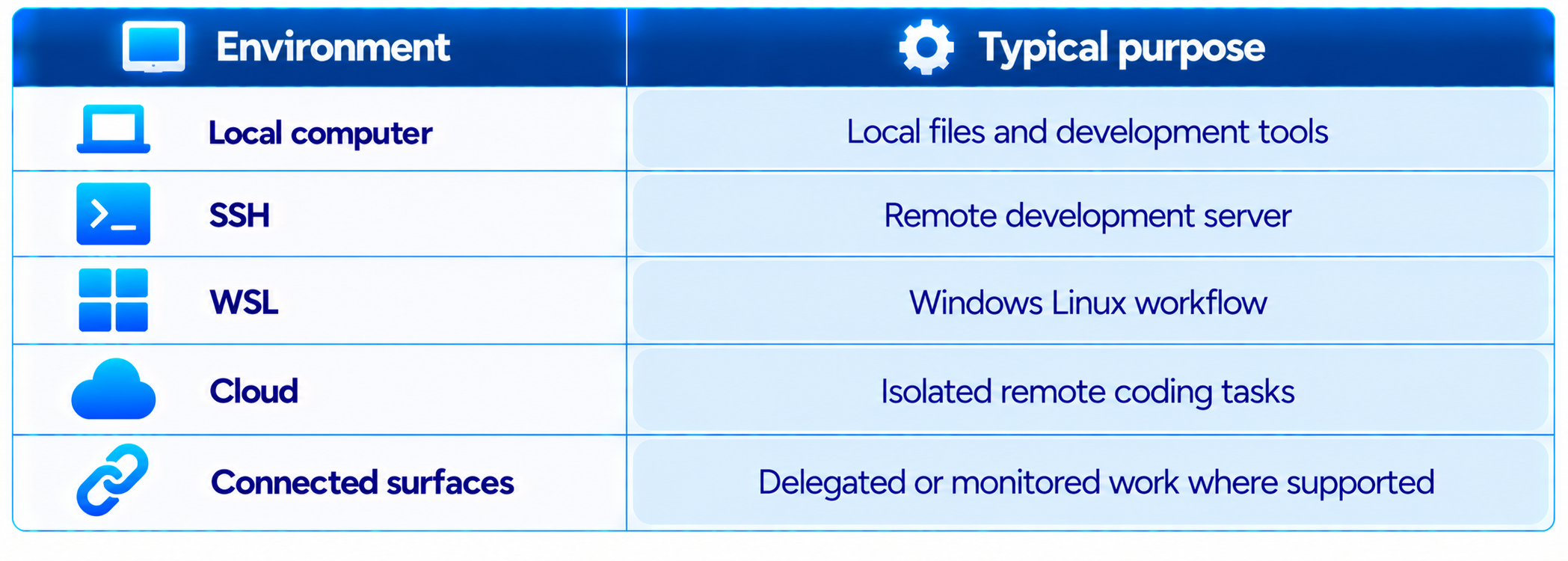
The current Desktop 2.37337.1 rollout makes environments more central to session organization. An environment can represent where Claude Code is working, such as the local computer, a cloud environment, an SSH host or another supported execution surface.
This is a logical direction for Claude Code because a developer may no longer have only one execution location. The same developer can work locally, connect to a remote machine, start cloud sessions and use mobile or web surfaces to monitor eligible cloud work.
This also makes environment selection part of session design. A local task may need local files and tools, while a cloud task can be isolated from the developer's machine.
8. What Happened With the 2.37337.1 Sidebar Rollout?
The current Desktop 2.37337.1 rollout has also changed the sidebar for some users. Reports from October 14-15, 2026 show sessions being reorganized around environment-based sections, with some users losing the previous project or folder grouping view after migration. Anthropic's public GitHub issue tracker contains reports of sessions being placed under a Default section when the previous folder grouping was not preserved.
This distinction matters. The reports describe an organization and navigation problem, not deletion of the underlying session records. In reported migrations, sessions remained available through other views, while another report says sessions still started in the correct folder even when the app displayed a local-environment warning.
For developers with hundreds of existing Claude Code sessions, this means the interface may look different after the update. The exact sidebar layout can vary during the rollout.
9. The Desktop App Is Becoming a Full Coding Workspace
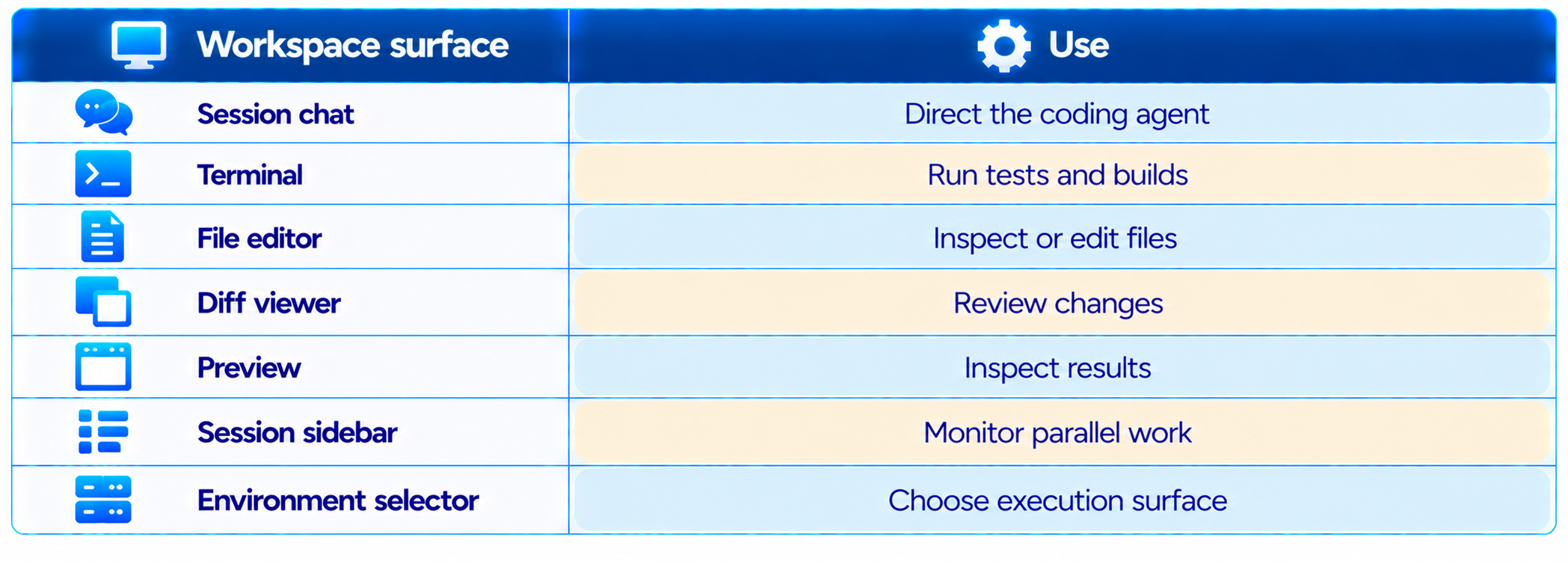
The multi-session update makes more sense when viewed alongside the rest of the Desktop redesign. Anthropic has brought an integrated terminal, file editor, faster diff viewer and expanded preview into the same interface. The idea is to reduce the number of times developers need to leave Claude Code to inspect or validate the agent's work.
This is closer to an AI-native IDE than a simple chat application. The agent can work while the developer remains in the same surface to inspect files, run validation and review diffs.
10. Claude Code Desktop vs Claude Code CLI
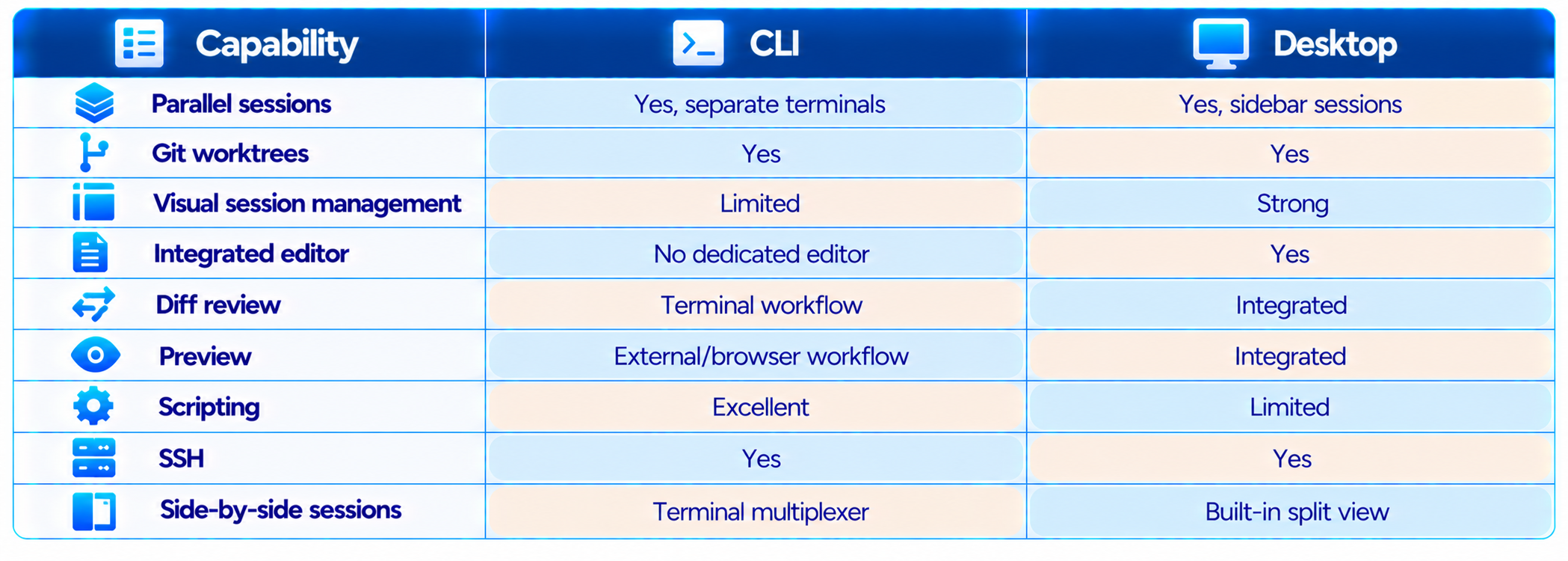
The CLI remains the better surface for scripting, automation and developers who prefer terminal-first workflows. Desktop is stronger when the job involves managing several sessions, visually reviewing changes and keeping multiple agent tasks in one workspace.
The important distinction is workflow rather than raw capability. Both surfaces can run Claude Code tasks, but Desktop adds a visual orchestration layer around sessions, environments, worktrees and review.
11. Claude Code Desktop vs Cursor and Other AI Coding Tools
Claude Code Desktop is competing less on the traditional editor feature checklist and more on agent orchestration. Cursor, Windsurf and other AI-native editors put the coding assistant inside the IDE. Claude Code's approach is increasingly centered on sessions, agents, worktrees and delegation.
Developers who want an AI editor that feels like a traditional IDE may still prefer an editor-first product. Developers who want to orchestrate several autonomous coding tasks may find Claude Code's session model more natural.
12. Parallel Sessions vs Subagents
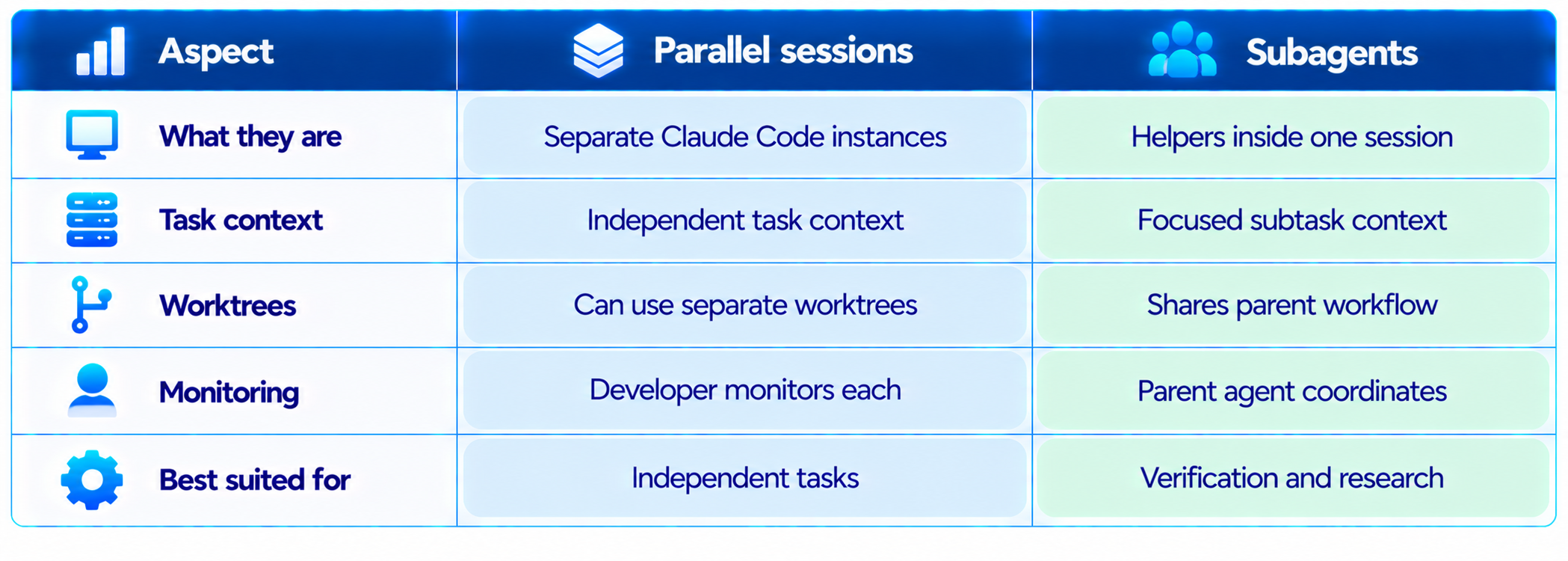
Parallel sessions and subagents solve different problems. A parallel session is a separate Claude Code instance with its own task context and, when using worktrees, its own repository checkout. A subagent runs inside a session as a scoped helper with its own context and tool limits.
A mature coding workflow can use both. One session can own a feature branch while subagents research the repository and verify tests. Separate sessions can then handle unrelated work streams.
13. A Practical Multi-Session Coding Workflow
The best use of the update is not to create as many sessions as possible. It is to identify tasks that can safely proceed independently.
Start with a clear project goal and inspect the repository before splitting work.
Separate tasks by ownership of files and components.
Create a Git worktree for each independent coding stream.
Give each session a narrow task with explicit acceptance criteria.
Let implementation, tests and research progress in parallel when they do not depend on one another.
Use side chats for questions that should not alter the main task.
Review diffs as sessions finish rather than merging everything blindly.
Run the complete test suite before merging branches.
Archive or close completed sessions so the workspace remains readable.
14. Example: Building a Full-Stack Feature With Claude Code Sessions
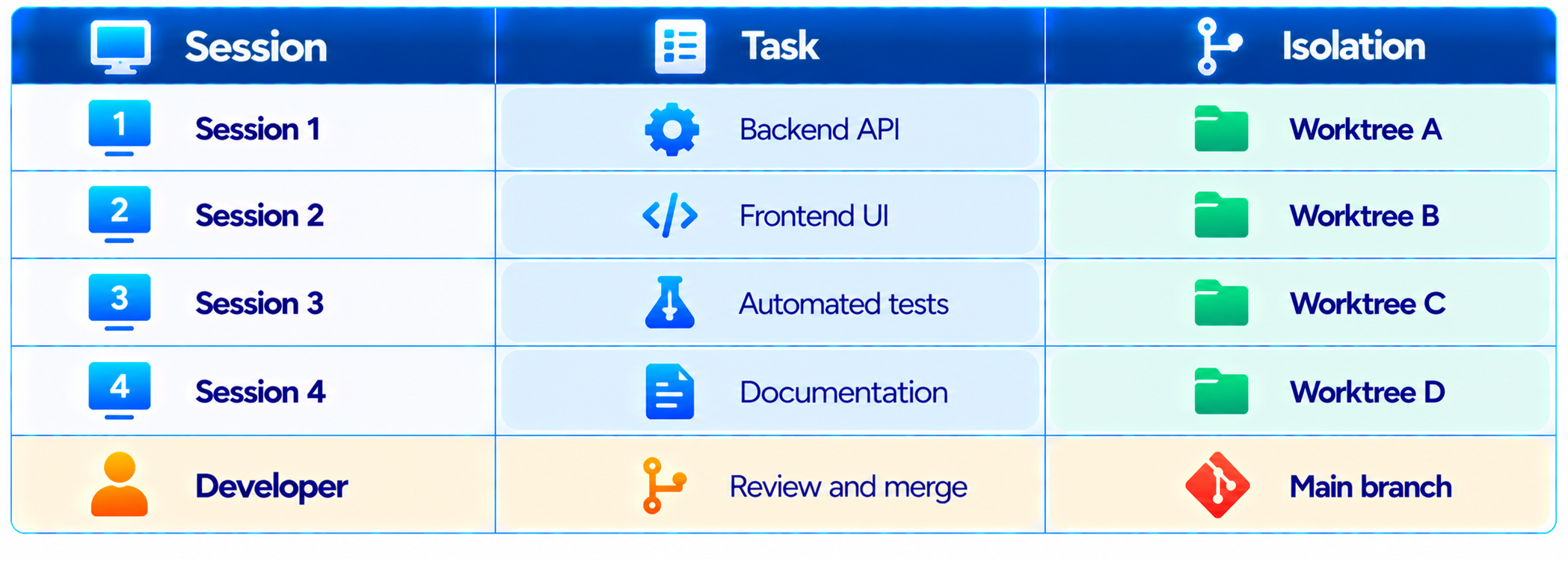
A useful full-stack split is to give one session ownership of the backend API, another ownership of the frontend UI, another ownership of automated tests and another ownership of documentation. The developer remains responsible for the final merge and acceptance.
The sessions can work concurrently because their responsibilities are separated. The developer's job becomes coordination and review rather than manually performing every intermediate coding step.
15. Why Context Management Becomes More Important
Multiple agents create a new problem: context fragmentation. If five sessions are working on one product, each session has a different view of the current state. A change in one worktree may affect another task even though the second agent does not know it yet.
That is why repository instructions, clear task boundaries, Git branches, tests and structured handoffs become more important as the number of sessions increases. A good session prompt should state the goal, relevant files, constraints, expected behavior and validation method.
16. Security and Permissions With Multiple Agents
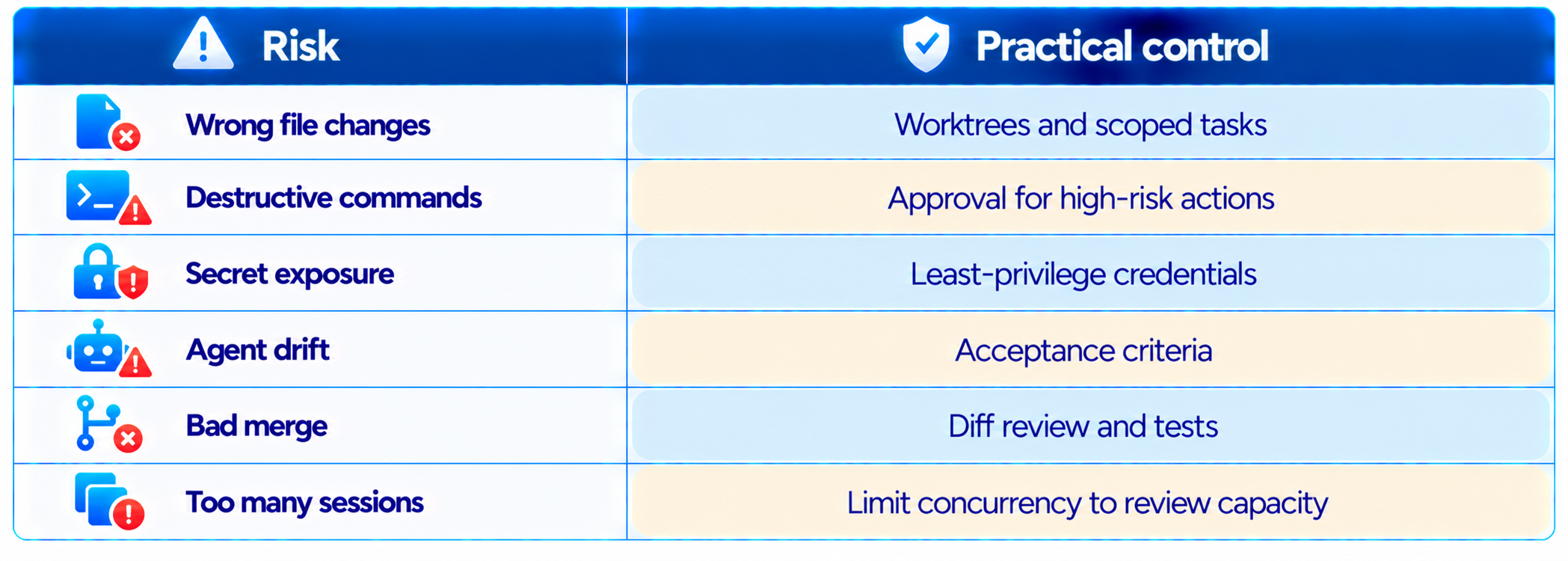
Parallel coding increases the number of actions an AI agent can take, so permission design matters. If several sessions can edit repositories, run shell commands and access external services, a mistake can propagate faster than it would in a single-agent workflow.
Use worktrees, scoped permissions, explicit approval for high-risk commands, least-privilege credentials, clear acceptance criteria and mandatory diff review. More sessions should never mean less review.
17. Cloud Sessions Change the Workflow Further
Claude Code's cloud sessions extend the same parallel-agent idea beyond the developer's local machine. Anthropic's current documentation describes cloud sessions as isolated environments where coding tasks can continue without relying on the local computer staying active. Cloud sessions can be started from supported Claude Code surfaces including Desktop, web and mobile.
Local sessions are useful when an agent needs local tools, local files or a development environment. Cloud sessions are useful for isolated repository tasks that can run independently. Their filesystem, credentials, network access and execution environment differ, so developers should choose the environment based on the task.
18. Claude Code Desktop and Long-Running Work
The more sessions a developer can manage, the more practical long-running agent work becomes. A refactor, test migration or documentation pass can continue while the developer handles another task.
Anthropic's newer project model goes further by coordinating parallel threads, with each thread able to operate as a Claude Code cloud session on its own branch and repository copy. This shows the broader direction of Claude Code: persistent software-development workflows in which several agent tasks operate under human supervision.
19. Who Should Use the New Multi-Session Workflow?
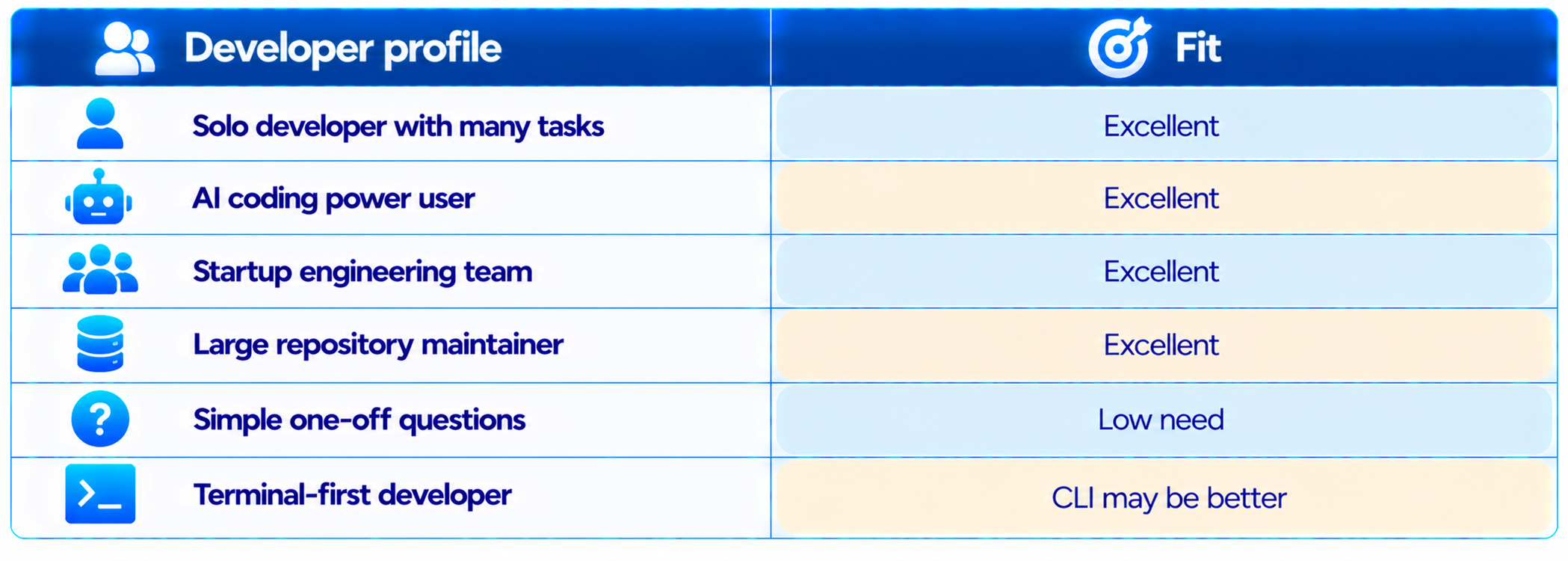
The biggest gains appear when there are multiple independent tasks. Solo developers with many small tasks, AI coding power users, startup engineering teams and repository maintainers are likely to benefit most. If you only ask Claude Code one question at a time, the multi-session update will not fundamentally change your workflow.
20. What Is Still Different Across Users?
The Desktop experience is actively changing, and the current 2.37337.1 rollout demonstrates why interface descriptions should be tied to the actual version and account configuration. Current reports show differences between machines on the same account, including different sidebar grouping options and migration states.
Screenshots, menu names and exact sidebar layouts can therefore change as Anthropic rolls out the new session model. The underlying concepts are more stable: sessions, environments, worktrees, parallel work, side chats and agent orchestration.
21. Best Practices for Claude Code Parallel Sessions
Use separate worktrees for independent changes. Do not split tasks that edit the same files unless the work is coordinated. Start with two or three concurrent sessions. Give every session a clear definition of done. Ask agents to run tests before reporting completion. Keep the main session focused and use side chats for unrelated questions. Use repository instructions such as CLAUDE.md to keep conventions consistent. Review every diff before merging. Track which agent owns which branch. Archive finished sessions. Measure rework and review time, not just the number of parallel sessions.
22. Is Claude Code Desktop Multi-Session Worth It?
Yes. The update addresses one of the biggest limitations of single-agent coding workflows: waiting. Once several independent tasks can run simultaneously, the developer's time can shift from watching one agent work to steering several streams of work.
The combination of sessions and Git worktrees is the strongest part. Parallelism without isolation is risky. Parallelism with isolated branches, clear task boundaries and human review is much more useful.
The desktop integration also matters. The terminal, editor, diff viewer and preview pane reduce the need to jump between applications while an agent works. The current sidebar rollout deserves some caution because users have reported project-grouping migrations and environment-related UI issues.
23. Final Verdict
Claude Code Desktop is becoming less like a graphical wrapper around a coding CLI and more like a control center for AI software engineering. The multi-session model is the reason.
The most important change is not the number of tabs. It is the ability to structure development as multiple independent agent tasks, each with its own context and, when needed, its own Git worktree. That makes parallel coding practical without requiring the developer to manually juggle several terminal windows.
The desktop workspace strengthens the workflow further with integrated terminal, file editing, diff review and previews. Side chats protect the main task from unrelated questions, while environment-aware sessions make local, remote and cloud development easier to manage.
The main limitation is complexity. More agents mean more branches, more context, more output and more changes to review. The right goal is not maximum concurrency. It is maximum useful concurrency while maintaining engineering quality.
My rating: 9.4/10 for parallel agent workflows, 9.2/10 for session management, 9.0/10 for developer productivity, 8.7/10 for current UX stability and 9.0/10 overall.
Bottom line: Claude Code Desktop's multi-session workflow is a meaningful step toward AI-native software development. Developers who regularly have several coding tasks in flight can get much more value from Claude Code by treating sessions as parallel work streams, isolating repository changes with worktrees and keeping human review at the center of the process.
Frequently Asked Questions
What is the Claude Code Desktop multi-session update?
It is the Desktop workflow that lets developers manage multiple Claude Code sessions in one application, including parallel tasks, session switching, side chats, split views and environment-aware workflows.
Can Claude Code Desktop run multiple sessions at once?
Yes. The Desktop app is designed to manage multiple active and recent Claude Code sessions and run independent tasks in parallel.
Does Claude Code Desktop support Git worktrees?
Yes. Sessions can use Git worktrees to isolate independent repository work and reduce conflicts between parallel agents.
Can I view two Claude Code sessions at the same time?
Yes. The current Desktop session-management workflow supports a split view with two sessions visible together.
What is a Claude Code side chat?
A side chat is a separate conversation branch for asking questions while a main coding session continues. Its discussion does not become part of the main task context.
What are Claude Code environments?
Environments identify where a session runs, such as the local computer, an SSH host or a cloud environment, depending on configuration.
Is Claude Code Desktop better than the CLI?
Desktop is better for visual session management and parallel workflows. The CLI remains stronger for scripting, terminal automation and terminal-first development.
Can Claude Code sessions run in the cloud?
Yes. Claude Code supports cloud sessions for eligible users and workflows, with isolated remote execution environments.
Do multiple Claude Code sessions share the same context?
No. Each session has its own conversation context. Repository instructions and shared files can provide common context, but the conversations are separate.
Can multiple sessions modify the same repository?
Yes, but independent tasks should use separate Git worktrees. Tasks that touch the same files should generally stay coordinated in one session.
What changed in Desktop 2.37337.1?
The current rollout introduces a new environment-oriented session organization layer and changes how some users see and group sessions in the sidebar.
Did the 2.37337.1 update delete Claude Code sessions?
Current reports describe sidebar organization and migration problems rather than deletion of session data. Sessions can still appear through other views, although behavior can vary during the rollout.
How many parallel Claude Code sessions should I run?
Two or three is a sensible starting point. Increase concurrency only while you can still review the resulting changes properly.
Is Claude Code Desktop worth using for coding?
Yes, especially for repository-level development, parallel tasks, agentic coding and workflows where reviewing several AI sessions from one workspace is valuable.
Recommended Blogs
Claude Fable 5.1 Review: Benchmarks, Pricing & Is It Worth It? (2026)
Claude Mythos 5.1 Review: Benchmarks, Price & Is It Worth It? (2026)
GPT-5.6 Review: Sol, Terra, Luna Features, Benchmarks & Pricing
Model Routing for AI Coding Agents: How Intelligent Routing Works
How to Secure AI Coding Agents: Permissions, Sandboxing, MCP & Secrets
Resources & Community
Join our community of 70,000+ AI enthusiasts and learn to build powerful AI applications. Whether you are a beginner or an experienced developer, Build Fast with AI helps you understand and implement AI in your projects.
Agentic AI Launchpad 2026
A structured 6-week cohort program that takes you from AI basics to building and deploying real-world agentic AI systems. Includes live sessions, expert mentorship, project reviews and a builder community network.
Ready to go from learning to building? Join the next cohort: Agentic AI Launchpad 2026
Free AI Resources
Access free tools, workshops and micro-learning to keep building.

