



Best AI Coding Agents in 2026: Which Tool Actually Fits Your Workflow?
The best AI coding agent in 2026 is not automatically the one with the highest benchmark score. It is the one that fits the way you build software: where the agent runs, how much control you need, which models you want to use, how you review changes, and how much you are willing to spend on repeated agent runs.
Claude Code, OpenAI Codex, Cursor and OpenCode all help developers move beyond autocomplete. They can inspect repositories, propose or make multi-file changes, run tools, work through errors and help complete a feature. But they approach that work from different directions. Claude Code is a terminal-first engineering agent, Codex is designed for delegated work across local and cloud environments, Cursor integrates agents into an AI-focused editor, and OpenCode is an open-source agent harness that lets developers choose among many model providers, including local models.
That distinction matters more than a universal ranking. A developer who wants a highly integrated editor may be more productive in Cursor. A team that hands off isolated tasks and reviews the resulting diff may prefer Codex. An engineer who wants a strong terminal workflow may gravitate toward Claude Code. A developer who wants control over model choice, provider and configuration may prefer OpenCode.
This guide compares the four tools by workflow, model flexibility, pricing approach, coding tasks, security and setup. Prices and plan allowances change frequently, so verify the current vendor pages before purchasing. This comparison does not treat one public benchmark as proof that an agent will be best on every repository.
QUICK ANSWER
Start with the tool that matches your preferred working environment, then benchmark it against your own tickets. For difficult multi-file tasks, test Claude Code and Codex. For continuous in-editor work, test Cursor. For model freedom, local inference and customization, test OpenCode. If you are building a system that routes work across models, our guide to model routing for AI coding agents explains how to make that architecture practical.
1. What Is an AI Coding Agent?
An AI coding agent is a software tool that uses a language model to carry out a development task through a cycle of understanding, planning, editing, tool execution and verification. Rather than returning only a code snippet, an agent can inspect files, search a repository, modify several modules, run tests, read the failures and attempt a correction.
That does not make it an autonomous senior engineer. The model can misunderstand requirements, choose the wrong abstraction, make tests pass without preserving intended behavior, or misread repository conventions. The developer remains responsible for task definition, permissions, review and the final decision to merge.
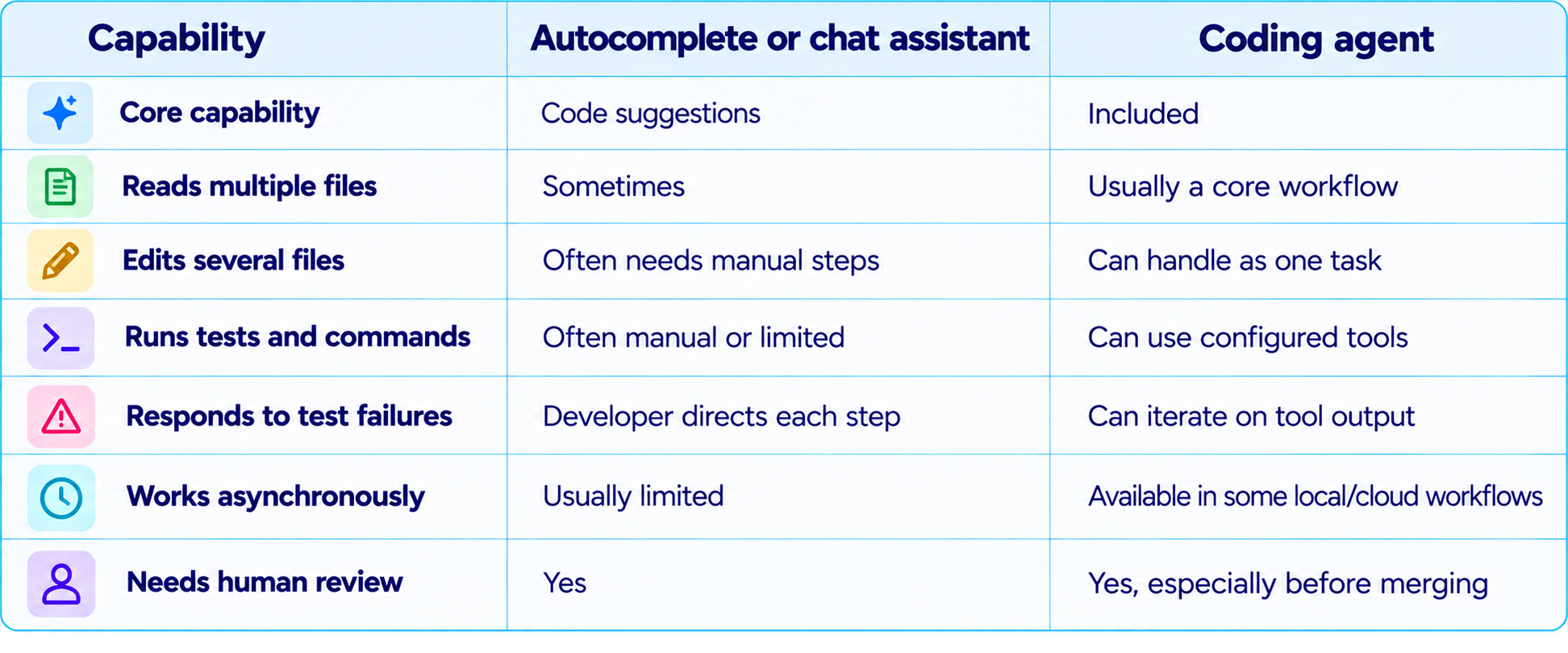
For a broader introduction to the category, read What Is an AI Agent? Beginner Guide With Examples (2026).
2. Claude Code: Best for Deep Terminal-First Engineering
Claude Code is Anthropic's coding agent built around a repository-aware terminal workflow. It can inspect a project, edit files, run shell commands and tests, and continue through a multi-step task. It is a natural fit for developers who are comfortable in a terminal and want the agent to work directly with the same repository, commands and test suite they use themselves.
A strength is that project guidance can be written down and reused. Teams can provide repository instructions, coding conventions, preferred commands and architectural boundaries so the agent does not need to rediscover them in every session. Hooks, skills, subagents and integrations can extend the workflow, although every additional tool increases the need for clear permissions and predictable behavior.
Claude Code is attractive for difficult debugging, multi-file refactoring, test-driven changes and work where the agent must repeatedly inspect output before deciding what to do next. The terminal-first experience also makes the action trail visible: commands and diffs can be reviewed as the task progresses.
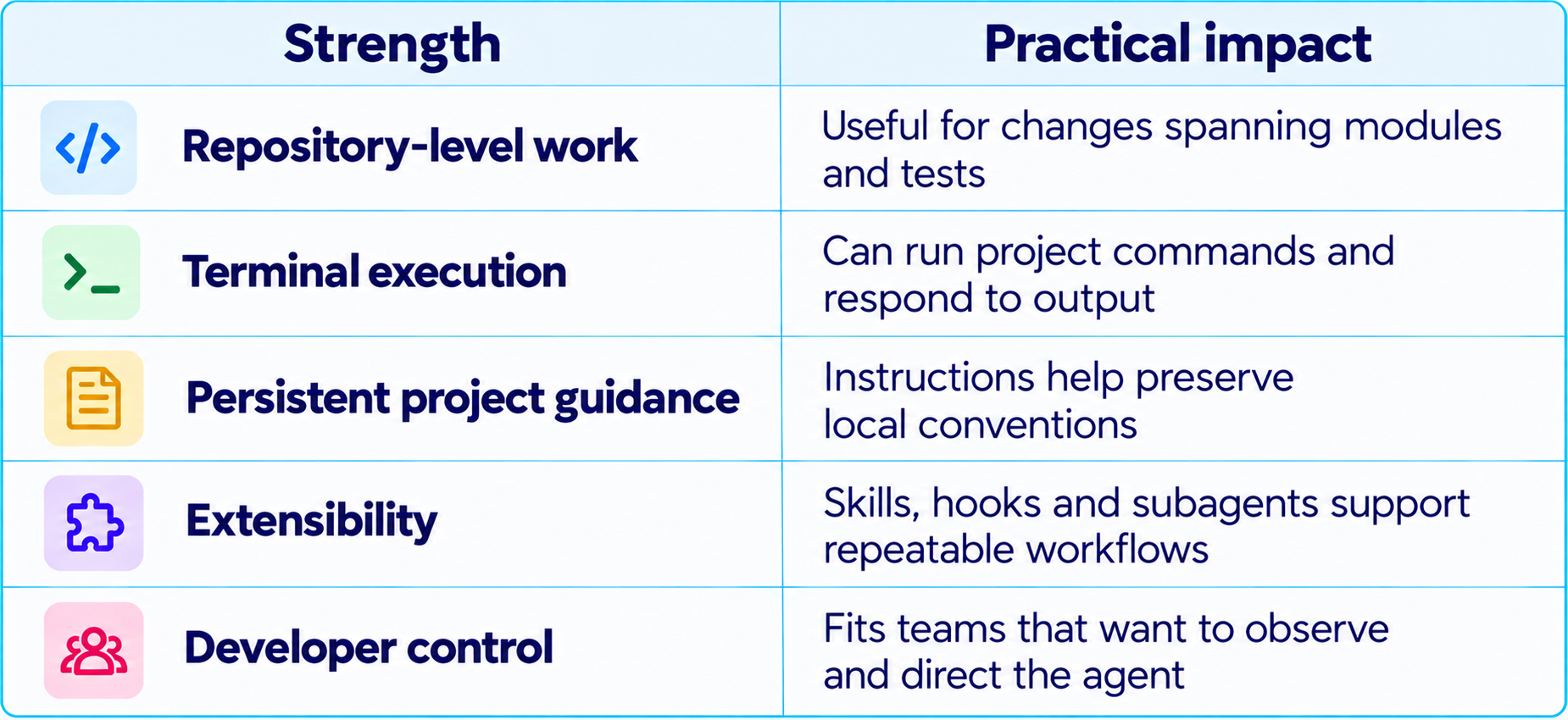
The trade-off is that a terminal-native workflow can feel less approachable to developers who prefer a visual editor. Cost also needs attention: subscription usage limits and API billing are not interchangeable, and large tasks can consume more usage than small edits. Compare how many of your real tasks each plan completes, not just the monthly sticker price.
For a closer look at terminal workflows and task delegation, see our Claude Code vs Codex comparison. If you manage concurrent sessions, Claude Code Agent View covers the multi-session management side.
3. OpenAI Codex: Best for Delegated and Parallel Tasks
OpenAI Codex has evolved into a broader coding-agent workflow spanning terminal use, IDE integration, desktop management and cloud execution. Its distinctive use case is delegation: describe a bounded task, let an agent work in its environment, and inspect the result when it is ready. This is useful when you want to keep moving on another task while the agent investigates a bug, implements a scoped feature or updates tests.
Codex's desktop workflow supports managing multiple agent threads and reviewing their changes. OpenAI has described worktree-based isolation, where separate agents work on isolated copies of a repository instead of competing over the same working tree. This is a meaningful advantage for parallel development because it reduces accidental interference between tasks.
Codex is a strong choice for issue-to-diff work: implement a clearly specified change, fix a test, investigate a regression, or prepare a reviewable patch. Cloud execution is useful when the task should run independently from the developer's local environment. Local CLI and IDE options matter when the developer wants a tighter loop.
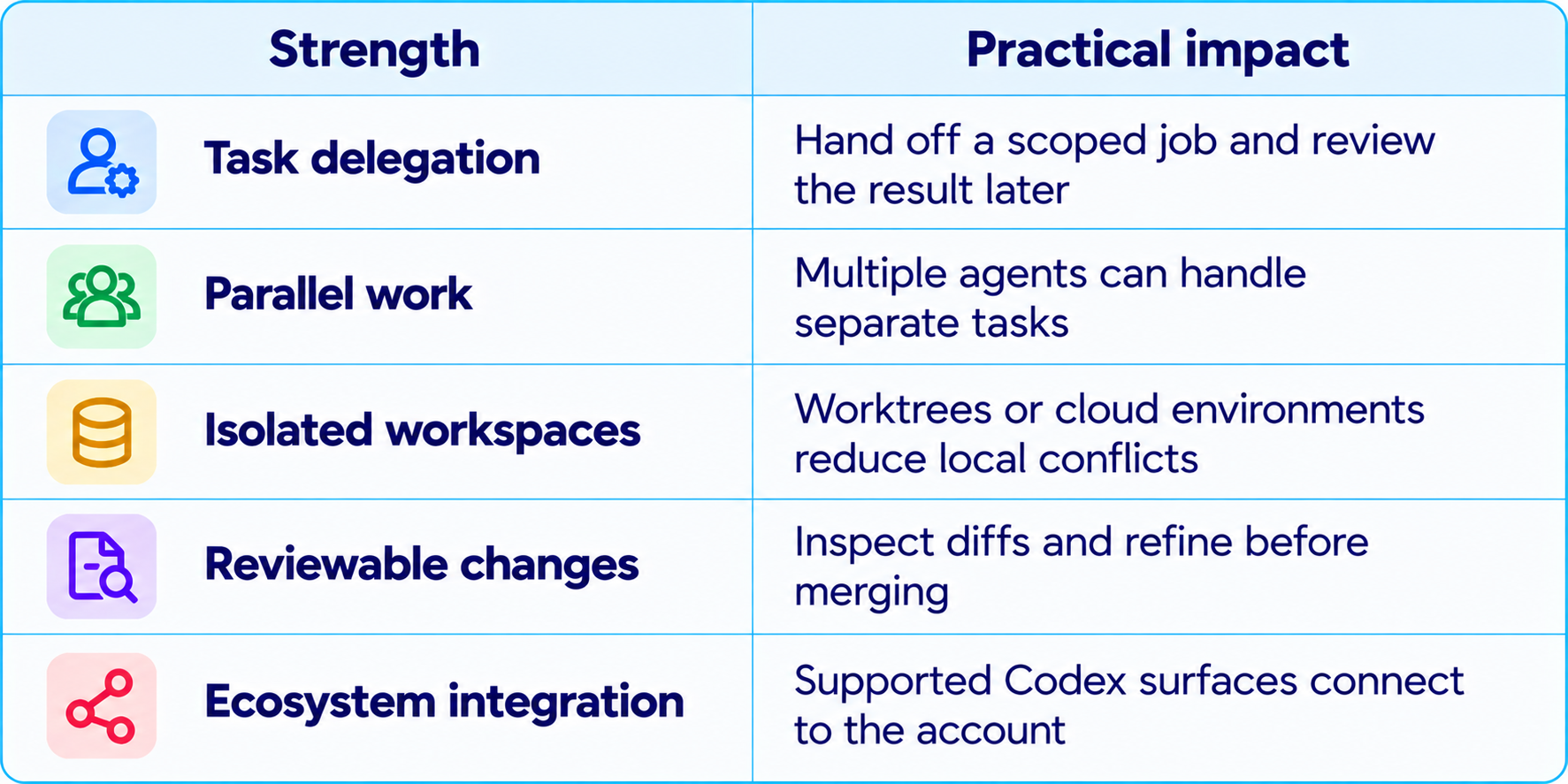
The trade-off is plan and environment dependence. Codex availability, cloud execution and usage limits vary by account type, plan and workspace configuration. A task that runs well in a prepared cloud environment may behave differently if dependencies, environment variables or network access are missing. Reproducible setup scripts and clear task instructions are essential.
Codex is not automatically better than Claude Code because it can run in the cloud, just as Claude Code is not automatically better because it runs in a terminal. Compare supervision needs, final-diff quality and cost per accepted task. Our AI coding tools collection tracks the broader shift from code completion to agent-based development.
4. Cursor: Best for Daily IDE-Based Development
Cursor is an AI-focused code editor designed to keep agentic features close to normal editing. Instead of making the terminal the center of the workflow, Cursor brings code navigation, inline edits, chat, agent tasks and model selection into one development environment. For developers who constantly move between small fixes, code review, refactoring and feature work, that integration can reduce context switching.
Cursor's advantage is not simply that it can call a model. It combines the editor with repository context, agent execution, model options, rules, MCP servers, skills, hooks and cloud agents on supported plans. That makes it useful for developers who want one environment for manual coding and larger AI-assisted tasks.
Cursor is particularly effective for incremental development: explain a component, change a few files, inspect the diff, correct a function and continue without leaving the editor. Cloud agents can extend that pattern by letting tasks run away from the local editing loop, depending on plan availability.
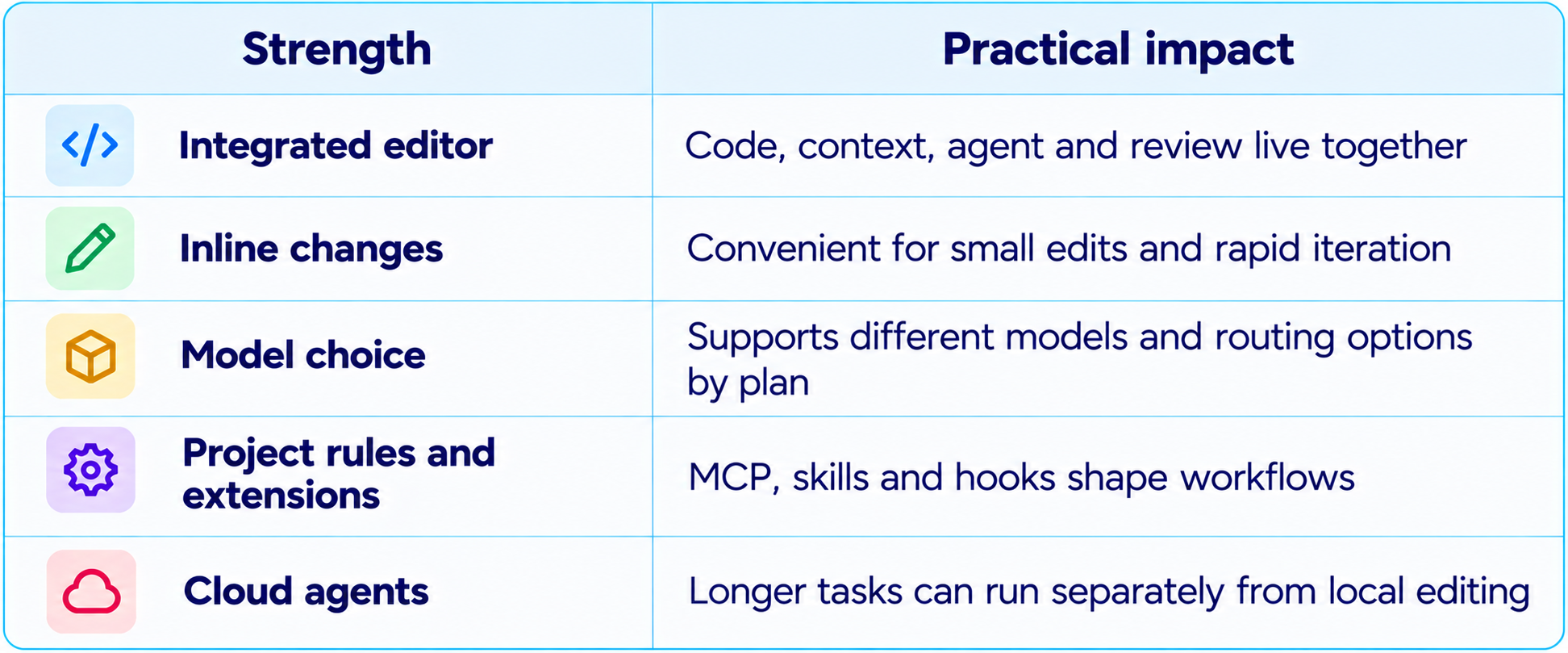
Cursor's trade-off is that pricing is more than a flat subscription label. Plans include different usage allowances, and third-party model usage may be charged separately or consume usage pools according to the current plan. A developer who repeatedly selects an expensive model can use their allowance faster than someone working with a lower-cost option.
Cursor has offered an India-specific Start plan at ₹649 per month, with local billing and UPI support. Availability and included models can change, so verify the live pricing page before budgeting. For a deeper look at background work, read our Cursor Cloud Agents & Dev Environments guide
5. OpenCode: Best for Model Choice and Customization
OpenCode is an open-source coding-agent harness that can connect to many model providers and can also work with local models. Its documentation describes support for more than 75 providers through the AI SDK and Models.dev, and lets developers choose a model, configure agents and customize tool permissions.
That flexibility matters if you do not want the agent and the model to be a single purchase. You can experiment with different providers, compare model quality on your own repository, switch endpoints, or connect a local inference server when the model and hardware are suitable. OpenCode includes primary agents such as Build and Plan, and supports specialized subagents with different prompts, model choices and tool access.
OpenCode is attractive for developers who like terminal workflows but want more control over the model layer. It can also be useful for teams building a repeatable internal coding setup, because configuration and permissions can be adapted to a project rather than relying entirely on a vendor's defaults.
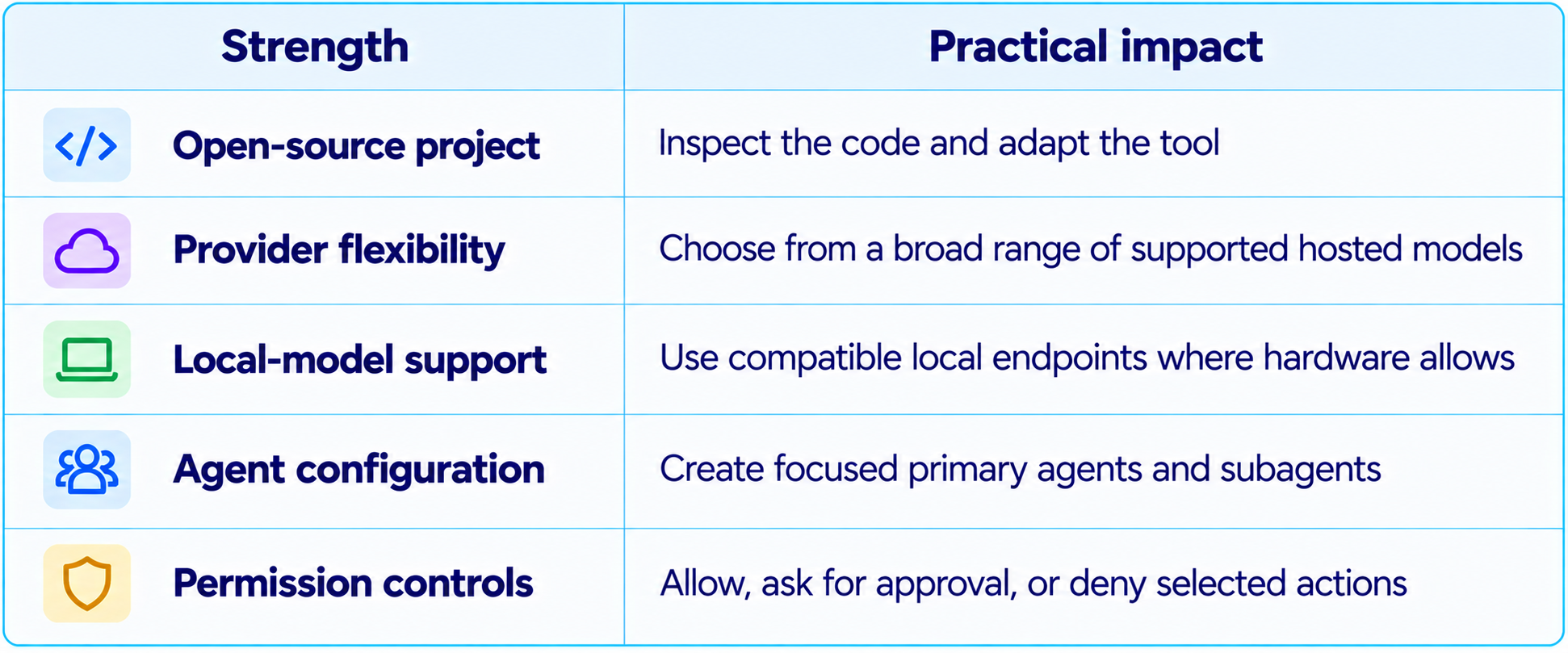
The trade-off is responsibility. OpenCode's flexibility does not mean every model will work equally well. Coding agents need both code generation and reliable tool calling. A model that writes plausible code may still fail when asked to execute commands, interpret test output or recover from a broken build. You must choose the model, configure access and evaluate results yourself.
OpenCode is not a free unlimited AI service. The agent harness is open source, but hosted inference can still cost money. Local inference may avoid per-token API charges, but shifts the cost to hardware, electricity, setup and model-performance limits. Use our AI coding tools collection as a starting point for the wider category.
6. Claude Code vs Codex vs Cursor vs OpenCode
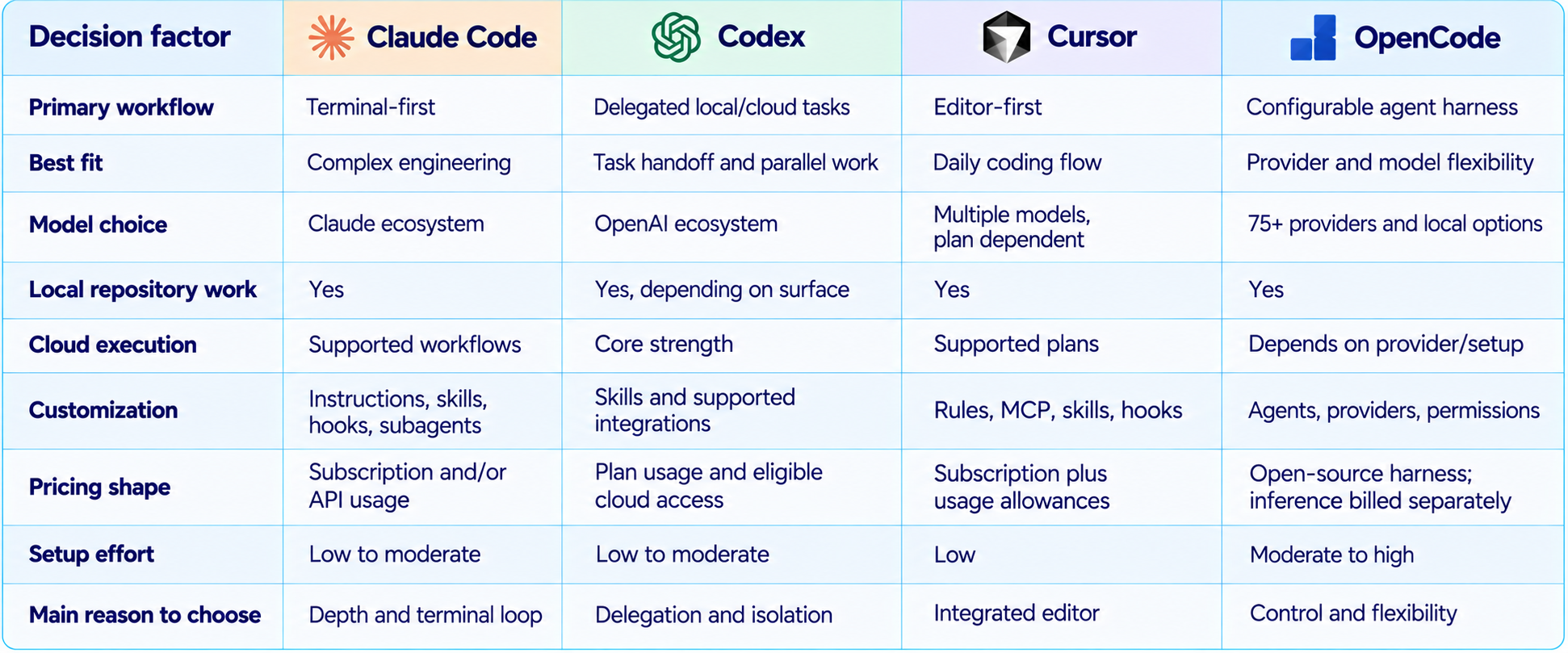
This is a workflow comparison, not a universal quality ranking. Results depend on the model selected, repository context, tool permissions, task description, tests and environment. Even the same model can perform differently inside two agent harnesses.
7. Which Agent Is Best for Different Tasks?
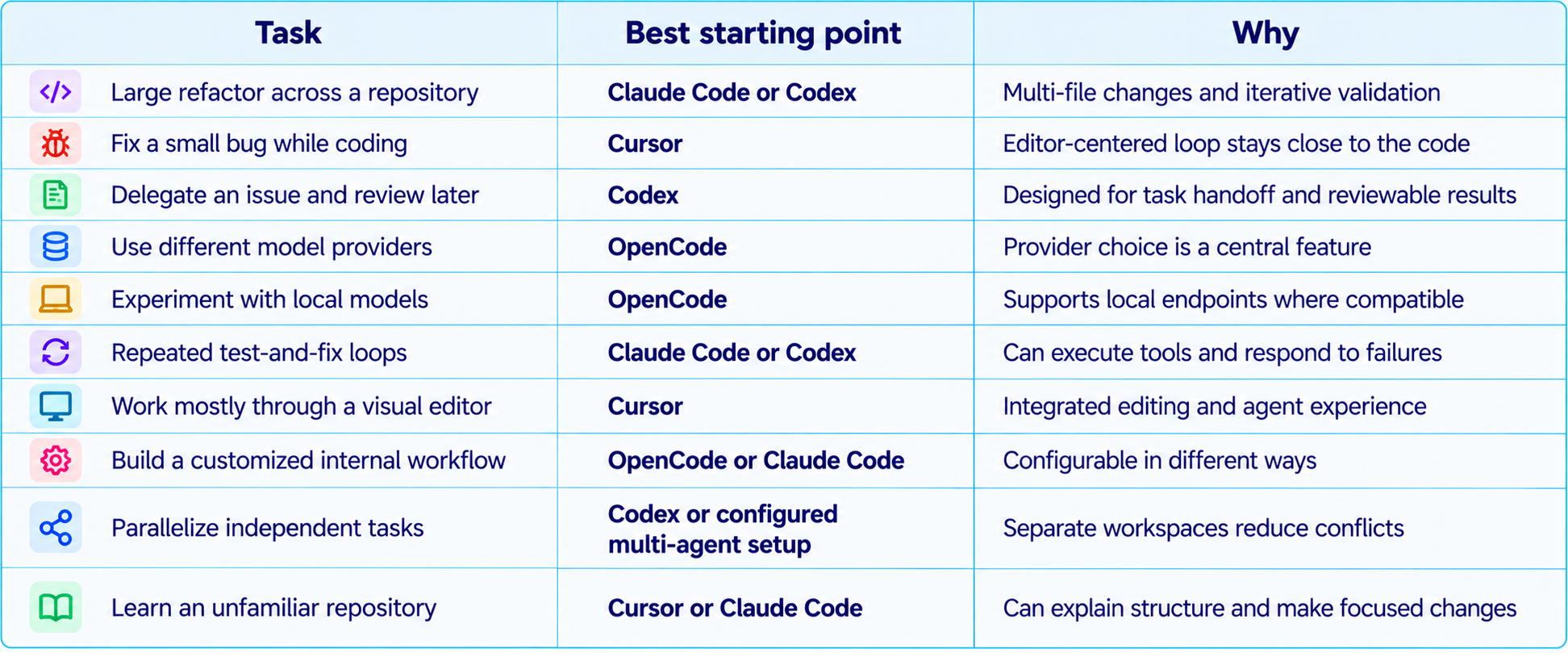
Treat these as starting recommendations. If you have a mature test suite and clear tickets, Codex may be more effective than expected. If your repository has unusual conventions, Claude Code may need carefully written project instructions. If you have a reliable local model, OpenCode may be attractive, but verify that the model can use tools and recover from errors.
8. Pricing: Compare Cost per Accepted Change
A common mistake is comparing monthly subscription prices and assuming the cheapest plan is the cheapest way to ship software. Coding-agent costs include the subscription, included usage, model-specific rates, overage or top-up rules, and the time a developer spends correcting output. The useful metric is cost per accepted change.
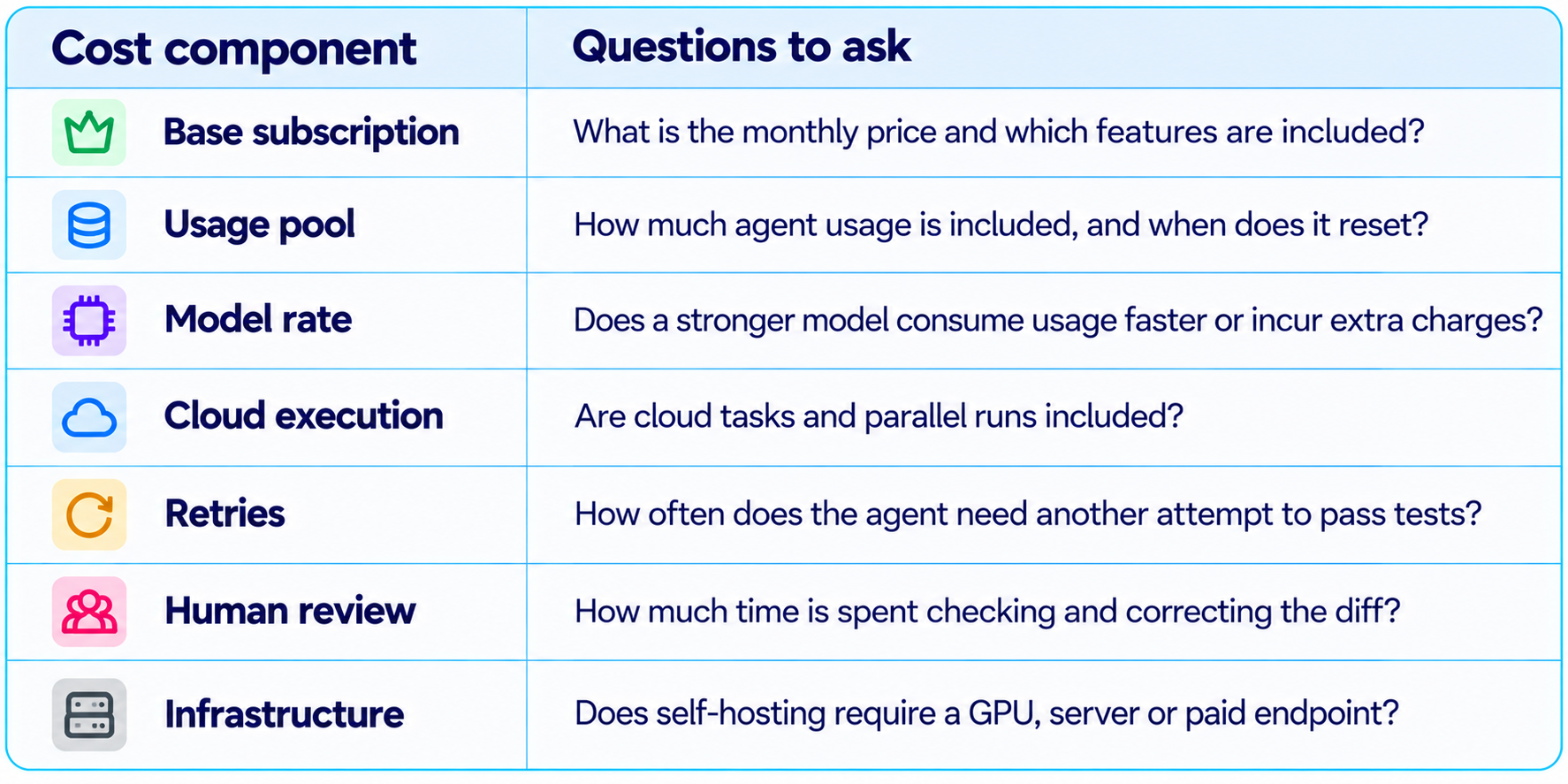
Claude Code's subscription and API routes should not be treated as interchangeable. Codex availability and cloud usage depend on plan and account eligibility. Cursor uses plan-specific allowances, and third-party model costs can vary. OpenCode does not remove inference costs: hosted providers still charge for usage, while local inference has hardware and operational costs.
A practical budget test is to select 20 to 30 representative tickets, run the same tasks through two or three tools, and record the outcome. Track total spend, wall-clock time, human correction time, tests passed and regressions. A tool that costs more but reduces review time substantially may be the better business choice.
9. Benchmarks: What They Can and Cannot Tell You
Benchmarks help narrow the field, but coding-agent performance depends on the task set and evaluation setup. A benchmark may measure issue resolution, repository-level patches, terminal tasks, code generation, or whether an agent can use tools successfully. Those are related but not identical skills.
SWE-bench-style evaluations test whether a system can resolve real repository issues under a defined harness. Terminal-focused evaluations emphasize command-line interaction and task completion. Neither fully captures editor comfort, ease of reviewing changes, team administration, cost predictability or whether the agent follows your codebase's conventions.
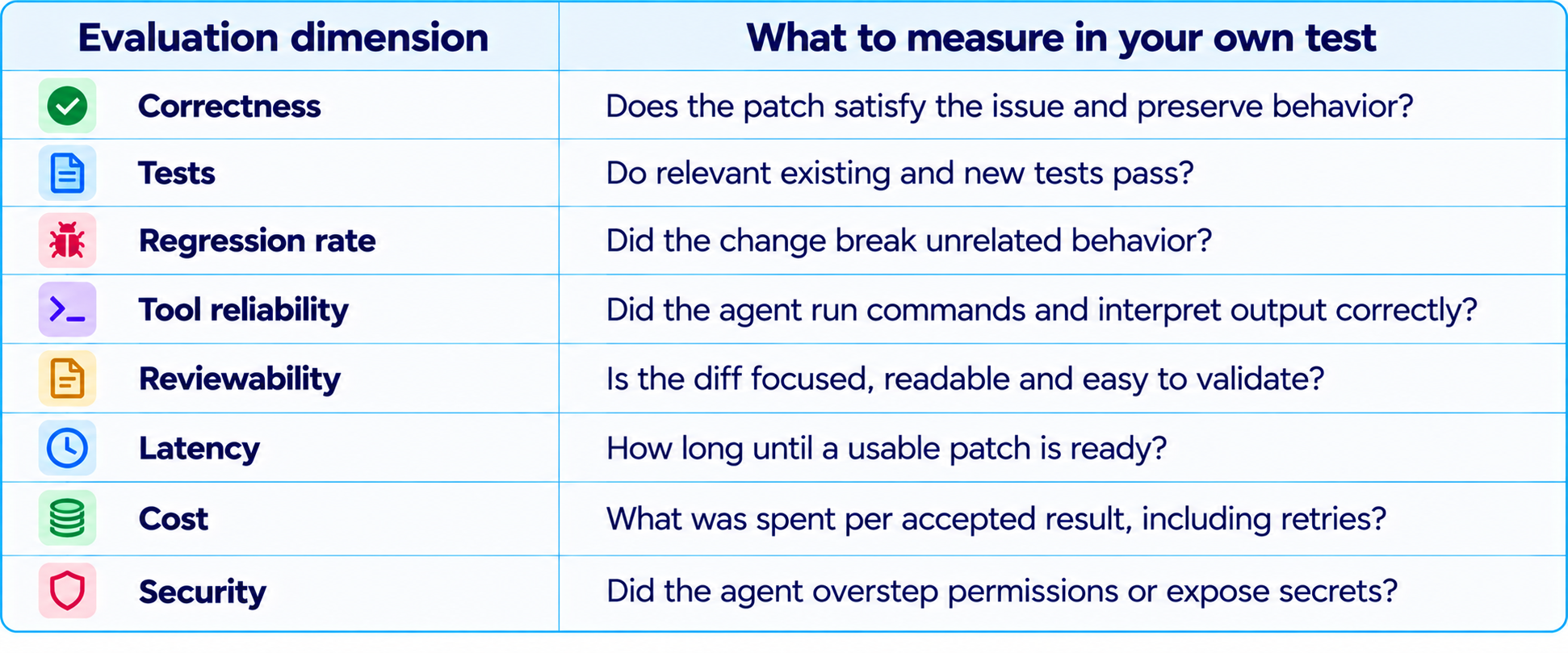
Do not copy a leaderboard score into a purchasing decision without understanding the model version, agent harness, task split and scoring method. Do not compare percentages from different evaluations as if they were the same unit. The most useful benchmark is a small, repeatable suite of real tasks from your own codebase.
10. Security: Do Not Give Every Agent Unlimited Access
AI coding agents can read and edit source code, execute shell commands, install dependencies and interact with tools. Depending on the environment, they may also encounter environment variables, cloud credentials, deployment configuration and private data. Permission design is therefore a core part of selecting an agent.
Use least privilege. Give the agent access only to the repository and tools required for its task. Keep production credentials out of the working environment when possible. Require approval for destructive shell commands, production deployment, permission changes, database writes and external actions. Use isolated branches, worktrees or disposable environments for risky changes, and inspect the final diff before merging.
OpenCode exposes explicit permission choices that can allow, deny or ask for approval for tool actions. Claude Code and Codex also provide ways to manage execution and approvals, while Cursor offers controls that depend on the tool and plan. No interface eliminates the need to understand the permissions it grants.
For a practical checklist, read How to Secure AI Coding Agents in 2026: Permissions, Sandboxing, MCP & Secrets. Our analysis of the risk of giving AI coding agents too much access explains why untrusted repository content matters when an agent can take actions.
11. How to Test the Four Agents Fairly
A fair comparison uses the same repository, task description, starting commit, test commands and acceptance criteria. Do not give one agent a detailed specification and another a vague one. Do not judge one tool by its first response and another by its final patch after several retries.
- Choose 20 to 30 representative tasks: bugs, small features, refactors, tests and documentation.
- Use the same base branch and equivalent environment setup for each tool.
- Provide the same project instructions and task-specific context.
- Record the model and agent version, plan, settings and date of each run.
- Allow a consistent retry policy and count retries in cost and latency.
- Run the same tests and inspect diffs without knowing which tool produced them, if possible.
- Score correctness, maintainability, security, review time and total cost.
- Repeat a subset of tasks to see whether results are stable.
The goal is not to crown a universal winner. It is to learn which tool performs best for the work your team actually does. For an organization, the best agent may vary by task type: a fast model for routine tests, a stronger model for architectural work, and a controlled environment for deployment changes.
12. Recommended Workflow: Use More Than One Agent When It Helps
You do not need to choose one tool forever. Teams can match the agent to the job: Cursor for the interactive editing loop, Claude Code for a difficult repository investigation, Codex for an isolated task that can run in parallel, and OpenCode when provider flexibility or local inference is important.
The key is to avoid multiplying agents without a reason. Parallel work helps when tasks are independent and can be reviewed separately. It can make a project harder to manage when agents edit the same files, depend on each other's unfinished changes or duplicate work. Assign clear boundaries, separate worktrees or branches, and define what counts as done.
For teams that want to select models dynamically, model routing can send routine tasks to a lower-cost model and reserve a stronger model for difficult tasks. Our model routing guide covers this approach, while the Cursor SDK guide is relevant if you want to build agent workflows into your own application.
13. Final Verdict: Which AI Coding Agent Should You Choose?
Claude Code is the best starting point for developers who want a terminal-first agent for complex, multi-step engineering tasks. It is compelling when work involves reading a repository, changing multiple files, running tests and responding to failures. Its value depends on good project context and appropriate permissions.
OpenAI Codex is the strongest starting point for developers who want to delegate work and review it later. Its mix of local and cloud workflows, isolated task execution and parallel agent management fits teams that treat coding tasks as tickets to be assigned and checked. Make sure the environment is reproducible and the plan supports the cloud features you intend to use.
Cursor is the best fit for developers who want AI to be part of the editor rather than a separate terminal process. Its integrated experience makes it a natural daily driver for incremental development, code navigation and quick multi-file edits. Pay attention to model selection and usage allowances when estimating the real monthly cost.
OpenCode is the strongest fit for developers who value model choice, open-source tooling, customization and local inference. It gives you more control over the agent and provider layers, but that control also means you are responsible for selecting a capable model, configuring permissions and validating the setup.
The final recommendation: choose based on workflow first, then test on your own code. Do not choose a tool solely because it tops one benchmark, and do not assume an open-source agent means free inference. Measure accepted changes, time saved, cost and risk. Those are the metrics that determine whether an AI coding agent is actually making your team better.
Frequently Asked Questions
What is the best AI coding agent in 2026?
There is no universal winner. Claude Code is a strong starting point for terminal-first engineering, Codex for delegated and parallel tasks, Cursor for editor-first development, and OpenCode for model flexibility and customization.
Is Claude Code better than Codex?
Claude Code is a natural fit for hands-on terminal workflows and complex repository tasks. Codex is attractive for isolated task delegation and reviewing work completed asynchronously. Test both on the same tickets.
Is Cursor better than Claude Code?
Cursor suits developers who want an integrated AI editor and interactive editing flow. Claude Code suits terminal-centric workflows where the agent runs commands and iterates on a larger task.
Is OpenCode free?
OpenCode is open source, but inference may not be free. Hosted model providers can charge for API use, while local inference requires compatible hardware and setup.
Can OpenCode use Claude or GPT models?
OpenCode supports a broad range of providers. Exact model availability depends on provider credentials, current integrations and provider terms.
Can OpenCode run local models?
Yes, it supports local models through compatible providers or endpoints. Performance depends on model capability, hardware, context length and tool calling.
Which coding agent is best for beginners?
Cursor is often an approachable starting point because the editor, code and agent share one interface. Beginners should still review changes and understand the commands the agent runs.
Which agent is best for large codebases?
Claude Code and Codex are strong candidates for multi-file repository work. Results depend on context quality, model selection, instructions and test coverage.
Are AI coding agents safe?
They can be used more safely with least-privilege permissions, isolated environments, protected secrets, reviewable diffs and human approval for high-impact actions.
How should I compare coding-agent prices?
Compare total cost per accepted change, including subscription, usage, model rates, retries and human review time. Monthly sticker price alone is insufficient.
Can I use more than one coding agent?
Yes. Assign clear ownership, use separate branches or worktrees and maintain a consistent review process to avoid conflicting edits.
Recommended Blogs
Best AI Coding Agents 2026: Claude Code vs Codex vs Muse Code vs Cursor
How to Secure AI Coding Agents in 2026: Permissions, Sandboxing, MCP & Secrets
Claude Code Agent View: Manage Multiple AI Coding Agents in One Dashboard
Resources & Community
Join our community of 70,000+ AI enthusiasts and learn to build powerful AI applications. Build Fast with AI helps developers, founders and teams understand and implement practical AI.
Agentic AI Launchpad 2026
A structured six-week cohort program focused on building and deploying real-world agentic AI systems, with live sessions, project reviews and a builder community.
Ready to go from learning to building? Join the next cohort: Agentic AI Launchpad 2026
Free AI Resources
Access free tools, workshops and micro-learning to keep building.

