



Best AI Tools for Indian Students in 2026: 15 Free Tools for Studying, Exams, Research and Projects
Indian students do not need to pay for a long list of AI subscriptions to study better. A small, well-chosen set of free AI tools can help you understand difficult subjects, turn lecture notes into revision material, research assignments, debug code, create presentations, improve writing and prepare for placements. The important part is choosing tools for specific jobs instead of asking one chatbot to do everything.
This guide focuses on tools that offer a usable free plan or a no-cost student benefit, with practical use cases for school students, college students, engineering students and competitive-exam aspirants in India. Free plans have limits, and offers can change, so this review distinguishes everyday free access from benefits that require student verification or an eligible institution.
The goal is to build a useful student AI toolkit for ₹0 first. Use AI to explain, question, organize and review your work. Do not use it to replace the learning that your exams, assignments and projects are meant to measure.
QUICK ANSWER
The best free AI tools for Indian students in 2026 are ChatGPT or Google Gemini for explanations and brainstorming, Gemini Notebook (formerly NotebookLM) for studying from your own PDFs and notes, Perplexity for web research with sources, Claude for writing feedback and long documents, GitHub Copilot Student for coding, Google Colab for Python experiments, Gamma for quick presentations, Grammarly for grammar checks, and Microsoft 365 for documents and spreadsheets. Wolfram Alpha can help with selected maths and science problems, while Canva and Notion support design and organization.
You do not need all 15. Start with one general AI assistant, one source-grounded study tool, one research tool and one tool for your main subject. Engineering students should add GitHub Copilot and Colab; students who present often can add Gamma; students writing reports can add Grammarly. Verify current eligibility before relying on student-only benefits.
The Best Free AI Tools for Students at a Glance
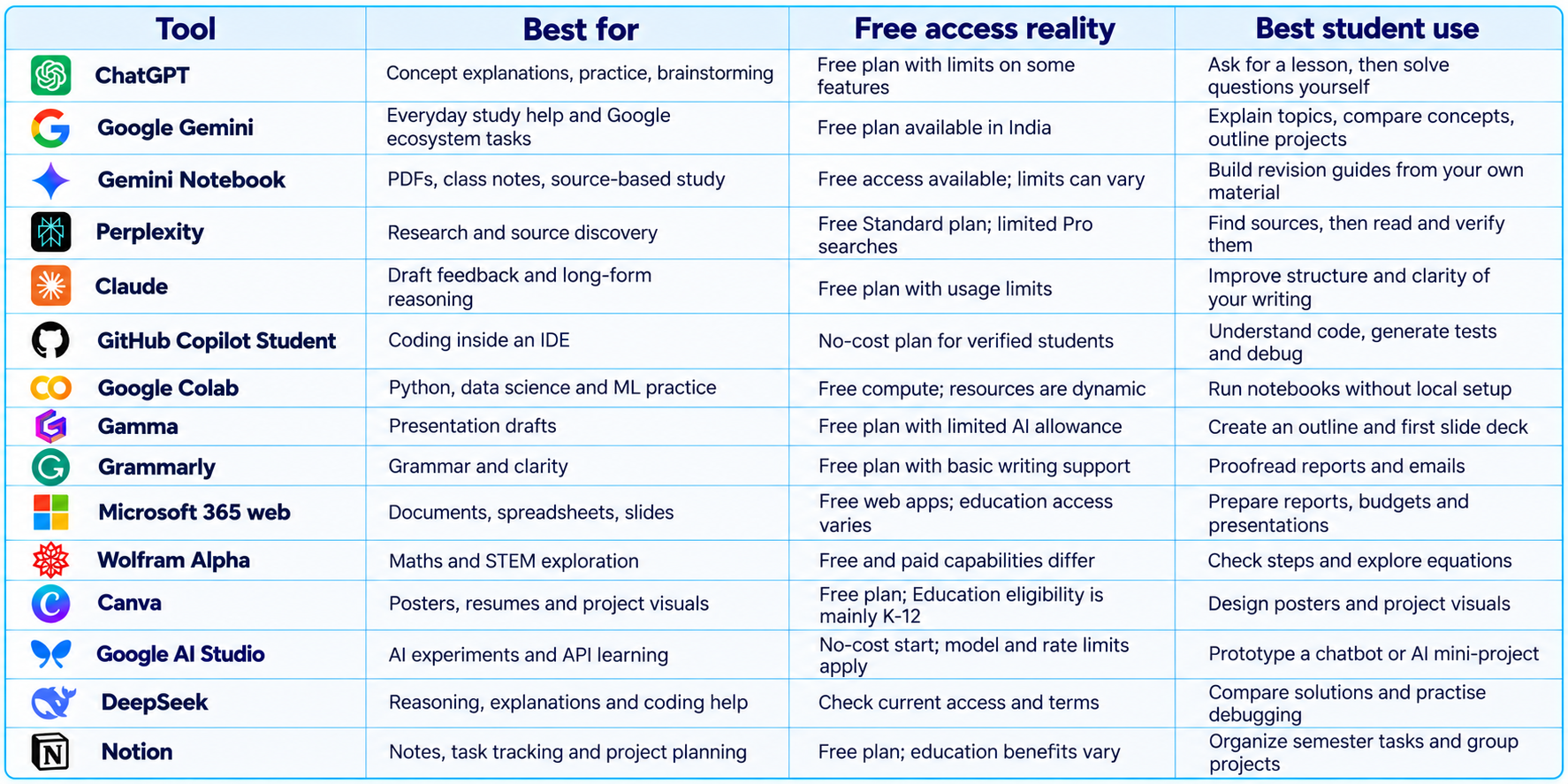
1. ChatGPT: Best All-Round AI Study Assistant
ChatGPT is a strong starting point if you want one AI tool for many student tasks. You can ask it to explain a difficult concept, generate practice questions, help plan an assignment, interpret an error message, brainstorm a project idea or turn a rough outline into a more organized draft. Its free plan provides everyday chat and limited access to some advanced features, so do not assume every model or tool is unlimited.
Treat ChatGPT as a tutor rather than an answer vending machine. Ask it to teach a concept in stages, give you a worked example, then create a similar problem without revealing the answer. Attempt the problem yourself and ask for feedback on your reasoning. This produces a better learning loop than copying a finished solution into your notebook.
For Indian students, ChatGPT can support semester exams, viva preparation, lab records, programming assignments, interview practice and English-language writing. It can still produce incorrect facts, calculations or citations, so check important claims against your textbook, lecture slides, official syllabus or source documents.
Try this prompt: “Teach me [topic] for a second-year engineering exam. Start with prerequisites, explain the concept using a simple example, list common mistakes, then quiz me with five questions one at a time. Do not reveal each answer until I respond.” For more reusable templates, our 100 Best ChatGPT Prompts 2026 includes patterns for studying, writing and problem-solving.
2. Google Gemini: Best for Everyday Study Help
Google Gemini is useful for explanations, brainstorming, planning and working with information in the Google ecosystem. Its India page lists a free plan at ₹0 per month with a Google Account. Available models, feature access and usage limits can vary by plan and change over time, so check the live plan details rather than relying on an old promotion.
Use Gemini to turn a syllabus into a weekly revision plan, compare two theories, explain a diagram you are allowed to share, create practice questions or outline a presentation. It can also help improve a project abstract or plan the sections of a report. Provide your course level, syllabus, required depth and output format.
Prompt: “I am preparing for [exam/course] at [level]. Use the syllabus below to create a seven-day revision plan. Prioritize high-weight topics only when the syllabus provides evidence, schedule active recall, include one practice session per day and leave time for review. Mark assumptions instead of inventing exam weightage.”
Gemini is not a substitute for official exam notices or faculty instructions. For current eligibility, dates, fees or regulations, confirm the information from the institution or exam authority. When the answer matters, ask for sources and open them yourself.
3. Gemini Notebook: Best for Studying From Your Own PDFs
Google renamed NotebookLM to Gemini Notebook in July 2026. The product remains a research and learning workspace designed to work with sources you provide, including notes and documents. That source-grounded approach makes it useful when an exam is based on a professor’s slides, a prescribed reading list, lab manuals or research papers.
Instead of asking a general chatbot to summarize an entire subject from memory, upload material you are allowed to use and ask questions about those sources. Request chapter summaries, glossary lists, revision questions, topic comparisons, study guides and audio-style recaps where available. Source-grounded answers make it easier to trace a claim back to your notes, but inspect the cited passage and check whether an important qualification was missed.
Create a separate notebook for each subject, add only relevant course materials, then ask it for a one-page chapter map, ten recall questions and a list of concepts that depend on earlier chapters. Before an exam, use it to find gaps in your notes rather than simply rereading a summary.
Prompt: “Use only the sources in this notebook. Create 20 exam-style questions from [chapters]. Include definitions, conceptual questions and application problems. Provide an answer key separately, cite the source section for each answer and flag topics not adequately covered by the uploaded material.” Google has described Gemini Notebook as a standalone research tool increasingly connected with the Gemini app and Search; features and usage limits differ by plan.
4. Perplexity: Best for Research With Sources
Perplexity is designed around search-led answers that surface sources. It is useful when an assignment requires current information, background reading, an initial list of references or a comparison of technologies. Its free Standard plan includes basic searches and a limited number of Pro Searches, while advanced model and feature access is restricted.
Use it as a map to primary sources, not as a citation you automatically trust. Open the original research paper, government report, official documentation or institutional page. Check the publication date, author, methodology and whether the source actually supports the statement you plan to use.
Prompt: “Find reliable primary sources published since [date] about [topic]. Separate official documentation, peer-reviewed research and news coverage. For each source, explain what it supports and what it does not establish. Do not invent references, and flag claims that need additional verification.”
Perplexity is most useful early in the research process. Once you have collected trustworthy material, organize it in Gemini Notebook or your own notes and write the argument in your own words. This reduces the risk of building an assignment around a search summary that missed context.
5. Claude: Best for Detailed Writing Feedback
Claude is worth trying when you need careful feedback on a long draft, dense reading or technical explanation. Its free tier has usage limits, but it can help improve a report’s structure, identify unclear paragraphs, explain a difficult passage or review a project proposal.
Give it your own draft and ask for a diagnosis before a rewrite. Request a list of unclear claims, repeated points, weak transitions and missing evidence. Then decide which changes to accept. This keeps your own thinking and voice in the work while using AI as an editor.
Prompt: “Review my report for [course]. Do not rewrite it immediately. First identify the five biggest problems with logic, evidence, structure and clarity. Quote the relevant sentence, explain the problem and suggest a revision direction. Do not add facts or references that are not in my draft.” Do not treat a chatbot as a plagiarism detector or proof that a submission complies with your college’s AI policy.
6. GitHub Copilot Student: Best Free AI Coding Tool for Verified Students
For computer science, IT, electronics and other technical students, GitHub Copilot can help inside a code editor. The GitHub Student Developer Pack lists Copilot Student for verified students, with unlimited code completions and a defined allowance for AI credits and limited chat or agent usage. Model and agent access can change, so review the current offer after verification.
Use it to understand unfamiliar code, generate a starting point for a function, draft unit tests, explain compiler errors and explore alternative implementations. Do not accept suggestions blindly. Run the code, inspect dependencies, test edge cases and make sure you can explain the solution during a viva or interview.
A good workflow is to write the requirement in your own words, ask Copilot for a small implementation, inspect the diff, run tests, then ask it to explain the parts you do not understand. For a major feature, plan first and implement in small steps. Avoid pasting passwords, API keys, private student records or confidential internship code into an AI system.
Students comparing coding assistants can use our Best AI Coding Tools 2026 to understand how editor-based assistants differ from terminal agents and autonomous coding workflows. Our 100 Best AI Coding Prompts 2026 includes reusable prompts for debugging, code review, testing and project planning.
7. Google Colab: Best for Python, Data Science and Machine Learning
Google Colab lets students run Python notebooks in a browser without setting up a complete local environment first. It is useful for statistics, data analysis, machine learning demonstrations and college projects using common Python libraries. The free tier can include compute resources, but availability, session duration, memory and GPU access are dynamic rather than guaranteed.
Start with a small notebook: import a CSV, inspect missing values, calculate summary statistics and plot a chart. Then progress to scikit-learn experiments or a simple neural-network tutorial. Save important work to Drive or download the notebook because free runtime sessions can disconnect and local runtime files may not persist.
Colab is not an unlimited free GPU server. If a project requires a specific GPU, long training sessions or guaranteed compute, check current limits and consider your institution’s lab or cloud credits. Do not assume a free session will be available exactly when a deadline is near.
8. Gamma: Best for Quick Presentations
Gamma can turn a prompt or outline into a first draft of a presentation, document or simple web page. Its free plan currently allows up to 10 slides per prompt and supports exports including PDF, PPTX, PNG and Google Slides. Free usage is limited, and branding or advanced features may require a paid plan.
For a college seminar, provide the topic, audience, slide count, learning objective and source material. Ask for a clear narrative instead of a collection of decorative slides. Then verify every statistic, replace generic visuals where needed, simplify crowded slides and practise speaking through the story.
Prompt: “Create a 9-slide presentation for a second-year college seminar on [topic]. Structure it as problem, background, three key ideas, real example, limitations, conclusion and references. Keep each slide to one central point, use short bullets and mark claims that need a source. Do not invent data.” Gamma should create the first draft, not the final submission. Check the assignment rubric and ensure the deck reflects your understanding.
9. Grammarly: Best for Grammar and Clarity
Grammarly’s free plan helps with spelling, grammar and tone, and currently includes a limited monthly allowance of AI prompts. It is useful for proofreading lab reports, internship emails, scholarship applications, project abstracts and resumes written in English.
Use it after you have finished the substance of a document. First check whether the argument is correct, the evidence is adequate and the structure follows the assignment brief. Then use grammar and clarity feedback to catch awkward phrasing, punctuation mistakes and inconsistent tone. A language tool cannot confirm that a technical statement is true, and it may suggest edits that change meaning, so review changes manually.
10. Microsoft 365 for the Web: Best for Reports, Spreadsheets and Group Work
Students can access free web versions of Word, Excel and PowerPoint, while eligible institutions may provide Microsoft 365 Education at no cost. This does not mean every premium Copilot feature is free to every student. Access depends on the account, institution and product plan.
Use Word for reports and formatting, Excel for tables and basic data analysis, and PowerPoint for presentations. AI can help outline a report, suggest spreadsheet formulas or explain an error, but validate calculations and follow course rules on assistance. For group assignments, cloud documents and version history can be as useful as AI generation.
Before paying for office software, sign in with your institution’s account and check whether your college already provides an education license. This is often a better first step than purchasing a personal subscription.
11. Wolfram Alpha: Best for Exploring Maths and STEM Problems
Wolfram Alpha is useful for checking mathematical expressions, exploring equations, working with units and investigating scientific relationships. Free and paid step-by-step capabilities differ by feature, so do not assume every solution step is available without payment.
For engineering and science students, it can be a second opinion after attempting a problem by hand. Compare the tool’s interpretation with the exact expression in your question, inspect units and conditions, and ask why a method works rather than memorizing a final number. Solve the problem yourself first, use the tool to check the result, then write the derivation in your own notation.
12. Canva: Best for Posters, Resumes and Project Visuals
Canva’s free plan is useful for project posters, club announcements, portfolio graphics, infographics and clean resume layouts. Canva Education is not a blanket free premium plan for every Indian college student: its official eligibility guidance says Education is intended for K-12 educators, schools and students, while university students should check whether their campus offers Canva for Campus.
Use a template as a starting point, not a replacement for content design. Keep hierarchy clear, use readable fonts, avoid too much text and ensure charts communicate the correct numbers. For an academic poster, ask your instructor whether a particular layout or citation format is required. AI-generated visuals can help with illustration, but do not use them to fabricate scientific results or misrepresent a project.
13. Google AI Studio: Best for Students Building AI Projects
Google AI Studio is a useful starting point for students who want to experiment with Gemini models and build small AI prototypes. Google describes it as a no-cost starting point for trying models and accessing the Gemini Developer API, with model availability, rate limits and billing conditions varying by model and usage.
Possible student projects include a syllabus question-answering prototype, multilingual campus FAQ bot, study planner or a tool that extracts structured information from sample documents. Begin with a narrow problem and a small test set. Record failure cases, latency and cost assumptions instead of judging the project only from one successful demo.
Do not upload sensitive personal information or confidential college records to a public prototype. Use synthetic or public sample data, store API keys in environment variables and add input validation. For a project that uses agents or tools, our What Is an AI Agent? Beginner Guide With Examples explains when an agent is useful and how tools, memory and stopping conditions fit together.
14. DeepSeek: A Useful Second Opinion for Reasoning and Coding
DeepSeek can be useful for explaining concepts, comparing approaches, reviewing code and generating practice problems. Availability, model selection, usage limits and data-handling terms can change, so check current service information before using it for coursework or private material.
Do not ask two chatbots the same question and assume the answer that sounds more confident is correct. Give each model the same evidence, compare their responses and verify disagreements against your textbook, documentation or a trusted source. This is especially useful for debugging and conceptual questions where one incorrect assumption can derail the answer.
For a better result, provide the task, relevant context, constraints and expected output. Our AI Prompts & Prompt Engineering collection contains copy-paste prompt libraries for research, coding, writing and study workflows.
15. Notion: Best for Semester Planning and Project Organization
Notion is useful for organizing class notes, assignment deadlines, group project tasks, revision plans and placement preparation. You can begin with a simple table or page structure without relying on paid AI features. Education benefits and AI access depend on eligibility and the current plan, so distinguish the free workspace from add-on AI features.
Create a semester dashboard with columns for subject, task, due date, priority, status and next action. Keep a separate page for each subject, and link lecture notes to assignments and revision questions. The main value is having a reliable system that tells you what to do next, not adding AI to every page. A simple checklist that is regularly updated is more useful than an elaborate dashboard that is ignored.
Which AI Tools Are Best for Different Indian Students?
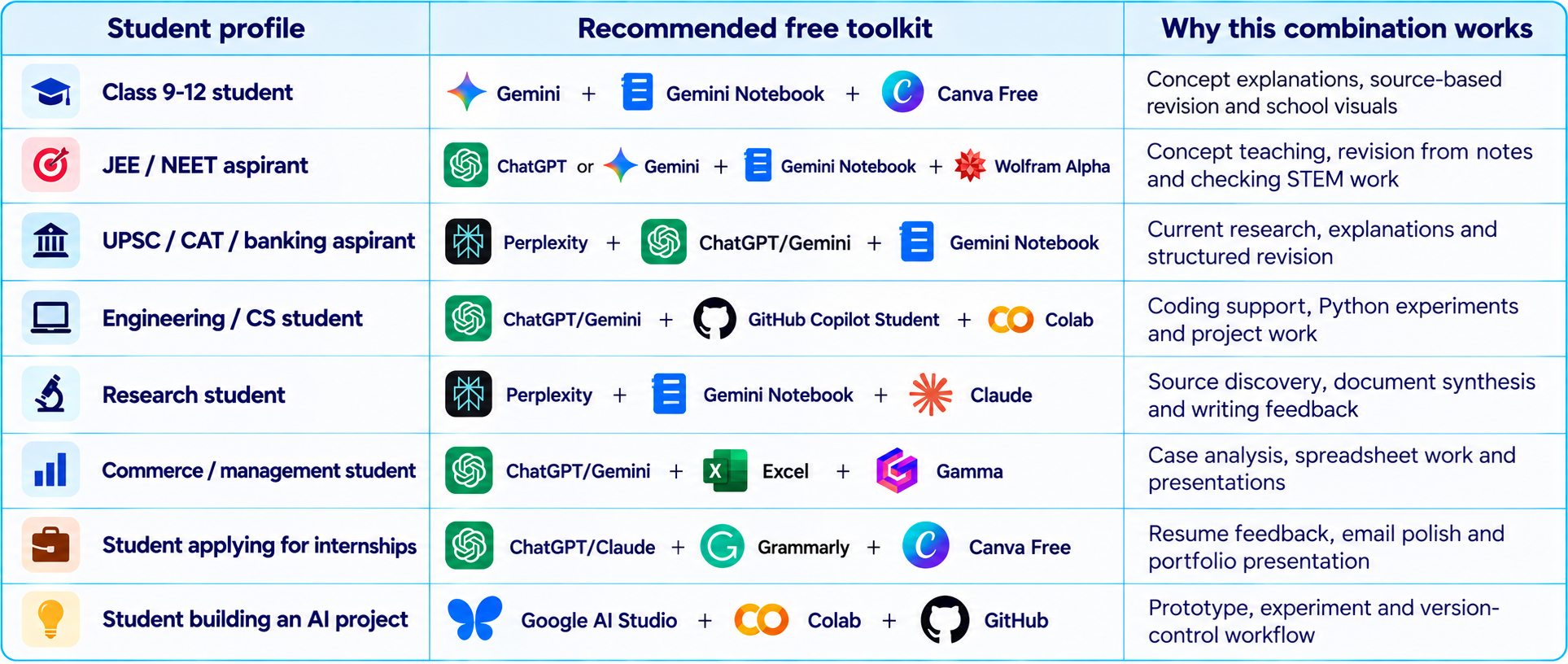
A Free AI Study Workflow That Actually Works
A tool list is useful only when it becomes a repeatable routine. This workflow works for many subjects and avoids paying for several overlapping subscriptions:
- Before class: ask ChatGPT or Gemini to explain prerequisites for the next topic, then read your textbook or attend the lecture.
- During revision: add your own notes and approved materials to Gemini Notebook and generate questions that test understanding.
- For research assignments: use Perplexity to discover sources, then open and read the original sources before making claims.
- For coding projects: use Copilot for suggestions, run tests locally or in Colab, and document what you changed.
- For reports and presentations: draft the argument yourself, use an editor for feedback, and use Gamma or Canva for the visual presentation.
- Before submission: compare the work with the rubric, verify references, check calculations and disclose AI assistance when required.
If your workflow involves multiple models, files and tools, the next skill is learning how to manage the information each model receives. Our What Is Context Engineering? Complete Guide (2026) explains how relevant context, retrieved documents, memory and tool results affect an AI system’s output.
How to Get Better Results From Free AI Tools
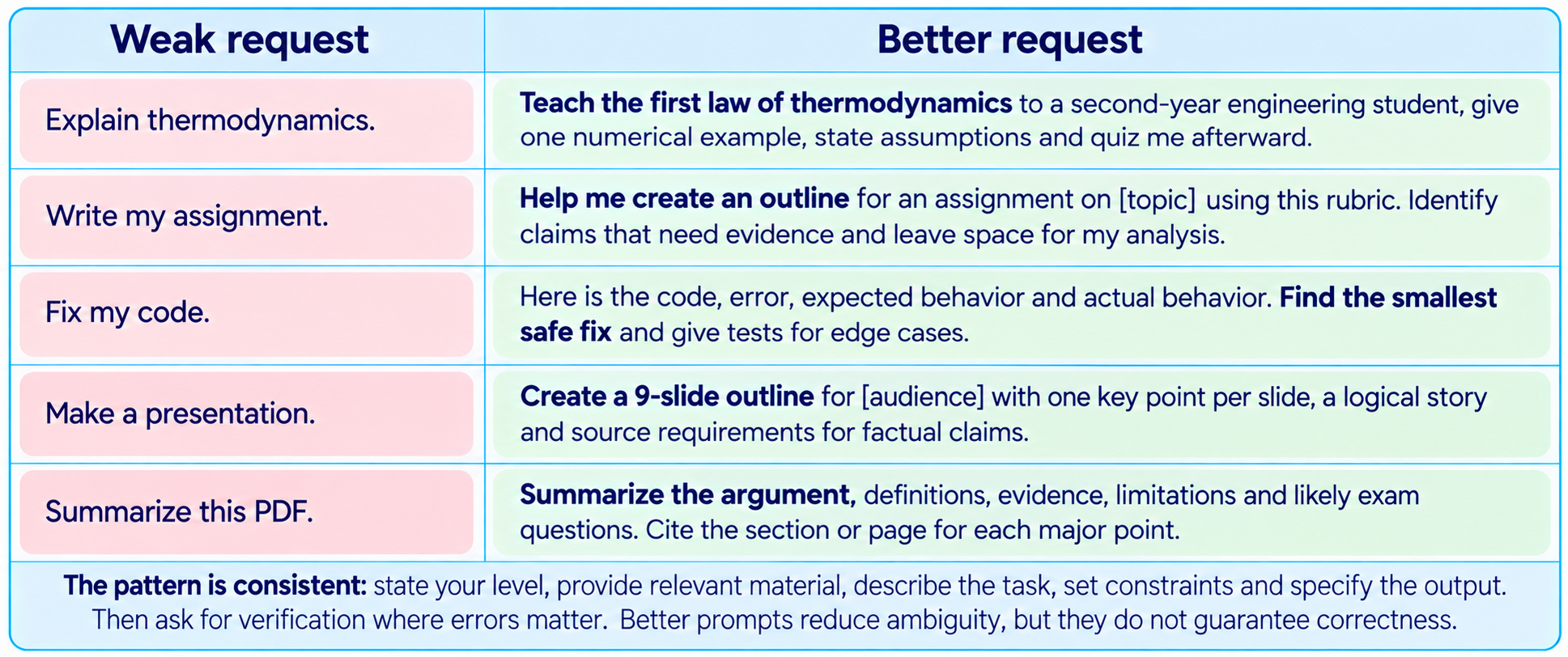
Free AI Tools for Students: Privacy and Academic Integrity
Before uploading a document, check whether it contains personal data, student IDs, unpublished research, confidential internship code or information belonging to another person. Use only tools permitted by your institution and avoid entering passwords, API keys or sensitive records. Free consumer accounts may have different data controls from institution-managed education accounts.
Academic rules vary by university, course and assignment. Some instructors allow AI for brainstorming or grammar, while others restrict generated text, code or translation. Read the policy, retain drafts and sources, and be prepared to explain every part of your submission. Never fabricate citations, lab results, survey responses or project work.
The best use of AI is to increase the quality of your learning process. Let it challenge you with questions, reveal gaps in your understanding, explain a failed test or help organize research. Do the thinking, verify the output and keep responsibility for the final work.
Is It Worth Paying for AI as a Student?
For most students, start with free tiers. A combination of one general assistant, Gemini Notebook, a research tool and free tools supplied by your college covers a large share of everyday study needs. Pay only when you can name the exact limitation blocking your work, such as repeated usage caps, a required advanced feature or a specific integration.
Before subscribing, check whether your college already provides Microsoft 365, GitHub Copilot Student, Canva for Campus or another campus license. Student eligibility often requires verification and a valid institution, and promotional offers may have end dates or automatic renewal. Read the terms and set a calendar reminder when a trial or student offer is due to expire.
A ₹0 toolkit is not automatically inferior to a paid subscription. The best setup is the smallest collection of tools that reliably helps you learn, produce better work and build skills. Avoid paying for several chatbots that all do the same job.
Final Verdict: The Best Free AI Toolkit for Indian Students in 2026
If you want the simplest recommendation, start with ChatGPT or Gemini for explanations, Gemini Notebook for your own course material, and Perplexity for research. Add GitHub Copilot Student and Google Colab if you code. Add Gamma, Canva or Grammarly only when you have a clear need for presentations, design or writing feedback.
The most valuable AI tools for Indian students are not necessarily the ones with the longest feature lists. They are the ones that fit the way you study, work within your budget and make it easier to verify what you learn. Free tiers are enough to build a strong study workflow, provided you understand their limits and avoid treating generated answers as unquestionable facts.
My practical recommendation: build a small free stack this week, use it on one real assignment or topic, and measure whether it improves comprehension, saves time or helps you produce a better project. Keep the tools that deliver real value, and ignore the rest.
Frequently Asked Questions
What are the best free AI tools for Indian students in 2026?
ChatGPT or Gemini for general study help, Gemini Notebook for your notes and PDFs, Perplexity for research, GitHub Copilot Student for verified coding access, and Google Colab for Python and data science are strong starting points.
Which AI tool is best for college students?
ChatGPT or Gemini is a useful all-round assistant. Gemini Notebook is best for course documents, Perplexity for source discovery, Copilot for coding and Gamma for slide drafts.
Is Gemini Notebook the same as NotebookLM?
Google announced in July 2026 that NotebookLM was being renamed Gemini Notebook. The product continues as a research and learning workspace with deeper integration across Google’s ecosystem.
Can I use ChatGPT for free in India?
Yes, ChatGPT has a free plan. Access to some models and features is limited, and exact limits can change.
Is GitHub Copilot free for Indian students?
Copilot Student is available at no cost to verified students who meet GitHub Education eligibility requirements. Check current terms and verification steps.
Which AI tool is best for JEE and NEET preparation?
Use ChatGPT or Gemini to explain concepts, Gemini Notebook to study your own notes, and a maths tool to check work. Solve questions yourself and confirm the official syllabus and exam pattern.
Which AI tool is best for research papers?
Perplexity can help discover sources, Gemini Notebook can organize material, and Claude or ChatGPT can critique structure. Read original papers and verify every citation.
Which AI tool is best for coding projects?
Verified students can use GitHub Copilot Student in an editor, while ChatGPT or Gemini can explain errors. Google Colab is useful for running Python experiments in a browser.
Are AI presentation makers free?
Gamma has a free plan with limited AI creation and up to 10 slides per prompt. Canva also has a free plan, while premium education access depends on eligibility.
Can AI write my college assignment?
AI can help with brainstorming, outlines, explanations and feedback, but whether generated text is permitted depends on institutional policy. Do not submit fabricated research or work you cannot explain.
Do I need a paid AI subscription as a student?
Not necessarily. Begin with free plans and campus-provided software. Upgrade only when a specific limit repeatedly blocks a real task.
How can I avoid incorrect AI answers?
Provide source material, ask for citations or source locations, check original documents, verify calculations and compare important claims against official or primary sources.
Recommended Blogs
- 100 Best ChatGPT Prompts 2026 (Copy-Paste)
- 100 Best AI Coding Prompts 2026 (Claude, GPT, Gemini)
- What Is an AI Agent? Beginner Guide With Examples (2026)
- What Is Context Engineering? Complete Guide (2026)
- Best AI Coding Tools 2026
- AI Prompts & Prompt Engineering
- 100 Best AI Marketing Prompts 2026 (Copy-Paste)
Resources & Community
Join our community of 70,000+ AI enthusiasts and learn to build powerful AI applications. Build Fast with AI helps students, creators, developers and teams understand and implement practical AI.
Agentic AI Launchpad 2026
A structured cohort program for learners who want to move from understanding AI concepts to building and deploying agentic AI systems. It is a useful next step for students who want to turn classroom knowledge into practical projects.
Explore the program: Agentic AI Launchpad 2026
Free AI Resources
Continue learning with free workshops and short daily lessons.
References
- OpenAI - ChatGPT Pricing
- Google - Gemini in India and plan details
- Google - NotebookLM is now Gemini Notebook
- Perplexity - Subscription plan details
- GitHub Education - Student Developer Pack
- Google Colab
- Gamma - Plans and pricing
- Grammarly - Plans and pricing
- Microsoft Education - Free software for students
- Canva Education - Eligibility guidelines
- Google for Education - Gemini for Education
- Google AI Studio
- Wolfram Alpha
- Notion for Education

