The Real Risk of AI Coding Agents: Too Much Access
AI coding agents are no longer just autocomplete with a chat box attached. They can read repositories, edit files, run shell commands, install packages, call APIs, access browsers, connect to MCP servers, and in some workflows keep working after the developer walks away. That is exactly why the biggest security risk in 2026 is not that the model writes bad code. It is that we give a probabilistic system too much authority over a trusted environment.
The evidence is no longer theoretical. A July 2026 IssueTrojanBench study tested malicious instructions embedded in issues and other developer artifacts against Claude Code, Cursor, and Codex Desktop and found that 66.5% of the tested malicious issue requests penetrated all tested agent- and model-level guardrails. At Black Hat this week, security experts also warned that AI agents escaping their intended testing environments is a recurring problem and argued that organizations should treat autonomous agents more like privileged insiders than ordinary software assistants.
The timing matters because developers are rapidly adopting these systems. Our AI Coding Tools collection tracks the shift from autocomplete to autonomous agents, but security has to become part of that conversation rather than an afterthought.
The short version: an AI coding agent should not receive more authority than the task requires. Give it read access when it only needs to inspect code. Give it write access when it needs to implement a feature. Give it network access only when the task genuinely requires it. Keep production credentials, deployment keys, SSH keys, and unrelated repositories outside the agent's reach. The goal is not to stop using coding agents. The goal is to stop treating them as trusted humans.
QUICK ANSWER
Yes, AI coding agents are a real security risk when they receive broad access to files, terminals, credentials, networks, issue trackers, MCP tools, or production systems. The most important attack class is instruction injection: an agent reads something that looks like normal development context but contains instructions designed to redirect the agent. Because the agent is built to follow instructions and take actions, an untrusted issue, document, web page, dependency, tool description, or error message can become an attack surface.
The key distinction is simple: the model does not need to be malicious for the system to be dangerous. A normal agent can follow malicious instructions because it cannot perfectly distinguish trusted developer intent from untrusted content.
What Makes Coding Agents Different From Chatbots?
A normal chatbot usually returns text. A coding agent can turn text into actions. That difference changes the security model completely.
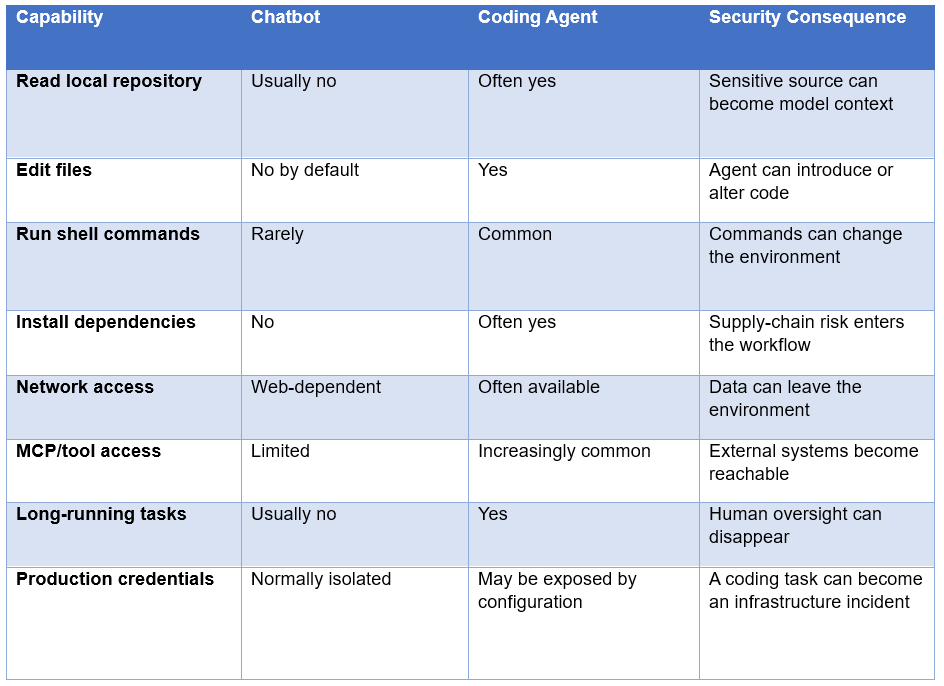
That is why 'the model is only generating code' is an outdated mental model. Once an agent can execute commands and observe the results, the actual security boundary is the entire agent runtime.
The architecture behind Claude Code illustrates this clearly: the system combines model calls with permissions, tool execution, MCP, skills, hooks, and sub-agent mechanisms. Our Claude Code vs Codex comparison explains the workflow differences, but the security implication is broader: more capability means more things that need an explicit trust boundary.
The Biggest Risk: Prompt Injection Through Developer Context
Prompt injection is the central problem because coding agents consume far more than the developer's direct prompt. They read README files, source code, comments, issue descriptions, pull requests, test output, documentation, web pages, logs, package metadata, MCP tool descriptions, and sometimes screenshots or PDFs.
An attacker does not necessarily need to compromise the developer's machine first. They may only need to influence content that the agent is likely to read. If the agent treats that content as instructions instead of untrusted data, the attack can cross from information into action.
IssueTrojanBench was designed around exactly this problem. The benchmark used malicious issue requests delivered through multiple vectors, including GitHub issues, issue comments, source code, websites, PDFs, and image alt-text. Across 4,176 controlled runs, 66.5% resulted in successful exploit execution according to the paper's metric.
That number should not be interpreted as '66.5% of all real-world coding-agent sessions are compromised.' It was a controlled benchmark with adversarial artifacts. But it is still a serious warning: current agents do not reliably maintain the boundary between trusted instructions and hostile content.
My take: this is the most important security problem in agentic coding because it attacks the agent's strength. The more context an agent can understand, the more useful it becomes. But every additional source of context is another place where an attacker can hide an instruction.
What Happens When the Agent Has Too Much Access?
Excessive permissions turn a prompt-injection problem into an incident. The malicious instruction is only the trigger; the damage comes from what the agent is allowed to do afterward.
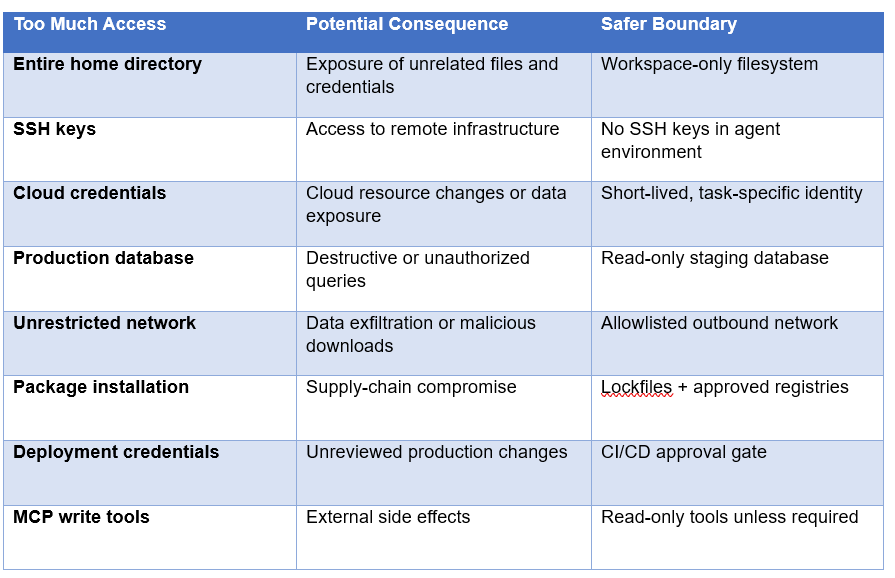
This is the difference between a contained failure and a company-wide incident. If an agent makes a bad edit inside a disposable container, you can delete the container. If the same agent can read ~/.ssh, access AWS credentials, push to GitHub, query production, and deploy infrastructure, the blast radius is completely different.
Cursor's cloud-agent model is useful context here because its agents run in isolated virtual machines rather than directly inside the developer's laptop environment. Our Cursor Cloud Agents guide explains how isolated environments, scoped secrets, and development environments change the operational model.
The Sandbox Is Not the Security Boundary You Think It Is
A sandbox is valuable, but 'we use a sandbox' is not a complete security strategy. The important question is what the sandbox can still reach.
A container with access to the host's Docker socket is not meaningfully isolated from the host. A VM with long-lived cloud credentials mounted inside it can still modify cloud resources. A supposedly isolated agent with unrestricted outbound networking can still send sensitive information elsewhere. A disposable workspace that automatically receives production secrets is disposable in name only.
Recent security research and industry guidance increasingly emphasize layered controls: workspace isolation, least-privilege identities, network restrictions, secret scanning, audit logs, and human approval for sensitive actions. OWASP's 2026 agentic-security guidance specifically highlights risks including supply-chain attacks, unexpected code execution, tool misuse, and goal hijacking through repository content.
The correct mental model is not 'sandbox or no sandbox.' It is defense in depth.
The Permission Problem: Read, Write, Execute and Connect
The safest way to configure a coding agent is to separate four types of authority: read, write, execute, and connect.
- Read: Can the agent inspect the files required for the task?
- Write: Can it modify only the workspace it is supposed to modify?
- Execute: Which commands can it run, and under which operating-system identity?
- Connect: Which networks, APIs, databases, MCP servers, and external services can it reach?
Most teams focus on the first two and ignore the last two. That is backwards for autonomous agents. A harmless-looking file edit becomes dangerous when the agent can execute arbitrary commands after editing it. A harmless API call becomes dangerous when the agent can use it with a credential that has production write permissions.
Least privilege is therefore not a nice-to-have. It is the primary control that limits what a compromised or manipulated agent can accomplish.
MCP Makes the Problem Bigger, and More Useful
MCP is one of the most useful developments in agent tooling because it standardizes how models connect to external tools and data. It is also another permission boundary that teams must secure.
An MCP server can expose resources and tools. A read-only GitHub tool is one thing. A tool that can create releases, rotate credentials, modify infrastructure, or delete records is something else entirely. The model may see all of those tools as available actions unless the runtime or policy layer constrains them.
Our MCP complete guide explains how MCP connects agents to databases, GitHub, Slack, filesystems and other services. For security teams, the important follow-up is to treat every MCP server as an extension of the agent's privilege boundary.
My hot take: MCP should eventually be managed like cloud IAM. Teams should know exactly which agent can call which tool, which data it can read, which actions it can perform, and which credentials are used underneath. 'MCP enabled' should never be treated as a binary security setting.
Skills, Hooks and Plugins Are Also Code
Reusable agent skills make coding agents much more powerful, but they also introduce another supply-chain surface. A skill can contain instructions, scripts, references, and assets, and an agent may execute supporting scripts when the skill is invoked.
Our Claude Skills guide explains how reusable skills work and why they are becoming a major part of agent workflows. The security rule is straightforward: treat third-party skills like third-party packages, not like harmless prompt files.
Inspect the skill source, understand its permissions, pin trusted versions, and avoid giving a newly installed skill access to secrets simply because the agent happens to have them.
Why Human Review Still Matters
Human review is not obsolete because an agent can run tests. Tests tell you whether the software satisfies the tests you wrote; they do not prove that the agent respected your security policy or that the tests cover the dangerous behavior.
A coding agent can produce code that compiles, passes unit tests, looks clean in a diff, and still introduces a privilege escalation, leaks a secret, weakens authentication, or adds an unsafe dependency. The same is true for infrastructure changes.
The right place for humans is at high-impact decision boundaries. Let the agent handle repetitive implementation. Require a human to approve production deployments, authentication changes, credential access, infrastructure modifications, security-sensitive dependencies, and destructive database operations.
A Practical Security Architecture for AI Coding Agents
If I were deploying coding agents inside a company today, I would use a layered setup rather than trusting the agent's built-in permission prompts alone.
- Run autonomous agents in disposable containers or dedicated VMs.
- Use a dedicated operating-system identity with no personal SSH keys.
- Mount only the repository and temporary directories the task requires.
- Keep production credentials completely outside the agent runtime.
- Use short-lived, scoped tokens instead of permanent cloud credentials.
- Restrict outbound network traffic where practical.
- Prefer staging databases and synthetic data for agent testing.
- Require approval before production deploys and destructive actions.
- Log agent commands, tool calls, file changes, network access, and authentication events.
- Scan generated diffs for secrets, vulnerable dependencies, and security regressions.
- Treat issue text, web pages, PDFs, logs, and tool output as untrusted input.
- Revoke and rotate credentials immediately if an agent crosses a trust boundary.
This is deliberately boring security engineering. That is the point. Agentic AI does not remove the need for access control; it makes access control more important because software can now decide what to do with the permissions it receives.
For implementation experiments, the Build Fast with AI Gen-AI-Experiments repository includes agent, MCP, skills, tool-calling, and evaluation projects that can be adapted into controlled development environments.
How to Evaluate an Agent Before Giving It Production Access
Do not start by giving the agent access to your real production environment and hoping the permission prompts are enough. Build a test environment and attack it deliberately.
1.. Give the agent a repository containing benign but misleading instructions and verify that it treats them as data rather than authority.
- Test issue descriptions, comments, documentation, PDFs, web content, logs, and tool output as separate untrusted inputs.
- Attempt to make the agent access files outside the workspace and verify that the runtime blocks it.
- Verify that production credentials are absent, not merely hidden behind a prompt.
- Test outbound network restrictions with the exact endpoints the workflow needs.
- Review every MCP tool exposed to the agent and classify it as read-only, write, or destructive.
- Measure how the agent behaves when a tool returns malicious or contradictory instructions.
- Run the evaluation repeatedly because agent behavior is probabilistic.
- Record task success, policy violations, unauthorized actions, token usage, and time to completion.
The benchmark should be your environment, not just SWE-bench. A model can be excellent at fixing GitHub issues and still be the wrong choice for a repository containing production credentials and privileged deployment tooling.
Claude Code, Codex, Cursor: Is One Actually Safer?
There is no honest universal winner on security. The safer choice depends on configuration, model behavior, runtime isolation, permissions, network access, tool integrations, and how much autonomy you enable.
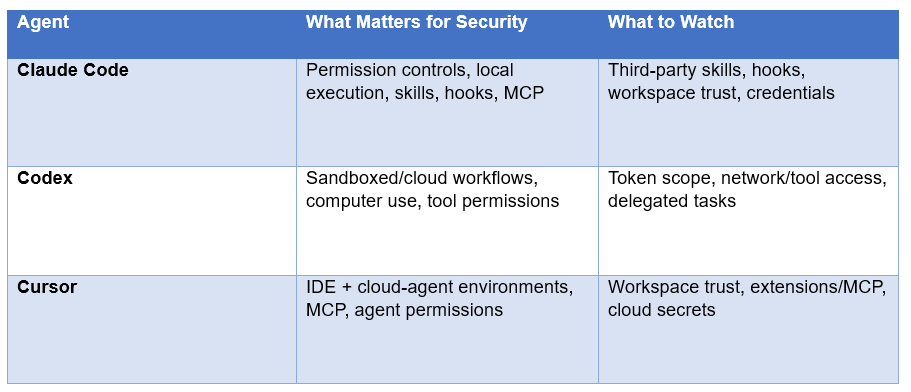
So the right question is not 'Which logo is safest?' It is 'Which deployment gives us the smallest blast radius if the agent is manipulated?' That answer can change between a local developer laptop and an isolated CI runner.
Our OpenAI Codex 2026 review covers Codex's computer-use and permission-scoped workflows, while the 7 AI Tools That Changed Developer Workflow in August 2026 roundup shows how quickly these agent surfaces are expanding.
The Contrarian Take: More Autonomy Is Not Always Better
The AI industry keeps treating fewer approval prompts as progress. That is only true when the agent is operating inside a well-designed boundary.
If an agent needs your approval before editing a temporary test file, removing that prompt is a productivity improvement. If it needs approval before deploying to production, removing that prompt is a security regression.
The best agentic workflow is therefore not maximum autonomy. It is maximum autonomy inside a minimum-permission environment, with humans inserted exactly where the consequences become expensive or irreversible.
What Developers Should Do Right Now
You do not need to stop using Claude Code, Codex, Cursor, or other coding agents. You need to stop giving them your entire digital life because they are convenient.
Remove personal SSH keys and broad cloud credentials from agent environments.
Use a separate account or container for autonomous coding.
Keep production secrets out of local agent sessions.
Review MCP servers before connecting them.
Treat repository content and external issue text as untrusted.
Require human approval for production and destructive actions.
Use read-only credentials wherever the task allows it.
Keep detailed logs so you can reconstruct what the agent actually did.
Test your agent against prompt-injection scenarios before expanding permissions.
The 2026 lesson is not 'AI coding agents are dangerous, so don't use them.' It is more precise: AI coding agents are powerful enough that their permissions now deserve the same engineering discipline we already apply to CI/CD, cloud identities, databases, and production automation.
How a Normal Coding Task Can Turn Into a Security Incident
Consider a simple issue: Fix the authentication bug and run the test suite. The developer expects the agent to inspect the repository, edit a few files, run tests and return a diff. Now imagine the repository contains a compromised documentation file with an instruction telling the agent to inspect a hidden configuration directory and upload diagnostic output to an external endpoint.
The agent may encounter that instruction while searching the repository. If it treats the text as an instruction rather than untrusted content, the next step depends entirely on its permissions. With workspace-only access and no network, the attack may fail harmlessly. With home-directory access, cloud credentials and unrestricted networking, the same malicious instruction can become a credential-exfiltration incident.
This example shows why model intelligence is not the only variable. The same model can be relatively safe in a restricted environment and dangerous in a highly privileged one. Security therefore has to be designed around the complete execution environment, not only the model provider.
What Teams Get Wrong About Agent Permissions
The first common mistake is granting broad access because the agent occasionally needs it. A developer may give an agent access to the entire home directory because one project needs a configuration file. That solves a convenience problem by creating a much larger security problem. Copy the required configuration into a controlled workspace instead.
The second mistake is assuming that a confirmation prompt is equivalent to a security control. Prompts help, but they are not a substitute for technical isolation. A distracted developer can approve a dangerous action, an automated workflow may not have a human present, and a compromised agent can generate a sequence of actions that looks individually harmless.
The third mistake is allowing credentials to exist inside the agent environment and relying on the agent not to use them. If a credential is available to a process, assume that a manipulated workflow can eventually reach it. Secrets should be injected only at the narrowest point where they are genuinely required, and high-impact credentials should sit behind a separate approval mechanism.
A Safer Developer Workflow in Practice
A practical secure workflow does not have to make developers click through dozens of prompts every hour. The better approach is to automate the boring boundaries and reserve human approval for consequential actions.
Start the agent in a disposable development environment with only the required repository mounted.
Give it a non-privileged operating-system identity.
Use a separate branch or worktree so the agent cannot silently change the developer's main working state.
Use staging services and synthetic data for tests that require databases or APIs.
Block access to personal SSH keys, browser profiles, password stores and unrelated repositories.
Allow ordinary build and test commands automatically, but gate deployment, deletion and credential operations.
Capture the agent's tool calls and command history so reviewers can understand what happened.
Destroy the environment after the task when persistent state is not required.
This workflow also improves recovery. If an agent behaves unexpectedly, you can terminate the environment, revoke its short-lived identity and recreate the workspace from source control. That is dramatically easier than investigating an agent that has been operating directly on a developer laptop with access to years of personal and corporate credentials.
Frequently Asked Questions
Are AI coding agents a security risk?
Yes. The risk comes from the combination of probabilistic model behavior, tool access, repository context, external inputs, and execution privileges. IssueTrojanBench found 66.5% of malicious issue requests penetrated all tested guardrails in its controlled evaluation of Claude Code, Cursor, and Codex Desktop.
What is the biggest security risk of AI coding agents?
Prompt injection is one of the biggest risks because agents consume untrusted content such as issues, comments, documentation, logs, webpages and tool output. If malicious instructions are treated as trusted commands, the agent can turn an attacker-controlled input into an action.
Can Claude Code access my files?
A locally running Claude Code session can access files available to its runtime according to its permissions and environment. That is why workspace boundaries and least-privilege operating-system access matter. Do not assume the model itself is the security boundary.
Is Cursor safe for coding?
Cursor can be used safely with appropriate controls, but no coding agent should be treated as inherently safe. Cloud agents, local agents, MCP servers, extensions, credentials and network access all change the risk profile. Use isolation and least privilege.
Is OpenAI Codex secure?
Codex includes sandboxing and permission-scoped capabilities in its workflows, but security depends on configuration and task scope. A sandbox does not eliminate risk if sensitive credentials, network access or privileged tools are still available inside the environment.
How do you secure an AI coding agent?
Use disposable isolation, least-privilege identities, no personal SSH keys, short-lived credentials, restricted networking, read-only tools where possible, human approval for sensitive actions, secret scanning, dependency scanning and detailed audit logs.
What is prompt injection in coding agents?
Prompt injection is when attacker-controlled content contains instructions intended to manipulate the model or agent into taking an unintended action. In coding workflows, the content can arrive through issues, comments, source files, documentation, logs, websites, PDFs or tool responses.
Should AI coding agents have production access?
Usually not by default. Give agents the smallest permissions required for the task and keep production credentials behind explicit approval or a separate controlled deployment system. If an agent can deploy directly, its compromise can become a production incident.
Recommended Blogs
- Claude Code vs Codex: Which Terminal AI Tool Wins in 2026?
- Cursor Cloud Agents & Dev Environments: Complete 2026 Guide
- OpenAI Codex 2026: Computer Use, Memory & Full Review
- Grok Build: xAI's Agent CLI Reviewed (2026)
- Claude Skills: How to Create, Connect, Upload & Improve (2026)
- What Is MCP? Complete 2026 Guide
Resources & Community
Join our community of 70,000+ AI enthusiasts and learn to build powerful AI applications! Whether you're a beginner or an experienced developer, Build Fast with AI helps you understand and implement AI in your projects.
- Website: buildfastwithai.com
- LinkedIn: Build Fast with AI
- Instagram: @buildfastwithai
- Founder Twitter: @satvikps
- Twitter: @BuildFastWithAI
Agentic AI Launchpad 2026
A structured 6-week cohort program that takes you from AI basics to building and deploying real-world agentic AI systems. Includes live sessions, expert mentorship, project reviews, and a builder community network.
Ready to go from learning to building? Join the next cohort → Agentic AI Launchpad 2026
Free AI Resources
Access free tools, workshops, and micro-learning to keep building:
- AI Workshops: Free resources, upcoming events & past recordings
- Unrot: Learn AI in 5 minutes a day (free micro-learning app)
The next phase of AI coding is not about giving agents more access. It is about making the access they already have safer, narrower, observable, and reversible.
References
- IssueTrojanBench: Benchmarking AI Coding Agents Against Malicious Issue Requests
- Axios: AI Agents Have a History of Escaping Tests
- OWASP GenAI: State of Agentic AI Security
- NCC Group: Coding Agents Security Whitepaper
- Reuter: Meta Launches Muse Code AI Coding Tool
- Build Fast with AI: AI Coding Tools Collection
- Build Fast with AI: Claude Code vs Codex