



The most common sentence that kills an automation project is that system has no API. It sounds like a wall, and teams treat it as one, quietly shelving the workflow that would have saved the most time. It is not a wall. In almost every case, a system with no API can still be automated, because there is always more than one way to get data in and out of software a human already operates. This is the field guide to the three patterns that actually work, in the order you should try them.
I have automated plenty of systems that had no API, from ancient ERPs to portals that predate REST, and the pattern is always the same: the API is the easy path, not the only path. When it is missing, you drop to the next pattern, and when that is impossible, the next. Let me walk through all three, when to use each, how to make them reliable enough for production, and the mistakes that turn a workable no-API project into a fragile one.
No API Does Not Mean No Automation
A missing API only removes the cleanest automation path, not the possibility of automation, because any system a human can operate can be operated by software. If a person can log in, read a screen, and type into a field, an automation can do the same, and if the system stores data anywhere, that store can often be read directly. The belief that no API equals no automation is the single most expensive misconception in enterprise automation, because it leaves the highest-value, messiest workflows untouched.
This matters because the systems without APIs are often the ones running the core of a business: the old ERP, the industry-specific desktop tool, the government portal, the internal application nobody can extend. Those are exactly where the manual, repetitive work piles up, and exactly where automation would pay off most. Writing them off because they lack an API means leaving the biggest wins on the table, when in reality they are reachable, just by a different pattern.
The reframe is to stop asking does it have an API and start asking how do I reliably get data in and out. That question always has an answer, and the three patterns below are the answers, ranked. This connects directly to our post on whether AI can work with legacy systems, because a missing API is the defining trait of most legacy software.
The 3 Patterns at a Glance
There are three patterns to automate a system with no API, and you try them in order, using the highest one that works for each integration point. Here they are before we go deep.
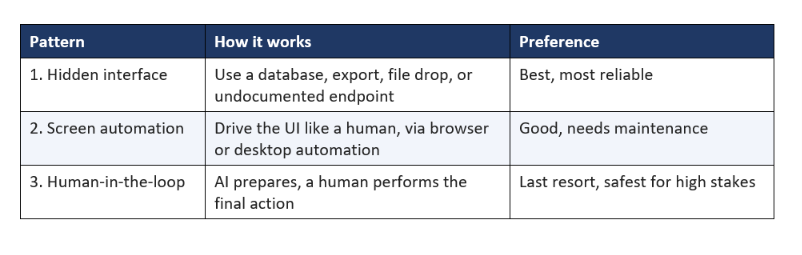
The order is deliberate. A hidden data interface is the most reliable, so look for one first. Screen automation is the workhorse when no data interface exists, powerful but more brittle. Human-in-the-loop is the honest fallback when neither works or the action is too risky to fully automate. Most real projects use a mix, the right pattern per system, which is exactly how an experienced deployment handles a workflow that spans several tools.
Pattern 1: Find the Hidden Interface
Before anything else, look for a hidden interface, because many systems without a public API still expose data through a database, an export, a file drop, or an undocumented endpoint. The system has to store its data somewhere and often has to move it somewhere, and those points are integration opportunities. A read-only database connection, a scheduled CSV export, a folder the system drops files into, or an internal endpoint the front end calls, any of these lets you get data in or out far more reliably than automating the screen.
This pattern is the most under-used because it takes investigation rather than assumption. Ask the vendor if there is a database or export you can access. Watch what the application does when it loads, sometimes the front end calls an internal API you can use directly. Check whether reports can be scheduled to a file location. Look for an import or export menu buried in the settings. An hour of this investigation often reveals a clean path that saves months of maintaining brittle screen automation.
- Direct database read: query the system's data store, often the cleanest option for reading.
- Scheduled export: have the system drop CSV or files you ingest on a schedule.
- File drop or import folder: write files the system imports, or read files it produces.
- Undocumented endpoint: the internal API the front end already uses, sometimes usable directly.
My rule: spend real effort here before dropping to screen automation, because a hidden interface is stable in a way a screen never is. When you find one, it is worth far more over the life of the system than a clever automation that breaks whenever the interface changes. Only when there is genuinely no data path do you move to pattern two.
Pattern 2: Automate the Screen
When a system has no data interface at all, you automate the screen, driving the software through its real interface exactly as a human would. Browser automation handles web-based systems by controlling a real browser, logging in, navigating, reading fields, and entering data. Desktop automation does the same for installed applications. This is the workhorse pattern for legacy software, and it unlocks the systems everyone assumed were impossible, because if a human can operate it, screen automation can too.
The trade-off is honesty about brittleness. Screen automation depends on the interface staying stable, so when a layout changes, the automation can break, which means it needs monitoring and occasional fixes. This is not a reason to avoid it, it is a reason to engineer it properly, with error handling, retries, and alerts when a screen does not behave as expected. Done that way, screen automation runs reliably in production every day across countless real deployments. The AI supplies the intelligence about what to read and write, and the automation supplies the hands.
In 2026, AI has made screen automation far more capable, because a model can now understand a screen and adapt to small changes rather than following a rigid script. This makes the pattern far more resilient than the old brittle scripts of a few years ago, though it still needs monitoring. For the agent tooling that powers this kind of adaptive control, our roundup of the best AI coding agents of 2026 is a useful reference, and the underlying behaviour is covered in our guide to agentic AI.
Pattern 3: Human-in-the-Loop by Design
When neither a data interface nor screen automation works, or when the action is too high-stakes to fully automate, the right pattern is a human-in-the-loop step designed on purpose. The AI does the heavy lifting, reading, extracting, deciding, drafting, and hands a human a clean, reviewed result to perform the final action into the untouchable system. This is not a failure of automation, it is a mature design choice that captures most of the value while keeping a human on the consequential step.
The key word is designed. A good human-in-the-loop step is deliberate and minimal: the AI does ninety percent of the work, so the person spends seconds confirming or entering a prepared result instead of minutes doing it from scratch. A bad design pretends the automation is complete and quietly relies on people to clean up its mess. The difference is whether the human step is planned and small, or accidental and constant. Designed well, it still delivers a large time saving.
This pattern is also the correct answer for high-stakes actions regardless of whether an API exists. For a payment, a legal filing, or an irreversible change, routing the final action through a human is a governance decision, not a technical limitation. Deciding what the AI may do alone versus what needs a person is exactly the approval boundary we cover in why AI pilots fail, and a designed human-in-the-loop step is how you implement it safely.
How to Choose the Right Pattern
Choosing the right pattern is a simple decision: try the patterns in order and use the highest one that works for each integration point. You are not picking one pattern for the whole project, you are picking the best available pattern for each system the workflow touches, which is why real deployments often use all three.
- Start with the hidden interface. Investigate for a database, export, file drop, or endpoint. If one exists and is usable, use it.
- Drop to screen automation. If there is no data interface, automate the UI, and engineer it with monitoring and error handling.
- Fall back to human-in-the-loop. If neither works, or the action is high-stakes, design a minimal human step for the final action.
The discipline is to try in order, not to jump straight to the flashiest option. Screen automation is exciting, but a hidden database read beats it every time on reliability. And a designed human step beats a fully automated one when the stakes are high. Match the pattern to the reality of each system, and you get a workflow that is as automated as it safely can be, no more and no less.
One more decision rule worth internalising: choose the pattern that a non-expert on your team could maintain. A clever automation nobody but its author understands is a liability the day that author leaves. A hidden interface documented simply, or a monitored screen automation with clear alerts, survives staff changes. Reliability is not only technical, it is organisational, and the most maintainable pattern is often the right one even when a slightly cleverer option exists.
RPA vs API vs Human-in-the-Loop: Cost and Reliability
The three patterns differ not just in how they work but in their cost and reliability, and understanding the trade-offs helps you choose well and set expectations. A hidden interface is cheapest to run and most reliable once found, but takes investigation to discover. Screen automation is quick to stand up and works almost anywhere, but carries ongoing maintenance because it breaks when interfaces change. A human-in-the-loop step is the most reliable for correctness on high-stakes actions, but caps how much time you save because a person stays in the flow.
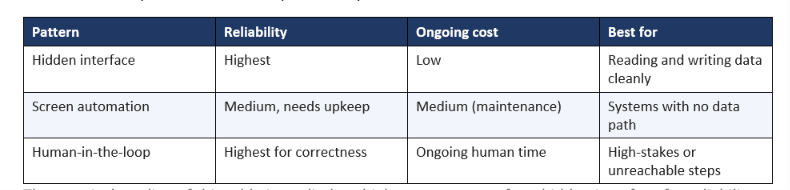
The practical reading of this table is to climb as high as you can: prefer a hidden interface for reliability and low cost, drop to screen automation when there is no data path, and keep a human in the loop only where correctness or stakes demand it. A workflow spanning several systems will often use all three, one per integration point, and that mix is a feature of a well-engineered deployment, not a compromise.
Making No-API Automation Reliable
No-API automation earns its place in production only when it is engineered for reliability, because the patterns, especially screen automation, are more fragile than a clean API. Reliability is not luck, it is a set of practices you build in from the start. The teams whose automations run for years apply these; the teams whose automations break weekly skip them.
- Monitoring and alerts: watch every run so a broken screen or failed export surfaces immediately, not silently.
- Retries and error handling: expect transient failures and handle them, rather than crashing on the first hiccup.
- Validation: check that the data read or written is sane, so a misread field does not corrupt the system.
- Fallbacks: define what happens when the automation cannot complete, including routing to a human.
- An owner: one person accountable for fixing it when a layout change or update breaks it.
The reliability practices are what separate a demo automation from a production one, the same distinction we draw across the whole FDE series. A no-API automation without monitoring and an owner is a demo that happens to run today. With them, it is a system you can depend on. Budget for the reliability work, because it is the difference between automation that saves time and automation that creates new fire drills.
When to Push the Vendor for a Real API
Sometimes the best long-term move is not to work around the missing API but to get one, and knowing when to push the vendor saves years of maintenance. If the system is strategic, widely used across your company, and the vendor is still active, it is worth asking, or paying, for API access, because a real API is far more stable than any workaround. Many vendors have an API on a higher tier that nobody purchased, and simply asking can reveal a clean path you assumed did not exist.
Push for an API when the integration is central and long-lived, when you are already a significant customer with negotiating power, or when the workaround would be so brittle that maintaining it costs more than the API would. Do not bother when the system is being retired soon, when the vendor is unresponsive, or when the workflow is small enough that screen automation handles it cheaply. The decision is economic: compare the one-time cost of getting an API against the ongoing cost of maintaining a workaround over the system's remaining life.
The honest middle path is to ship now with a workaround and pursue the API in parallel. You get the value immediately through screen automation or a hidden interface, and if a real API arrives later, you swap it in for a more stable connection. This deploy-now, improve-later sequence beats waiting months for an API that may never come, and it is exactly the pragmatism a Forward Deployed Engineer brings to a no-API problem.
A Real Example: Automating a No-API ERP
Here is an illustrative example that uses all three patterns in one workflow. A company wants to automate order entry: orders arrive by email, stock is checked in a 12-year-old ERP with no API, and confirmed orders are entered into a separate portal. The instinct was that the ERP has no API, so this cannot be automated. It could, using the right pattern at each step.
The email reading used AI directly, extracting order details from messy, sometimes multilingual emails including scanned attachments. The ERP stock check had no API, but investigation found a read-only reporting database, a hidden interface, so stock could be read cleanly without touching the screen. The portal order entry had neither an API nor a safe database write and carried financial consequence, so it used a designed human-in-the-loop step: the AI prepared the complete order and a person clicked confirm. Three patterns, one workflow, and the ERP was never replaced.
The result, illustratively, was a three-person manual process reduced to a fraction of the time, shipped in weeks, with the legacy ERP untouched. The lesson is that no API is a routing decision, not a dead end. You find the hidden interface where you can, automate the screen where you must, and keep a human on the step that needs one, and the workflow that everyone said could not be automated ships.
Mistakes to Avoid
A few mistakes turn a workable no-API automation into a fragile one, and all are avoidable.
- Assuming no API means no automation, and shelving the highest-value workflow.
- Jumping straight to screen automation without looking for a hidden interface first.
- Building screen automation with no monitoring, so it breaks silently when a layout changes.
- Fully automating a high-stakes action that should have kept a human in the loop.
- Shipping without an owner, so the first interface change ends the automation for good.
The pattern behind the mistakes is either giving up too early or over-automating carelessly. The balanced approach, try the patterns in order and engineer for reliability, avoids both. A no-API system is not a reason to abandon a workflow, it is a reason to reach for the right pattern and build it properly.
So the last word on automating a system with no API is that the missing API is a routing decision, not a dead end. Investigate for a hidden interface, automate the screen where you must, keep a human on the steps that need one, and engineer the whole thing for reliability with monitoring and an owner. Do that, and the workflow everyone said could not be automated because the system has no API becomes a live, reliable system, which is exactly the kind of unglamorous, high-value win that a Forward Deployed Engineer is hired to deliver. The next time you hear it has no API, treat it as a routing question, not a full stop.
Frequently Asked Questions
How do you automate a system that has no API?
Use one of three patterns in order: find a hidden interface such as a database, export, or file drop; if none exists, automate the screen with browser or desktop automation that drives the UI like a human; and as a last resort or for high-stakes actions, design a human-in-the-loop step where the AI prepares the work and a person performs the final action.
Can AI work with software that has no API?
Yes. AI can work with software that has no API by connecting through a hidden data interface, by driving the screen with automation while the AI supplies the intelligence, or through a designed human-in-the-loop step. The lack of an API removes the cleanest path, not the possibility, since any system a human can operate can be operated by software.
What is the difference between RPA and an API?
An API is a built-in, structured way for software to exchange data directly, which is clean and reliable. RPA, or robotic process automation, drives a system through its user interface the way a human would, clicking and typing, and is used when no API exists. RPA is more flexible but more brittle than an API, so it needs monitoring and maintenance.
Is browser automation reliable for production?
Yes, browser automation is production-ready when engineered with monitoring, retries, validation, and quick fixes for interface changes. It is more brittle than an API because it depends on the UI staying stable, so it needs an owner and alerts. Treated as real engineering rather than a one-off script, it reliably powers legacy integrations every day.
How do you connect AI to a legacy system?
Connect AI to a legacy system by first looking for a hidden interface like a database or export, then automating the screen if there is no data path, and using a human-in-the-loop step for anything that cannot be reached or is too risky to fully automate. The age of the system rarely blocks AI; there is almost always a reliable way to move data in and out.
Is it better to build an API or automate the screen?
If you can get the vendor to add an API or you find a usable data interface, that is better than screen automation because it is far more stable. Screen automation is the right choice only when no data interface exists. Always prefer a data path when one is available, and reserve screen automation for the systems that genuinely have no other way in.
Does AI make no-API automation more reliable?
Yes. Modern AI can understand a screen and adapt to small changes rather than following a rigid script, which makes screen automation far more resilient than the brittle scripts of a few years ago. It still needs monitoring, but AI-driven automation handles minor layout changes and messy inputs far better, widening the range of no-API systems you can reliably automate.
When should I keep a human in the loop?
Keep a human in the loop when the final action is high-stakes or irreversible, such as a payment, a legal filing, or a major data change, or when no reliable automated path exists. Design the step so the AI does most of the work and the human only confirms or performs the final action, which keeps the time saving while controlling the risk.
Which no-API pattern is the most reliable?
A hidden data interface, such as a read-only database, export, or file drop, is the most reliable pattern, because it does not depend on a user interface that can change. Screen automation is next, reliable when engineered with monitoring but more brittle. A human-in-the-loop step is most reliable for correctness on high-stakes actions but limits how much you automate. Prefer the highest pattern that works.
How much maintenance does screen automation need?
Screen automation needs periodic maintenance because it can break when the target system's interface changes after an update or redesign. With monitoring and alerts, a break is a quick fix rather than a silent outage, and modern AI-driven automation that adapts to small changes reduces how often it breaks. Budget for an owner who maintains it, and it runs reliably for years.
Recommended Blogs
- Can AI Work With Legacy Systems, or Must You Replace Them?
- Why AI POCs Never Reach Production (2026 Blueprint)
- The 3 Layers of an AI System That Survives Real Users
- Best AI Coding Agents 2026: Claude Code vs Codex vs Cursor
- What Is Agentic AI? Complete Beginner's Guide